Hello,
I, previously, am sorry for posting a long message like this.
I spent my time and enthusiasm long time to struggle with BCR2000 but it is still not successful.
I am new to SysEx things but learnt by my own for this couple of weeks.
I used to use only MIDI CC or Program Change things. I found that SysEx much more challenging for me to use.
My devices are:
- BCR2000
- Voice Live 3 (TC-Hericon)
Software:
BC Manager (Ver. 3.1.1)
What I would like to do is:
- To control Voice Live 3 by MIDI system exclusive message.
- Send SysEx from BCR2000 to VoiceLive 3.
My try and error so far:
Succeeded things are,
- Getting SysEx implementation chart from TC-Hericon customer support (please see attached)
- Install the latest version of BC Manager
- Getting the latest version of BCR2000 firmware 1.10
- Preparing Windows 7 (x64) with USB 2.0
- From BC Manager, assign normal MIDI CC message. And then, control VoiceLive 3 from BCR2000
Failed Things are,
- Send System Exclusive from BC Manager from BCR2000
- Send appropriate message from BCR2000 to VoiceLIve3 (tried through both USB and MIDI port)
*Just merely sending SysEx to assign to BCR2000 seems succeed, but nothing happens when I send it from BCR2000 to VoiceLive 3.
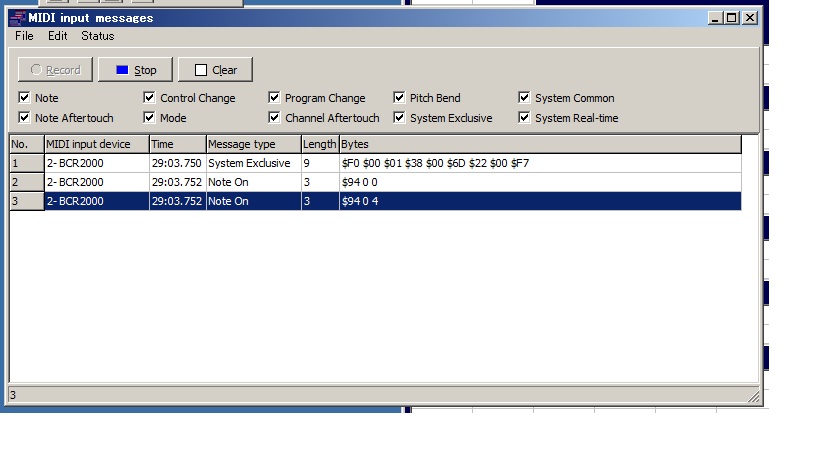
*In addition, When I check the MIDI input message function on BC Manager to see the actual signal from BCR2000, the message which expected to be one SysEx message is divided to 3 messages like below.
I wrote and send the Sysex as,
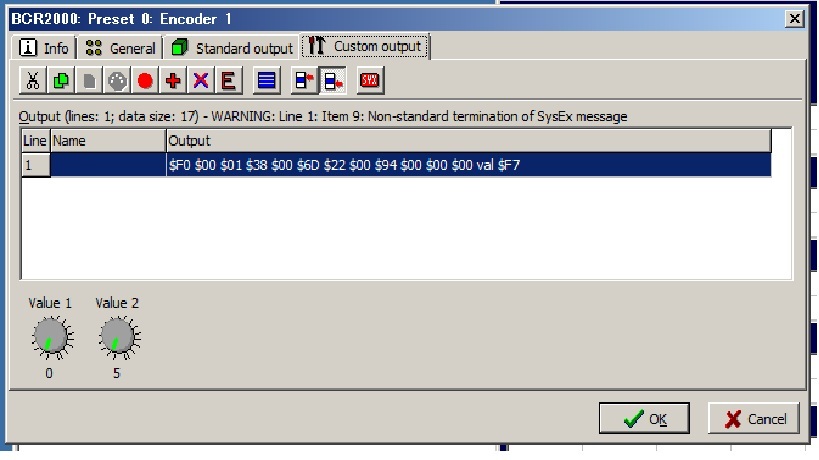
$F0 $00 $01 $38 $00 $6D $22 $00 $94 $00 $00 $00 val $F7
According to the SysEx chart from Tc-Hericon,
[00 01 38] is a manufacturer ID.
[00] is ’SysEx ID’ set 0 by VoiceLive 3 setup menu.
[6D] is the Model ID.
[22] is a Message ID for , parameter data.
[00 94] is the message to change the Harmony Scale Type to ‘Minor 3’(able to see it at the attached VoiceLive3 SysEx manual)
[00 00 00 val] is a 4 bytes message for the value of the parameter. This time the minimum is 0 and the maximum is 6 then I set [Value1 as 0] and [Value2 as 5]. (you can see it on the attached picture)
However, the recorded message from BCR2000 by BC Manager shows like this (see also attached),
- Message type: System Exclusive, Length: 9, Bytes: $F0 $00 $01 $38 $00 $6D $22 $00 $F7
- Message type: Note On, Length: 3, Bytes: $94 0 0
- Message type: Note On, Length: 3, Bytes: $94 0 4
It shows the received message is divided to 3 message???
My notice is that BC Manager also expect the generated SysEx message to end with $F7 at 9th byte (the error message says so), when I access ’System Exclusive message’ mode at the menu of [View - MIDI - System Exclusive message] of BC Manager.
Is there any limitation of 9 bytes message? I cannot find any description about it on any manual.
Moreover, some of the preset SysEx message is sometime over 9 bytes. It looks ok for me to make more than 9 bytes but why my SysEx is divided?
I know a software called “VoiceLive 3 Editor” to edit the detail parameter of VoiceLive3 to use SysEx message, but VoiceLive3 Editor is made to refuse all devices except VoiceLive3. I used to think that to use Learn mode of BCR2000, but I have realised that it is impossible. (VoiceLive 3 does not have THRU OUT port, and never output SysEx message)
I am also suspecting the rightness of the SysEx message that I wrote.
Anyone could you please check the attached TC-Hericon VoiceLive3 SysEx manual and correct it if there is any mistake?
Anyway I have no more idea after spent 7nights to struggle with these devices. Please help me…