
Bc2000 (for the BCF2000 & BCR2000) group photo

Yahoo Groups archive

Bc2000 (for the BCF2000 & BCR2000)

Index last updated: 2026-04-28 23:16 UTC

Thread

BCRM50 (Voice Editor for Yamaha RM50 Drum Synth Using Behringer BCR2000 MIDI Controller)

BCRM50 (Voice Editor for Yamaha RM50 Drum Synth Using Behringer BCR2000 MIDI Controller)

2014-01-24 by <evanlong@...>

I've completed the first round of work on a set of SysEx files designed to make a BCR2000 and a Yamaha RM50 drum synth compatible for editing purposes. What you get with this system is an RM50 which is customized to have 8 user kits of 16 notes each and a BCR2000 which can edit two of these kits at a time down to pretty fine details. (Unfortunately not all of the RM50's parameters can fit on the BCR's 50-some knob array, but I've included those which I feel to be the most important.) There are more details in the release notes in the ZIP file, but basically you get 8 GM-compatible percussion kits using all eight of the RM50's audio outputs and including kick, snare, side stick, clap, three toms, hi-hat (open, closed, and pedal), ride and ride bell, cowbell, and two crash cymbals.

In this release, although the RM50 will be set up for all 8 kits/128 user voices (I-MX bank), I have only included a SysEx file for the first editor for the BCR (presets 1-16 -- one for each note in the kit). Eventually I will get around to setting up and sharing the BCR editors for kits 2-8, but it's a very tedious and time-consuming process to program them, and I figured that having at least one kit editor fully up and running would be worth an early release.

I have quadruple-checked the RM50's settings, and I think everything is in order per the specifications I laid out for it. I used RM50 Manager as well as the front panel of the box to set up the kits and voices, and it worked pretty well, but I did notice a few bugs even after I thought I'd finished, so if anyone uses this system and notices any bad settings, please let me know. Likewise with the BCR2000, if anyone notices a knob that doesn't do what it's supposed to, please let me know, and I'll publish a fix when I get a chance.

Hopefully others will find this useful! Again there are more details in the release notes, but the RM50 is a powerful ROMpler that can do some pretty interesting sounds. With the BCR's knobs so set to control it and dig into its brain, I think it will be that much easier to explore its full potential. Happy programming!
Attachments

Re: [bc2000] BCRM50 (Voice Editor for Yamaha RM50 Drum Synth Using Behringer BCR2000 MIDI Controller) [1 Attachment]

2014-01-25 by enrique c.

Thank you Evanlong. Wonder if a customised version of it could edit voices on the RM50 cousin, TG500 rompler.
Show quoted textHide quoted text
2014/1/24 <evanlong@ymail.com>
[Attachment(s) from evanlong@... included below]

I've completed the first round of work on a set of SysEx files designed to make a BCR2000 and a Yamaha RM50 drum synth compatible for editing purposes. What you get with this system is an RM50 which is customized to have 8 user kits of 16 notes each and a BCR2000 which can edit two of these kits at a time down to pretty fine details. (Unfortunately not all of the RM50's parameters can fit on the BCR's 50-some knob array, but I've included those which I feel to be the most important.) There are more details in the release notes in the ZIP file, but basically you get 8 GM-compatible percussion kits using all eight of the RM50';s audio outputs and including kick, snare, side stick, clap, three toms, hi-hat (open, closed, and pedal), ride and ride bell, cowbell, and two crash cymbals.

In this release, although the RM50 will be set up for all 8 kits/128 user voices (I-MX bank), I have only included a SysEx file for the first editor for the BCR (presets 1-16 -- one for each note in the kit). Eventually I will get around to setting up and sharing the BCR editors for kits 2-8, but it's a very tedious and time-consuming process to program them, and I figured that having at least one kit editor fully up and running would be worth an early release.

I have quadruple-checked the RM50's settings, and I think everything is in order per the specifications I laid out for it. I used RM50 Manager as well as the front panel of the box to set up the kits and voices, and it worked pretty well, but I did notice a few bugs even after I thought I'd finished, so if anyone uses this system and notices any bad settings, please let me know. Likewise with the BCR2000, if anyone notices a knob that doesn't do what it's supposed to, please let me know, and I'll publish a fix when I get a chance.

Hopefully others will find this useful! Again there are more details in the release notes, but the RM50 is a powerful ROMpler that can do some pretty interesting sounds. With the BCR's knobs so set to control it and dig into its brain, I think it will be that much easier to explore its full potential. Happy programming!


Re: [bc2000] BCRM50 (Voice Editor for Yamaha RM50 Drum Synth Using Behringer BCR2000 MIDI Controller) [1 Attachment]

2014-01-30 by <evanlong@...>

Just to add to that, one of the reasons why it would be a completely different project, in addition to the string definitions being different, is that the RM50 editor works on multiple drum voices per kit, while the TG500 is going to be in the equivalent of the RM50's "voice mode" -- i. e. more like a regular synthesizer with one sound (or maybe two layers) over the entire key range.

RE: BCRM50 (Voice Editor for Yamaha RM50 Drum Synth Using Behringer BCR2000 MIDI Controller)

2014-01-31 by <evanlong@...>

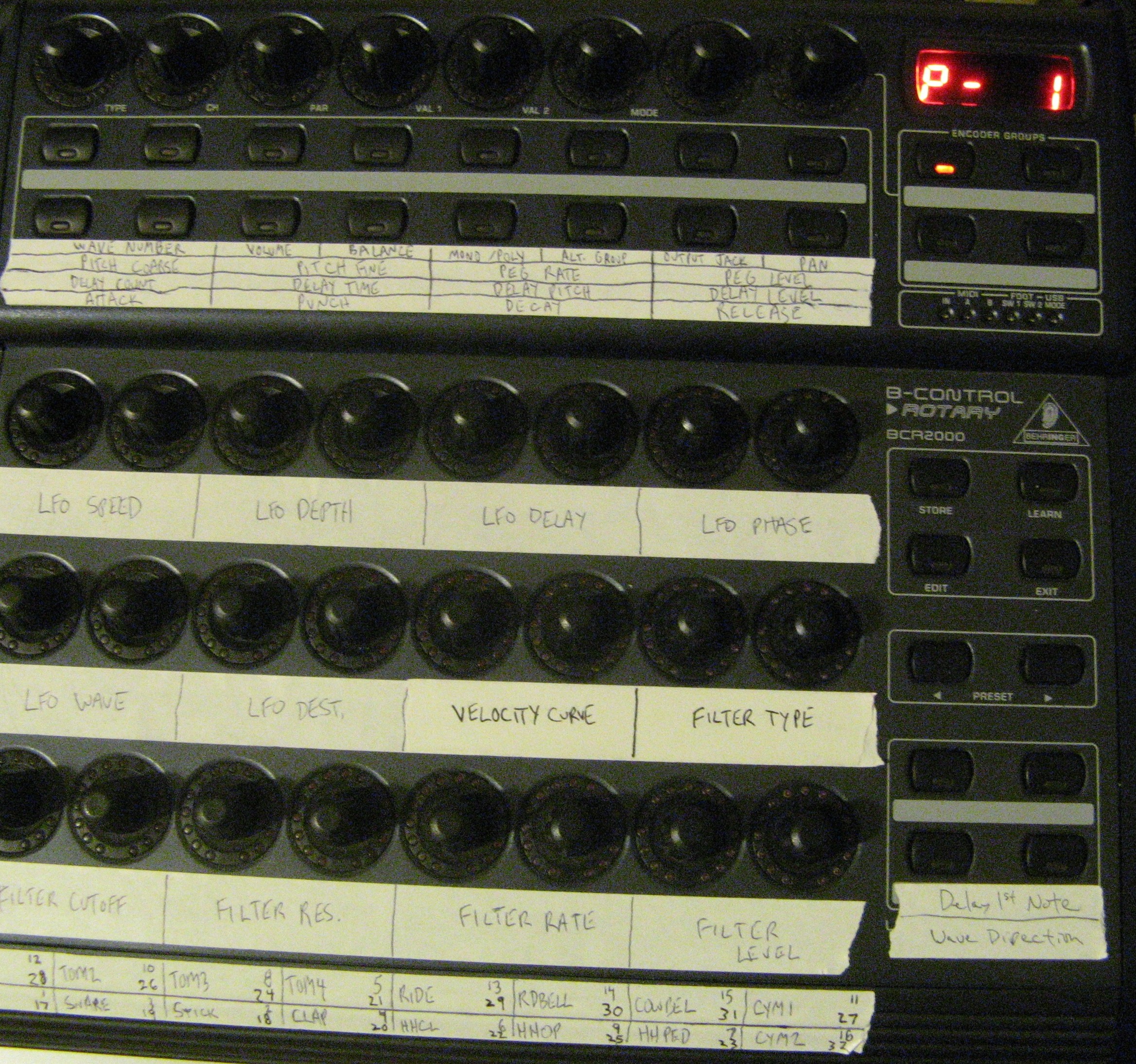
Here's a picture of the BCR2000 labeled with the BCRM50 tags. Settings per knob are the same from preset/voice to preset/voice. You can't see it in the picture, but when you turn the knobs, the altered setting appears in the LCD ring around each knob. The buttons also light up when you press them.


---In bc2000@yahoogroups.com, <evanlong@...> wrote:

I've completed the first round of work on a set of SysEx files designed to make a BCR2000 and a Yamaha RM50 drum synth compatible for editing purposes. What you get with this system is an RM50 which is customized to have 8 user kits of 16 notes each and a BCR2000 which can edit two of these kits at a time down to pretty fine details. (Unfortunately not all of the RM50's parameters can fit on the BCR's 50-some knob array, but I've included those which I feel to be the most important.) There are more details in the release notes in the ZIP file, but basically you get 8 GM-compatible percussion kits using all eight of the RM50's audio outputs and including kick, snare, side stick, clap, three toms, hi-hat (open, closed, and pedal), ride and ride bell, cowbell, and two crash cymbals.

In this release, although the RM50 will be set up for all 8 kits/128 user voices (I-MX bank), I have only included a SysEx file for the first editor for the BCR (presets 1-16 -- one for each note in the kit). Eventually I will get around to setting up and sharing the BCR editors for kits 2-8, but it's a very tedious and time-consuming process to program them, and I figured that having at least one kit editor fully up and running would be worth an early release.

I have quadruple-checked the RM50's settings, and I think everything is in order per the specifications I laid out for it. I used RM50 Manager as well as the front panel of the box to set up the kits and voices, and it worked pretty well, but I did notice a few bugs even after I thought I'd finished, so if anyone uses this system and notices any bad settings, please let me know. Likewise with the BCR2000, if anyone notices a knob that doesn't do what it's supposed to, please let me know, and I'll publish a fix when I get a chance.

Hopefully others will find this useful! Again there are more details in the release notes, but the RM50 is a powerful ROMpler that can do some pretty interesting sounds. With the BCR's knobs so set to control it and dig into its brain, I think it will be that much easier to explore its full potential. Happy programming!

Attachments

Re: BCRM50 (Voice Editor for Yamaha RM50 Drum Synth Using Behringer BCR2000 MIDI Controller)

2014-04-09 by <evanlong@...>

v1.1 is now available:

http://evanlong.net/wp-content/uploads/ ... BCRM50.zip

Version 1.1 corrects some minor errors that were present in version 1.0 and makes a few other changes:

1) Wave Number now stops at 132
2) Balance now stops at 128
3) Pitch EG Level now stops at 144
4) LFO Speed now goes all the way to 99
5) The enclosed RM50 device definition files for BC Manager have been updated to reflect the above
6) Documentation has been collapsed into one text file

v2.0 will have the editors for kits 1 and 2 as well as a few other improvements. ETA is... a month? We'll see.

Re: BCRM50 (Voice Editor for Yamaha RM50 Drum Synth Using Behringer BCR2000 MIDI Controller)

2014-04-24 by <evanlong@...>

Here's v2.0 of the BCRM50 project (same link as before, updated file package):

[url]http://evanlong.net/wp-content/uploads/2014/01/BCRM50.zip[/url]

As promised, this version fills the entire memory of the BCR2000 by including voice editors for all of I-MX voices 1-32. It also upgrades the RM50's configuration by adding 24 new "double kits" to user kit slots 9-36.

Therefore, the BCR2000 can now be used either to edit kits 1 ("BCRM50 1," comprised of I-MX voices 1-16) and 2 ("BCRM50 2," comprised of I-MX voices 17-32) separately or, by using the double-kit (two voices per note instead of one) in user kit 9 ("BCRM50 1+2," comprised of I-MX voices 1/17, 2/18, 3/19, etc.), simultaneously. Users wishing to save their results can copy them to the higher-numbered voice slots (33-128) using the front panel, then resume editing the lower-numbered voices.

We'll see how this one works in terms of its workflow. If it works well, I may not bother making live editors for the voices of kits 3-8, relying instead on the voice-copying method. Let's hope it does work well because the tedious process of creating these kit editors is definitely not my favorite activity.

Move to quarantaine

This moves the raw source file on disk only. The archive index is not changed automatically, so you still need to run a manual refresh afterward.