2017-01-02 by mastresticator@...
Hello, I am new to this forum.
I just bought a BCR-2000 and am trying to program it to control my MicroKorg XL +
I am new to understanding MIDI, but so far I figured out (learning on the internet) how to configure CC# and NRPN.
I now would like to control parameters that go through Sysex, and therefore have downloaded the BC Manager.
What I am trying to do right now is having a whole row of buttons control Arp steps (8 steps).
So I would like to have one click on the button activate the step, while another click would disable the step.
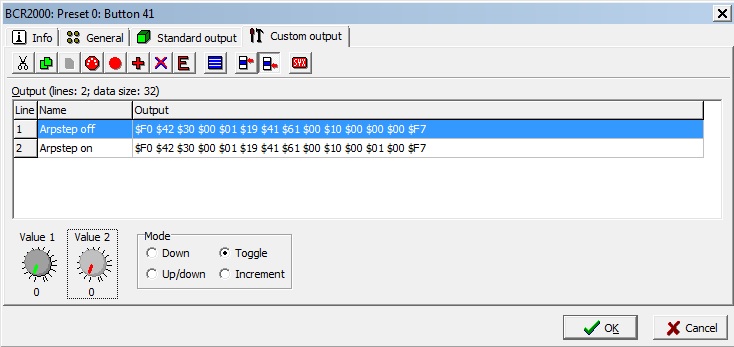
I managed the first part, my button does activate the step, but haven't got a clue how to have the same button have the other value when clicked a second time. I am joining a screenshot of what I've done so far.
Chrysostome
2017-01-04 by rpcfender@...
Hi
The only difference on the off and on message is the third last byte- $00 and $01
So the button should be programmed ...
.showvalue on
.minmax 0 1
.default 0
.mode toggle
.tx $F0 $42 $30 $00 $01 $19 $41 $61 $00 $10 00 val $00 $F7
When the BC is powered up it has the default in val (0 = min)
Pressing the button flips it to max ie val =1
The output is
$F0 $42 $30 $00 $01 $19 $41 $61 $00 $10 $00 $01 $00 $F7
Pressing the button again flips it back to min ie val =0
The output is
$F0 $42 $30 $00 $01 $19 $41 $61 $00 $10 $00 $00 $00 $F7
All the best
Royce
2017-01-05 by mastresticator@...
Hi Royce, thanks a lot for your help !
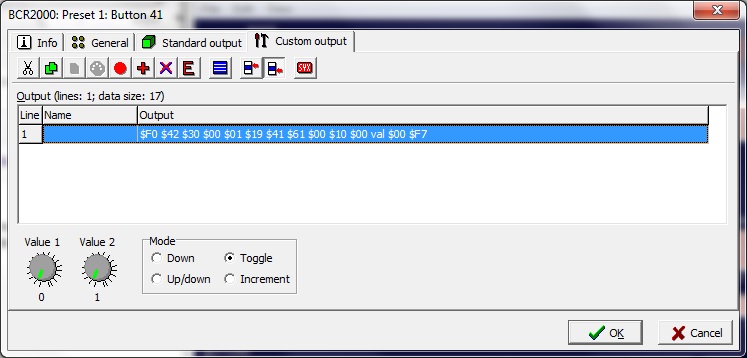
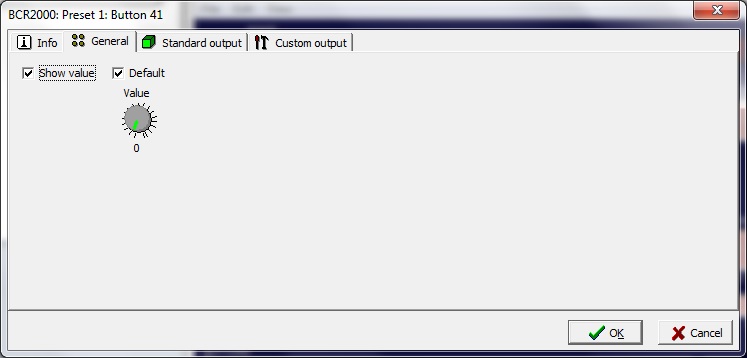
I think I've tried what you said but it's still not working. But maybe my lack of knowledge of programming made me misinterpret your guidelines ? I'm joining two screenshots of what I did so you can see if I've got it right.
Cheers
Chrysostome
2017-01-06 by rpcfender@...
Hi
Chrysostome,Go to the first menu of the BC Manager View / Midi / Input Messages (general) press Record on the new window and check in the Byte column that you are getting the correct messages.
Perhaps post them here.
If you are getting what you want and its not changing the Korg it is likely you sysex line is incorrect.
I couldn't find the Arp sysex definition on the web - perhaps you could point me in the right direction.
All the best
Royce
2017-01-06 by mastresticator@...
Hi Royce,
I checked the message that was programmed using the input message window and all was correct. The mystery of what could possibly go wrong was thickening when I realized that the button I had programmed like you told me was actually working correctly finally ! I didn't know that I had to turn the BCR off and then back on before the sent changes would apply, so it actually would have already worked yesterday if I had just thought of rebooting it !
Anyways, I hadn't thought of using the input message window for testing if the message sent by the BCR was correct, so that was a very useful tip that will probably help more than once !
Thanks a lot for all your helpful advice :-)
All the best,
Chrysostome
2017-01-06 by rpcfender@...
Hi
Chrysostome,
It shouldn't need turning off and on for the changes to be active.
The BC has an edit buffer that it loads the preset into when you select a new preset (1 to 32).
As this preset remains how you left it, even after you turn off the BC, Mark calls it Preset 0.
This is the active preset so if you change this Preset 0 the changes are active straight away.
In Mark's editor, when you send any preset from 1 to 32, he adds a "Save" statement to store it in that location, but he warns you first.
It doesn't go anywhere near the active preset so the changes don't take effect until you select that preset and the BC loads it into Preset 0 and becomes active.
When you send Preset 0 you can't add a Save statement so it goes straight out to the BC and becomes the active preset.
So if you see a warning about overwriting the preset, then you know that after it is saved you have to select it again for the BC to load it into Preset 0 and be active.
In BC Manager I always find it best to copy and paste the preset I want to edit into Preset 0 and then send Preset 0 to the BC.
Now I edit Preset 0 in BC Manager and after I send the changes to the BC, I can test the changes straight away.
All the best
Royce.
2017-01-08 by mastresticator@...
Thanks again for the good tips Royce. Very useful !
Thanks to you I now know how to have the changes immediately effective. On testing my new sent parameters I still however have a constraint. I can't manage to have my BCR linked to the BC Manager and sending MIDI information to the Microkorg under one mode. I've tried them all and I either have the BCR exchanging with the BC manager (modes U1 to U4) or with the Microkorg (modes S1 to S4). So unfortunately for now I just keep changing back and forth from mode U4 to S4 each time I want to test if a newly programmed controller works on the Microkorg. Would there be another method I might be missing ?
Cheers,
Chrysostome
2017-01-08 by rpcfender@...
Hi
Chrysostome
In Mode 2 U2 the BCR has two independent Midi interfaces to the PC via USB.
BCR 1 In and Out is the BC itself and BCR 2 In and Out are just the Midi ports (In Port & Out Port A) on the back of the unit.
Connect the synth to the BCR Midi Ports.
Connect BC Manager to BCR 1 In and Out.
As the Behringer Midi driver is multi client, you can run more than one program connected to the same midi ports at the same time.
Start Midi Ox and connect BCR1 In to BCR2 Out and now movement on the BCR will send Midi to the synth. Connecting BCR2 In to BCR1 Out will provide feedback to the BC controls from the synth (if it is capable of that and has been set up to do that).
Although the BC will send sysex back to BC Manager and this will be also sent to the synth, the synth will ignore it.
All the best
Royce
2017-01-09 by mastresticator@...
Thanks again Royce. Got the theory, but in my case Midi OX and the BC Manager are not willing to run simultaneously. Whichever one I launch first, the second sends an error message saying it lacks memory and I should close another program to increase available memory. Got any idea why in my case it doesn't seem possible to run more than one program at the same time ?
All the best,
Chrysostome
2017-01-10 by rpcfender@...
What OS are you using?
I have WinXp 32bit and Win7 Ultra 64 and both programs work perfectly on both platforms.
Start BC Manager first and make sure it is functioning. Then start MidiOx .
Royce
2017-01-11 by mastresticator@...
Hi Royce,
I am using Windows 7 family premium edition 64 bits.
I've tried it both ways : if I start the BC manager first, Midi Ox shows an error message when launched and when I start Midi Ox first, the BC Manager shows an error message when launched. As you said the Behringer Midi driver should be multi client, could my driver be the problem ?
Chrysostome
2017-01-11 by mastresticator@...
I followed my assumption and downloaded the Behringer multi client driver on their website (my previous driver had been automatically downloaded by Windows and was obviously not the most appropriate one). It know works fine ! Thanks again for all the great tips Royce !
All the best,
Chrysostome