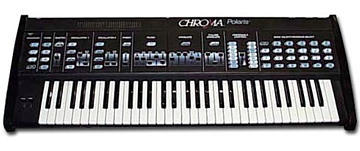
>  I'll start with my goal, and work backwards.
> I'd like to control my newly acquired Polaris with a ROLI Seaboard. To
> take full advantage
> of its capabilities, I need to send on 6 separate midi channels, and
> be able to apply expression
> separately on each voice...

Your Polaris already has the ability be opeate multi-timbrally over
MIDI.

Specfically, the Polaris already internally has the concept of separate
'instruments.'  Each 'instrument' is assigned to a MIDI channel - and so
if you have the Polaris set up to listen to 6 MIDI channels (for
instance) then the Polaris will respond like 6 different instruments
over MIDI, each one assigned to a different MIDI channel.

This behaviour already does much of what you'd need for basic MPE
operation.

The one thing that is 'missing' though, is that MPE is set up so that
there's a MIDI control channel such that if you do a 'program change'
message on that single channel, then that program will be used for all
of the 'channels' in the device.

As the Polaris will behave like 6 different 'instruments', this 'one
program change for all channels concept' isn't there.  That said - you
can mimic this by externally sending extra program change messages from
an external sequencer/controller/host.

So the general idea would be:

- Set up the Polaris in 'normal' mode (e.g., _not_ Omni mode)
- Set up the Polaris to listen to as many MIDI channels as you'd want
- On your sequencer/controller, send a Program Change message on EACH of
the MIDI channels you've assigned to the Polaris.
- Use your MPE instrument as you'd otherwise like.

That's it.  Note - you can use 6 different copies of the same patch (if
you want), but strictly speaking you don't have to.  Instead, you can
have one program/patch on the Polaris be used to define all the
instruments you're going to use.

As an example, let's assume you're going to define 6
channels/instruments, and you're going to want to have these assigned to
MIDI channels 1 - 6.

To configure the Polaris to listen to these 6 channels:

1) Set up Polaris MIDI so that you're listing to 6 channels, and will
allow the receipt of program/parameter data.  Quickly looking, this
would seem to be:

Lower Function, Cassette 6 = ON (turn on receipt of program changes)
Lower Function, Cassette 8 = ON (turn on receipt of MIDI 'panel' info)
Lower Function, Cassette 9 = OFF (turn off OMNI mode)
Lower Function, MIDI Channel 1 = ON
Lower Function, MIDI Channel 2-6 = OFF (MIDI base channel = 1)
Lower Function, MIDI Channel 10 = ON (additinally listen to 3 extra MIDI
channels)

2) Determine which Polaris patch you want (say, A2)
From the sequencer send Program Change "2" on MIDI Channel 1
From the sequencer send Program Change "2" on MIDI Channel 2
From the sequencer send Program Change "2" on MIDI Channel 3
From the sequencer send Program Change "2" on MIDI Channel 4
From the sequencer send Program Change "2" on MIDI Channel 5
From the sequencer send Program Change "2" on MIDI Channel 6

Play the ROLI as you'd otherwise want.

Your MIDI settings will generally be saved after you sent them once.  If
you want to use the ROLI with a different patch, then the only 'extra'
thing you will need to do is to otherwise ensure you send a Program
Change for at new patch on channels 2-6.
Message
Re: [chromapolaris] Multitimbral access without a sequencer.
2017-01-08 by David Clarke
Attachments
- No local attachments were found for this message.