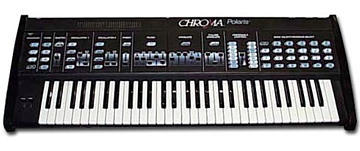
Rhodes Chroma Polaris group photo

Yahoo Groups archive

Rhodes Chroma Polaris

Index last updated: 2026-04-28 23:17 UTC

Thread

HELP HELP HELP ME WITH SYSEX !!!

HELP HELP HELP ME WITH SYSEX !!!

2006-11-11 by alex459686

hi
im having a lot of trouble understanding what sysex data i need to send to the polaris .
i have read the midi manual but am still confused. 
what data do i need to send ?
for example i have tried :

F0 (sysex start) 08 (fender manufacturese ID) 03 (polaris model ID) 0Css (press switch 
number ss) 7F (sysex message ends)

thats :

F0 08 03 0css 7F

i must be missing something valuable as this fails to work . 
could anyone help me with this . 
id like to access all the panel switches of my polaris via midi sysex and implement into an 
editor. 
thanks for your time again.
peace
alex

Re: [chromapolaris] HELP HELP HELP ME WITH SYSEX !!!

2006-11-12 by David Clarke

> From: "alex459686" <no_reply@yahoogroups.com>
>... for example i have tried :
> F0 (sysex start) 08 (fender manufacturese ID) 03 (polaris model ID)
> 0Css (press switch number ss) 7F (sysex message ends)...

It's been a while since I attempted to talk to the Polaris via Sysex, 
but I believe that the format was

SYSEX Start (F0)
Fender ID   (08)
Channel Number (value 0 -> 15)
(Commands)
SYSEX End (F7)

The Polaris is set up to only respond to sysex on the channels it is 
currently programmed to listen to.  For instance - if the Polaris is 
only listening to channel 2, then sending sysex on channel 3 should be 
ignored.  The exception to that rule is if the Polaris is in Omni mode - 
then sysex should be received regardless of the channel number used.

To confirm that sysex is being received OK by the Polaris, I'd first try 
some very simple commands, like the "Identify" command.

F0 08 00 49 F7

(0x49 = ASCII "I")

I believe this should return the instrument ID, software revision anem 
the name "Polaris"

The 0Css referenced isn't a direct SYSEX opcode; rather, it's part of a 
bigger idea.

SYSEX on the Polaris is a bit strange (at least in terms of other 
implementations).  You can actually 'talk' to the internal data streams 
controlling Polaris behavior and you do this by sending and receiving 
'messages'.  This is very much like an operating system I/O - you can 
'open' a stream, and the read or write to it.

I may not be remembering if there's an easy way to do this - but my 
recollection is that to do panel control you'll first need to do an 
'open' on the 'panel' data stream.

You can then 'write' data to that open stream.

The format for an 'open' is 0nnnnmm, where n - the object number and mm 
= the mode.

the 'panel' object is '16'

a mode of '01' is 'write-enabled'

So - that might be:

F0 08 00 4F 00 16 01 F7

Once 'opened' you could do a 'send' message.

The details are in the MIDI Implementation manual, although some trial 
and error will likely be needed, as it takes some tries to get used to 
how the Polaris likes to see data (e.g., ASCII characters, but 
translated into hex.)
Re: HELP HELP HELP ME WITH SYSEX !!!

2006-11-14 by alex459686

many thanks for the info .
ill give it a try when i get a spare minute .

:)

fingers crossed .


--- In chromapolaris@yahoogroups.com, David Clarke <ac151@...> wrote:
Show quoted textHide quoted text
>
> > From: "alex459686" <no_reply@yahoogroups.com>
> >... for example i have tried :
> > F0 (sysex start) 08 (fender manufacturese ID) 03 (polaris model ID)
> > 0Css (press switch number ss) 7F (sysex message ends)...
> 
> It's been a while since I attempted to talk to the Polaris via Sysex, 
> but I believe that the format was
> 
> SYSEX Start (F0)
> Fender ID   (08)
> Channel Number (value 0 -> 15)
> (Commands)
> SYSEX End (F7)
> 
> The Polaris is set up to only respond to sysex on the channels it is 
> currently programmed to listen to.  For instance - if the Polaris is 
> only listening to channel 2, then sending sysex on channel 3 should be 
> ignored.  The exception to that rule is if the Polaris is in Omni mode - 
> then sysex should be received regardless of the channel number used.
> 
> To confirm that sysex is being received OK by the Polaris, I'd first try 
> some very simple commands, like the "Identify" command.
> 
> F0 08 00 49 F7
> 
> (0x49 = ASCII "I")
> 
> I believe this should return the instrument ID, software revision anem 
> the name "Polaris"
> 
> The 0Css referenced isn't a direct SYSEX opcode; rather, it's part of a 
> bigger idea.
> 
> SYSEX on the Polaris is a bit strange (at least in terms of other 
> implementations).  You can actually 'talk' to the internal data streams 
> controlling Polaris behavior and you do this by sending and receiving 
> 'messages'.  This is very much like an operating system I/O - you can 
> 'open' a stream, and the read or write to it.
> 
> I may not be remembering if there's an easy way to do this - but my 
> recollection is that to do panel control you'll first need to do an 
> 'open' on the 'panel' data stream.
> 
> You can then 'write' data to that open stream.
> 
> The format for an 'open' is 0nnnnmm, where n - the object number and mm 
> = the mode.
> 
> the 'panel' object is '16'
> 
> a mode of '01' is 'write-enabled'
> 
> So - that might be:
> 
> F0 08 00 4F 00 16 01 F7
> 
> Once 'opened' you could do a 'send' message.
> 
> The details are in the MIDI Implementation manual, although some trial 
> and error will likely be needed, as it takes some tries to get used to 
> how the Polaris likes to see data (e.g., ASCII characters, but 
> translated into hex.)
>

Re: [chromapolaris] HELP HELP HELP ME WITH SYSEX !!!

2006-11-14 by David Clarke

Following up to my own note, if you just want to do button presses, then 
you won't have to do an 'open' first; rather, you can just do a 'send 
message' command.

To confirm that sysex can be received OK by the host, from the Polaris 
do a LF-C-12.  This should perform a "send main workspace program out 
over MIDI."  It will do this via a sysex message.

You'll see something like:

   190905  F0 08 01 4F
           30 30 38 35
           30 31
   190909  F0 08 01 57
           32 43 30 30
           30 30 46 34
           30 30 31 43
           30 30 30 30
           30 30 30 30
           38 30 43 38
           41 45 30 36
           43 38 31 37
           38 36 35 31
           30 30 30 30
           30 31 30 30
           41 30 30 31
           46 43 30 44
           30 35 46 38
           30 31 31 43
           38 30 46 46
           30 36 30 30
           30 39 31 38
           30 30 30 30
           30 31 30 36
           30 30 30 30
           31 38 30 36
           30 32 37 35
           31 46
   190947  F0 08 01 53
           31 45 30 30
           37 46 30 30
           F7

Using the MIDI Implementation manual to decode the stream will give you 
a good felling for how the Polaris decodes/encodes sysex.

Of this dump, the last portion is the most interesting for your original 
question.  It has:

   190947  F0 08 01 53
           31 45 30 30
           37 46 30 30
           F7

Decoding the stream we have:

F0 08 01 = start of sysex, fender ID, channel # (in my case, the MIDI 
base channel was '2').

The Polaris uses ASCII strings to represent data - so for the first 
message we have:

 53 31 45 30 30 37 46 30 30 F7

0x53 = ASCII "S" = Send Message.

A 'send' has the following format:

   Sssiimmoo

Where S = ASCII for 'stream'
ss = stream number
ii = instrument number
mm = message
oo = operand

For this example, stream number = 1E (instrument stream)
instrument number = 00
Message = 7F
Operand = 00

In your case where you'd like to change the value of a switch, you'd to 
'send' to a stream.  Stream 16 is the panel stream.

So that would be:

F0 08 01 53 31 36 30 30 30 43 30 31 F7

Where:

53 = ASCII for "S"
31 36 = stream number "16"
30 30 = instrument number 00 (ignored)
30 43 = "0C" = 'switch press' command
30 31 = "01" = switch #1

So sending this command should 'press' switch #1 (The sequencer 'stop' 
button).  Changing the switch number (the last two bytes) will allow you 
to press any/all buttons on the Polaris.

A similar syntax can be used for slider moves.

Be sure to let us know how you make out.

David

Move to quarantaine

This moves the raw source file on disk only. The archive index is not changed automatically, so you still need to run a manual refresh afterward.