color profile and uploading to web
2006-05-29 by Darkman
I was doing some editing today of a shoot I did, and in
photoshop the images looked perfect. but once I uploaded them to a server, or
myspace, or even when I right clicked on them and hit preview, they were darker
than they were in photohop.
I calibrate my monitor about once a week or two.
and i have mt profile to work in photoshop in the color setting as the sRGB-IEC61966-2.1. I am a little confused as to why this is happening.
I am posting the same two images here, one the finished product from photoshop, which looked fine in photoshop, till I previewed it, or uploaded it. and the edited one where i lightened it up a bit, so the hat on the foot could be seen. In photoshop the hat was clearly visible, but as I said, when I previewed it or uploaded it anywhere, it was too dark. any help would be appreciated.
Looked fine in PS until I uploaded it:
I calibrate my monitor about once a week or two.
and i have mt profile to work in photoshop in the color setting as the sRGB-IEC61966-2.1. I am a little confused as to why this is happening.
I am posting the same two images here, one the finished product from photoshop, which looked fine in photoshop, till I previewed it, or uploaded it. and the edited one where i lightened it up a bit, so the hat on the foot could be seen. In photoshop the hat was clearly visible, but as I said, when I previewed it or uploaded it anywhere, it was too dark. any help would be appreciated.
Looked fine in PS until I uploaded it:
http://www.darkmansdarkroom.com/lj/shannon-23.jpg
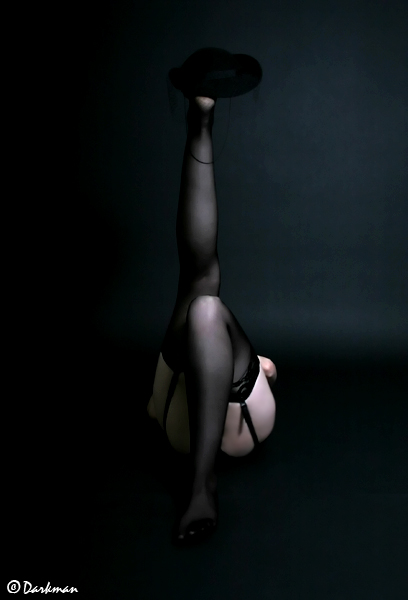
after editing it so it would come out light enough to see the hat, which in my opinion, ruined the aesthetics of the picture:
http://www.darkmansdarkroom.com/lj/hatleg.jpg