eml 400/401 manual needed
2002-04-17 by verbos2002
Yahoo Groups archive
Index last updated: 2026-04-28 23:23 UTC
Thread
2002-04-17 by verbos2002
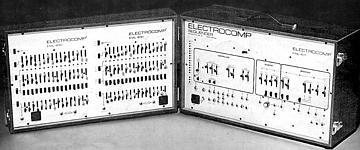
I need a manual and diagram booklet for the 400/401. This thing is
impossible to figure out without the documentation.

anyone have that?

mark
2002-04-17 by Mike B (digiboy)
>I need a manual and diagram booklet for the 400/401. This thing is
>
>impossible to figure out without the documentation.
>
>
>
>anyone have that?
>
>
>
>mark


Hi Mark,

Below are the basic steps for setting up a 400 sequencer . I have to admit
that this startup procedure is certainly not intuitive, but once you get
past this part  I think you'll find you can get along pretty well without
the manual .

I'll be very surprized if you don't find yourself  completely hog wild over
this thing once you get it up and running.

 I am assuming you have the full 32 (2 x 16)  stage sequencer.

You can connect from the  Hi or Lo output to an external amp.
Leave the power OFF  for everything.

Now connect the multi-pin cable to the socket on the synth (right) side and
plug the other end to the nearest socket on the sequencer  side. Be careful
with this cable. Last I checked  it is replaceable but it'll be a good $100
to have one made up.

Run 2 short patch cables.  One cable goes  from the leftmost "in" jack on
the bottom of the sequencer side to the rightmost "out" jack on the
sequencer side. Then run another cable between the 2 inner "in" and "out"
jacks. Remove all other patch cables.  You have now looped the two 16 step
sequencers so they will run together as one continuous 32 stepper. (There
are dozens of other options using the 2 sets running seperately but this is
just a starter). You don't need to hook up any other patches to get started.

Flip on the EML 400/401 power but make sure the output slider is backed
off.  You may get a lot of LED's going, or nothing at all...don't worry.
You can turn on your external amp now  but make sure gain on the amp is
down too.

Note there are 5 switches running down the left side of the sequencer
section and then 5 more of the same running down the middle.  We gotta get
them set right. We'll work across the top, then down to the next set and so
on.

Set the 2 switches above the top row of sliders (one on the top left and
the other  in the top center) down to clock.

Set the  next 2 switches just below them up to Vclk and set all the sliders
in the top  row somewhere in the middle of their range.

Set all the sliders in the next row down someshere in the middle of their range
Move the 2 switches (3rd ones down from the top now) in this same section
down  to "reset" and then up to center "off."
All lights on the sequencer side should go out.

 (At some point coming up you may hear a single repeating note.)

Now set the 2 switches just below them ( 4th down from the top) up to
"Quan"  The 32 switches that are below each slider in this row determine
octaves, you can fool with them later.


Over to the synth side for a minute. Look at the clock and quantizer
section. Set the first slider (rate) about 1/4 of the way up from the
bottom. Set the switch just below it down to "off"
Put both "trigger" switches to up ( INT and SLOW).

ready?

Go back to the sequencer and all the way to the left. The 3rd switch down
from the top should be at "off." Move it up to "set" The first slider LED
lights up.

Now bring that switch back down to "off" and away we go! The lights should
go across in sequence and then repeat. You can move the gain up on the
output slider and turn up your amp...carefully.  If there is no sound yet,
go back over to the synth side and get the VCO's going.

I think I have covered every step, I hope this makes sense.

From here you just gotta start twiddling. You are only hearing the tiniest
fraction of what you can do with this beast! have fun!  The manual will
help but you can really find just about everything if you experiment. The
worst that can happen if you try something "wrong"  is the sequencer just
goes dead or silent or goes into overdrive with every LED lit up. If that
happens just flip off the power and go back and start again with this
procedure.

Regards,

Mike b.


Mike Berman
digiboy@...
2002-04-18 by verbos2002
wow! thanks. I hope to get this thing going now.

mark

--- In emlsynth@y..., "Mike B (digiboy)" <digiboy@n...> wrote:
> >I need a manual and diagram booklet for the 400/401. This thing is
> >
> >impossible to figure out without the documentation.
> >
> >
> >
> >anyone have that?
> >
> >
> >
> >mark
>
>
> Hi Mark,
>
> Below are the basic steps for setting up a 400 sequencer . I have to admit
> that this startup procedure is certainly not intuitive, but once you get
> past this part  I think you'll find you can get along pretty well without
> the manual .
>
> I'll be very surprized if you don't find yourself  completely hog wild over
> this thing once you get it up and running.
>
>  I am assuming you have the full 32 (2 x 16)  stage sequencer.
>
> You can connect from the  Hi or Lo output to an external amp.
> Leave the power OFF  for everything.
>
> Now connect the multi-pin cable to the socket on the synth (right) side and
> plug the other end to the nearest socket on the sequencer  side. Be careful
> with this cable. Last I checked  it is replaceable but it'll be a good $100
> to have one made up.
>
> Run 2 short patch cables.  One cable goes  from the leftmost "in" jack on
> the bottom of the sequencer side to the rightmost "out" jack on the
> sequencer side. Then run another cable between the 2 inner "in" and "out"
> jacks. Remove all other patch cables.  You have now looped the two 16 step
> sequencers so they will run together as one continuous 32 stepper. (There
> are dozens of other options using the 2 sets running seperately but this is
> just a starter). You don't need to hook up any other patches to get started.
>
> Flip on the EML 400/401 power but make sure the output slider is backed
> off.  You may get a lot of LED's going, or nothing at all...don't worry.
> You can turn on your external amp now  but make sure gain on the amp is
> down too.
>
> Note there are 5 switches running down the left side of the sequencer
> section and then 5 more of the same running down the middle.  We gotta get
> them set right. We'll work across the top, then down to the next set and so
> on.
>
> Set the 2 switches above the top row of sliders (one on the top left and
> the other  in the top center) down to clock.
>
> Set the  next 2 switches just below them up to Vclk and set all the sliders
> in the top  row somewhere in the middle of their range.
>
> Set all the sliders in the next row down someshere in the middle of their range
> Move the 2 switches (3rd ones down from the top now) in this same section
> down  to "reset" and then up to center "off."
> All lights on the sequencer side should go out.
>
>  (At some point coming up you may hear a single repeating note.)
>
> Now set the 2 switches just below them ( 4th down from the top) up to
> "Quan"  The 32 switches that are below each slider in this row determine
> octaves, you can fool with them later.
>
>
> Over to the synth side for a minute. Look at the clock and quantizer
> section. Set the first slider (rate) about 1/4 of the way up from the
> bottom. Set the switch just below it down to "off"
> Put both "trigger" switches to up ( INT and SLOW).
>
> ready?
>
> Go back to the sequencer and all the way to the left. The 3rd switch down
> from the top should be at "off." Move it up to "set" The first slider LED
> lights up.
>
> Now bring that switch back down to "off" and away we go! The lights should
> go across in sequence and then repeat. You can move the gain up on the
> output slider and turn up your amp...carefully.  If there is no sound yet,
> go back over to the synth side and get the VCO's going.
>
> I think I have covered every step, I hope this makes sense.
>
> From here you just gotta start twiddling. You are only hearing the tiniest
> fraction of what you can do with this beast! have fun!  The manual will
> help but you can really find just about everything if you experiment. The
> worst that can happen if you try something "wrong"  is the sequencer just
> goes dead or silent or goes into overdrive with every LED lit up. If that
> happens just flip off the power and go back and start again with this
> procedure.
>
> Regards,
>
> Mike b.
>
>
>
>
>
>
> Mike Berman
> digiboy@n...