What is up with photos
2009-10-30 by Sean
Yahoo Groups archive
Index last updated: 2026-04-28 23:38 UTC
Thread
2009-10-30 by Sean
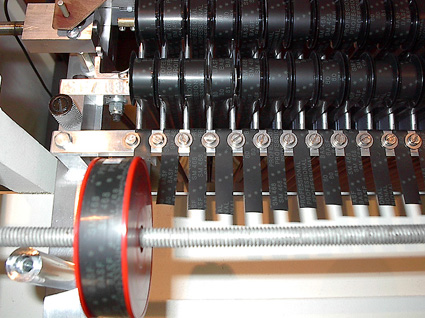
Thanks for posting the 4 track photos. Super cool.

Does anyone have a clue (besides time travel and/or pesky wizards) why photos aren't appearing in emails. Better yet, does anyone have any methods (besides time travel and/or pesky wizards) to fix this?

-Sean
2009-10-30 by Rick Blechta
Does anyone have a clue (besides time travel and/or pesky wizards) why photos aren't appearing in emails. Better yet, does anyone have any methods (besides time travel and/or pesky wizards) to fix this?
2009-11-01 by ClayE
It's a Yahoo Group set-up issue.  To complicate matters, Yahoo has recently introduced a new 'improved' method of handling attachments.  If you post a message with an attachment, the attachment goes in a folder on our web page.
http://launch.groups.yahoo.com/group/newmellotrongroup
See "Attachments" folder on the left.


The best method of sharing photos?  Upload them to our "photos" folder and send a message to the group about it.

Clay


--- In newmellotrongroup@yahoogroups.com, "Sean" <fourtytwominds@...> wrote:
>
> Thanks for posting the 4 track photos. Super cool.
>
> Does anyone have a clue (besides time travel and/or pesky wizards) why photos aren't appearing in emails. Better yet, does anyone have any methods (besides time travel and/or pesky wizards) to fix this?
>
> -Sean
>
2009-11-01 by Bob Snyder
Clay,

When Frank attached the 4-track photos they came through fine here.  Do
you suppose it's because in my Yahoo settings I have selected "Full
Featured" in preferences? Who else saw them in Frank's email?

Bob S.


ClayE wrote:
>
>
> It's a Yahoo Group set-up issue. To complicate matters, Yahoo has
> recently introduced a new 'improved' method of handling attachments.
> If you post a message with an attachment, the attachment goes in a
> folder on our web page.
> http://launch.groups.yahoo.com/group/newmellotrongroup
> <http://launch.groups.yahoo.com/group/newmellotrongroup>
> See "Attachments" folder on the left.
>
> The best method of sharing photos? Upload them to our "photos" folder
> and send a message to the group about it.
>
> Clay
>
> --- In newmellotrongroup@yahoogroups.com
> <mailto:newmellotrongroup%40yahoogroups.com>, "Sean"
> <fourtytwominds@...> wrote:
> >
> > Thanks for posting the 4 track photos. Super cool.
> >
> > Does anyone have a clue (besides time travel and/or pesky wizards)
> why photos aren't appearing in emails. Better yet, does anyone have
> any methods (besides time travel and/or pesky wizards) to fix this?
> >
> > -Sean
> >
>
>
2009-11-01 by doctorwho8@aol.com
2009-11-01 by jonesalley
I get all photo attachments both in my Outlook Express via my Cox account, and also in my Yahoo! Mail account.


--- In newmellotrongroup@yahoogroups.com, Bob Snyder <bob.snyder@...> wrote:
>
> Clay,
>
> When Frank attached the 4-track photos they came through fine here.  Do
> you suppose it's because in my Yahoo settings I have selected "Full
> Featured" in preferences? Who else saw them in Frank's email?
>
> Bob S.
>
>
> ClayE wrote:
> >
> >
> > It's a Yahoo Group set-up issue. To complicate matters, Yahoo has
> > recently introduced a new 'improved' method of handling attachments.
> > If you post a message with an attachment, the attachment goes in a
> > folder on our web page.
> > http://launch.groups.yahoo.com/group/newmellotrongroup
> > <http://launch.groups.yahoo.com/group/newmellotrongroup>
> > See "Attachments" folder on the left.
> >
> > The best method of sharing photos? Upload them to our "photos" folder
> > and send a message to the group about it.
> >
> > Clay
> >
> > --- In newmellotrongroup@yahoogroups.com
> > <mailto:newmellotrongroup%40yahoogroups.com>, "Sean"
> > <fourtytwominds@> wrote:
> > >
> > > Thanks for posting the 4 track photos. Super cool.
> > >
> > > Does anyone have a clue (besides time travel and/or pesky wizards)
> > why photos aren't appearing in emails. Better yet, does anyone have
> > any methods (besides time travel and/or pesky wizards) to fix this?
> > >
> > > -Sean
> > >
> >
> >
>
2009-11-01 by Gary Brumm
The photos show up fine here with Windows 7 and IE 8....also on my other XP machines all looks ok.

Gary

From: newmellotrongroup@yahoogroups.com [mailto:newmellotrongroup@yahoogroups.com] On Behalf Of Bob Snyder
Sent: Saturday, October 31, 2009 7:09 PM
To: newmellotrongroup@yahoogroups.com
Subject: Re: [newmellotrongroup] Re: What is up with photos


Clay,

When Frank attached the 4-track photos they came through fine here. Do
you suppose it's because in my Yahoo settings I have selected "Full
Featured" in preferences? Who else saw them in Frank's email?

Bob S.

ClayE wrote:
>
>
> It's a Yahoo Group set-up issue. To complicate matters, Yahoo has
> recently introduced a new 'improved' method of handling attachments.
> If you post a message with an attachment, the attachment goes in a
> folder on our web page.
> http://launch.groups.yahoo.com/group/newmellotrongroup
> <http://launch.groups.yahoo.com/group/newmellotrongroup>
> See "Attachments" folder on the left.
>
> The best method of sharing photos? Upload them to our "photos" folder
> and send a message to the group about it.
>
> Clay
>
> --- In newmellotrongroup@yahoogroups.com<mailto:newmellotrongroup%40yahoogroups.com>
> <mailto:newmellotrongroup%40yahoogroups.com>, "Sean"
> <fourtytwominds@...<mailto:fourtytwominds@...>> wrote:
> >
> > Thanks for posting the 4 track photos. Super cool.
> >
> > Does anyone have a clue (besides time travel and/or pesky wizards)
> why photos aren't appearing in emails. Better yet, does anyone have
> any methods (besides time travel and/or pesky wizards) to fix this?
> >
> > -Sean
> >
>
>
2009-11-01 by tony1
----- Original Message -----From: Gary BrummSent: Sunday, November 01, 2009 11:52 AMSubject: RE: [newmellotrongroup] Re: What is up with photos
The photos show up fine here with Windows 7 and IE 8 .also on my other XP machines all looks ok.
Gary
From: newmellotrongroup@yahoogroups.com [mailto:newmellotrongroup@yahoogroups.com] On Behalf Of Bob Snyder
Sent: Saturday, October 31, 2009 7:09 PM
To: newmellotrongroup@yahoogroups.com
Subject: Re: [newmellotrongroup] Re: What is up with photos
Clay,
When Frank attached the 4-track photos they came through fine here. Do
you suppose it's because in my Yahoo settings I have selected "Full
Featured" in preferences? Who else saw them in Frank's email?
Bob S.
ClayE wrote:
>
>
> It's a Yahoo Group set-up issue. To complicate matters, Yahoo has
> recently introduced a new 'improved' method of handling attachments.
> If you post a message with an attachment, the attachment goes in a
> folder on our web page.
> http://launch.groups.yahoo.com/group/newmellotrongroup
> <http://launch.groups.yahoo.com/group/newmellotrongroup>;
> See "Attachments" folder on the left.
>
> The best method of sharing photos? Upload them to our "photos" folder
> and send a message to the group about it.
>
> Clay
>
> --- In newmellotrongroup@yahoogroups.com
> <mailto:newmellotrongroup%40yahoogroups.com>, "Sean"
> <fourtytwominds@...> wrote:
> >
> > Thanks for posting the 4 track photos. Super cool.
> >
> > Does anyone have a clue (besides time travel and/or pesky wizards)
> why photos aren't appearing in emails. Better yet, does anyone have
> any methods (besides time travel and/or pesky wizards) to fix this?
> >
> > -Sean
> >
>
>
2009-11-01 by Gary Brumm
Hi Tony,

I had the RC version of 7 on my ThinkPad X61 laptop for several months now and everything has run fast and without any
issues.  At first I ran the 32 bit version with 2Gb RAM and later the 64 bit version with 4Gb RAM.  Even with the 64 bit version
I have yet to run into any issues although I expected at least driver issues I have had none.  It's kind of like what Vista should
have been.  I use it in multiple network situations and still no issues.  I am now on the full Enterprise edition (same as Ultimate
Retail version) and I bought the Professional and Home Premium editions when they had the half-price sale not long back.  I am
sure there are programs out there that will have issues but I would expect that with any version of any OS.  If you give it a try
let me know what you think.

Cheers,

Gary

From: newmellotrongroup@yahoogroups.com [mailto:newmellotrongroup@yahoogroups.com] On Behalf Of tony1
Sent: Sunday, November 01, 2009 10:13 AM
To: newmellotrongroup@yahoogroups.com
Subject: Re: [newmellotrongroup] Re: What is up with photos


Hey Gary,
What do you think about Windows 7?
I have 8 PCs and don't want to install it on any machine until I know more.

Thanks,
Tony
Tampa

----- Original Message -----
From: Gary Brumm<mailto:gabru@comsec.net>
To: newmellotrongroup@yahoogroups.com<mailto:newmellotrongroup@yahoogroups.com>
Sent: Sunday, November 01, 2009 11:52 AM
Subject: RE: [newmellotrongroup] Re: What is up with photos


The photos show up fine here with Windows 7 and IE 8....also on my other XP machines all looks ok.
Gary
From: newmellotrongroup@yahoogroups.com<mailto:newmellotrongroup@yahoogroups.com> [mailto:newmellotrongroup@yahoogroups.com] On Behalf Of Bob Snyder
Sent: Saturday, October 31, 2009 7:09 PM
To: newmellotrongroup@yahoogroups.com<mailto:newmellotrongroup@yahoogroups.com>
Subject: Re: [newmellotrongroup] Re: What is up with photos


Clay,

When Frank attached the 4-track photos they came through fine here. Do
you suppose it's because in my Yahoo settings I have selected "Full
Featured" in preferences? Who else saw them in Frank's email?

Bob S.

ClayE wrote:
>
>
> It's a Yahoo Group set-up issue. To complicate matters, Yahoo has
> recently introduced a new 'improved' method of handling attachments.
> If you post a message with an attachment, the attachment goes in a
> folder on our web page.
> http://launch.groups.yahoo.com/group/newmellotrongroup
> <http://launch.groups.yahoo.com/group/newmellotrongroup>
> See "Attachments" folder on the left.
>
> The best method of sharing photos? Upload them to our "photos" folder
> and send a message to the group about it.
>
> Clay
>
> --- In newmellotrongroup@yahoogroups.com<mailto:newmellotrongroup%40yahoogroups.com>
> <mailto:newmellotrongroup%40yahoogroups.com>, "Sean"
> <fourtytwominds@...<mailto:fourtytwominds@...>> wrote:
> >
> > Thanks for posting the 4 track photos. Super cool.
> >
> > Does anyone have a clue (besides time travel and/or pesky wizards)
> why photos aren't appearing in emails. Better yet, does anyone have
> any methods (besides time travel and/or pesky wizards) to fix this?
> >
> > -Sean
> >
>
>
2009-11-01 by Tron400
8 PC's?!! What do you need so many for? I have an ADK Core Xtreme with an overclocked Intel Core I7 920, W7 64 bit, 12 gb Corsair RAM, 2-1 TB HD on order. I know it's not the same as an upgrade, but I'll let you know what I think of the OS when I have it completely set up. ADK assures me that W7 is compatible with my hardware and software. My remaining PC and 2 laptops will continue to use XP SP2.

Bernie

--- In newmellotrongroup@yahoogroups.com, "tony1" <atm655@...> wrote:
>
> Hey Gary,
> What do you think about Windows 7?
> I have 8 PCs and don't want to install it on any machine until I know more.
>
> Thanks,
> Tony
> Tampa
>
>   ----- Original Message -----
>   From: Gary Brumm
>   To: newmellotrongroup@yahoogroups.com
>   Sent: Sunday, November 01, 2009 11:52 AM
>   Subject: RE: [newmellotrongroup] Re: What is up with photos
>
>
>
>   The photos show up fine here with Windows 7 and IE 8..also on my other XP machines all looks ok.
>
>
>
>   Gary
>
>
>
>   From: newmellotrongroup@yahoogroups.com [mailto:newmellotrongroup@yahoogroups.com] On Behalf Of Bob Snyder
>   Sent: Saturday, October 31, 2009 7:09 PM
>   To: newmellotrongroup@yahoogroups.com
>   Subject: Re: [newmellotrongroup] Re: What is up with photos
>
>
>
>
>
>   Clay,
>
>   When Frank attached the 4-track photos they came through fine here. Do
>   you suppose it's because in my Yahoo settings I have selected "Full
>   Featured" in preferences? Who else saw them in Frank's email?
>
>   Bob S.
>
>   ClayE wrote:
>   >
>   >
>   > It's a Yahoo Group set-up issue. To complicate matters, Yahoo has
>   > recently introduced a new 'improved' method of handling attachments.
>   > If you post a message with an attachment, the attachment goes in a
>   > folder on our web page.
>   > http://launch.groups.yahoo.com/group/newmellotrongroup
>   > <http://launch.groups.yahoo.com/group/newmellotrongroup>
>   > See "Attachments" folder on the left.
>   >
>   > The best method of sharing photos? Upload them to our "photos" folder
>   > and send a message to the group about it.
>   >
>   > Clay
>   >
>   > --- In newmellotrongroup@yahoogroups.com
>   > <mailto:newmellotrongroup%40yahoogroups.com>, "Sean"
>   > <fourtytwominds@> wrote:
>   > >
>   > > Thanks for posting the 4 track photos. Super cool.
>   > >
>   > > Does anyone have a clue (besides time travel and/or pesky wizards)
>   > why photos aren't appearing in emails. Better yet, does anyone have
>   > any methods (besides time travel and/or pesky wizards) to fix this?
>   > >
>   > > -Sean
>   > >
>   >
>   >
>
2009-11-02 by Bruce Daily
From: jonesalley
Subject: [newmellotrongroup] Re: What is up with photos
To: newmellotrongroup@yahoogroups.com
Date: Saturday, October 31, 2009, 11:12 PM
I get all photo attachments both in my Outlook Express via my Cox account, and also in my Yahoo! Mail account.
--- In newmellotrongroup@ yahoogroups. com, Bob Snyder wrote:
>
> Clay,
>
> When Frank attached the 4-track photos they came through fine here. Do
> you suppose it's because in my Yahoo settings I have selected "Full
> Featured" in preferences? Who else saw them in Frank's email?
>
> Bob S.
>
>
> ClayE wrote:
> >
> >
> >; It's a Yahoo Group set-up issue. To complicate matters, Yahoo has
>; > recently introduced a new 'improved' method of handling attachments.
> > If you post a message with an attachment, the attachment goes in a
> > folder on our web page.
> > http://launch. groups.yahoo. com/group/ newmellotrongrou p
> > <http://launch. groups.yahoo. com/group/ newmellotrongrou p>
> > See "Attachments" folder on the left.
> >
> > The best method of sharing photos? Upload them to our "photos" folder
> > and send a message to the group about it.
> >
> > Clay
> >
> > --- In newmellotrongroup@ yahoogroups. com
> > , "Sean"
> > wrote:
> > >
> > > Thanks for posting the 4 track photos. Super cool.
> > >
>; > > Does anyone have a clue (besides time travel and/or pesky wizards)
> > why photos aren't appearing in emails. Better yet, does anyone have
> > any methods (besides time travel and/or pesky wizards) to fix this?
> > >
> > > -Sean
> > >
> >
> >
>