Xpantastic! group photo

Yahoo Groups archive

Xpantastic!

Index last updated: 2026-04-28 23:44 UTC

Thread

Getting random patches in Xplorer keyboard tracked

Getting random patches in Xplorer keyboard tracked

2017-05-17 by Jeremy Smith

Hi folks,

I bought Xplorer a while back. It has the ability to make a random patch.

The problem is, the patch can't be played on the keyboard because that 
aspect is randomised too.

What patch settings do I need on the Xpander to make a random patch 
keyboard tracked? So that it plays the notes you play, but the rest of 
the random patch.

The guy said read the manual, but I still can't figure it out!

All the best,

Jeremy.

Re: [xpantastic] Getting random patches in Xplorer keyboard tracked

2017-05-17 by Jacob Vosmaer

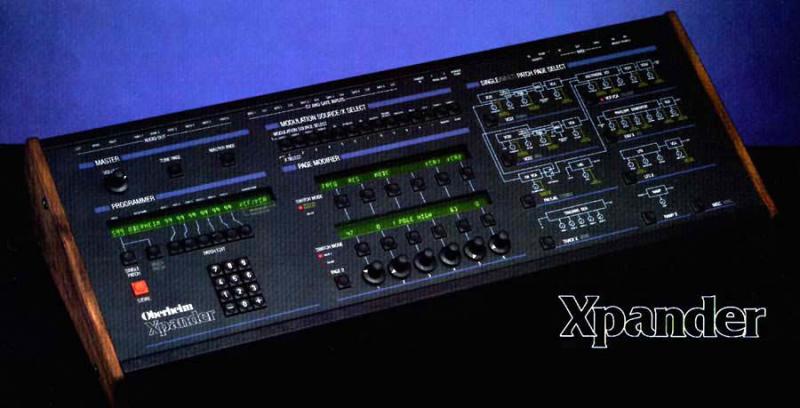
On the second page of each VCO menu, in the top row, you can select which inputs control VCO pitch. Push the buttons so that only 9;keyboard' is underlined.
Show quoted textHide quoted text
2017-05-17 19:43 GMT+02:00 Jeremy Smith jeremy@... [xpantastic] <xpantastic@yahoogroups.com>:

Hi folks,

I bought Xplorer a while back. It has the ability to make a random patch.

The problem is, the patch can't be played on the keyboard because that
aspect is randomised too.

What patch settings do I need on the Xpander to make a random patch
keyboard tracked? So that it plays the notes you play, but the rest of
the random patch.

The guy said read the manual, but I still can't figure it out!

All the best,

Jeremy.


Re: [xpantastic] Getting random patches in Xplorer keyboard tracked

2017-05-17 by PeWe

Don�t own Xplorer ...

But Page 2 of OSC1 and OSC2 offer controll sources for precise pitch 
control:

a) MOD = KEYBD
b) MOD = LAG

press the related switches,- p.ex.:

the switch below [KEYBD] will "underline" (activate) KEYBD as the 
control source,- or ...
the switch below [LAG] will "underline" (activate) LAG as the control 
source which is usefull when PORTAMENTO (Glide) is desired.


hope that helps

P.


Am 17.05.2017 um 19:43 schrieb Jeremy Smith jeremy@... [xpantastic]:
Show quoted textHide quoted text
>
> Hi folks,
>
> I bought Xplorer a while back. It has the ability to make a random patch.
>
> The problem is, the patch can't be played on the keyboard because that
> aspect is randomised too.
>
> What patch settings do I need on the Xpander to make a random patch
> keyboard tracked? So that it plays the notes you play, but the rest of
> the random patch.
>
> The guy said read the manual, but I still can't figure it out!
>
> All the best,
>
> Jeremy.
>

Re: Getting random patches in Xplorer keyboard tracked

2017-05-18 by Karl Schmeer

Hi Jeremy,
Long time:-).   I don't have Xplorer,  the link seems dead.  I was wondering does it randomize the matrix mods also? If so, you may need to go through the matrix mods,  and clear any modulations  to the VCOs.  
At the moment without any documentation for Xplorer that's all I can think of. 
and    What PeWe posted,   check that out also.
Best 
Karl

Re: [xpantastic] Getting random patches in Xplorer keyboard tracked

2017-05-27 by Jeremy Smith

PeWe ha-pewe@... [xpantastic] wrote:

>
>
> Don�t own Xplorer ...
>
> But Page 2 of OSC1 and OSC2 offer controll sources for precise pitch 
> control:
>
> a) MOD = KEYBD
> b) MOD = LAG
>
> press the related switches,- p.ex.:
>
> the switch below [KEYBD] will "underline" (activate) KEYBD as the 
> control source,- or ...
> the switch below [LAG] will "underline" (activate) LAG as the control 
> source which is usefull when PORTAMENTO (Glide) is desired.
>
I tried adjusting the keyboard sources. Although they weren't set on the 
'normal' patches, setting them on a random patch had no effect. It 
wouldn't track pitch to the keyboard.

Thanks for the help though!

Jeremy.

Re: [xpantastic] Re: Getting random patches in Xplorer keyboard tracked

2017-05-27 by Jeremy Smith

Karl Schmeer shire03@... [xpantastic] wrote:

>
>
> Hi Jeremy,
>
> Long time:-).   I don't have Xplorer,  the link seems dead.  I was 
> wondering does it randomize the matrix mods also? If so, you may need to
> go through the matrix mods,  and clear any modulations  to the VCOs. 

Yup, that's what I'd have to do, and it's kind of beyond me. :-(

>
> At the moment without any documentation for Xplorer that's all I can 
> think of.

Well thanks for helping.

>
> and    What PeWe posted,   check that out also.

I tried PeWe's suggestion (see other post).

The only way to get this to work, was if the author of Xplorer could 
make it so it tracked random patches.

Never mind though.

Cheers,

Jeremy.
Re: Getting random patches in Xplorer keyboard tracked

2017-05-28 by geebeex@...

Hi,

I'm the author of Xplorer. It's being a while I was'nt there. You should have a look at the default patch (File/New or Ctrl-N), which gives you the very basics of controlling the sound with the keyboard (BTW, this is the default "Oberheim" single patch of the Xpander Manual - no rocket science here).

It can even be simplified at the bare minimum:
- set VCO2 volume to 0 (so it is not used).
- remove LEV1 and VIB from VCO1 and VCF.
- remove ENV1 modulation in the modulation matrix (set it to none).

this gives you the minimal setting needed:
- ENV2 has only the SUSTAIN and VCA to full value, this means it acts more or less as a "gate" if it is used as a modulation source. Setting ENV2 to modulation VCA2, it will open/close the sound out of the VCF.
- The "Keyb" modulation of the VCO1 is keeped checked to have a VCO frequency following the keyboard. If you uncheck it you will have the same frequency whatever the key pressed (put VCO1 default freq to max to ear something.

No more no less.

Cheers,

Move to quarantaine

This moves the raw source file on disk only. The archive index is not changed automatically, so you still need to run a manual refresh afterward.