Sorry Paul, I pulled the cart but didn't really know what to look for. Should I be looking at the cart itself, or the cyan portion of the Calibration Print or...?
Long as I had it out I topped it off, I made a couple of prints, but still getting solarization. I will say, however, I'm getting noticably better blacks with the refilled cyan.
I do have two more sets of carts, one has version 6.0 chips and one has 6.3. The 6.3 set is new, from MIS, took three tries to get a set that was recognized, you may recall that time I had trouble. My set now in use has 6.0's, they're from Jon Cone and he had them made to his specs so they could be manually resettable, I feature I really like. The spare 6.0's - I suspect they're autoreset, got those from a guy who's a member here.
Should I try a cyan from one of these sets? Would I damage anything by trying a cyan cart from either set?
By the way I sent the same file to two of my colleagues and they got prints fine with no solarization. One was printed at Costco, and one in a 3800 with a Jon Cone b/w set of carts. And my humble little HP Inkjet which I used for everyday letter writing did fine with the same image, no solarization.
Paul
Message
Re: [Digital BW] Re: narrowing in on my solarized prints problem
2014-10-25 by Paul Roark
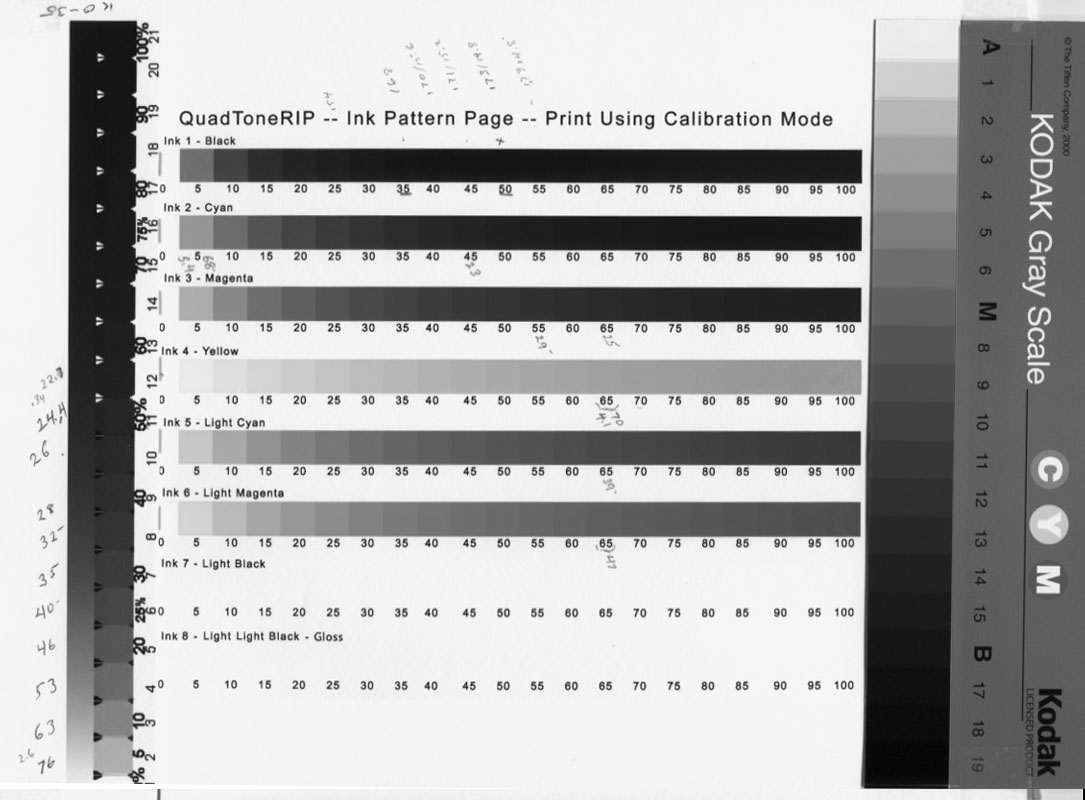
See if your QTR Calibration mode print has about the same grayscale densities -- particularly the cyan position relative to the others -- as this:
(multi-scan with inexpensive scanner, 4 total, two each vertical direction)
I didn't have a PA 205 saved.
It's not a bad idea to have a folder for the printer and inkset that has these sheets for your favorite papers.
Paul
On Sat, Oct 25, 2014 at 9:52 AM, paulmwhiting@... [DigitalBlackandWhiteThePrint] <DigitalBlackandWhiteThePrint@yahoogroups.com>; wrote:
Attachments
- No local attachments were found for this message.