Yahoo Groups archive

Digital BW, The Print

Index last updated: 2026-04-28 22:56 UTC

Thread

narrowing in on my solarized prints problem

narrowing in on my solarized prints problem

2014-10-24 by paulmwhiting@...

In an earlier thread Paul suggested I might have to relinearize my curve. I was preparing to do so (the curve is Eb6-PA-205 and I would save it under a new name) and when I printed out the 21-step file. I noticed that after the 70% patch, starting with the 65, the next 2 or 3 patches were abnormally lighter. Then, at 55%, they got darker again and the progression to white seemed more uniform. I think these problem areas might be what's giving me the solarized look. Those solarized areas in my print look to be the same shade of grey as in my 21-step print. Interestingly, this showed up more when the printer was set at 2880 ppi as opposed to 1440. (just to reiterate, am using a refurbed 1400, Paul's curve, and Premier Art 205 paper.)

However, when I printed the Calibration Print, the grey scale for each cart looked quite uniform.

Nozzle checks were excellent but I did the Epson's cleaning up to the third level just to be sure. But the cleaning routines did not help.

Is there a way to determine which cart or carts is causing that grey scale to have those problem areas? I do have a spare set of carts, maybe I should just replace all of them. Their chips have different version numbers so it might be best not to mix the two versions.

As an aside... do the mixed inks grow stale after a while? Just a thought...

I may need to provide more information, please let me know.

Thanks all!

Paul


Re: [Digital BW] narrowing in on my solarized prints problem

2014-10-25 by Paul Roark

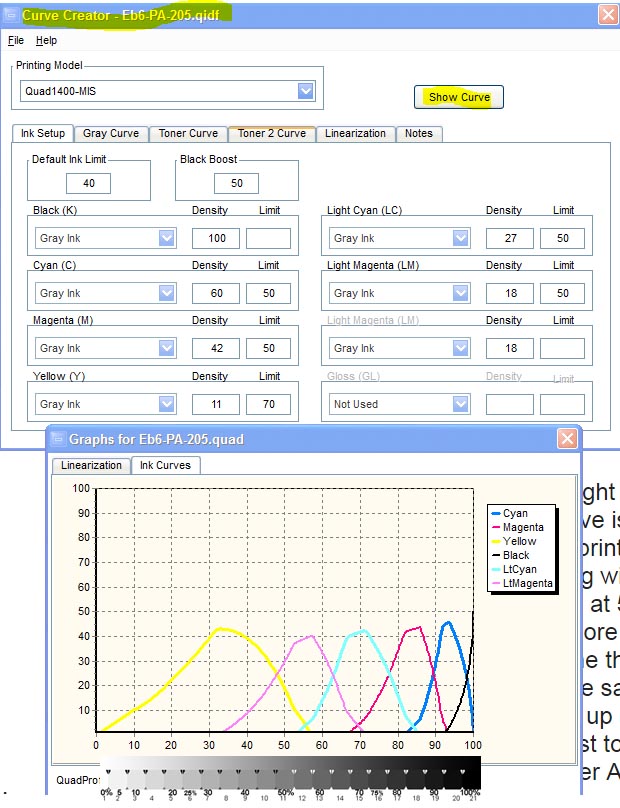
In QTR when you press the "show curve" button in the Curve Creator you'll get a graph of the partitioned inks. Comparing that to the 21-step might tell you which ink is causing the problem.

Paul
Show quoted textHide quoted text
On Fri, Oct 24, 2014 at 12:46 PM, paulmwhiting@... [DigitalBlackandWhiteThePrint] <DigitalBlackandWhiteThePrint@yahoogroups.com> wrote:

In an earlier thread Paul suggested I might have to relinearize my curve. I was preparing to do so (the curve is Eb6-PA-205 and I would save it under a new name) and when I printed out the 21-step file. I noticed that after the 70% patch, starting with the 65, the next 2 or 3 patches were abnormally lighter. Then, at 55%, they got darker again and the progression to white seemed more uniform. I think these problem areas might be what's giving me the solarized look. Those solarized areas in my print look to be the same shade of grey as in my 21-step print. Interestingly, this showed up more when the printer was set at 2880 ppi as opposed to 1440. (just to reiterate, am using a refurbed 1400, Paul's curve, and Premier Art 205 paper.)

However, when I printed the Calibration Print, the grey scale for each cart looked quite uniform.

Nozzle checks were excellent but I did the Epson's cleaning up to the third level just to be sure. But the cleaning routines did not help.

Is there a way to determine which cart or carts is causing that grey scale to have those problem areas? I do have a spare set of carts, maybe I should just replace all of them. Their chips have different version numbers so it might be best not to mix the two versions.

As an aside... do the mixed inks grow stale after a while? Just a thought...

I may need to provide more information, please let me know.

Thanks all!

Paul


Re: [Digital BW] narrowing in on my solarized prints problem

2014-10-25 by paulmwhiting@...

Thanks, Paul, I wasn't sure to look for but I did notice all the color position curves had an "up slope" and a "down slope" - but black only had the up slope. I didn't know how to compare it with the 21-step file.

Very much a lay observation, I assure you.

Paul

Re: [Digital BW] narrowing in on my solarized prints problem

2014-10-25 by Paul Roark

... I noticed that after the 70% patch, starting with the 65, the next 2 or 3 patches were abnormally lighter. Then, at 55%, they got darker again and the progression to white seemed more uniform...


It could be the cyan position ink that is too light or not set up correctly. See that the settings are as shown in the Curve Creator screen shot in the Jpeg above.

However, when I printed the Calibration Print, the grey scale for each cart looked quite uniform.

But was the cyan position significantly darker than the magenta position ink?

As an aside... do the mixed inks grow stale after a while?

They settle (as to all pigment inks) with time. It's a good idea to agitate them the night before you're going to re-load or mix a new batch. (Let the air bubble rise and too-large particles settle over night.)

Paul

Re: [Digital BW] narrowing in on my solarized prints problem

2014-10-25 by paulmwhiting@...

Paul,

Here's what I get, virtually identical to yours: http://paulwhitingphotography.com/utility/index.html#curve.jpg

So if my curve is ok, don't we get pointed to a faulty cartridge? or something else?

As for ink settling, I do shake my bottles (small 125ml bottles) of the various dilutions before refilling my carts. (I'm using the home brew variety of Eb6, aka C6, carefully mixed with an Ohaus scale to .1 gram). I believe I heard you say at one point that with a desktop we don't need to remove the carts and shake them before printing because the back and forth movement of the carriage is sufficient.

I'm very happy you've joined this thread... I'm hopeful we can get to the bottom of this!

Regards,

Paul

Re: [Digital BW] narrowing in on my solarized prints problem

2014-10-25 by paulmwhiting@...

Paul, sorry forgot to answer this question:

Judging by the Calibration Print, yes thet cyan output is darker. Of course, it's at 30% Eboni and the Cyan is at 18%. Not sure if that is "significantly" darker.


---In DigitalBlackandWhiteThePrint@yahoogroups.com, <roark.paul@...> wrote :
Show quoted textHide quoted text
But was the cyan position significantly darker than the magenta position ink?

Re: narrowing in on my solarized prints problem

2014-10-25 by paulmwhiting@...

Sorry Paul, I pulled the cart but didn't really know what to look for. Should I be looking at the cart itself, or the cyan portion of the Calibration Print or...?

Long as I had it out I topped it off, I made a couple of prints, but still getting solarization. I will say, however, I'm getting noticably better blacks with the refilled cyan.

I do have two more sets of carts, one has version 6.0 chips and one has 6.3. The 6.3 set is new, from MIS, took three tries to get a set that was recognized, you may recall that time I had trouble. My set now in use has 6.0's, they're from Jon Cone and he had them made to his specs so they could be manually resettable, I feature I really like. The spare 6.0's - I suspect they're autoreset, got those from a guy who's a member here.

Should I try a cyan from one of these sets? Would I damage anything by trying a cyan cart from either set?

By the way I sent the same file to two of my colleagues and they got prints fine with no solarization. One was printed at Costco, and one in a 3800 with a Jon Cone b/w set of carts. And my humble little HP Inkjet which I used for everyday letter writing did fine with the same image, no solarization.

Paul

Re: [Digital BW] Re: narrowing in on my solarized prints problem

2014-10-25 by Paul Roark

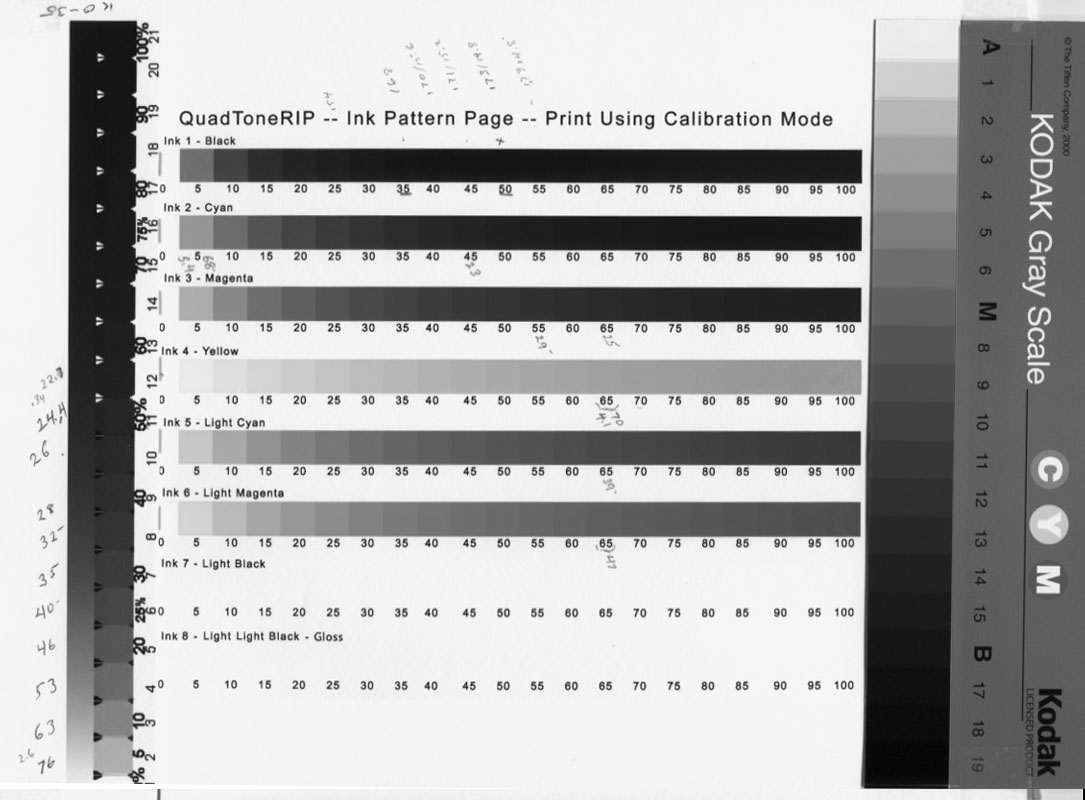
See if your QTR Calibration mode print has about the same grayscale densities -- particularly the cyan position relative to the others -- as this:


(multi-scan with inexpensive scanner, 4 total, two each vertical direction)

I didn't have a PA 205 saved.

It's not a bad idea to have a folder for the printer and inkset that has these sheets for your favorite papers.

Paul
Show quoted textHide quoted text
On Sat, Oct 25, 2014 at 9:52 AM, paulmwhiting@... [DigitalBlackandWhiteThePrint] <DigitalBlackandWhiteThePrint@yahoogroups.com>; wrote:

Sorry Paul, I pulled the cart but didn't really know what to look for. Should I be looking at the cart itself, or the cyan portion of the Calibration Print or...?

Long as I had it out I topped it off, I made a couple of prints, but still getting solarization. I will say, however, I'm getting noticably better blacks with the refilled cyan.

I do have two more sets of carts, one has version 6.0 chips and one has 6.3. The 6.3 set is new, from MIS, took three tries to get a set that was recognized, you may recall that time I had trouble. My set now in use has 6.0's, they're from Jon Cone and he had them made to his specs so they could be manually resettable, I feature I really like. The spare 6.0's - I suspect they're autoreset, got those from a guy who's a member here.

Should I try a cyan from one of these sets? Would I damage anything by trying a cyan cart from either set?

By the way I sent the same file to two of my colleagues and they got prints fine with no solarization. One was printed at Costco, and one in a 3800 with a Jon Cone b/w set of carts. And my humble little HP Inkjet which I used for everyday letter writing did fine with the same image, no solarization.

Paul


Re: [Digital BW] Re: narrowing in on my solarized prints problem

2014-10-25 by paulmwhiting@...

Paul,

Here's the procedure I followed, I hope this is what you had in mind:

I printed out my Calibration Print, using Eb6-PA-205, with linearization tables filled in.

Next I printed your jpg, same method. (Had a little trouble at first, no matter what size I filled in in QTR, I got a very small print. So I re-saved your jpg as a tiff and all went well.)

Then I placed both on my flatbed, positioning them so the two cyan grey scales were oriented the same and close together for convenience. The rest of each print was off the table as I didn't think they were needed for now. I scanned both as acquired within PS (Elements 9), and used the eyedropper at 5x5 pixels. Here's what I got:

%............. your cyan gray scale .................... my Calibration Print cyan's gray scale
0................245.............................................. 254
5................136 ..............................................156
10...............87................................................113
15...............95..................................................86
20...............85..................................................70
25...............74..................................................60
30...............64 .................................................52
35...............57..................................................46
40...............53..................................................43
45...............54..................................................40

They both rather leveled off after this. Note the increase for your gray scale from 10 to 15, then back down again. What does this mean? It was easily visible in the printout as well.

Your folder idea is a good one. So far, have stuck to one paper. When I get over this current hump, I want to try the Epson Hot Press (which is the one you chose for this exercise, apparently.) I'm trying to limit my variables for now, just as I finally settled on Ilford MG Fiber in the darkroom, again for simplicity.

Thank you,

Paul

Re: [Digital BW] Re: narrowing in on my solarized prints problem

2014-10-25 by Paul Roark


I printed out my Calibration Print, using Eb6-PA-205, with linearization tables filled in.

The Calibration Mode does not use your profile. Just be sure the slider is at 100. The point is to see the inks without a profile in the loop.

Next I printed your jpg,

Don't print it. Pull it into Photoshop along with a scan of your Calibration Mode print and see of the relative densities of the inks -- particularly your cyan -- is close to what you see on my Jpeg.

Paul


Re: [Digital BW] Re: narrowing in on my solarized prints problem

2014-10-26 by paulmwhiting@...

Yup, the slider was at 100.

OK, here we go... they're a lot closer now, your numbers are slightly lower but appear to be consistently lower:

percentage........your print's cyan numbers.... my Cal Mode's #'s

0.................................240........................254
5.................................149........................156
10...............................108........................111
15................................82,,,,,,,,,,,,,,,,,,,,,,,,,85
20................................67.........................70
25................................58.........................59
30................................49.........................52
35................................42.........................46
40................................38.........................42
45................................35.........................40

Now I've done this only for cyan... what does that tell us so far? perhaps another cart is the culprit?

I don't expect you to answer tonight ... this has been pretty intense. But I do hope to continue this pursuit. I feel like we're on the right path.

Paul

Re: [Digital BW] Re: narrowing in on my solarized prints problem

2014-10-26 by Paul Roark

I'm sorry, I misspoke earlier. The LC is what you ought to be looking at, not the C. And what your flat spot sponed like to me was a weak LC. So, that is what I've been seeing if we can verify.

I think the best way to do this is pick a single Calibration Mode density patch -- say 40 -- and compare the LC to the M and LM, which are the darker and lighter inks, respectively. If you have the 2 Jpegs -- the one I posted and the scan of yours of the inkset/printer with the problem -- in PS, try using your Brightness/Contrast to get the LM and M of the two to the same Lab L (or RGB) values. Then compare the LC values of the two scans. Is yours lighter than mine?

Paul
Show quoted textHide quoted text
On Sat, Oct 25, 2014 at 5:59 PM, paulmwhiting@... [DigitalBlackandWhiteThePrint] <DigitalBlackandWhiteThePrint@yahoogroups.com> wrote:

Yup, the slider was at 100.

OK, here we go... they're a lot closer now, your numbers are slightly lower but appear to be consistently lower:

percentage........your print's cyan numbers.... my Cal Mode's #'s

0.................................240........................254
5.................................149........................156
10...............................108........................111
15................................82,,,,,,,,,,,,,,,,,,,,,,,,,85
20................................67.........................70
25................................58.........................59
30................................49.........................52
35................................42.........................46
40................................38.........................42
45................................35.........................40

Now I've done this only for cyan... what does that tell us so far? perhaps another cart is the culprit?

I don't expect you to answer tonight ... this has been pretty intense. But I do hope to continue this pursuit. I feel like we';re on the right path.

Paul


Re: [Digital BW] Re: narrowing in on my solarized prints problem

2014-10-26 by paulmwhiting@...

ok, this is a rough draft... having a heck of a time adjusting brightness and contrast on this Dell monitor. It's got five small buttons on the right that you can't see, they're not labeled, and they are same color as the monitor chassis, and you have to go through several menus to get to B and C. I'm going to download their pdf, print it out, and see if I can make sense of it.

In the meantime, here's what I have. If not satisfactory, I'll be happy to do better once I get the monitor manual.

on the 40 patch:

my Cal Print.............. your supplied jpg

LC..... 112..................94
M........62...................59
LM......90..................114

not very good numbers I'm afraid. be frank and tell me they're lousy! My LC patch is lighter, which is what you were asking.

stay tuned,

Paul

Re: [Digital BW] Re: narrowing in on my solarized prints problem

2014-10-26 by Paul Roark

It looks like your LM and LC are swapped. That would cause your problem.

That is, you probably have an ink mixing or installation error.

Paul
Show quoted textHide quoted text
On Sun, Oct 26, 2014 at 7:32 AM, paulmwhiting@yahoo.com [DigitalBlackandWhiteThePrint] <DigitalBlackandWhiteThePrint@yahoogroups.com> wrote:

ok, this is a rough draft... having a heck of a time adjusting brightness and contrast on this Dell monitor. It's got five small buttons on the right that you can't see, they're not labeled, and they are same color as the monitor chassis, and you have to go through several menus to get to B and C. I'm going to download their pdf, print it out, and see if I can make sense of it.

In the meantime, here's what I have. If not satisfactory, I'll be happy to do better once I get the monitor manual.

on the 40 patch:

my Cal Print.............. your supplied jpg

LC..... 112..................94
M........62...................59
LM......90..................114

not very good numbers I'm afraid. be frank and tell me they're lousy! My LC patch is lighter, which is what you were asking.

stay tuned,

Paul


Re: narrowing in on my solarized prints problem

2014-10-26 by paulmwhiting@...

Oh, Paul.... I am feeling so stupid. Of course, that was it. I looked at my carts and sure enough. Please forgive me - all the time you spent, good grief.

You said once you learn by helping others. That may be true, but this was a true test of your patience. I had a feeling it had to be something simple - and it was. I have learned a very hard lesson - to check my installation from now on, whenever I have a problem.

I'm so sorry,

Paul

Move to quarantaine

This moves the raw source file on disk only. The archive index is not changed automatically, so you still need to run a manual refresh afterward.