Yahoo Groups archive

Digital BW, The Print

Index last updated: 2026-04-28 22:56 UTC

Thread

when to resize

when to resize

2014-10-22 by Myron Gochnauer

Is there any received wisdom on when resizing of an image should be done during processing?

From experience, but not careful testing, I do any upsizing in Photoshop as early as possible in my processing, but after I have performed any necessary noise reduction.  

My untested thinking is that upsizing before noise reduction might make noise reduction less reliable, since upsizing always involves *some* degree of guessing and so has some reasonable likelihood of producing random noise artifacts.  (I use noise reduction plugins that rely on analyzing the image, or a representatively similar image. The more uniform and predictable the noise is, the better they seem to work.)

Have any of you done careful tests to solve this problem?  If not, does my approach seem sensible?

Every time I decide I should test this, I run into complications in the nature of “well, it depends. . .”.   And, of course, it usually doesn’t make any visible difference at all when I finally just get it up on the wall. :-)

Myron

Re: [Digital BW] when to resize

2014-10-23 by Paul Roark

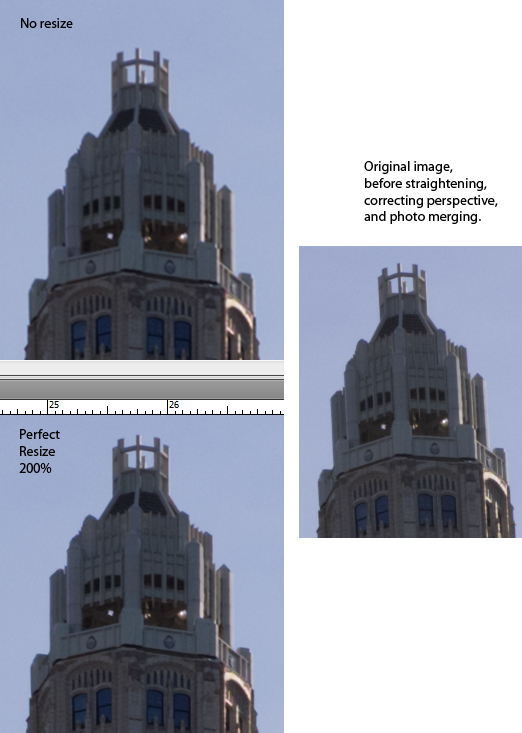
The only testing I've done on up-sizing relates to minimizing the losses where there are geometric alterations in the file, like in stitching. In those cases a "smart" up-res (old Genuine Fractals/Perfect Resize or -- better -- PS CC in auto mode) of 200% does seem to preserve details. See http://www.paulroark.com/BW-Info/Perfect-Resize-comparison.jpg

Paul
Show quoted textHide quoted text
On Wed, Oct 22, 2014 at 3:40 PM, Myron Gochnauer goch@... [DigitalBlackandWhiteThePrint] <DigitalBlackandWhiteThePrint@yahoogroups.com> wrote:

Is there any received wisdom on when resizing of an image should be done during processing?

From experience, but not careful testing, I do any upsizing in Photoshop as early as possible in my processing, but after I have performed any necessary noise reduction.

My untested thinking is that upsizing before noise reduction might make noise reduction less reliable, since upsizing always involves *some* degree of guessing and so has some reasonable likelihood of producing random noise artifacts. (I use noise reduction plugins that rely on analyzing the image, or a representatively similar image. The more uniform and predictable the noise is, the better they seem to work.)

Have any of you done careful tests to solve this problem? If not, does my approach seem sensible?

Every time I decide I should test this, I run into complications in the nature of “well, it depends. . .”. And, of course, it usually doesn’t make any visible difference at all when I finally just get it up on the wall. :-)

Myron


Re: [Digital BW] when to resize

2014-10-23 by Joe Dempsey

I started with the first Genuine Fractals and have used every 
permutation since \u2014 up to and including the latest "Perfect Resize." I 
have always had satisfactory results. The latest versions give you some 
options that are best done in Photoshop (IMHO), sharpening being one of 
those.
Joe


On 10/22/2014 21:36, Paul Roark roark.paul@... 
[DigitalBlackandWhiteThePrint] wrote:
> The only testing I've done on up-sizing relates to minimizing the 
> losses where there are geometric alterations in the file, like in 
> stitching.  In those cases a "smart" up-res (old Genuine 
> Fractals/Perfect Resize or -- better -- PS CC in auto mode) of 200% 
> does seem to preserve details.  See 
> http://www.paulroark.com/BW-Info/Perfect-Resize-comparison.jpg
>
> Paul
> www.PaulRoark.com <http://www.PaulRoark.com>
>
> On Wed, Oct 22, 2014 at 3:40 PM, Myron Gochnauer goch@... 
> <mailto:goch@...> [DigitalBlackandWhiteThePrint] 
> <DigitalBlackandWhiteThePrint@yahoogroups.com 
> <mailto:DigitalBlackandWhiteThePrint@yahoogroups.com>> wrote:
>
>     Is there any received wisdom on when resizing of an image should
>     be done during processing?
>
>     >From experience, but not careful testing, I do any upsizing in
>     Photoshop as early as possible in my processing, but after I have
>     performed any necessary noise reduction.
>
>     My untested thinking is that upsizing before noise reduction might
>     make noise reduction less reliable, since upsizing always involves
>     *some* degree of guessing and so has some reasonable likelihood of
>     producing random noise artifacts. (I use noise reduction plugins
>     that rely on analyzing the image, or a representatively similar
>     image. The more uniform and predictable the noise is, the better
>     they seem to work.)
>
>     Have any of you done careful tests to solve this problem? If not,
>     does my approach seem sensible?
>
>     Every time I decide I should test this, I run into complications
>     in the nature of \u201cwell, it depends. . .\u201d. And, of course, it
>     usually doesn\u2019t make any visible difference at all when I finally
>     just get it up on the wall. :-)
>
>     Myron
>
>
> 

-- 
Joe Dempsey
870.550.0191
http://www.joedempseyphoto.com/
http://www.corndancer.com/joephoto/photohome.html
http://weeklygrist.wordpress.com/
Re: [Digital BW] when to resize

2014-10-23 by Richard Smallfield

My only comment here is that I always sharpen after, not before resizing.

Richard

www.richardsmallfield.com

Show quoted textHide quoted text
On Oct 23, 2014 4:06 PM, "Joe Dempsey jdempsey@... [DigitalBlackandWhiteThePrint]" <DigitalBlackandWhiteThePrint@yahoogroups.com> wrote:

I started with the first Genuine Fractals and have used every permutation since — up to and including the latest "Perfect Resize." I have always had satisfactory results. The latest versions give you some options that are best done in Photoshop (IMHO), sharpening being one of those.
Joe


On 10/22/2014 21:36, Paul Roark roark.paul@... [DigitalBlackandWhiteThePrint] wrote:
The only testing I've done on up-sizing relates to minimizing the losses where there are geometric alterations in the file, like in stitching. In those cases a "smart" up-res (old Genuine Fractals/Perfect Resize or -- better -- PS CC in auto mode) of 200% does seem to preserve details. See http://www.paulroark.com/BW-Info/Perfect-Resize-comparison.jpg

Paul

On Wed, Oct 22, 2014 at 3:40 PM, Myron Gochnauer goch@... [DigitalBlackandWhiteThePrint] <DigitalBlackandWhiteThePrint@yahoogroups.com> wrote:

Is there any received wisdom on when resizing of an image should be done during processing?

>From experience, but not careful testing, I do any upsizing in Photoshop as early as possible in my processing, but after I have performed any necessary noise reduction.

My untested thinking is that upsizing before noise reduction might make noise reduction less reliable, since upsizing always involves *some* degree of guessing and so has some reasonable likelihood of producing random noise artifacts. (I use noise reduction plugins that rely on analyzing the image, or a representatively similar image. The more uniform and predictable the noise is, the better they seem to work.)

Have any of you done careful tests to solve this problem? If not, does my approach seem sensible?

Every time I decide I should test this, I run into complications in the nature of “well, it depends. . .”. And, of course, it usually doesn’t make any visible difference at all when I finally just get it up on the wall. :-)

Myron


-- 
Joe Dempsey
870.550.0191
http://www.joedempseyphoto.com/
http://www.corndancer.com/joephoto/photohome.html
http://weeklygrist.wordpress.com/

Re: [Digital BW] when to resize

2014-10-23 by Paul Roark

I might add that aside from the occasional up-sizing when doing geometric alterations, I try to keep the file size as is as long as possible. While I work up images as Tiffs, I want the ability to go back to the raw file easily. I also usually don't sharpen until the very end of my processing.

Additionally, while my current favorite camera (Sony a7r) has sufficient pixels (36 mp) for most uses, I sometimes up-res, particularly older files, to 360 or 720 for my "print only" file, which is usually deleted after the print is complete. I suspect PS CC does a better job of up-sizing than the print drivers, though I admit I have not actually tested it. (My actual best guess is that no one would ever see the difference, but it makes me feel better!)

Paul

Re: [Digital BW] when to resize

2014-10-27 by Joe Dempsey

Absolutely, positively, sharpening is the last step.

On 10/23/2014 07:32, Richard Smallfield rwsmallfield@... 
[DigitalBlackandWhiteThePrint] wrote:
Show quoted textHide quoted text
>
> My only comment here is that I always sharpen after, not before resizing.
>
> Richard
>
> www.richardsmallfield.com <http://www.richardsmallfield.com>
>

Move to quarantaine

This moves the raw source file on disk only. The archive index is not changed automatically, so you still need to run a manual refresh afterward.