It looks like the toner is working and the ink limit is varying the amount of toner. Look at the Lab B values. Particularly in the lighter part of the test strips. Probably the reason the shadow values did not change much is that there is way less toner per carbon particle in the shadows with the generic QTR "toner" curve set up the way you have it. If you can do a "show curves" in your system, you'll see that the amount of toner is relatively flat with your settings.
I've posted a comparison of your profile's "show curves" compared to the "generic" neutral curve I manually drew for the 1400 EbVT. See http://www.paulroark.com/BW-Info/Toner-curves-4-3-16.jpg . (The 1400 EbVT used the 90% dilution. For the 75% divide the ink limit by 2.5.) You can move the peak of the QTR "toner" cures right or left by altering the "density" value. I just make them manually for a better fit. You might just want to copy the values out of my curve as a starting point.
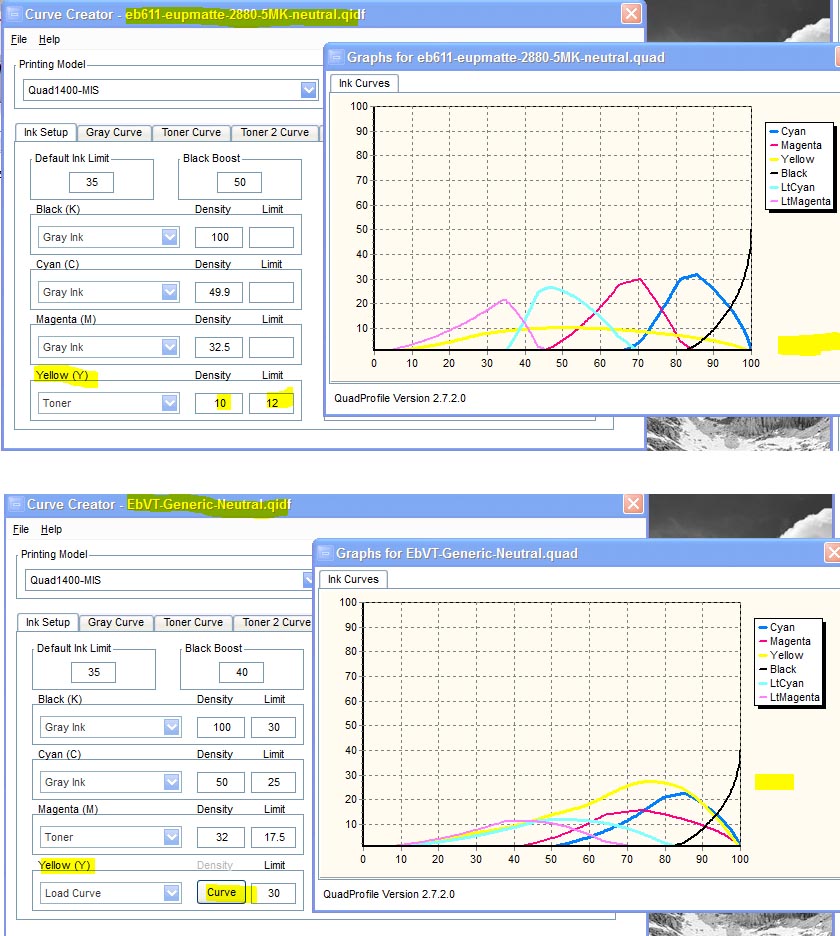
My manual curve uses the following coordinates: 0;0 10;4.7 20;13 30;22 40;31 50;46 60;61 70;85 75;91 80;89 85;81 90;61 95;35 100;0
(I'm not sure how this will display on the forum.)
Hope this helps.
Paul
On Sun, Apr 3, 2016 at 10:35 AM, andrey@... [DigitalBlackandWhiteThePrint] <DigitalBlackandWhiteThePrint@yahoogroups.com> wrote:
Paul R or anyone else who knows,
How does one determine the neutralizing toner settings in the .qidf file? The main lever I've been pulling is the Y limit, as the TONER_VAL_1 value doesn't seem to have much effect. I'm trying to neutralize the 5-shade Eboni 1.1 on Epson Ultra Premium Presentation Paper Matte (because it's cheap, and a good way to get the workflow down before moving to more expensive paper), and the Lab b swings are kind of big and not easily controlled when I change the Y limit. Also, I set some value, and then I print a stepwedge to see how it does. Is there a more deterministic way to do this?From looking through the archives, it seems like changing the limit is the main way people deal with the toner.Here's a link to 3 different measurements, all text output from the QTR-Linearize-Data app, as well as the. qidf file. All of these files are not linearized. The toner mix is the 75% dilution of the Canon blue and cyan inks at Paul's ratios.Thanks in advance for any help!--Andre