Bc2000 (for the BCF2000 & BCR2000) group photo

Yahoo Groups archive

Bc2000 (for the BCF2000 & BCR2000)

Index last updated: 2026-04-28 23:16 UTC

Thread

How to send SysEx with BCR?

How to send SysEx with BCR?

2017-04-24 by vrvgqj4fs6uocsp6wnx3aynvlpfp64rohhcsho67@...

Sorry if this has been asked many times before; I'm new to all this. I'm trying to use my BCR2000 to control my Roland JD-Xi, which requires Sysex for many important controls. I'm having trouble finding info about sending sysex in the manual. Is there a guide on how to do this?
Thanks for reading.

Re: [bc2000] How to send SysEx with BCR?

2017-04-26 by mall.claude@...

Hello,

you can use BCFR Edit software. Switch to "Learned" and copy the Sysex to Tx box ( or learn you JD-Xi command).


cheers


---- Message d'origine ----
De : "vrvgqj4fs6uocsp6wnx3aynvlpfp64rohhcsho67@... [bc2000]"
À : bc2000@yahoogroups.com
Objet : [bc2000] How to send SysEx with BCR?
Date : 24/04/2017 10:50:54 CEST

Sorry if this has been asked many times before; I'm new to all this. I'm trying to use my BCR2000 to control my Roland JD-Xi, which requires Sysex for many important controls. I'm having trouble finding info about sending sysex in the manual. Is there a guide on how to do this?
Thanks for reading.

Re: How to send SysEx with BCR?

2017-04-29 by rpcfender@...

Hi

The BC will Learn sysex if the JD-Xi will output sysex.
- check 4.3.1 page 13 of the very average manual.

Connect up the Midi so the BCR can see the data coming from the synth.
Hold the LEARN button and move the encoder you want to use. You are now in Learn mode.

Move the control on the JD-Xi through its whole range (ie go to min then to max) and the BCR should display Good.
That encode is now programmed. do the other controls and save the preset.

OR you could go to Marc's web site and download the editor as claude suggested
You can only program a few things from the front panel.
This editor allows you to program everything possible on the BCR.

Feel free to ask about anything you are having trouble with.

All the best
Royce

Re: How to send SysEx with BCR?

2017-04-29 by vrvgqj4fs6uocsp6wnx3aynvlpfp64rohhcsho67@...

Hello Royce,

I have tried using the LEARN function, but nothing seems to work. I've tried the following methods:
Setting my synth (JD-Xi)'s Tx Edit Data option to ON (this specifies whether changes I make in a program will be transmitted as SysEx)
With the cable connected to MIDI OUT in the BCR and MIDI IN in my synth, nothing happens if I'm using the LEARN fuction. The EDIT function works perfectly though, and I can control CC and NRPN parameters. With the cable connected to MIDI OUT in my synth and MIDI IN in my BCR, the MIDI IN, A, and B display lights stay lit, and when I try to use the Learn function everything returns BAD almost instantly.
I have tried changing many settings in my synth, but nothing seems to fix it.

I've downloaded BCR manager. I'm very new to this, so it was only recently that I learned about SysEx, using this tutorial: http://www.2writers.com/eddie/tutsysex.htm

I don't entirely understand it though.
*Note: if this explaining this is too much trouble for you, I understand, it's a complicated subject (at least to me), so you can skip to the bolded sentences near the end of this mesage if you want. Thanks*

I get the meaning of Exclusive Status, Device ID, address, cheksum, etc. but don't understand how assigning the actual data value works. In CC, for example, to my understanding, I can easily set the data values to 0-127, depending on the parameter I want to control. And me turning the knob is what sets the exact data value. In the case of SysEx, it doesn't seem to work that way. My synth's manual provides an example of a Sysex message for the Reverb Send Level. Here it is:

F0 41 10 00 00 00 0E 12 18 00 02 03 64 7F F7

F0 = Exclusive Status, 41 = Roland ID, 10 = Device ID, 00 00 00 0E = Model, 12 = Command ID, 18 00 02 03 = Address, 64 = ... Data?! So this is actually a message that would tell my synth, "set the Reverb Send Level to 64"? I guess the subject of this thread is wrong then. My question should be: How do I control my synth, from my BCR, using SysEx, in the same way I can do it with NRPN and CC?

I tried sending the message above to the BCR via BC Manager, just to see what happens. When I did it, and connected the BCR to my synth, nothing happened when turning the knob. In fact, the encoder's light didn't move, and the LED Display didn't indicate any value. I'm reading BC Manager's manual but still haven't found a solution. Can you help me figure out what I could be doing wrong, please?

Also,
English isn't my first language, so if there's anything unclear in my message please let me know.
Thanks!


---In bc2000@yahoogroups.com, <rpcfender@...> wrote :

Hi

The BC will Learn sysex if the JD-Xi will output sysex.
- check 4.3.1 page 13 of the very average manual.

Connect up the Midi so the BCR can see the data coming from the synth.
Hold the LEARN button and move the encoder you want to use. You are now in Learn mode.

Move the control on the JD-Xi through its whole range (ie go to min then to max) and the BCR should display Good.
That encode is now programmed. do the other controls and save the preset.

OR you could go to Marc's web site and download the editor as claude suggested
You can only program a few things from the front panel.
This editor allows you to program everything possible on the BCR.

Feel free to ask about anything you are having trouble with.

All the best
Royce

Re: How to send SysEx with BCR?

2017-04-30 by rpcfender@...

Hi
"I have tried using the LEARN function, but nothing seems to work."
First make sure you are transmitting the sysex.
If you have a PC you can use MidiOx or Mark's BC Manager

If you need a Midi interface you can use the BCR.
Start by putting it into Mode U-2. In this mode the BC acts as though it is a 2 In 2 Out Midi interface.
In and Out 1 are connected to the BCR and In and Out 2 are a separate Midi interface with no connection to the BCR.

Now run the program - the BC won't appear in the list of interfaces if you power it up or change modes after you start the program.

Connect the synth Midi In to BC Midi Out A and the reverse, synth Midi Out to BC Midi In, with 2 Midi cables.
Always connect Out to In

So when using MidiOx go to Options/ Midi Devices and select the TWO BC inputs and the TWO BC output ports.
Make sure you have the Input Monitor and Port Routing wind open in MidiOx (you'll find them in the View menu)

It might be handy to see where the Midi data is coming from, but MidiOx only displays 3 letters, so go to Options / Customize Port Names... and use the function key F2 on the computer to change the BC ports. I use Bi1 and Bo1 and Bi2 and Bo2 so I can see in's and out's.
Play the Roland and see if you get the note data coming in Bi 2.
Change a synth parameter and see if it is outputting sysex, also from Bi2.
If you twist an encoder on the BCR you are likely to get data coming in to MidiOx onBi1

On MidiOx's Port Routing window drag the Bi1 (BCR) input to the Bo2 (synth) output.
Also n MidiOx's Port Routing window drag the Bi2 (synth) input to the Bo1 (BCR) output.
I know this might seem strange, but have a look at the diagram of Mode U2 on page 9 of the manual

Now when you change a parameter on the synth, with a data wheel I guess, the sysex should be seen by the BCR.
Drop the BCR into Learn mode and select an encoder. Twist the data wheel quickly to give the max and min (the Roland should jump lots of in-between values if you twist it quickly.) Hopefully the BCR will say "good"

If not you will have to program the BC by learning Marks editor.

As far as the sysex goes F0 41 10 00 00 00 0E 12 18 00 02 03 64 7F F7
F0 start sysex
41 Roland (manufacture's id)
10 Id - you can have a lot of JD-Xi's connected and you this to pick the one you want
00 00 00 0E Model Id JD-Xi
12 DTS Command "I'm sending you parameter data"
18 00 02 03 This is the 4 byte address of where it goes (parameter Id)
64 This is the value (just like CC that is CC+channel type value - B0 07 40 - set the volume)
7F checksum you already know
F7 end of sysex
To program this line in the language that the BC understands (BCL)
.tx F0 41 10 00 00 00 0E 12 18 00 02 03 val cks-1 8 F7
(Mark's editor hides a lot of the BCL to make it easier for you)

val as you might guess - 7 bit value - 0 to 127
cks-1 8 checksum type 1 starting at byte 8

Roland uses type 1 checksum and performs the checksum from the start of the address (0 is F0 so 18 is byte 8)

Twist the encoder and the BC will put out
F0 41 10 00 00 00 0E 12 18 00 02 03 00 43 F7
F0 41 10 00 00 00 0E 12 18 00 02 03 01 42 F7
F0 41 10 00 00 00 0E 12 18 00 02 03 02 41 F7
F0 41 10 00 00 00 0E 12 18 00 02 03 03 40 F7
F0 41 10 00 00 00 0E 12 18 00 02 03 04 3F F7
etc.

Hope this helps
Royce

Re: How to send SysEx with BCR?

2017-05-02 by bill@...

Royce - another detailed and helpful reply. I always learn something from your postings.

Thank you :)

Bill


---In bc2000@yahoogroups.com, <rpcfender@...> wrote :

First make sure you are transmitting the sysex.
If you have a PC you can use MidiOx or Mark's BC Manager


Re: How to send SysEx with BCR?

2017-05-03 by flp2912@...

Hi Royce,

I finally found time to work with my BCR again. I'm using the second method (learning to use Mark's software) since I currently only have one MIDI cable (plus the USB cable). I think I might be getting closer, but still haven't achieved what I want. In BC Manager, I did the following:

went to Preset 0, encoder 56. In custom input, I typed
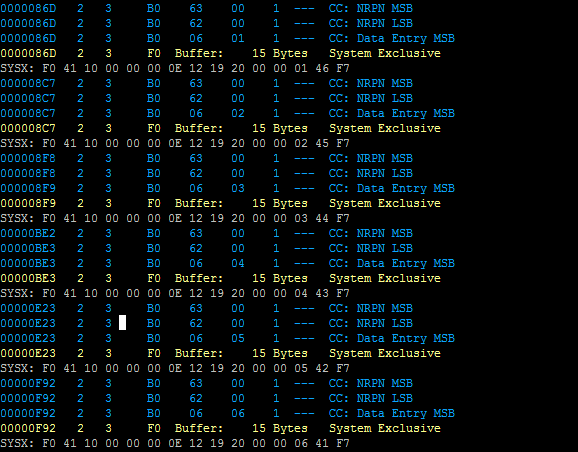
$F0 $41 10 00 00 00 0E 12 19 20 00 00 val cks-1 (starting index:8) F7
(I wanted to test changing the oscillator wave shape. In my synth, the parameter address for that is
19 20 00 00)

Then, I set the Value 1 to 0 and Value 2 to 7 (as my synth's manual indicates, for waves Saw, sine, triangle square, PCM, etc). Then, copied from Preset 0 to Preset 1 and MIDI>Send. The problem is, for some reason the modified encoder won't respond when I turn it. No value changes, the light doesn't move, nothing, as if I didn't set the values to 0-7. What should I do? I tried using the Standard Output, setting it to NRPN, Ch 1, set the NRPN numbers to 0, and the values to 0-7. That way, the encoder responds. I opened up MIDI-OX and as expected, it sent both NRPN and Sysex data, and it seems my synth won't recognize that since the OSC parameters don't change when I move the encoder (unless I have the address wrong?).

Again, thanks for much for all the info you've provided. You've been very helpful. Hopefully we can solve this; if not, I'll have to get an extra MDI cable. I'm probably going to need one eventually anyway.


---In bc2000@yahoogroups.com, <rpcfender@...> wrote :

Hi
"I have tried using the LEARN function, but nothing seems to work."
First make sure you are transmitting the sysex.
If you have a PC you can use MidiOx or Mark's BC Manager

If you need a Midi interface you can use the BCR.
Start by putting it into Mode U-2. In this mode the BC acts as though it is a 2 In 2 Out Midi interface.
In and Out 1 are connected to the BCR and In and Out 2 are a separate Midi interface with no connection to the BCR.

Now run the program - the BC won't appear in the list of interfaces if you power it up or change modes after you start the program.

Connect the synth Midi In to BC Midi Out A and the reverse, synth Midi Out to BC Midi In, with 2 Midi cables.
Always connect Out to In

So when using MidiOx go to Options/ Midi Devices and select the TWO BC inputs and the TWO BC output ports.
Make sure you have the Input Monitor and Port Routing wind open in MidiOx (you'll find them in the View menu)

It might be handy to see where the Midi data is coming from, but MidiOx only displays 3 letters, so go to Options / Customize Port Names... and use the function key F2 on the computer to change the BC ports. I use Bi1 and Bo1 and Bi2 and Bo2 so I can see in's and out's.
Play the Roland and see if you get the note data coming in Bi 2.
Change a synth parameter and see if it is outputting sysex, also from Bi2.
If you twist an encoder on the BCR you are likely to get data coming in to MidiOx onBi1

On MidiOx's Port Routing window drag the Bi1 (BCR) input to the Bo2 (synth) output.
Also n MidiOx's Port Routing window drag the Bi2 (synth) input to the Bo1 (BCR) output.
I know this might seem strange, but have a look at the diagram of Mode U2 on page 9 of the manual

Now when you change a parameter on the synth, with a data wheel I guess, the sysex should be seen by the BCR.
Drop the BCR into Learn mode and select an encoder. Twist the data wheel quickly to give the max and min (the Roland should jump lots of in-between values if you twist it quickly.) Hopefully the BCR will say "good"

If not you will have to program the BC by learning Marks editor.

As far as the sysex goes F0 41 10 00 00 00 0E 12 18 00 02 03 64 7F F7
F0 start sysex
41 Roland (manufacture's id)
10 Id - you can have a lot of JD-Xi's connected and you this to pick the one you want
00 00 00 0E Model Id JD-Xi
12 DTS Command "I'm sending you parameter data"
18 00 02 03 This is the 4 byte address of where it goes (parameter Id)
64 This is the value (just like CC that is CC+channel type value - B0 07 40 - set the volume)
7F checksum you already know
F7 end of sysex
To program this line in the language that the BC understands (BCL)
.tx F0 41 10 00 00 00 0E 12 18 00 02 03 val cks-1 8 F7
(Mark's editor hides a lot of the BCL to make it easier for you)

val as you might guess - 7 bit value - 0 to 127
cks-1 8 checksum type 1 starting at byte 8

Roland uses type 1 checksum and performs the checksum from the start of the address (0 is F0 so 18 is byte 8)

Twist the encoder and the BC will put out
F0 41 10 00 00 00 0E 12 18 00 02 03 00 43 F7
F0 41 10 00 00 00 0E 12 18 00 02 03 01 42 F7
F0 41 10 00 00 00 0E 12 18 00 02 03 02 41 F7
F0 41 10 00 00 00 0E 12 18 00 02 03 03 40 F7
F0 41 10 00 00 00 0E 12 18 00 02 03 04 3F F7
etc.

Hope this helps
Royce
Attachments

Re: How to send SysEx with BCR?

2017-05-04 by rpcfender@...

Hi

I am hoping that instead of
$F0 $41 10 00 00 00 0E 12 19 20 00 00 val cks-1 (starting index:8) F7
you are using
$F0 $41 $10 $00 $00 $00 $0E $12 $19 $20 $00 $00 val cks-1 $08 $F7

The "$" means hexadecimal (hex) in BCL and without it the BC will reject the message.

$F0 $41 $10 0 0 0 $0E $12 $19 $20 0 0 val cks-1 8 $F7

This is OK as well as the BC doesn't mind you mixing hex (with the "$") and decimal (without the "$")
But you might find you have fewer mistakes if everything is in hex.
Using 19 when you meant $19 will be a mistake that is hard to spot because the BC is quite happy to use either $19 or 19

But $19 is (1 x 16) + 9 = 25 decimal

If you are new to hex, I have a great (he says modestly) little conversion program on my web site -
It even has a way to calculate a hex number list into a checksum, BUT it doesn't wan't a $ for each number and calculates all the numbers.
That is, it doesn't have an offset so for Roland things only use the address and value.
So for a value of 7 in your sysex message type in 19 20 0 0 7 .

The checksum is calculated as you type so it is easy to vary the value or edit the address and quickly get the new checksum.

Here is a pic

Here is the web page

All the best
Royce

Re: How to send SysEx with BCR?

2017-10-15 by b78485@...

Hello, did you successfully programmed your bcr for the jdxi?
I would be very interested too, so if you could share your template would be awesome!
Best
Bastian

Re: How to send SysEx with BCR?

2017-10-18 by Pat Rafferty

Gday All. Mine is hooked up to a JV1080. After spending a month of rainy days at it have finally got the BCR to tweak every parameter in the temporary patch area. Next is to direct the attention of the BCR to the temporary performance patch area. Good luck with it.

Move to quarantaine

This moves the raw source file on disk only. The archive index is not changed automatically, so you still need to run a manual refresh afterward.