2017-12-11 by man.of.mystery@...
You won't need to understand much. A MIDI monitor shows a scrolling list of messages. If you're turning a knob that it's seeing, the number on the right is the value you're changing. The number before that is normally the CC being sent. If you manage to send different CCs, you will be able to see that number change.
Assuming you use MIDI-OX, connect the MIDI OUT of your JX-10 to a MIDI IN on your PCs MIDI interface. Connecting up the BCR is optional - you only need to see what's being sent, for now.
On the Options menu of MIDI-OX, choose MIDI Devices. That lets you tell it which inputs to watch. You can also use it to route the input back out, but you don't need that necessarily.
Here's how to connect an input and an output, with the input routed through to the output (though just the input will do). Tick the box at bottom left that says "Automatically attach inputs to outputs during selection". Click on the input you want, and the output you want. For now, you can just the input. Then press Okay. See attached picture.
Now, on the View menu, choose "Input monitor". Hopefully you will now see messages when you turn a knob, or your value dial.
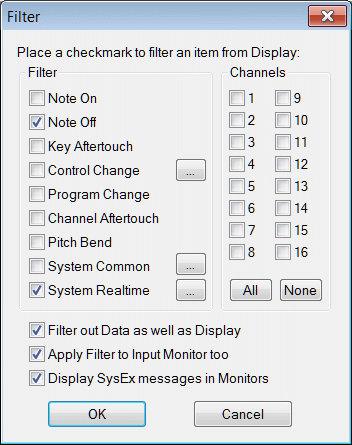
You may also see a lot of useless Active Sense messages, and MIDI clock messages getting in the way of what you're looking for, so the next thing is to go to the Options menu and choose MIDI Filter, then tick some boxes to get rid of that stuff. See other attached picture - that's how I have mine set.
If you have some other MIDI controller, even a USB one, try that to get the hang of MIDI-OX's monitor. You normally have to connect a device without MIDI-OX running, then start it up, or it probably won't see it in Options->MIDI Devices.
Final picture - here's what it looks like, when it's working. If it's a standard CC, with a definition in the MIDI spec, MIDI-OX will show the official name. If it's a general purpose one, it just shows the number.
You aren't forced to use them for the intended purpose, of course - some synths use standard CCs to do different things than normal.
I think by default, MIDI-OX uses hexadecimal (e.g. 7F for 127), but you can switch that off, on the Options menu - move down to Data Display, then un-tick "Monitor input: hex", by clicking on the tick mark. In my example picture, it's showing the numbers in decimal.
If you have a Mac, I don't know of MIDI-OX is an option, but midi monitors are all quite similar.
Andy
---In bc2000@yahoogroups.com, <sebastianlafayette@...> wrote :
I'm going to have to investigate further, though I'm not very adept at scrutinizing midi code.