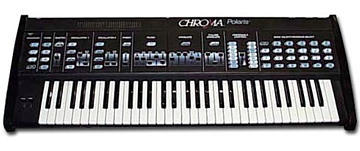
> ... I have created two separate midi outs in Logic X and I am sending
> midi data to channel 1 + channel 2 on the Polaris and it only play out
> one
>  of the instruments.

I can't speak to the Logic side of things - but as long as you end up
wtih two different MIDI streams, each on different MIDI channels (with
appropriate Program Change messages on each) - then the Polaris is
capable of playing them at the same time (this is a common configuration
for the Polaris - and so if you're not hearing the desired behaviour
then something isn't quite as expected.

It may have already been done - but if not, the first quick test is to
actually set up to 'record' the Polaris.

After you have started the 'record' on Logic, manually select the
'linked' patch on the Polaris front panel - and then play a few notes.
You can now stop the sequencer and attempt to 'play back' to the Polaris
what was just recorded.  If it plays back fine - with both patches
sounding (link and main) - then the Polaris is set up OK and focus is on
Logic.

If during playback you only hear one patch - then after you review what
events were actually recorded (e.g., to confirm you see two MIDI
channels and two program changes + notes) review of the Polaris settings
would be appropriate.  Feel free to jot down and share here what buttons
are on/off in the main setup menus (e.g., LF + cassette, LF + interface,
LF + MIDI Channel)

> I have also tried sending an ALL channels message which should make
> the
> Polaris play on midi channel 1 and 2 but this is not working.

I don't know how an 'all channels' mode setting works for Logic, but
some care will be needed if that not only sends note data but also sends
program change data - as unless there's a dedicated Program Change sent
on a unique MIDI channel, the Polaris end up doing what it is being
told - just not what you want (e.g., if it sends 'Program Change X' to
all channels, then sends Program Change Y to all channels - then 'Y'
will be the instrument defined for any/all channels that are active).
Message
Re: [chromapolaris] Playing a Link Patch through midi keyboard
2017-06-19 by David Clarke
Attachments
- No local attachments were found for this message.