Rhodes Chroma Polaris group photo

Yahoo Groups archive

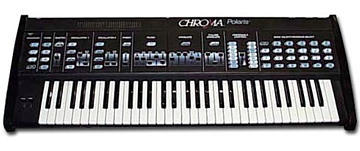
Rhodes Chroma Polaris

Index last updated: 2026-04-28 23:17 UTC

Thread

Playing a Link Patch through midi keyboard

Playing a Link Patch through midi keyboard

2017-06-18 by conorstrachan@...

Been trying to get my head around playing a linked patch through midi.
I understand that a linked patch goes through two different midi channels.
I can route it through midi 16 and then Midi 1 which lets me control two different sounds.
What I want to do is play the linked patch through my midi keyboard like you would play from the polaris.
I thought when I would of selected ALL it would play channel 16 + 1 and therefore play the linked patch but it does not do this. Also when I create two midi instruments one to play on 16 and one on track 1 one of the tracks just defaults to the other. Any info?


Re: [chromapolaris] Playing a Link Patch through midi keyboard

2017-06-19 by David Clarke

> ... Been trying to get my head around playing a linked patch through 
> midi.
> ... What I want to do is play the linked patch through my midi 
> keyboard like
> you would play from the polaris...

It is best to think of the Polaris in terms of 'instruments.'

By default, there is one instrument created for the 'main' patch.

If there is a 'link', then there is another instrument created for it.

Each instrument normally resides on its own MIDI channel.

So - let's say (for instance) that you have a 'main' patch of A-1 and a 
'link' patch of B-1 - and you're set up with 'link unison' (so that 
whenever you play from the local Polaris keyboard you hear both A-1 and 
B-1 play.

Let's also assume (for instance) that you have the Polaris set up for a 
MIDI base channel of 1.

If you were to look at the MIDI stream from the Polaris you'd monintally 
see data on MIDI Channel 1 (for the 'main' patch instrument) and data on 
MIDI Channel 2 (for the 'link' patch instrument).

If you were to play the Polaris - record the MIDI data just like that - 
and then play it back to the Polaris - then you'd get exactly what you'd 
played.  Namely you'd record data on MIDI Channel 1 and MIDI Channel 2. 
When you play that back to the Polaris - the Polaris will play the 'main 
instrument' on MIDI Channel 1 and the link instrument on MIDI Channel 
2 - and you'll hear two patches sound (because you are actually playing 
two different instruments at the same time, via MIDI).

Are you experiencing a difficulty in having that sort of behaviour 
occur - or are you trying to have it so that you have an external 
keyboard send data on _one_ MIDI channel but have the Polaris internally 
use that to play _both_ the main and link patches/instruments at the 
same time?

David Clarke

Re: [chromapolaris] Playing a Link Patch through midi keyboard

2017-06-19 by conorstrachan@...

Hi Dave

Thanks for your response.

From what I have experience and what I have read in the manual, one instrument is on Midi channel 16 and the other is on midi channel 1.

I am playing from an external midi keyboard that goes to midi IN and then Midi OUT goes to the polaris. This is all routed through my DAW Logic X.

I can control the polaris on midi Channel 16 or Channel 1 and the individual sounds from the linked patch.

The issue is the Polaris will not play both the main and linked sound if I tell it to play on all channels, only one "instrument" plays from the Polaris. Subsequently if I create two "instruments" inside logic and tell the Polaris to play from midi Channel 16 on one and Channel 1 on the other. The Polaris defaults to one of the instruments only and does not play two instruments at once.


Re: [chromapolaris] Playing a Link Patch through midi keyboard

2017-06-19 by David Clarke

> ... one instrument is on Midi channel 16 and the other is on midi 
> channel 1.

The MIDI channel assignments are not fixed - they are settable by the 
user.

The user choses a 'base' channel, and then additionally can specify how 
many MIDI channels to use.

By default the Polaris will use 3 MIDI channels:

   base = main instrument
   base + 1 = link instrument
   base + 2 = sequencer

The base channel is set with buttons 1-6 after selecting "LF + MIDI 
Channel".

The base channel is the sum of the numbers you choose - so if you select 
(for instance) just button 1 - then that's a base MIDI channel of "1". 
If you select button 1 and 3, then that represents 1+3 = a MIDI base 
channel of 4.  If you select 1+4+5+6, then that's a base channel of 16.

If the base is 16, then base + 1 will wrap around to "1".

> I can control the polaris on midi Channel 16 or Channel 1 and the
> individual sounds from the linked patch.

This is how the Polaris normally works.  Specifically - from MIDI, each 
MIDI channel is connected to an 'instrument' - not a 'patch.'

So - for instance - let's assume that the patch which is desired is K-3, 
and let's also assume that that is a 'link Unison' with J-6.  (and let's 
assume the 'base' channel is set to '1')

From the Polaris' panel, when you press "K-3", there will actually be 
two different program change messages appear on MIDI:

Channel1 (main instrument):  Program Change for Prog 123 (K-3)
Channel2 (link instrument):  Program Change for Prog 114 (J-6)

Now, forgetting about the keyboard on the Polaris - consider it only as 
6-possible 'instruments'.  If from MIDI you send a program change "123" 
on channel 1 - and then send data on channel 1 - then ONLY the base 
program (K-3) will play on the Polaris.  You will not hear the 'link' 
program.

If you want to hear the 'link' program, then you would send to the link 
instrument (e.g.  base MIDI channel + 1).

> > The issue is the Polaris will not play both the main and linked 
> > sound if I tell it to play
> on all channels, only one "instrument" plays from the Polaris.

You want/need to ensure that the Polaris is not configured for 'Omni' 
mode (where it listens to all channels, and will direct all that data to 
a single instrument internally).

E.g, Lower Function + Cassette, 9 (MIDI Omni Mode) should be off.

You generally do want MIDI Panel Switch enabled (e.g., Lower Function + 
Cassette, 8 = on).

> Subsequently if I create two "instruments" inside logic and tell the 
> Polaris to play
> from midi Channel 16 on one and Channel 1 on the other. The Polaris 
> defaults to one of the
> instruments only and does not play two instruments at once.

As long as Omni mode is not on, and the Polaris can receive program 
changes, then this should work fine.

In the example above, that means:

On MIDI Channel 1, send a program change message for program 123
On MIDI Channel 2, send a program change message for program 114

Now, if you send MIDI nodes on Channel 1 - program 123 will play on the 
Polaris.  If you send MIDI notes on Channel 2 - program 114 will play on 
the Polaris.  If you send notes on both Channel 1 and 2 at the same 
time - then both progroms 123 and 114 will play at the same time.

Note - from MIDI, the Polaris is not limited to just a 'main' and 'link' 
program.  You can actually play up to 6 different patches at the same 
time over MIDI (each 'instrument' will get its own MIDI channel. 
Logically, the Polaris will look like 6 different synths, all reachable 
on their own MIDI channel).
Re: [chromapolaris] Playing a Link Patch through midi keyboard

2017-06-19 by conorstrachan@...

Hi David thanks for the detailed description. 

I have got my head around the signal flow now and it all makes sense. 

The only issue I have is that when I am sending to both midi channels 1 (main instrument) and midi channel 2 (linked instrument) it will only play one or the other. 

I have created two separate midi outs in Logic X and I am sending midi data to channel 1 + channel 2 on the Polaris and it only play out one of the instruments. I have also tried sending an ALL channels message which should make the Polaris play on midi channel 1 and 2 but this is not working. Somewhere down the line it is refusing to receive two channels of information.

Re: [chromapolaris] Playing a Link Patch through midi keyboard

2017-06-19 by David Clarke

> ... I have created two separate midi outs in Logic X and I am sending
> midi data to channel 1 + channel 2 on the Polaris and it only play out 
> one
>  of the instruments.

I can't speak to the Logic side of things - but as long as you end up 
wtih two different MIDI streams, each on different MIDI channels (with 
appropriate Program Change messages on each) - then the Polaris is 
capable of playing them at the same time (this is a common configuration 
for the Polaris - and so if you're not hearing the desired behaviour 
then something isn't quite as expected.

It may have already been done - but if not, the first quick test is to 
actually set up to 'record' the Polaris.

After you have started the 'record' on Logic, manually select the 
'linked' patch on the Polaris front panel - and then play a few notes. 
You can now stop the sequencer and attempt to 'play back' to the Polaris 
what was just recorded.  If it plays back fine - with both patches 
sounding (link and main) - then the Polaris is set up OK and focus is on 
Logic.

If during playback you only hear one patch - then after you review what 
events were actually recorded (e.g., to confirm you see two MIDI 
channels and two program changes + notes) review of the Polaris settings 
would be appropriate.  Feel free to jot down and share here what buttons 
are on/off in the main setup menus (e.g., LF + cassette, LF + interface, 
LF + MIDI Channel)

> I have also tried sending an ALL channels message which should make 
> the
> Polaris play on midi channel 1 and 2 but this is not working.

I don't know how an 'all channels' mode setting works for Logic, but 
some care will be needed if that not only sends note data but also sends 
program change data - as unless there's a dedicated Program Change sent 
on a unique MIDI channel, the Polaris end up doing what it is being 
told - just not what you want (e.g., if it sends 'Program Change X' to 
all channels, then sends Program Change Y to all channels - then 'Y' 
will be the instrument defined for any/all channels that are active).

Re: [chromapolaris] Playing a Link Patch through midi keyboard

2017-06-19 by conorstrachan@...

Hi David 

I worked it out, bit of a head scratcher. 

Logic X won't let you send on two midi channels to the Polaris at once unless it is set up as one multitombral output. The Polaris looks like it gets confused by two streams coming in as in having two separate logic instruments connected to two different midi channels. 

So the solution is create one multitimbral external instrument which then links two tracks together and sends information presumably down one stream as it were instead of two separate standalones or one non multimbral track. 

Got there! 

Many thanks

Move to quarantaine

This moves the raw source file on disk only. The archive index is not changed automatically, so you still need to run a manual refresh afterward.