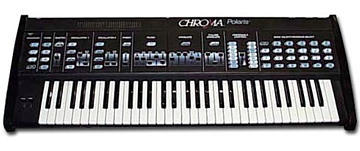
This is going to be fairly long-- I'll try to make a .pdf of the
actual manual soon.  For now I'll abbreviate:

Diagnostic readouts:
Lower Function - D - 1:  displays charge on battery in right column
of LEDs in assignable control section.  Expect 4-5.  Replace cells if
less then 2 LEDs light.  If 7 LEDs light, the battery cap. is
overcharged which is usually an open between cell terminal and cap.

L F - D - 2:  flashes number led of revision of SW

L F - D - 3:  Turns on all LEDs to check LEDs and digital power
supply for max current.

L F - D - 4: (for bryon!) turns on LED above master slider when
master slider is positions to produce a value of 255.  This checks
out the range of the A/D convertor

L F - D - 12:  erases all memory.  don't do this!

L F - D - 10:  MIDI reset

L F - D - 11:  warm reset.  For minor glitches like stuck notes

L F - D - 12:  cold reset.  like toggling the power switch

*adjustments and checkout*
Digital level: turn on all LEDs.  measure at P3 pin 3 and pin2 adjust
R9 for +5V (10mv tolerance)

Reference level: p4 pin 1 and p6.  adjus r5 for +5V within 10mV.

DC ok threshold:  back off R17 to minimum (full CCW) then turn
clockwise till LED CR10 lights.  Later models have a different design
w/no adjustments

ADC range (for slider!):  push master slider up to max and pull all
other sliders to minimum.  Press lower function D-4 and watchi the
LED in the master secetio nof the panel (volume/tune).  Turn R45
clockwise to maximum, then back off couterclockwise until LED
lights.  Continue turning CCW 5 degress beyond this point.  Press
lowre Function to return panel to normal operation.

DAC null:  using 3.5 or 4 digit DMM to measure between TP1 and TP2
adjust R46 until the meter reads within 100uV of 0 (-.0001 to
+.0001V).  This is a critical adjustment and quite sensitive.

lever position:  measure the DC voltage between the center terminal
and ground of each pot in the lever assembly.  At rest should be 2-
3V.  IF either is out of range use 1/2 inch wrench to loosen the nut
on the pot, rotate the pot until the voltage reads 2.5V and retighten.

skipping so stuff...

Lever range:
LF - A - 7 and move levers (pb/mod) through the entire mechanical
range.  The computer will adjust to the measured range.

Pedal range:
LF - A - 8 as above but move pedal

volume offset:  to long to type

key sensitivity: LF - A -10.  Use a touch sensitive patch.  If a key
feels over or under senstive, press a key and use master slider to
adjust sensitivity.

final stuff for Bryon to debug ADC:
check out ADC voltage (R45 adjustment above).
Output of sliders are selected for ADC by MUX Z5 (on control panel).
1/2 of Z54 buffers the mux output which is fed into Z53 (ADC0804 ADC)
the othe r1/2 of Z54 buffers the ADC reference voltage (R45).
Make sure all these chips are well seated.

You can also use MIDI controls if all else fails or to verify that it
isn't a voice problem... but that will have to wait (I guess you
could check the range of the midi out signals using a PC and a midi
monitor program).

Good luck,
Ben
Message
Diagnostics
2004-08-04 by bkuris
Attachments
- No local attachments were found for this message.