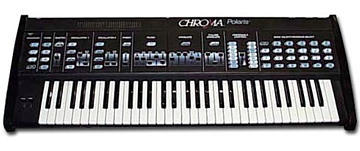
Rhodes Chroma Polaris group photo

Yahoo Groups archive

Rhodes Chroma Polaris

Index last updated: 2026-04-28 23:17 UTC

Thread

Is this group still functional?

Is this group still functional?

2004-08-01 by funkjunke

Just noticing that the last post before mine was, well, quite some 
time ago.

Well, it would be nice to chat with fellow owners of the son of 
Chroma. If anyone feels the urge to answer a question or two, here's 
one...on the inside of the polaris, there are 4 different philips 
head pots...does anyone know what each of them is for? I'm assuming 
that they may be for a master tuneing control, or filter 
calibration...I'm just curious though, since I don't want to move one 
if I don't need to.

Cheers,
Byron

RE: [chromapolaris] Is this group still functional?

2004-08-02 by johnsound1@netscape.net

Not sure what the pots are for, I do have the schematics and could look when I get some time, but I wouldn't touch them if I were you. 
The Oscillator volume and other calibration/setup procedure is done from the front panel, the steps are in the manual I believe, if you have one. If not, I could forward them in a couple weeks.
Good luck w/your machine.  


"funkjunke" <earworm@...> wrote:

>Just noticing that the last post before mine was, well, quite some 
>time ago.
>
>Well, it would be nice to chat with fellow owners of the son of 
>Chroma. If anyone feels the urge to answer a question or two, here's 
>one...on the inside of the polaris, there are 4 different philips 
>head pots...does anyone know what each of them is for? I'm assuming 
>that they may be for a master tuneing control, or filter 
>calibration...I'm just curious though, since I don't want to move one 
>if I don't need to.
>
>Cheers,
>Byron
>
>

__________________________________________________________________
Switch to Netscape Internet Service.
As low as $9.95 a month -- Sign up today at http://isp.netscape.com/register

Netscape. Just the Net You Need.

New! Netscape Toolbar for Internet Explorer
Search from anywhere on the Web and block those annoying pop-ups.
Download now at http://channels.netscape.com/ns/search/install.jsp

Re: Is this group still functional?

2004-08-02 by funkjunke

That would be grand John, I don't have one. I'm thinking it may not 
be worth the attempt to remove the top panels to fix the slider 
calibration, since everything else works, BUT, considering the 
batteries in here look to be the originals (they have japanese print 
all over them), I'm surely going to have to change them at some 
point...and I'll lose ALL of the calibration come then won't I?

Cheers,
Byron

--- In chromapolaris@yahoogroups.com, johnsound1@n... wrote:
> Not sure what the pots are for, I do have the schematics and could 
look when I get some time, but I wouldn't touch them if I were you. 
> The Oscillator volume and other calibration/setup procedure is done 
from the front panel, the steps are in the manual I believe, if you 
have one. If not, I could forward them in a couple weeks.
Show quoted textHide quoted text
> Good luck w/your machine.  
> 
> 
> 
>

RE: [chromapolaris] Is this group still functional?

2004-08-02 by fuse

Sure its still functional.
I'm the mod and I started this group sorta.
But these old synths just keep on doing their thing.
Possibly there's not that mucht to talk about.

I wouldn't mind if someone could help us out with the orginal factory
presets.
Show quoted textHide quoted text
> -----Original Message-----
> From: funkjunke [mailto:earworm@...]
> Sent: Monday, August 02, 2004 1:00 AM
> To: chromapolaris@yahoogroups.com
> Subject: [chromapolaris] Is this group still functional?
>
>
> Just noticing that the last post before mine was, well, quite some
> time ago.
>
> Well, it would be nice to chat with fellow owners of the son of
> Chroma. If anyone feels the urge to answer a question or two, here's
> one...on the inside of the polaris, there are 4 different philips
> head pots...does anyone know what each of them is for? I'm assuming
> that they may be for a master tuneing control, or filter
> calibration...I'm just curious though, since I don't want to move one
> if I don't need to.
>
> Cheers,
> Byron
>
>
>
> ------------------------ Yahoo! Groups Sponsor
> --------------------~-->
> Tired of hearing the same songs over and over?
> Listen to Internet Radio! Skip songs. Click to listen to LAUNCHcast!
> http://us.click.yahoo.com/Ykrq7C/HARHAA/n1hLAA/QnLolB/TM
> --------------------------------------------------------------
> ------~->
>
>
> Yahoo! Groups Links
>
>
>
>
>

Re: Slider problems

2004-08-02 by bkuris

One pot, by the gold colored chip is a trim adjustment for the DAC.  
The polaris's CPU uses this to generate CV voltages that are clocked 
into the various sound generating parameters.  When the Polaris was 
designed, DACs were expensive so there is just one and that is 
shared.   The service manual describes calibrating this, and I've 
done it (I had a bad DAC and built a new one using modern parts) but 
you need a very good meter.   I doubt that is your problem. 

Another by the power supply (I think) pot is for the "power ok" set 
point.  You shouldn't need to touch that either unless you are having 
issues getting your keyboard to reset properly on power cycles.

As for the sliders, the service manual describes how to do a s/w 
calibration of the sliders.  You put it in this mode (I don't have 
service manual in front of me), and then just move the sliders 
through their range. 

However, it sounds like you have the common problem of 
damage/cracking on the aging ribbon wires that plug into the contol 
panel.  Carefully examine them, and if they are cracked they will 
need to be repaired.  On my polaris, I cut back to good material and 
used a meter to verify contact.

Also, the resonance control isn't 12bit analog like the others, it 
has only 8 positions (3 digital control lines).

-Ben


> --- In chromapolaris@yahoogroups.com, johnsound1@n... wrote:
> > Not sure what the pots are for, I do have the schematics and 
could 
> look when I get some time, but I wouldn't touch them if I were you. 
> > The Oscillator volume and other calibration/setup procedure is 
done 
Show quoted textHide quoted text
> from the front panel, the steps are in the manual I believe, if you 
> have one. If not, I could forward them in a couple weeks.
> > Good luck w/your machine.  
> > 
> > 
> > 
> >

Re: [chromapolaris] Is this group still functional?

2004-08-02 by Byron IV

Good to hear, I was fearful that the only place I actually found
people who knew of this synth and used it still was dead :b

I did find a page that had the original factory presets on it the
other day, but the link was re-routed to a page about another synth
(prophet 600 or something). They had a few other factory presets there
that were still online, like the Matrix 6. Perhaps I can contact them
about it? It would be interesting to hear what was considered the norm
for this thing at the time.

Cheers,
Byron

On Mon, 2 Aug 2004 19:24:21 +0200, fuse <fuse@...> wrote:
> Sure its still functional.
> I'm the mod and I started this group sorta.
> But these old synths just keep on doing their thing.
> Possibly there's not that mucht to talk about.
> 
> I wouldn't mind if someone could help us out with the orginal factory
> presets.
> 

-- 
For your electronik listening pleasures 
http://www.limbikfreq.com
---
Mindset Studio Music and Media
http://www.mindsetstudio.com

Re: [chromapolaris] Re: Slider problems

2004-08-02 by Byron IV

Thanks for the info Ben, I'm quite glad I didn't attempt to touch them
now (I have a tendency for fiddling when it comes to gear). from what
I could actually see of the ribbons, they didnt appear broken, but, I
didn't remove the panels, and could only see the bends of them
basically. Let me know if you find the calibration procedures, If it
keeps kicking after that, I won't feel the need to fix the ribbons
until I'm forced to (which will most undoubtably be at the worst time,
hehe)

Thanks,
Byron

On Mon, 02 Aug 2004 20:21:44 -0000, bkuris <benjamin.kuris@...> wrote:
> One pot, by the gold colored chip is a trim adjustment for the DAC.
> The polaris's CPU uses this to generate CV voltages that are clocked
> into the various sound generating parameters.  When the Polaris was
> designed, DACs were expensive so there is just one and that is
> shared.   The service manual describes calibrating this, and I've
> done it (I had a bad DAC and built a new one using modern parts) but
> you need a very good meter.   I doubt that is your problem.
> 
> Another by the power supply (I think) pot is for the "power ok" set
> point.  You shouldn't need to touch that either unless you are having
> issues getting your keyboard to reset properly on power cycles.
> 
> As for the sliders, the service manual describes how to do a s/w
> calibration of the sliders.  You put it in this mode (I don't have
> service manual in front of me), and then just move the sliders
> through their range.
> 
> However, it sounds like you have the common problem of
> damage/cracking on the aging ribbon wires that plug into the contol
> panel.  Carefully examine them, and if they are cracked they will
> need to be repaired.  On my polaris, I cut back to good material and
> used a meter to verify contact.
> 
> Also, the resonance control isn't 12bit analog like the others, it
> has only 8 positions (3 digital control lines).
> 
> -Ben


-- 
For your electronik listening pleasures 
http://www.limbikfreq.com
---
Mindset Studio Music and Media
http://www.mindsetstudio.com

Re: Slider problems

2004-08-03 by bkuris

The part of the ribbon that breaks is on the bends.  Actually I think 
the sliders use the wire connectors not the flex, but I'll need to 
double check.

I just bought a 2nd polaris last night and it is a bit sick so I'll 
dig out my service manual w/calibration info in the next few days and 
revisit the ADC circuitry.   I can email a .pdf of the proceedure or 
post to this file area if it is open.

One thing I highly recommend is lifting the ground from the headphone 
jack and grounding it along w/the other jacks (orange wire on my 
polaris, blue wire is disconnected).  That removes digital hash noise 
from the phones output.

While you are checking out the unit, listen for inconsistancies 
between voices.  For example, the polaris I'm debugging now has a 
voice that is permanently detuned.  I tracked it down to a bad op-amp 
(TL084) last night and am waiting for a replacement part.   If you 
play a sequence of 6 notes, you can identify the bad voice and then 
just hold the bad note.  To narrow down which voice, I use a tweezer 
destabilize the voice chip-- you can tap on pin 4 (maybe 5) of the 
CEM3374 and hear a change in the voice if it is the chip that is 
playing now.  Be careful not to short anything!

-Ben

--- In chromapolaris@yahoogroups.com, Byron IV <earworm@g...> wrote:
> Thanks for the info Ben, I'm quite glad I didn't attempt to touch 
them
> now (I have a tendency for fiddling when it comes to gear). from 
what
> I could actually see of the ribbons, they didnt appear broken, but, 
I
> didn't remove the panels, and could only see the bends of them
> basically. Let me know if you find the calibration procedures, If it
> keeps kicking after that, I won't feel the need to fix the ribbons
> until I'm forced to (which will most undoubtably be at the worst 
time,
Show quoted textHide quoted text
> hehe)
> 
> Thanks,
> Byron

Re: Slider problems

2004-08-03 by funkjunke

Hey, that would be great :) you can directly email if you can't post, 
or, whatever you prefer is fine. I contacted the guy who had the 
original presets on his still, and he said he's going to try to get 
them back into wav form soon, so I'll probably post a sysex or midi 
file of them to the group as well (for space reasons).

As for the rest of the functionality of mine, it's really in tip top 
shape. All of the voices are consistent, the tune is dead on, all the 
buttons work, and very few show any wear...in fact the entire unit 
has hardly any wear on it. I think besides the sliders, the only 
other thing I've found wrong with it is part of the panel on the top 
of the 'assignable control' section started to bubble up a tiny bit. 
I'm not too concerned about the headphone jasck atm either, I just 
split off of the high output, and there's no noise I've noticed yet 
if the patches are at max volume. Thanks for the tip though, it may 
come in handy at some point.

Cheers
Byron

--- In chromapolaris@yahoogroups.com, "bkuris" <benjamin.kuris@h...> 
wrote:
> The part of the ribbon that breaks is on the bends.  Actually I 
think 
> the sliders use the wire connectors not the flex, but I'll need to 
> double check.
> 
> I just bought a 2nd polaris last night and it is a bit sick so I'll 
> dig out my service manual w/calibration info in the next few days 
and 
> revisit the ADC circuitry.   I can email a .pdf of the proceedure 
or 
> post to this file area if it is open.
> 
> One thing I highly recommend is lifting the ground from the 
headphone 
> jack and grounding it along w/the other jacks (orange wire on my 
> polaris, blue wire is disconnected).  That removes digital hash 
noise 
> from the phones output.
> 
> While you are checking out the unit, listen for inconsistancies 
> between voices.  For example, the polaris I'm debugging now has a 
> voice that is permanently detuned.  I tracked it down to a bad op-
amp 
> (TL084) last night and am waiting for a replacement part.   If you 
> play a sequence of 6 notes, you can identify the bad voice and then 
> just hold the bad note.  To narrow down which voice, I use a 
tweezer 
Show quoted textHide quoted text
> destabilize the voice chip-- you can tap on pin 4 (maybe 5) of the 
> CEM3374 and hear a change in the voice if it is the chip that is 
> playing now.  Be careful not to short anything!
> 
> -Ben
>

Diagnostics

2004-08-04 by bkuris

This is going to be fairly long-- I'll try to make a .pdf of the 
actual manual soon.  For now I'll abbreviate:

Diagnostic readouts:
Lower Function - D - 1:  displays charge on battery in right column 
of LEDs in assignable control section.  Expect 4-5.  Replace cells if 
less then 2 LEDs light.  If 7 LEDs light, the battery cap. is 
overcharged which is usually an open between cell terminal and cap.

L F - D - 2:  flashes number led of revision of SW

L F - D - 3:  Turns on all LEDs to check LEDs and digital power 
supply for max current.

L F - D - 4: (for bryon!) turns on LED above master slider when 
master slider is positions to produce a value of 255.  This checks 
out the range of the A/D convertor

L F - D - 12:  erases all memory.  don't do this!

L F - D - 10:  MIDI reset

L F - D - 11:  warm reset.  For minor glitches like stuck notes

L F - D - 12:  cold reset.  like toggling the power switch

*adjustments and checkout*
Digital level: turn on all LEDs.  measure at P3 pin 3 and pin2 adjust 
R9 for +5V (10mv tolerance)

Reference level: p4 pin 1 and p6.  adjus r5 for +5V within 10mV.

DC ok threshold:  back off R17 to minimum (full CCW) then turn 
clockwise till LED CR10 lights.  Later models have a different design 
w/no adjustments

ADC range (for slider!):  push master slider up to max and pull all 
other sliders to minimum.  Press lower function D-4 and watchi the 
LED in the master secetio nof the panel (volume/tune).  Turn R45 
clockwise to maximum, then back off couterclockwise until LED 
lights.  Continue turning CCW 5 degress beyond this point.  Press 
lowre Function to return panel to normal operation.

DAC null:  using 3.5 or 4 digit DMM to measure between TP1 and TP2 
adjust R46 until the meter reads within 100uV of 0 (-.0001 to 
+.0001V).  This is a critical adjustment and quite sensitive.

lever position:  measure the DC voltage between the center terminal 
and ground of each pot in the lever assembly.  At rest should be 2-
3V.  IF either is out of range use 1/2 inch wrench to loosen the nut 
on the pot, rotate the pot until the voltage reads 2.5V and retighten.

skipping so stuff...

Lever range:
LF - A - 7 and move levers (pb/mod) through the entire mechanical 
range.  The computer will adjust to the measured range.

Pedal range:
LF - A - 8 as above but move pedal 

volume offset:  to long to type

key sensitivity: LF - A -10.  Use a touch sensitive patch.  If a key 
feels over or under senstive, press a key and use master slider to 
adjust sensitivity.

final stuff for Bryon to debug ADC:
check out ADC voltage (R45 adjustment above).  
Output of sliders are selected for ADC by MUX Z5 (on control panel).  
1/2 of Z54 buffers the mux output which is fed into Z53 (ADC0804 ADC) 
the othe r1/2 of Z54 buffers the ADC reference voltage (R45).
Make sure all these chips are well seated.

You can also use MIDI controls if all else fails or to verify that it 
isn't a voice problem... but that will have to wait (I guess you 
could check the range of the midi out signals using a PC and a midi 
monitor program).

Good luck,
Ben

Re: Diagnostics

2004-08-04 by funkjunke

Wow, nice :) The plot thickens however...of course. First off though, 
all standard CC# controls work perfect via midi, the only control I'm 
noticing now does not seem to work at all, physically or midi, is the 
glide. That stirs some bad thoughts in my mind already.

I attempted the L-D-4 method, adjusting R45, with no change in any 
element whatsoever. I tried multiple times, and in slightly different 
manners. After that, I checked the Z53 and Z54 chips, and they seem 
extremely rooted. I'm assuming Z5 is underneath the back edge of the 
keys, since I could see 8, 9, 10, and so forth spreading from that 
direction. I don't have a DMM, so didn't check the voltages, but 
while inside I noticed a few other things. First being that someone 
seems to have maintanced it at some point. There's an extra ground on 
the far right side, soldered to a screw on the top panel which dosn't 
look like it was meant to be there, spreading down to a screw with 
the paint scraped off on the bottom. Checking all of the ultra frail 
ribbons more closely, all of the obviously visible ones look to be 
completely intact, but the one that is inbetween the top and the left 
circuit board, the one thats mostly hidden, looks to have a hairline 
crack nearly in it's center, crossing only one strand of strip. Not 
good.

So, with that said, I think I'll just sleep on it and wait to see 
what I think of it all in the morning.

Cheers and thanks alot for the info again :)
Byron
RE: [chromapolaris] Diagnostics

2004-08-04 by fuse

Thank you this is extremely usefull stuff.
Can't wait for the .pdf file now. :)
Show quoted textHide quoted text
> -----Original Message-----
> From: bkuris [mailto:benjamin.kuris@...]
> Sent: Wednesday, August 04, 2004 6:05 AM
> To: chromapolaris@yahoogroups.com
> Subject: [chromapolaris] Diagnostics
> 
> 
> This is going to be fairly long-- I'll try to make a .pdf of the 
> actual manual soon.  For now I'll abbreviate:
> 
> Diagnostic readouts:
> Lower Function - D - 1:  displays charge on battery in right column 
> of LEDs in assignable control section.  Expect 4-5.  Replace cells if 
> less then 2 LEDs light.  If 7 LEDs light, the battery cap. is 
> overcharged which is usually an open between cell terminal and cap.
> 
> L F - D - 2:  flashes number led of revision of SW
> 
> L F - D - 3:  Turns on all LEDs to check LEDs and digital power 
> supply for max current.
> 
> L F - D - 4: (for bryon!) turns on LED above master slider when 
> master slider is positions to produce a value of 255.  This checks 
> out the range of the A/D convertor
> 
> L F - D - 12:  erases all memory.  don't do this!
> 
> L F - D - 10:  MIDI reset
> 
> L F - D - 11:  warm reset.  For minor glitches like stuck notes
> 
> L F - D - 12:  cold reset.  like toggling the power switch
> 
> *adjustments and checkout*
> Digital level: turn on all LEDs.  measure at P3 pin 3 and pin2 adjust 
> R9 for +5V (10mv tolerance)
> 
> Reference level: p4 pin 1 and p6.  adjus r5 for +5V within 10mV.
> 
> DC ok threshold:  back off R17 to minimum (full CCW) then turn 
> clockwise till LED CR10 lights.  Later models have a different design 
> w/no adjustments
> 
> ADC range (for slider!):  push master slider up to max and pull all 
> other sliders to minimum.  Press lower function D-4 and watchi the 
> LED in the master secetio nof the panel (volume/tune).  Turn R45 
> clockwise to maximum, then back off couterclockwise until LED 
> lights.  Continue turning CCW 5 degress beyond this point.  Press 
> lowre Function to return panel to normal operation.
> 
> DAC null:  using 3.5 or 4 digit DMM to measure between TP1 and TP2 
> adjust R46 until the meter reads within 100uV of 0 (-.0001 to 
> +.0001V).  This is a critical adjustment and quite sensitive.
> 
> lever position:  measure the DC voltage between the center terminal 
> and ground of each pot in the lever assembly.  At rest should be 2-
> 3V.  IF either is out of range use 1/2 inch wrench to loosen the nut 
> on the pot, rotate the pot until the voltage reads 2.5V and retighten.
> 
> skipping so stuff...
> 
> Lever range:
> LF - A - 7 and move levers (pb/mod) through the entire mechanical 
> range.  The computer will adjust to the measured range.
> 
> Pedal range:
> LF - A - 8 as above but move pedal 
> 
> volume offset:  to long to type
> 
> key sensitivity: LF - A -10.  Use a touch sensitive patch.  If a key 
> feels over or under senstive, press a key and use master slider to 
> adjust sensitivity.
> 
> final stuff for Bryon to debug ADC:
> check out ADC voltage (R45 adjustment above).  
> Output of sliders are selected for ADC by MUX Z5 (on control panel).  
> 1/2 of Z54 buffers the mux output which is fed into Z53 (ADC0804 ADC) 
> the othe r1/2 of Z54 buffers the ADC reference voltage (R45).
> Make sure all these chips are well seated.
> 
> You can also use MIDI controls if all else fails or to verify that it 
> isn't a voice problem... but that will have to wait (I guess you 
> could check the range of the midi out signals using a PC and a midi 
> monitor program).
> 
> Good luck,
> Ben
> 
> 
> 
> 
> 
> 
> ------------------------ Yahoo! Groups Sponsor 
> --------------------~--> 
> Over 1 billion served! The most music videos on the web.
> Click to Watch now!
> http://us.click.yahoo.com/Xkrq7C/IARHAA/n1hLAA/QnLolB/TM
> --------------------------------------------------------------
> ------~-> 
> 
>  
> Yahoo! Groups Links
> 
> 
> 
>  
>

Re: Diagnostics

2004-08-05 by bkuris

Just in case you didn't try it, you need to hold the sustain pedal to 
get glide to work.

-Ben


--- In chromapolaris@yahoogroups.com, "funkjunke" <earworm@g...> 
wrote:
> Wow, nice :) The plot thickens however...of course. First off 
though, 
> all standard CC# controls work perfect via midi, the only control 
I'm 
> noticing now does not seem to work at all, physically or midi, is 
the 
> glide. That stirs some bad thoughts in my mind already.
>

Re: Diagnostics

2004-08-05 by funkjunke

Ah, that makes more sense....I guess I'll be investing in a sustain 
pedal soon then :)

Byron

--- In chromapolaris@yahoogroups.com, "bkuris" <benjamin.kuris@h...> 
wrote:
> Just in case you didn't try it, you need to hold the sustain pedal 
to 
Show quoted textHide quoted text
> get glide to work.
> 
> -Ben
>

Move to quarantaine

This moves the raw source file on disk only. The archive index is not changed automatically, so you still need to run a manual refresh afterward.