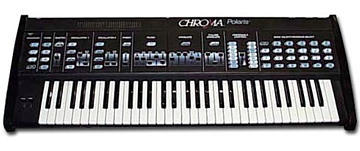
Filter input mod
2004-08-07 by bkuris
For those of you with decent soldering skills, it is pretty easy to
add a filter input to the polaris.  Q9 on on the lower middle of the
motherboard is a buffer for the noise source (Z64).  I lifted the
Base of the transistor (marked B) and ran some thin shielded stereo
cable to add an insert using the high output jack which is switched
(and then routing the high output to the low jack).

Specifically you need to:
1) move wires from high output to low output (remove the resistors on
the jack and store for future un-modding).  Leave the ground wire
there.

2) carefully lift the B pin on Q9 (I did this by heating all 3 pins
simultaneously and then tilting the transistor so the lead would pop
out)

3) run shielded stereo cable.  one conductor from pad where Q9 base
used to be (this is the noise send) to the shunt on the jack.  The
other conductor from the Base pin on the transistor to the contact on
the jack.  Ground the shield to the existing ground on the jack
(orange wire).

The aux in will replace the noise source when a cable is plugged in
to the high output jack-- so you need to turn on "noise" to enable it
and can't be using ring mod.  I recommend setting volume release on
max and then playing around w/sweep filter depth-- in sine mode the
modulation is asynchronous so you can get some interesting beats
going if you hit a few keys.

The input is quite low.  It really needs to be boosted-- headphone
out on one of my synths was fine, but another needed a bit of a boost
first.

It would be trivial to use a hardwired switch or add a simple mixer
for noise/input balancing.

-Ben