Yahoo Groups archive

Disklavier

Index last updated: 2026-04-28 23:20 UTC

Thread

wireless MIDI and the DKV

wireless MIDI and the DKV

2014-12-26 by Carol Beigel

Greetings group!  I am hoping someone can explain my most recent, miserable failure.  I have a MarkIIXG disklavier that always works!  I can use either my iPhone6 or iPad2 to play it, and any other Disklavier so far, by using the Yamaha I-MX1 MIDI interface connected to the MIDI In on the Disklavier.  I use Sweet MIDI Player with the settings Core MIDI out and the selected interface.  MIDI in is the session network.  Always works.

Now enter the new PUC  wireless MIDI interface Santa brought me for Christmas.  I connect either iDevice using the same network settings (mipucXXX).  The PUC is connected via MIDI cable to the same MIDI in port on the Disklavier.  The PUC is flashing red indicating that MIDI data is being transmitted.  But the piano is not playing!!!!!  Grrrrr………

On closer look at the packaging I am wondering if this unit only works backwards - by transmitting MIDI out from the Disklavier to an app on the iPad.  However, the PUC is flashing red so it should be working.  Is there a difference between MIDI data that flows through a MIDI cable and that which comes thru the air?  Does the receiver make a difference?  Could it be that the MarkIIXG just cannot read wireless MIDI data?  Ahhhgggg!

Also, there are different drivers for the iMac and the PC.  Maybe I will try those.

Hope someone knows the answers!

Carol Beigel

Re: [disklavier] wireless MIDI and the DKV

2014-12-26 by Steven Trawford

Someone needs to help Carol! She helps us so often!!! I wish I had answers for her but do not.

Happy New Year Carol!

Steve


Show quoted textHide quoted text
On Fri, Dec 26, 2014 at 2:01 PM, Carol Beigel carol@... [disklavier] <disklavier@yahoogroups.com> wrote:

Greetings group! I am hoping someone can explain my most recent, miserable failure. I have a MarkIIXG disklavier that always works! I can use either my iPhone6 or iPad2 to play it, and any other Disklavier so far, by using the Yamaha I-MX1 MIDI interface connected to the MIDI In on the Disklavier. I use Sweet MIDI Player with the settings Core MIDI out and the selected interface. MIDI in is the session network. Always works.

Now enter the new PUC wireless MIDI interface Santa brought me for Christmas. I connect either iDevice using the same network settings (mipucXXX). The PUC is connected via MIDI cable to the same MIDI in port on the Disklavier. The PUC is flashing red indicating that MIDI data is being transmitted. But the piano is not playing!!!!! Grrrrr………

On closer look at the packaging I am wondering if this unit only works backwards - by transmitting MIDI out from the Disklavier to an app on the iPad. However, the PUC is flashing red so it should be working. Is there a difference between MIDI data that flows through a MIDI cable and that which comes thru the air? Does the receiver make a difference? Could it be that the MarkIIXG just cannot read wireless MIDI data? Ahhhgggg!

Also, there are different drivers for the iMac and the PC. Maybe I will try those.

Hope someone knows the answers!

Carol Beigel


Re: [disklavier] wireless MIDI and the DKV

2014-12-27 by Skanter123

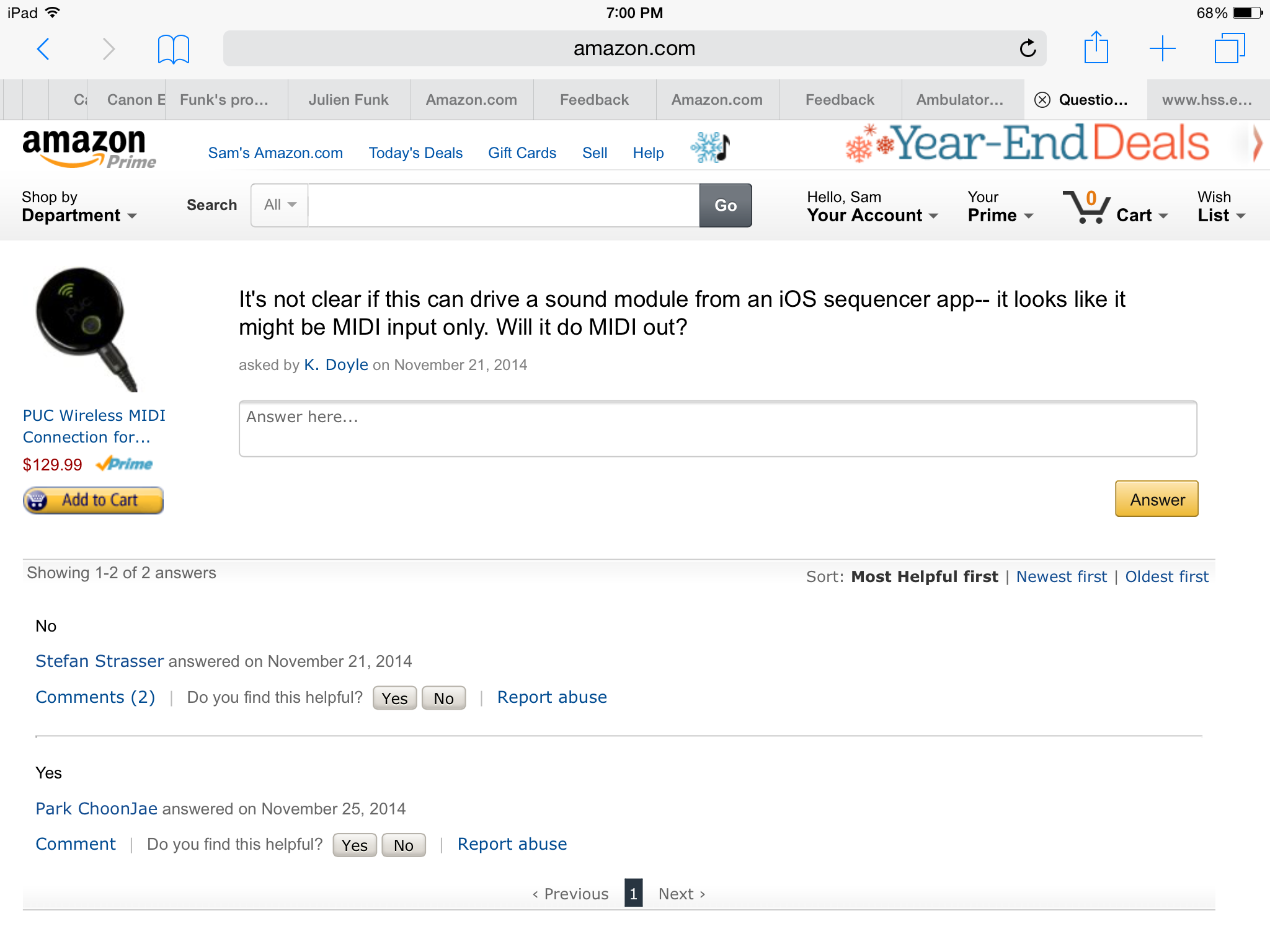
I looked at some reviews, but still not clear if it will do MIDI out (iPad to MIDI instrument). The question below on Amazon did not help. Carol, IQ suggest you call the PUC company...


Sam 
www.keyboardcollective.com
(212) 684-3304
Show quoted textHide quoted text
> On Dec 26, 2014, at 6:21 PM, Steven Trawford play88keys@gmail.com [disklavier] <disklavier@yahoogroups.com> wrote:
> 
> Someone needs to help Carol! She helps us so often!!! I wish I had answers for her but do not.
> 
> Happy New Year Carol!
> 
> Steve
> 
> 
> 
> 
> 
> 
>> On Fri, Dec 26, 2014 at 2:01 PM, Carol Beigel carol@... [disklavier] <disklavier@yahoogroups.com> wrote:
>>  
>> Greetings group! I am hoping someone can explain my most recent, miserable failure. I have a MarkIIXG disklavier that always works! I can use either my iPhone6 or iPad2 to play it, and any other Disklavier so far, by using the Yamaha I-MX1 MIDI interface connected to the MIDI In on the Disklavier. I use Sweet MIDI Player with the settings Core MIDI out and the selected interface. MIDI in is the session network. Always works.
>> 
>> Now enter the new PUC wireless MIDI interface Santa brought me for Christmas. I connect either iDevice using the same network settings (mipucXXX). The PUC is connected via MIDI cable to the same MIDI in port on the Disklavier. The PUC is flashing red indicating that MIDI data is being transmitted. But the piano is not playing!!!!! Grrrrr………
>> 
>> On closer look at the packaging I am wondering if this unit only works backwards - by transmitting MIDI out from the Disklavier to an app on the iPad. However, the PUC is flashing red so it should be working. Is there a difference between MIDI data that flows through a MIDI cable and that which comes thru the air? Does the receiver make a difference? Could it be that the MarkIIXG just cannot read wireless MIDI data? Ahhhgggg!
>> 
>> Also, there are different drivers for the iMac and the PC. Maybe I will try those.
>> 
>> Hope someone knows the answers!
>> 
>> Carol Beigel
>> 
> 
>

Attachments

Re: [disklavier] wireless MIDI and the DKV

2014-12-27 by Skanter123

From iLounge review:

Zivix's PUC ($130) offers a new twist on connecting iOS and MIDI devices to one another. Rather than providing a Lightning interface, it instead acts as a Wi-Fi MIDI bridge, effectively turning your keyboards, DJ controllers and more into Wi-Fi-enabled MIDI devices. Powered for up to 15 hours of continuous use from included batteries, PUC includes a single standard MIDI DIN port for connection of a single MIDI device or hub, and can be switched to function as either a MIDI input or output interface. A free companion iOS app provides the interface between the PUC Wi-Fi connection and iOS, which should allow compatibility with any CoreMIDI-compliant iOS app.

Sam 
www.keyboardcollective.com
Show quoted textHide quoted text
> On Dec 26, 2014, at 3:01 PM, Carol Beigel carol@... [disklavier] <disklavier@yahoogroups.com> wrote:
> 
> Greetings group! I am hoping someone can explain my most recent, miserable failure.  I have a MarkIIXG disklavier that always works! I can use either my iPhone6 or iPad2 to play it, and any other Disklavier so far, by using the Yamaha I-MX1 MIDI interface connected to the MIDI In on the Disklavier. I use Sweet MIDI Player with the settings Core MIDI out and the selected interface. MIDI in is the session network. Always works.
> 
> Now enter the new PUC wireless MIDI interface Santa brought me for Christmas. I connect either iDevice using the same network settings (mipucXXX). The PUC is connected via MIDI cable to the same MIDI in port on the Disklavier. The PUC is flashing red indicating that MIDI data is being transmitted. But the piano is not playing!!!!! Grrrrr………
> 
> On closer look at the packaging I am wondering if this unit only works backwards - by transmitting MIDI out from the Disklavier to an app on the iPad. However, the PUC is flashing red so it should be working. Is there a difference between MIDI data that flows through a MIDI cable and that which comes thru the air? Does the receiver make a difference? Could it be that the MarkIIXG just cannot read wireless MIDI data? Ahhhgggg!
> 
> Also, there are different drivers for the iMac and the PC. Maybe I will try those.
> 
> Hope someone knows the answers!
> 
> Carol Beigel
> 
>

Re: [disklavier] wireless MIDI and the DKV

2014-12-27 by Bill Brandom

I agree with Steve. I hope someone can help Carol with her question. I am no help on this one!

Carol, this is always the problem when you are playing with this bleeding edge technology stuff :-))

Bill
Show quoted textHide quoted text
On Fri, Dec 26, 2014 at 3:21 PM, Steven Trawford play88keys@... [disklavier] <disklavier@yahoogroups.com> wrote:

Someone needs to help Carol! She helps us so often!!! I wish I had answers for her but do not.

Happy New Year Carol!

Steve


On Fri, Dec 26, 2014 at 2:01 PM, Carol Beigel carol@... [disklavier] <disklavier@yahoogroups.com> wrote:

Greetings group! I am hoping someone can explain my most recent, miserable failure. I have a MarkIIXG disklavier that always works! I can use either my iPhone6 or iPad2 to play it, and any other Disklavier so far, by using the Yamaha I-MX1 MIDI interface connected to the MIDI In on the Disklavier. I use Sweet MIDI Player with the settings Core MIDI out and the selected interface. MIDI in is the session network. Always works.

Now enter the new PUC wireless MIDI interface Santa brought me for Christmas. I connect either iDevice using the same network settings (mipucXXX). The PUC is connected via MIDI cable to the same MIDI in port on the Disklavier. The PUC is flashing red indicating that MIDI data is being transmitted. But the piano is not playing!!!!! Grrrrr………

On closer look at the packaging I am wondering if this unit only works backwards - by transmitting MIDI out from the Disklavier to an app on the iPad. However, the PUC is flashing red so it should be working. Is there a difference between MIDI data that flows through a MIDI cable and that which comes thru the air? Does the receiver make a difference? Could it be that the MarkIIXG just cannot read wireless MIDI data? Ahhhgggg!

Also, there are different drivers for the iMac and the PC. Maybe I will try those.

Hope someone knows the answers!

Carol Beigel


Re: [disklavier] wireless MIDI and the DKV

2014-12-27 by Mark Fontana

Carol, I did a little digging on this and it looks like you need to 
install the PUC Connect app on your iPad, then change the mode to "Out" 
via the "DIN 5 Port" slide switch as shown about 1 second into this video:

https://www.youtube.com/watch?v=4LXHFt8Hf34
<https://www.youtube.com/watch?v=4LXHFt8Hf34>
I hope it's that simple...
Show quoted textHide quoted text
On 12/26/2014 02:01 PM, Carol Beigel carol@... [disklavier] wrote:
>
> Greetings group! I am hoping someone can explain my most recent, 
> miserable failure. I have a MarkIIXG disklavier that always works! I 
> can use either my iPhone6 or iPad2 to play it, and any other 
> Disklavier so far, by using the Yamaha I-MX1 MIDI interface connected 
> to the MIDI In on the Disklavier. I use Sweet MIDI Player with the 
> settings Core MIDI out and the selected interface. MIDI in is the 
> session network. Always works.
>
> Now enter the new PUC wireless MIDI interface Santa brought me for 
> Christmas. I connect either iDevice using the same network settings 
> (mipucXXX). The PUC is connected via MIDI cable to the same MIDI in 
> port on the Disklavier. The PUC is flashing red indicating that MIDI 
> data is being transmitted. But the piano is not playing!!!!! Grrrrr\u2026\u2026\u2026
>
> On closer look at the packaging I am wondering if this unit only works 
> backwards - by transmitting MIDI out from the Disklavier to an app on 
> the iPad. However, the PUC is flashing red so it should be working. Is 
> there a difference between MIDI data that flows through a MIDI cable 
> and that which comes thru the air? Does the receiver make a 
> difference? Could it be that the MarkIIXG just cannot read wireless 
> MIDI data? Ahhhgggg!
>
> Also, there are different drivers for the iMac and the PC. Maybe I 
> will try those.
>
> Hope someone knows the answers!
>
> Carol Beigel
>
>

Re: [disklavier] wireless MIDI and the DKV

2014-12-27 by Carol Beigel

Yeah, that worked!!!!!  Apparently, when using a wireless network, there is a third switch to consider - that DIN 5 port which controls the direction of the MIDI data.  Normally there are two switches to consider when using a cable - the Core MIDI and the MIDI interface itself; now there is that DIN 5 port when using a wireless network.  Thank you, thank you, thank you!

Alright, so my grandchildren are here for a week, and grandma is high on their gummy worms and the other candy that came with them.  However, I did remember the basic rituals to get these electronics to work.  Number one, is to reboot, reboot and reboot again.  The PUC has 2 batteries, but they need to be removed to reset the unit.  Also, when things don’t work, like your iPad does not see the PUC, then you need to reboot the iPad as well.

Everything is now working well.  So far, the only app I ever got to work to play MIDI files to my disklavier has been Sweet MIDI Player.  With the new IOS, it is now very easy to take MIDI files directly from the internet (Safari) right into Sweet MIDI Player without having to go thru Dropbox.

I wanted the PUC because I have been too cheap to buy a DKC-850.  I had one here for a week to play with but just couldn’t justify the expense just for Disklavier radio.  I don’t think this wireless MIDI gives an old MarkIIXG an IP address so I don’t have great hopes for MIDI radio.  However the PUC also works on Mac OS with a different driver.  Later today I will try to play a MIDI file directly from the internet thru the PUC and see if that works.

Thanks again for you help, and I look forward to this week to play with new toys.

Carol Beigel
Show quoted textHide quoted text
> On Dec 26, 2014, at 11:02 PM, Mark Fontana mark@... [disklavier] <disklavier@yahoogroups.com> wrote:
> 
> 
> 
> 
> Carol, I did a little digging on this and it looks like you need to install the PUC Connect app on your iPad, then change the mode to "Out" via the "DIN 5 Port" slide switch as shown about 1 second into this video:
> 
> https://www.youtube.com/watch?v=4LXHFt8Hf34
>  <https://www.youtube.com/watch?v=4LXHFt8Hf34>
> I hope it's that simple...
> 
> 
> On 12/26/2014 02:01 PM, Carol Beigel carol@... <mailto:carol@carolrpt.com> [disklavier] wrote:
>> Greetings group! I am hoping someone can explain my most recent, miserable failure. I have a MarkIIXG disklavier that always works! I can use either my iPhone6 or iPad2 to play it, and any other Disklavier so far, by using the Yamaha I-MX1 MIDI interface connected to the MIDI In on the Disklavier. I use Sweet MIDI Player with the settings Core MIDI out and the selected interface. MIDI in is the session network. Always works.
>> 
>> Now enter the new PUC wireless MIDI interface Santa brought me for Christmas. I connect either iDevice using the same network settings (mipucXXX). The PUC is connected via MIDI cable to the same MIDI in port on the Disklavier. The PUC is flashing red indicating that MIDI data is being transmitted. But the piano is not playing!!!!! Grrrrr………
>> 
>> On closer look at the packaging I am wondering if this unit only works backwards - by transmitting MIDI out from the Disklavier to an app on the iPad. However, the PUC is flashing red so it should be working. Is there a difference between MIDI data that flows through a MIDI cable and that which comes thru the air? Does the receiver make a difference? Could it be that the MarkIIXG just cannot read wireless MIDI data? Ahhhgggg!
>> 
>> Also, there are different drivers for the iMac and the PC. Maybe I will try those.
>> 
>> Hope someone knows the answers!
>> 
>> Carol Beigel
>> 
>> 
> 
> 
> 
> 
> 
>

Re: [disklavier] wireless MIDI and the DKV

2014-12-27 by George Frederick Litterst

Good morning, everyone.

Thanks for this insight, Mark. For many people, this device may be terrific, especially if they only want to send MIDI data from an iPad or Mac to the Disklavier. For others, though, the inability both to send and receive MIDI simultaneously is a bummer.

For example, when using Home Concert Xtreme, one wants to send MIDI data to the iPad or computer while Home Concert Xtreme simultaneously sends MIDI data for the accompaniment tracks back to the Disklavier’s tone generator. Similarly, when using Internet MIDI, one needs the free to send or receive MIDI data at will. When using the PUC, it will be necessary both to flip the switch on the PUC back and forth between MIDI In and MIDI Out as well as to swap the cable connection to the Disklavier.

Regards,
PianoBench
Show quoted textHide quoted text
> On Dec 26, 2014, at 11:02 PM, Mark Fontana mark@... [disklavier] <disklavier@yahoogroups.com> wrote:
> 
> 
> 
> Carol, I did a little digging on this and it looks like you need to install the PUC Connect app on your iPad, then change the mode to "Out" via the "DIN 5 Port" slide switch as shown about 1 second into this video:
> 
> https://www.youtube.com/watch?v=4LXHFt8Hf34
>  <https://www.youtube.com/watch?v=4LXHFt8Hf34>
> I hope it's that simple...
> 
> 
> On 12/26/2014 02:01 PM, Carol Beigel carol@... <mailto:carol@...> [disklavier] wrote:
>>  
>> Greetings group! I am hoping someone can explain my most recent, miserable failure. I have a MarkIIXG disklavier that always works! I can use either my iPhone6 or iPad2 to play it, and any other Disklavier so far, by using the Yamaha I-MX1 MIDI interface connected to the MIDI In on the Disklavier. I use Sweet MIDI Player with the settings Core MIDI out and the selected interface. MIDI in is the session network. Always works.
>> 
>> Now enter the new PUC wireless MIDI interface Santa brought me for Christmas. I connect either iDevice using the same network settings (mipucXXX). The PUC is connected via MIDI cable to the same MIDI in port on the Disklavier. The PUC is flashing red indicating that MIDI data is being transmitted. But the piano is not playing!!!!! Grrrrr………
>> 
>> On closer look at the packaging I am wondering if this unit only works backwards - by transmitting MIDI out from the Disklavier to an app on the iPad. However, the PUC is flashing red so it should be working. Is there a difference between MIDI data that flows through a MIDI cable and that which comes thru the air? Does the receiver make a difference? Could it be that the MarkIIXG just cannot read wireless MIDI data? Ahhhgggg!
>> 
>> Also, there are different drivers for the iMac and the PC. Maybe I will try those.
>> 
>> Hope someone knows the answers!
>> 
>> Carol Beigel
>> 
>> 
> 
> 
> 
> 
>

Re: [disklavier] wireless MIDI and the DKV

2014-12-27 by Skanter123

Carol, update us on your progress. The PUC could be a good option for getting DKV radio.

Sam 
www.keyboardcollective.com
Show quoted textHide quoted text
> On Dec 27, 2014, at 10:26 AM, Carol Beigel carol@... [disklavier] <disklavier@yahoogroups.com> wrote:
> 
> Yeah, that worked!!!!!  Apparently, when using a wireless network, there is a third switch to consider - that DIN 5 port which controls the direction of the MIDI data.  Normally there are two switches to consider when using a cable - the Core MIDI and the MIDI interface itself; now there is that DIN 5 port when using a wireless network.  Thank you, thank you, thank you!
> 
> 
> Alright, so my grandchildren are here for a week, and grandma is high on their gummy worms and the other candy that came with them.  However, I did remember the basic rituals to get these electronics to work.  Number one, is to reboot, reboot and reboot again.  The PUC has 2 batteries, but they need to be removed to reset the unit.  Also, when things don’t work, like your iPad does not see the PUC, then you need to reboot the iPad as well.
> 
> Everything is now working well.  So far, the only app I ever got to work to play MIDI files to my disklavier has been Sweet MIDI Player.  With the new IOS, it is now very easy to take MIDI files directly from the internet (Safari) right into Sweet MIDI Player without having to go thru Dropbox.
> 
> I wanted the PUC because I have been too cheap to buy a DKC-850.  I had one here for a week to play with but just couldn’t justify the expense just for Disklavier radio.  I don’t think this wireless MIDI gives an old MarkIIXG an IP address so I don’t have great hopes for MIDI radio.  However the PUC also works on Mac OS with a different driver.  Later today I will try to play a MIDI file directly from the internet thru the PUC and see if that works.
> 
> Thanks again for you help, and I look forward to this week to play with new toys.
> 
> Carol Beigel
> 
>> On Dec 26, 2014, at 11:02 PM, Mark Fontana mark@kinura.net [disklavier] <disklavier@yahoogroups.com> wrote:
>> 
>> 
>> 
>> 
>> Carol, I did a little digging on this and it looks like you need to install the PUC Connect app on your iPad, then change the mode to "Out" via the "DIN 5 Port" slide switch as shown about 1 second into this video:
>> 
>> https://www.youtube.com/watch?v=4LXHFt8Hf34
>> 
>> I hope it's that simple...
>> 
>> 
>>> On 12/26/2014 02:01 PM, Carol Beigel carol@... [disklavier] wrote:
>>> Greetings group! I am hoping someone can explain my most recent, miserable failure. I have a MarkIIXG disklavier that always works! I can use either my iPhone6 or iPad2 to play it, and any other Disklavier so far, by using the Yamaha I-MX1 MIDI interface connected to the MIDI In on the Disklavier. I use Sweet MIDI Player with the settings Core MIDI out and the selected interface. MIDI in is the session network. Always works.
>>> 
>>> Now enter the new PUC wireless MIDI interface Santa brought me for Christmas. I connect either iDevice using the same network settings (mipucXXX). The PUC is connected via MIDI cable to the same MIDI in port on the Disklavier. The PUC is flashing red indicating that MIDI data is being transmitted. But the piano is not playing!!!!! Grrrrr………
>>> 
>>> On closer look at the packaging I am wondering if this unit only works backwards - by transmitting MIDI out from the Disklavier to an app on the iPad. However, the PUC is flashing red so it should be working. Is there a difference between MIDI data that flows through a MIDI cable and that which comes thru the air? Does the receiver make a difference? Could it be that the MarkIIXG just cannot read wireless MIDI data? Ahhhgggg!
>>> 
>>> Also, there are different drivers for the iMac and the PC. Maybe I will try those.
>>> 
>>> Hope someone knows the answers!
>>> 
>>> Carol Beigel
>>> 
>>> 
>> 
>> 
>> 
>> 
>> 
> 
>

Re: [disklavier] wireless MIDI and the DKV

2014-12-27 by George Frederick Litterst

Good afternoon, everyone.

I can guarantee everyone on this list that a third party product like PUC will not provide access to DisklavierRadio. I can provide a technical explanation if necessary.

Regards,
PianoBench
Show quoted textHide quoted text
> On Dec 27, 2014, at 1:22 PM, Skanter123 skanter123@... [disklavier] <disklavier@yahoogroups.com> wrote:
> 
> 
> Carol, update us on your progress. The PUC could be a good option for getting DKV radio.
> 
> Sam 
> www.keyboardcollective.com <http://www.keyboardcollective.com/>
> 
> 
> 
> 
> 
> 
> On Dec 27, 2014, at 10:26 AM, Carol Beigel carol@... <mailto:carol@...> [disklavier] <disklavier@yahoogroups.com <mailto:disklavier@yahoogroups.com>> wrote:
> 
>>  
>> Yeah, that worked!!!!!  Apparently, when using a wireless network, there is a third switch to consider - that DIN 5 port which controls the direction of the MIDI data.  Normally there are two switches to consider when using a cable - the Core MIDI and the MIDI interface itself; now there is that DIN 5 port when using a wireless network.  Thank you, thank you, thank you!
>> 
>> 
>> Alright, so my grandchildren are here for a week, and grandma is high on their gummy worms and the other candy that came with them.  However, I did remember the basic rituals to get these electronics to work.  Number one, is to reboot, reboot and reboot again.  The PUC has 2 batteries, but they need to be removed to reset the unit.  Also, when things don’t work, like your iPad does not see the PUC, then you need to reboot the iPad as well.
>> 
>> Everything is now working well.  So far, the only app I ever got to work to play MIDI files to my disklavier has been Sweet MIDI Player.  With the new IOS, it is now very easy to take MIDI files directly from the internet (Safari) right into Sweet MIDI Player without having to go thru Dropbox.
>> 
>> I wanted the PUC because I have been too cheap to buy a DKC-850.  I had one here for a week to play with but just couldn’t justify the expense just for Disklavier radio.  I don’t think this wireless MIDI gives an old MarkIIXG an IP address so I don’t have great hopes for MIDI radio.  However the PUC also works on Mac OS with a different driver.  Later today I will try to play a MIDI file directly from the internet thru the PUC and see if that works.
>> 
>> Thanks again for you help, and I look forward to this week to play with new toys.
>> 
>> Carol Beigel
>> 
>>> On Dec 26, 2014, at 11:02 PM, Mark Fontana mark@... <mailto:mark@...> [disklavier] <disklavier@yahoogroups.com <mailto:disklavier@yahoogroups.com>> wrote:
>>> 
>>> 
>>> 
>>> 
>>> Carol, I did a little digging on this and it looks like you need to install the PUC Connect app on your iPad, then change the mode to "Out" via the "DIN 5 Port" slide switch as shown about 1 second into this video:
>>> 
>>> https://www.youtube.com/watch?v=4LXHFt8Hf34
>>>  <https://www.youtube.com/watch?v=4LXHFt8Hf34>
>>> I hope it's that simple...
>>> 
>>> 
>>> On 12/26/2014 02:01 PM, Carol Beigel carol@... <mailto:carol@...> [disklavier] wrote:
>>>> Greetings group! I am hoping someone can explain my most recent, miserable failure. I have a MarkIIXG disklavier that always works! I can use either my iPhone6 or iPad2 to play it, and any other Disklavier so far, by using the Yamaha I-MX1 MIDI interface connected to the MIDI In on the Disklavier. I use Sweet MIDI Player with the settings Core MIDI out and the selected interface. MIDI in is the session network. Always works.
>>>> 
>>>> Now enter the new PUC wireless MIDI interface Santa brought me for Christmas. I connect either iDevice using the same network settings (mipucXXX). The PUC is connected via MIDI cable to the same MIDI in port on the Disklavier. The PUC is flashing red indicating that MIDI data is being transmitted. But the piano is not playing!!!!! Grrrrr………
>>>> 
>>>> On closer look at the packaging I am wondering if this unit only works backwards - by transmitting MIDI out from the Disklavier to an app on the iPad. However, the PUC is flashing red so it should be working. Is there a difference between MIDI data that flows through a MIDI cable and that which comes thru the air? Does the receiver make a difference? Could it be that the MarkIIXG just cannot read wireless MIDI data? Ahhhgggg!
>>>> 
>>>> Also, there are different drivers for the iMac and the PC. Maybe I will try those.
>>>> 
>>>> Hope someone knows the answers!
>>>> 
>>>> Carol Beigel
>>>> 
>>>> 
>>> 
>>> 
>>> 
>>> 
>>> 
>> 
>> 
> 
>

Re: [disklavier] wireless MIDI and the DKV

2014-12-27 by Skanter123

Actually, I don't think Carol could get DKV Radio on her Mark II XG even with a DKC-850. Is this not correct?

Sam 
www.keyboardcollective.com
(212) 684-3304
Show quoted textHide quoted text
> On Dec 27, 2014, at 2:28 PM, George Frederick Litterst PianoBench@... [disklavier] <disklavier@yahoogroups.com> wrote:
> 
> Good afternoon, everyone.
> 
> 
> I can guarantee everyone on this list that a third party product like PUC will not provide access to DisklavierRadio. I can provide a technical explanation if necessary.
> 
> Regards,
> PianoBench
> 
> 
>> On Dec 27, 2014, at 1:22 PM, Skanter123 skanter123@... [disklavier] <disklavier@yahoogroups.com> wrote:
>> 
>> 
>> Carol, update us on your progress. The PUC could be a good option for getting DKV radio.
>> 
>> Sam 
>> www.keyboardcollective.com
>> 
>> 
>> 
>> 
>> 
>> 
>>> On Dec 27, 2014, at 10:26 AM, Carol Beigel carol@... [disklavier] <disklavier@yahoogroups.com> wrote:
>>> 
>>>  
>>> Yeah, that worked!!!!!  Apparently, when using a wireless network, there is a third switch to consider - that DIN 5 port which controls the direction of the MIDI data.  Normally there are two switches to consider when using a cable - the Core MIDI and the MIDI interface itself; now there is that DIN 5 port when using a wireless network.  Thank you, thank you, thank you!
>>> 
>>> 
>>> Alright, so my grandchildren are here for a week, and grandma is high on their gummy worms and the other candy that came with them.  However, I did remember the basic rituals to get these electronics to work.  Number one, is to reboot, reboot and reboot again.  The PUC has 2 batteries, but they need to be removed to reset the unit.  Also, when things don’t work, like your iPad does not see the PUC, then you need to reboot the iPad as well.
>>> 
>>> Everything is now working well.  So far, the only app I ever got to work to play MIDI files to my disklavier has been Sweet MIDI Player.  With the new IOS, it is now very easy to take MIDI files directly from the internet (Safari) right into Sweet MIDI Player without having to go thru Dropbox.
>>> 
>>> I wanted the PUC because I have been too cheap to buy a DKC-850.  I had one here for a week to play with but just couldn’t justify the expense just for Disklavier radio.  I don’t think this wireless MIDI gives an old MarkIIXG an IP address so I don’t have great hopes for MIDI radio.  However the PUC also works on Mac OS with a different driver.  Later today I will try to play a MIDI file directly from the internet thru the PUC and see if that works.
>>> 
>>> Thanks again for you help, and I look forward to this week to play with new toys.
>>> 
>>> Carol Beigel
>>> 
>>>> On Dec 26, 2014, at 11:02 PM, Mark Fontana mark@... [disklavier] <disklavier@yahoogroups.com> wrote:
>>>> 
>>>> 
>>>> 
>>>> 
>>>> Carol, I did a little digging on this and it looks like you need to install the PUC Connect app on your iPad, then change the mode to "Out" via the "DIN 5 Port" slide switch as shown about 1 second into this video:
>>>> 
>>>> https://www.youtube.com/watch?v=4LXHFt8Hf34
>>>> 
>>>> I hope it's that simple...
>>>> 
>>>> 
>>>>> On 12/26/2014 02:01 PM, Carol Beigel carol@... [disklavier] wrote:
>>>>> Greetings group! I am hoping someone can explain my most recent, miserable failure. I have a MarkIIXG disklavier that always works! I can use either my iPhone6 or iPad2 to play it, and any other Disklavier so far, by using the Yamaha I-MX1 MIDI interface connected to the MIDI In on the Disklavier. I use Sweet MIDI Player with the settings Core MIDI out and the selected interface. MIDI in is the session network. Always works.
>>>>> 
>>>>> Now enter the new PUC wireless MIDI interface Santa brought me for Christmas. I connect either iDevice using the same network settings (mipucXXX). The PUC is connected via MIDI cable to the same MIDI in port on the Disklavier. The PUC is flashing red indicating that MIDI data is being transmitted. But the piano is not playing!!!!! Grrrrr………
>>>>> 
>>>>> On closer look at the packaging I am wondering if this unit only works backwards - by transmitting MIDI out from the Disklavier to an app on the iPad. However, the PUC is flashing red so it should be working. Is there a difference between MIDI data that flows through a MIDI cable and that which comes thru the air? Does the receiver make a difference? Could it be that the MarkIIXG just cannot read wireless MIDI data? Ahhhgggg!
>>>>> 
>>>>> Also, there are different drivers for the iMac and the PC. Maybe I will try those.
>>>>> 
>>>>> Hope someone knows the answers!
>>>>> 
>>>>> Carol Beigel
>>>>> 
>>>>> 
>>>> 
>>>> 
>>>> 
>>>> 
>>>> 
>>> 
>>> 
>> 
> 
>
Re: [disklavier] wireless MIDI and the DKV

2014-12-27 by kassey22000@...

I have a DC6 MarkIIXG Pro that I upgraded with the DKC-850 and it works perfectly with DK TV and Radio services when installed as a "replacement" unit.


Because the MIIXG head unit has superior sampled instrument voices and the ability to record 6 tracks of accompaniment I often run the 850 as a "add-on" which also give me an additional set of voices from the 850 unit plus the ability to play/record DK Pro files/music. When I want to go back to running the radio/TV features, it's one cable connection and one setting change on the 850 and I'm back online (takes less than 2 minutes). It's sort of the best of both worlds if you don't mind an occasional cable and setting change.


Re: [disklavier] wireless MIDI and the DKV

2014-12-28 by Skanter123

I guess I'm a generation back with my MPX 100II which is Mark II but not XG, will not take 850 as replacement.

I do listen to multitrack MIDI files by playing non-piano tracks with virtual samples on my computer - probably better quality than XG samples. I keep all MIDI files on my desktop computer which is adjacent to my piano, never use the floppy. I have heard some recorded versions of DKV radio, but what I've heard doesn't seem like the quality of music I'd be interested in. I'm sure others enjoy it, and that's fine.

Sam 
www.keyboardcollective.com
(212) 684-3304
Show quoted textHide quoted text
> On Dec 27, 2014, at 3:19 PM, kassey22000@... [disklavier] <disklavier@...m> wrote:
> 
> I have a DC6 MarkIIXG Pro that I upgraded with the DKC-850 and it works perfectly with DK TV and Radio services when installed as a "replacement" unit. 
> 
> 
> 
> Because the MIIXG head unit has superior sampled instrument voices and the ability to record 6 tracks of accompaniment I often run the 850 as a "add-on" which also give me an additional set of voices from the 850 unit plus the ability to play/record DK Pro files/music.  When I want to go back to running the radio/TV features, it's one cable connection and one setting change on the 850 and I'm back online (takes less than 2 minutes).  It's sort of the best of both worlds if you don't mind an occasional cable and setting change.   
> 
> 
> 
> 
> 
>

Re: [disklavier] wireless MIDI and the DKV

2015-04-02 by Barbara Graff

I have the new E3 Disklavier (retrofitted from an earlier Mark III).
I have two questions for the group.
1). Can you pause in the middle of a recording WHERE YOU ARE PLAYING PIANO AND RECORDING IT NOT LISTENING TO PRE-RECORDED MUSIC,  and then resume recording. It seems to say yes in the manual but it doesn't work when I play the play/pause button in the middle of a song I'm playing and recording. 
2). If the memory for recording yourself is full, can you record on a second "album"? How many songs does each "album" hold?
thanks!!!

Move to quarantaine

This moves the raw source file on disk only. The archive index is not changed automatically, so you still need to run a manual refresh afterward.