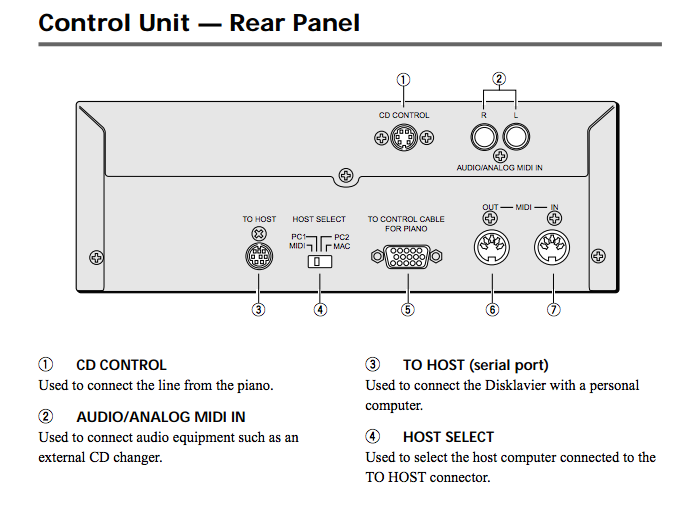
Fran, if you recorded a MIDI file of your playing at the same time as
the video was shot, you can convert the MIDI file to a Yamaha MIDIWAVE
stream to synchronize with the video and play through the Mark III's
Analog MIDI IN jacks.   Use this Windows program to do the conversion:
http://www.kinura.net/mid2pianocd/ making sure to set the output format
to Yamaha Disklavier, the audio file type to WAV, and in the Advanced
menu, the sample rate to 48 KHz and the source velocity profile to
Disklavier.

Import the resulting WAV file into your video editing software and sync
it with the video by iteratively sliding the audio track forwards and
backwards in time relative to the video and then testing playback until
the sync is correct, with the audio output of the computer playing the
stream into the Mark III's Analog MIDI jacks.

When doing final encoding of your video, be sure to use LPCM, FLAC or
Apple Lossless for the Disklavier stream.  Lossy codecs like AAC and MP3
will damage the signal too much to play reliably.

Mark Fontana
Show quoted textHide quoted text
On 05/26/2016 10:48 AM, fannychanart@... [disklavier] wrote:
> [Attachment(s) <#TopText> from fannychanart@... included below]
>
> Hello,
>
>
> I have a video and would like its background music being played by a
> MarkIII DC3A piano (with keys movement), while I play the video on a
> TV at the same time.
>
>
> Is there any way that I could achieve this? Any software that I could
> convert the music into Yamaha's format and be playable by the
> Disklavier? and how should I connect the piano and the TV if I use a
> synchroniser to synchronise the audio and video?
>
>
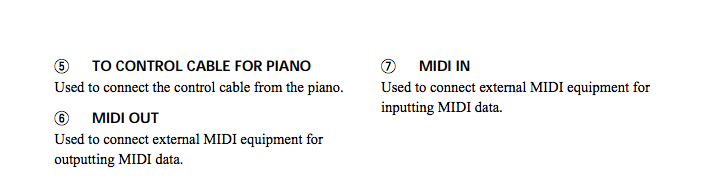
> Would also be great if anyone knows what functions port 5 (To control
> cable for paino) has and how it works...I am attaching the manual of
> its control unit for your reference.
>
>
> Many many thanks! :)
>
>
> Fran
>
>
>