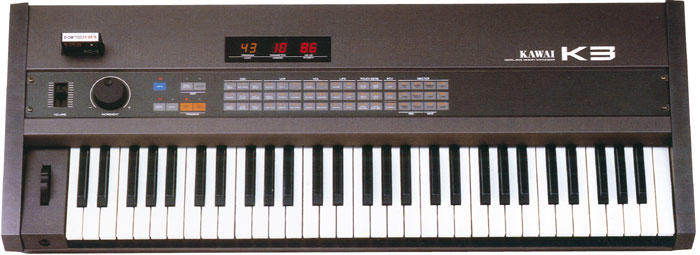
Amazing job, Elliot, congrats... I opened up my CZ101 to change the LCD, took one look & said 'screw that', & put it back together... wanna do me a= favor? jonboy --- In kawaik3zone@yahoogroups.com, Stuart Williams <netbrowserman@y...> wrote: > > > > > > Hey ppl > > > > I thought I would share with you some experience I had with a very long t= erm repair of my Kawai K3 synth. Want to know what the longest running repair = job is on a K3 ? > > > > My repair started about 10 years ago. I had a strange overheating proble= m with K3, it would play all sorts of strange noises once it had heated up, t= akes around 2 hours or so to overheat. I would then experience strange irregula= r sounds being generated, and the LEDs would flash erratically. > > > > With the K3 running, I did a bit of flexing and tapping. I pulled all th= e boards out and examined the boards for cracks, and checked for bulging caps. Discovered a small crack on the lower PCB closest to the power supply, this= was effecting one segment of the LED display! I repaired this track, and = the LED display segment came up good. I waited for the K3 to heat up, to see i= f this fixed the other problem and experienced the same random noises etc. T= he boards had many dry solder joints, I would suggest a reflow to anyone who h= as not done so recently on the K3. I replaced most of the components on the power supply and checked and pushed nearly everything I could! > > > > I found that around the processor board, near the processor, it was very = sensitive to heat. > > > > The processor is an Intel 8031P manufactured in 1980 (by many companies; = Sanyo, Philips, Intel, MHS), its an 8-bit Microprocessor in the family of t= he 8051, 8052, 8054, 8058, 8751, 8752, 8754, 8758, 8032 which later evolved to 8086, 80x86.... > > > > The processor does everything, controls the display and runs the K3 operating system, ie. You press a button and you control another part of th= e synth. Its quite amusing to think there is a whole operating system (OS) i= n there chugging away. > > > > Looking at the specifications for around then, it was NMOS technology. I= suspected the processor was faulty so I sourced a replacement. I do not kn= ow a great deal about the manufacturing, but I know that CMOS reduces the heat= vastly, and there is an 80C31 CMOS processor that will operate at the same = voltage/pin specification as the original NMOS 8031 at half the density, wh= ich means a lot less heat. You can easily find the datasheets and verify that = it is a suitable replacement. > > > > I desoldered the original 8031 and replaced it with a socketed shiny new = 80C31 processor. I fired up the K3..... and DEAD!. Nothing at all on the = display. After all this it did not work at all bullocks I say... > > > > I went over more of the Philips 80C3X datasheets and realized the K3 may = be configured to clock in the wrong way, what this thing needs is XTAL1 juice.= > > > > On the 80C31 pins 18 XTAL2 and 19 XTAL1 need to be swapped. Pin 18 shoul= d not be connected, ie. Do not ground it like the K3 does, clock the pin 19 i= nstead (where pin 18 was connected on the board). This is very easy to fix with a= DIP socket. You can simply lift out pin 18 and bend pin 19 across to fill its = place. > > > > The K3 now runs at a very low temperature, I ran it all day and all night= with the new 80C31. It has been running now for a couple of weeks with no heat = problems or random noises. The original processor was a power pig, this processor uses a lot less power -- CMOS replacement may be a solution to other peoples heat / power consumption problems on the K3? > > > > Regards, > > Elliot > > > > > --------------------------------- > Yahoo! Mobile > - Check & compose your email via SMS on your Telstra or Vodafone mobile.
Message
Re: Kawai Repairs
2003-07-19 by jboy917
Attachments
- No local attachments were found for this message.