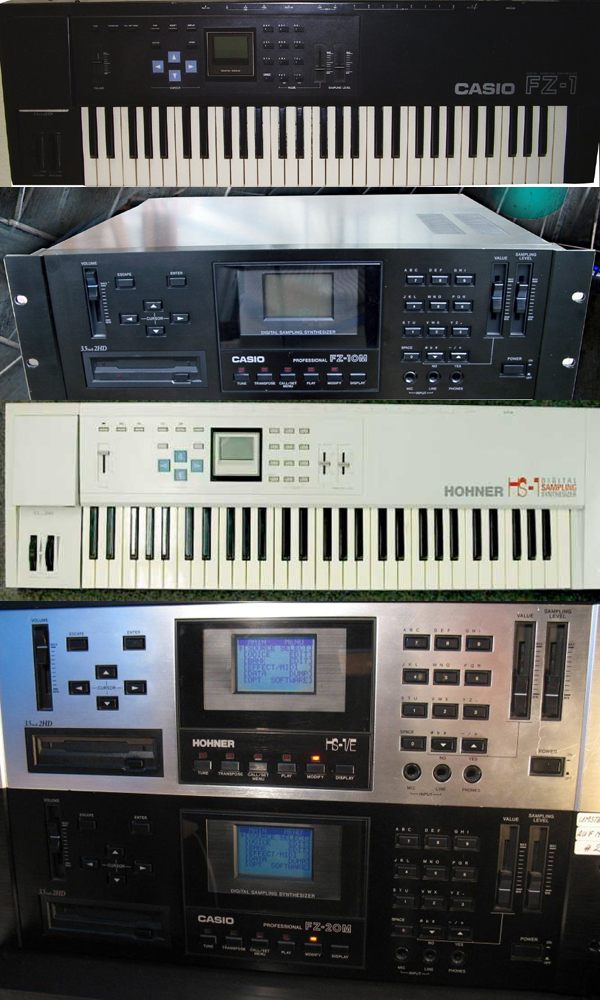
Casio FZ Samplers group photo

Yahoo Groups archive

Casio FZ Samplers

Index last updated: 2026-04-28 22:42 UTC

Thread

Casio FZ1 Display Woes

Casio FZ1 Display Woes

2014-11-10 by reubenfinger@...

Hello everyone, I tried to repair the failing bars on my screen and unfortunately unseated one of the three carbon ribbon cable for the LCD, I have since been on the hunt for a solution, involving T-Bar soldering heads, heat resistant tape and cannibalising the insides of a Casio Fx7000GA......all to no avail, I just cannot seem to get it to work. I have been trying to soldier on with the manual and no display, but with no feedback on button pushes it is tricky unreliable work...there are a few software solutions to editing but I can't seem to get them to work.


So I need some advice, should I just call it a day and consign the FZ to midi controller duties, and forget tha there is a sampler in there, or should I install a HXC floppy emulator and use it as a sound module. Has anyone had any luck using software editors like Steinberg Synthworks on the Atari ST/FZdump/Tools on windows in creating banks, editing voices and then sending them from there to HXC and into the FZ1.


Or Does anybody know of anywhere at all that I could source a replacement display?


Any advice at all would be welcome, and sorry about the number of questions


Neil

Re: [Casio_FZ_Samplers] Casio FZ1 Display Woes

2014-11-11 by Lee

All I can tell you is I have never had any luck with pc software communication with the fz. I think I once managed to get a file OFF it buy could not get it back again.
I am intrigued by your fx7000 solution for the display.
I think there is a general problem of sourcing replacements for complex retro synth displays that are non standard.
Someone has a niche market waiting to be filled.

Lee

Sent from my iPhone

On 10 Nov 2014, at 14:25, "reubenfinger@... [Casio_FZ_Samplers]" <Casio_FZ_Samplers@yahoogroups.com> wrote:

Show quoted textHide quoted text

Hello everyone, I tried to repair the failing bars on my screen and unfortunately unseated one of the three carbon ribbon cable for the LCD, I have since been on the hunt for a solution, involving T-Bar soldering heads, heat resistant tape and cannibalising the insides of a Casio Fx7000GA......all to no avail, I just cannot seem to get it to work. I have been trying to soldier on with the manual and no display, but with no feedback on button pushes it is tricky unreliable work...there are a few software solutions to editing but I can't seem to get them to work.


So I need some advice, should I just call it a day and consign the FZ to midi controller duties, and forget tha there is a sampler in there, or should I install a HXC floppy emulator and use it as a sound module. Has anyone had any luck using software editors like Steinberg Synthworks on the Atari ST/FZdump/Tools on windows in creating banks, editing voices and then sending them from there to HXC and into the FZ1.


Or Does anybody know of anywhere at all that I could source a replacement display?


Any advice at all would be welcome, and sorry about the number of questions


Neil

Re: [Casio_FZ_Samplers] Casio FZ1 Display Woes

2014-11-11 by reubenfinger@...

Thanks Lee,

I did manage to send a few programs through to the FZ1 using FZDump running Windows XP on VMware on my IMAC but that was before the screen died. The problem is navigating to the choose device menu of the DATA Dump screen.

According to the manual if I go to the modify menu, it is four downward button pushes then enter, then in the DUMP menu four further downward button presses then enter. Then move the data slider down to tell the FZ to accept a midi connection, then one more downward button press to set it to remote control.

Now that was relatively easy when I could view the screen , but I have found it infuriatingly tricky with no screen. I wonder if some kind soul with a working screen can confirm if that sequence of btton presses is right.

The LCD in the Casio FX7000g and F7000GA are the same as in the FZ1, I bought the F7000GA but the drivers for the screen are different, and I haven't been able to source a FX7000g at a reasonable price. The idea was to cut some tracks and solder in the screen, but with the drivers being different, apart from me taking alot of notes of voltages, I have kinda stalled on that solution....still going to try though.

You are right that alot of these FZ1's are out there with failing/damaged screens, hopefully someone somewhere has a solution

Neil

Re: [Casio_FZ_Samplers] Casio FZ1 Display Woes

2014-11-11 by emma

Looking at the signals that go to it its a 4bit mode there's a lot the ce and w/e and 1and 2 these signals I dont know what 1 and 2 are yet but I do have a logic analyzer so will see as its the gal that sends the lcd signals now any lcd company should be able to create a controler for it on the back of the lcd screen as most now are created on a machine that wire solders the links and puts a resin protective coating its the 1or 2 black circles on the pcb

Now on China there companies who can make cistom glass and controllers if there is enough interest in a group buy then it's something we can look at


Sent from Samsung Mobile


-------- Original message --------
From: "reubenfinger@gmail.com [Casio_FZ_Samplers]" <Casio_FZ_Samplers@yahoogroups.com>
Date: 11/11/2014 15:08 (GMT+00:00)
To: Casio_FZ_Samplers@yahoogroups.com
Subject: Re: [Casio_FZ_Samplers] Casio FZ1 Display Woes


Thanks Lee,


I did manage to send a few programs through to the FZ1 using FZDump running Windows XP on VMware on my IMAC but that was before the screen died. The problem is navigating to the choose device menu of the DATA Dump screen.

According to the manual if I go to the modify menu, it is four downward button pushes then enter, then in the DUMP menu four further downward button presses then enter. Then move the data slider down to tell the FZ to accept a midi connection, then one more downward button press to set it to remote control.

Now that was relatively easy when I could view the screen , but I have found it infuriatingly tricky with no screen. I wonder if some kind soul with a working screen can confirm if that sequence of btton presses is right.

The LCD in the Casio FX7000g and F7000GA are the same as in the FZ1, I bought the F7000GA but the drivers for the screen are different, and I haven't been able to source a FX7000g at a reasonable price. The idea was to cut some tracks and solder in the screen, but with the drivers being different, apart from me taking alot of notes of voltages, I have kinda stalled on that solution....still going to try though.

You are right that alot of these FZ1's are out there with failing/damaged screens, hopefully someone somewhere has a solution

Neil

Re: [Casio_FZ_Samplers] Casio FZ1 Display Woes

2014-11-11 by reubenfinger@...

That sounds amazing Emma, So you would bypass the HD44350/351 controller. I am no expert but that seemed to be the snag in replacing the LCD as there are no datasheets for the controllers, so yeah a logic analyser is the only way to go, Rainer Buchty had some thoughts on the controllers: [www.buchty.net] Casiorama. A few of the older Akai samplers have had OLED replacement it would be amazing if that could happen for the FZ1


Re: [Casio_FZ_Samplers] Casio FZ1 Display Woes

2014-11-11 by emma

I have the schematics and all the information is there even the signals fron the gal chip that coverts the cpu information into the lcd circuits

Theres one controller and 2 line drivers for the column and row

We do away with control board and interface direct to the gal lcd signals which should be ok for any type lcd controller

When people were looking at it before they were thinking a vga instead I talked to rainer about this several years ago he gave up on the project early on because the gal uses similar signals to the mpc3000 there is a vga circuit that could be used a vga means we could use a tft screen im in talks at the moment on other displays

The akai oled are just standard lcd chips and because 16x2 20×2 40×2 are standard industry sizes and are still used for new designs both led oled and vfd screens are made


Sent from Samsung Mobile


-------- Original message --------
From: "reubenfinger@gmail.com [Casio_FZ_Samplers]" <Casio_FZ_Samplers@yahoogroups.com>
Date: 11/11/2014 16:50 (GMT+00:00)
To: Casio_FZ_Samplers@yahoogroups.com
Subject: Re: [Casio_FZ_Samplers] Casio FZ1 Display Woes


That sounds amazing Emma, So you would bypass the HD44350/351 controller. I am no expert but that seemed to be the snag in replacing the LCD as there are no datasheets for the controllers, so yeah a logic analyser is the only way to go, Rainer Buchty had some thoughts on the controllers: [www.buchty.net] Casiorama. A few of the older Akai samplers have had OLED replacement it would be amazing if that could happen for the FZ1


Re: Casio FZ1 Display Woes

2014-11-11 by reubenfinger@...

Amazing Emma, so VGA is a possible option, I'll have to read up on the MPC3000 Akai VGA card, there are a few posts on the MPC forum......is it likely that VGA is simpler to implement than the Group buy option of a new LCD or are they both are difficult as each other....wow thank-you, you are really throwing up some incredible knowledge, hats off to you, is the schematic you have, the one from the service manual?

Re: [Casio_FZ_Samplers] Re: Casio FZ1 Display Woes

2014-11-11 by emma

Interfacing is a lot easier today because of fpga and analyzers

When rainer was doing it his screen was broken so it was hard for him to analyze my screen works fine dead efoil but it works fine so im doing tests to see what the digital signals are doing as it does not use a standard 4 bit the 4th bit is the d7 8th bit address and it was this address that he was guessing at


All I need to know is what the data is on these lines and what information they send

Its also a lot like akai interface chips on the mpc range

The
screen is split into 2 halfs and why there are the 2 clock signals theres a 4bit address and theres cs and op and power 5v ground and -2v which is not needed

Today they make custom controllers so its just getting them to make a controller that can do the job for the signals applied ill also give them a working display the display schematics show all the connections I have some one looking into it and it will be a group buy so the cost can be spread then at least we can see the funding that way im not going to fund the whole project and be left with loads of screens


Sent from Samsung Mobile


-------- Original message --------
From: "reubenfinger@gmail.com [Casio_FZ_Samplers]" <Casio_FZ_Samplers@yahoogroups.com>
Date: 11/11/2014 18:51 (GMT+00:00)
To: Casio_FZ_Samplers@yahoogroups.com
Subject: [Casio_FZ_Samplers] Re: Casio FZ1 Display Woes


Amazing Emma, so VGA is a possible option, I'll have to read up on the MPC3000 Akai VGA card, there are a few posts on the MPC forum......is it likely that VGA is simpler to implement than the Group buy option of a new LCD or are they both are difficult as each other....wow thank-you, you are really throwing up some incredible knowledge, hats off to you, is the schematic you have, the one from the service manual?

Re: [Casio_FZ_Samplers] Casio FZ1 Display Woes

2014-11-11 by Lee

Having changed cz displays and yamaha dx ones it is apparent that some have custom displays such as the cz230s.
Obviously the vz/fz are larger and as difficult to replace. Never thought of calculators.
Been trying to get a vz, so I am interested too,in any sort of display replacement solutions.

The button sequence for midi choice sounds correct to me,without checking. I obviously don't use that sequence myself, but on the occasions I have I believe it is the correct route to the menu.

The fz manual should be at :

Http://templarseries.atspace.com/fz.html


Sent from my iPhone
Show quoted textHide quoted text
On 11 Nov 2014, at 17:22, "chrispoacher@... [Casio_FZ_Samplers]" <Casio_FZ_Samplers@yahoogroups.com> wrote:

> 
> 
> 
> I have a VZ-1 which has a dying screen. I'm hoping it uses the same as the FZ-1 so I'm watching this post with interest :)   Chris. 
> 
>

Re: Casio FZ1 Display Woes

2014-11-12 by reubenfinger@...

So how many people do we need to make a group buy viable, once Emma has done the research?

Re: Casio FZ1 Display Woes

2014-11-12 by narfman96@...

Remember to include the CZ group since there will be VZ owners there. I have seen several posts where those displays failed and owners were looking for replacements.

Re: Casio FZ1 Display Woes

2014-11-15 by eliasmacpherson@...

This program works for me on Windows provided I have my usb MIDI adapter plugged in before clicking on the exe.


https://web.archive.org/web/20050328011542/http://hem.passagen.se/highpuls/fz/fz_ftu.zip


https://web.archive.org/web/20070609183501/http://hem.passagen.se/highpuls/index.htm

Casio FZ File Transfer Utility

This is my program to transfer FZ files to/from a PC via MIDI. The program is FREEWARE! That means that you can download it, copy it, share it with a fellow FZ owner without paying for it. However, it would be nice with feedback, for example an e-mail telling me how nice I am giving this piece of software away for free ;-). Even bug reports would be nice!

I would like to send a special thank you to Jeff McClintock for the System Exclusive and FZ file format documentation.
Some features in version 1.0

* Transfer Full/Voice/Bank/Effects dump to/from FZ
* Recieve a Full Dump as voices or banks, for example, you can receive voices 1 to 25 just with a few mouse clicks
* Play fzv, wav, aif, txw files
* Convert form fzv/wav/aif/txw files to fzv/wav/txw files
* Associate the supported file types to FZ File Transfer Utility

System requirements

* Any model of Casio FZ
* A PC running Windows 95/NT 4.0 (Windows 98/2000/XP might work)
* A soundcard supported by any of the above mentioned platforms

For details see the help file provided with the program.

Screenshot/Download

Screenshot of FZ File Transfer Utility
Download FZ File Transfer Utility (272 kB)


Re: Casio FZ1 Display Woes

2014-11-15 by eliasmacpherson@...

I should add that to get it to work, you have to go to Modify, then to Data Dump, then to Select Device, press Yes button two times to set it to MIDI.
Then press the down arrow once to put the Menu Cursor on the line that says Remote Mode.

It takes a long time but is nice for getting individual voices on and off.

Re: Casio FZ1 Display Woes

2014-11-15 by reubenfinger@...

Thankyou very much Elias, I have the software, but, the confirmation of the button presses is priceless to me without use of the screen


Re: Casio FZ1 Display Woes

2014-11-15 by eliasmacpherson@...

Yes, I was outlining what program and MIDI setup works for me in case somebody could not get it to work for them. I have not gotten it to work without first selecting Remote Mode. Not suggesting it as a substitute for a working screen, moreover the MIDI transfer oc-casio-nally fails, hard to spot that without a screen I'd say.

Re: Casio FZ1 Display Woes

2014-11-15 by eliasmacpherson@...

> According to the manual if I go to the modify menu, it is four downward button pushes then enter, then in the DUMP menu four further downward button presses then enter. Then move the data slider down to tell the FZ to accept a midi connection, then one more downward button press to set it to remote control.

this is incorrect.

When the FZ boots, the default is "DISK" in the select device screen. It is position 0. position 1 is PORT and position 2 is MIDI. You must press the "YES" button which doubles as an up arrow two times, instead of moving the slider down.

The slider when is at its topmost value -> moving down will decrease the position. since the position is already 0, moving down will not do anything.

When the slider is at the bottom value moving the slider UP may set it to MIDI but this is less accurate than pressing "YES, YES".

Re: Casio FZ1 Display Woes

2014-11-15 by eliasmacpherson@...

> According to the manual if I go to the modify menu, it is four downwardbutton pushes then enter, then in the DUMP menu four further downward button presses then enter. Then move the data slider down to tell the FZ to accept a midi connection, then one more downward button press to set it to remote control.

I forgot to add that apart from the "move the slider down" instruction - the rest of your process is correct.

Re: Casio FZ1 Display Woes

2014-11-15 by reubenfinger@...

Thankyou again Elias, I have used the FZdump program when I had a functioning LCD, but I did not have the sampler long enough to get comfortable with the button presses, so your post is invaluable to me.

To anyone out there whom has used an editor with the FZ1/FZ10, I am aware of two.

Steinberg Synthworks on Atari ST,

which I have only used on an Atari emulator, which looks great and useful, but I have not managed to get the emulation to communicate with the FZ1....I have obtained a real Atari St in the last few days, but am not up and running with it yet ( I can't burn 780k disks with my usb floppy drive) I have thought about purchasing the HXC floppy emulator and using the editor on Atari and saving FZV/FZB to the HXC then attaching the HXC directly to the FZ1, although I am unsure if this would work. Has anyone ever used AVALON or SYNTHWORKS on Atari to edit the FZ1

and I have been in contact with a chap called John Smith, who has created an editor for Windows XP to be used with a FZdump and a data cable on a parallel port to transfer files very quickly. I think his work is inspired by or based on Jeff McClintock's Dos transfer, but I don't know. I mention it only because it may be use/interest to some of you his website is here:

and the manual for his editor is here:
http://undecyclenate.neocities.org/manual.html


Re: Casio FZ1 Display Woes

2015-02-26 by bobrorama@...

Hi, new member here, have the same problem as OP. Wanted to ask if this reverse engineering project is still alive.

Re: Casio FZ1 Display Woes

2016-12-01 by tarkan.sahin78@...

Hi Emma,

did you ever further investigated this or any news on this topic. Im interested in an new Display for the Casio FZ 10m (Hohner HS1). How many Of this LED Display we need to take so that the manufacturer can make them?

Move to quarantaine

This moves the raw source file on disk only. The archive index is not changed automatically, so you still need to run a manual refresh afterward.