Yahoo Groups archive

Datacolor User to User Support Group.

Index last updated: 2026-04-28 23:18 UTC

Thread

Monitor Brightness Problem - not bright enough??

Monitor Brightness Problem - not bright enough??

2011-07-26 by Lori

I recently purchased a new desktop tower with Win7 and had to upgrade my Spyder2 to a Spyder3PRO. I am using the same monitor. The Spyder3 tells me that my monitor is not bright enough - with a target of 180 it reads my monitor at 74 at 100% brightness and sets the new target at 74. The final profile then dims my screen so much that I lose all detail in blacks/grays.  It is a HUGE difference. For example, on the Spyder3 menu screen with an uncalibrated monitor I can see that there is a pinstriping effect on the black background. After calibration this becomes solid black, as does anything else that has shades of black/gray.  This was never an issue with my Spyder2 so I don't believe there is a problem with my monitor, certainly not to that degree. 

Most people with brightness problems seem to have the opposite problem, I can't find any info about anyone running into a problem with a monitor not being bright enough.

Re: [datacolor_group] Monitor Brightness Problem - not bright enough??

2011-07-27 by C D Tobie

On Jul 26, 2011, at 6:48 PM, Lori wrote:

> I recently purchased a new desktop tower with Win7 and had to upgrade my Spyder2 to a Spyder3PRO. I am using the same monitor. The Spyder3 tells me that my monitor is not bright enough - with a target of 180 it reads my monitor at 74 at 100% brightness and sets the new target at 74. The final profile then dims my screen so much that I lose all detail in blacks/grays.  It is a HUGE difference. For example, on the Spyder3 menu screen with an uncalibrated monitor I can see that there is a pinstriping effect on the black background. After calibration this becomes solid black, as does anything else that has shades of black/gray.  This was never an issue with my Spyder2 so I don't believe there is a problem with my monitor, certainly not to that degree. 
> 
> Most people with brightness problems seem to have the opposite problem, I can't find any info about anyone running into a problem with a monitor not being bright enough. 

You neglect to tell us what version of Spyder3 software you own, or what settings you are using. It could be that you are running the ambient light check, and your room is do dark that it is trying to get your display dimmed down to match. If you turn off the ambient light option, set the target to 120 candelas as a white luminance (brightness) then it should calibrate to that level, and be a good moderate brightness. Give that a try before moving on to other things. 

C. David Tobie
Global Product Technology Manager
Imaging Color Solutions
CDTobie@...
Datacolor
www.datacolor.com/Spyder

Attachments

Re: [datacolor_group] Monitor Brightness Problem - not bright enough?? [1 Attachment]

2011-07-27 by Wim van Leeuwen

I have exactly the same problem with a DELL 2007 WFP monitor. 
There where no problems before but, now using Spider Elite 4.0.2, all the sudden I get the message 
“Brightness target  adjusted from 120.0 to 88.0” and that is a very big difference. 
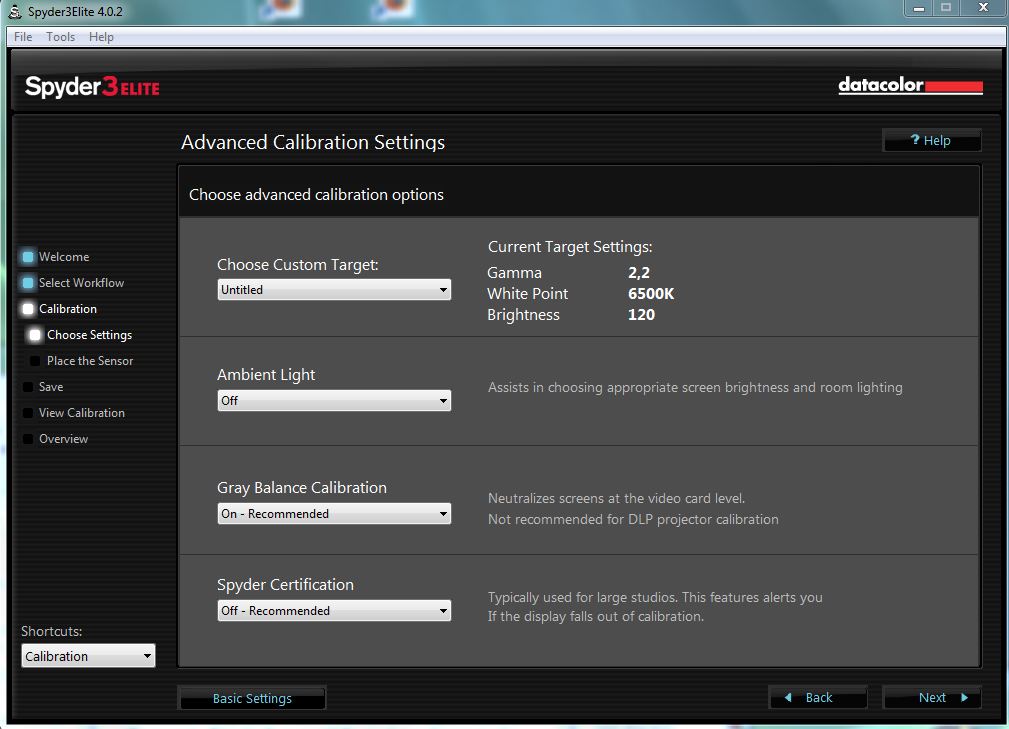
For your information the “ambient light option is OFF” and the calibration setting (when I started calibration) are: 
FULLCAL, Gamma2.2, White Point 6500 K, Brightness 120
remark:
When I leave the Sensor attached to the USB-port I see the blue-led on the sensor going on and off, so it looks like the ambient light routine, although switsched off, is still working. 
Greetings,
Wim
Show quoted textHide quoted text
From: C D Tobie 
Sent: Wednesday, July 27, 2011 3:57 PM
To: datacolor_group@yahoogroups.com 
Subject: Re: [datacolor_group] Monitor Brightness Problem - not bright enough?? [1 Attachment]

  
[Attachment(s) from C D Tobie included below]
 

On Jul 26, 2011, at 6:48 PM, Lori wrote:

> I recently purchased a new desktop tower with Win7 and had to upgrade my Spyder2 to a Spyder3PRO. I am using the same monitor. The Spyder3 tells me that my monitor is not bright enough - with a target of 180 it reads my monitor at 74 at 100% brightness and sets the new target at 74. The final profile then dims my screen so much that I lose all detail in blacks/grays. It is a HUGE difference. For example, on the Spyder3 menu screen with an uncalibrated monitor I can see that there is a pinstriping effect on the black background. After calibration this becomes solid black, as does anything else that has shades of black/gray. This was never an issue with my Spyder2 so I don't believe there is a problem with my monitor, certainly not to that degree. 
> 
> Most people with brightness problems seem to have the opposite problem, I can't find any info about anyone running into a problem with a monitor not being bright enough. 

You neglect to tell us what version of Spyder3 software you own, or what settings you are using. It could be that you are running the ambient light check, and your room is do dark that it is trying to get your display dimmed down to match. If you turn off the ambient light option, set the target to 120 candelas as a white luminance (brightness) then it should calibrate to that level, and be a good moderate brightness. Give that a try before moving on to other things. 

C. David Tobie
Global Product Technology Manager
Imaging Color Solutions
mailto:CDTobie%40datacolor.com
Datacolor
www.datacolor.com/Spyder


--------------------------------------------------------------------------------

Re: [datacolor_group] Monitor Brightness Problem - not bright enough??

2011-07-27 by Cdtobie

Ongoing ambient checks are a different part of the software. Go to the expert console, and see what your current brightness (white luminance) target is. If it's 120, then calibrating should target that. Let me know if thats not the case. 

C. D. Tobie
Global Product Technology Mngr.
Imaging Color Management
Datacolor.com
CDTobie@...
Show quoted textHide quoted text
On Jul 27, 2011, at 2:09 PM, "Wim van Leeuwen" <wimvanleeuwen@...> wrote:

> 
> 
> I have exactly the same problem with a DELL 2007 WFP monitor. 
> There where no problems before but, now using Spider Elite 4.0.2, all the sudden I get the message 
> “Brightness target  adjusted from 120.0 to 88.0” and that is a very big difference. 
> For your information the “ambient light option is OFF” and the calibration setting (when I started calibration) are: 
> FULLCAL, Gamma2.2, White Point 6500 K, Brightness 120
> remark:
> When I leave the Sensor attached to the USB-port I see the blue-led on the sensor going on and off, so it looks like the ambient light routine, although switsched off, is still working.
>  
> Greetings,
> Wim
>  
> From: C D Tobie
> Sent: Wednesday, July 27, 2011 3:57 PM
> To: datacolor_group@yahoogroups.com
> Subject: Re: [datacolor_group] Monitor Brightness Problem - not bright enough?? [1 Attachment]
>  
> 
> On Jul 26, 2011, at 6:48 PM, Lori wrote:
> 
> > I recently purchased a new desktop tower with Win7 and had to upgrade my Spyder2 to a Spyder3PRO. I am using the same monitor. The Spyder3 tells me that my monitor is not bright enough - with a target of 180 it reads my monitor at 74 at 100% brightness and sets the new target at 74. The final profile then dims my screen so much that I lose all detail in blacks/grays. It is a HUGE difference. For example, on the Spyder3 menu screen with an uncalibrated monitor I can see that there is a pinstriping effect on the black background. After calibration this becomes solid black, as does anything else that has shades of black/gray. This was never an issue with my Spyder2 so I don't believe there is a problem with my monitor, certainly not to that degree. 
> > 
> > Most people with brightness problems seem to have the opposite problem, I can't find any info about anyone running into a problem with a monitor not being bright enough. 
> 
> You neglect to tell us what version of Spyder3 software you own, or what settings you are using. It could be that you are running the ambient light check, and your room is do dark that it is trying to get your display dimmed down to match. If you turn off the ambient light option, set the target to 120 candelas as a white luminance (brightness) then it should calibrate to that level, and be a good moderate brightness. Give that a try before moving on to other things. 
> 
> C. David Tobie
> Global Product Technology Manager
> Imaging Color Solutions
> mailto:CDTobie%40datacolor.com
> Datacolor
> www.datacolor.com/Spyder
> 
> 
> 
> 
> 
> 
>

Re: [datacolor_group] Monitor Brightness Problem - not bright enough??

2011-07-28 by Wim van Leeuwen

The following “LUMINANCE values” can be seen in the “Expert Console”:

Black Luminance:       0.27
White Luminance:    88.0

So the program has exactly done what he told me during the calibration process: “Brightness target adjusted from 120.0 to 88.0”

I never saw a message like this in previous versions!

Greetings,
Wim
Show quoted textHide quoted text
From: Cdtobie 
Sent: Wednesday, July 27, 2011 10:42 PM
To: datacolor_group@yahoogroups.com 
Subject: Re: [datacolor_group] Monitor Brightness Problem - not bright enough??


Ongoing ambient checks are a different part of the software. Go to the expert console, and see what your current brightness (white luminance) target is. If it's 120, then calibrating should target that. Let me know if thats not the case. 

C. D. Tobie 
Global Product Technology Mngr.
Imaging Color Management
Datacolor.com
CDTobie@datacolor.com

On Jul 27, 2011, at 2:09 PM, "Wim van Leeuwen" <wimvanleeuwen@wanadoo.nl> wrote:


  I have exactly the same problem with a DELL 2007 WFP monitor. 
  There where no problems before but, now using Spider Elite 4.0.2, all the sudden I get the message 
  “Brightness target  adjusted from 120.0 to 88.0” and that is a very big difference. 
  For your information the “ambient light option is OFF” and the 
  calibration setting (when I started calibration) are: 
  FULLCAL, Gamma2.2, White Point 6500 K, Brightness 120
  remark:
  When I leave the Sensor attached to the USB-port I see the blue-led on the sensor going on and off, so it looks like the ambient light routine, although switsched off, is still working. 

  Greetings,
  Wim

  From: C D Tobie 
  Sent: Wednesday, July 27, 2011 3:57 PM
  To: datacolor_group@yahoogroups.com 
  Subject: Re: [datacolor_group] Monitor Brightness Problem - not bright enough?? [1 Attachment]


  On Jul 26, 2011, at 6:48 PM, Lori wrote:

  > I recently purchased a new desktop tower with Win7 and had to upgrade my Spyder2 to a Spyder3PRO. I am using the same monitor. The Spyder3 tells me that my monitor is not bright enough - with a target of 180 it reads my monitor at 74 at 100% brightness and sets the new target at 74. The final profile then dims my screen so much that I lose all detail in blacks/grays. It is a HUGE difference. For example, on the Spyder3 menu screen with an uncalibrated monitor I can see that there is a pinstriping effect on the black background. After calibration this becomes solid black, as does anything else that has shades of black/gray. This was never an issue with my Spyder2 so I don't believe there is a problem with my monitor, certainly not to that degree. 
  > 
  > Most people with brightness problems seem to have the opposite problem, I can't find any info about anyone running into a problem with a monitor not being bright enough. 

  You neglect to tell us what version of Spyder3 software you own, or what settings you are using. It could be that you are running the ambient light check, and your room is do dark that it is trying to get your display dimmed down to match. If you turn off the ambient light option, set the target to 120 candelas as a white luminance (brightness) then it should calibrate to that level, and be a good moderate brightness. Give that a try before moving on to other things. 

  C. David Tobie
  Global Product Technology Manager
  Imaging Color Solutions
  mailto:CDTobie%40datacolor.com
  Datacolor
  www.datacolor.com/Spyder


------------------------------------------------------------------------------

Re: [datacolor_group] Monitor Brightness Problem - not bright enough??

2011-07-28 by C D Tobie


On Jul 28, 2011, at 11:06 AM, Wim van Leeuwen wrote:


The following “LUMINANCE values” can be seen in the “Expert Console”:
Black Luminance: 0.27
White Luminance: ; 88.0
So the program has exactly done what he told me during the calibration process: “Brightness target adjusted from 120.0 to 88.0”
I never saw a message like this in previous versions!

But your description does not explain which method is being used. Please set the target white to 120 (there is a popdown option for 120, Gamma 2.2, Whitepoint 6550k) or manually in the Expert Console, and calibrate again. If it asks if you would like to change the target value based on ambient light readings, say no. See if it will then calibrate to the selected value of 120.

C. David Tobie
Global Product Technology Manager
Imaging Color Solutions


Re: Monitor Brightness Problem - not bright enough??

2011-07-28 by Lori

The software I am using is Spyder2Pro 4.0.2. 

You are correct that I am calibrating in a dim room. I turned off the ambient light sensor, reset the target to 120 candelas and recalibrated with no change in the results...it again determined that the brightness of my monitor was in high 70s (78 this time) and reset the target. Although as Wim points out, the blue LED continues to flash during calibration even with that option turned off, so I wonder if it is still checking the ambient light.  

Interestingly enough, I am also using a Dell flat panel.

Re: Spyder compatibility with Mac Lion (OSX 10.7)

2011-07-28 by C D Tobie

For those of you considering updating to Apple's new Lion OS, here is a link to all known compatibility issues with all levels of Spyder display calibration products:

http://www.datacolor.eu/en/support/osx-lion-support/index.html

This document is also available in French and German, but since this is an English list, I've posted the English link.

The key issue for Spyder2 apps is that Lion no longer supports Rosetta emulation, thus older applications (including the Spyder2 apps) cannot be run under Lion. A basic app that is Lion compatible, that can be used with these older Spyder 2 unit will be developed by fall.  Keep in mind that updating to Spyder3 certainly makes sense for anyone with a newer display type (which tends to go along with a newer computer, and a newer OS such as Lion). 

The key issue for Spyder3 is that Apple has decided to make the folder where ICC profiles are stored in the main Library a "read only" location. This is part of the ongoing goal of making OSes more secure, but the reasoning for this particular choice is very unclear, since other items at that same level have not been reset this way. The simplest fix is to set your software to save your profiles to your own folder (which you still, at least at this point in time, retain full control over). This means other users won't have access to your profiles. 

While Spyder3Print SR is not included in the document  linked above, the only issues I've noticed there is the same as for the display calibration products: you need to save profiles to your user library, not the global one, unless you reset the permissions on that Library ICC profiles folder... something I haven't actually tried yet. A terminal script should do it, if its "legal" to do, but we can't really go around resetting permissions to OS folders from our apps, so I doubt our software will ever perform this function for you. We all might as well get used to having our profiles in our user library...

C. David Tobie
Global Product Technology Manager
Imaging Color Solutions
CDTobie@...
Datacolor
www.datacolor.com/Spyder

Attachments

Re: [datacolor_group] Re: Monitor Brightness Problem - not bright enough??

2011-07-28 by C D Tobie

On Jul 28, 2011, at 11:29 AM, Lori wrote:

> The software I am using is Spyder2Pro 4.0.2. 
> 
> You are correct that I am calibrating in a dim room. I turned off the ambient light sensor, reset the target to 120 candelas and recalibrated with no change in the results...it again determined that the brightness of my monitor was in high 70s (78 this time) and reset the target. Although as Wim points out, the blue LED continues to flash during calibration even with that option turned off, so I wonder if it is still checking the ambient light.  

It reset the target? That should only occur when you agree to it. If your display  is only capable of reaching 78, then you'd end up at 78, but not with a reset target... if the display is capable of more, then it should go for the target value of 120. I'll see if I can reproduce this, but I don't have any Dells here... what model are you using?
> 
> Interestingly enough, I am also using a Dell flat panel. 

C. David Tobie
Global Product Technology Manager
Imaging Color Solutions
CDTobie@datacolor.com
Datacolor
www.datacolor.com/Spyder

Re: Spyder compatibility with Mac Lion (OSX 10.7)

2011-07-29 by grandpollo

I had no trouble saving the profile on 4 macs so when does this problem arise? Perhaps if not signed in as admin?

Also a couple of things maybe Lion related:

Every time I start any mac there is a Spyder 3 Utility in Recovered Files in the Trash, also it seems that in some cases in the user preference you can see the Spyder 3 Utility is "greyed out" e.g though a startup item it is not starting up. What does this do? If it is just the reminder I can do without it.

In your previous notes to me (switch from Spyder 2 to 3 Express) I bought the Spyder 3 Pro as here it was on sale for $10 more than Express, quite a discount. 

When I activated it the first time on the main mac I use for editing, subsequently activation on other macs (my laptops) was automatic and the previous registration code arrived correctly on its own. No need to save the number as I am guessing activation is  based on the serial number of the photospectrometer and as such it is seamless as long as it is the same one, which is great.

The help files installed with the newest installer have nothing in the chapter index. You can read the help notes but in the left hand side where the table of contents would be are just little book symbols and no words at all. This makes it hard to find a topic as you can imagine.

Anyway calibration and use on OSX 10.7 is seamless but these small issues are annoying, re the utility and help file.
--- In datacolor_group@yahoogroups.com, C D Tobie <CDTobie@...> wrote:
Show quoted textHide quoted text
>
> For those of you considering updating to Apple's new Lion OS, here is a link to all known compatibility issues with all levels of Spyder display calibration products:
> 
> http://www.datacolor.eu/en/support/osx-lion-support/index.html
> 
> This document is also available in French and German, but since this is an English list, I've posted the English link.
> 
> The key issue for Spyder2 apps is that Lion no longer supports Rosetta emulation, thus older applications (including the Spyder2 apps) cannot be run under Lion. A basic app that is Lion compatible, that can be used with these older Spyder 2 unit will be developed by fall.  Keep in mind that updating to Spyder3 certainly makes sense for anyone with a newer display type (which tends to go along with a newer computer, and a newer OS such as Lion). 
> 
> The key issue for Spyder3 is that Apple has decided to make the folder where ICC profiles are stored in the main Library a "read only" location. This is part of the ongoing goal of making OSes more secure, but the reasoning for this particular choice is very unclear, since other items at that same level have not been reset this way. The simplest fix is to set your software to save your profiles to your own folder (which you still, at least at this point in time, retain full control over). This means other users won't have access to your profiles. 
> 
> While Spyder3Print SR is not included in the document  linked above, the only issues I've noticed there is the same as for the display calibration products: you need to save profiles to your user library, not the global one, unless you reset the permissions on that Library ICC profiles folder... something I haven't actually tried yet. A terminal script should do it, if its "legal" to do, but we can't really go around resetting permissions to OS folders from our apps, so I doubt our software will ever perform this function for you. We all might as well get used to having our profiles in our user library...
> 
> C. David Tobie
> Global Product Technology Manager
> Imaging Color Solutions
> CDTobie@...
> Datacolor
> www.datacolor.com/Spyder
>

Re: [datacolor_group] Re: Spyder compatibility with Mac Lion (OSX 10.7)

2011-07-29 by David Miller

On Jul 29, 2011, at 11:18 AM, grandpollo wrote:

> 
> I had no trouble saving the profile on 4 macs so when does this problem arise? Perhaps if not signed in as admin?
> 
> Also a couple of things maybe Lion related:
> 
> Every time I start any mac there is a Spyder 3 Utility in Recovered Files in the Trash, also it seems that in some cases in the user preference you can see the Spyder 3 Utility is "greyed out" e.g though a startup item it is not starting up. What does this do? If it is just the reminder I can do without it.
> 

Spyder3Utility earlier than the most current (1.1.10) isn't compatible with
Lion. You most likely have an earlier version installed; it's going to crash on launch,
every time you start up.

To get the updated version: either browse to the downloads section on our web site, and find
the link for Spyder3Utility 1.1.10, or you can use this URL to get to that download page directly:

http://support.datacolor.com/index.php?_m=downloads&_a=viewdownload&downloaditemid=183&nav=0,12

Download the new version; it will show up as a single application file in your Downloads folder in
Safari (or whatever web browser you're using).

Copy the new application into your Applications\Datacolor\Spyder3Pro folder, and replace your older
version of Spyder3Utility with this one. Then double-click to launch the new version; after a few
seconds, it's icon should appear in your menu bar.

Your system should still be set to automatically launch Spyder3Utility for ambient light monitoring
when you restart, but you can check, to make sure, by going into System Preferences: Users and
Groups; and for your user account, go to the Login Items section and make sure that Spyder3Utility
appears in the list. (If not, you can add it manually)

David Miller
Senior Software Engineer, Imaging Color Solutions
Datacolor

Re: [datacolor_group] Re: Monitor Brightness Problem - not bright enough??

2011-07-30 by Wim van Leeuwen

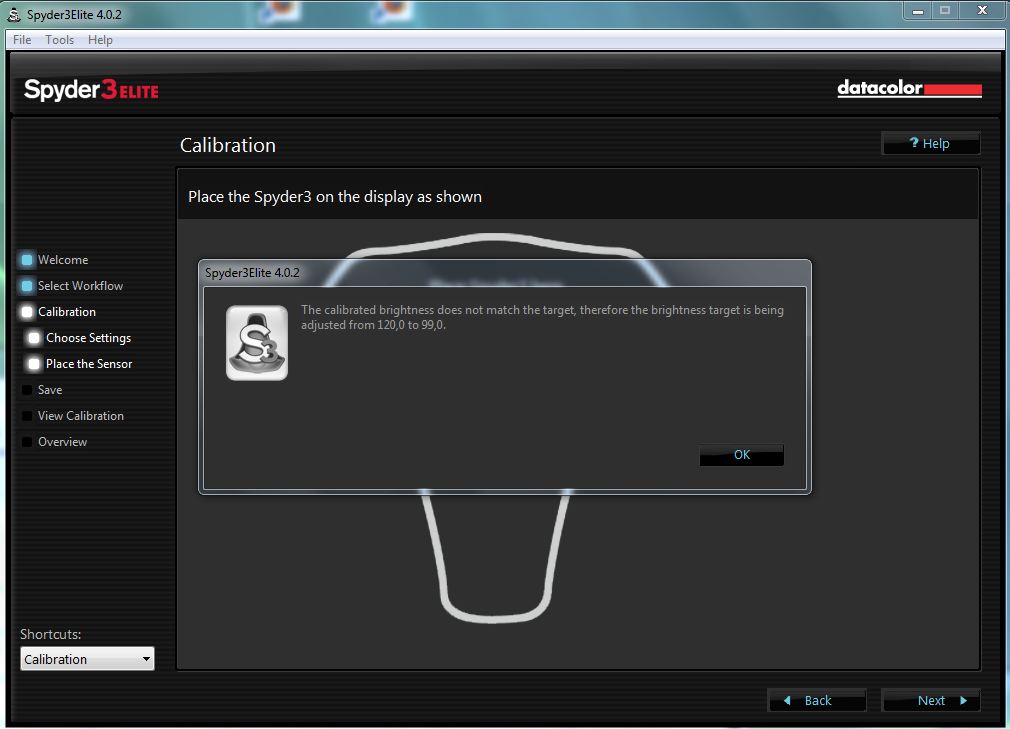
I tested one more time, my  problem is that I never have the option to accept or reject the change of the target value.
I can only klick “OK” when the program is ready calibrating.
See the attached screen copies.
Have a nice weekend,
Wim
Show quoted textHide quoted text
From: C D Tobie 
Sent: Thursday, July 28, 2011 5:59 PM
To: datacolor_group@yahoogroups.com 
Subject: Re: [datacolor_group] Re: Monitor Brightness Problem - not bright enough??


On Jul 28, 2011, at 11:29 AM, Lori wrote:


  The software I am using is Spyder2Pro 4.0.2. 

  You are correct that I am calibrating in a dim room. I turned off the ambient light sensor, reset the target to 120 candelas and recalibrated with no change in the results...it again determined that the brightness of my monitor was in high 70s (78 this time) and reset the target. Although as Wim points out, the blue LED continues to flash during calibration even with that option turned off, so I wonder if it is still checking the ambient light.  


It reset the target? That should only occur when you agree to it. If your display  is only capable of reaching 78, then you'd end up at 78, but not with a reset target... if the display is capable of more, then it should go for the target value of 120. I'll see if I can reproduce this, but I don't have any Dells here... what model are you using?


  Interestingly enough, I am also using a Dell flat panel. 


C. David Tobie
Global Product Technology Manager
Imaging Color Solutions
CDTobie@...
Datacolor
www.datacolor.com/Spyder

Attachments

Re: [datacolor_group] Re: Monitor Brightness Problem - not bright enough?? [2 Attachments]

2011-07-30 by Cdtobie

The situation your screenshots show is not one where ambient light compensation is lowering your target value, it's one where your display does not appear to be bright enough to meet the target value. Does the software ask you to adjust brightness at some point? Ifvsonto you set it to the target value? Or is this happening before that? Is possible that the software ( if it's an Apple display) is checking your brightness range automatically in advance. 

So the nex question is: can this display reach 120 candelas? Or is the software resetting the target because the screen is dimmer than the requested brightness?

C. David Tobie
Global Product Technology Manager
Imaging Color Solutions
Datacolor inc. 
cdtobie@...
www.datacolor.com
Show quoted textHide quoted text
On Jul 30, 2011, at 2:10 PM, "Wim van Leeuwen" <wimvanleeuwen@...> wrote:

> [Attachment(s) from Wim van Leeuwen included below] 
> 
> I tested one more time, my  problem is that I never have the option to accept or reject the change of the target value.
> I can only klick “OK” when the program is ready calibrating.
> See the attached screen copies.
> Have a nice weekend,
> Wim
>  
>  
> From: C D Tobie
> Sent: Thursday, July 28, 2011 5:59 PM
> To: datacolor_group@yahoogroups.com
> Subject: Re: [datacolor_group] Re: Monitor Brightness Problem - not bright enough??
>  
>  
> On Jul 28, 2011, at 11:29 AM, Lori wrote:
> 
>> The software I am using is Spyder2Pro 4.0.2. 
>> 
>> You are correct that I am calibrating in a dim room. I turned off the ambient light sensor, reset the target to 120 candelas and recalibrated with no change in the results...it again determined that the brightness of my monitor was in high 70s (78 this time) and reset the target. Although as Wim points out, the blue LED continues to flash during calibration even with that option turned off, so I wonder if it is still checking the ambient light.  
>  
> It reset the target? That should only occur when you agree to it. If your display  is only capable of reaching 78, then you'd end up at 78, but not with a reset target... if the display is capable of more, then it should go for the target value of 120. I'll see if I can reproduce this, but I don't have any Dells here... what model are you using?
>> 
>> Interestingly enough, I am also using a Dell flat panel. 
> 
>  
> C. David Tobie
> Global Product Technology Manager
> Imaging Color Solutions
> CDTobie@...
> Datacolor
> www.datacolor.com/Spyder
>  
> 
> <image003.gif>
>  
> 
> Attachment(s) from Wim van Leeuwen
> 
> 2 of 2 Photo(s)
> 
> 
> Spider1.JPG
> 
> Spider2.JPG
> 
>

Re: [datacolor_group] Re: Monitor Brightness Problem - not bright enough??

2011-07-31 by Wim van Leeuwen

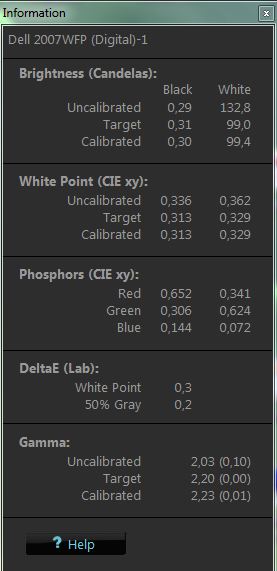
The “INFO screen” indicates that the monitor is able to meet the target value of 120 candela, or am I mis-interpreting these values?
Greetings,
Wim
Show quoted textHide quoted text
From: Cdtobie 
Sent: Sunday, July 31, 2011 12:40 AM
To: datacolor_group@yahoogroups.com 
Subject: Re: [datacolor_group] Re: Monitor Brightness Problem - not bright enough??


The situation your screenshots show is not one where ambient light compensation is lowering your target value, it's one where your display does not appear to be bright enough to meet the target value. Does the software ask you to adjust brightness at some point? Ifvsonto you set it to the target value? Or is this happening before that? Is possible that the software ( if it's an Apple display) is checking your brightness range automatically in advance. 

So the nex question is: can this display reach 120 candelas? Or is the software resetting the target because the screen is dimmer than the requested brightness?


C. David Tobie
Global Product Technology Manager
Imaging Color Solutions
Datacolor inc. 
cdtobie@...
www.datacolor.com

On Jul 30, 2011, at 2:10 PM, "Wim van Leeuwen" <wimvanleeuwen@...> wrote:


  I tested one more time, my  problem is that I never have the option to accept or reject the change of the target value.
  I can only klick “OK” when the program is ready calibrating.
  See the attached screen copies.
  Have a nice weekend,
  Wim


  From: C D Tobie 
  Sent: Thursday, July 28, 2011 5:59 PM
  To: datacolor_group@yahoogroups.com 
  Subject: Re: [datacolor_group] Re: Monitor Brightness Problem - not bright enough??


  On Jul 28, 2011, at 11:29 AM, Lori wrote:


    The software I am using is Spyder2Pro 4.0.2. 

    You are correct that I am calibrating in a dim room. I turned off the ambient light sensor, reset the target to 120 candelas and recalibrated with no change in the results...it again determined that the brightness of my monitor was in high 70s (78 this time) and reset the target. Although as Wim points out, the blue LED continues to flash during calibration even with that option turned off, so I wonder if it is still checking the ambient light.  


  It reset the target? That should only occur when you agree to it. If your display  is only capable of reaching 78, then you'd end up at 78, but not with a reset target... if the display is capable of more, then it should go for the target value of 120. I'll see if I can reproduce this, but I don't have any Dells here... what model are you using?


    Interestingly enough, I am also using a Dell flat panel. 


  C. David Tobie
  Global Product Technology Manager
  Imaging Color Solutions
  CDTobie@...m
  Datacolor
  www.datacolor.com/Spyder


  <image003.gif>

Attachments

Re: [datacolor_group] Re: Monitor Brightness Problem - not bright enough?? [1 Attachment]

2011-08-01 by C D Tobie

Yes, your info window indicates a very successful calibration of a screen capable of 130 nits, to a target of 100. If it is forcing you down from a target of 120, thats more of a mystery to me...

C. David Tobie
Global Product Technology Manager
Imaging Color Solutions


On Jul 31, 2011, at 3:52 AM, Wim van Leeuwen wrote:

[Attachment(s) from Wim van Leeuwen included below]

The “INFO screen” indicates that the monitor is able to meet the target value of 120 candela, or am I mis-interpreting these values?
Greetings,
Wim
From: Cdtobie
Sent: Sunday, July 31, 2011 12:40 AM
Subject: Re: [datacolor_group] Re: Monitor Brightness Problem - not bright enough??

The situation your screenshots show is not one where ambient light compensation is lowering your target value, it's one where your display does not appear to be bright enough to meet the target value. Does the software ask you to adjust brightness at some point? Ifvsonto you set it to the target value? Or is this happening before that? Is possible that the software ( if it's an Apple display) is checking your brightness range automatically in advance.
So the nex question is: can this display reach 120 candelas? Or is the software resetting the target because the screen is dimmer than the requested brightness?

C. David Tobie
Global Product Technology Manager
Imaging Color Solutions
Datacolor inc.

On Jul 30, 2011, at 2:10 PM, "Wim van Leeuwen" <wimvanleeuwen@...> wrote:

I tested one more time, my problem is that I never have the option to accept or reject the change of the target value.
I can only klick “OK” when the program is ready calibrating.
See the attached screen copies.
Have a nice weekend,
Wim
From: C D Tobie
Sent: Thursday, July 28, 2011 5:59 PM
Subject: Re: [datacolor_group] Re: Monitor Brightness Problem - not bright enough??
On Jul 28, 2011, at 11:29 AM, Lori wrote:

The software I am using is Spyder2Pro 4.0.2.

You are correct that I am calibrating in a dim room. I turned off the ambient light sensor, reset the target to 120 candelas and recalibrated with no change in the results...it again determined that the brightness of my monitor was in high 70s (78 this time) and reset the target. Although as Wim points out, the blue LED continues to flash during calibration even with that option turned off, so I wonder if it is still checking the ambient light.
It reset the target? That should only occur when you agree to it. If your display is only capable of reaching 78, then you'd end up at 78, but not with a reset target... if the display is capable of more, then it should go for the target value of 120. I'll see if I can reproduce this, but I don't have any Dells here... what model are you using?

Interestingly enough, I am also using a Dell flat panel.
C. David Tobie
Global Product Technology Manager
Imaging Color Solutions


Attachment(s) from Wim van Leeuwen

1 of 1 Photo(s)


Re: [datacolor_group] Re: Monitor Brightness Problem - not bright enough??

2011-08-01 by Wim van Leeuwen

That’s exactly what happens, I don’t know why it happens this way, but mysteries still happen!
Greeting,
Wim
From: C D Tobie
Sent: Monday, August 01, 2011 4:06 PM
Subject: Re: [datacolor_group] Re: Monitor Brightness Problem - not bright enough??
Yes, your info window indicates a very successful calibration of a screen capable of 130 nits, to a target of 100. If it is forcing you down from a target of 120, thats more of a mystery to me...
C. David Tobie
Global Product Technology Manager
Imaging Color Solutions

On Jul 31, 2011, at 3:52 AM, Wim van Leeuwen wrote:

[Attachment(s) from Wim van Leeuwen included below]

The “INFO screen” indicates that the monitor is able to meet the target value of 120 candela, or am I mis-interpreting these values?
Greetings,
Wim
From: Cdtobie
Sent: Sunday, July 31, 2011 12:40 AM
Subject: Re: [datacolor_group] Re: Monitor Brightness Problem - not bright enough??
The situation your screenshots show is not one where ambient light compensation is lowering your target value, it's one where your display does not appear to be bright enough to meet the target value. Does the software ask you to adjust brightness at some point? Ifvsonto you set it to the target value? Or is this happening before that? Is possible that the software ( if it's an Apple display) is checking your brightness range automatically in advance.
So the nex question is: can this display reach 120 candelas? Or is the software resetting the target because the screen is dimmer than the requested brightness?

C. David Tobie
Global Product Technology Manager
Imaging Color Solutions
Datacolor inc.

On Jul 30, 2011, at 2:10 PM, "Wim van Leeuwen" <wimvanleeuwen@...> wrote:

I tested one more time, my problem is that I never have the option to accept or reject the change of the target value.
I can only klick “OK” when the program is ready calibrating.
See the attached screen copies.
Have a nice weekend,
Wim
From: C D Tobie
Sent: Thursday, July 28, 2011 5:59 PM
Subject: Re: [datacolor_group] Re: Monitor Brightness Problem - not bright enough??
On Jul 28, 2011, at 11:29 AM, Lori wrote:

The software I am using is Spyder2Pro 4.0.2.

You are correct that I am calibrating in a dim room. I turned off the ambient light sensor, reset the target to 120 candelas and recalibrated with no change in the results...it again determined that the brightness of my monitor was in high 70s (78 this time) and reset the target. Although as Wim points out, the blue LED continues to flash during calibration even with that option turned off, so I wonder if it is still checking the ambient light.
It reset the target? That should only occur when you agree to it. If your display is only capable of reaching 78, then you'd end up at 78, but not with a reset target... if the display is capable of more, then it should go for the target value of 120. I'll see if I can reproduce this, but I don't have any Dells here... what model are you using?

Interestingly enough, I am also using a Dell flat panel.
C. David Tobie
Global Product Technology Manager
Imaging Color Solutions


Attachment(s) from Wim van Leeuwen

1 of 1 Photo(s)

C. David Tobie
Global Product Technology Manager
Imaging Color Solutions

Move to quarantaine

This moves the raw source file on disk only. The archive index is not changed automatically, so you still need to run a manual refresh afterward.