SpyderPrint Targets
2013-06-10 by DavidRLorenz
Yahoo Groups archive
Index last updated: 2026-04-28 23:18 UTC
Thread
2013-06-10 by DavidRLorenz
I print uncoated watercolor paper or mat canvas on an Epson 10600.
Which targets will give the very best profiles?

Also, I use the older spectro I think it is called 1005.  Will it give good profiles?

Kind Regards,

David Lorenz
davidlorenz.com
2013-06-11 by johnvphoto
I always use the largest target possible. Should have no problem with the 1005. Just make sure to use the latest software: http://support.datacolor.com/index.php?/Knowledgebase/List/Index/91


--- In datacolor_group@yahoogroups.com, "DavidRLorenz" <DavidLorenz@...> wrote:
>
> I print uncoated watercolor paper or mat canvas on an Epson 10600.
> Which targets will give the very best profiles?
>
> Also, I use the older spectro I think it is called 1005.  Will it give good profiles?
>
> Kind Regards,
>
> David Lorenz
> davidlorenz.com
>
2013-06-12 by C D Tobie
Also, I use the older spectro I think it is called 1005. Will it give good profiles?
C. David Tobie
Datacolor
5 Princess Road
Lawrenceville, NJ 08648, USA
609.924.2189
Phone: 207.685.9248
Mobile: 207.312.0448
Fax: 207.685.4455
Email: ;cdtobie@...
Skype: cdtobie
2013-06-18 by DavidRLorenz
Oh,  I have been using the EZ 4 page targets with the extended blacks. Should I be using the 7 or 9 page ones?  I do want good black and white.

Kind Regards,

David Lorenz
This message sent from my Windows XP machine.

--- In datacolor_group@yahoogroups.com, C D Tobie <CDTobie@...> wrote:
>
> No problem with the profile quality from it, as long as its in good working order. But it does take longer to use, since it reads patches, not strips. However, that can save you paper, since the patch targets are half the size of the EZ targets designed for strip reading.
>
> C. David Tobie
> Global Product Technology Manager
>
> Datacolor
> 5 Princess Road
> Lawrenceville, NJ 08648, USA
> 609.924.2189
> www.datacolor.com
>
> Phone: 207.685.9248
> Mobile: 207.312.0448
> Fax: 207.685.4455
> Email:  cdtobie@...
> Skype: cdtobie
>
2013-06-18 by C D Tobie
Oh, I have been using the EZ 4 page targets with the extended blacks. Should I be using the 7 or 9 page ones? I do want good black and white.
C. David Tobie
Datacolor
5 Princess Road
Lawrenceville, NJ 08648, USA
609.924.2189
Phone: 207.685.9248
Mobile: 207.312.0448
Fax: 207.685.4455
Email: cdtobie@...
Skype: cdtobie
2013-06-26 by Michael de Courcy
2013-06-26 by C D Tobie
C. David Tobie
Datacolor
5 Princess Road
Lawrenceville, NJ 08648, USA
609.924.2189
Phone: 207.685.9248
Mobile: 207.312.0448
Fax: 207.685.4455
Email: cdtobie@...
Skype: cdtobie
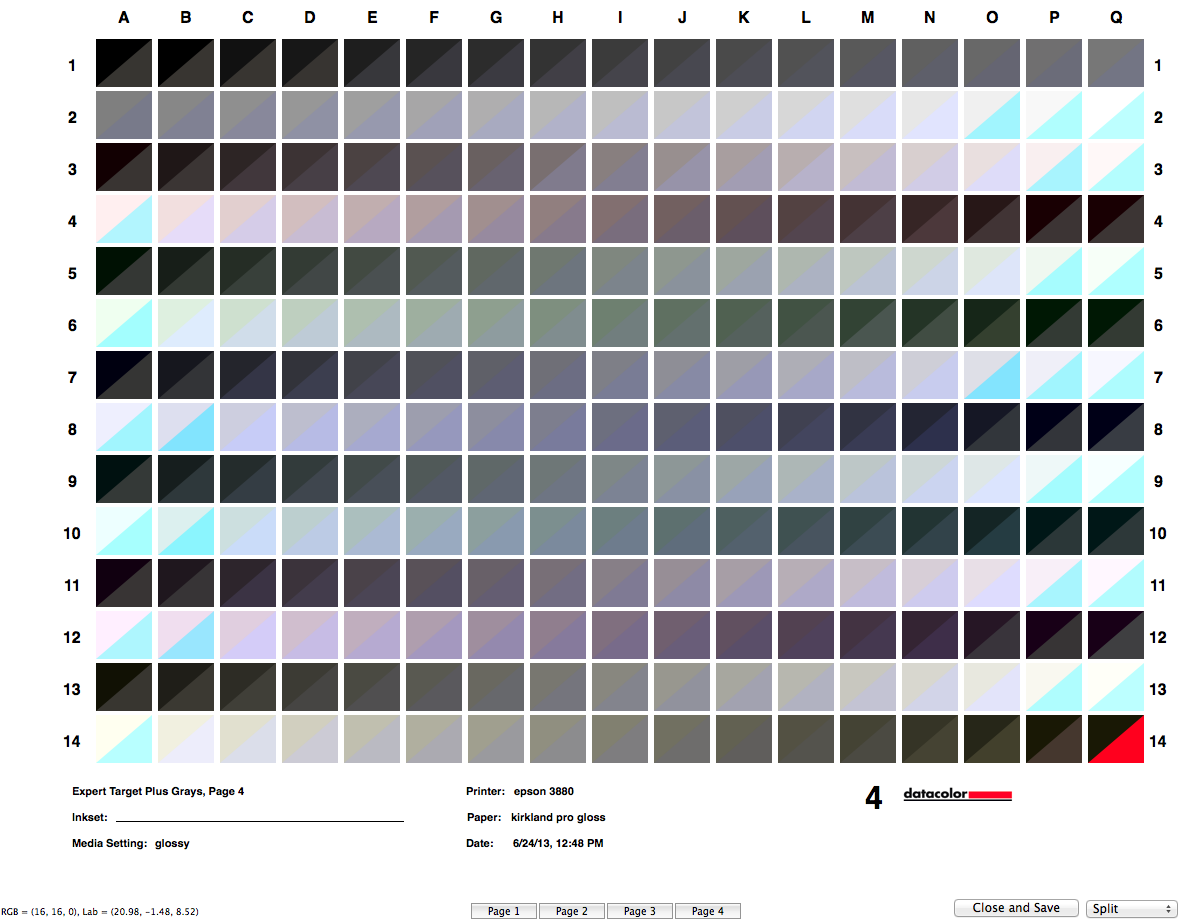
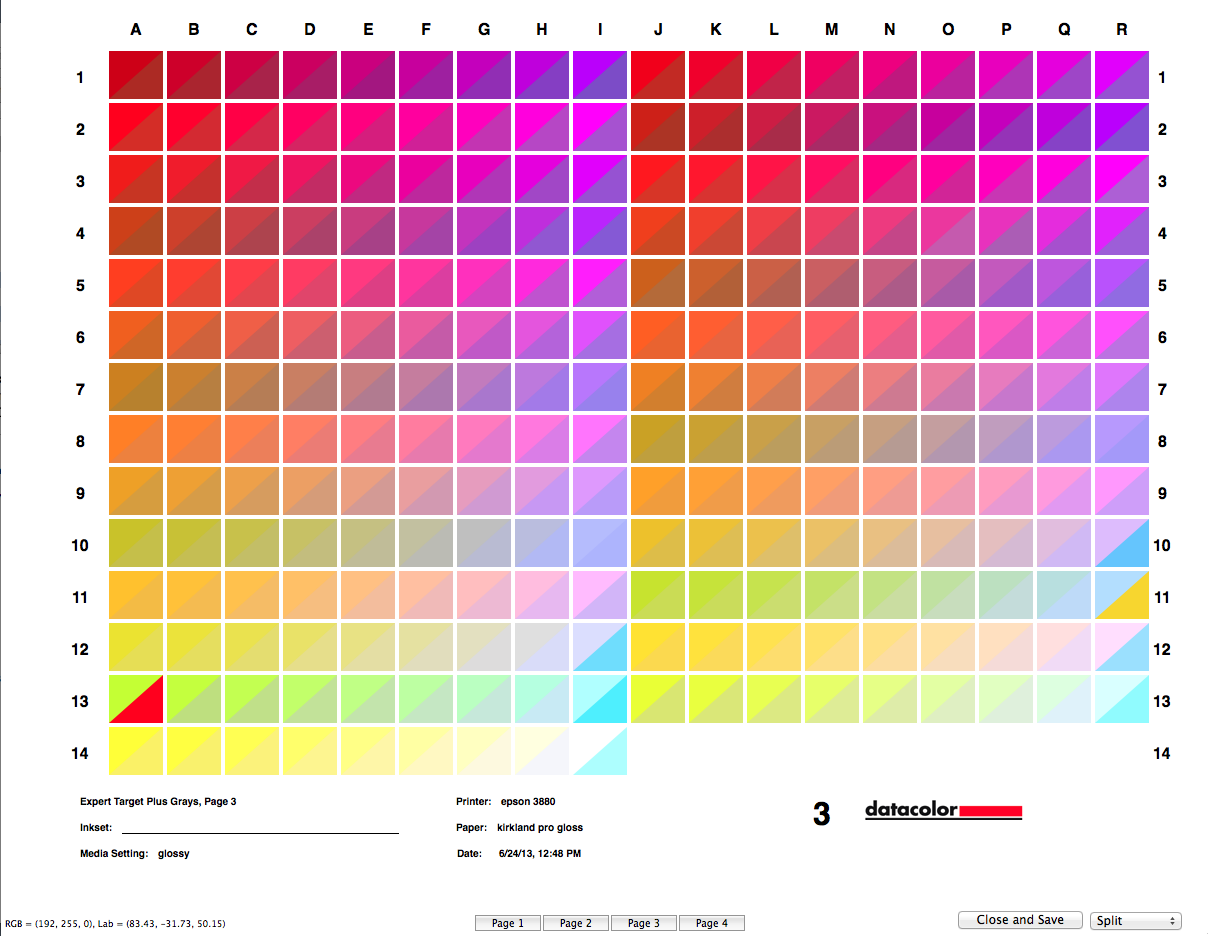
hello david,i have been trying to create a profile for a new paper and my spectrometer will measure about 99 percent of the target patches with no problem each target however has several patches which give me a solid yellow or solid cyan reading which is obviously wrong i re-measured it over and over again— same wrong reading — i have restarted the application —re started the computer— still those particular target patches refuse to measure correctly. i have a ticket going with datacolor support and was told that the calibration tile needed cleaning. which i did as they directed with dish washing detergent and warm water it seemed seems clean to me. i have observed that it is ever so slightly discolored i assume from contact with the spectro . but this is extremely slight barely visible. after cleaning i got the same result exactly. i am attaching several screen captures of the split measures as illustrations. also the xml profile. i am printing black and white images and the profile results in a yellow cast. not usablei have made been making profiles for years and have not had this problem. there has been no physical damage to the hardware it is stored in its protective case between operations.i am working on a 2008 iMac with osx 10.8.4 spiderprint 4.2.3 library version 1.85why would only certain patches be a problem. any ideas.thank you . . .michael
2013-06-26 by Michael de Courcy
Not sure which of us "Davids" you are addressing. But I'll point out that the critical factor here is the paper involved. I would guess that Kirkland Gloss is highly whitened. This means there are optical brighteners that are causing the overflow condition on white and near white patches. One hack for this is to calibrate the spectro on the paper in question, instead of its white tile. While this is not ideal, it may well produce a usable profile for this paper, which you are not going to get otherwise. Avoiding highly whitened papers is another workaround, but not one that will help you with this particular situation.C. David Tobie
Global Product Technology Manager
<image003.gif>
Datacolor
5 Princess RoadLawrenceville, NJ 08648, USA
609.924.2189
Phone: 207.685.9248Mobile: 207.312.0448
Fax: 207.685.4455
Email: ;cdtobie@...
Skype: cdtobie
On Jun 26, 2013, at 2:04 PM, Michael de Courcy <mdec@...> wrote:hello david,i have been trying to create a profile for a new paper and my spectrometer will measure about 99 percent of the target patches with no problem each target however has several patches which give me a solid yellow or solid cyan reading which is obviously wrong i re-measured it over and over again— same wrong reading — i have restarted the application —re started the computer— still those particular target patches refuse to measure correctly. i have a ticket going with datacolor support and was told that the calibration tile needed cleaning. which i did as they directed with dish washing detergent and warm water it seemed seems clean to me. i have observed that it is ever so slightly discolored i assume from contact with the spectro . but this is extremely slight barely visible. after cleaning i got the same result exactly. i am attaching several screen captures of the split measures as illustrations. also the xml profile. i am printing black and white images and the profile results in a yellow cast. not usablei have made been making profiles for years and have not had this problem. there has been no physical damage to the hardware it is stored in its protective case between operations.i am working on a 2008 iMac with osx 10.8.4 spiderprint 4.2.3 library version 1.85why would only certain patches be a problem. any ideas.thank you . . .michael
2013-06-27 by Michael de Courcy
2013-06-27 by C D Tobie
i made a profile using the brightened white paper as the spectra calibration target. it did facilitate reading all of the target patches. the resulting black and white prints made with the new profile are neutral and have good detail in the shadows
however they are noticeably flat in that the blacks don't have much punch. i tried to compensate by turning up the ink color density in advanced media settings in photoshops print dialogue box but this was not ideal as it just made the entire print darker.
is there a way i can increase the dmax in the print by adjusting the profile in advanced editing function of spyderprint app. that is without loosing too much shadow detail or is that just an inevitable trade off.
C. David Tobie
Datacolor
5 Princess Road
Lawrenceville, NJ 08648, USA
609.924.2189
Phone: 207.685.9248
Mobile: 207.312.0448
Fax: 207.685.4455
Email: cdtobie@...
Skype: cdtobie
2013-06-27 by Michael de Courcy
You can open our Matrix Large test image in Photoshop,
you can then import that RGB correction curve into SpyderPrint and apply it to the profile to get these results directly from a new version of the custom profile.
On Jun 27, 2013, at 1:53 AM, Michael de Courcy <mdec@...> wrote:i made a profile using the brightened white paper as the spectra calibration target. it did facilitate reading all of the target patches. the resulting black and white prints made with the new profile are neutral and have good detail in the shadowsI'm glad to hear this offers a work-around for you.however they are noticeably flat in that the blacks don't have much punch. i tried to compensate by turning up the ink color density in advanced media settings in photoshops print dialogue box but this was not ideal as it just made the entire print darker.That is seldom a solution that improves results...is there a way i can increase the dmax in the print by adjusting the profile in advanced editing function of spyderprint app. that is without loosing too much shadow detail or is that just an inevitable trade off.You can open our Matrix Large test image in Photoshop, apply your SpyderPrint-built profile to the image, then create an RGB correction curve in Photoshop, adjusting only the global curve, not the individual R, G or B curve. Once you get the gray densities as desired, you can then import that RGB correction curve into SpyderPrint and apply it to the profile to get these results directly from a new version of the custom profile.
2013-06-27 by C D Tobie
hi david,
thank you for your thoughts on this.You can open our Matrix Large test image in Photoshop,i am able to do thisapply your SpyderPrint-built profile to the imagehow exactly do i proceed to apply my spyderprint built profile to the image.
then create an RGB correction curve in Photoshop, adjusting only the global curve, not the individual R, G or B curve.i think i can do the above
you can then import that RGB correction curve into SpyderPrint and apply it to the profile to get these results directly from a new version of the custom profile.how do i do accomplish this import and the application of the curve to the profile.
michael
C. David Tobie
Datacolor
5 Princess Road
Lawrenceville, NJ 08648, USA
609.924.2189
Phone: 207.685.9248
Mobile: 207.312.0448
Fax: 207.685.4455
Email: cdtobie@...
Skype: cdtobie
2013-06-28 by Michael de Courcy
On Jun 27, 2013, at 3:53 PM, Michael de Courcy <mdec@decourcy.ca> wrote:hi david,
thank you for your thoughts on this.You can open our Matrix Large test image in Photoshop,i am able to do thisapply your SpyderPrint-built profile to the imagehow exactly do i proceed to apply my spyderprint built profile to the image.Edit > Convert to Profile. Choose your Custom SpyderPrint profile.then create an RGB correction curve in Photoshop, adjusting only the global curve, not the individual R, G or B curve.i think i can do the aboveIts a matter or making small adjustments to the areas that you want lighter or darker, printing tests, making further changes, saving each generation of curve adjustments, until the print results are just as you want them. Since the output profile has already been applied, you just print with No Color Management.you can then import that RGB correction curve into SpyderPrint and apply it to the profile to get these results directly from a new version of the custom profile.how do i do accomplish this import and the application of the curve to the profile.Launch SpyderPrint. At the fork in the road, select Choose Existing Measurement Set. Select the set for your profile. Move forward to the SpyderProof View screen, and choose the button for the Advanced Editing button. On the SpyderProof Edit screen, select the button named Import Curves File, and navigate to where you have saved your Photoshop Curves file. Once selected, it will be applied to your profile. Now save new version of the profile, named to reflect the addition of the curves.michaelC. David Tobie
Global Product Technology Manager
Datacolor
5 Princess RoadLawrenceville, NJ 08648, USA
609.924.2189
Phone: 207.685.9248Mobile: 207.312.0448
Fax: 207.685.4455
Email: cdtobie@...
Skype: cdtobie
2013-07-08 by Michael de Courcy
"Since the output profile has already been applied, you just print with No Color Management."in principle i understand this instruction however if i print the progressive curve tests through photoshop and in the print diologue box select photoshop manages colors i am required to select the appropriate icc profile from the drop down menu. isn't this a problem. won't i be adding an extra profile adjustment to the test print.how do i print the curve tests with no color management. do i let printer manage colors or do i just print using the "output" option in the ps print dialogue box. . .thank you.
"Since the output profile has already been applied, you just print with No Color Management."in principle i understand this instruction however if i print the progressive curve tests through photoshop and in the print diologue box select photoshop manages colors i am required to select the appropriate icc profile from the drop down menu. isn't this a problem. won't i be adding an extra profile adjustment to the test print.how do i print the curve tests with no color management. do i let printer manage colors. . .thank you.On Jun 27, 2013, at 4:43 PM, C D Tobie <CDTobie@...> wrote:On Jun 27, 2013, at 3:53 PM, Michael de Courcy <mdec@...> wrote:hi david,
thank you for your thoughts on this.You can open our Matrix Large test image in Photoshop,i am able to do thisapply your SpyderPrint-built profile to the imagehow exactly do i proceed to apply my spyderprint built profile to the image.Edit > Convert to Profile. Choose your Custom SpyderPrint profile.then create an RGB correction curve in Photoshop, adjusting only the global curve, not the individual R, G or B curve.i think i can do the aboveIts a matter or making small adjustments to the areas that you want lighter or darker, printing tests, making further changes, saving each generation of curve adjustments, until the print results are just as you want them. Since the output profile has already been applied, you just print with No Color Management.you can then import that RGB correction curve into SpyderPrint and apply it to the profile to get these results directly from a new version of the custom profile.how do i do accomplish this import and the application of the curve to the profile.Launch SpyderPrint. At the fork in the road, select Choose Existing Measurement Set. Select the set for your profile. Move forward to the SpyderProof View screen, and choose the button for the Advanced Editing button. On the SpyderProof Edit screen, select the button named Import Curves File, and navigate to where you have saved your Photoshop Curves file. Once selected, it will be applied to your profile. Now save new version of the profile, named to reflect the addition of the curves.michaelC. David Tobie
Global Product Technology Manager
Datacolor
5 Princess Road