Yahoo Groups archive

Disklavier

Index last updated: 2026-04-28 23:20 UTC

Thread

external tone generator

external tone generator

2014-01-16 by Sam Kanter

Hope I'm not wearing out my welcome with so many questions from a new user, but here's another.

The MPX100II came with a MU50 XG external tone generator (and powered speaker) probably because this model was released before this was built-in to the Mk II XG disklaviers.

I assume one can use MIDI thru to connect both DK and external module, but what about the 500ms delay of the dk when receiving MIDI data, preventing everything from syncing up? There are latency settings in some advanced sequencers I have, but I was hoping there would be a simpler way to play back multi-channel MIDI files...

Has anyone else tried this?

Thanks in advance...

Sam Kanter
www.keyboardcollective.com
(212) 684-3304

Re: [disklavier] external tone generator

2014-01-17 by Bill Brandom

Send your MIDI data to your MPX100II MIDI In port. Connect the MU50 to the MPX100II MIDI Out.

This way the 500ms delay is incorporated in both the Disklavier and the MU50.

Bill

Sent from my iPhone.

On Jan 16, 2014, at 11:46 AM, Sam Kanter <skanter123@...> wrote:

Hope I'm not wearing out my welcome with so many questions from a new user, but here's another.

The MPX100II came with a MU50 XG external tone generator (and powered speaker) probably because this model was released before this was built-in to the Mk II XG disklaviers.

I assume one can use MIDI thru to connect both DK and external module, but what about the 500ms delay of the dk when receiving MIDI data, preventing everything from syncing up? There are latency settings in some advanced sequencers I have, but I was hoping there would be a simpler way to play back multi-channel MIDI files...

Has anyone else tried this?

Thanks in advance...

Sam Kanter
www.keyboardcollective.com
(212) 684-3304

Re: [disklavier] external tone generator

2014-01-17 by Skanter123

> Send your MIDI data to your MPX100II MIDI In port. Connect the MU50 to the MPX100II MIDI Out.


Hmmm...not sure that would work. I think i'd need a MIDI THRU on the DKL?

Sam
www.keyboardcollective.com
(212) 684-3304
Show quoted textHide quoted text
> On Jan 17, 2014, at 2:57 AM, Bill Brandom <bill.brandom03@...> wrote:
>
> Send your MIDI data to your MPX100II MIDI In port. Connect the MU50 to the MPX100II MIDI Out.
>
> This way the 500ms delay is incorporated in both the Disklavier and the MU50.
>
> Bill
>
> Sent from my iPhone.
>
> On Jan 16, 2014, at 11:46 AM, Sam Kanter <skanter123@...> wrote:
>
>
> Hope I'm not wearing out my welcome with so many questions from a new user, but here's another.
>
> The MPX100II came with a MU50 XG external tone generator (and powered speaker) probably because this model was released before this was built-in to the Mk II XG disklaviers.
>
> I assume one can use MIDI thru to connect both DK and external module, but what about the 500ms delay of the dk when receiving MIDI data, preventing everything from syncing up? There are latency settings in some advanced sequencers I have, but I was hoping there would be a simpler way to play back multi-channel MIDI files...
>
> Has anyone else tried this?
>
> Thanks in advance...
>
> Sam Kanter
> www.keyboardcollective.com
> (212) 684-3304
>

Re: [disklavier] external tone generator

2014-01-19 by PianoBench@...

Good evening, everyone.

Sam, this procedure does work with the Mark II. This Disklavier does not have a MIDI Thru port. Instead, the MIDI Output port functions as either a MIDI Output for or a MIDI Thru part. In the latter case, a 500ms delay is applied.

To use the MIDI Out port of a Mark II as a MIDI Thru port with a 500ms delay, change the MIDI Out setting from Keyboard Out to Delay Out.

Regards,
PianoBench

On Jan 17, 2014, at 3:07 AM, Skanter123 <skanter123@...> wrote:


Send your MIDI data to your MPX100II MIDI In port. Connect the MU50 to the MPX100II MIDI Out.

Hmmm...not sure that would work. I think i'd need a MIDI THRU on the DKL?

Sam

On Jan 17, 2014, at 2:57 AM, Bill Brandom <bill.brandom03@...> wrote:


Send your MIDI data to your MPX100II MIDI In port. Connect the MU50 to the MPX100II MIDI Out.

This way the 500ms delay is incorporated in both the Disklavier and the MU50.

Bill

Sent from my iPhone.

On Jan 16, 2014, at 11:46 AM, Sam Kanter <skanter123@...> wrote:


Hope I'm not wearing out my welcome with so many questions from a new user, but here's another.

The MPX100II came with a MU50 XG external tone generator (and powered speaker) probably because this model was released before this was built-in to the Mk II XG disklaviers.

I assume one can use MIDI thru to connect both DK and external module, but what about the 500ms delay of the dk when receiving MIDI data, preventing everything from syncing up? There are latency settings in some advanced sequencers I have, but I was hoping there would be a simpler way to play back multi-channel MIDI files...

Has anyone else tried this?

Thanks in advance...

Sam Kanter
www.keyboardcollective.com
(212) 684-3304


Re: [disklavier] external tone generator

2014-01-19 by Skanter123

Pianobench, thanks for the reply. As I took a look at the nice reference guide I noticed this fact - MIDI OUT can be changed to MIDI THRU in the settings - neat!

Without some type of MIDI junction box, I think I would need to keep switching cables to send MIDI OUT from disklavier to MIDI IN of computer for playing of virtual piano (Synthogy Ivory)? Or connect MIDI THRU on MU50 back to computer MIDi in, then switch settings when needed? I'd have to keep MU50 on all the time.

I think i'd better make a diagram of this. :-)

Sam 
www.keyboardcollective.com
(212) 684-3304
Show quoted textHide quoted text
> On Jan 18, 2014, at 10:46 PM, PianoBench@... wrote:
> 
> Good evening, everyone.
> 
> 
> Sam, this procedure does work with the Mark II. This Disklavier does not have a MIDI Thru port. Instead, the MIDI Output port functions as either a MIDI Output for or a MIDI Thru part. In the latter case, a 500ms delay is applied.
> 
> To use the MIDI Out port of a Mark II as a MIDI Thru port with a 500ms delay, change the MIDI Out setting from Keyboard Out to Delay Out.
> 
> Regards,
> PianoBench
> 
>> On Jan 17, 2014, at 3:07 AM, Skanter123 <skanter123@...> wrote:
>> 
>> 
>>> Send your MIDI data to your MPX100II MIDI In port. Connect the MU50 to the MPX100II MIDI Out.
>> 
>> 
>> Hmmm...not sure that would work. I think i'd need a MIDI THRU on the DKL?
>> 
>> Sam 
>> www.keyboardcollective.com
>> (212) 684-3304
>> 
>> 
>> 
>> 
>> 
>>> On Jan 17, 2014, at 2:57 AM, Bill Brandom <bill.brandom03@...> wrote:
>>> 
>>>  
>>> 
>>> Send your MIDI data to your MPX100II MIDI In port. Connect the MU50 to the MPX100II MIDI Out.
>>> 
>>> This way the 500ms delay is incorporated in both the Disklavier and the MU50.
>>> 
>>> Bill
>>> 
>>> Sent from my iPhone.
>>> 
>>> On Jan 16, 2014, at 11:46 AM, Sam Kanter <skanter123@...> wrote:
>>> 
>>>  
>>> 
>>> Hope I'm not wearing out my welcome with so many questions from a new user, but here's another.
>>> 
>>> The MPX100II came with a MU50 XG external tone generator (and powered speaker) probably because this model was released before this was built-in to the Mk II XG disklaviers.
>>> 
>>> I assume one can use MIDI thru to connect both DK and external module, but what about the 500ms delay of the dk when receiving MIDI data, preventing everything from syncing up? There are latency settings in some advanced sequencers I have, but I was hoping there would be a simpler way to play back multi-channel MIDI files...
>>> 
>>> Has anyone else tried this?
>>> 
>>> Thanks in advance...
>>> 
>>> Sam Kanter
>>> www.keyboardcollective.com
>>> (212) 684-3304
>>> 
>>> 
>> 
> 
>

Re: [disklavier] external tone generator

2014-01-19 by Skanter123

Also, I've been trying to accomplish playing multi-channel playback with dkl using virtual instruments inside computer. Will i lose delay if i just change settimg on dkl? I must try this tomorrow when I wont be disturbing neighbors!

Sam 
www.keyboardcollective.com
(212) 684-3304
Show quoted textHide quoted text
> On Jan 18, 2014, at 10:46 PM, PianoBench@... wrote:
> 
> Good evening, everyone.
> 
> 
> Sam, this procedure does work with the Mark II. This Disklavier does not have a MIDI Thru port. Instead, the MIDI Output port functions as either a MIDI Output for or a MIDI Thru part. In the latter case, a 500ms delay is applied.
> 
> To use the MIDI Out port of a Mark II as a MIDI Thru port with a 500ms delay, change the MIDI Out setting from Keyboard Out to Delay Out.
> 
> Regards,
> PianoBench
> 
>> On Jan 17, 2014, at 3:07 AM, Skanter123 <skanter123@...> wrote:
>> 
>> 
>>> Send your MIDI data to your MPX100II MIDI In port. Connect the MU50 to the MPX100II MIDI Out.
>> 
>> 
>> Hmmm...not sure that would work. I think i'd need a MIDI THRU on the DKL?
>> 
>> Sam 
>> www.keyboardcollective.com
>> (212) 684-3304
>> 
>> 
>> 
>> 
>> 
>>> On Jan 17, 2014, at 2:57 AM, Bill Brandom <bill.brandom03@...> wrote:
>>> 
>>>  
>>> 
>>> Send your MIDI data to your MPX100II MIDI In port. Connect the MU50 to the MPX100II MIDI Out.
>>> 
>>> This way the 500ms delay is incorporated in both the Disklavier and the MU50.
>>> 
>>> Bill
>>> 
>>> Sent from my iPhone.
>>> 
>>> On Jan 16, 2014, at 11:46 AM, Sam Kanter <skanter123@...> wrote:
>>> 
>>>  
>>> 
>>> Hope I'm not wearing out my welcome with so many questions from a new user, but here's another.
>>> 
>>> The MPX100II came with a MU50 XG external tone generator (and powered speaker) probably because this model was released before this was built-in to the Mk II XG disklaviers.
>>> 
>>> I assume one can use MIDI thru to connect both DK and external module, but what about the 500ms delay of the dk when receiving MIDI data, preventing everything from syncing up? There are latency settings in some advanced sequencers I have, but I was hoping there would be a simpler way to play back multi-channel MIDI files...
>>> 
>>> Has anyone else tried this?
>>> 
>>> Thanks in advance...
>>> 
>>> Sam Kanter
>>> www.keyboardcollective.com
>>> (212) 684-3304
>>> 
>>> 
>> 
> 
>

Re: [disklavier] external tone generator

2014-01-19 by Spencer Chase

you can use MIDIOX with its associated MIDI YOKE to send midi from any 
software of hardware device on a PC to any other. you may have to shift 
the piano tracks by 500 ms in the file. this can be done in a sequencer. 
i probably have a program somewhere that i wrote that will do it or 
could write one if there is interest. i could probably stick the feature 
into my MIDIMOD 2 program but that is such a complicated mess and i have 
not worked on it in a while so ???

On 1/18/2014 8:22 PM, Skanter123 wrote:
> Pianobench, thanks for the reply. As I took a look at the nice 
> reference guide I noticed this fact - MIDI OUT can be changed to MIDI 
> THRU in the settings - neat!
>
> Without some type of MIDI junction box, I think I would need to keep 
> switching cables to send MIDI OUT from disklavier to MIDI IN of 
> computer for playing of virtual piano (Synthogy Ivory)? Or connect 
> MIDI THRU on MU50 back to computer MIDi in, then switch settings when 
> needed? I'd have to keep MU50 on all the time.
>
> I think i'd better make a diagram of this. :-)
>
> Sam
> www.keyboardcollective.com <http://www.keyboardcollective.com>
> (212) 684-3304
>
>
>
>
>
> On Jan 18, 2014, at 10:46 PM, PianoBench@... 
> <mailto:PianoBench@...> wrote:
>
>> Good evening, everyone.
>>
>>
>> Sam, this procedure does work with the Mark II. This Disklavier does 
>> not have a MIDI Thru port. Instead, the MIDI Output port functions as 
>> either a MIDI Output for or a MIDI Thru part. In the latter case, a 
>> 500ms delay is applied.
>>
>> To use the MIDI Out port of a Mark II as a MIDI Thru port with a 
>> 500ms delay, change the MIDI Out setting from Keyboard Out to Delay Out.
>>
>> Regards,
>> PianoBench
>>
>> On Jan 17, 2014, at 3:07 AM, Skanter123 <skanter123@... 
>> <mailto:skanter123@...>> wrote:
>>
>>>
>>>> Send your MIDI data to your MPX100II MIDI In port. Connect the MU50 
>>>> to the MPX100II MIDI Out.
>>>
>>> Hmmm...not sure that would work. I think i'd need a MIDI THRU on the 
>>> DKL?
>>>
>>> Sam
>>> www.keyboardcollective.com <http://www.keyboardcollective.com/>
>>> (212) 684-3304
>>>
>>>
>>>
>>>
>>>
>>> On Jan 17, 2014, at 2:57 AM, Bill Brandom <bill.brandom03@... 
>>> <mailto:bill.brandom03@...>> wrote:
>>>
>>>>
>>>> Send your MIDI data to your MPX100II MIDI In port. Connect the MU50 
>>>> to the MPX100II MIDI Out.
>>>>
>>>> This way the 500ms delay is incorporated in both the Disklavier and 
>>>> the MU50.
>>>>
>>>> Bill
>>>>
>>>> Sent from my iPhone.
>>>>
>>>> On Jan 16, 2014, at 11:46 AM, Sam Kanter <skanter123@... 
>>>> <mailto:skanter123@...>> wrote:
>>>>
>>>>
>>>> Hope I'm not wearing out my welcome with so many questions from a 
>>>> new user, but here's another.
>>>>
>>>> The MPX100II came with a MU50 XG external tone generator (and 
>>>> powered speaker) probably because this model was released before 
>>>> this was built-in to the Mk II XG disklaviers.
>>>>
>>>> I assume one can use MIDI thru to connect both DK and external 
>>>> module, but what about the 500ms delay of the dk when receiving 
>>>> MIDI data, preventing everything from syncing up? There are latency 
>>>> settings in some advanced sequencers I have, but I was hoping there 
>>>> would be a simpler way to play back multi-channel MIDI files...
>>>>
>>>> Has anyone else tried this?
>>>>
>>>> Thanks in advance...
>>>>
>>>> Sam Kanter
>>>> www.keyboardcollective.com <http://www.keyboardcollective.com/>
>>>> (212) 684-3304
>>>>
>>>>
>>>
>>
> 

-- 

Best regards, Spencer Chase
67550-Bell Springs Rd.
Garberville, CA 95542 Postal service only.
Laytonville, CA 95454 UPS only.
Spencer@...
http://www.spencerserolls.com
(707) 984-8356
(425) 791-0309

Re: [disklavier] external tone generator

2014-01-19 by Skanter123

Yes Spencer, i have tried this in a sequencer by adding a 500ms delay to non- disklavier tracks, and it synced up fine. Problem is I have to do this every time i load a file. Cant seem to save a template using Realband, which i use at home as DAW.

Sam 
www.keyboardcollective.com
(212) 684-3304
Show quoted textHide quoted text
> On Jan 18, 2014, at 11:51 PM, Spencer Chase <lists@...> wrote:
> 
> you can use MIDIOX with its associated MIDI YOKE to send midi from any software of hardware device on a PC to any other. you may have to shift the piano tracks by 500 ms in the file. this can be done in a sequencer. i probably have a program somewhere that i wrote that will do it or could write one if there is interest. i could probably stick the feature into my MIDIMOD 2 program but that is such a complicated mess and i have not worked on it in a while so ???
> 
>> On 1/18/2014 8:22 PM, Skanter123 wrote:
>> Â 
>> Pianobench, thanks for the reply. As I took a look at the nice reference guide I noticed this fact - MIDI OUT can be changed to MIDI THRU in the settings - neat!
>> 
>> Without some type of MIDI junction box, I think I would need to keep switching cables to send MIDI OUT from disklavier to MIDI IN of computer for playing of virtual piano (Synthogy Ivory)? Or connect MIDI THRU on MU50 back to computer MIDi in, then switch settings when needed? I'd have to keep MU50 on all the time.
>> 
>> I think i'd better make a diagram of this. :-)
>> 
>> Sam 
>> www.keyboardcollective.com
>> (212) 684-3304
>> 
>> 
>> 
>> 
>> 
>> On Jan 18, 2014, at 10:46 PM, PianoBench@... wrote:
>> 
>>> Â 
>>> Good evening, everyone.
>>> 
>>> 
>>> Sam, this procedure does work with the Mark II. This Disklavier does not have a MIDI Thru port. Instead, the MIDI Output port functions as either a MIDI Output for or a MIDI Thru part. In the latter case, a 500ms delay is applied.
>>> 
>>> To use the MIDI Out port of a Mark II as a MIDI Thru port with a 500ms delay, change the MIDI Out setting from Keyboard Out to Delay Out.
>>> 
>>> Regards,
>>> PianoBench
>>> 
>>>> On Jan 17, 2014, at 3:07 AM, Skanter123 <skanter123@...> wrote:
>>>> 
>>>> 
>>>>> Send your MIDI data to your MPX100II MIDI In port. Connect the MU50 to the MPX100II MIDI Out.
>>>> 
>>>> 
>>>> Hmmm...not sure that would work. I think i'd need a MIDI THRU on the DKL?
>>>> 
>>>> Sam 
>>>> www.keyboardcollective.com
>>>> (212) 684-3304
>>>> 
>>>> 
>>>> 
>>>> 
>>>> 
>>>> On Jan 17, 2014, at 2:57 AM, Bill Brandom <bill.brandom03@...> wrote:
>>>> 
>>>>> Â 
>>>>> 
>>>>> Send your MIDI data to your MPX100II MIDI In port. Connect the MU50 to the MPX100II MIDI Out.
>>>>> 
>>>>> This way the 500ms delay is incorporated in both the Disklavier and the MU50.
>>>>> 
>>>>> Bill
>>>>> 
>>>>> Sent from my iPhone.
>>>>> 
>>>>> On Jan 16, 2014, at 11:46 AM, Sam Kanter <skanter123@...> wrote:
>>>>> 
>>>>> Â 
>>>>> 
>>>>> Hope I'm not wearing out my welcome with so many questions from a new user, but here's another.
>>>>> 
>>>>> The MPX100II came with a MU50 XG external tone generator (and powered speaker) probably because this model was released before this was built-in to the Mk II XG disklaviers.
>>>>> 
>>>>> I assume one can use MIDI thru to connect both DK and external module, but what about the 500ms delay of the dk when receiving MIDI data, preventing everything from syncing up? There are latency settings in some advanced sequencers I have, but I was hoping there would be a simpler way to play back multi-channel MIDI files...
>>>>> 
>>>>> Has anyone else tried this?
>>>>> 
>>>>> Thanks in advance...
>>>>> 
>>>>> Sam Kanter
>>>>> www.keyboardcollective.com
>>>>> (212) 684-3304
>>>>> 
>>>>> 
>>>> 
>>> 
> 
> --
> 
> Best regards, Spencer Chase
> 67550-Bell Springs Rd.
> Garberville, CA 95542 Postal service only.
> Laytonville, CA 95454 UPS only.
> Spencer@...
> http://www.spencerserolls.com
> (707) 984-8356
> (425) 791-0309
>

Re: [disklavier] external tone generator

2014-01-19 by Skanter123

Does this look right? (Excuse lousy diagram)

Computer MIDI OUT to DKL IN
DKL OUT /THRU to MU50 IN
MU50 THRU to Computer IN

Play multi-channel MIDI file from computer, plays disklavier live then sends other channels to MU50 with delay so all syncs up.

If i want to play virtual piano in Computer from silent DKL just change DSK setting from DLY OUT to KBD OUT, and keep MU50 powered on.

Sam 
www.keyboardcollective.com
(212) 684-3304
Show quoted textHide quoted text
> On Jan 18, 2014, at 10:46 PM, PianoBench@... wrote:
> 
> Good evening, everyone.
> 
> 
> Sam, this procedure does work with the Mark II. This Disklavier does not have a MIDI Thru port. Instead, the MIDI Output port functions as either a MIDI Output for or a MIDI Thru part. In the latter case, a 500ms delay is applied.
> 
> To use the MIDI Out port of a Mark II as a MIDI Thru port with a 500ms delay, change the MIDI Out setting from Keyboard Out to Delay Out.
> 
> Regards,
> PianoBench
> 
>> On Jan 17, 2014, at 3:07 AM, Skanter123 <skanter123@...> wrote:
>> 
>> 
>>> Send your MIDI data to your MPX100II MIDI In port. Connect the MU50 to the MPX100II MIDI Out.
>> 
>> 
>> Hmmm...not sure that would work. I think i'd need a MIDI THRU on the DKL?
>> 
>> Sam 
>> www.keyboardcollective.com
>> (212) 684-3304
>> 
>> 
>> 
>> 
>> 
>>> On Jan 17, 2014, at 2:57 AM, Bill Brandom <bill.brandom03@gmail.com> wrote:
>>> 
>>>  
>>> 
>>> Send your MIDI data to your MPX100II MIDI In port. Connect the MU50 to the MPX100II MIDI Out.
>>> 
>>> This way the 500ms delay is incorporated in both the Disklavier and the MU50.
>>> 
>>> Bill
>>> 
>>> Sent from my iPhone.
>>> 
>>> On Jan 16, 2014, at 11:46 AM, Sam Kanter <skanter123@...> wrote:
>>> 
>>>  
>>> 
>>> Hope I'm not wearing out my welcome with so many questions from a new user, but here's another.
>>> 
>>> The MPX100II came with a MU50 XG external tone generator (and powered speaker) probably because this model was released before this was built-in to the Mk II XG disklaviers.
>>> 
>>> I assume one can use MIDI thru to connect both DK and external module, but what about the 500ms delay of the dk when receiving MIDI data, preventing everything from syncing up? There are latency settings in some advanced sequencers I have, but I was hoping there would be a simpler way to play back multi-channel MIDI files...
>>> 
>>> Has anyone else tried this?
>>> 
>>> Thanks in advance...
>>> 
>>> Sam Kanter
>>> www.keyboardcollective.com
>>> (212) 684-3304
> 
>

Attachments

Re: [disklavier] external tone generator

2014-01-19 by Spencer Chase

i don't know what you mean by "every time i load a file" do you mean that you need to process each file separately? i can write a program that will batch process a folder of files and delay all non piano parts. if you know that the piano parts will always be on channel 0 1 and 2 and that you want to shift all other channels it would be pretty easy. if i have to make a graphical interface with a bunch of options it would probably be more than i would care to do for free.
Show quoted textHide quoted text
On 1/18/2014 8:53 PM, Skanter123 wrote:
Yes Spencer, i have tried this in a sequencer by adding a 500ms delay to non- disklavier tracks, and it synced up fine. Problem is I have to do this every time i load a file. Cant seem to save a template using Realband, which i use at home as DAW.

Sam�

On Jan 18, 2014, at 11:51 PM, Spencer Chase <lists@...> wrote:

you can use MIDIOX with its associated MIDI YOKE to send midi from any software of hardware device on a PC to any other. you may have to shift the piano tracks by 500 ms in the file. this can be done in a sequencer. i probably have a program somewhere that i wrote that will do it or could write one if there is interest. i could probably stick the feature into my MIDIMOD 2 program but that is such a complicated mess and i have not worked on it in a while so ???

On 1/18/2014 8:22 PM, Skanter123 wrote:
Pianobench, thanks for the reply. As I took a look at the nice reference guide I noticed this fact - MIDI OUT can be changed to MIDI THRU in the settings - neat!

Without some type of MIDI junction box, I think I would need to keep switching cables to send MIDI OUT from disklavier to MIDI IN of computer for playing of virtual piano (Synthogy Ivory)? Or connect MIDI THRU on MU50 back to computer MIDi in, then switch settings when needed? I'd have to keep MU50 on all the time.

I think i'd better make a diagram of this. :-)

Sam

On Jan 18, 2014, at 10:46 PM, PianoBench@... wrote:

Good evening, everyone.


Sam, this procedure does work with the Mark II. This Disklavier does not have a MIDI Thru port. Instead, the MIDI Output port functions as either a MIDI Output for or a MIDI Thru part. In the latter case, a 500ms delay is applied.

To use the MIDI Out port of a Mark II as a MIDI Thru port with a 500ms delay, change the MIDI Out setting from Keyboard Out to Delay Out.

Regards,
PianoBench

On Jan 17, 2014, at 3:07 AM, Skanter123 <skanter123@...> wrote:


Send your MIDI data to your MPX100II MIDI In port. Connect the MU50 to the MPX100II MIDI Out.

Hmmm...not sure that would work. I think i'd need a MIDI THRU on the DKL?

Sam

On Jan 17, 2014, at 2:57 AM, Bill Brandom <bill.brandom03@...> wrote:


Send your MIDI data to your MPX100II MIDI In port. Connect the MU50 to the MPX100II MIDI Out.

This way the 500ms delay is incorporated in both the Disklavier and the MU50.

Bill

Sent from my iPhone.

On Jan 16, 2014, at 11:46 AM, Sam Kanter <skanter123@...> wrote:


Hope I'm not wearing out my welcome with so many questions from a new user, but here's another.

The MPX100II came with a MU50 XG external tone generator (and powered speaker) probably because this model was released before this was built-in to the Mk II XG disklaviers.

I assume one can use MIDI thru to connect both DK and external module, but what about the 500ms delay of the dk when receiving MIDI data, preventing everything from syncing up? There are latency settings in some advanced sequencers I have, but I was hoping there would be a simpler way to play back multi-channel MIDI files...

Has anyone else tried this?

Thanks in advance...

Sam Kanter
www.keyboardcollective.com
(212) 684-3304


--

Best regards, Spencer Chase
67550-Bell Springs Rd.
Garberville, CA 95542 Postal service only.
Laytonville, CA 95454 UPS only.
Spencer@...
http://www.spencerserolls.com
(707) 984-8356
(425) 791-0309

-- 

Best regards, Spencer Chase
67550-Bell Springs Rd.
Garberville, CA 95542 Postal service only.
Laytonville, CA 95454 UPS only.
Spencer@...
http://www.spencerserolls.com
(707) 984-8356 
(425) 791-0309

Re: [disklavier] external tone generator

2014-01-19 by Skanter123

Yes, i haven't figured out with present sequencer /DAW how to save a template like this, so I have to configure latency of 500ms every time I load a new MIDI file.

That program sounds like what i might need, but certainly don't spend any time on it. I have to see if other sequencers I have in studio might be able to save a template like this. Also, playing multi-channel MIDI files is not that crucial to me right now, just experimenting. Since I have the MU50 might try with hardware, but virtual sounds in computer are just as good if not better.

Does anyone else play multi-channel MIDI files with older disklaviers that don't have GM sounds built in?

Thanks Spencer, and anyone else in advance...


Sam 
www.keyboardcollective.com
(212) 684-3304
Show quoted textHide quoted text
> On Jan 19, 2014, at 12:47 AM, Spencer Chase <lists@spencerserolls.com> wrote:
> 
> i don't know what you mean by "every time i load a file" do you mean that you need to process each file separately? i can write a program that will batch process a folder of files and delay all non piano parts. if you know that the piano parts will always be on channel 0 1 and 2 and that you want to shift all other channels it would be pretty easy. if i have to make a graphical interface with a bunch of options it would probably be more than i would care to do for free.
> 
> 
>> On 1/18/2014 8:53 PM, Skanter123 wrote:
>>  
>> Yes Spencer, i have tried this in a sequencer by adding a 500ms delay to non- disklavier tracks, and it synced up fine. Problem is I have to do this every time i load a file. Cant seem to save a template using Realband, which i use at home as DAW.
>> 
>> Sam 
>> www.keyboardcollective.com
>> (212) 684-3304
>> 
>> 
>> 
>> 
>> 
>> On Jan 18, 2014, at 11:51 PM, Spencer Chase <lists@...> wrote:
>> 
>>>  
>>> you can use MIDIOX with its associated MIDI YOKE to send midi from any software of hardware device on a PC to any other. you may have to shift the piano tracks by 500 ms in the file. this can be done in a sequencer. i probably have a program somewhere that i wrote that will do it or could write one if there is interest. i could probably stick the feature into my MIDIMOD 2 program but that is such a complicated mess and i have not worked on it in a while so ???
>>> 
>>>> On 1/18/2014 8:22 PM, Skanter123 wrote:
>>>> Â 
>>>> Pianobench, thanks for the reply. As I took a look at the nice reference guide I noticed this fact - MIDI OUT can be changed to MIDI THRU in the settings - neat!
>>>> 
>>>> Without some type of MIDI junction box, I think I would need to keep switching cables to send MIDI OUT from disklavier to MIDI IN of computer for playing of virtual piano (Synthogy Ivory)? Or connect MIDI THRU on MU50 back to computer MIDi in, then switch settings when needed? I'd have to keep MU50 on all the time.
>>>> 
>>>> I think i'd better make a diagram of this. :-)
>>>> 
>>>> Sam 
>>>> www.keyboardcollective.com
>>>> (212) 684-3304
>>>> 
>>>> 
>>>> 
>>>> 
>>>> 
>>>> On Jan 18, 2014, at 10:46 PM, PianoBench@... wrote:
>>>> 
>>>>> Â 
>>>>> Good evening, everyone.
>>>>> 
>>>>> 
>>>>> Sam, this procedure does work with the Mark II. This Disklavier does not have a MIDI Thru port. Instead, the MIDI Output port functions as either a MIDI Output for or a MIDI Thru part. In the latter case, a 500ms delay is applied.
>>>>> 
>>>>> To use the MIDI Out port of a Mark II as a MIDI Thru port with a 500ms delay, change the MIDI Out setting from Keyboard Out to Delay Out.
>>>>> 
>>>>> Regards,
>>>>> PianoBench
>>>>> 
>>>>>> On Jan 17, 2014, at 3:07 AM, Skanter123 <skanter123@...> wrote:
>>>>>> 
>>>>>> 
>>>>>>> Send your MIDI data to your MPX100II MIDI In port. Connect the MU50 to the MPX100II MIDI Out.
>>>>>> 
>>>>>> 
>>>>>> Hmmm...not sure that would work. I think i'd need a MIDI THRU on the DKL?
>>>>>> 
>>>>>> Sam 
>>>>>> www.keyboardcollective.com
>>>>>> (212) 684-3304
>>>>>> 
>>>>>> 
>>>>>> 
>>>>>> 
>>>>>> 
>>>>>> On Jan 17, 2014, at 2:57 AM, Bill Brandom <bill.brandom03@...> wrote:
>>>>>> 
>>>>>>> Â 
>>>>>>> 
>>>>>>> Send your MIDI data to your MPX100II MIDI In port. Connect the MU50 to the MPX100II MIDI Out.
>>>>>>> 
>>>>>>> This way the 500ms delay is incorporated in both the Disklavier and the MU50.
>>>>>>> 
>>>>>>> Bill
>>>>>>> 
>>>>>>> Sent from my iPhone.
>>>>>>> 
>>>>>>> On Jan 16, 2014, at 11:46 AM, Sam Kanter <skanter123@...> wrote:
>>>>>>> 
>>>>>>> Â 
>>>>>>> 
>>>>>>> Hope I'm not wearing out my welcome with so many questions from a new user, but here's another.
>>>>>>> 
>>>>>>> The MPX100II came with a MU50 XG external tone generator (and powered speaker) probably because this model was released before this was built-in to the Mk II XG disklaviers.
>>>>>>> 
>>>>>>> I assume one can use MIDI thru to connect both DK and external module, but what about the 500ms delay of the dk when receiving MIDI data, preventing everything from syncing up? There are latency settings in some advanced sequencers I have, but I was hoping there would be a simpler way to play back multi-channel MIDI files...
>>>>>>> 
>>>>>>> Has anyone else tried this?
>>>>>>> 
>>>>>>> Thanks in advance...
>>>>>>> 
>>>>>>> Sam Kanter
>>>>>>> www.keyboardcollective.com
>>>>>>> (212) 684-3304
>>>>>>> 
>>>>>>> 
>>>>>> 
>>>>> 
>>> 
>>> --
>>> 
>>> Best regards, Spencer Chase
>>> 67550-Bell Springs Rd.
>>> Garberville, CA 95542 Postal service only.
>>> Laytonville, CA 95454 UPS only.
>>> Spencer@spencerserolls.com
>>> http://www.spencerserolls.com
>>> (707) 984-8356
>>> (425) 791-0309
> 
> -- 
> 
> Best regards, Spencer Chase
> 67550-Bell Springs Rd.
> Garberville, CA 95542 Postal service only.
> Laytonville, CA 95454 UPS only.
> Spencer@...
> http://www.spencerserolls.com
> (707) 984-8356 
> (425) 791-0309
>

Re: [disklavier] external tone generator

2014-01-19 by Spencer Chase

i don't think any sequencers let you save macros like the one you would need. Cakewalk (Sonar now) does have an application language that would probably work for this but the learning curve is steep.

i have a bunch of programs that could be used as the basis for making the event shifter so it would not be a big job but no point in doing it if no one would use it much.
Show quoted textHide quoted text
On 1/18/2014 10:03 PM, Skanter123 wrote:
Yes, i haven't figured out with present sequencer /DAW how to save a template like this, so I have to configure latency of 500ms every time I load a new MIDI file.

That program sounds like what i might need, but certainly don't spend any time on it. I have to see if other sequencers I have in studio might be able to save a template like this. Also, playing multi-channel MIDI files is not that crucial to me right now, just experimenting. Since I have the MU50 might try with hardware, but virtual sounds in computer are just as good if not better.

Does anyone else play multi-channel MIDI files with older disklaviers that don't have GM sounds built in?

Thanks Spencer, and anyone else in advance...


Sam�

On Jan 19, 2014, at 12:47 AM, Spencer Chase <lists@...> wrote:

i don't know what you mean by "every time i load a file" do you mean that you need to process each file separately? i can write a program that will batch process a folder of files and delay all non piano parts. if you know that the piano parts will always be on channel 0 1 and 2 and that you want to shift all other channels it would be pretty easy. if i have to make a graphical interface with a bunch of options it would probably be more than i would care to do for free.


On 1/18/2014 8:53 PM, Skanter123 wrote:
Yes Spencer, i have tried this in a sequencer by adding a 500ms delay to non- disklavier tracks, and it synced up fine. Problem is I have to do this every time i load a file. Cant seem to save a template using Realband, which i use at home as DAW.

Sam�

On Jan 18, 2014, at 11:51 PM, Spencer Chase <lists@...> wrote:

you can use MIDIOX with its associated MIDI YOKE to send midi from any software of hardware device on a PC to any other. you may have to shift the piano tracks by 500 ms in the file. this can be done in a sequencer. i probably have a program somewhere that i wrote that will do it or could write one if there is interest. i could probably stick the feature into my MIDIMOD 2 program but that is such a complicated mess and i have not worked on it in a while so ???

On 1/18/2014 8:22 PM, Skanter123 wrote:
Pianobench, thanks for the reply. As I took a look at the nice reference guide I noticed this fact - MIDI OUT can be changed to MIDI THRU in the settings - neat!

Without some type of MIDI junction box, I think I would need to keep switching cables to send MIDI OUT from disklavier to MIDI IN of computer for playing of virtual piano (Synthogy Ivory)? Or connect MIDI THRU on MU50 back to computer MIDi in, then switch settings when needed? I'd have to keep MU50 on all the time.

I think i'd better make a diagram of this. :-)

Sam

On Jan 18, 2014, at 10:46 PM, PianoBench@... wrote:

Good evening, everyone.


Sam, this procedure does work with the Mark II. This Disklavier does not have a MIDI Thru port. Instead, the MIDI Output port functions as either a MIDI Output for or a MIDI Thru part. In the latter case, a 500ms delay is applied.

To use the MIDI Out port of a Mark II as a MIDI Thru port with a 500ms delay, change the MIDI Out setting from Keyboard Out to Delay Out.

Regards,
PianoBench

On Jan 17, 2014, at 3:07 AM, Skanter123 <skanter123@...> wrote:


Send your MIDI data to your MPX100II MIDI In port. Connect the MU50 to the MPX100II MIDI Out.

Hmmm...not sure that would work. I think i'd need a MIDI THRU on the DKL?

Sam

On Jan 17, 2014, at 2:57 AM, Bill Brandom <bill.brandom03@...> wrote:


Send your MIDI data to your MPX100II MIDI In port. Connect the MU50 to the MPX100II MIDI Out.

This way the 500ms delay is incorporated in both the Disklavier and the MU50.

Bill

Sent from my iPhone.

On Jan 16, 2014, at 11:46 AM, Sam Kanter <skanter123@...> wrote:


Hope I'm not wearing out my welcome with so many questions from a new user, but here's another.

The MPX100II came with a MU50 XG external tone generator (and powered speaker) probably because this model was released before this was built-in to the Mk II XG disklaviers.

I assume one can use MIDI thru to connect both DK and external module, but what about the 500ms delay of the dk when receiving MIDI data, preventing everything from syncing up? There are latency settings in some advanced sequencers I have, but I was hoping there would be a simpler way to play back multi-channel MIDI files...

Has anyone else tried this?

Thanks in advance...

Sam Kanter
www.keyboardcollective.com
(212) 684-3304


--

Best regards, Spencer Chase
67550-Bell Springs Rd.
Garberville, CA 95542 Postal service only.
Laytonville, CA 95454 UPS only.
Spencer@...
http://www.spencerserolls.com
(707) 984-8356
(425) 791-0309

-- 

Best regards, Spencer Chase
67550-Bell Springs Rd.
Garberville, CA 95542 Postal service only.
Laytonville, CA 95454 UPS only.
Spencer@...
http://www.spencerserolls.com
(707) 984-8356 
(425) 791-0309

-- 

Best regards, Spencer Chase
67550-Bell Springs Rd.
Garberville, CA 95542 Postal service only.
Laytonville, CA 95454 UPS only.
Spencer@...
http://www.spencerserolls.com
(707) 984-8356 
(425) 791-0309

Re: [disklavier] external tone generator

2014-01-19 by Skanter123

Sounds like you could make the program, but not much of a need.  Most probably use external tone generator. Im still experimenting, but really appreciate your input.

Sam 
www.keyboardcollective.com
(212) 684-3304
Show quoted textHide quoted text
> On Jan 19, 2014, at 1:41 AM, Spencer Chase <lists@...> wrote:
> 
> i don't think any sequencers let you save macros like the one you would need. Cakewalk (Sonar now) does have an application language that would probably work for this but the learning curve is steep.
> 
> i have a bunch of programs that could be used as the basis for making the event shifter so it would not be a big job but no point in doing it if no one would use it much.
> 
>> On 1/18/2014 10:03 PM, Skanter123 wrote:
>>  
>> Yes, i haven't figured out with present sequencer /DAW how to save a template like this, so I have to configure latency of 500ms every time I load a new MIDI file.
>> 
>> That program sounds like what i might need, but certainly don't spend any time on it. I have to see if other sequencers I have in studio might be able to save a template like this. Also, playing multi-channel MIDI files is not that crucial to me right now, just experimenting. Since I have the MU50 might try with hardware, but virtual sounds in computer are just as good if not better.
>> 
>> Does anyone else play multi-channel MIDI files with older disklaviers that don't have GM sounds built in?
>> 
>> Thanks Spencer, and anyone else in advance...
>> 
>> 
>> Sam 
>> www.keyboardcollective.com
>> (212) 684-3304
>> 
>> 
>> 
>> 
>> 
>> On Jan 19, 2014, at 12:47 AM, Spencer Chase <lists@...> wrote:
>> 
>>>  
>>> i don't know what you mean by "every time i load a file" do you mean that you need to process each file separately? i can write a program that will batch process a folder of files and delay all non piano parts. if you know that the piano parts will always be on channel 0 1 and 2 and that you want to shift all other channels it would be pretty easy. if i have to make a graphical interface with a bunch of options it would probably be more than i would care to do for free.
>>> 
>>> 
>>>> On 1/18/2014 8:53 PM, Skanter123 wrote:
>>>>  
>>>> Yes Spencer, i have tried this in a sequencer by adding a 500ms delay to non- disklavier tracks, and it synced up fine. Problem is I have to do this every time i load a file. Cant seem to save a template using Realband, which i use at home as DAW.
>>>> 
>>>> Sam 
>>>> www.keyboardcollective.com
>>>> (212) 684-3304
>>>> 
>>>> 
>>>> 
>>>> 
>>>> 
>>>> On Jan 18, 2014, at 11:51 PM, Spencer Chase <lists@...> wrote:
>>>> 
>>>>>  
>>>>> you can use MIDIOX with its associated MIDI YOKE to send midi from any software of hardware device on a PC to any other. you may have to shift the piano tracks by 500 ms in the file. this can be done in a sequencer. i probably have a program somewhere that i wrote that will do it or could write one if there is interest. i could probably stick the feature into my MIDIMOD 2 program but that is such a complicated mess and i have not worked on it in a while so ???
>>>>> 
>>>>>> On 1/18/2014 8:22 PM, Skanter123 wrote:
>>>>>> Â 
>>>>>> Pianobench, thanks for the reply. As I took a look at the nice reference guide I noticed this fact - MIDI OUT can be changed to MIDI THRU in the settings - neat!
>>>>>> 
>>>>>> Without some type of MIDI junction box, I think I would need to keep switching cables to send MIDI OUT from disklavier to MIDI IN of computer for playing of virtual piano (Synthogy Ivory)? Or connect MIDI THRU on MU50 back to computer MIDi in, then switch settings when needed? I'd have to keep MU50 on all the time.
>>>>>> 
>>>>>> I think i'd better make a diagram of this. :-)
>>>>>> 
>>>>>> Sam 
>>>>>> www.keyboardcollective.com
>>>>>> (212) 684-3304
>>>>>> 
>>>>>> 
>>>>>> 
>>>>>> 
>>>>>> 
>>>>>> On Jan 18, 2014, at 10:46 PM, PianoBench@aol.com wrote:
>>>>>> 
>>>>>>> Â 
>>>>>>> Good evening, everyone.
>>>>>>> 
>>>>>>> 
>>>>>>> Sam, this procedure does work with the Mark II. This Disklavier does not have a MIDI Thru port. Instead, the MIDI Output port functions as either a MIDI Output for or a MIDI Thru part. In the latter case, a 500ms delay is applied.
>>>>>>> 
>>>>>>> To use the MIDI Out port of a Mark II as a MIDI Thru port with a 500ms delay, change the MIDI Out setting from Keyboard Out to Delay Out.
>>>>>>> 
>>>>>>> Regards,
>>>>>>> PianoBench
>>>>>>> 
>>>>>>>> On Jan 17, 2014, at 3:07 AM, Skanter123 <skanter123@gmail.com> wrote:
>>>>>>>> 
>>>>>>>> 
>>>>>>>>> Send your MIDI data to your MPX100II MIDI In port. Connect the MU50 to the MPX100II MIDI Out.
>>>>>>>> 
>>>>>>>> 
>>>>>>>> Hmmm...not sure that would work. I think i'd need a MIDI THRU on the DKL?
>>>>>>>> 
>>>>>>>> Sam 
>>>>>>>> www.keyboardcollective.com
>>>>>>>> (212) 684-3304
>>>>>>>> 
>>>>>>>> 
>>>>>>>> 
>>>>>>>> 
>>>>>>>> 
>>>>>>>> On Jan 17, 2014, at 2:57 AM, Bill Brandom <bill.brandom03@gmail.com> wrote:
>>>>>>>> 
>>>>>>>>> Â 
>>>>>>>>> 
>>>>>>>>> Send your MIDI data to your MPX100II MIDI In port. Connect the MU50 to the MPX100II MIDI Out.
>>>>>>>>> 
>>>>>>>>> This way the 500ms delay is incorporated in both the Disklavier and the MU50.
>>>>>>>>> 
>>>>>>>>> Bill
>>>>>>>>> 
>>>>>>>>> Sent from my iPhone.
>>>>>>>>> 
>>>>>>>>> On Jan 16, 2014, at 11:46 AM, Sam Kanter <skanter123@...> wrote:
>>>>>>>>> 
>>>>>>>>> Â 
>>>>>>>>> 
>>>>>>>>> Hope I'm not wearing out my welcome with so many questions from a new user, but here's another.
>>>>>>>>> 
>>>>>>>>> The MPX100II came with a MU50 XG external tone generator (and powered speaker) probably because this model was released before this was built-in to the Mk II XG disklaviers.
>>>>>>>>> 
>>>>>>>>> I assume one can use MIDI thru to connect both DK and external module, but what about the 500ms delay of the dk when receiving MIDI data, preventing everything from syncing up? There are latency settings in some advanced sequencers I have, but I was hoping there would be a simpler way to play back multi-channel MIDI files...
>>>>>>>>> 
>>>>>>>>> Has anyone else tried this?
>>>>>>>>> 
>>>>>>>>> Thanks in advance...
>>>>>>>>> 
>>>>>>>>> Sam Kanter
>>>>>>>>> www.keyboardcollective.com
>>>>>>>>> (212) 684-3304
>>>>> 
>>>>> --
>>>>> 
>>>>> Best regards, Spencer Chase
>>>>> 67550-Bell Springs Rd.
>>>>> Garberville, CA 95542 Postal service only.
>>>>> Laytonville, CA 95454 UPS only.
>>>>> Spencer@...
>>>>> http://www.spencerserolls.com
>>>>> (707) 984-8356
>>>>> (425) 791-0309
>>> 
>>> -- 
>>> 
>>> Best regards, Spencer Chase
>>> 67550-Bell Springs Rd.
>>> Garberville, CA 95542 Postal service only.
>>> Laytonville, CA 95454 UPS only.
>>> Spencer@...
>>> http://www.spencerserolls.com
>>> (707) 984-8356 
>>> (425) 791-0309
> 
> -- 
> 
> Best regards, Spencer Chase
> 67550-Bell Springs Rd.
> Garberville, CA 95542 Postal service only.
> Laytonville, CA 95454 UPS only.
> Spencer@...
> http://www.spencerserolls.com
> (707) 984-8356 
> (425) 791-0309
>

Re: [disklavier] external tone generator [1 Attachment]

2014-01-19 by George Frederick Litterst

Good morning, everyone.

Sam, assuming that you are not going to upgrade your Disklavier with a DKC-850 and enjoy the benefits of an integrated tone generator, your diagram is the way to go.

There is one problem, however, with your last scenario ("If i want to play virtual piano in Computer from silent DKL...): When you change MIDI Out from Delay Out to Keyboard Out, the MIDI Out port no longer functions as a MIDI Thru port.

Regards,
PianoBench
Show quoted textHide quoted text
On Jan 19, 2014, at 12:42 AM, Skanter123 wrote:

> <image.png>
> 
> Does this look right? (Excuse lousy diagram)
> 
> Computer MIDI OUT to DKL IN
> DKL OUT /THRU to MU50 IN
> MU50 THRU to Computer IN
> 
> Play multi-channel MIDI file from computer, plays disklavier live then sends other channels to MU50 with delay so all syncs up.
> 
> If i want to play virtual piano in Computer from silent DKL just change DSK setting from DLY OUT to KBD OUT, and keep MU50 powered on.
> 
> Sam 
> www.keyboardcollective.com
> (212) 684-3304
> 
> 
> 
> 
> 
> On Jan 18, 2014, at 10:46 PM, PianoBench@... wrote:
> 
>> Good evening, everyone.
>> 
>> 
>> Sam, this procedure does work with the Mark II. This Disklavier does not have a MIDI Thru port. Instead, the MIDI Output port functions as either a MIDI Output for or a MIDI Thru part. In the latter case, a 500ms delay is applied.
>> 
>> To use the MIDI Out port of a Mark II as a MIDI Thru port with a 500ms delay, change the MIDI Out setting from Keyboard Out to Delay Out.
>> 
>> Regards,
>> PianoBench
>> 
>> On Jan 17, 2014, at 3:07 AM, Skanter123 <skanter123@...> wrote:
>> 
>>> 
>>>> Send your MIDI data to your MPX100II MIDI In port. Connect the MU50 to the MPX100II MIDI Out.
>>> 
>>> 
>>> Hmmm...not sure that would work. I think i'd need a MIDI THRU on the DKL?
>>> 
>>> Sam 
>>> www.keyboardcollective.com
>>> (212) 684-3304
>>> 
>>> 
>>> 
>>> 
>>> 
>>> On Jan 17, 2014, at 2:57 AM, Bill Brandom <bill.brandom03@...> wrote:
>>> 
>>>>  
>>>> 
>>>> Send your MIDI data to your MPX100II MIDI In port. Connect the MU50 to the MPX100II MIDI Out.
>>>> 
>>>> This way the 500ms delay is incorporated in both the Disklavier and the MU50.
>>>> 
>>>> Bill
>>>> 
>>>> Sent from my iPhone.
>>>> 
>>>> On Jan 16, 2014, at 11:46 AM, Sam Kanter <skanter123@...> wrote:
>>>> 
>>>>  
>>>> 
>>>> Hope I'm not wearing out my welcome with so many questions from a new user, but here's another.
>>>> 
>>>> The MPX100II came with a MU50 XG external tone generator (and powered speaker) probably because this model was released before this was built-in to the Mk II XG disklaviers.
>>>> 
>>>> I assume one can use MIDI thru to connect both DK and external module, but what about the 500ms delay of the dk when receiving MIDI data, preventing everything from syncing up? There are latency settings in some advanced sequencers I have, but I was hoping there would be a simpler way to play back multi-channel MIDI files...
>>>> 
>>>> Has anyone else tried this?
>>>> 
>>>> Thanks in advance...
>>>> 
>>>> Sam Kanter
>>>> www.keyboardcollective.com
>>>> (212) 684-3304
>>>> 
>>>> 
>>> 
>> 
>>

Re: [disklavier] external tone generator

2014-01-19 by George Frederick Litterst

Good morning, everyone.

Sam, if you play a sequence from floppy disk in your Mark II, any tracks that are sent to an external tone generator will play in time--assuming that the external tone generator has no latency. In other words, when playing from the Disklavier, you don't have to worry about any delays within the Disklavier system itself.

The only time that you have to be concerned about delays from the Disklavier system are when you send MIDI data to the Disklavier from an external source. When you do, your Disklavier can be set up to receive and react to the MIDI data immediately or with a 500ms delay. Generally speaking, the 500ms delay is desirable because it insures that all of the hammers will strike the strings with correct relative timing.

If you set your Disklavier to receive MIDI data in real time mode, the Disklavier will immediately start to move the keys with each note-on message. Each note will have a slight delay before you hear it because it takes a small amount of time for each hammer to hit the string. The higher the note-on velocity, the sooner the note will be heard. This means that the relative timing will be a bit off.

There is another problem with real-time input mode: In the case of rapidly repeated notes--as in a trill, sometimes the note-off message will come in before the key has finished its downward movement, thereby interrupting the fulfillment of the previous note-on message. This results in poor playback.

Regards,
PianoBench

On Jan 18, 2014, at 11:26 PM, Skanter123 wrote:


Also, I've been trying to accomplish playing multi-channel playback with dkl using virtual instruments inside computer. Will i lose delay if i just change settimg on dkl? I must try this tomorrow when I wont be disturbing neighbors!

Sam

On Jan 18, 2014, at 10:46 PM, PianoBench@... wrote:

Good evening, everyone.


Sam, this procedure does work with the Mark II. This Disklavier does not have a MIDI Thru port. Instead, the MIDI Output port functions as either a MIDI Output for or a MIDI Thru part. In the latter case, a 500ms delay is applied.

To use the MIDI Out port of a Mark II as a MIDI Thru port with a 500ms delay, change the MIDI Out setting from Keyboard Out to Delay Out.

Regards,
PianoBench

On Jan 17, 2014, at 3:07 AM, Skanter123 <skanter123@...> wrote:


Send your MIDI data to your MPX100II MIDI In port. Connect the MU50 to the MPX100II MIDI Out.

Hmmm...not sure that would work. I think i'd need a MIDI THRU on the DKL?

Sam

On Jan 17, 2014, at 2:57 AM, Bill Brandom <bill.brandom03@...> wrote:


Send your MIDI data to your MPX100II MIDI In port. Connect the MU50 to the MPX100II MIDI Out.

This way the 500ms delay is incorporated in both the Disklavier and the MU50.

Bill

Sent from my iPhone.

On Jan 16, 2014, at 11:46 AM, Sam Kanter <skanter123@...> wrote:


Hope I'm not wearing out my welcome with so many questions from a new user, but here's another.

The MPX100II came with a MU50 XG external tone generator (and powered speaker) probably because this model was released before this was built-in to the Mk II XG disklaviers.

I assume one can use MIDI thru to connect both DK and external module, but what about the 500ms delay of the dk when receiving MIDI data, preventing everything from syncing up? There are latency settings in some advanced sequencers I have, but I was hoping there would be a simpler way to play back multi-channel MIDI files...

Has anyone else tried this?

Thanks in advance...

Sam Kanter
www.keyboardcollective.com
(212) 684-3304


Re: [disklavier] external tone generator

2014-01-19 by Skanter123

> There is one problem, however, with your last scenario ("If i want to play virtual piano in Computer from silent DKL...): When you change MIDI Out from Delay Out to Keyboard Out, the MIDI Out port no longer functions as a MIDI Thru port.

Pianobench, i was thinking that I would just have to change that one setting when I wanted to play virtual piano from silent piano, and toggle it when I go from that mode to multi-channel playback mode. Does that make sense?

Sam 
www.keyboardcollective.com
(212) 684-3304
Show quoted textHide quoted text
> On Jan 19, 2014, at 9:30 AM, George Frederick Litterst <PianoBench@...> wrote:
> 
> Good morning, everyone.
> 
> 
> Sam, assuming that you are not going to upgrade your Disklavier with a DKC-850 and enjoy the benefits of an integrated tone generator, your diagram is the way to go.
> 
> There is one problem, however, with your last scenario ("If i want to play virtual piano in Computer from silent DKL...): When you change MIDI Out from Delay Out to Keyboard Out, the MIDI Out port no longer functions as a MIDI Thru port.
> 
> Regards,
> PianoBench
> 
> 
>> On Jan 19, 2014, at 12:42 AM, Skanter123 wrote:
>> 
>> <image.png>
>> 
>> Does this look right? (Excuse lousy diagram)
>> 
>> Computer MIDI OUT to DKL IN
>> DKL OUT /THRU to MU50 IN
>> MU50 THRU to Computer IN
>> 
>> Play multi-channel MIDI file from computer, plays disklavier live then sends other channels to MU50 with delay so all syncs up.
>> 
>> If i want to play virtual piano in Computer from silent DKL just change DSK setting from DLY OUT to KBD OUT, and keep MU50 powered on.
>> 
>> Sam 
>> www.keyboardcollective.com
>> (212) 684-3304
>> 
>> 
>> 
>> 
>> 
>>> On Jan 18, 2014, at 10:46 PM, PianoBench@... wrote:
>>> 
>>>  
>>> Good evening, everyone.
>>> 
>>> 
>>> Sam, this procedure does work with the Mark II. This Disklavier does not have a MIDI Thru port. Instead, the MIDI Output port functions as either a MIDI Output for or a MIDI Thru part. In the latter case, a 500ms delay is applied.
>>> 
>>> To use the MIDI Out port of a Mark II as a MIDI Thru port with a 500ms delay, change the MIDI Out setting from Keyboard Out to Delay Out.
>>> 
>>> Regards,
>>> PianoBench
>>> 
>>>> On Jan 17, 2014, at 3:07 AM, Skanter123 <skanter123@...> wrote:
>>>> 
>>>> 
>>>>> Send your MIDI data to your MPX100II MIDI In port. Connect the MU50 to the MPX100II MIDI Out.
>>>> 
>>>> 
>>>> Hmmm...not sure that would work. I think i'd need a MIDI THRU on the DKL?
>>>> 
>>>> Sam 
>>>> www.keyboardcollective.com
>>>> (212) 684-3304
>>>> 
>>>> 
>>>> 
>>>> 
>>>> 
>>>>> On Jan 17, 2014, at 2:57 AM, Bill Brandom <bill.brandom03@gmail.com> wrote:
>>>>> 
>>>>>  
>>>>> 
>>>>> Send your MIDI data to your MPX100II MIDI In port. Connect the MU50 to the MPX100II MIDI Out.
>>>>> 
>>>>> This way the 500ms delay is incorporated in both the Disklavier and the MU50.
>>>>> 
>>>>> Bill
>>>>> 
>>>>> Sent from my iPhone.
>>>>> 
>>>>> On Jan 16, 2014, at 11:46 AM, Sam Kanter <skanter123@...> wrote:
>>>>> 
>>>>>  
>>>>> 
>>>>> Hope I'm not wearing out my welcome with so many questions from a new user, but here's another.
>>>>> 
>>>>> The MPX100II came with a MU50 XG external tone generator (and powered speaker) probably because this model was released before this was built-in to the Mk II XG disklaviers.
>>>>> 
>>>>> I assume one can use MIDI thru to connect both DK and external module, but what about the 500ms delay of the dk when receiving MIDI data, preventing everything from syncing up? There are latency settings in some advanced sequencers I have, but I was hoping there would be a simpler way to play back multi-channel MIDI files...
>>>>> 
>>>>> Has anyone else tried this?
>>>>> 
>>>>> Thanks in advance...
>>>>> 
>>>>> Sam Kanter
>>>>> www.keyboardcollective.com
>>>>> (212) 684-3304
>>>>> 
>>>>> 
>>>> 
>>> 
>>> 
> 
>

Re: [disklavier] external tone generator

2014-01-19 by Skanter123

So, i could eliminate the out of sync issue by just changing to real-time mode? Seems easy enough...

Sam 
www.keyboardcollective.com
(212) 684-3304
Show quoted textHide quoted text
> On Jan 19, 2014, at 11:17 AM, George Frederick Litterst <PianoBench@aol.com> wrote:
> 
> Good morning, everyone.
> 
> 
> Sam, if you play a sequence from floppy disk in your Mark II, any tracks that are sent to an external tone generator will play in time--assuming that the external tone generator has no latency. In other words, when playing from the Disklavier,  you don't have to worry about any delays within the Disklavier system itself.
> 
> The only time that you have to be concerned about delays from the Disklavier system are when you send MIDI data to the Disklavier from an external source. When you do, your Disklavier can be set up to receive and react to the MIDI data immediately or with a 500ms delay. Generally speaking, the 500ms delay is desirable because it insures that all of the hammers will strike the strings with correct relative timing.
> 
> If you set your Disklavier to receive MIDI data in real time mode, the Disklavier will immediately start to move the keys with each note-on message. Each note will have a slight delay before you hear it because it takes a small amount of time for each hammer to hit the string. The higher the note-on velocity, the sooner the note will be heard. This means that the relative timing will be a bit off.
> 
> There is another problem with real-time input mode: In the case of rapidly repeated notes--as in a trill, sometimes the note-off message will come in before the key has finished its downward movement, thereby interrupting the fulfillment of the previous note-on message. This results in poor playback.
> 
> Regards,
> PianoBench
> 
>> On Jan 18, 2014, at 11:26 PM, Skanter123 wrote:
>> 
>>  
>> 
>> Also, I've been trying to accomplish playing multi-channel playback with dkl using virtual instruments inside computer. Will i lose delay if i just change settimg on dkl? I must try this tomorrow when I wont be disturbing neighbors!
>> 
>> Sam 
>> www.keyboardcollective.com
>> (212) 684-3304
>> 
>> 
>> 
>> 
>> 
>>> On Jan 18, 2014, at 10:46 PM, PianoBench@... wrote:
>>> 
>>>  
>>> Good evening, everyone.
>>> 
>>> 
>>> Sam, this procedure does work with the Mark II. This Disklavier does not have a MIDI Thru port. Instead, the MIDI Output port functions as either a MIDI Output for or a MIDI Thru part. In the latter case, a 500ms delay is applied.
>>> 
>>> To use the MIDI Out port of a Mark II as a MIDI Thru port with a 500ms delay, change the MIDI Out setting from Keyboard Out to Delay Out.
>>> 
>>> Regards,
>>> PianoBench
>>> 
>>>> On Jan 17, 2014, at 3:07 AM, Skanter123 <skanter123@...> wrote:
>>>> 
>>>> 
>>>>> Send your MIDI data to your MPX100II MIDI In port. Connect the MU50 to the MPX100II MIDI Out.
>>>> 
>>>> 
>>>> Hmmm...not sure that would work. I think i'd need a MIDI THRU on the DKL?
>>>> 
>>>> Sam 
>>>> www.keyboardcollective.com
>>>> (212) 684-3304
>>>> 
>>>> 
>>>> 
>>>> 
>>>> 
>>>>> On Jan 17, 2014, at 2:57 AM, Bill Brandom <bill.brandom03@...> wrote:
>>>>> 
>>>>>  
>>>>> 
>>>>> Send your MIDI data to your MPX100II MIDI In port. Connect the MU50 to the MPX100II MIDI Out.
>>>>> 
>>>>> This way the 500ms delay is incorporated in both the Disklavier and the MU50.
>>>>> 
>>>>> Bill
>>>>> 
>>>>> Sent from my iPhone.
>>>>> 
>>>>> On Jan 16, 2014, at 11:46 AM, Sam Kanter <skanter123@...> wrote:
>>>>> 
>>>>>  
>>>>> 
>>>>> Hope I'm not wearing out my welcome with so many questions from a new user, but here's another.
>>>>> 
>>>>> The MPX100II came with a MU50 XG external tone generator (and powered speaker) probably because this model was released before this was built-in to the Mk II XG disklaviers.
>>>>> 
>>>>> I assume one can use MIDI thru to connect both DK and external module, but what about the 500ms delay of the dk when receiving MIDI data, preventing everything from syncing up? There are latency settings in some advanced sequencers I have, but I was hoping there would be a simpler way to play back multi-channel MIDI files...
>>>>> 
>>>>> Has anyone else tried this?
>>>>> 
>>>>> Thanks in advance...
>>>>> 
>>>>> Sam Kanter
>>>>> www.keyboardcollective.com
>>>>> (212) 684-3304
> 
>

Re: [disklavier] external tone generator

2014-01-19 by Spencer Chase

it will mess up note timing especially if there is a lot of dynamic 
variation and or fast repeated notes. for simple music it should be 
fine. the LX piano does the same thing with its 500 ms delay and Wayne 
was very hesitant to allow the defeat of the 500 ms delay. I wanted the 
option for an interactive program and he did reluctantly give me a 
firmware version without the delay but only for testing. He does not 
want his piano to perform less than perfectly.

On 1/19/2014 9:14 AM, Skanter123 wrote:
> So, i could eliminate the out of sync issue by just changing to 
> real-time mode? Seems easy enough...
>
> Sam
> www.keyboardcollective.com <http://www.keyboardcollective.com>
> (212) 684-3304
>
>
>
>
>
> On Jan 19, 2014, at 11:17 AM, George Frederick Litterst 
> <PianoBench@... <mailto:PianoBench@...>> wrote:
>
>> Good morning, everyone.
>>
>>
>> Sam, if you play a sequence from floppy disk in your Mark II, any 
>> tracks that are sent to an external tone generator will play in 
>> time--assuming that the external tone generator has no latency. In 
>> other words, when playing from the Disklavier,  you don't have to 
>> worry about any delays within the Disklavier system itself.
>>
>> The only time that you have to be concerned about delays from the 
>> Disklavier system are when you send MIDI data to the Disklavier from 
>> an external source. When you do, your Disklavier can be set up to 
>> receive and react to the MIDI data immediately or with a 500ms delay. 
>> Generally speaking, the 500ms delay is desirable because it insures 
>> that all of the hammers will strike the strings with correct relative 
>> timing.
>>
>> If you set your Disklavier to receive MIDI data in real time mode, 
>> the Disklavier will immediately start to move the keys with each 
>> note-on message. Each note will have a slight delay before you hear 
>> it because it takes a small amount of time for each hammer to hit the 
>> string. The higher the note-on velocity, the sooner the note will be 
>> heard. This means that the relative timing will be a bit off.
>>
>> There is another problem with real-time input mode: In the case of 
>> rapidly repeated notes--as in a trill, sometimes the note-off message 
>> will come in before the key has finished its downward movement, 
>> thereby interrupting the fulfillment of the previous note-on message. 
>> This results in poor playback.
>>
>> Regards,
>> PianoBench
>>
>> On Jan 18, 2014, at 11:26 PM, Skanter123 wrote:
>>
>>>
>>> Also, I've been trying to accomplish playing multi-channel playback 
>>> with dkl using virtual instruments inside computer. Will i lose 
>>> delay if i just change settimg on dkl? I must try this tomorrow when 
>>> I wont be disturbing neighbors!
>>>
>>> Sam
>>> www.keyboardcollective.com <http://www.keyboardcollective.com/>
>>> (212) 684-3304
>>>
>>>
>>>
>>>
>>>
>>> On Jan 18, 2014, at 10:46 PM, PianoBench@... 
>>> <mailto:PianoBench@...> wrote:
>>>
>>>> Good evening, everyone.
>>>>
>>>>
>>>> Sam, this procedure does work with the Mark II. This Disklavier 
>>>> does not have a MIDI Thru port. Instead, the MIDI Output port 
>>>> functions as either a MIDI Output for or a MIDI Thru part. In the 
>>>> latter case, a 500ms delay is applied.
>>>>
>>>> To use the MIDI Out port of a Mark II as a MIDI Thru port with a 
>>>> 500ms delay, change the MIDI Out setting from Keyboard Out to Delay 
>>>> Out.
>>>>
>>>> Regards,
>>>> PianoBench
>>>>
>>>> On Jan 17, 2014, at 3:07 AM, Skanter123 <skanter123@... 
>>>> <mailto:skanter123@...>> wrote:
>>>>
>>>>>
>>>>>> Send your MIDI data to your MPX100II MIDI In port. Connect the 
>>>>>> MU50 to the MPX100II MIDI Out.
>>>>>
>>>>> Hmmm...not sure that would work. I think i'd need a MIDI THRU on 
>>>>> the DKL?
>>>>>
>>>>> Sam
>>>>> www.keyboardcollective.com <http://www.keyboardcollective.com/>
>>>>> (212) 684-3304
>>>>>
>>>>>
>>>>>
>>>>>
>>>>>
>>>>> On Jan 17, 2014, at 2:57 AM, Bill Brandom 
>>>>> <bill.brandom03@... <mailto:bill.brandom03@...>> wrote:
>>>>>
>>>>>>
>>>>>> Send your MIDI data to your MPX100II MIDI In port. Connect the 
>>>>>> MU50 to the MPX100II MIDI Out.
>>>>>>
>>>>>> This way the 500ms delay is incorporated in both the Disklavier 
>>>>>> and the MU50.
>>>>>>
>>>>>> Bill
>>>>>>
>>>>>> Sent from my iPhone.
>>>>>>
>>>>>> On Jan 16, 2014, at 11:46 AM, Sam Kanter <skanter123@... 
>>>>>> <mailto:skanter123@...>> wrote:
>>>>>>
>>>>>>
>>>>>> Hope I'm not wearing out my welcome with so many questions from a 
>>>>>> new user, but here's another.
>>>>>>
>>>>>> The MPX100II came with a MU50 XG external tone generator (and 
>>>>>> powered speaker) probably because this model was released before 
>>>>>> this was built-in to the Mk II XG disklaviers.
>>>>>>
>>>>>> I assume one can use MIDI thru to connect both DK and external 
>>>>>> module, but what about the 500ms delay of the dk when receiving 
>>>>>> MIDI data, preventing everything from syncing up? There are 
>>>>>> latency settings in some advanced sequencers I have, but I was 
>>>>>> hoping there would be a simpler way to play back multi-channel 
>>>>>> MIDI files...
>>>>>>
>>>>>> Has anyone else tried this?
>>>>>>
>>>>>> Thanks in advance...
>>>>>>
>>>>>> Sam Kanter
>>>>>> www.keyboardcollective.com <http://www.keyboardcollective.com/>
>>>>>> (212) 684-3304
>>>>>>
>>>>>>
>>>>>
>>>>
>>>>
>>>
>>
> 

-- 

Best regards, Spencer Chase
67550-Bell Springs Rd.
Garberville, CA 95542 Postal service only.
Laytonville, CA 95454 UPS only.
Spencer@...
http://www.spencerserolls.com
(707) 984-8356
(425) 791-0309

Re: [disklavier] external tone generator

2014-01-19 by George Frederick Litterst

Good afternoon, everyone.

Sam, I think that the variety of scenarios that have been discussed have confused things. So, I'll lay out the information in a different way:

(1) Playback from internal memory or floppy disk
The MIDI Out port automatically works. All data is sent out the MIDI out port EXCEPT for the data that is played by the piano itself. The MIDI data that is sent to the MIDI Out port will be in sync with the playback of the piano itself.

If you want to send out ALL recorded data during playback (including the data that is intended to be played by the piano), you have to turn on the feature called Piano Part Ensemble Out.

(2) MIDI Out vs. MIDI Thru
You have two choices for the MIDI Out port: Keyboard Out and Delay Out.

If you choose Keyboard Out, the data that you generate by playing the piano yourself in real time is sent out the MIDI Out port without delay. I believe that I am correct in saying that on a Mark II, MIDI data that arrives at the MIDI In port is not sent to the MIDI Out port in this scenario. However, MIDI data that causes the keys to move will be sent to the MIDI Out port.

If you choose Delay Out, the MIDI Out port because a MIDI Thru port. In this scenario, the data that you generate by playing the piano yourself in real time is not sent out the MIDI Out port. Instead, whatever comes in the MIDI In port is passed through to the MIDI Out port. I am reasonably certain that if MIDI In is set to Real Time, there is no delay when the data is passed to the MIDI Out port. If MIDI In is set to the 500ms delay, that same delay is applied to the MIDI Out port.

(3) MIDI In: Real Time vs. 500ms Delay
It is very rare, with a Mark II, that you would want to set MIDI In to Real Time. If you do, playback by the piano becomes sloppy as the timing of each note is related to velocity of each note. Loud notes will be heard sooner than soft notes and rapidly repeated notes will not speak well. All notes will have some amount of delay.

In the case of a Mark IIXG or later Disklavier with an internal tone generator, there are times when you might want to set MIDI In to Real Time. Generally this is the case when you are going to play the piano yourself and are working with interactive MIDI software that only sends data to the Disklavier's internal tone generator. In that scenario, you might want the internal tone generator to respond without delay.

Regards,
PianoBench


On Jan 19, 2014, at 12:12 PM, Skanter123 wrote:


There is one problem, however, with your last scenario ("If i want to play virtual piano in Computer from silent DKL...): When you change MIDI Out from Delay Out to Keyboard Out, the MIDI Out port no longer functions as a MIDI Thru port.

Pianobench, i was thinking that I would just have to change that one setting when I wanted to play virtual piano from silent piano, and toggle it when I go from that mode to multi-channel playback mode. Does that make sense?

Sam

On Jan 19, 2014, at 9:30 AM, George Frederick Litterst <PianoBench@...> wrote:

Good morning, everyone.


Sam, assuming that you are not going to upgrade your Disklavier with a DKC-850 and enjoy the benefits of an integrated tone generator, your diagram is the way to go.

There is one problem, however, with your last scenario ("If i want to play virtual piano in Computer from silent DKL...): When you change MIDI Out from Delay Out to Keyboard Out, the MIDI Out port no longer functions as a MIDI Thru port.

Regards,
PianoBench


On Jan 19, 2014, at 12:42 AM, Skanter123 wrote:


Does this look right? (Excuse lousy diagram)

Computer MIDI OUT to DKL IN
DKL OUT /THRU to MU50 IN
MU50 THRU to Computer IN

Play multi-channel MIDI file from computer, plays disklavier live then sends other channels to MU50 with delay so all syncs up.

If i want to play virtual piano in Computer from silent DKL just change DSK setting from DLY OUT to KBD OUT, and keep MU50 powered on.

Sam

On Jan 18, 2014, at 10:46 PM, PianoBench@... wrote:

Good evening, everyone.


Sam, this procedure does work with the Mark II. This Disklavier does not have a MIDI Thru port. Instead, the MIDI Output port functions as either a MIDI Output for or a MIDI Thru part. In the latter case, a 500ms delay is applied.

To use the MIDI Out port of a Mark II as a MIDI Thru port with a 500ms delay, change the MIDI Out setting from Keyboard Out to Delay Out.

Regards,
PianoBench

On Jan 17, 2014, at 3:07 AM, Skanter123 <skanter123@...> wrote:


Send your MIDI data to your MPX100II MIDI In port. Connect the MU50 to the MPX100II MIDI Out.

Hmmm...not sure that would work. I think i'd need a MIDI THRU on the DKL?

Sam

On Jan 17, 2014, at 2:57 AM, Bill Brandom <bill.brandom03@...> wrote:


Send your MIDI data to your MPX100II MIDI In port. Connect the MU50 to the MPX100II MIDI Out.

This way the 500ms delay is incorporated in both the Disklavier and the MU50.

Bill

Sent from my iPhone.

On Jan 16, 2014, at 11:46 AM, Sam Kanter <skanter123@gmail.com> wrote:


Hope I'm not wearing out my welcome with so many questions from a new user, but here's another.

The MPX100II came with a MU50 XG external tone generator (and powered speaker) probably because this model was released before this was b uilt-in to the Mk II XG disklaviers.

I assume one can use MIDI thru to connect both DK and external module, but what about the 500ms delay of the dk when receiving MIDI data, preventing everything from syncing up? There are latency settings in some advanced sequencers I have, but I was hoping there would be a simpler way to play back multi-channel MIDI files...

Has anyone else tried this?

Thanks in advance...

Sam Kanter
www.keyboardcollective.com
(212) 684-3304


Re: [disklavier] external tone generator

2014-01-19 by Skanter123

Thanks for that, George. I'll have to go back to another scenario to play back mukti-channel files using external module or internal virtual sounds on computer.

Right now i'm thrilled that i can read Pianosoft and and dkl recordings using USB floppy drive and PPFUB. Less of a reason for replacing broken internal floppy.

Sam 
www.keyboardcollective.com
(212) 684-3304
Show quoted textHide quoted text
> On Jan 19, 2014, at 1:16 PM, George Frederick Litterst <PianoBench@aol.com> wrote:
> 
> Good afternoon, everyone.
> 
> 
> Sam, I think that the variety of scenarios that have been discussed have confused things. So, I'll lay out the information in a different way:
> 
> (1) Playback from internal memory or floppy disk
> The MIDI Out port automatically works. All data is sent out the MIDI out port EXCEPT for the data that is played by the piano itself. The MIDI data that is sent to the MIDI Out port will be in sync with the playback of the piano itself.
> 
> If you want to send out ALL recorded data during playback (including the data that is intended to be played by the piano), you have to turn on the feature called Piano Part Ensemble Out.
> 
> (2) MIDI Out vs. MIDI Thru
> You have two choices for the MIDI Out port: Keyboard Out and Delay Out.
> 
> If you choose Keyboard Out, the data that you generate by playing the piano yourself in real time is sent out the MIDI Out port without delay. I believe that I am correct in saying that on a Mark II, MIDI data that arrives at the MIDI In port is not sent to the MIDI Out port in this scenario. However, MIDI data that causes the keys to move will be sent to the MIDI Out port.
> 
> If you choose Delay Out, the MIDI Out port because a MIDI Thru port. In this scenario, the data that you generate by playing the piano yourself in real time is not sent out the MIDI Out port. Instead, whatever comes in the MIDI In port is passed through to the MIDI Out port. I am reasonably certain that if MIDI In is set to Real Time, there is no delay when the data is passed to the MIDI Out port. If MIDI In is set to the 500ms delay, that same delay is applied to the MIDI Out port.
> 
> (3) MIDI In: Real Time vs. 500ms Delay
> It is very rare, with a Mark II, that you would want to set MIDI In to Real Time. If you do, playback by the piano becomes sloppy as the timing of each note is related to velocity of each note. Loud notes will be heard sooner than soft notes and rapidly repeated notes will not speak well. All notes will have some amount of delay.
> 
> In the case of a Mark IIXG or later Disklavier with an internal tone generator, there are times when you might want to set MIDI In to Real Time. Generally this is the case when you are going to play the piano yourself and are working with interactive MIDI software that only sends data to the Disklavier's internal tone generator. In that scenario, you might want the internal tone generator to respond without delay.
> 
> Regards,
> PianoBench
> 
> 
>> On Jan 19, 2014, at 12:12 PM, Skanter123 wrote:
>> 
>>  
>> 
>>> There is one problem, however, with your last scenario ("If i want to play virtual piano in Computer from silent DKL...): When you change MIDI Out from Delay Out to Keyboard Out, the MIDI Out port no longer functions as a MIDI Thru port.
>> 
>> Pianobench, i was thinking that I would just have to change that one setting when I wanted to play virtual piano from silent piano, and toggle it when I go from that mode to multi-channel playback mode. Does that make sense?
>> 
>> Sam 
>> www.keyboardcollective.com
>> (212) 684-3304
>> 
>> 
>> 
>> 
>> 
>>> On Jan 19, 2014, at 9:30 AM, George Frederick Litterst <PianoBench@...> wrote:
>>> 
>>>  
>>> Good morning, everyone.
>>> 
>>> 
>>> Sam, assuming that you are not going to upgrade your Disklavier with a DKC-850 and enjoy the benefits of an integrated tone generator, your diagram is the way to go.
>>> 
>>> There is one problem, however, with your last scenario ("If i want to play virtual piano in Computer from silent DKL...): When you change MIDI Out from Delay Out to Keyboard Out, the MIDI Out port no longer functions as a MIDI Thru port.
>>> 
>>> Regards,
>>> PianoBench
>>> 
>>> 
>>>> On Jan 19, 2014, at 12:42 AM, Skanter123 wrote:
>>>> 
>>>> <image.png>
>>>> 
>>>> Does this look right? (Excuse lousy diagram)
>>>> 
>>>> Computer MIDI OUT to DKL IN
>>>> DKL OUT /THRU to MU50 IN
>>>> MU50 THRU to Computer IN
>>>> 
>>>> Play multi-channel MIDI file from computer, plays disklavier live then sends other channels to MU50 with delay so all syncs up.
>>>> 
>>>> If i want to play virtual piano in Computer from silent DKL just change DSK setting from DLY OUT to KBD OUT, and keep MU50 powered on.
>>>> 
>>>> Sam 
>>>> www.keyboardcollective.com
>>>> (212) 684-3304
>>>> 
>>>> 
>>>> 
>>>> 
>>>> 
>>>>> On Jan 18, 2014, at 10:46 PM, PianoBench@... wrote:
>>>>> 
>>>>>  
>>>>> Good evening, everyone.
>>>>> 
>>>>> 
>>>>> Sam, this procedure does work with the Mark II. This Disklavier does not have a MIDI Thru port. Instead, the MIDI Output port functions as either a MIDI Output for or a MIDI Thru part. In the latter case, a 500ms delay is applied.
>>>>> 
>>>>> To use the MIDI Out port of a Mark II as a MIDI Thru port with a 500ms delay, change the MIDI Out setting from Keyboard Out to Delay Out.
>>>>> 
>>>>> Regards,
>>>>> PianoBench
>>>>> 
>>>>>> On Jan 17, 2014, at 3:07 AM, Skanter123 <skanter123@...> wrote:
>>>>>> 
>>>>>> 
>>>>>>> Send your MIDI data to your MPX100II MIDI In port. Connect the MU50 to the MPX100II MIDI Out.
>>>>>> 
>>>>>> 
>>>>>> Hmmm...not sure that would work. I think i'd need a MIDI THRU on the DKL?
>>>>>> 
>>>>>> Sam 
>>>>>> www.keyboardcollective.com
>>>>>> (212) 684-3304
>>>>>> 
>>>>>> 
>>>>>> 
>>>>>> 
>>>>>> 
>>>>>>> On Jan 17, 2014, at 2:57 AM, Bill Brandom <bill.brandom03@...> wrote:
>>>>>>> 
>>>>>>>  
>>>>>>> 
>>>>>>> Send your MIDI data to your MPX100II MIDI In port. Connect the MU50 to the MPX100II MIDI Out.
>>>>>>> 
>>>>>>> This way the 500ms delay is incorporated in both the Disklavier and the MU50.
>>>>>>> 
>>>>>>> Bill
>>>>>>> 
>>>>>>> Sent from my iPhone.
>>>>>>> 
>>>>>>> On Jan 16, 2014, at 11:46 AM, Sam Kanter <skanter123@...> wrote:
>>>>>>> 
>>>>>>>  
>>>>>>> 
>>>>>>> Hope I'm not wearing out my welcome with so many questions from a new user, but here's another.
>>>>>>> 
>>>>>>> The MPX100II came with a MU50 XG external tone generator (and powered speaker) probably because this model was released before this was b uilt-in to the Mk II XG disklaviers.
>>>>>>> 
>>>>>>> I assume one can use MIDI thru to connect both DK and external module, but what about the 500ms delay of the dk when receiving MIDI data, preventing everything from syncing up? There are latency settings in some advanced sequencers I have, but I was hoping there would be a simpler way to play back multi-channel MIDI files...
>>>>>>> 
>>>>>>> Has anyone else tried this?
>>>>>>> 
>>>>>>> Thanks in advance...
>>>>>>> 
>>>>>>> Sam Kanter
>>>>>>> www.keyboardcollective.com
>>>>>>> (212) 684-3304
> 
>

Re: [disklavier] external tone generator

2014-01-19 by Spencer Chase

i found an old program that would be easy to convert to do the 
following: let you pick a channel limit, let you pick a delay in 
milliseconds choose if you want all channels processed at and above or 
at and below the chosen channel. would probably take about 15 minutes to 
convert the program. then i would need someone to test it because i 
don't have time for that. it would be a simple program that opens a dos 
box and batch processes all files in a specified folder (would default 
to the folder from which it i run) no time to write a fancy graphical 
interface so the program asks you each time to specify the parameters. 
defaults would cover most uses so you would just have to hit "enter" a 
few times.

if anyone wants this, please suggest reasonable default values. my guess 
is 500 ms and anything equal or greater than channel 3 (2 if you are 
counting from 0)

On 1/18/2014 11:26 PM, Skanter123 wrote:
> Sounds like you could make the program, but not much of a need.  Most 
> probably use external tone generator. Im still experimenting, but 
> really appreciate your input.
>
> Sam
> www.keyboardcollective.com <http://www.keyboardcollective.com>
> (212) 684-3304
>
>
>
>
>
> On Jan 19, 2014, at 1:41 AM, Spencer Chase <lists@... 
> <mailto:lists@...>> wrote:
>
>> i don't think any sequencers let you save macros like the one you 
>> would need. Cakewalk (Sonar now) does have an application language 
>> that would probably work for this but the learning curve is steep.
>>
>> i have a bunch of programs that could be used as the basis for making 
>> the event shifter so it would not be a big job but no point in doing 
>> it if no one would use it much.
>>
>> On 1/18/2014 10:03 PM, Skanter123 wrote:
>>> Yes, i haven't figured out with present sequencer /DAW how to save a 
>>> template like this, so I have to configure latency of 500ms every 
>>> time I load a new MIDI file.
>>>
>>> That program sounds like what i might need, but certainly don't 
>>> spend any time on it. I have to see if other sequencers I have in 
>>> studio might be able to save a template like this. Also, playing 
>>> multi-channel MIDI files is not that crucial to me right now, just 
>>> experimenting. Since I have the MU50 might try with hardware, but 
>>> virtual sounds in computer are just as good if not better.
>>>
>>> Does anyone else play multi-channel MIDI files with older 
>>> disklaviers that don't have GM sounds built in?
>>>
>>> Thanks Spencer, and anyone else in advance...
>>>
>>>
>>> Sam
>>> www.keyboardcollective.com <http://www.keyboardcollective.com>
>>> (212) 684-3304
>>>
>>>
>>>
>>>
>>>
>>> On Jan 19, 2014, at 12:47 AM, Spencer Chase 
>>> <lists@... <mailto:lists@...>> wrote:
>>>
>>>> i don't know what you mean by "every time i load a file" do you 
>>>> mean that you need to process each file separately? i can write a 
>>>> program that will batch process a folder of files and delay all non 
>>>> piano parts. if you know that the piano parts will always be on 
>>>> channel 0 1 and 2 and that you want to shift all other channels it 
>>>> would be pretty easy. if i have to make a graphical interface with 
>>>> a bunch of options it would probably be more than i would care to 
>>>> do for free.
>>>>
>>>>
>>>> On 1/18/2014 8:53 PM, Skanter123 wrote:
>>>>> Yes Spencer, i have tried this in a sequencer by adding a 500ms 
>>>>> delay to non- disklavier tracks, and it synced up fine. Problem is 
>>>>> I have to do this every time i load a file. Cant seem to save a 
>>>>> template using Realband, which i use at home as DAW.
>>>>>
>>>>> Sam
>>>>> www.keyboardcollective.com <http://www.keyboardcollective.com>
>>>>> (212) 684-3304
>>>>>
>>>>>
>>>>>
>>>>>
>>>>>
>>>>> On Jan 18, 2014, at 11:51 PM, Spencer Chase 
>>>>> <lists@... <mailto:lists@...>> wrote:
>>>>>
>>>>>> you can use MIDIOX with its associated MIDI YOKE to send midi 
>>>>>> from any software of hardware device on a PC to any other. you 
>>>>>> may have to shift the piano tracks by 500 ms in the file. this 
>>>>>> can be done in a sequencer. i probably have a program somewhere 
>>>>>> that i wrote that will do it or could write one if there is 
>>>>>> interest. i could probably stick the feature into my MIDIMOD 2 
>>>>>> program but that is such a complicated mess and i have not worked 
>>>>>> on it in a while so ???
>>>>>>
>>>>>> On 1/18/2014 8:22 PM, Skanter123 wrote:
>>>>>>> �
>>>>>>> Pianobench, thanks for the reply. As I took a look at the nice 
>>>>>>> reference guide I noticed this fact - MIDI OUT can be changed to 
>>>>>>> MIDI THRU in the settings - neat!
>>>>>>>
>>>>>>> Without some type of MIDI junction box, I think I would need to 
>>>>>>> keep switching cables to send MIDI OUT from disklavier to MIDI 
>>>>>>> IN of computer for playing of virtual piano (Synthogy Ivory)? Or 
>>>>>>> connect MIDI THRU on MU50 back to computer MIDi in, then switch 
>>>>>>> settings when needed? I'd have to keep MU50 on all the time.
>>>>>>>
>>>>>>> I think i'd better make a diagram of this. :-)
>>>>>>>
>>>>>>> Sam�
>>>>>>> www.keyboardcollective.com <http://www.keyboardcollective.com>
>>>>>>> (212) 684-3304
>>>>>>>
>>>>>>>
>>>>>>>
>>>>>>>
>>>>>>>
>>>>>>> On Jan 18, 2014, at 10:46 PM, PianoBench@... 
>>>>>>> <mailto:PianoBench@...> wrote:
>>>>>>>
>>>>>>>> �
>>>>>>>>
>>>>>>>> Good evening, everyone.
>>>>>>>>
>>>>>>>>
>>>>>>>> Sam, this procedure does work with the Mark II. This Disklavier 
>>>>>>>> does not have a MIDI Thru port. Instead, the MIDI Output port 
>>>>>>>> functions as either a MIDI Output for or a MIDI Thru part. In 
>>>>>>>> the latter case, a 500ms delay is applied.
>>>>>>>>
>>>>>>>> To use the MIDI Out port of a Mark II as a MIDI Thru port with 
>>>>>>>> a 500ms delay, change the MIDI Out setting from Keyboard Out to 
>>>>>>>> Delay Out.
>>>>>>>>
>>>>>>>> Regards,
>>>>>>>> PianoBench
>>>>>>>>
>>>>>>>> On Jan 17, 2014, at 3:07 AM, Skanter123 <skanter123@... 
>>>>>>>> <mailto:skanter123@...>> wrote:
>>>>>>>>
>>>>>>>>>
>>>>>>>>>> Send your MIDI data to your MPX100II MIDI In port. Connect 
>>>>>>>>>> the MU50 to the MPX100II MIDI Out.
>>>>>>>>>
>>>>>>>>> Hmmm...not sure that would work. I think i'd need a MIDI THRU 
>>>>>>>>> on the DKL?
>>>>>>>>>
>>>>>>>>> Sam�
>>>>>>>>> www.keyboardcollective.com <http://www.keyboardcollective.com/>
>>>>>>>>> (212) 684-3304
>>>>>>>>>
>>>>>>>>>
>>>>>>>>>
>>>>>>>>>
>>>>>>>>>
>>>>>>>>> On Jan 17, 2014, at 2:57 AM, Bill Brandom 
>>>>>>>>> <bill.brandom03@... <mailto:bill.brandom03@...>> 
>>>>>>>>> wrote:
>>>>>>>>>
>>>>>>>>>> �
>>>>>>>>>>
>>>>>>>>>> Send your MIDI data to your MPX100II MIDI In port. Connect 
>>>>>>>>>> the MU50 to the MPX100II MIDI Out.
>>>>>>>>>>
>>>>>>>>>> This way the 500ms delay is incorporated in both the 
>>>>>>>>>> Disklavier and the MU50.
>>>>>>>>>>
>>>>>>>>>> Bill
>>>>>>>>>>
>>>>>>>>>> Sent from my iPhone.
>>>>>>>>>>
>>>>>>>>>> On Jan 16, 2014, at 11:46 AM, Sam Kanter 
>>>>>>>>>> <skanter123@... <mailto:skanter123@...>> wrote:
>>>>>>>>>>
>>>>>>>>>> �
>>>>>>>>>>
>>>>>>>>>> Hope I'm not wearing out my welcome with so many questions 
>>>>>>>>>> from a new user, but here's another.
>>>>>>>>>>
>>>>>>>>>> The MPX100II came with a MU50 XG external tone generator (and 
>>>>>>>>>> powered speaker) probably because this model was released 
>>>>>>>>>> before this was built-in to the Mk II XG disklaviers.
>>>>>>>>>>
>>>>>>>>>> I assume one can use MIDI thru to connect both DK and 
>>>>>>>>>> external module, but what about the 500ms delay of the dk 
>>>>>>>>>> when receiving MIDI data, preventing everything from syncing 
>>>>>>>>>> up? There are latency settings in some advanced sequencers I 
>>>>>>>>>> have, but I was hoping there would be a simpler way to play 
>>>>>>>>>> back multi-channel MIDI files...
>>>>>>>>>>
>>>>>>>>>> Has anyone else tried this?
>>>>>>>>>>
>>>>>>>>>> Thanks in advance...
>>>>>>>>>>
>>>>>>>>>> Sam Kanter
>>>>>>>>>> www.keyboardcollective.com <http://www.keyboardcollective.com/>
>>>>>>>>>> (212) 684-3304
>>>>>>>>>>
>>>>>>>>>>
>>>>>>>>>
>>>>>>>>
>>>>>>
>>>>>> --
>>>>>>
>>>>>> Best regards, Spencer Chase
>>>>>> 67550-Bell Springs Rd.
>>>>>> Garberville, CA 95542 Postal service only.
>>>>>> Laytonville, CA 95454 UPS only.
>>>>>> Spencer@...
>>>>>> http://www.spencerserolls.com
>>>>>> (707) 984-8356
>>>>>> (425) 791-0309
>>>>
>>>> -- 
>>>>
>>>> Best regards, Spencer Chase
>>>> 67550-Bell Springs Rd.
>>>> Garberville, CA 95542 Postal service only.
>>>> Laytonville, CA 95454 UPS only.
>>>> Spencer@...
>>>> http://www.spencerserolls.com
>>>> (707) 984-8356
>>>> (425) 791-0309
>>
>> -- 
>>
>> Best regards, Spencer Chase
>> 67550-Bell Springs Rd.
>> Garberville, CA 95542 Postal service only.
>> Laytonville, CA 95454 UPS only.
>> Spencer@...
>> http://www.spencerserolls.com
>> (707) 984-8356
>> (425) 791-0309
> 

-- 

Best regards, Spencer Chase
67550-Bell Springs Rd.
Garberville, CA 95542 Postal service only.
Laytonville, CA 95454 UPS only.
Spencer@...
http://www.spencerserolls.com
(707) 984-8356
(425) 791-0309

Re: [disklavier] external tone generator

2014-01-19 by Skanter123

I would give it a try (not too much time during week). What does channel limit accomplish? 

Sam 
www.keyboardcollective.com
(212) 684-3304
Show quoted textHide quoted text
> On Jan 19, 2014, at 2:35 PM, Spencer Chase <lists@...> wrote:
> 
> i found an old program that would be easy to convert to do the following: let you pick a channel limit, let you pick a delay in milliseconds choose if you want all channels processed at and above or at and below the chosen channel. would probably take about 15 minutes to convert the program. then i would need someone to test it because i don't have time for that. it would be a simple program that opens a dos box and batch processes all files in a specified folder (would default to the folder from which it i run) no time to write a fancy graphical interface so the program asks you each time to specify the parameters. defaults would cover most uses so you would just have to hit "enter" a few times. 
> 
> if anyone wants this, please suggest reasonable default values. my guess is 500 ms and anything equal or greater than channel 3 (2 if you are counting from 0)
> 
>> On 1/18/2014 11:26 PM, Skanter123 wrote:
>>  
>> Sounds like you could make the program, but not much of a need.  Most probably use external tone generator. Im still experimenting, but really appreciate your input.
>> 
>> Sam 
>> www.keyboardcollective.com
>> (212) 684-3304
>> 
>> 
>> 
>> 
>> 
>> On Jan 19, 2014, at 1:41 AM, Spencer Chase <lists@...> wrote:
>> 
>>>  
>>> i don't think any sequencers let you save macros like the one you would need. Cakewalk (Sonar now) does have an application language that would probably work for this but the learning curve is steep.
>>> 
>>> i have a bunch of programs that could be used as the basis for making the event shifter so it would not be a big job but no point in doing it if no one would use it much.
>>> 
>>>> On 1/18/2014 10:03 PM, Skanter123 wrote:
>>>>  
>>>> Yes, i haven't figured out with present sequencer /DAW how to save a template like this, so I have to configure latency of 500ms every time I load a new MIDI file.
>>>> 
>>>> That program sounds like what i might need, but certainly don't spend any time on it. I have to see if other sequencers I have in studio might be able to save a template like this. Also, playing multi-channel MIDI files is not that crucial to me right now, just experimenting. Since I have the MU50 might try with hardware, but virtual sounds in computer are just as good if not better.
>>>> 
>>>> Does anyone else play multi-channel MIDI files with older disklaviers that don't have GM sounds built in?
>>>> 
>>>> Thanks Spencer, and anyone else in advance...
>>>> 
>>>> 
>>>> Sam 
>>>> www.keyboardcollective.com
>>>> (212) 684-3304
>>>> 
>>>> 
>>>> 
>>>> 
>>>> 
>>>> On Jan 19, 2014, at 12:47 AM, Spencer Chase <lists@spencerserolls.com> wrote:
>>>> 
>>>>>  
>>>>> i don't know what you mean by "every time i load a file" do you mean that you need to process each file separately? i can write a program that will batch process a folder of files and delay all non piano parts. if you know that the piano parts will always be on channel 0 1 and 2 and that you want to shift all other channels it would be pretty easy. if i have to make a graphical interface with a bunch of options it would probably be more than i would care to do for free.
>>>>> 
>>>>> 
>>>>>> On 1/18/2014 8:53 PM, Skanter123 wrote:
>>>>>>  
>>>>>> Yes Spencer, i have tried this in a sequencer by adding a 500ms delay to non- disklavier tracks, and it synced up fine. Problem is I have to do this every time i load a file. Cant seem to save a template using Realband, which i use at home as DAW.
>>>>>> 
>>>>>> Sam 
>>>>>> www.keyboardcollective.com
>>>>>> (212) 684-3304
>>>>>> 
>>>>>> 
>>>>>> 
>>>>>> 
>>>>>> 
>>>>>> On Jan 18, 2014, at 11:51 PM, Spencer Chase <lists@...> wrote:
>>>>>> 
>>>>>>>  
>>>>>>> you can use MIDIOX with its associated MIDI YOKE to send midi from any software of hardware device on a PC to any other. you may have to shift the piano tracks by 500 ms in the file. this can be done in a sequencer. i probably have a program somewhere that i wrote that will do it or could write one if there is interest. i could probably stick the feature into my MIDIMOD 2 program but that is such a complicated mess and i have not worked on it in a while so ???
>>>>>>> 
>>>>>>>> On 1/18/2014 8:22 PM, Skanter123 wrote:
>>>>>>>> Â 
>>>>>>>> Pianobench, thanks for the reply. As I took a look at the nice reference guide I noticed this fact - MIDI OUT can be changed to MIDI THRU in the settings - neat!
>>>>>>>> 
>>>>>>>> Without some type of MIDI junction box, I think I would need to keep switching cables to send MIDI OUT from disklavier to MIDI IN of computer for playing of virtual piano (Synthogy Ivory)? Or connect MIDI THRU on MU50 back to computer MIDi in, then switch settings when needed? I'd have to keep MU50 on all the time.
>>>>>>>> 
>>>>>>>> I think i'd better make a diagram of this. :-)
>>>>>>>> 
>>>>>>>> Sam 
>>>>>>>> www.keyboardcollective.com
>>>>>>>> (212) 684-3304
>>>>>>>> 
>>>>>>>> 
>>>>>>>> 
>>>>>>>> 
>>>>>>>> 
>>>>>>>> On Jan 18, 2014, at 10:46 PM, PianoBench@... wrote:
>>>>>>>> 
>>>>>>>>> Â 
>>>>>>>>> Good evening, everyone.
>>>>>>>>> 
>>>>>>>>> 
>>>>>>>>> Sam, this procedure does work with the Mark II. This Disklavier does not have a MIDI Thru port. Instead, the MIDI Output port functions as either a MIDI Output for or a MIDI Thru part. In the latter case, a 500ms delay is applied.
>>>>>>>>> 
>>>>>>>>> To use the MIDI Out port of a Mark II as a MIDI Thru port with a 500ms delay, change the MIDI Out setting from Keyboard Out to Delay Out.
>>>>>>>>> 
>>>>>>>>> Regards,
>>>>>>>>> PianoBench
>>>>>>>>> 
>>>>>>>>>> On Jan 17, 2014, at 3:07 AM, Skanter123 <skanter123@...> wrote:
>>>>>>>>>> 
>>>>>>>>>> 
>>>>>>>>>>> Send your MIDI data to your MPX100II MIDI In port. Connect the MU50 to the MPX100II MIDI Out.
>>>>>>>>>> 
>>>>>>>>>> 
>>>>>>>>>> Hmmm...not sure that would work. I think i'd need a MIDI THRU on the DKL?
>>>>>>>>>> 
>>>>>>>>>> Sam 
>>>>>>>>>> www.keyboardcollective.com
>>>>>>>>>> (212) 684-3304
>>>>>>>>>> 
>>>>>>>>>> 
>>>>>>>>>> 
>>>>>>>>>> 
>>>>>>>>>> 
>>>>>>>>>> On Jan 17, 2014, at 2:57 AM, Bill Brandom <bill.brandom03@...> wrote:
>>>>>>>>>> 
>>>>>>>>>>> Â 
>>>>>>>>>>> 
>>>>>>>>>>> Send your MIDI data to your MPX100II MIDI In port. Connect the MU50 to the MPX100II MIDI Out.
>>>>>>>>>>> 
>>>>>>>>>>> This way the 500ms delay is incorporated in both the Disklavier and the MU50.
>>>>>>>>>>> 
>>>>>>>>>>> Bill
>>>>>>>>>>> 
>>>>>>>>>>> Sent from my iPhone.
>>>>>>>>>>> 
>>>>>>>>>>> On Jan 16, 2014, at 11:46 AM, Sam Kanter <skanter123@gmail.com> wrote:
>>>>>>>>>>> 
>>>>>>>>>>> Â 
>>>>>>>>>>> 
>>>>>>>>>>> Hope I'm not wearing out my welcome with so many questions from a new user, but here's                                                           another.
>>>>>>>>>>> 
>>>>>>>>>>> The MPX100II came with a MU50 XG external tone generator (and powered speaker) probably because this model was released before this was built-in to the Mk II XG disklaviers.
>>>>>>>>>>> 
>>>>>>>>>>> I assume one can use MIDI thru to connect both DK and external module, but what about the 500ms delay of the dk when receiving MIDI data, preventing everything from syncing up? There are latency settings in some advanced sequencers I have, but I was hoping there would be a simpler way to play back multi-channel MIDI files...
>>>>>>>>>>> 
>>>>>>>>>>> Has anyone else tried this?
>>>>>>>>>>> 
>>>>>>>>>>> Thanks in advance...
>>>>>>>>>>> 
>>>>>>>>>>> Sam Kanter
>>>>>>>>>>> www.keyboardcollective.com
>>>>>>>>>>> (212) 684-3304
>>>>>>>>>>> 
>>>>>>>>>>> 
>>>>>>>>>> 
>>>>>>>>> 
>>>>>>> 
>>>>>>> --
>>>>>>> 
>>>>>>> Best regards, Spencer Chase
>>>>>>> 67550-Bell Springs Rd.
>>>>>>> Garberville, CA 95542 Postal service only.
>>>>>>> Laytonville, CA 95454 UPS only.
>>>>>>> Spencer@...
>>>>>>> http://www.spencerserolls.com
>>>>>>> (707) 984-8356
>>>>>>> (425) 791-0309
>>>>> 
>>>>> -- 
>>>>> 
>>>>> Best regards, Spencer Chase
>>>>> 67550-Bell Springs Rd.
>>>>> Garberville, CA 95542 Postal service only.
>>>>> Laytonville, CA 95454 UPS only.
>>>>> Spencer@...
>>>>> http://www.spencerserolls.com
>>>>> (707) 984-8356 
>>>>> (425) 791-0309
>>> 
>>> -- 
>>> 
>>> Best regards, Spencer Chase
>>> 67550-Bell Springs Rd.
>>> Garberville, CA 95542 Postal service only.
>>> Laytonville, CA 95454 UPS only.
>>> Spencer@spencerserolls.com
>>> http://www.spencerserolls.com
>>> (707) 984-8356 
>>> (425) 791-0309
> 
> -- 
> 
> Best regards, Spencer Chase
> 67550-Bell Springs Rd.
> Garberville, CA 95542 Postal service only.
> Laytonville, CA 95454 UPS only.
> Spencer@...
> http://www.spencerserolls.com
> (707) 984-8356 
> (425) 791-0309
>

Re: [disklavier] external tone generator

2014-01-19 by Spencer Chase

as far as i know (please someone else correct me) the DKV will play 
anything on channels 0 to 2 as acoustic piano this is because some 
people put the left hand on ch 0 the right on ch2 and pedals on ch 3  so 
if you have the rest of the stuff on channel 3 and greater these are the 
channels you want to delay. allowing the user to change the channel 
threshold and whether you want to do above or below it would just make 
the program more flexible. if it is just going to be used by DKV owners 
and if there is never non piano data on channels below 2 and if the DKV 
would play them as piano anyway making this necessary for music to be 
played on the DKV then there is no reason to confuse the user with these 
option.

On 1/19/2014 11:53 AM, Skanter123 wrote:
> I would give it a try (not too much time during week). What does 
> channel limit accomplish?
>
> Sam
> www.keyboardcollective.com <http://www.keyboardcollective.com>
> (212) 684-3304
>
>
>
>
>
> On Jan 19, 2014, at 2:35 PM, Spencer Chase <lists@... 
> <mailto:lists@...>> wrote:
>
>> i found an old program that would be easy to convert to do the 
>> following: let you pick a channel limit, let you pick a delay in 
>> milliseconds choose if you want all channels processed at and above 
>> or at and below the chosen channel. would probably take about 15 
>> minutes to convert the program. then i would need someone to test it 
>> because i don't have time for that. it would be a simple program that 
>> opens a dos box and batch processes all files in a specified folder 
>> (would default to the folder from which it i run) no time to write a 
>> fancy graphical interface so the program asks you each time to 
>> specify the parameters. defaults would cover most uses so you would 
>> just have to hit "enter" a few times.
>>
>> if anyone wants this, please suggest reasonable default values. my 
>> guess is 500 ms and anything equal or greater than channel 3 (2 if 
>> you are counting from 0)
>>
>> On 1/18/2014 11:26 PM, Skanter123 wrote:
>>> Sounds like you could make the program, but not much of a need. 
>>>  Most probably use external tone generator. Im still experimenting, 
>>> but really appreciate your input.
>>>
>>> Sam
>>> www.keyboardcollective.com <http://www.keyboardcollective.com>
>>> (212) 684-3304
>>>
>>>
>>>
>>>
>>>
>>> On Jan 19, 2014, at 1:41 AM, Spencer Chase <lists@... 
>>> <mailto:lists@...>> wrote:
>>>
>>>> i don't think any sequencers let you save macros like the one you 
>>>> would need. Cakewalk (Sonar now) does have an application language 
>>>> that would probably work for this but the learning curve is steep.
>>>>
>>>> i have a bunch of programs that could be used as the basis for 
>>>> making the event shifter so it would not be a big job but no point 
>>>> in doing it if no one would use it much.
>>>>
>>>> On 1/18/2014 10:03 PM, Skanter123 wrote:
>>>>> Yes, i haven't figured out with present sequencer /DAW how to save 
>>>>> a template like this, so I have to configure latency of 500ms 
>>>>> every time I load a new MIDI file.
>>>>>
>>>>> That program sounds like what i might need, but certainly don't 
>>>>> spend any time on it. I have to see if other sequencers I have in 
>>>>> studio might be able to save a template like this. Also, playing 
>>>>> multi-channel MIDI files is not that crucial to me right now, just 
>>>>> experimenting. Since I have the MU50 might try with hardware, but 
>>>>> virtual sounds in computer are just as good if not better.
>>>>>
>>>>> Does anyone else play multi-channel MIDI files with older 
>>>>> disklaviers that don't have GM sounds built in?
>>>>>
>>>>> Thanks Spencer, and anyone else in advance...
>>>>>
>>>>>
>>>>> Sam
>>>>> www.keyboardcollective.com <http://www.keyboardcollective.com>
>>>>> (212) 684-3304
>>>>>
>>>>>
>>>>>
>>>>>
>>>>>
>>>>> On Jan 19, 2014, at 12:47 AM, Spencer Chase 
>>>>> <lists@... <mailto:lists@...>> wrote:
>>>>>
>>>>>> i don't know what you mean by "every time i load a file" do you 
>>>>>> mean that you need to process each file separately? i can write a 
>>>>>> program that will batch process a folder of files and delay all 
>>>>>> non piano parts. if you know that the piano parts will always be 
>>>>>> on channel 0 1 and 2 and that you want to shift all other 
>>>>>> channels it would be pretty easy. if i have to make a graphical 
>>>>>> interface with a bunch of options it would probably be more than 
>>>>>> i would care to do for free.
>>>>>>
>>>>>>
>>>>>> On 1/18/2014 8:53 PM, Skanter123 wrote:
>>>>>>> Yes Spencer, i have tried this in a sequencer by adding a 500ms 
>>>>>>> delay to non- disklavier tracks, and it synced up fine. Problem 
>>>>>>> is I have to do this every time i load a file. Cant seem to save 
>>>>>>> a template using Realband, which i use at home as DAW.
>>>>>>>
>>>>>>> Sam
>>>>>>> www.keyboardcollective.com <http://www.keyboardcollective.com>
>>>>>>> (212) 684-3304
>>>>>>>
>>>>>>>
>>>>>>>
>>>>>>>
>>>>>>>
>>>>>>> On Jan 18, 2014, at 11:51 PM, Spencer Chase 
>>>>>>> <lists@... <mailto:lists@...>> wrote:
>>>>>>>
>>>>>>>> you can use MIDIOX with its associated MIDI YOKE to send midi 
>>>>>>>> from any software of hardware device on a PC to any other. you 
>>>>>>>> may have to shift the piano tracks by 500 ms in the file. this 
>>>>>>>> can be done in a sequencer. i probably have a program somewhere 
>>>>>>>> that i wrote that will do it or could write one if there is 
>>>>>>>> interest. i could probably stick the feature into my MIDIMOD 2 
>>>>>>>> program but that is such a complicated mess and i have not 
>>>>>>>> worked on it in a while so ???
>>>>>>>>
>>>>>>>> On 1/18/2014 8:22 PM, Skanter123 wrote:
>>>>>>>>> �
>>>>>>>>> Pianobench, thanks for the reply. As I took a look at the nice 
>>>>>>>>> reference guide I noticed this fact - MIDI OUT can be changed 
>>>>>>>>> to MIDI THRU in the settings - neat!
>>>>>>>>>
>>>>>>>>> Without some type of MIDI junction box, I think I would need 
>>>>>>>>> to keep switching cables to send MIDI OUT from disklavier to 
>>>>>>>>> MIDI IN of computer for playing of virtual piano (Synthogy 
>>>>>>>>> Ivory)? Or connect MIDI THRU on MU50 back to computer MIDi in, 
>>>>>>>>> then switch settings when needed? I'd have to keep MU50 on all 
>>>>>>>>> the time.
>>>>>>>>>
>>>>>>>>> I think i'd better make a diagram of this. :-)
>>>>>>>>>
>>>>>>>>> Sam�
>>>>>>>>> www.keyboardcollective.com <http://www.keyboardcollective.com>
>>>>>>>>> (212) 684-3304
>>>>>>>>>
>>>>>>>>>
>>>>>>>>>
>>>>>>>>>
>>>>>>>>>
>>>>>>>>> On Jan 18, 2014, at 10:46 PM, PianoBench@... 
>>>>>>>>> <mailto:PianoBench@...> wrote:
>>>>>>>>>
>>>>>>>>>> �
>>>>>>>>>>
>>>>>>>>>> Good evening, everyone.
>>>>>>>>>>
>>>>>>>>>>
>>>>>>>>>> Sam, this procedure does work with the Mark II. This 
>>>>>>>>>> Disklavier does not have a MIDI Thru port. Instead, the MIDI 
>>>>>>>>>> Output port functions as either a MIDI Output for or a MIDI 
>>>>>>>>>> Thru part. In the latter case, a 500ms delay is applied.
>>>>>>>>>>
>>>>>>>>>> To use the MIDI Out port of a Mark II as a MIDI Thru port 
>>>>>>>>>> with a 500ms delay, change the MIDI Out setting from Keyboard 
>>>>>>>>>> Out to Delay Out.
>>>>>>>>>>
>>>>>>>>>> Regards,
>>>>>>>>>> PianoBench
>>>>>>>>>>
>>>>>>>>>> On Jan 17, 2014, at 3:07 AM, Skanter123 <skanter123@... 
>>>>>>>>>> <mailto:skanter123@...>> wrote:
>>>>>>>>>>
>>>>>>>>>>>
>>>>>>>>>>>> Send your MIDI data to your MPX100II MIDI In port. Connect 
>>>>>>>>>>>> the MU50 to the MPX100II MIDI Out.
>>>>>>>>>>>
>>>>>>>>>>> Hmmm...not sure that would work. I think i'd need a MIDI 
>>>>>>>>>>> THRU on the DKL?
>>>>>>>>>>>
>>>>>>>>>>> Sam�
>>>>>>>>>>> www.keyboardcollective.com <http://www.keyboardcollective.com/>
>>>>>>>>>>> (212) 684-3304
>>>>>>>>>>>
>>>>>>>>>>>
>>>>>>>>>>>
>>>>>>>>>>>
>>>>>>>>>>>
>>>>>>>>>>> On Jan 17, 2014, at 2:57 AM, Bill Brandom 
>>>>>>>>>>> <bill.brandom03@... <mailto:bill.brandom03@...>> 
>>>>>>>>>>> wrote:
>>>>>>>>>>>
>>>>>>>>>>>> �
>>>>>>>>>>>>
>>>>>>>>>>>> Send your MIDI data to your MPX100II MIDI In port. Connect 
>>>>>>>>>>>> the MU50 to the MPX100II MIDI Out.
>>>>>>>>>>>>
>>>>>>>>>>>> This way the 500ms delay is incorporated in both the 
>>>>>>>>>>>> Disklavier and the MU50.
>>>>>>>>>>>>
>>>>>>>>>>>> Bill
>>>>>>>>>>>>
>>>>>>>>>>>> Sent from my iPhone.
>>>>>>>>>>>>
>>>>>>>>>>>> On Jan 16, 2014, at 11:46 AM, Sam Kanter 
>>>>>>>>>>>> <skanter123@... <mailto:skanter123@...>> wrote:
>>>>>>>>>>>>
>>>>>>>>>>>> �
>>>>>>>>>>>>
>>>>>>>>>>>> Hope I'm not wearing out my welcome with so many questions 
>>>>>>>>>>>> from a new user, but here's another.
>>>>>>>>>>>>
>>>>>>>>>>>> The MPX100II came with a MU50 XG external tone generator 
>>>>>>>>>>>> (and powered speaker) probably because this model was 
>>>>>>>>>>>> released before this was built-in to the Mk II XG disklaviers.
>>>>>>>>>>>>
>>>>>>>>>>>> I assume one can use MIDI thru to connect both DK and 
>>>>>>>>>>>> external module, but what about the 500ms delay of the dk 
>>>>>>>>>>>> when receiving MIDI data, preventing everything from 
>>>>>>>>>>>> syncing up? There are latency settings in some advanced 
>>>>>>>>>>>> sequencers I have, but I was hoping there would be a 
>>>>>>>>>>>> simpler way to play back multi-channel MIDI files...
>>>>>>>>>>>>
>>>>>>>>>>>> Has anyone else tried this?
>>>>>>>>>>>>
>>>>>>>>>>>> Thanks in advance...
>>>>>>>>>>>>
>>>>>>>>>>>> Sam Kanter
>>>>>>>>>>>> www.keyboardcollective.com <http://www.keyboardcollective.com/>
>>>>>>>>>>>> (212) 684-3304
>>>>>>>>>>>>
>>>>>>>>>>>>
>>>>>>>>>>>
>>>>>>>>>>
>>>>>>>>
>>>>>>>> --
>>>>>>>>
>>>>>>>> Best regards, Spencer Chase
>>>>>>>> 67550-Bell Springs Rd.
>>>>>>>> Garberville, CA 95542 Postal service only.
>>>>>>>> Laytonville, CA 95454 UPS only.
>>>>>>>> Spencer@...
>>>>>>>> http://www.spencerserolls.com
>>>>>>>> (707) 984-8356
>>>>>>>> (425) 791-0309
>>>>>>
>>>>>> -- 
>>>>>>
>>>>>> Best regards, Spencer Chase
>>>>>> 67550-Bell Springs Rd.
>>>>>> Garberville, CA 95542 Postal service only.
>>>>>> Laytonville, CA 95454 UPS only.
>>>>>> Spencer@...
>>>>>> http://www.spencerserolls.com
>>>>>> (707) 984-8356
>>>>>> (425) 791-0309
>>>>
>>>> -- 
>>>>
>>>> Best regards, Spencer Chase
>>>> 67550-Bell Springs Rd.
>>>> Garberville, CA 95542 Postal service only.
>>>> Laytonville, CA 95454 UPS only.
>>>> Spencer@...
>>>> http://www.spencerserolls.com
>>>> (707) 984-8356
>>>> (425) 791-0309
>>
>> -- 
>>
>> Best regards, Spencer Chase
>> 67550-Bell Springs Rd.
>> Garberville, CA 95542 Postal service only.
>> Laytonville, CA 95454 UPS only.
>> Spencer@...
>> http://www.spencerserolls.com
>> (707) 984-8356
>> (425) 791-0309
> 

-- 

Best regards, Spencer Chase
67550-Bell Springs Rd.
Garberville, CA 95542 Postal service only.
Laytonville, CA 95454 UPS only.
Spencer@...
http://www.spencerserolls.com
(707) 984-8356
(425) 791-0309

RE: [disklavier] external tone generator

2014-01-19 by Geoff Ward

Hello


Another instance where real time play is desirable is where the midi file
has on-screen lyrics, such as a karaoke file.  I have many of these and the
lyrics don't progress in time with the melody if the 500ms delay is
operative.


I therefore have a question: how noticeable is the sloppy timing of soft vs.
loud notes and rapidly repeating notes?  Is it only a problem for intense
classical music and not really a problem for less demanding popular music?


Kind regards


Geoff


  _____  
Show quoted textHide quoted text
From: disklavier@yahoogroups.com [mailto:disklavier@yahoogroups.com] On
Behalf Of George Frederick Litterst
Sent: Monday, 20 January 2014 5:16 AM
To: disklavier@yahoogroups.com
Subject: Re: [disklavier] external tone generator


Good afternoon, everyone.


Sam, I think that the variety of scenarios that have been discussed have
confused things. So, I'll lay out the information in a different way:


(1) Playback from internal memory or floppy disk

The MIDI Out port automatically works. All data is sent out the MIDI out
port EXCEPT for the data that is played by the piano itself. The MIDI data
that is sent to the MIDI Out port will be in sync with the playback of the
piano itself.


If you want to send out ALL recorded data during playback (including the
data that is intended to be played by the piano), you have to turn on the
feature called Piano Part Ensemble Out.


(2) MIDI Out vs. MIDI Thru

You have two choices for the MIDI Out port: Keyboard Out and Delay Out.


If you choose Keyboard Out, the data that you generate by playing the piano
yourself in real time is sent out the MIDI Out port without delay. I believe
that I am correct in saying that on a Mark II, MIDI data that arrives at the
MIDI In port is not sent to the MIDI Out port in this scenario. However,
MIDI data that causes the keys to move will be sent to the MIDI Out port.


If you choose Delay Out, the MIDI Out port because a MIDI Thru port. In this
scenario, the data that you generate by playing the piano yourself in real
time is not sent out the MIDI Out port. Instead, whatever comes in the MIDI
In port is passed through to the MIDI Out port. I am reasonably certain that
if MIDI In is set to Real Time, there is no delay when the data is passed to
the MIDI Out port. If MIDI In is set to the 500ms delay, that same delay is
applied to the MIDI Out port.


(3) MIDI In: Real Time vs. 500ms Delay

It is very rare, with a Mark II, that you would want to set MIDI In to Real
Time. If you do, playback by the piano becomes sloppy as the timing of each
note is related to velocity of each note. Loud notes will be heard sooner
than soft notes and rapidly repeated notes will not speak well. All notes
will have some amount of delay.


In the case of a Mark IIXG or later Disklavier with an internal tone
generator, there are times when you might want to set MIDI In to Real Time.
Generally this is the case when you are going to play the piano yourself and
are working with interactive MIDI software that only sends data to the
Disklavier's internal tone generator. In that scenario, you might want the
internal tone generator to respond without delay.


Regards,

PianoBench


On Jan 19, 2014, at 12:12 PM, Skanter123 wrote:


There is one problem, however, with your last scenario ("If i want to play
virtual piano in Computer from silent DKL...): When you change MIDI Out from
Delay Out to Keyboard Out, the MIDI Out port no longer functions as a MIDI
Thru port.


Pianobench, i was thinking that I would just have to change that one setting
when I wanted to play virtual piano from silent piano, and toggle it when I
go from that mode to multi-channel playback mode. Does that make sense?

Sam 

www.keyboardcollective.com <http://www.keyboardcollective.com/> 

(212) 684-3304


On Jan 19, 2014, at 9:30 AM, George Frederick Litterst <PianoBench@...>
wrote:


Good morning, everyone.


Sam, assuming that you are not going to upgrade your Disklavier with a
DKC-850 and enjoy the benefits of an integrated tone generator, your diagram
is the way to go.


There is one problem, however, with your last scenario ("If i want to play
virtual piano in Computer from silent DKL...): When you change MIDI Out from
Delay Out to Keyboard Out, the MIDI Out port no longer functions as a MIDI
Thru port.


Regards,

PianoBench


On Jan 19, 2014, at 12:42 AM, Skanter123 wrote:


<image.png>

Does this look right? (Excuse lousy diagram)


Computer MIDI OUT to DKL IN

DKL OUT /THRU to MU50 IN

MU50 THRU to Computer IN


Play multi-channel MIDI file from computer, plays disklavier live then sends
other channels to MU50 with delay so all syncs up.


If i want to play virtual piano in Computer from silent DKL just change DSK
setting from DLY OUT to KBD OUT, and keep MU50 powered on.


Sam 

www.keyboardcollective.com <http://www.keyboardcollective.com/> 

(212) 684-3304


On Jan 18, 2014, at 10:46 PM, PianoBench@... wrote:


Good evening, everyone.


Sam, this procedure does work with the Mark II. This Disklavier does not
have a MIDI Thru port. Instead, the MIDI Output port functions as either a
MIDI Output for or a MIDI Thru part. In the latter case, a 500ms delay is
applied.


To use the MIDI Out port of a Mark II as a MIDI Thru port with a 500ms
delay, change the MIDI Out setting from Keyboard Out to Delay Out.


Regards,

PianoBench


On Jan 17, 2014, at 3:07 AM, Skanter123 <skanter123@...> wrote:


Send your MIDI data to your MPX100II MIDI In port. Connect the MU50 to the
MPX100II MIDI Out.


Hmmm...not sure that would work. I think i'd need a MIDI THRU on the DKL?

Sam 

www.keyboardcollective.com <http://www.keyboardcollective.com/> 

(212) 684-3304


On Jan 17, 2014, at 2:57 AM, Bill Brandom <bill.brandom03@...> wrote:


Send your MIDI data to your MPX100II MIDI In port. Connect the MU50 to the
MPX100II MIDI Out.


This way the 500ms delay is incorporated in both the Disklavier and the
MU50.

Bill


Sent from my iPhone.


On Jan 16, 2014, at 11:46 AM, Sam Kanter <skanter123@...> wrote:


Hope I'm not wearing out my welcome with so many questions from a new user,
but here's another.

The MPX100II came with a MU50 XG external tone generator (and powered
speaker) probably because this model was released before this was b uilt-in
to the Mk II XG disklaviers.

I assume one can use MIDI thru to connect both DK and external module, but
what about the 500ms delay of the dk when receiving MIDI data, preventing
everything from syncing up? There are latency settings in some advanced
sequencers I have, but I was hoping there would be a simpler way to play
back multi-channel MIDI files...

Has anyone else tried this?

Thanks in advance...


Sam Kanter
www.keyboardcollective.com <http://www.keyboardcollective.com/> 
(212) 684-3304

Re: [disklavier] external tone generator

2014-01-20 by JORGE FERNANDEZ

I use Van Basco KAR player, even cascading to an external tone generator, no problems, it works great!

From PC to DKV to generator using MIDI, lyrics delayed by KAR player.

El domingo, 19 de enero de 2014, Geoff Ward <gward1211@...> escribió:

Hello

Another instance where real time play is desirable is where the midi file has on-screen lyrics, such as a karaoke file. I have many of these and the lyrics don’t progress in time with the melody if the 500ms delay is operative.

I therefore have a question: how noticeable is the sloppy timing of soft vs. loud notes and rapidly repeating notes? Is it only a problem for intense classical music and not really a problem for less demanding popular music?

Kind regards

Geoff

From: disklavier@yahoogroups.com [mailto:disklavier@yahoogroups.com] On Behalf Of George Frederick Litterst
Sent: Monday, 20 January 2014 5:16 AM
To: disklavier@yahoogroups.com
Subject: Re: [disklavier] external tone generator

Good afternoon, everyone.

Sam, I think that the variety of scenarios that have been discussed have confused things. So, I'll lay out the information in a different way:

(1) Playback from internal memory or floppy disk

The MIDI Out port automatically works. All data is sent out the MIDI out port EXCEPT for the data that is played by the piano itself. The MIDI data that is sent to the MIDI Out port will be in sync with the playback of the piano itself.

If you want to send out ALL recorded data during playback (including the data that is intended to be played by the piano), you have to turn on the feature called Piano Part Ensemble Out.

(2) MIDI Out vs. MIDI Thru

You have two choices for the MIDI Out port: Keyboard Out and Delay Out.

If you choose Keyboard Out, the data that you generate by playing the piano yourself in real time is sent out the MIDI Out port without delay. I believe that I am correct in saying that on a Mark II, MIDI data that arrives at the MIDI In port is not sent to the MIDI Out port in this scenario. However, MIDI data that causes the keys to move will be sent to the MIDI Out port.

If you choose Delay Out, the MIDI Out port because a MIDI Thru port. In this scenario, the data that you generate by playing the piano yourself in real time is not sent out the MIDI Out port. Instead, whatever comes in the MIDI In port is passed through to the MIDI Out port. I am reasonably certain that if MIDI In is set to Real Time, there is no delay when the data is passed to the MIDI Out port. If MIDI In is set to the 500ms delay, that same delay is applied to the MIDI Out port.

(3) MIDI In: Real Time vs. 500ms Delay

It is very rare, with a Mark II, that you would want to set MIDI In to Real Time. If you do, playback by the piano becomes sloppy as the timing of each note is related to velocity of each note. Loud notes will be heard sooner than soft notes and rapidly repeated notes will not speak well. All notes will have some amount of delay.


--
Saludos

___,,,^..^,,,___

RE: [disklavier] external tone generator

2014-01-20 by Geoff Ward

Yes, VanBasco still works but there is a timing mismatch between the melody and the progress of the lyrics.

Geoff

Show quoted textHide quoted text

From: disklavier@yahoogroups.com [mailto:disklavier@yahoogroups.com] On Behalf Of JORGE FERNANDEZ
Sent: Monday, 20 January 2014 11:26 AM
To: disklavier@yahoogroups.com
Subject: Re: [disklavier] external tone generator

I use Van Basco KAR player, even cascading to an external tone generator, no problems, it works great!

From PC to DKV to generator using MIDI, lyrics delayed by KAR player.

El domingo, 19 de enero de 2014, Geoff Ward <gward1211@...> escribió:

Hello

Another instance where real time play is desirable is where the midi file has on-screen lyrics, such as a karaoke file. I have many of these and the lyrics don\u2019t progress in time with the melody if the 500ms delay is operative.

I therefore have a question: how noticeable is the sloppy timing of soft vs. loud notes and rapidly repeating notes? Is it only a problem for intense classical music and not really a problem for less demanding popular music?

Kind regards

Geoff

From: disklavier@yahoogroups.com [mailto:disklavier@yahoogroups.com] On Behalf Of George Frederick Litterst
Sent: Monday, 20 January 2014 5:16 AM
To: disklavier@...m
Subject: Re: [disklavier] external tone generator

Good afternoon, everyone.

Sam, I think that the variety of scenarios that have been discussed have confused things. So, I'll lay out the information in a different way:

(1) Playback from internal memory or floppy disk

The MIDI Out port automatically works. All data is sent out the MIDI out port EXCEPT for the data that is played by the piano itself. The MIDI data that is sent to the MIDI Out port will be in sync with the playback of the piano itself.

If you want to send out ALL recorded data during playback (including the data that is intended to be played by the piano), you have to turn on the feature called Piano Part Ensemble Out.

(2) MIDI Out vs. MIDI Thru

You have two choices for the MIDI Out port: Keyboard Out and Delay Out.

If you choose Keyboard Out, the data that you generate by playing the piano yourself in real time is sent out the MIDI Out port without delay. I believe that I am correct in saying that on a Mark II, MIDI data that arrives at the MIDI In port is not sent to the MIDI Out port in this scenario. However, MIDI data that causes the keys to move will be sent to the MIDI Out port.

If you choose Delay Out, the MIDI Out port because a MIDI Thru port. In this scenario, the data that you generate by playing the piano yourself in real time is not sent out the MIDI Out port. Instead, whatever comes in the MIDI In port is passed through to the MIDI Out port. I am reasonably certain that if MIDI In is set to Real Time, there is no delay when the data is passed to the MIDI Out port. If MIDI In is set to the 500ms delay, that same delay is applied to the MIDI Out port.

(3) MIDI In: Real Time vs. 500ms Delay

It is very rare, with a Mark II, that you would want to set MIDI In to Real Time. If you do, playback by the piano becomes sloppy as the timing of each note is related to velocity of each note. Loud notes will be heard sooner than soft notes and rapidly repeated notes will not speak well. All notes will have some amount of delay.


--
Saludos

___,,,^..^,,,___

Re: [disklavier] external tone generator

2014-01-20 by Bill Brandom

Hi Geoff,

For a high velocity note, the delay will be as short as 32 milliseconds. For a low velocity note, delay will be up about 225 milliseconds.

Bill
Show quoted textHide quoted text
On Sun, Jan 19, 2014 at 2:54 PM, Geoff Ward <gward1211@...> wrote:

Hello

Another instance where real time play is desirable is where the midi file has on-screen lyrics, such as a karaoke file. I have many of these and the lyrics don’t progress in time with the melody if the 500ms delay is operative.

I therefore have a question: how noticeable is the sloppy timing of soft vs. loud notes and rapidly repeating notes? Is it only a problem for intense classical music and not really a problem for less demanding popular music?

Kind regards

Geoff

From: disklavier@yahoogroups.com [mailto:disklavier@yahoogroups.com] On Behalf Of George Frederick Litterst
Sent: Monday, 20 January 2014 5:16 AM
To: disklavier@yahoogroups.com
Subject: Re: [disklavier] external tone generator

Good afternoon, everyone.

Sam, I think that the variety of scenarios that have been discussed have confused things. So, I'll lay out the information in a different way:

(1) Playback from internal memory or floppy disk

The MIDI Out port automatically works. All data is sent out the MIDI out port EXCEPT for the data that is played by the piano itself. The MIDI data that is sent to the MIDI Out port will be in sync with the playback of the piano itself.

If you want to send out ALL recorded data during playback (including the data that is intended to be played by the piano), you have to turn on the feature called Piano Part Ensemble Out.

(2) MIDI Out vs. MIDI Thru

You have two choices for the MIDI Out port: Keyboard Out and Delay Out.

If you choose Keyboard Out, the data that you generate by playing the piano yourself in real time is sent out the MIDI Out port without delay. I believe that I am correct in saying that on a Mark II, MIDI data that arrives at the MIDI In port is not sent to the MIDI Out port in this scenario. However, MIDI data that causes the keys to move will be sent to the MIDI Out port.

If you choose Delay Out, the MIDI Out port because a MIDI Thru port. In this scenario, the data that you generate by playing the piano yourself in real time is not sent out the MIDI Out port. Instead, whatever comes in the MIDI In port is passed through to the MIDI Out port. I am reasonably certain that if MIDI In is set to Real Time, there is no delay when the data is passed to the MIDI Out port. If MIDI In is set to the 500ms delay, that same delay is applied to the MIDI Out port.

(3) MIDI In: Real Time vs. 500ms Delay

It is very rare, with a Mark II, that you would want to set MIDI In to Real Time. If you do, playback by the piano becomes sloppy as the timing of each note is related to velocity of each note. Loud notes will be heard sooner than soft notes and rapidly repeated notes will not speak well. All notes will have some amount of delay.

In the case of a Mark IIXG or later Disklavier with an internal tone generator, there are times when you might want to set MIDI In to Real Time. Generally this is the case when you are going to play the piano yourself and are working with interactive MIDI software that only sends data to the Disklavier's internal tone generator. In that scenario, you might want the internal tone generator to respond without delay.

Regards,

PianoBench

On Jan 19, 2014, at 12:12 PM, Skanter123 wrote:


There is one problem, however, with your last scenario ("If i want to play virtual piano in Computer from silent DKL...): When you change MIDI Out from Delay Out to Keyboard Out, the MIDI Out port no longer functions as a MIDI Thru port.

Pianobench, i was thinking that I would just have to change that one setting when I wanted to play virtual piano from silent piano, and toggle it when I go from that mode to multi-channel playback mode. Does that make sense?

Sam


On Jan 19, 2014, at 9:30 AM, George Frederick Litterst <PianoBench@...> wrote:

Good morning, everyone.

Sam, assuming that you are not going to upgrade your Disklavier with a DKC-850 and enjoy the benefits of an integrated tone generator, your diagram is the way to go.

There is one problem, however, with your last scenario ("If i want to play virtual piano in Computer from silent DKL...): When you change MIDI Out from Delay Out to Keyboard Out, the MIDI Out port no longer functions as a MIDI Thru port.

Regards,

PianoBench

On Jan 19, 2014, at 12:42 AM, Skanter123 wrote:


Does this look right? (Excuse lousy diagram)

Computer MIDI OUT to DKL IN

DKL OUT /THRU to MU50 IN

MU50 THRU to Computer IN

Play multi-channel MIDI file from computer, plays disklavier live then sends other channels to MU50 with delay so all syncs up.

If i want to play virtual piano in Computer from silent DKL just change DSK setting from DLY OUT to KBD OUT, and keep MU50 powered on.


On Jan 18, 2014, at 10:46 PM, PianoBench@... wrote:

Good evening, everyone.

Sam, this procedure does work with the Mark II. This Disklavier does not have a MIDI Thru port. Instead, the MIDI Output port functions as either a MIDI Output for or a MIDI Thru part. In the latter case, a 500ms delay is applied.

To use the MIDI Out port of a Mark II as a MIDI Thru port with a 500ms delay, change the MIDI Out setting from Keyboard Out to Delay Out.

Regards,

PianoBench

On Jan 17, 2014, at 3:07 AM, Skanter123 <skanter123@...> wrote:


Send your MIDI data to your MPX100II MIDI In port. Connect the MU50 to the MPX100II MIDI Out.

Hmmm...not sure that would work. I think i'd need a MIDI THRU on the DKL?

Sam


On Jan 17, 2014, at 2:57 AM, Bill Brandom <bill.brandom03@...> wrote:

Send your MIDI data to your MPX100II MIDI In port. Connect the MU50 to the MPX100II MIDI Out.

This way the 500ms delay is incorporated in both the Disklavier and the MU50.

Bill

Sent from my iPhone.


On Jan 16, 2014, at 11:46 AM, Sam Kanter <skanter123@...> wrote:

Hope I'm not wearing out my welcome with so many questions from a new user, but here's another.

The MPX100II came with a MU50 XG external tone generator (and powered speaker) probably because this model was released before this was b uilt-in to the Mk II XG disklaviers.

I assume one can use MIDI thru to connect both DK and external module, but what about the 500ms delay of the dk when receiving MIDI data, preventing everything from syncing up? There are latency settings in some advanced sequencers I have, but I was hoping there would be a simpler way to play back multi-channel MIDI files...

Has anyone else tried this?

Thanks in advance...


RE: [disklavier] external tone generator

2014-01-21 by Geoff Ward

Bill, Thanks for the advice.  The delays are probably not significant for
most of the music I listen to which is scanned from pianola rolls, a lot of
which has a constant velocity anyway.


Kind regards


Geoff


  _____  
Show quoted textHide quoted text
From: disklavier@yahoogroups.com [mailto:disklavier@yahoogroups.com] On
Behalf Of Bill Brandom
Sent: Monday, 20 January 2014 4:13 PM
To: disklavier@yahoogroups.com
Subject: Re: [disklavier] external tone generator


Hi Geoff,


For a high velocity note, the delay will be as short as 32 milliseconds. For
a low velocity note, delay will be up about 225 milliseconds.


Bill


On Sun, Jan 19, 2014 at 2:54 PM, Geoff Ward <gward1211@...> wrote:


Hello


Another instance where real time play is desirable is where the midi file
has on-screen lyrics, such as a karaoke file.  I have many of these and the
lyrics don't progress in time with the melody if the 500ms delay is
operative.


I therefore have a question: how noticeable is the sloppy timing of soft vs.
loud notes and rapidly repeating notes?  Is it only a problem for intense
classical music and not really a problem for less demanding popular music?


Kind regards


Geoff


  _____  

From: disklavier@yahoogroups.com [mailto:disklavier@yahoogroups.com] On
Behalf Of George Frederick Litterst
Sent: Monday, 20 January 2014 5:16 AM
To: disklavier@yahoogroups.com
Subject: Re: [disklavier] external tone generator


Good afternoon, everyone.


Sam, I think that the variety of scenarios that have been discussed have
confused things. So, I'll lay out the information in a different way:


(1) Playback from internal memory or floppy disk

The MIDI Out port automatically works. All data is sent out the MIDI out
port EXCEPT for the data that is played by the piano itself. The MIDI data
that is sent to the MIDI Out port will be in sync with the playback of the
piano itself.


If you want to send out ALL recorded data during playback (including the
data that is intended to be played by the piano), you have to turn on the
feature called Piano Part Ensemble Out.


(2) MIDI Out vs. MIDI Thru

You have two choices for the MIDI Out port: Keyboard Out and Delay Out.


If you choose Keyboard Out, the data that you generate by playing the piano
yourself in real time is sent out the MIDI Out port without delay. I believe
that I am correct in saying that on a Mark II, MIDI data that arrives at the
MIDI In port is not sent to the MIDI Out port in this scenario. However,
MIDI data that causes the keys to move will be sent to the MIDI Out port.


If you choose Delay Out, the MIDI Out port because a MIDI Thru port. In this
scenario, the data that you generate by playing the piano yourself in real
time is not sent out the MIDI Out port. Instead, whatever comes in the MIDI
In port is passed through to the MIDI Out port. I am reasonably certain that
if MIDI In is set to Real Time, there is no delay when the data is passed to
the MIDI Out port. If MIDI In is set to the 500ms delay, that same delay is
applied to the MIDI Out port.


(3) MIDI In: Real Time vs. 500ms Delay

It is very rare, with a Mark II, that you would want to set MIDI In to Real
Time. If you do, playback by the piano becomes sloppy as the timing of each
note is related to velocity of each note. Loud notes will be heard sooner
than soft notes and rapidly repeated notes will not speak well. All notes
will have some amount of delay.


In the case of a Mark IIXG or later Disklavier with an internal tone
generator, there are times when you might want to set MIDI In to Real Time.
Generally this is the case when you are going to play the piano yourself and
are working with interactive MIDI software that only sends data to the
Disklavier's internal tone generator. In that scenario, you might want the
internal tone generator to respond without delay.


Regards,

PianoBench


On Jan 19, 2014, at 12:12 PM, Skanter123 wrote:


There is one problem, however, with your last scenario ("If i want to play
virtual piano in Computer from silent DKL...): When you change MIDI Out from
Delay Out to Keyboard Out, the MIDI Out port no longer functions as a MIDI
Thru port.


Pianobench, i was thinking that I would just have to change that one setting
when I wanted to play virtual piano from silent piano, and toggle it when I
go from that mode to multi-channel playback mode. Does that make sense?

Sam 

www.keyboardcollective.com <http://www.keyboardcollective.com/> 

(212) <tel:%28212%29%20684-3304>  684-3304
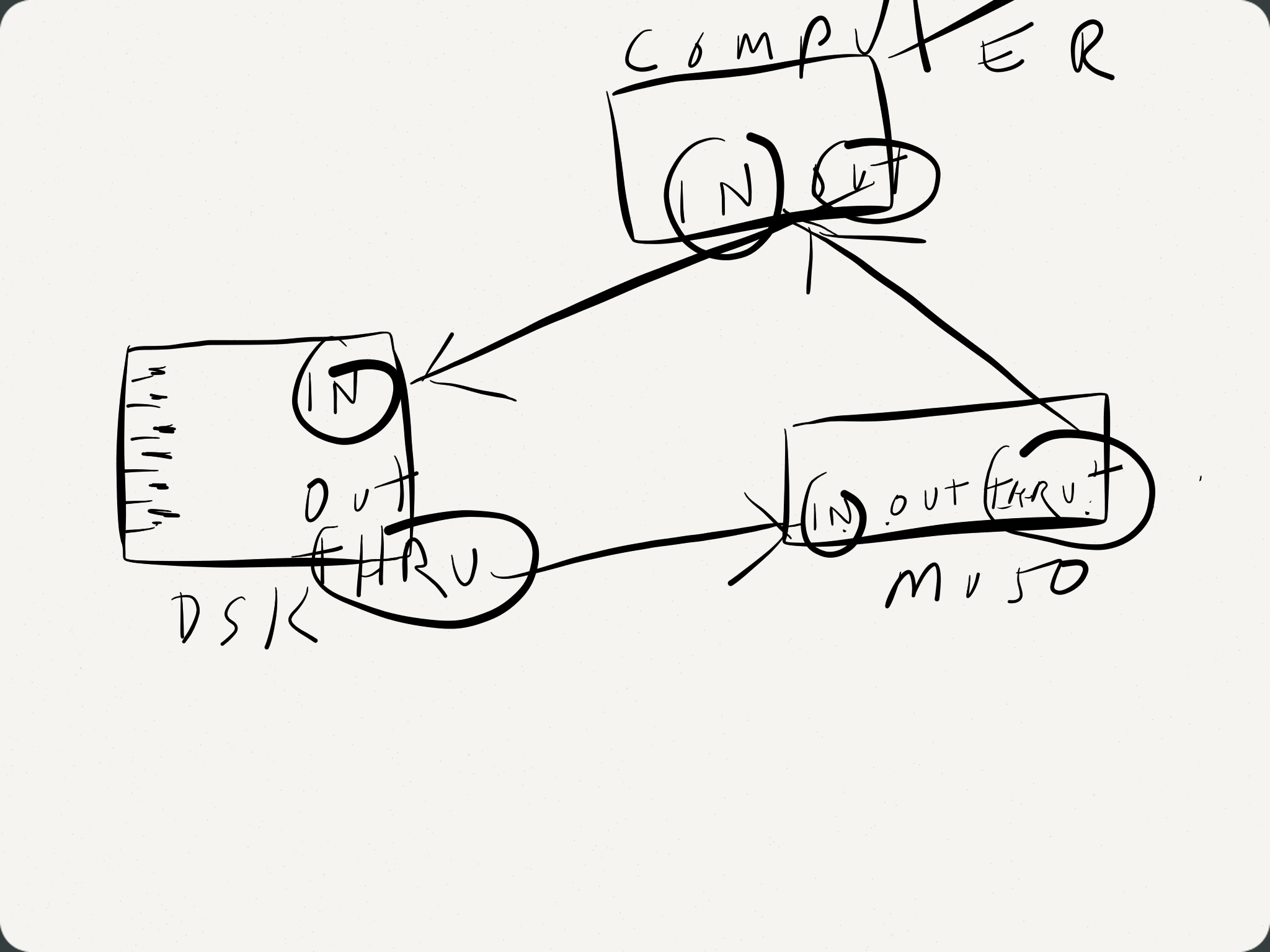


On Jan 19, 2014, at 9:30 AM, George Frederick Litterst <PianoBench@...>
wrote:


Good morning, everyone.


Sam, assuming that you are not going to upgrade your Disklavier with a
DKC-850 and enjoy the benefits of an integrated tone generator, your diagram
is the way to go.


There is one problem, however, with your last scenario ("If i want to play
virtual piano in Computer from silent DKL...): When you change MIDI Out from
Delay Out to Keyboard Out, the MIDI Out port no longer functions as a MIDI
Thru port.


Regards,

PianoBench


On Jan 19, 2014, at 12:42 AM, Skanter123 wrote:


<image.png>

Does this look right? (Excuse lousy diagram)


Computer MIDI OUT to DKL IN

DKL OUT /THRU to MU50 IN

MU50 THRU to Computer IN


Play multi-channel MIDI file from computer, plays disklavier live then sends
other channels to MU50 with delay so all syncs up.


If i want to play virtual piano in Computer from silent DKL just change DSK
setting from DLY OUT to KBD OUT, and keep MU50 powered on.


Sam 

www.keyboardcollective.com <http://www.keyboardcollective.com/> 

(212) <tel:%28212%29%20684-3304>  684-3304


On Jan 18, 2014, at 10:46 PM, PianoBench@... wrote:


Good evening, everyone.


Sam, this procedure does work with the Mark II. This Disklavier does not
have a MIDI Thru port. Instead, the MIDI Output port functions as either a
MIDI Output for or a MIDI Thru part. In the latter case, a 500ms delay is
applied.


To use the MIDI Out port of a Mark II as a MIDI Thru port with a 500ms
delay, change the MIDI Out setting from Keyboard Out to Delay Out.


Regards,

PianoBench


On Jan 17, 2014, at 3:07 AM, Skanter123 <skanter123@...> wrote:


Send your MIDI data to your MPX100II MIDI In port. Connect the MU50 to the
MPX100II MIDI Out.


Hmmm...not sure that would work. I think i'd need a MIDI THRU on the DKL?

Sam 

www.keyboardcollective.com <http://www.keyboardcollective.com/> 

(212) 684-3304 <tel:%28212%29%20684-3304> 


On Jan 17, 2014, at 2:57 AM, Bill Brandom <bill.brandom03@...> wrote:


Send your MIDI data to your MPX100II MIDI In port. Connect the MU50 to the
MPX100II MIDI Out.


This way the 500ms delay is incorporated in both the Disklavier and the
MU50.

Bill


Sent from my iPhone.


On Jan 16, 2014, at 11:46 AM, Sam Kanter <skanter123@...> wrote:


Hope I'm not wearing out my welcome with so many questions from a new user,
but here's another.

The MPX100II came with a MU50 XG external tone generator (and powered
speaker) probably because this model was released before this was b uilt-in
to the Mk II XG disklaviers.

I assume one can use MIDI thru to connect both DK and external module, but
what about the 500ms delay of the dk when receiving MIDI data, preventing
everything from syncing up? There are latency settings in some advanced
sequencers I have, but I was hoping there would be a simpler way to play
back multi-channel MIDI files...

Has anyone else tried this?

Thanks in advance...


Sam Kanter
www.keyboardcollective.com <http://www.keyboardcollective.com/> 
(212) <tel:%28212%29%20684-3304>  684-3304

Move to quarantaine

This moves the raw source file on disk only. The archive index is not changed automatically, so you still need to run a manual refresh afterward.