Yahoo Groups archive

Disklavier

Index last updated: 2026-04-28 23:20 UTC

Thread

Line in input for Disklavier

Line in input for Disklavier

2014-04-11 by Kevin Weng

I am trying to setup the karaoke on the disklavier to have input accompany sound like from a youtube video.

It is working but I have to use the "Remote Live" feature , which requires me to subscribe to the disklavier radio.

I am thinking there has to be an input to take an audio line in without turning to remote live. I try OMNI IN and it does not work. Any idea?

Kevin

Re: [disklavier] Line in input for Disklavier

2014-04-11 by Bill Brandom

It sounds like your OMNI IN volume is set to 00. Raise your volume level to 60 or so and see if you can hear what is being sent to the OMNI IN.

Bill

On Apr 11, 2014, at 11:48 AM, Kevin Weng <kevinweng99@...> wrote:

I am trying to setup the karaoke on the disklavier to have input accompany sound like from a youtube video. 

It is working but I have to use the "Remote Live" feature , which requires me to subscribe to the disklavier radio.

I am thinking there has to be an input to take an audio line in without turning to remote live. I try OMNI IN and it does not work. Any idea?

Kevin

Re: [disklavier] Line in input for Disklavier

2014-04-12 by Kevin Weng

Hi Bill,

Where I can set the OMNI IN level? I look at the volume setting, I only see :

Voice
TG
Audio
Mic

Thanks,
Kevin
Show quoted textHide quoted text
On Fri, Apr 11, 2014 at 3:48 PM, Bill Brandom <billbrando@...> wrote:

It sounds like your OMNI IN volume is set to 00. Raise your volume level to 60 or so and see if you can hear what is being sent to the OMNI IN.

Bill

On Apr 11, 2014, at 11:48 AM, Kevin Weng <kevinweng99@...> wrote:

I am trying to setup the karaoke on the disklavier to have input accompany sound like from a youtube video.

It is working but I have to use the "Remote Live" feature , which requires me to subscribe to the disklavier radio.

I am thinking there has to be an input to take an audio line in without turning to remote live. I try OMNI IN and it does not work. Any idea?

Kevin


Re: [disklavier] Line in input for Disklavier

2014-04-12 by Bill Current Gmail

Go into Setup, then Audio I/O, (last page of User functions on the PRC-100.)

Bill

On Apr 12, 2014, at 10:27 AM, Kevin Weng <kevinweng99@...> wrote:

Hi Bill,

Where I can set the OMNI IN level? I look at the volume setting, I only see :

Voice
TG
Audio
Mic

Thanks,
Kevin
Show quoted textHide quoted text
> On Fri, Apr 11, 2014 at 3:48 PM, Bill Brandom <billbrando@...> wrote:
>  
> It sounds like your OMNI IN volume is set to 00. Raise your volume level to 60 or so and see if you can hear what is being sent to the OMNI IN.
> 
> Bill
> 
> On Apr 11, 2014, at 11:48 AM, Kevin Weng <kevinweng99@...> wrote:
> 
>  
> I am trying to setup the karaoke on the disklavier to have input accompany sound like from a youtube video. 
> 
> It is working but I have to use the "Remote Live" feature , which requires me to subscribe to the disklavier radio.
> 
> I am thinking there has to be an input to take an audio line in without turning to remote live. I try OMNI IN and it does not work. Any idea?
> 
> Kevin
>

Re: [disklavier] Line in input for Disklavier

2014-04-12 by Kevin Weng

Yes I get there and indeed the audio in is set to 0.
However I don't see how I can change it. I can get into the field but then?

Kevin

Show quoted textHide quoted text
On Apr 12, 2014 10:59 AM, "Bill Current Gmail" <bill.brandom03@...> wrote:

Go into Setup, then Audio I/O, (last page of User functions on the PRC-100.)

Bill

On Apr 12, 2014, at 10:27 AM, Kevin Weng <kevinweng99@gmail.com> wrote:

Hi Bill,

Where I can set the OMNI IN level? I look at the volume setting, I only see :

Voice
TG
Audio
Mic

Thanks,
Kevin


On Fri, Apr 11, 2014 at 3:48 PM, Bill Brandom <billbrando@...> wrote:

It sounds like your OMNI IN volume is set to 00. Raise your volume level to 60 or so and see if you can hear what is being sent to the OMNI IN.

Bill

On Apr 11, 2014, at 11:48 AM, Kevin Weng <kevinweng99@...> wrote:

I am trying to setup the karaoke on the disklavier to have input accompany sound like from a youtube video.

It is working but I have to use the "Remote Live" feature , which requires me to subscribe to the disklavier radio.

I am thinking there has to be an input to take an audio line in without turning to remote live. I try OMNI IN and it does not work. Any idea?

Kevin


Re: [disklavier] Line in input for Disklavier

2014-04-12 by Bill Current Gmail

Highlight the line then use your YES/NO buttons.

Bill

On Apr 12, 2014, at 1:10 PM, Kevin Weng <kevinweng99@...> wrote:

Yes I get there and indeed the audio in is set to 0.
However I don't see how I can change it. I can get into the field but then?

Kevin
Show quoted textHide quoted text
> On Apr 12, 2014 10:59 AM, "Bill Current Gmail" <bill.brandom03@...> wrote:
>  
> Go into Setup, then Audio I/O, (last page of User functions on the PRC-100.)
> 
> Bill
> 
> On Apr 12, 2014, at 10:27 AM, Kevin Weng <kevinweng99@...> wrote:
> 
>  
> Hi Bill,
> 
> Where I can set the OMNI IN level? I look at the volume setting, I only see :
> 
> Voice
> TG
> Audio
> Mic
> 
> Thanks,
> Kevin
> 
> 
>> On Fri, Apr 11, 2014 at 3:48 PM, Bill Brandom <billbrando@...> wrote:
>>  
>> It sounds like your OMNI IN volume is set to 00. Raise your volume level to 60 or so and see if you can hear what is being sent to the OMNI IN.
>> 
>> Bill
>> 
>> On Apr 11, 2014, at 11:48 AM, Kevin Weng <kevinweng99@...> wrote:
>> 
>>  
>> I am trying to setup the karaoke on the disklavier to have input accompany sound like from a youtube video. 
>> 
>> It is working but I have to use the "Remote Live" feature , which requires me to subscribe to the disklavier radio.
>> 
>> I am thinking there has to be an input to take an audio line in without turning to remote live. I try OMNI IN and it does not work. Any idea?
>> 
>> Kevin
>>

Re: [disklavier] Line in input for Disklavier

2014-04-12 by Kevin Weng

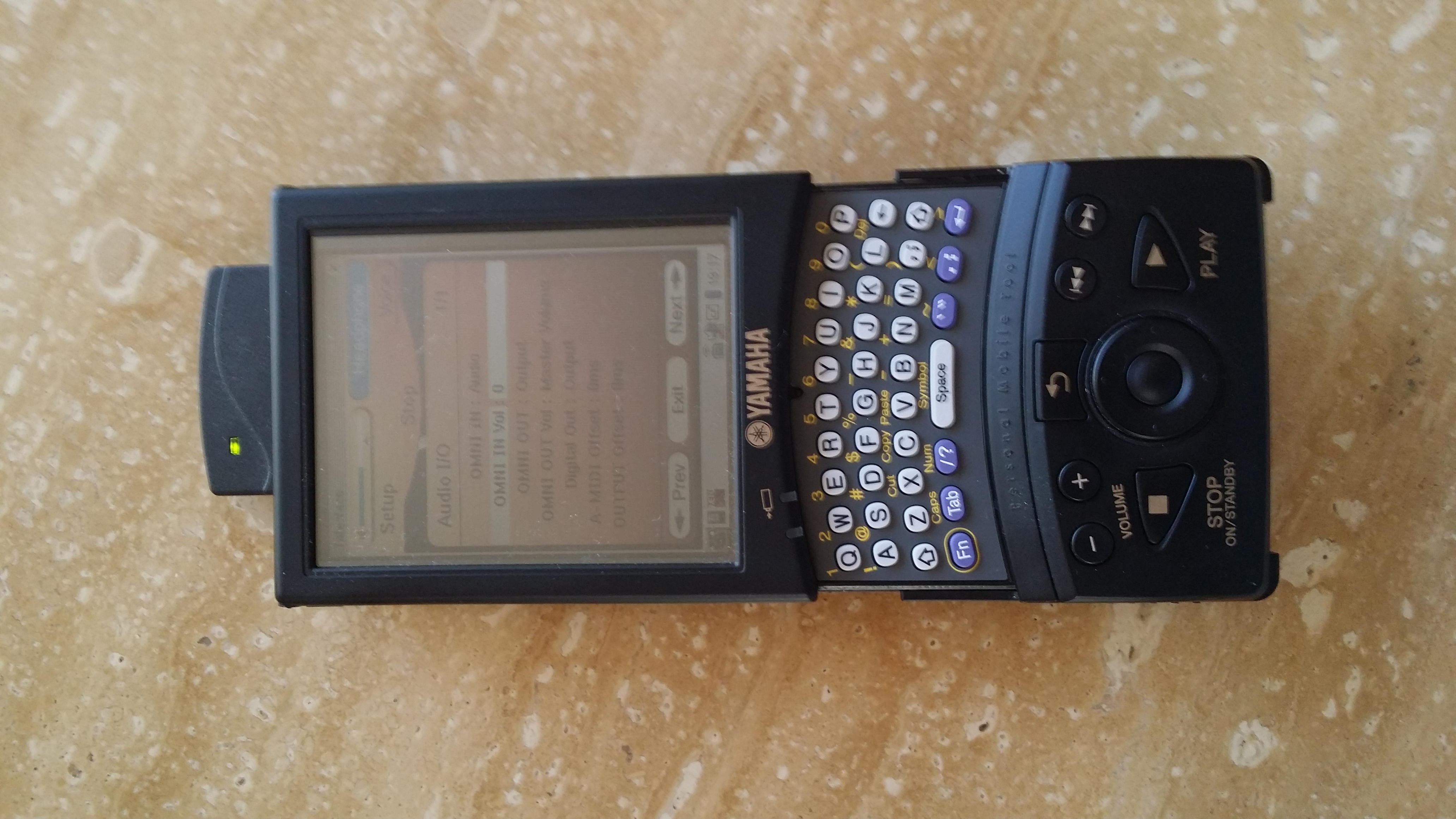
Sorry Bill I still can't find the yes/no key. Here is picture of my prc-100.

Kevin

Show quoted textHide quoted text
On Apr 12, 2014 1:25 PM, "Bill Current Gmail" <bill.brandom03@...> wrote:

Highlight the line then use your YES/NO buttons.

Bill

On Apr 12, 2014, at 1:10 PM, Kevin Weng <kevinweng99@...> wrote:

Yes I get there and indeed the audio in is set to 0.
However I don't see how I can change it. I can get into the field but then?

Kevin

On Apr 12, 2014 10:59 AM, "Bill Current Gmail" <bill.brandom03@...> wrote:

Go into Setup, then Audio I/O, (last page of User functions on the PRC-100.)

Bill

On Apr 12, 2014, at 10:27 AM, Kevin Weng <kevinweng99@...> wrote:

Hi Bill,

Where I can set the OMNI IN level? I look at the volume setting, I only see :

Voice
TG
Audio
Mic

Thanks,
Kevin


On Fri, Apr 11, 2014 at 3:48 PM, Bill Brandom <;billbrando@...> wrote:

It sounds like your OMNI IN volume is set to 00. Raise your volume level to 60 or so and see if you can hear what is being sent to the OMNI IN.

Bill

On Apr 11, 2014, at 11:48 AM, Kevin Weng <kevinweng99@...> wrote:

I am trying to setup the karaoke on the disklavier to have input accompany sound like from a youtube video.

It is working but I have to use the ";Remote Live" feature , which requires me to subscribe to the disklavier radio.

I am thinking there has to be an input to take an audio line in without turning to remote live. I try OMNI IN and it does not work. Any idea?

Kevin


Attachments

Re: [disklavier] Line in input for Disklavier [1 Attachment]

2014-04-13 by Bill Current Gmail

Hi Kevin,

Sorry for the mis-information. Highlight the OMNI IN VOLUME line, you have an outer ring that goes around the SELECT button on the PRC-100. Use the left and right sides of the outer ring to change the value of the Volume setting from 0 to around 70 and see how it sounds - raise or lower the value, as needed.

Bill

On Apr 12, 2014, at 4:19 PM, Kevin Weng <kevinweng99@...> wrote:

[Attachment(s) from Kevin Weng included below]
Sorry Bill I still can't find the yes/no key. Here is picture of my prc-100.

Kevin
Show quoted textHide quoted text
> On Apr 12, 2014 1:25 PM, "Bill Current Gmail" <bill.brandom03@gmail.com> wrote:
>  
> Highlight the line then use your YES/NO buttons.
> 
> Bill
> 
> On Apr 12, 2014, at 1:10 PM, Kevin Weng <kevinweng99@...> wrote:
> 
>  
> Yes I get there and indeed the audio in is set to 0.
> However I don't see how I can change it. I can get into the field but then?
> 
> Kevin
> 
>> On Apr 12, 2014 10:59 AM, "Bill Current Gmail" <bill.brandom03@gmail.com> wrote:
>>  
>> Go into Setup, then Audio I/O, (last page of User functions on the PRC-100.)
>> 
>> Bill
>> 
>> On Apr 12, 2014, at 10:27 AM, Kevin Weng <kevinweng99@...> wrote:
>> 
>>  
>> Hi Bill,
>> 
>> Where I can set the OMNI IN level? I look at the volume setting, I only see :
>> 
>> Voice
>> TG
>> Audio
>> Mic
>> 
>> Thanks,
>> Kevin
>> 
>> 
>>> On Fri, Apr 11, 2014 at 3:48 PM, Bill Brandom <billbrando@...> wrote:
>>>  
>>> It sounds like your OMNI IN volume is set to 00. Raise your volume level to 60 or so and see if you can hear what is being sent to the OMNI IN.
>>> 
>>> Bill
>>> 
>>> On Apr 11, 2014, at 11:48 AM, Kevin Weng <kevinweng99@...> wrote:
>>> 
>>>  
>>> I am trying to setup the karaoke on the disklavier to have input accompany sound like from a youtube video. 
>>> 
>>> It is working but I have to use the "Remote Live" feature , which requires me to subscribe to the disklavier radio.
>>> 
>>> I am thinking there has to be an input to take an audio line in without turning to remote live. I try OMNI IN and it does not work. Any idea?
>>> 
>>> Kevin
>>>
Re: [disklavier] Line in input for Disklavier

2014-04-13 by Kevin Weng

Awesome! I got it now. The line in works perfectly. My daughter can now pick a video from youtube and sing and play. Wonderful.
Thanks Bill!


Show quoted textHide quoted text
On Sun, Apr 13, 2014 at 12:14 AM, Bill Current Gmail <bill.brandom03@...> wrote:

Hi Kevin,

Sorry for the mis-information. Highlight the OMNI IN VOLUME line, you have an outer ring that goes around the SELECT button on the PRC-100. Use the left and right sides of the outer ring to change the value of the Volume setting from 0 to around 70 and see how it sounds - raise or lower the value, as needed.

Bill

On Apr 12, 2014, at 4:19 PM, Kevin Weng <kevinweng99@...> wrote:

Sorry Bill I still can't find the yes/no key. Here is picture of my prc-100.

Kevin

On Apr 12, 2014 1:25 PM, "Bill Current Gmail" <bill.brandom03@...> wrote:

Highlight the line then use your YES/NO buttons.

Bill

On Apr 12, 2014, at 1:10 PM, Kevin Weng <kevinweng99@...> wrote:

Yes I get there and indeed the audio in is set to 0.
However I don't see how I can change it. I can get into the field but then?

Kevin

On Apr 12, 2014 10:59 AM, "Bill Current Gmail" <bill.brandom03@...> wrote:

Go into Setup, then Audio I/O, (last page of User functions on the PRC-100.)

Bill

On Apr 12, 2014, at 10:27 AM, Kevin Weng <kevinweng99@...> wrote:

Hi Bill,

Where I can set the OMNI IN level? I look at the volume setting, I only see :

Voice
TG
Audio
Mic

Thanks,
Kevin


On Fri, Apr 11, 2014 at 3:48 PM, Bill Brandom <;billbrando@...> wrote:

It sounds like your OMNI IN volume is set to 00. Raise your volume level to 60 or so and see if you can hear what is being sent to the OMNI IN.

Bill

On Apr 11, 2014, at 11:48 AM, Kevin Weng <kevinweng99@...m> wrote:

I am trying to setup the karaoke on the disklavier to have input accompany sound like from a youtube video.

It is working but I have to use the "Remote Live" feature , which requires me to subscribe to the disklavier radio.

I am thinking there has to be an input to take an audio line in without turning to remote live. I try OMNI IN and it does not work. Any idea?

Kevin


Move to quarantaine

This moves the raw source file on disk only. The archive index is not changed automatically, so you still need to run a manual refresh afterward.