The key drive temperature is very high
2016-11-11 by Dmitry
Yahoo Groups archive
Index last updated: 2026-04-28 23:20 UTC
Thread
2016-11-11 by Dmitry
2016-11-12 by Bill Brandom
The piano is being played too hard by the Disklavier system. The thermostats in the system are designed to shut down when the temperature around them reaches 212 degrees.

Reducing the velocities and turning the Disklavier volume down should solve the issue.

Bill

On Nov 11, 2016, at 4:16 PM, Dmitry dmitryos@... [disklavier] <disklavier@yahoogroups.com> wrote:

Hi guys,

Got this message after some time of playing midi files on the piano. Then it stopped producing the sound. Do you have any idea what might be reason?

Thank you,
Dmitry
2016-11-13 by Dmitry
Thank you, Bill!
Will monitor this throw service menu just in case.
Thank you,
Dmitry
The piano is being played too hard by the Disklavier system. The thermostats in the system are designed to shut down when the temperature around them reaches 212 degrees.Reducing the velocities and turning the Disklavier volume down should solve the issue.BillHi guys,Got this message after some time of playing midi files on the piano. Then it stopped producing the sound. Do you have any idea what might be reason?Thank you,Dmitry
2016-11-13 by George F. Litterst
Good morning, everyone.

Bill, is that 212 degree temperature measured on the Fahrenheit scale?

If so, it’s funny to think that the engineers choose the temperature at which water boils at seal level as the shutdown threshold.

Regards,
PianoBench
> On Nov 12, 2016, at 5:28 AM, Bill Brandom billbrando@... [disklavier] <disklavier@yahoogroups.com> wrote:
>
>
> The piano is being played too hard by the Disklavier system. The thermostats in the system are designed to shut down when the temperature around them reaches 212 degrees.
>
> Reducing the velocities and turning the Disklavier volume down should solve the issue.
>
> Bill
>
> On Nov 11, 2016, at 4:16 PM, Dmitry dmitryos@... <mailto:dmitryos@...> [disklavier] <disklavier@yahoogroups.com <mailto:disklavier@yahoogroups.com>> wrote:
>
>
>
> Hi guys,
>
> Got this message after some time of playing midi files on the piano. Then it stopped producing the sound. Do you have any idea what might be reason?
>
> Thank you,
> Dmitry
>
>
>
2016-11-13 by Bill Brandom
George,

It is Fahrenheit. Of course, the engineers figured it in Celsius at 100. I just converted it. Some of the thermostats are set at 200 degrees Fahrenheit, 93 degrees Celsius.

Bill
Love God. Love People. Make a difference.


On Nov 13, 2016, at 4:58 PM, 'George F. Litterst' PianoBench@... [disklavier] <disklavier@yahoogroups.com> wrote:

Fahrenheit
2016-11-17 by tnmshd@...
2016-11-17 by Dmitry
I guess that your Disklavier system needs fine adjustment.
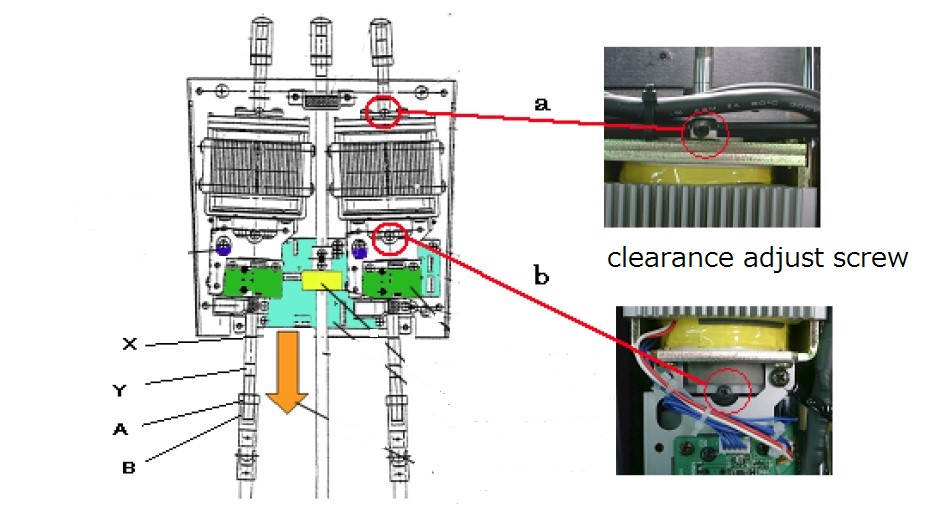
Most of the reason why the piano performance stops is insufficient adjustment of the pedalpedal regulate and measurement.(The most important point)key regulate and measurement.Regular regulation and tuning.How about asking Yamaha?
2016-11-17 by Spencer Chase
Thank you for the diagram - I will definitely check that (a bit away from home this week).Just the issue happened first time recently (twice) but now I cannot reproduce it even I used midi files to play for about 30 min.It might happen that the issue was caused by a file that was not "designed" for disklavier - looks like all the notes had maximum volume. But not sure - I didn't want to run that file again as it was that loud and don't want to stress the piano again.I might contact Yamaha but need to be sure what to tell them if it will be a consistent issue I think as a general maintenance was done recently (within 4 months).On 17 November 2016 at 01:32, tnmshd@... [disklavier] <disklavier@yahoogroups.com> wrote:I guess that your Disklavier system needs fine adjustment.
Most of the reason why the piano performance stops is insufficient adjustment of the pedalpedal regulate and measurement.(The most important point)key regulate and measurement.Regular regulation and tuning.How about asking Yamaha?
2016-11-17 by Bill Brandom
If you have a MIDI file with most notes at maximum velocity, then that is what is causing your overheating problems with the key drive unit.

Don't play that file anymore without reducing the velocities and you should no longer get that error message.

Bill

On Nov 17, 2016, at 8:20 AM, Dmitry dmitryos@... [disklavier] <disklavier@yahoogroups.com> wrote:

Thank you for the diagram - I will definitely check that (a bit away from home this week).
Just the issue happened first time recently (twice) but now I cannot reproduce it even I used midi files to play for about 30 min.
It might happen that the issue was caused by a file that was not "designed" for disklavier - looks like all the notes had maximum volume. But not sure - I didn't want to run that file again as it was that loud and don't want to stress the piano again.
I might contact Yamaha but need to be sure what to tell them if it will be a consistent issue I think as a general maintenance was done recently (within 4 months).
> On 17 November 2016 at 01:32, tnmshd@...m [disklavier] <disklavier@yahoogroups.com> wrote:
>
> I guess that your Disklavier system needs fine adjustment.
>
> Most of the reason why the piano performance stops is insufficient adjustment of the pedal
> pedal regulate and measurement.(The most important point)
> key regulate and  measurement.
> Regular regulation and tuning.
>
> How about asking Yamaha?
>
2017-06-22 by Dmitry
If you have a MIDI file with most notes at maximum velocity, then that is what is causing your overheating problems with the key drive unit.Don't play that file anymore without reducing the velocities and you should no longer get that error message.BillThank you for the diagram - I will definitely check that (a bit away from home this week).Just the issue happened first time recently (twice) but now I cannot reproduce it even I used midi files to play for about 30 min.It might happen that the issue was caused by a file that was not "designed" for disklavier - looks like all the notes had maximum volume. But not sure - I didn't want to run that file again as it was that loud and don't want to stress the piano again.I might contact Yamaha but need to be sure what to tell them if it will be a consistent issue I think as a general maintenance was done recently (within 4 months).On 17 November 2016 at 01:32, tnmshd@... [disklavier] <disklavier@yahoogroups.com> wrote:I guess that your Disklavier system needs fine adjustment.
Most of the reason why the piano performance stops is insufficient adjustment of the pedalpedal regulate and measurement.(The most important point)key regulate and measurement.Regular regulation and tuning.How about asking Yamaha?
2017-07-11 by Dmitry
Hi guys,Just in case it might be useful one day to someone. I was able to "fix" the issue by re-calibrating the pedal. Last time when technician finished the maintenance he told me he slightly adjusted the pedal position. I didn't pay much attention to it and forgot about this. Today when I was recording myself in the headphones I was able to reproduce my recording without a problem (as the pedal was not moving during the playback). It came to my mind to try to record the real keys without pressing the pedal. And the piano played that normally after that. But once I added a pedal it started to show the error messages strait away (The key drive temperature is very high). I just think it was not able to move the pedal to the same position it was calibrated before the adjustment but the message was a bit misleading.As I mentioned before after the process of the pedal calibration everything started to work perfectly.Hope this may help someone.Good luck,DmitryOn 18 November 2016 at 05:30, Bill Brandom billbrando@... [disklavier] <disklavier@yahoogroups.com> wrote:If you have a MIDI file with most notes at maximum velocity, then that is what is causing your overheating problems with the key drive unit.Don't play that file anymore without reducing the velocities and you should no longer get that error message.BillThank you for the diagram - I will definitely check that (a bit away from home this week).Just the issue happened first time recently (twice) but now I cannot reproduce it even I used midi files to play for about 30 min.It might happen that the issue was caused by a file that was not "designed" for disklavier - looks like all the notes had maximum volume. But not sure - I didn't want to run that file again as it was that loud and don't want to stress the piano again.I might contact Yamaha but need to be sure what to tell them if it will be a consistent issue I think as a general maintenance was done recently (within 4 months).On 17 November 2016 at 01:32, tnmshd@... [disklavier] <disklavier@yahoogroups.com> wrote:I guess that your Disklavier system needs fine adjustment.
Most of the reason why the piano performance stops is insufficient adjustment of the pedalpedal regulate and measurement.(The most important point)key regulate and measurement.Regular regulation and tuning.How about asking Yamaha?
2017-07-11 by tnmshd@...
2017-07-11 by Dmitry
Hi Dmitry
Disklavier IV is most confusing adjustment in Disklavier series.Please call a hybrid piano professional tuner from YAMAHA.He should have maintenance manual .1:acoustic damper and shift pedal adjustment.Check X , Y line and each sensor LED loght in range.2:Pedal rod clearance adjustment.3:Enter Service center mode4:Enter maintenance mode(push D M P within 0.5sec)5:Enter Data base mode6:Enter Log View modeanalyze error log and find the bad part.(pedal/key/motor/sensor/power unit)7:Enter search point mode8:Enter right pedal or Left pedal or other mode9:check error log , warning log stroke and temp history.10:Find the bad point and fix it.11::Acoustic regulation piano action and keyboard.12:All Keyboard and pedal measurement.13:Do the test playing.Good luck..(・ω<)
2017-07-11 by darren.everitt@...
2017-07-12 by tnmshd@...
2017-07-12 by Dmitry
>Have you plugged in a monitor to the video out port?If you refer to the service manual it will tell you how to get into the test mode using a USB keyboard, from there you can access a lot of test information.No.It's the way to enter I/O center test mode.Normally you will enter Maintenance mode using PRC.If the PRC or media center is broken, take that way.Service manual and maintenance hand book are required for tuner.
2017-07-12 by tnmshd@...
Do not worry about pedal LED check.
Please be more careful with X / Y line ,solenoid clearance and acoustic pedal adjustment than that.
If you get PRC then check error log and do the all maintenance.

Good luck.
2017-07-29 by Dmitry
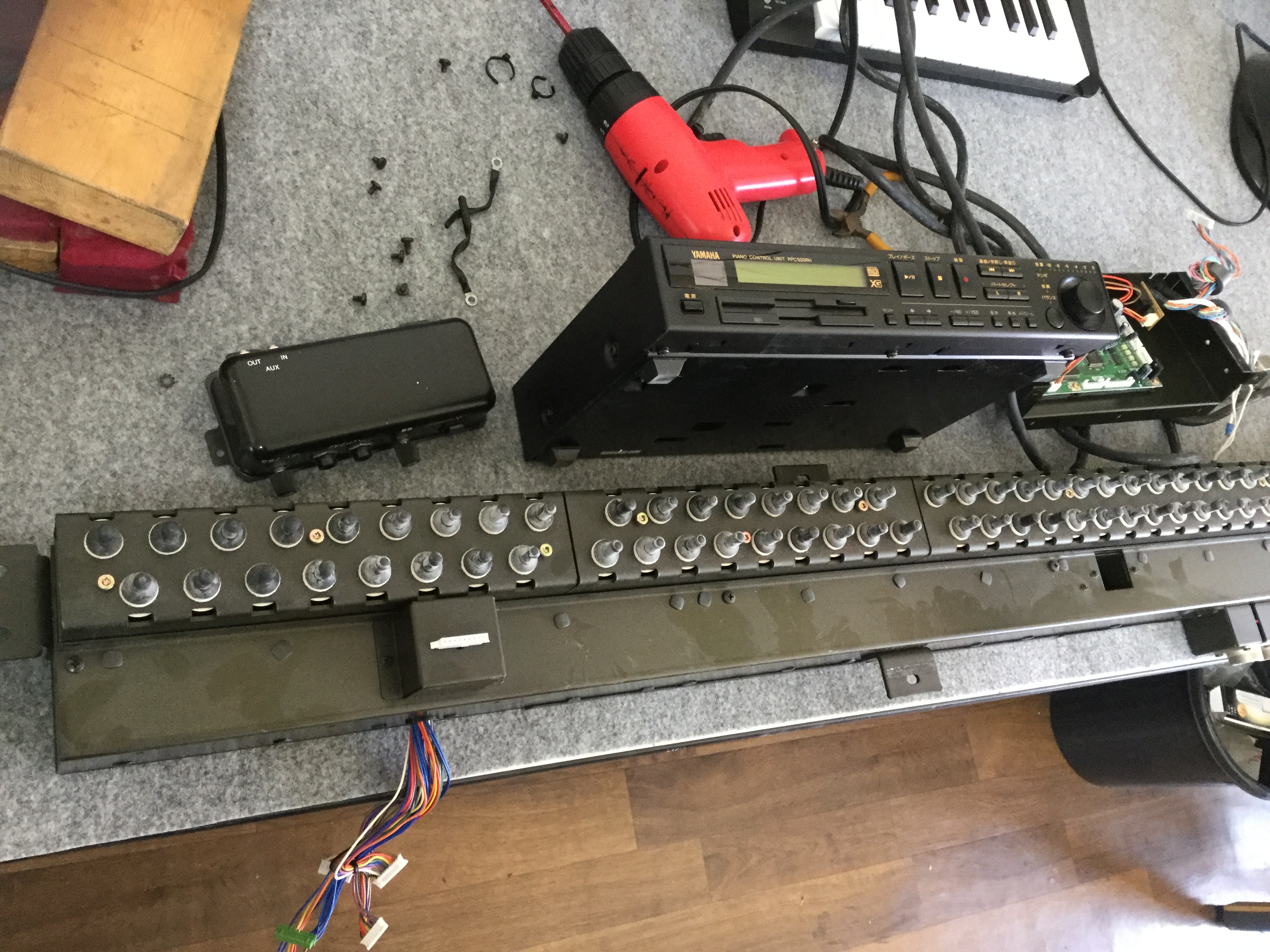
Thank you, Darren, tnmshd!I really forgot about the video out connector. Will also look at it as I hope additional information from this may give some points to think but unfortunately it doesn't say anything about solenoids based on the description.But I also found the LED status description in the service manual (p.122+). But it will require to open the units again. Especially the solenoid one which is a bit of a pain (the right one. I think the centre one would be even more as it asks to dismount the pedal unit and all above it)).On Tue, Jul 11, 2017 at 5:40 PM, tnmshd@... [disklavier] <disklavier@yahoogroups.com>; wrote:>Have you plugged in a monitor to the video out port?If you refer to the service manual it will tell you how to get into the test mode using a USB keyboard, from there you can access a lot of test information.No.It's the way to enter I/O center test mode.Normally you will enter Maintenance mode using PRC.If the PRC or media center is broken, take that way.Service manual and maintenance hand book are required for tuner.
2017-07-30 by tnmshd@...
2017-07-30 by Dmitry
48V error
5V errorTemp errorLoop errorHow about following results1:Check all connection2:Pedal drive info.3:Log view-- search for special--key drive /damper pedal
2017-07-31 by tnmshd@...
2017-08-07 by Dmitry
thermo 100 ,26.1I guess one of keydrive board is dead or thermo is dead.kd1 thermo ntsa0xv103 normal registance10kΩ.I guess that is possible to judge good or bad if the thermo is short circuited.or keydrive has 4 thermo and replace them.
2017-08-07 by yamada yamada
I think that you should doubt the breakdown of KD1's thermistor(chip) see the attached file. If it seems that it is broken, you can pursue the cause by temporarily shorting it.
 by the way You are in luck.
 In near days I will get used parts of this type of Disklavier. If I get it then I'll contact you again.

On Monday, August 7, 2017, 12:41:20 PM GMT+9, Dmitry dmitryos@... [disklavier] <disklavier@yahoogroups.com> wrote:


My Adventure with the Key Drive is still under its way. But the further I go more it doesn't look good to me...
I removed 3 cards and checked the thermo resistance - all looked good. No visual cracks or marks on the cards or chips. One time when I bent a little bit of two cards together (KD2 and KD3) I had for a one second all the E1 errors disappeared. But could not reproduce the same benting only one card. After that moment I could not even reproduce the same state when there was no E1 error anymore.
Technician could not help me and he also could not find out what card is faulty. He also called Yamaha and they told me I have to buy the boards without possibility to return them if I make a wrong decision first (as technical said he wont take that responsibility).
Didn't think it would that way. Will try to check the voltage somewhere on the boards to identify which one is faulty but it now looks to me more sophisticated task and I can burn a board if I make a short circuit.
Was told that each board would cost $322 (hope AUD). But wondering guys if you know someone sells second hard  boards (not much hope for that actually) and might take one back if the issue will be not in that one.
Thank you,Dmitry

On Mon, Jul 31, 2017 at 3:23 PM, tnmshd@yahoo.com [disklavier] <disklavier@yahoogroups.com> wrote:


thermo 100 ,26.1
I guess one of keydrive board is dead or thermo is dead.kd1 thermo ntsa0xv103 normal registance10kΩ.I guess that is possible to judge good or bad if the thermo is short circuited.or keydrive has 4 thermo and replace them.2017-08-07 by Dmitry
I think that you should doubt the breakdown of KD1's thermistor(chip) see the attached file. If it seems that it is broken, you can pursue the cause by temporarily shorting it.
by the way You are in luck.
In near days I will get used parts of this type of Disklavier. If I get it then I'll contact you again.On Monday, August 7, 2017, 12:41:20 PM GMT+9, Dmitry dmitryos@... [disklavier] <disklavier@yahoogroups.com> wrote:My Adventure with the Key Drive is still under its way. But the further I go more it doesn't look good to me...I removed 3 cards and checked the thermo resistance - all looked good. No visual cracks or marks on the cards or chips. One time when I bent a little bit of two cards together (KD2 and KD3) I had for a one second all the E1 errors disappeared. But could not reproduce the same benting only one card. After that moment I could not even reproduce the same state when there was no E1 error anymore.Technician could not help me and he also could not find out what card is faulty. He also called Yamaha and they told me I have to buy the boards without possibility to return them if I make a wrong decision first (as technical said he wont take that responsibility).Didn't think it would that way. Will try to check the voltage somewhere on the boards to identify which one is faulty but it now looks to me more sophisticated task and I can burn a board if I make a short circuit.Was told that each board would cost $322 (hope AUD). But wondering guys if you know someone sells second hard boards (not much hope for that actually) and might take one back if the issue will be not in that one.Thank you,DmitryOn Mon, Jul 31, 2017 at 3:23 PM, tnmshd@... [disklavier] <disklavier@yahoogroups.com> wrote:thermo 100 ,26.1I guess one of keydrive board is dead or thermo is dead.kd1 thermo ntsa0xv103 normal registance10kΩ.I guess that is possible to judge good or bad if the thermo is short circuited.or keydrive has 4 thermo and replace them.
2017-08-09 by tnmshd@...
2017-08-09 by Dmitry
[Attachment(s) from tnmshd@... [disklavier] included below]I've got used parts but it's not your type .
It's pro-series but not XP.parts are incompatible. so sory..I can get new parts from yamaha jp.they said price are KD 1,2,3,4 24494JPY(283AUD) each.(shipping cost extra)KD3&KD4 doesn't have thermal chip.I feel like KD1 has poblem in this case.How is KD board Led? red ,green,green .(48v/3.3v/5v)