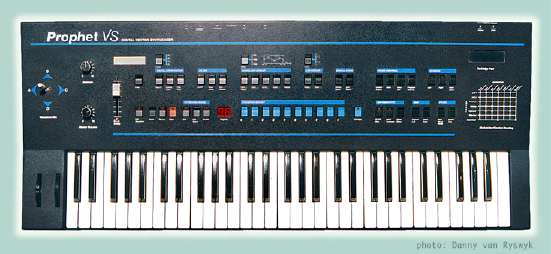
Prophet VS group photo

Yahoo Groups archive

Prophet VS

Index last updated: 2026-04-28 23:40 UTC

Thread

New VS operating system work

New VS operating system work

2018-07-19 by stickfigurewhore@...

Hello all!


In the files section you can now find a v1.3 OS. This is version 1.2 but with free-running LFOs. Eventually I'll figure out making it a patch selection, but since I'm working only in 68k assembly that will be much more of an undertaking.


Special thanks to John Manfreda and his incredibly helpful Virtual VS software. This emulation uses the original ROM images so I didn't have to keep burning ROMs to test my code.


Enjoy, and let me know if there are any issues!
Re: [prophet_vs] New VS operating system work

2018-07-20 by Jason Proctor

thanks so much for doing this!

idk whether i am going to blow ROMs for my VS anytime soon but the free-running LFO is a useful hack for sure.

another one would be swapping the byte ordering of the NRPN support so that regular MIDI controllers could control the VS without something in the way to swap them over!


Show quoted textHide quoted text
On Thu, Jul 19, 2018 at 12:37 PM, stickfigurewhore@... [prophet_vs] <prophet_vs@yahoogroups.com> wrote:


Hello all!


In the files section you can now find a v1.3 OS. This is version 1.2 but with free-running LFOs. Eventually I'll figure out making it a patch selection, but since I'm working only in 68k assembly that will be much more of an undertaking.


Special thanks to John Manfreda and his incredibly helpful Virtual VS software. This emulation uses the original ROM images so I didn't have to keep burning ROMs to test my code.


Enjoy, and let me know if there are any issues!


Re: [prophet_vs] New VS operating system work

2018-07-20 by Jason Proctor

it doesn't have anything to do with aftertouch -- it's the remote-control protocol, used by graphic editors (like my Vector Surgeon) to change parameter values in the VS's edit buffer. also, with MIDI parameter transmission turned on, the VS will send packets when you select parameters and move the data slider.

i think the VS was released before the MMA finalised the NRPN spec, and they got it backwards. the VS sends and expects parameter spec LSB, then parameter spec MSB, then data slider value LSB/MSB. the spec (correctly, IMHO, as the LSB is more likely to change without setting the MSB being required) says MSB first then LSB.

reversing the order would make a bunch of NRPN-sending control surfaces (Behringer BCR2000 etc etc) just work with the VS, where they don't at the moment.


Show quoted textHide quoted text
On Thu, Jul 19, 2018 at 5:33 PM, stickfigurewhore@... [prophet_vs] <prophet_vs@yahoogroups.com> wrote:


I wonder if that is part of the "poly-at into channel" thing. It internally reroutes poly aftertouch messages to channel even in MIDI mode 4.


Re: [prophet_vs] New VS operating system work

2018-07-30 by stickfigurewhore@...

Here are some v1.3 updates:

Most of this would be way easier if I could rearrange the code without having to change the branch cross references in the entire thing. As it stands I am using empty space at the very end of the eprom.

Figured out most of the panel switch addressing, then coded a way to enable key-synced LFOs while holding down a button ("Enter" for example).

Then, I started using memory addresses basically at random to get the "enable" to latch. This will take some time... My first memory area would disable key-sync LFO if you hit the Mod Dest button. The second choice would disable if you edited Wave C's fine tuning. With the memory address I'm using now i have not found the bug yet, but it is probably there...

Now for cool stuff... As it stands presently, I can hold "LFO Select" and hit a key... key-sync turns on. Hold "Cartridge" and hit a key, it turns off. The buttons are totally arbitrary and can be changed to anything. The amazing thing though is that right now it SAVES the selection PER PATCH.

There's bound to be a bug somewhere since I'm shooting blind with memory addresses, but it is neat nonetheless. Once I burn some eproms to test on my hardware VS I'll post a video.

Re: [prophet_vs] New VS operating system work

2018-07-30 by Jason Proctor

thanks so much for diving in and doing this!

on the branch offsets, can you replace them with mnemonic labels and have the assembler sort the actual numeric offsets?


Show quoted textHide quoted text
On Sun, Jul 29, 2018 at 7:07 PM, stickfigurewhore@... [prophet_vs] <prophet_vs@yahoogroups.com> wrote:


Here are some v1.3 updates:

Most of this would be way easier if I could rearrange the code without having to change the branch cross references in the entire thing. As it stands I am using empty space at the very end of the eprom.

Figured out most of the panel switch addressing, then coded a way to enable key-synced LFOs while holding down a button ("Enter" for example).

Then, I started using memory addresses basically at random to get the "enable" to latch. This will take some time... My first memory area would disable key-sync LFO if you hit the Mod Dest button. The second choice would disable if you edited Wave C's fine tuning. With the memory address I'm using now i have not found the bug yet, but it is probably there...

Now for cool stuff... As it stands presently, I can hold "LFO Select" and hit a key... key-sync turns on. Hold "Cartridge" and hit a key, it turns off. The buttons are totally arbitrary and can be changed to anything. The amazing thing though is that right now it SAVES the selection PER PATCH.

There's bound to be a bug somewhere since I'm shooting blind with memory addresses, but it is neat nonetheless. Once I burn some eproms to test on my hardware VS I'll post a video.


Re: [prophet_vs] New VS operating system work

2018-07-30 by deano

Excellent work, stickfigurewhore -- I was working on trying to do this myself a few years, but got distracted on other things.

I'd be really interested to hear some more info on this. I didn't quite figure out where the LFO generation was happening in code before I stopped. If this works well, I'm very tempted to burn it and put it into my VS -- be interesting to hear if this makes much difference to the presets (obviously go and turn LFO sync off for each)

Cheers!

//deano

Show quoted textHide quoted text
On Mon, Jul 30, 2018 at 3:07 AM, stickfigurewhore@... [prophet_vs] <prophet_vs@...m> wrote:

Here are some v1.3 updates:

Most of this would be way easier if I could rearrange the code without having to change the branch cross references in the entire thing. As it stands I am using empty space at the very end of the eprom.

Figured out most of the panel switch addressing, then coded a way to enable key-synced LFOs while holding down a button ("Enter" for example).

Then, I started using memory addresses basically at random to get the "enable" to latch.. This will take some time... My first memory area would disable key-sync LFO if you hit the Mod Dest button. The second choice would disable if you edited Wave C's fine tuning. With the memory address I'm using now i have not found the bug yet, but it is probably there...

Now for cool stuff... As it stands presently, I can hold "LFO Select" and hit a key... key-sync turns on. Hold "Cartridge" and hit a key, it turns off. The buttons are totally arbitrary and can be changed to anything. The amazing thing though is that right now it SAVES the selection PER PATCH.

There's bound to be a bug somewhere since I'm shooting blind with memory addresses, but it is neat nonetheless. Once I burn some eproms to test on my hardware VS I'll post a video.


Re: New VS operating system work

2018-07-30 by jariseon@...

Hi,

i've been exploring OS 1.2 a bit, and i _think_ MIDI channel messages are handled with the routines listed in a jump table 0x5986 - 0x5992. Control change handler is therefore at 0x500e. The handler there loads the received databyte1 into D1 at 0x501e, compares it to recognized controller codes (located in a table at 0x4fd2), and jumps to the corresponding controller handler (based on table at 0x4fe6).

to reverse NRPN and Data Entry MSB/LSB order, maybe it is then enough to just switch the order of the following bytes in the recognized controller codes table ?

0x4fdb : 0x63 0x62 -> 0x4fdb : 0x62 0x63 (for NRPN parameter select) and

0x4fd5 : 0x06 0x26 -> 0x4fd5 : 0x26 0x06 (for data entry)


i haven't tried that though, so chances are that the mod above does not work properly. VS MIDI out NRPN and Data Entry messages seem to be emitted from 0x56fc. At least control codes are there, and D0 input looks like midi channel number.

can you please share where the LFO routine and button codes are located ? thanks :)

jari

Re: New VS operating system work

2018-07-30 by stickfigurewhore@...

I'll give it a shot to swap those bytes.

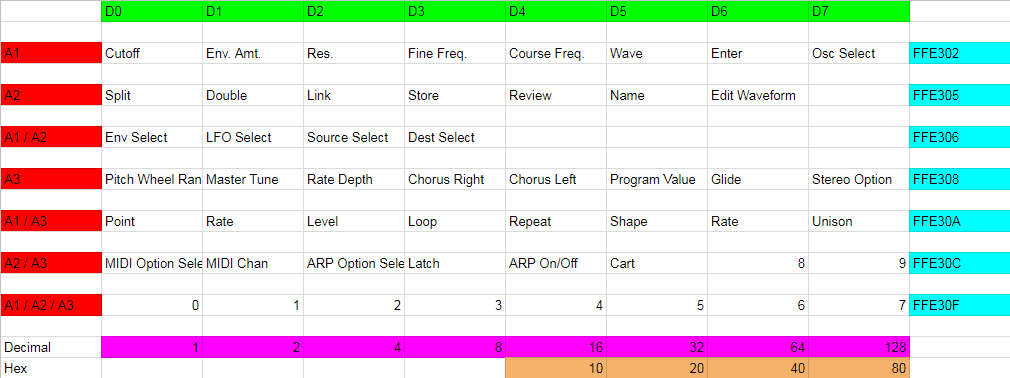
Since I knew that the beginning of the code would have the diagnostic routine based on holding "0+2" I looked for any cmpi commands. This is what starts the diagnostic mode:

cmpi.b #5,($FFE30F).w

Then I figured out that whole row from the binary: 0=1, 2=4, so it is seeing if 5 is there. The rest was relatively easy. See the attached image.


Attachments

Re: New VS operating system work

2018-08-05 by shalebridge@...

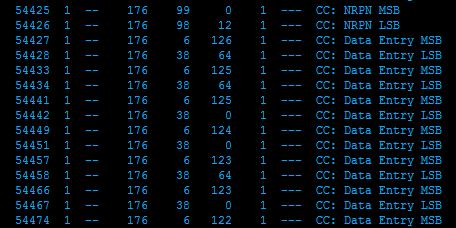
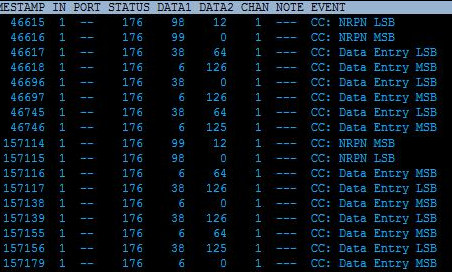
NRPN messages are well on the way to being fixed. The attached photo is the original OS (top) vs new (bottom). The MSB/LSB transmit/receive has been swapped but the data has not. Working on rearranging the code presently to fix that. Thanks for the initial tip Jari!

Attachments

Re: [prophet_vs] New VS operating system work

2018-08-06 by shalebridge@...

So, I got the NRPN out messages to be correct by rearranging the code (see image). It looks like it was only the output messages that were flipped though.

Flipping the input bytes breaks the incoming message and no NRPN codes work. In fact using original 1.0 & 1.2 eproms it looks like the VS already read the input NRPN correctly, based on watching the messages in MIDI-OX. I send it this message in this order from an Arturia BeatStep Pro in NRPN mode:

99 0 NRPN MSB
98 12 NRPN LSB
6 (*) DATA MSB

And it controls the Cutoff Freq just fine.

Attachments

Re: [prophet_vs] New VS operating system work

2018-08-06 by jariseon@...

cool!

MAME emulator has a pretty decent m68k debugger btw. thought it might be possible to whip up a MAME driver for VS now that we know where the front panel buttons are located in the address space (thanks !)

the end result would be similar to VirtualVS. sans sound of course, but with the driver it'd be possible to debug and step through the m68k code, look memory and register contents in real time etc. i embedded couple of MAME synths recently inside a VST plugin, but haven't so far written any drivers. has anyone in the group experience with MAME by any chance?

Re: [prophet_vs] New VS operating system work

2018-08-06 by shalebridge@...

I use MAME for various other emulations, e.g. Prophet 600, and thought it would be cool to do a VS one. Not too familiar with it though.

Recently acquired a 68-channel logic analyzer with inverse assembly capability. I need to make an adapter board for the 68k though... the ones online are either for the PGA version or very expensive.

I've started to go through and see what the other address areas are to make a list (MIDI IN/OUT, foot pedal, LCD). Curious about the backlight timer code too.

I noticed in the VS owners manual that mode 4 aftertouch messages are treated like the mod wheel. Wonder if there is enough room in the code to make it either poly-AT or poly-AT-->chan split compatible. Maybe I can drop some of the diagnostic code like they did :).

Re: [prophet_vs] New VS operating system work [1 Attachment]

2018-08-07 by Jason Proctor

a regular NRPN editor will *appear* to work, but in fact is always at least one data update behind, as the VS is waiting for the MSB packet to commit the change. this packet arrives as part of the *next* parameter change packet sequence. and technically, the MSB only needs to be sent if the MSB of the value changes, so if the controller implements that, it could be a while...

i think this is why the official NRPN spec is big endian, as lots of MSB packets can be saved if only the LSB changes, which is most of the time. the VS version is more wasteful on the wire.

i found all this out the hard way, before i knew anything about the VS implementation, using an Encore Electronics Knobby to control my VS. i talked to Tony K (now chief hardware guy at DSI) about it and they actually did implement a little-endian mode in the Knobby for the VS as a result (thanks guys).

so for accurate parameter changes from NRPN controllers, the input code needs to be swapped too.

thanks for tunnelling through the code and sorting this out!


Show quoted textHide quoted text
On Sun, Aug 5, 2018 at 8:16 PM, shalebridge@... [prophet_vs] <prophet_vs@yahoogroups.com> wrote:


So, I got the NRPN out messages to be correct by rearranging the code (see image). It looks like it was only the output messages that were flipped though.

Flipping the input bytes breaks the incoming message and no NRPN codes work. In fact using original 1.0 & 1.2 eproms it looks like the VS already read the input NRPN correctly, based on watching the messages in MIDI-OX. I send it this message in this order from an Arturia BeatStep Pro in NRPN mode:

99 0 NRPN MSB
98 12 NRPN LSB
6 (*) DATA MSB

And it controls the Cutoff Freq just fine.


Re: [prophet_vs] New VS operating system work [1 Attachment]

2018-08-07 by shalebridge@...

Sorry if this double posts, I didn't see it pop up anywhere...

Thanks for the extra info Jason! I was working on a sort of memory map for all the patch info, but I'll go back to working on the NRPN input.

You know, there as a glitch I noticed while working with the BeatStep. If I adjusted Cutoff for example, then tried to adjust Res, the Cutoff value would change right before the Res would. I figured it just needed a null RPN between the adjustments.

Re: [prophet_vs] New VS operating system work [1 Attachment]

2018-08-07 by jariseon@...

oh i did not see your post so i gave this a shot as well. below is some monkey code which caches MSB (instead of LSB) and triggers NRPN param change handling when LSB is received (instead of MSB). the code trashes D4 though to fit in.

; jump table entry for NPRN_LSB

; needs a tweak because NRPN_MSB routine is now shorter

;

4ff2 0x5130

; NRPN_MSB

;

511e btst.b 0x1, 0xccc3.w

5124 beq.w 0x500e

5128 move.b d0, 0xccc0.w

512c bra.w 0x500e

; NRPN_LSB

;

5130 btst.b 0x1, 0xccc3.w

5136 beq.w 0x500e

513a move.b 0xccc0.w, d4

513e move.b d0, 0xccc0.w ; just in case

5142 tst.b d4

5144 beq.w 0x514c

5148 bsr.w 0x3638 ; NRPN MSB == 1

514c bra.w 0x500e

5150 andi.w 0x7f, d0 ; NRPN MSB == 0

5154 movea.w d0, a6

5156 adda.w d0, a6

5158 movea.w 0x3654(a6), a6

515c jsr (a6)

515e bra.w 0x500e

wdyt? sorry to post untested code, don't have the machine. the controller code table should be as it is in original v1.2 OS (ie., 4fdb: 0x6362, and 4fd5: 0x0626)

Re: [prophet_vs] New VS operating system work

2018-08-08 by Jason Proctor

that's the symptom exactly. the BeatStep sends official NRPNs, MSB-LSB, but the VS expects it the other way round. so the VS won't update until the *next* data value comes in, so in this case, your resonance MSB is interpreted as a cutoff MSB, and when the LSB comes in, the VS then starts waiting for the accompanying MSB...

fwiw, i've always found the VS to be pretty bulletproof when it comes to external control. my editor sends the full four-packet enchilada for every parameter change and the VS never so much as hiccups.


Show quoted textHide quoted text
On Tue, Aug 7, 2018 at 1:14 PM, shalebridge@... [prophet_vs] <prophet_vs@...m> wrote:


Sorry if this double posts, I didn't see it pop up anywhere...

Thanks for the extra info Jason! I was working on a sort of memory map for all the patch info, but I'll go back to working on the NRPN input.

You know, there as a glitch I noticed while working with the BeatStep. If I adjusted Cutoff for example, then tried to adjust Res, the Cutoff value would change right before the Res would. I figured it just needed a null RPN between the adjustments.


Re: [prophet_vs] New VS operating system work

2018-08-08 by shalebridge@...

Jari,

I can see this code probably working. Curious about D4 though... I think the next command to that register is "addi" so it might get screwy. My VS & eprom burner are at work but I can give this a shot when I get to the shop in a little while.


Jason,

Very into the phrase "four-packet enchilada".

Re: [prophet_vs] New VS operating system work [1 Attachment]

2018-08-09 by shalebridge@...

Oh, also I hadn't noticed this before. You give the MSB/LSB location as:

4fdb: 0x6362

When in mine it is 4FD7/8.

ROM:00004FD2 dc.b 4
ROM:00004FD3 dc.b 3
ROM:00004FD4 dc.b $1F
ROM:00004FD5 dc.b 6 ; NRPN?
ROM:00004FD6 dc.b $26 ; NRPN?
ROM:00004FD7 dc.b $63 ; c ; NRPN?
ROM:00004FD8 dc.b $62 ; NRPN?
ROM:00004FD9 dc.b $A
ROM:00004FDA dc.b $2A
ROM:00004FDB dc.b $10
ROM:00004FDC dc.b $30

Re: [prophet_vs] New VS operating system work [1 Attachment]

2018-08-11 by shalebridge@...

Hey, I got the code working Jari!

I started playing around with it some more. Your code as sent didn't work for MSB=0 but did for MSB=1. If I changed 4ff2 to 0x5150 then MSB=0 would work but MSB=1 wouldn't. I realized where the problem was then...

5144 beq.w 0x514c -> 514c bra.w 0x500e


should be:


5144 beq.w 0x5150 -> 5150 andi.w 0x7f, d0 ; NRPN MSB == 0


Re: New VS operating system work

2018-08-11 by shalebridge@...

So now NRPN in & out have been fixed. While listing all the patch offsets/NRPN numbers I rethought some of my LFO sync code and how to turn it on and off. This is how it works now:

By default the unit is in freerun mode. If you want LFO1&2 to sync to key depressions, make the 8th digit of the patch name 'S' (e.g. "Zenny 1S"). But then I figured out how to make only one LFO sync! If you make the 8th digit 'X' (e.g. "Zenny 1X") then LFO1 is synced, but LFO2 freeruns.


Re: [prophet_vs] Re: New VS operating system work

2018-08-11 by Jason Proctor

great job, you guys! now people with NRPN controllers can just set up controller numbers and wail away.


Show quoted textHide quoted text
On Sat, Aug 11, 2018 at 12:38 PM, shalebridge@... [prophet_vs] <prophet_vs@yahoogroups.com> wrote:


So now NRPN in & out have been fixed. While listing all the patch offsets/NRPN numbers I rethought some of my LFO sync code and how to turn it on and off. This is how it works now:

By default the unit is in freerun mode. If you want LFO1&2 to sync to key depressions, make the 8th digit of the patch name 'S' (e.g. "Zenny 1S"). But then I figured out how to make only one LFO sync! If you make the 8th digit 'X' (e.g. "Zenny 1X") then LFO1 is synced, but LFO2 freeruns.


Re: New VS operating system work

2019-03-07 by maxinzinger@...

Hello stickfigurewhore,


Where can i get your "New" OS for the Prophet VS ?


Super great that someone is doing this Job for all the VS Guys out there.


I am working on a 16x Ram Card for our beloved VS.

It is almost ready


Best

Mikke

Re: New VS operating system work

2019-03-07 by shalebridge@...

Hey,

Funny you mention making a RAM expansion... I had started doing something very similar too. There were two ways I was gonna go... make my own RAM cartridge, or something that plugs into the cart signals internally. I liked the idea of making my own carts because the prices for the original ones are crazy!

Do you want hard copies on ROM or do you just need the *.BIN files?

Hopefully soon I'm going to attempt an actual rewrite & expansion of the OS, not just using the empty space that's there already.

Re: New VS operating system work

2019-03-08 by maxinzinger@...

Hey Stick,


Great, very fast response... !

I need only the *.Bin files if possible but if it make sense to wait

for your complete rewrite i can wait also.

--- But to get the actual working OS as *.Bin files would be great also.

i can burn eproms by myself. ;-))


I will check if i can post Pictures here of my working 16x VS Ram Card.

All in all i would have a price per piece of 229€ + shipment because of the "selfmade" housing, PCB prices, IC's, eaten time and so on.

I think you know what i mean.

it is almost the Price of a used old "original" VS Card but you have 16 times

the Memory. it would be easy to get more Memory but i think 1600

Patches are more than enough.


i try to attach 3 Pictures to this post.

IMG_1168 is only to Show the Label (old case variant)

the other Pictures show the newer case variant.

i will add two Color marks at the Write Protect Slider

Red Dot = Caution not write protected

Green Dot = Write protected


Best

Mikke

Attachments

Re: New VS operating system work

2019-03-10 by raltoja@...

Your 16 bank VS cartridge would be bought by many VS users including me. I happen to be up (6 AM on the East Coast) because I just finished installing one of Luxmuzik's white on blue LCD's in my Access Virus TI2 keyboard.

I just finished taking it apart and installing the new display. It looks great. Only one part left over. LOL There is this plate that helps hold the corner together under the mod & pitch wheels. I could not figure out how this plate was supposed to be replaced. It had to be detached before I could get the keyboard open so I couldn’t see how it was originally attached. I am duct taping that corner under the synth for the time being. I had to take the keybed screws out to release the synth to move around a little and allow me to open the synth up. The two videos on Youtube that I found both dealt with the Virus TI keyboard which is not quite the same. You would have hoped that the synth opening procedure would have been improved with the mark 2 TI. No Access made it worse. Even the screws inside the synth were the “star” type.

I contacted Access for clarification about the 6 inch metal plate placement. I am not holding my breath. Anyway it looks great. I will mention on the two Youtube videos comments section my opinion that you have to remove the keybed screws to allow enough play for the synth to be opened. Also you have to apply white out on the ends of the keybed mounting posts to be able to even see them when you reassemble the synth.

Doing the Access Virus TI2 table top display was so much easier and installing the display once before made the second time easier. Anyway did I say that it looks great? The white on blue is worlds better than the original washed out gray on white.

Fish

PS –. I am one of the moderators so I can go off topic. LOL - Still looking for volunteers to take over my Korg Kronos Group and Korg Kingkorg Group. BTW the Virus TI2 has the logo below the display. The original Virus TI has the logo above the display.

Re: New VS operating system work

2019-03-10 by maxinzinger@...

Hi Fish,

think you are a Guy having also a lot of projects with music gear like me....
If you are a mod you maybe can answer my question.
Why i can not see the pictures of my 16xCard i have posted?
Also in the pictures section i can see anything.

I hope Stick... is answering me again because of the VS SPECIAL Firmware.
;-)))

My 16xCard has a special save function.
If you push both buttons (Up and Down) a the moment a -SAVE- text appears.
Now the bank of 16 you have saved is the favorite Bank.
Everytime you switch on your VS or put the Card in your VS this Bank is
preselected. I think this would be usefull.

Maybe i show here my Card to everyone but without Pictures it makes no sense

Mikke

Re: New VS operating system work

2019-03-10 by raltoja@...

I looked through the group's settings and I can't determine why photos are not saving to the photos section. I will try to reset the default settings which include saving photos. I have also tried to save photos without success.

Fish

Re: New VS operating system work

2019-03-10 by raltoja@...

I am trying to get support from Yahoo but all roads lead to canned "Answers to common questions" blurbs that don't deal with photos. I will keep working on it until I find a human or at least a helpful robot.

Fish

Re: New VS operating system work

2019-03-10 by raltoja@...

I created a new public group called prophet_vs_photos. No luck posting photos there either. I will try to post photos to other groups and see if they have the same problem. Maybe other moderators can help. I really checked and double checked the control panel for our group. Posting photos shouldn't be a problem. In the meantime, please use the files section for posting photos. At least that works.

Re: New VS operating system work

2019-03-12 by maxinzinger@...

Hello stickfigurewhore,


is it possible to send me the newest working OS File 1.4 (?)

to my Yahoo Email accout ?


Is the anything you are interested in to swap ?

I have some OS/Firmware Binaries for other of my running music gear.


Or are you selling the OS only ?


Can you answer please.


sincerely

Mikke

Re: [prophet_vs] Re: New VS operating system work

2019-03-12 by Jason Proctor

One more request... :-)

The VS oscillators can't detune negative, so any detuning for body will result in the patch being slightly sharp. It's possible to counter this by configuring a slight negative global detune, but that means we get the opposite problem -- oscillators that are at 0, 12, 24 etc coarse pitch and zero fine pitch will be slightly flat. Arrgh!

(I don't know of a single other synth that has this issue - not quite innovation!)

So if the synth could fine tune negative as well as positive.... not an easy thing to implement without hosing existing patches, admittedly!


Show quoted textHide quoted text
On Tue, Mar 12, 2019 at 3:17 AM maxinzinger@... [prophet_vs] <prophet_vs@yahoogroups.com> wrote:


Hello stickfigurewhore,


is it possible to send me the newest working OS File 1.4 (?)

to my Yahoo Email accout ?


Is the anything you are interested in to swap ?

I have some OS/Firmware Binaries for other of my running music gear.


Or are you selling the OS only ?


Can you answer please.


sincerely

Mikke


Re: New VS operating system work

2019-03-15 by maxinzinger@...

Hello Prophet VS  RACK users,

Can anyone provide me the r1.2 OS Files for the Rack Version?
It seems to be different to the r1.2 Keyboard OS.

My VS Rack is startig up with the Keyboard 1.2 OS but it is doing no Sound.

maxinzinger@yahoo.de

Thanks for all Informations or Files

Mikke

Re: New VS operating system work

2019-03-15 by shalebridge@...

Hey, sorry it took me so long to respond. I don't use a smartphone and my computer has been down.

The rack and keyboard OS are both the same.

You can paypal $10 to "shalebridge@gmail.com" and I'll send you the 1.4OS. Or if you happen to have Eventide H3000 ROMs I could be interested in a trade.

Re: [prophet_vs] Re: New VS operating system work

2019-03-15 by Jason Proctor

Does the 1.4 OS come on ROM chips or as files? Could you perhaps post a list of the 1.4 features?

thanks!

Show quoted textHide quoted text
On Fri, Mar 15, 2019 at 10:33 AM shalebridge@... [prophet_vs] <prophet_vs@yahoogroups.com> wrote:


Hey, sorry it took me so long to respond. I don9;t use a smartphone and my computer has been down.

The rack and keyboard OS are both the same.

You can paypal $10 to "shalebridge@..." and I'll send you the 1.4OS. Or if you happen to have Eventide H3000 ROMs I could be interested in a trade.


Re: New VS operating system work

2019-03-17 by maxinzinger@...

Hello Stick,
paypaled you the 10$ for the 1.4 OS.
I have a lot of firmware/OS Files but nothing for Eventide.
Thanks a lot.


Best
Mikke

Re: New VS operating system work

2019-03-17 by maxinzinger@...

Hi Stick,

at PayPal sha....@yahoo.com has not accepted the 10USD untill now...

i do not know if i used the right paypal

Otherwise email me your account direct to
maxinzinger(AT)yahoo.de

Mikke

Re: New VS operating system work

2019-11-06 by maxinzinger@...

Hi Stick,


i have purchased the "old" 1.4 Rom a time ago.


Can you please send me the corrected Firmware 1.4 File


Best regards

Mikke


Re: [prophet_vs] Re: New VS operating system work

2019-11-07 by Patrick Edwards

Yes, here is the v1.45!


v1.45, Future possible enhancements for v1.5 in bold:
- Fixed my silent wave bug.
- Instead of changing patch name letters for selecting LFO reset, it is now a menu option under "LFO Select" and it is global
- ARP key reset is also now a selectable option under "Option Select"
- ARP Rate MIDI bug has been fixed, so it is now controllable by NRPN.
- Full v1.0 diagnostics are available instead of the slimmed down v1.2 diags.
- The "MIDI Parameter" option now saves in NV memory.
- NRPN byte order is flipped. If you use a Stereoping controller contact Gregor there and he will send you an update to your controller for compatibility.
- Split point MIDI bug.
- Option to have joystick freerun, so if you move it to a new location it doesn't reset when new keys are pressed.
- OSC Sync capability. Very tough one.
- Different patch randomizing options, eg if you like the wave selection it only randomizes the rest of the values, or vice-versa
- Whatever else we all can think of!
Show quoted textHide quoted text
On Wed, Nov 6, 2019 at 2:23 AM maxinzinger@... [prophet_vs] <prophet_vs@yahoogroups.com> wrote:

Hi Stick,


i have purchased the "old" 1.4 Rom a time ago.


Can you please send me the corrected Firmware 1.4 File


Best regards

Mikke


--
Patrick

Re: [prophet_vs] Re: New VS operating system work

2019-11-07 by Jason Proctor

Great work!

I will upload an update to Vector Surgeon to support flipped (ie
compliant) NRPNs RSN.

Btw question - where in the VS ROMs are the stock waveforms?

thanks!
J

On Thu, Nov 7, 2019 at 9:58 AM Patrick Edwards shalebridge@...
[prophet_vs] <prophet_vs@yahoogroups.com> wrote:
Show quoted textHide quoted text
>
>
>
> Yes, here is the v1.45!
>
>
> v1.45, Future possible enhancements for v1.5 in bold:
>     - Fixed my silent wave bug.
>     - Instead of changing patch name letters for selecting LFO reset, it is now a menu option under "LFO Select" and it is global
>     - ARP key reset is also now a selectable option under "Option Select"
>     - ARP Rate MIDI bug has been fixed, so it is now controllable by NRPN.
>     - Full v1.0 diagnostics are available instead of the slimmed down v1.2 diags.
>     - The "MIDI Parameter" option now saves in NV memory.
>     - NRPN byte order is flipped. If you use a Stereoping controller contact Gregor there and he will send you an update to your controller for compatibility.
>     - Split point MIDI bug.
>     - Option to have joystick freerun, so if you move it to a new location it doesn't reset when new keys are pressed.
>     - OSC Sync capability. Very tough one.
>     - Different patch randomizing options, eg if you like the wave selection it only randomizes the rest of the values, or vice-versa
>     - Whatever else we all can think of!
>
> On Wed, Nov 6, 2019 at 2:23 AM maxinzinger@... [prophet_vs] <prophet_vs@yahoogroups.com> wrote:
>>
>>
>>
>> Hi Stick,
>>
>>
>> i have purchased the "old" 1.4 Rom a time ago.
>>
>>
>> Can you please send me the corrected Firmware 1.4 File
>>
>>
>> Best regards
>>
>> Mikke
>>
>>
>>
>
>
> --
> Patrick
>
>
>
>

Move to quarantaine

This moves the raw source file on disk only. The archive index is not changed automatically, so you still need to run a manual refresh afterward.