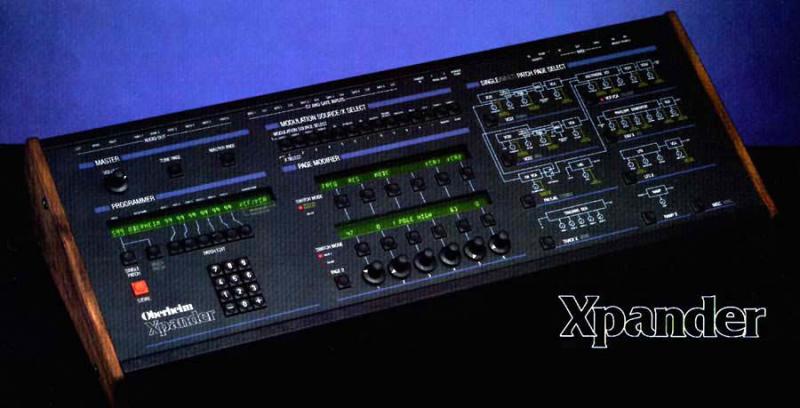
Well, on the far right of the center display. However
I must apologize as I am looking at my Matrix 12
which allows 6 zones instead of three, and does not
have external CV inputs.

Looking at the xpander midi spec though, it says you have the
option of Omni in each of the 3 zones so it should be in there.


From Xpander Midi Spec:

These Zones, an Oberheim innovation, are polyphonic note assignment modules. For
each Zone, its control

source (one of the sixteen MIDI channels or OMNI) , the range of notes over
which it is active (MIDI notes

1 through 127), and the method by which it should assign notes to voices
(including Rotate, Reassign,

Reset, and three unison modes) may be specified.


Perhaps PeWe  or another Xpander owner can help.

Karl


________________________________
From: "endofcommon@..." <endofcommon@...>
To: xpantastic@yahoogroups.com
Sent: Mon, March 11, 2013 6:24:08 PM
Subject: Re: [xpantastic] Xpander Midi Recieve Channel


re: far right do you mean on the zone encoder ?
Im not seeing Omni ? as a selection (just Zone 1-3, CV1-6, CH 1-16)

Can someone please check on this when there in front of there machine. Thanks


On Mar 11, 2013, at 7:04 PM, Karl Schmeer wrote:


>Hi,
>Each zone (in single mode) may be set to it's own midi channel,
>or to Omni mode.
>
>Try this button sequence:
>
>>> Master Page >>  Zone >> Zone Number (1 - 6)
>
>At the far right of the zone page is the midi channel, make sure it is
>not set to omni.
>
>Best Luck
>
>Karl
>
>
>
>________________________________
>From: "endofcommon@gmail.comendofcommon@...>
>To: xpantastic@yahoogroups.com
>Sent: Mon, March 11, 2013 5:31:12 PM
>Subject: Re: [xpantastic] Xpander Midi Recieve Channel
>
>
>Xpander Master Midi channel is set to Ch1 (Master, Midi, Channel), Logic is
>sending out on Ch. 1  (tested all other channels working correctly). Has it to
>do with midi zones/ (master/midi/zones) perhaps ? Again this is in single mode.


> Thanks, e
>
>On Mar 11, 2013, at 6:17 PM, Ancient Eyeball Recipe wrote:
>
>
>>
>>
>>Well, my guess would be that either the xpander doesn't have its midi channel
>>set to one (I think that the default may be 'omni', which would produce your
>>symptoms), OR you're channelizing the output incorrectly  through your DAW,
>>which can be easy to do.
>>
>>
>>
>>In any case, I'm not in front of my matrix 12 at the moment, but logically
>>that's what comes to mind.
>>
>>________________________________
>From: endofcommon@...
>>To: xpantastic@yahoogroups.com
>>Sent: Monday, March 11, 2013 3:24:05 PM
>>Subject: [xpantastic] Xpander Midi Recieve Channel
>>
>>
>>Until recently I had my my Xpander on its own midi buss, but due to
>>some setup thinning out, it now needs to share a midi bus (1 Midi out
>>from a Emagic MT-4) with other synths but I cannot seem to set it
>>correctly in single mode to receive on just one midi channel, it wants
>>to respond to all channels, could someone please go over these steps
>>with me please, I must be missing something. Thank you, e
>>
>>OB Xpander
>>Processor v1.2
>>Voice v1.4
>>Casette v1.0
>>
>>
>>
>
>
Message
Re: [xpantastic] Xpander Midi Recieve Channel
2013-03-11 by Karl Schmeer
Attachments
- No local attachments were found for this message.