Xpantastic! group photo

Yahoo Groups archive

Xpantastic!

Index last updated: 2026-04-28 23:44 UTC

Thread

Re: [xpantastic] Xpander Midi Recieve Channel

Re: [xpantastic] Xpander Midi Recieve Channel

2013-03-11 by Ancient Eyeball Recipe

Well, my guess would be that either the xpander doesn't have its midi channel set to one (I think that the default may be 'omni', which would produce your symptoms), OR you're channelizing the output incorrectly through your DAW, which can be easy to do. 


In any case, I'm not in front of my matrix 12 at the moment, but logically that's what comes to mind. 
Show quoted textHide quoted text
----- Original Message -----
From: endofcommon@... 
To: xpantastic@yahoogroups.com 
Sent: Monday, March 11, 2013 3:24:05 PM 
Subject: [xpantastic] Xpander Midi Recieve Channel 


Until recently I had my my Xpander on its own midi buss, but due to 
some setup thinning out, it now needs to share a midi bus (1 Midi out 
from a Emagic MT-4) with other synths but I cannot seem to set it 
correctly in single mode to receive on just one midi channel, it wants 
to respond to all channels, could someone please go over these steps 
with me please, I must be missing something. Thank you, e 

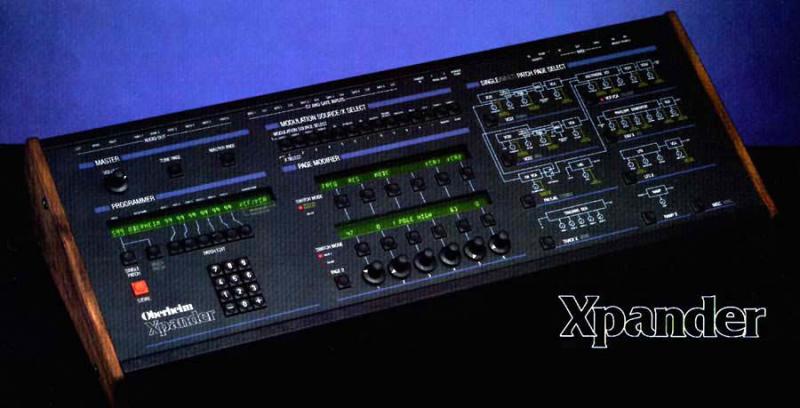
OB Xpander 
Processor v1.2 
Voice v1.4 
Casette v1.0

Xpander Midi Recieve Channel

2013-03-11 by endofcommon@...

Until recently I had my my Xpander on its own midi buss, but due to  
some setup thinning out, it now needs to share a midi bus (1 Midi out  
from a Emagic MT-4) with other synths but I cannot seem to set it  
correctly in single mode to receive on just one midi channel, it wants  
to respond to all channels, could someone please go over these steps  
with me please, I must be missing something. Thank you, e

OB Xpander
Processor v1.2
Voice v1.4
Casette v1.0

Re: [xpantastic] Xpander Midi Recieve Channel

2013-03-11 by endofcommon@...

Xpander Master Midi channel is set to Ch1 (Master, Midi, Channel), Logic is sending out on Ch. 1 (tested all other channels working correctly). Has it to do with midi zones/ (master/midi/zones) perhaps ? Again this is in single mode. Thanks, e

On Mar 11, 2013, at 6:17 PM, Ancient Eyeball Recipe wrote:


Well, my guess would be that either the xpander doesn't have its midi channel set to one (I think that the default may be 'omni', which would produce your symptoms), OR you're channelizing the output incorrectly through your DAW, which can be easy to do.

In any case, I'm not in front of my matrix 12 at the moment, but logically that's what comes to mind.

Show quoted textHide quoted text
From: endofcommon@...
To: xpantastic@...m
Sent: Monday, March 11, 2013 3:24:05 PM
Subject: [xpantastic] Xpander Midi Recieve Channel

Until recently I had my my Xpander on its own midi buss, but due to
some setup thinning out, it now needs to share a midi bus (1 Midi out
from a Emagic MT-4) with other synths but I cannot seem to set it
correctly in single mode to receive on just one midi channel, it wants
to respond to all channels, could someone please go over these steps
with me please, I must be missing something. Thank you, e

OB Xpander
Processor v1.2
Voice v1.4
Casette v1.0


Re: [xpantastic] Xpander Midi Recieve Channel

2013-03-11 by Ancient Eyeball Recipe

If I remember, I'll look at my matrix later after I get home. I think that it's the same setup. 


There is probably a separate zone midi channel - I vaguely recall that single mode uses zone 1 by default (?). In any case, it might be worth poking around to see if there is somewhere else where a midi channel is set. 
Show quoted textHide quoted text
----- Original Message -----
From: endofcommon@...m 
To: xpantastic@yahoogroups.com 
Sent: Monday, March 11, 2013 3:42:29 PM 
Subject: Re: [xpantastic] Xpander Midi Recieve Channel 


Xpander Master Midi channel is set to Ch1 (Master, Midi, Channel), Logic is sending out on Ch. 1 (tested all other channels working correctly). Has it to do with midi zones/ (master/midi/zones) perhaps ? Again this is in single mode. Thanks, e 


On Mar 11, 2013, at 6:17 PM, Ancient Eyeball Recipe wrote: 


Well, my guess would be that either the xpander doesn't have its midi channel set to one (I think that the default may be 'omni', which would produce your symptoms), OR you're channelizing the output incorrectly through your DAW, which can be easy to do. 


In any case, I'm not in front of my matrix 12 at the moment, but logically that's what comes to mind. 

----- Original Message -----
From: endofcommon@... 
To: xpantastic@yahoogroups.com 
Sent: Monday, March 11, 2013 3:24:05 PM 
Subject: [xpantastic] Xpander Midi Recieve Channel 


Until recently I had my my Xpander on its own midi buss, but due to 
some setup thinning out, it now needs to share a midi bus (1 Midi out 
from a Emagic MT-4) with other synths but I cannot seem to set it 
correctly in single mode to receive on just one midi channel, it wants 
to respond to all channels, could someone please go over these steps 
with me please, I must be missing something. Thank you, e 

OB Xpander 
Processor v1.2 
Voice v1.4 
Casette v1.0

Re: [xpantastic] Xpander Midi Recieve Channel

2013-03-11 by PeWe


Not being in front of my Xpander too,- but typing from my head:

go to [Master] page > [MIDI] > select the MIDI channel Xpander will listen to

go to [Zone] > [Input] > set Zone 1 to the same channel ...

so, if you have set both p.ex. to [5], Xpander will listen to MIDI on channel 5.

double check the [Limits] (keyrange) is set to 0-127 and [Mode] is set to "rotate",- this works for 6 voice poly.

double check for MIDI controllers being assigned to levers, switches, pedal 1 & 2.

In case you don\ufffdt hear anything, which can happen when you switch between single and multi patch mode back and forth by some reason,- send a MIDI CC#7 value 127 volume command from your master keyboard controller.


Am 11.03.2013 23:24, schrieb endofcommon@...:
Show quoted textHide quoted text
\ufffd

Until recently I had my my Xpander on its own midi buss, but due to
some setup thinning out, it now needs to share a midi bus (1 Midi out
from a Emagic MT-4) with other synths but I cannot seem to set it
correctly in single mode to receive on just one midi channel, it wants
to respond to all channels, could someone please go over these steps
with me please, I must be missing something. Thank you, e

OB Xpander
Processor v1.2
Voice v1.4
Casette v1.0


Re: [xpantastic] Xpander Midi Recieve Channel

2013-03-11 by Ancient Eyeball Recipe

just realized that I have the matrix 12 pdf manual here at work... 


it looks like you need to set it in the zone itself, or in multiple zones if you have the voices mapped out that way. It looks like the basic channel is used for program changes. "Thus Patch Changes are global commands and Notes and Controllers are tied in to the ZONES or individual channel settings in VASSIGN" 
Show quoted textHide quoted text
----- Original Message -----
From: endofcommon@... 
To: xpantastic@yahoogroups.com 
Sent: Monday, March 11, 2013 3:42:29 PM 
Subject: Re: [xpantastic] Xpander Midi Recieve Channel 


Xpander Master Midi channel is set to Ch1 (Master, Midi, Channel), Logic is sending out on Ch. 1 (tested all other channels working correctly). Has it to do with midi zones/ (master/midi/zones) perhaps ? Again this is in single mode. Thanks, e 


On Mar 11, 2013, at 6:17 PM, Ancient Eyeball Recipe wrote: 


Well, my guess would be that either the xpander doesn't have its midi channel set to one (I think that the default may be 'omni', which would produce your symptoms), OR you're channelizing the output incorrectly through your DAW, which can be easy to do. 


In any case, I'm not in front of my matrix 12 at the moment, but logically that's what comes to mind. 

----- Original Message -----
From: endofcommon@... 
To: xpantastic@yahoogroups.com 
Sent: Monday, March 11, 2013 3:24:05 PM 
Subject: [xpantastic] Xpander Midi Recieve Channel 


Until recently I had my my Xpander on its own midi buss, but due to 
some setup thinning out, it now needs to share a midi bus (1 Midi out 
from a Emagic MT-4) with other synths but I cannot seem to set it 
correctly in single mode to receive on just one midi channel, it wants 
to respond to all channels, could someone please go over these steps 
with me please, I must be missing something. Thank you, e 

OB Xpander 
Processor v1.2 
Voice v1.4 
Casette v1.0

Re: [xpantastic] Xpander Midi Recieve Channel

2013-03-11 by Karl Schmeer

Hi,
Each zone (in single mode) may be set to it's own midi channel, 
or to Omni mode. 

Try this button sequence:

>> Master Page >>  Zone >> Zone Number (1 - 6)

At the far right of the zone page is the midi channel, make sure it is 
not set to omni.

Best Luck

Karl


________________________________
From: "endofcommon@..." <endofcommon@...m>
To: xpantastic@yahoogroups.com
Sent: Mon, March 11, 2013 5:31:12 PM
Subject: Re: [xpantastic] Xpander Midi Recieve Channel

  
Xpander Master Midi channel is set to Ch1 (Master, Midi, Channel), Logic is 
sending out on Ch. 1  (tested all other channels working correctly). Has it to 
do with midi zones/ (master/midi/zones) perhaps ? Again this is in single mode. 
 Thanks, e 
Show quoted textHide quoted text
On Mar 11, 2013, at 6:17 PM, Ancient Eyeball Recipe wrote:

  
>
>
>Well, my guess would be that either the xpander doesn't have its midi channel 
>set to one (I think that the default may be 'omni', which would produce your 
>symptoms), OR you're channelizing the output incorrectly  through your DAW, 
>which can be easy to do. 
>
>
>
>In any case, I'm not in front of my matrix 12 at the moment, but logically 
>that's what comes to mind.
>
>________________________________
From: endofcommon@...
>To: xpantastic@yahoogroups.com
>Sent: Monday, March 11, 2013 3:24:05 PM
>Subject: [xpantastic] Xpander Midi Recieve Channel
>
>  
>Until recently I had my my Xpander on its own midi buss, but due to 
>some setup thinning out, it now needs to share a midi bus (1 Midi out 
>from a Emagic MT-4) with other synths but I cannot seem to set it 
>correctly in single mode to receive on just one midi channel, it wants 
>to respond to all channels, could someone please go over these steps 
>with me please, I must be missing something. Thank you, e
>
>OB Xpander
>Processor v1.2
>Voice v1.4
>Casette v1.0
>
>
>

Re: [xpantastic] Xpander Midi Recieve Channel

2013-03-11 by endofcommon@...

re: far right do you mean on the zone encoder ?
Im not seeing Omni ? as a selection (just Zone 1-3, CV1-6, CH 1-16)

Can someone please check on this when there in front of there machine. Thanks


On Mar 11, 2013, at 7:04 PM, Karl Schmeer wrote:

Hi,
Each zone (in single mode) may be set to it's own midi channel,
or to Omni mode.

Try this button sequence:

>> Master Page >> Zone >> Zone Number (1 - 6)

At the far right of the zone page is the midi channel, make sure it is
not set to omni.

Best Luck

Karl


________________________________

Show quoted textHide quoted text

From: "endofcommon@...endofcommon@...>
To: xpantastic@yahoogroups.com
Sent: Mon, March 11, 2013 5:31:12 PM
Subject: Re: [xpantastic] Xpander Midi Recieve Channel


Xpander Master Midi channel is set to Ch1 (Master, Midi, Channel), Logic is
sending out on Ch. 1 (tested all other channels working correctly). Has it to
do with midi zones/ (master/midi/zones) perhaps ? Again this is in single mode.
Thanks, e

On Mar 11, 2013, at 6:17 PM, Ancient Eyeball Recipe wrote:


>
>
>Well, my guess would be that either the xpander doesn't have its midi channel
>set to one (I think that the default may be 'omni', which would produce your
>symptoms), OR you're channelizing the output incorrectly through your DAW,
>which can be easy to do.
>
>
>
>In any case, I'm not in front of my matrix 12 at the moment, but logically
>that's what comes to mind.
>
>________________________________
From: endofcommon@...
>To: xpantastic@yahoogroups.com
>Sent: Monday, March 11, 2013 3:24:05 PM
>Subject: [xpantastic] Xpander Midi Recieve Channel
>
>
>Until recently I had my my Xpander on its own midi buss, but due to
>some setup thinning out, it now needs to share a midi bus (1 Midi out
>from a Emagic MT-4) with other synths but I cannot seem to set it
>correctly in single mode to receive on just one midi channel, it wants
>to respond to all channels, could someone please go over these steps
>with me please, I must be missing something. Thank you, e
>
>OB Xpander
>Processor v1.2
>Voice v1.4
>Casette v1.0
>
>
>


Re: [xpantastic] Xpander Midi Recieve Channel

2013-03-11 by Karl Schmeer

Well, on the far right of the center display. However 
I must apologize as I am looking at my Matrix 12 
which allows 6 zones instead of three, and does not
have external CV inputs.

Looking at the xpander midi spec though, it says you have the 
option of Omni in each of the 3 zones so it should be in there.


From Xpander Midi Spec: 

These Zones, an Oberheim innovation, are polyphonic note assignment modules. For 
each Zone, its control 

source (one of the sixteen MIDI channels or OMNI) , the range of notes over 
which it is active (MIDI notes 

1 through 127), and the method by which it should assign notes to voices 
(including Rotate, Reassign, 

Reset, and three unison modes) may be specified.


Perhaps PeWe  or another Xpander owner can help.

Karl


________________________________
From: "endofcommon@..." <endofcommon@...>
To: xpantastic@yahoogroups.com
Sent: Mon, March 11, 2013 6:24:08 PM
Subject: Re: [xpantastic] Xpander Midi Recieve Channel

  
re: far right do you mean on the zone encoder ? 
Im not seeing Omni ? as a selection (just Zone 1-3, CV1-6, CH 1-16)

Can someone please check on this when there in front of there machine. Thanks
Show quoted textHide quoted text
On Mar 11, 2013, at 7:04 PM, Karl Schmeer wrote:

  
>Hi,
>Each zone (in single mode) may be set to it's own midi channel, 
>or to Omni mode. 
>
>Try this button sequence:
>
>>> Master Page >>  Zone >> Zone Number (1 - 6)
>
>At the far right of the zone page is the midi channel, make sure it is 
>not set to omni.
>
>Best Luck
>
>Karl
>
> 
>
>________________________________
>From: "endofcommon@gmail.comendofcommon@...>
>To: xpantastic@yahoogroups.com
>Sent: Mon, March 11, 2013 5:31:12 PM
>Subject: Re: [xpantastic] Xpander Midi Recieve Channel
>
>  
>Xpander Master Midi channel is set to Ch1 (Master, Midi, Channel), Logic is 
>sending out on Ch. 1  (tested all other channels working correctly). Has it to 
>do with midi zones/ (master/midi/zones) perhaps ? Again this is in single mode. 


> Thanks, e 
>
>On Mar 11, 2013, at 6:17 PM, Ancient Eyeball Recipe wrote:
>
>  
>>
>>
>>Well, my guess would be that either the xpander doesn't have its midi channel 
>>set to one (I think that the default may be 'omni', which would produce your 
>>symptoms), OR you're channelizing the output incorrectly  through your DAW, 
>>which can be easy to do. 
>>
>>
>>
>>In any case, I'm not in front of my matrix 12 at the moment, but logically 
>>that's what comes to mind.
>>
>>________________________________
>From: endofcommon@...
>>To: xpantastic@yahoogroups.com
>>Sent: Monday, March 11, 2013 3:24:05 PM
>>Subject: [xpantastic] Xpander Midi Recieve Channel
>>
>>  
>>Until recently I had my my Xpander on its own midi buss, but due to 
>>some setup thinning out, it now needs to share a midi bus (1 Midi out 
>>from a Emagic MT-4) with other synths but I cannot seem to set it 
>>correctly in single mode to receive on just one midi channel, it wants 
>>to respond to all channels, could someone please go over these steps 
>>with me please, I must be missing something. Thank you, e
>>
>>OB Xpander
>>Processor v1.2
>>Voice v1.4
>>Casette v1.0
>>
>>
>>
>
>

Re: [xpantastic] I got it now was/Xpander Midi Recieve Channel

2013-03-11 by endofcommon@...

Ok, I got it now Karl, how frustrating all these steps! : )

The key here is the Zone button under Master page that you mention which was set to Omni for all 3 zones.
Changing this to the desired channel worked and everything is good now. I was confusing the CV/Midi and Zone as one button not two.

Appreciate the help! e

On Mar 11, 2013, at 7:04 PM, Karl Schmeer wrote:

Hi,
Each zone (in single mode) may be set to it's own midi channel,
or to Omni mode.

Try this button sequence:

>> Master Page >> Zone >> Zone Number (1 - 6)

At the far right of the zone page is the midi channel, make sure it is
not set to omni.

Best Luck

Karl


________________________________

Show quoted textHide quoted text

From: "endofcommon@...endofcommon@...>
To: xpantastic@yahoogroups.com
Sent: Mon, March 11, 2013 5:31:12 PM
Subject: Re: [xpantastic] Xpander Midi Recieve Channel


Xpander Master Midi channel is set to Ch1 (Master, Midi, Channel), Logic is
sending out on Ch. 1 (tested all other channels working correctly). Has it to
do with midi zones/ (master/midi/zones) perhaps ? Again this is in single mode.
Thanks, e

On Mar 11, 2013, at 6:17 PM, Ancient Eyeball Recipe wrote:


>
>
>Well, my guess would be that either the xpander doesn't have its midi channel
>set to one (I think that the default may be 'omni', which would produce your
>symptoms), OR you're channelizing the output incorrectly through your DAW,
>which can be easy to do.
>
>
>
>In any case, I'm not in front of my matrix 12 at the moment, but logically
>that's what comes to mind.
>
>________________________________
From: endofcommon@...
>To: xpantastic@yahoogroups.com
>Sent: Monday, March 11, 2013 3:24:05 PM
>Subject: [xpantastic] Xpander Midi Recieve Channel
>
>
>Until recently I had my my Xpander on its own midi buss, but due to
>some setup thinning out, it now needs to share a midi bus (1 Midi out
>from a Emagic MT-4) with other synths but I cannot seem to set it
>correctly in single mode to receive on just one midi channel, it wants
>to respond to all channels, could someone please go over these steps
>with me please, I must be missing something. Thank you, e
>
>OB Xpander
>Processor v1.2
>Voice v1.4
>Casette v1.0
>
>
>


Re: [xpantastic] I got it now was/Xpander Midi Recieve Channel

2013-03-11 by Karl Schmeer

:-)))


________________________________
From: "endofcommon@..." <endofcommon@...>
To: xpantastic@yahoogroups.com
Sent: Mon, March 11, 2013 6:30:59 PM
Subject: Re: [xpantastic] I got it now was/Xpander Midi Recieve Channel

  
Ok, I got it now Karl, how frustrating all these steps!  : ) 

The key here is the Zone button under Master page that you mention which was set 
to Omni for all 3 zones.
Changing this to the desired channel worked and everything is good now.  I was 
confusing the CV/Midi and Zone as one button not two.

Appreciate the help! e
Show quoted textHide quoted text
On Mar 11, 2013, at 7:04 PM, Karl Schmeer wrote:

  
>Hi,
>Each zone (in single mode) may be set to it's own midi channel, 
>or to Omni mode. 
>
>Try this button sequence:
>
>>> Master Page >>  Zone >> Zone Number (1 - 6)
>
>At the far right of the zone page is the midi channel, make sure it is 
>not set to omni.
>
>Best Luck
>
>Karl
>
> 
>
>________________________________
>From: "endofcommon@...@...>
>To: xpantastic@yahoogroups.com
>Sent: Mon, March 11, 2013 5:31:12 PM
>Subject: Re: [xpantastic] Xpander Midi Recieve Channel
>
>  
>Xpander Master Midi channel is set to Ch1 (Master, Midi, Channel), Logic is 
>sending out on Ch. 1  (tested all other channels working correctly). Has it to 
>do with midi zones/ (master/midi/zones) perhaps ? Again this is in single mode. 

> Thanks, e 
>
>On Mar 11, 2013, at 6:17 PM, Ancient Eyeball Recipe wrote:
>
>  
>>
>>
>>Well, my guess would be that either the xpander doesn't have its midi channel 
>>set to one (I think that the default may be 'omni', which would produce your 
>>symptoms), OR you're channelizing the output incorrectly  through your DAW, 
>>which can be easy to do. 
>>
>>
>>
>>In any case, I'm not in front of my matrix 12 at the moment, but logically 
>>that's what comes to mind.
>>
>>________________________________
>From: endofcommon@...
>>To: xpantastic@yahoogroups.com
>>Sent: Monday, March 11, 2013 3:24:05 PM
>>Subject: [xpantastic] Xpander Midi Recieve Channel
>>
>>  
>>Until recently I had my my Xpander on its own midi buss, but due to 
>>some setup thinning out, it now needs to share a midi bus (1 Midi out 
>>from a Emagic MT-4) with other synths but I cannot seem to set it 
>>correctly in single mode to receive on just one midi channel, it wants 
>>to respond to all channels, could someone please go over these steps 
>>with me please, I must be missing something. Thank you, e
>>
>>OB Xpander
>>Processor v1.2
>>Voice v1.4
>>Casette v1.0
>>
>>
>>
>
>

Re: [xpantastic] Xpander Midi Recieve Channel

2013-03-11 by PeWe


thx, Karl,- I already posted and I was correct,- my Xpander is switched ON now so I double checked.

It\ufffds a matter of Masterpage > MIDI > Channel (selects basic MIDI channel) and the ZONE 1 Input which should be set to the same MIDI channel.
Never OMNI !

Single patch mode is ZONE 1 always.

Am 12.03.2013 00:39, schrieb Karl Schmeer:
Show quoted textHide quoted text
\ufffd


Perhaps PeWe\ufffd\ufffdor another Xpander owner can help.

Karl

\ufffd


Move to quarantaine

This moves the raw source file on disk only. The archive index is not changed automatically, so you still need to run a manual refresh afterward.