Xpantastic! group photo

Yahoo Groups archive

Xpantastic!

Index last updated: 2026-04-28 23:44 UTC

Thread

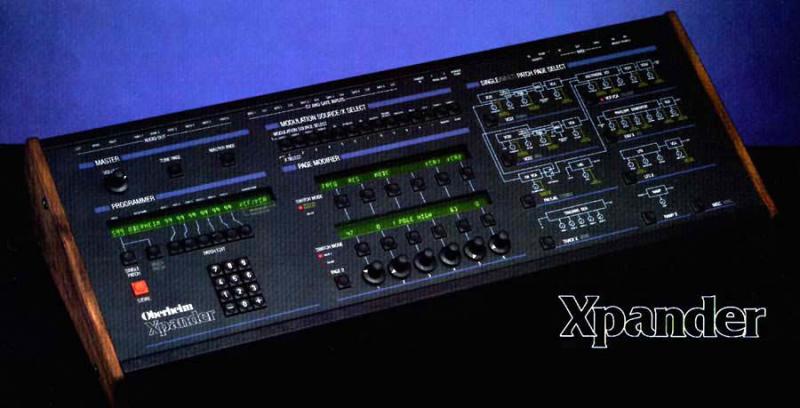
Sticking Buttons on Xpander?

Sticking Buttons on Xpander?

2014-12-11 by 3r1n915xt@...

Hi all,


Im looking for suggestions on how to fix the sticking buttons on my Xpander. When pressed down, they stay down, and can only be brought back up by scratching at their sides, or, gasp, tugging at the side with a sharp object. It seems like they are slightly offset, rubbing against the front panel.


The only option I can think of is to open her up, and bend the buttons where they sit on the PCB to get them up striaght. But I've never seen the inside of an Xpander, so I don't know what to expect.


Anyone seen this before?


Any ideas for a cure?


Any advice appreciated.

Re: Sticking Buttons on Xpander?

2014-12-11 by Sean Finnigan

Same!!

I too am having one of my button sticking in the same manner and had considered the same remedy.

Any suggestions would be awesome.

S

Re: [xpantastic] Sticking Buttons on Xpander?

2014-12-11 by PeWe

Be carefull !

1st try to reseat the circuit boards under the frontpanel,- if this 
doesn�t help, here�s my story:

It�s possibly the plastic surface w/ all the printouts which is glued to 
the frontpanel.
The cutouts for the buttons are also under that frontpanel surface in 
the metal-frontpanel and I doubt the buttons stick there.
No kidding, but it can be your frontpanel surface "moved sidewards" ...
I had it when direct sunlight hit the Xpander�s surface for a long 
enough period of time and made the plastic surface "swim".
After that open air gig the Xpander went into it�s case and to the 
airport into a plane and after lift off it became much colder, so the 
plasic shrinked a bit,- talking about 1-2mm here.
When arrived at the next venue, all buttons on my Xpander were stuck.

We had to remove the circuit bords carrying the buttons/switches, then 
taking a rasp and remove the plasic until the holes in the plastic 
frontpanel fit the ones in the metal frontpanel again.

I think it not urgently needs direct sunlight, all kind of stage lights 
when hot enough can cause that.
It is definitely the glue under the plasic panel which is obviously much 
more sensitive to heat than the plastic panel itself.
On my Xpander it looks like new.

P.


Am 11.12.2014 um 19:58 schrieb 3r1n915xt@... [xpantastic]:
Show quoted textHide quoted text
>
> Hi all,
>
>
> Im looking for suggestions on how to fix the sticking buttons on my 
> Xpander.  When pressed down, they stay down, and can only be brought 
> back up by scratching at their sides, or, gasp, tugging at the side 
> with a sharp object.  It seems like they are slightly offset, rubbing 
> against the front panel.
>
>
> The only option I can think of is to open her up, and bend the buttons 
> where they sit on the PCB to get them up striaght.  But I've never 
> seen the inside of an Xpander, so I don't know what to expect.
>
>
> Anyone seen this before?
>
>
> Any ideas for a cure?
>
>
> Any advice appreciated.
>
>

Re: [xpantastic] Re: Sticking Buttons on Xpander?

2014-12-11 by John Henson

It sounds as if the front panel is slightly out of line with its switch 
holes. Just loosen all the panel mounting nuts on the inside, just 
enough to allow a little free movement of the pcb, and shuffle the board 
around gently until all the buttons are free switching. Then finger 
tighten a couple of the nuts to hold it in place. Recheck again and if 
all it good, tighten them all up again. Recheck again and repeat if not 
successful.

Re: [xpantastic] Re: Sticking Buttons on Xpander?

2014-12-12 by yan lesage

i have a xpander , not hard to open.. they are the big main board, psu board , and other board for memory, control on cover ..pcb board are hold and fragile, some component are fragilising by the time, some should not be tuch like some "mosfet" component.take all your time, calmly, with all precaution, put power cable 110v / 220v out. all voltage wire/ slot coming from psu to alimenting different boards should be reconnect before you put back power supply on .psu card have to run "on charge" otherwise it can be damaged as technician tell me.. they are some post on internet about intervention maintenance for display, rotary encoder, button zone ..bie 

     Le Jeudi 11 décembre 2014 21h38, "John Henson synthnerd@...t [xpantastic]" <xpantastic@yahoogroups.com> a écrit :
   

     It sounds as if the front panel is slightly out of line with its switch 
holes. Just loosen all the panel mounting nuts on the inside, just 
enough to allow a little free movement of the pcb, and shuffle the board 
around gently until all the buttons are free switching. Then finger 
tighten a couple of the nuts to hold it in place. Recheck again and if 
all it good, tighten them all up again. Recheck again and repeat if not 
successful.

Re: [xpantastic] Re: Sticking Buttons on Xpander?

2014-12-12 by mattvrazo@...

I had the same issue on mine. Rather than opening it up, I simply took a razor blade and shaved off the edge of the button hole on the case until it didn't stick. This sounds bad, but the holes are not exactly cut in the first place, and no one is going to notice. You literally only need to shave a thin sliver, and it will still look normal.

Re: [xpantastic] Re: Sticking Buttons on Xpander?

2014-12-14 by Karl Schmeer

Hi,
It's a well built machine, removing the six screws on the ends allows you to lift the front panel of the xpander up.
The circuit board that the buttons are attached to, are actually on a special  hinge. All you have to do is remove two screws 
and the whole circuit board bends up for repair/cleaning.  From this vantage point you should be able to fix the problem.
 
 
Best
 
Karl 


On Friday, December 12, 2014 1:22 PM, "mattvrazo@... [xpantastic]" <xpantastic@yahoogroups.com> wrote:


I had the same issue on mine. Rather than opening it up, I simply took a razor blade and shaved off the edge of the button hole on the case until it didn't stick. This sounds bad, but the holes are not exactly cut in the first place, and no one is going to notice. You literally only need to shave a thin sliver, and it will still look normal.

Re: Sticking Buttons on Xpander?

2015-01-15 by 3r1n915xt@...

Thanks all so much for the ideas. I tryed a few things. 

Reseating the board didn't work because the PCBs screw holes are actually very tight and don't allow for enough movement. 

I took a razor to the edge of a button's panel hole, but the button is up tight enough to the side that it's difficult to get a decent cut. Also, I slipped and left a small scar on my front panel. :(

For my next attempt, I'll try removing the boards entirely and filing the edges away...

Re: Sticking Buttons on Xpander?

2015-01-16 by blchrr@...

I had this problem a few years ago, the only solution was filing the edges 
of the button holes which worked well. 
Show quoted textHide quoted text
> Thanks all so much for the ideas. I tryed a few things.  
> 
> Reseating the board didn't work because the PCBs screw holes are actually very tight and don't allow for enough movement.  
> 
> I took a razor to the edge of a button's panel hole, but the button is up tight enough to the side that it's difficult to get a decent cut. Also, I slipped and left a small scar on my front panel. :( 
> 
> For my next attempt, I'll try removing the boards entirely and filing the edges away...

Re: Sticking Buttons on Xpander?

2015-04-24 by khatri.naeem786@...

I just got a non-working Xpander (that seems to be a Rev. A U.S. made one).  After a power supply recap and full cleanup- I'm getting a "Voice Processor Malfunction" warning.  FYI- the U.S. made on uses the Hitachi 68B09P.  I read another post elsewhere where the user replaced their 68B09EP chip.  I assumed the U.S. Model uses the same chip but it doesn't.

It's a REALLY easy fix but you need to be extremely careful.  I took the thinnest flathead screwsdriver I could find: you need to be gentle and pop the button cap off (while the pot and processor boards are installed as normal). The flathead tip should easily fit into one side while the button's snug against the opposite edge.

You'll have full access to the actual exposed switch assembly once the cap is removed: push it in the opposite direction of the edge the button sticks to using the flathead tip.  Pop the top cap on (should line up and snap in easily).

Be careful and make sure the flathead won't slip while between the cap and bottom switch assembly before you pry it off.

It's actually simpler to do than explain but just make sure the tip doesn't slip and scratch the cap.

Re: [xpantastic] Re: Sticking Buttons on Xpander?

2015-04-25 by Karl Schmeer

Hello You may have tried this already,  but if you re-seat ( carefully pull out and push back in) the integrated circuits in the digital section your problem may go away.  Best Luck Karl    


     On Friday, April 24, 2015 5:32 PM, "khatri.naeem786@...m [xpantastic]" <xpantastic@yahoogroups.com> wrote:
   

     I just got a non-working Xpander (that seems to be a Rev. A U.S. made one). After a power supply recap and full cleanup- I'm getting a "Voice Processor Malfunction" warning. FYI- the U.S. made on uses the Hitachi 68B09P. I read another post elsewhere where the user replaced their 68B09EP chip. I assumed the U.S. Model uses the same chip but it doesn't.

It's a REALLY easy fix but you need to be extremely careful. I took the thinnest flathead screwsdriver I could find: you need to be gentle and pop the button cap off (while the pot and processor boards are installed as normal). The flathead tip should easily fit into one side while the button's snug against the opposite edge.

You'll have full access to the actual exposed switch assembly once the cap is removed: push it in the opposite direction of the edge the button sticks to using the flathead tip. Pop the top cap on (should line up and snap in easily).

Be careful and make sure the flathead won't slip while between the cap and bottom switch assembly before you pry it off.

It's actually simpler to do than explain but just make sure the tip doesn't slip and scratch the cap.  #yiv8771119113 #yiv8771119113 -- #yiv8771119113ygrp-mkp {border:1px solid #d8d8d8;font-family:Arial;margin:10px 0;padding:0 10px;}#yiv8771119113 #yiv8771119113ygrp-mkp hr {border:1px solid #d8d8d8;}#yiv8771119113 #yiv8771119113ygrp-mkp #yiv8771119113hd {color:#628c2a;font-size:85%;font-weight:700;line-height:122%;margin:10px 0;}#yiv8771119113 #yiv8771119113ygrp-mkp #yiv8771119113ads {margin-bottom:10px;}#yiv8771119113 #yiv8771119113ygrp-mkp .yiv8771119113ad {padding:0 0;}#yiv8771119113 #yiv8771119113ygrp-mkp .yiv8771119113ad p {margin:0;}#yiv8771119113 #yiv8771119113ygrp-mkp .yiv8771119113ad a {color:#0000ff;text-decoration:none;}#yiv8771119113 #yiv8771119113ygrp-sponsor #yiv8771119113ygrp-lc {font-family:Arial;}#yiv8771119113 #yiv8771119113ygrp-sponsor #yiv8771119113ygrp-lc #yiv8771119113hd {margin:10px 0px;font-weight:700;font-size:78%;line-height:122%;}#yiv8771119113 #yiv8771119113ygrp-sponsor #yiv8771119113ygrp-lc .yiv8771119113ad {margin-bottom:10px;padding:0 0;}#yiv8771119113 #yiv8771119113actions {font-family:Verdana;font-size:11px;padding:10px 0;}#yiv8771119113 #yiv8771119113activity {background-color:#e0ecee;float:left;font-family:Verdana;font-size:10px;padding:10px;}#yiv8771119113 #yiv8771119113activity span {font-weight:700;}#yiv8771119113 #yiv8771119113activity span:first-child {text-transform:uppercase;}#yiv8771119113 #yiv8771119113activity span a {color:#5085b6;text-decoration:none;}#yiv8771119113 #yiv8771119113activity span span {color:#ff7900;}#yiv8771119113 #yiv8771119113activity span .yiv8771119113underline {text-decoration:underline;}#yiv8771119113 .yiv8771119113attach {clear:both;display:table;font-family:Arial;font-size:12px;padding:10px 0;width:400px;}#yiv8771119113 .yiv8771119113attach div a {text-decoration:none;}#yiv8771119113 .yiv8771119113attach img {border:none;padding-right:5px;}#yiv8771119113 .yiv8771119113attach label {display:block;margin-bottom:5px;}#yiv8771119113 .yiv8771119113attach label a {text-decoration:none;}#yiv8771119113 blockquote {margin:0 0 0 4px;}#yiv8771119113 .yiv8771119113bold {font-family:Arial;font-size:13px;font-weight:700;}#yiv8771119113 .yiv8771119113bold a {text-decoration:none;}#yiv8771119113 dd.yiv8771119113last p a {font-family:Verdana;font-weight:700;}#yiv8771119113 dd.yiv8771119113last p span {margin-right:10px;font-family:Verdana;font-weight:700;}#yiv8771119113 dd.yiv8771119113last p span.yiv8771119113yshortcuts {margin-right:0;}#yiv8771119113 div.yiv8771119113attach-table div div a {text-decoration:none;}#yiv8771119113 div.yiv8771119113attach-table {width:400px;}#yiv8771119113 div.yiv8771119113file-title a, #yiv8771119113 div.yiv8771119113file-title a:active, #yiv8771119113 div.yiv8771119113file-title a:hover, #yiv8771119113 div.yiv8771119113file-title a:visited {text-decoration:none;}#yiv8771119113 div.yiv8771119113photo-title a, #yiv8771119113 div.yiv8771119113photo-title a:active, #yiv8771119113 div.yiv8771119113photo-title a:hover, #yiv8771119113 div.yiv8771119113photo-title a:visited {text-decoration:none;}#yiv8771119113 div#yiv8771119113ygrp-mlmsg #yiv8771119113ygrp-msg p a span.yiv8771119113yshortcuts {font-family:Verdana;font-size:10px;font-weight:normal;}#yiv8771119113 .yiv8771119113green {color:#628c2a;}#yiv8771119113 .yiv8771119113MsoNormal {margin:0 0 0 0;}#yiv8771119113 o {font-size:0;}#yiv8771119113 #yiv8771119113photos div {float:left;width:72px;}#yiv8771119113 #yiv8771119113photos div div {border:1px solid #666666;height:62px;overflow:hidden;width:62px;}#yiv8771119113 #yiv8771119113photos div label {color:#666666;font-size:10px;overflow:hidden;text-align:center;white-space:nowrap;width:64px;}#yiv8771119113 #yiv8771119113reco-category {font-size:77%;}#yiv8771119113 #yiv8771119113reco-desc {font-size:77%;}#yiv8771119113 .yiv8771119113replbq {margin:4px;}#yiv8771119113 #yiv8771119113ygrp-actbar div a:first-child {margin-right:2px;padding-right:5px;}#yiv8771119113 #yiv8771119113ygrp-mlmsg {font-size:13px;font-family:Arial, helvetica, clean, sans-serif;}#yiv8771119113 #yiv8771119113ygrp-mlmsg table {font-size:inherit;font:100%;}#yiv8771119113 #yiv8771119113ygrp-mlmsg select, #yiv8771119113 input, #yiv8771119113 textarea {font:99% Arial, Helvetica, clean, sans-serif;}#yiv8771119113 #yiv8771119113ygrp-mlmsg pre, #yiv8771119113 code {font:115% monospace;}#yiv8771119113 #yiv8771119113ygrp-mlmsg * {line-height:1.22em;}#yiv8771119113 #yiv8771119113ygrp-mlmsg #yiv8771119113logo {padding-bottom:10px;}#yiv8771119113 #yiv8771119113ygrp-msg p a {font-family:Verdana;}#yiv8771119113 #yiv8771119113ygrp-msg p#yiv8771119113attach-count span {color:#1E66AE;font-weight:700;}#yiv8771119113 #yiv8771119113ygrp-reco #yiv8771119113reco-head {color:#ff7900;font-weight:700;}#yiv8771119113 #yiv8771119113ygrp-reco {margin-bottom:20px;padding:0px;}#yiv8771119113 #yiv8771119113ygrp-sponsor #yiv8771119113ov li a {font-size:130%;text-decoration:none;}#yiv8771119113 #yiv8771119113ygrp-sponsor #yiv8771119113ov li {font-size:77%;list-style-type:square;padding:6px 0;}#yiv8771119113 #yiv8771119113ygrp-sponsor #yiv8771119113ov ul {margin:0;padding:0 0 0 8px;}#yiv8771119113 #yiv8771119113ygrp-text {font-family:Georgia;}#yiv8771119113 #yiv8771119113ygrp-text p {margin:0 0 1em 0;}#yiv8771119113 #yiv8771119113ygrp-text tt {font-size:120%;}#yiv8771119113 #yiv8771119113ygrp-vital ul li:last-child {border-right:none !important;}#yiv8771119113
Move to quarantaine

This moves the raw source file on disk only. The archive index is not changed automatically, so you still need to run a manual refresh afterward.