Yahoo Groups archive

QTR-Quadtone RIP

Index last updated: 2026-04-28 23:12 UTC

Thread

QTR Linearizing of Quad files -- K7 Piezo and regular curves

QTR Linearizing of Quad files -- K7 Piezo and regular curves

2015-06-09 by Roy Harrington

There seems to be a fair amount of interest in re-linearizing existing .quad curves.
So looked into it and created a new droplet program QTR-Linearize-Quad that does this.
The droplet takes two files -- a .quad file that you wish to re-linearize and a
measurement file i.e. .txt file like the usual QTR-Linearize-Data takes.
This is basically equivalent to adding a LINEARIZE line to a curve descriptor file.
The output .quad file will have the same name with "-lin" appended to curve name.

This gives you the capability of linearizing Piezo .quad files and also allowing a
second linearizing of the standard curves -- i.e. you can have a linearized curve
but fine-tune the linearize with a second one.

The plan is for this in the next version but I currently have a Mac version that
can be tried out. Here's a link to the droplet application:


Comments welcome.
Roy
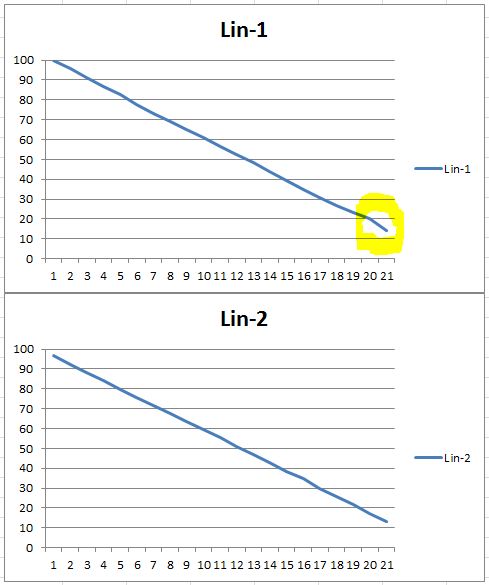

--

Re: QTR Linearizing of Quad files -- K7 Piezo and regular curves

2015-06-10 by richard@...

Its funny that this comes out the same day I announced my QuadLin service...

I just tried this new script Roy posted with a set of curves I know to work with my personal solution and I get the "L-values not in order" error. Does this still need the L* values to have at least 1 L* between each step?

Richard Boutwell
www.bwmastery.com


Re: [QuadtoneRIP] Re: QTR Linearizing of Quad files -- K7 Piezo and regular curves

2015-06-10 by Roy Harrington

It's exactly the same functionality as QTR linearize. It's not strictly 1 L value step minimum.
But that's probably about the idea. The points are joined like Photoshop curves and
then there can be no reversals. Lots of little wiggles are problematic I'd say.

Roy
Show quoted textHide quoted text
On Tue, Jun 9, 2015 at 6:01 PM, richard@richardboutwell.com [QuadtoneRIP] <QuadtoneRIP@yahoogroups.com> wrote:


Its funny that this comes out the same day I announced my QuadLin service...

I just tried this new script Roy posted with a set of curves I know to work with my personal solution and I get the "L-values not in order" error. Does this still need the L* values to have at least 1 L* between each step?

Richard Boutwell


--

Re: QTR Linearizing of Quad files -- K7 Piezo and regular curves

2015-06-10 by brian_downunda@...

As one of the people who has been pushing this issue and experimenting, I'd like to say a very big thank you to Roy. It would have been useful to have this a while ago, as it would have saved a lot of spreadsheeting, but it's just as useful now. I am rather keen to get my hands on the Windows version, although there's no rush, as I now won't be able to use it until late July.

I don't understand Richard's angst, as I've already posted how to do effectively the same thing in a less elegant and more tedious manner. If someone wants to start a commercial linearisation service (I'm yet to read the other thread, so I'm assuming that's what you're doing) then good luck to them, but this whole area has been inhabited by people willing to share information and learn. Long may it continue.

Re: QTR Linearizing of Quad files -- K7 Piezo and regular curves

2015-06-11 by jeff.grant@...

Without wishing to sound like a dummy, I downloaded the droplet, dropped a Quad and TXT file and nothing happened. Is there an order for the Quad and TXT files, a folder with both in or does the output go somewhere new? I'm used to the other droplets which add to the folder that has the TXT file.

Re: [QuadtoneRIP] Re: QTR Linearizing of Quad files -- K7 Piezo and regular curves

2015-06-11 by joel

Roy,
If you would please post the link to your drop box I would appreciate it.
Thanks so much
Joel
On Jun 10, 2015, at 7:41 PM, brian_downunda@... [QuadtoneRIP] <QuadtoneRIP@yahoogroups.com> wrote:

As one of the people who has been pushing this issue and experimenting, I'd like to say a very big thank you to Roy. It would have been useful to have this a while ago, as it would have saved a lot of spreadsheeting, but it's just as useful now. I am rather keen to get my hands on the Windows version, although there's no rush, as I now won't be able to use it until late July.

I don't understand Richard's angst, as I've already posted how to do effectively the same thing in a less elegant and more tedious manner. If someone wants to start a commercial linearisation service (I'm yet to read the other thread, so I'm assuming that's what you're doing) then good luck to them, but this whole area has been inhabited by people willing to share information and learn. Long may it continue.


Re: [QuadtoneRIP] Re: QTR Linearizing of Quad files -- K7 Piezo and regular curves

2015-06-11 by Roy Harrington

Show quoted textHide quoted text
On Thu, Jun 11, 2015 at 6:43 AM, joel jcon77@... [QuadtoneRIP] <QuadtoneRIP@yahoogroups.com> wrote:


Roy,
If you would please post the link to your drop box I would appreciate it.
Thanks so much
Joel
On Jun 10, 2015, at 7:41 PM, brian_downunda@... [QuadtoneRIP] <QuadtoneRIP@yahoogroups.com> wrote:

As one of the people who has been pushing this issue and experimenting, I'd like to say a very big thank you to Roy. It would have been useful to have this a while ago, as it would have saved a lot of spreadsheeting, but it's just as useful now. I am rather keen to get my hands on the Windows version, although there's no rush, as I now won't be able to use it until late July.

I don't understand Richard9;s angst, as I've already posted how to do effectively the same thing in a less elegant and more tedious manner. If someone wants to start a commercial linearisation service (I'm yet to read the other thread, so I'm assuming that's what you're doing) then good luck to them, but this whole area has been inhabited by people willing to share information and learn. Long may it continue.


--

Re: [QuadtoneRIP] QTR Linearizing of Quad files -- K7 Piezo and regular curves

2015-06-11 by joel

Thanks Roy!
Joel
On Jun 11, 2015, at 2:04 PM, Roy Harrington roy@... [QuadtoneRIP] <QuadtoneRIP@yahoogroups.com> wrote:


Here it is again:


On Thu, Jun 11, 2015 at 6:43 AM, joel jcon77@... [QuadtoneRIP]<QuadtoneRIP@yahoogroups.com> wrote:


Roy,
If you would please post the link to your drop box I would appreciate it.
Thanks so much
Joel
On Jun 10, 2015, at 7:41 PM, brian_downunda@... [QuadtoneRIP] <QuadtoneRIP@yahoogroups.com> wrote:

As one of the people who has been pushing this issue and experimenting, I'd like to say a very big thank you to Roy. It would have been useful to have this a while ago, as it would have saved a lot of spreadsheeting, but it's just as useful now. I am rather keen to get my hands on the Windows version, although there's no rush, as I now won't be able to use it until late July.

I don't understand Richard's angst, as I've already posted how to do effectively the same thing in a less elegant and more tedious manner. If someone wants to start a commercial linearisation service (I'm yet to read the other thread, so I'm assuming that's what you're doing) then good luck to them, but this whole area has been inhabited by people willing to share information and learn. Long may it continue.


--


Re: [QuadtoneRIP] QTR Linearizing of Quad files -- K7 Piezo and regular curves

2015-06-13 by richard@...

Brian, there’s no angst on my part. Awhile back I offered to run your quad file and a 51x3 measurement file through my workflow and send you the results. This was before I even considered offering this as a service. I am still willing to do so, feel free to send me an email at richard@richardboutwell.com.

What I write on here, and on my site, is meant to help people. For people who want more I do offer workshops and one-on-one teaching—the information isn’t very different than what I have posted before, but people are willing to pay to be taught directly, without sifting through lots of information that isn't relevant to them. The personalized relinearization service is the same thing. It's meant to help people who are not able, or simply don’t want, to spend the time and energy experimenting with the tools available.

Roy has made an amazing program that gives people tons of control over their printers and inks and allows them the tools to make better black and white prints. I would continue to tell people to buy and use QTR and PrintTool if they were five times the price he asks people to buy it for. I'm happy he is including Linearize-Quad as part of the next release of QTR, and is making it available for people now.

I tried the new app for a few hours on Wednesday. It seemed to work well once on my computer running Yosemite, and the other times it either just made a “-out.txt” file with a graph of the Lab values (with no error message in the text file it produced), or didn’t do anything when the .quad and measurement files were dropped onto it.

It responded somewhat better on my snow leopard machine though. The new linearize-quad.app seems to work well with profiles that produce a somewhat smooth curve already, but if there are reversals or bumps, then it might not work at all, or it might create a bumpy linearization. It worked similarly well to my method with an Eboni-6 profile that was pretty linear to begin with, but I found the results with my relinearization method were smoother than the results from the new QTR app for existing P2 Piezography profiles I tested (which all print too dark on my 3800, and are a little bumpy). I’m heading out of town for a few weeks and I have lots of client work to do before then, but I will try to make a few comparison scans and post them before I head out.

Richard Boutwell

Re: QTR Linearizing of Quad files -- K7 Piezo and regular curves

2015-06-19 by bruce_pickering@...

Having read that using the curve_K is more predictable than the Linearize= line I moved my readings over to the curve_K last night and did a comparison. I am using an all black inkset and If I have any difference then it is too subtle for me to tell.

If I want to fine tune the curve, can I now add a second lot of step wedge readings to the Linearize= option, leaving the original values in the curve_K?

If I can, then what is the advantage of the new droplet to add a second lot of step wedge readings to an existing quad file?

Bruce

Re: QTR Linearizing of Quad files -- K7 Piezo and regular curves

2015-06-28 by richard@...

If you are creating a single-channel black only profile then defining the K_curve has basically the same effect of defining the curve with the gray_curve= setting.

When using either Gray_curve or K_curve you can still fine tune the curve with the Linearize= inputs. This could be done even before the new LinearizeQuad droplet Roy created.

If you do use this new droplet after defining the K_curve and Linearize= settings then you basically have a three step linearization process. That might be overkill with a single channel black only profile, but could useful with Eb-6 style profiles.

Richard Boutwell
www.bwmastery.com

Re: QTR Linearizing of Quad files -- K7 Piezo and regular curves

2015-07-11 by Roy Harrington

Finally got the PC version going. You need to put the .exe file in the same
folder with all the .exe's like QTR-Linearize-Data.exe -- its the QuadToneRIP\Eye-One\ folder.
You can grab the two files (.quad and .txt) from anywhere on disk.

https://www.dropbox.com/s/7vmo1nwlj3s57e0/QTR-Linearize-Quad.exe?dl=0

Roy

Show quoted textHide quoted text
On Tue, Jun 9, 2015 at 4:07 PM, Roy Harrington <roy@...> wrote:
There seems to be a fair amount of interest in re-linearizing existing .quad curves.
So looked into it and created a new droplet program QTR-Linearize-Quad that does this.
The droplet takes two files -- a .quad file that you wish to re-linearize and a
measurement file i.e. .txt file like the usual QTR-Linearize-Data takes.
This is basically equivalent to adding a LINEARIZE line to a curve descriptor file.
The output .quad file will have the same name with "-lin" appended to curve name.

This gives you the capability of linearizing Piezo .quad files and also allowing a
second linearizing of the standard curves -- i.e. you can have a linearized curve
but fine-tune the linearize with a second one.

The plan is for this in the next version but I currently have a Mac version that
can be tried out. Here's a link to the droplet application:


Comments welcome.
Roy


--


--

Re: [QuadtoneRIP] Re: QTR Linearizing of Quad files -- K7 Piezo and regular curves

2015-07-11 by Paul Roark

Very nice. Thank you.

Here is an example of a glitch that just got corrected in an Epson Hot Press profile: http://www.paulroark.com/BW-Info/QTR-2nd-linearization.JPG

Paul
Show quoted textHide quoted text
On Fri, Jul 10, 2015 at 5:29 PM, Roy Harrington roy@... [QuadtoneRIP] <QuadtoneRIP@yahoogroups.com> wrote:

Finally got the PC version going. You need to put the .exe file in the same
folder with all the .exe's like QTR-Linearize-Data.exe -- its the QuadToneRIP\Eye-One\ folder.
You can grab the two files (.quad and .txt) from anywhere on disk.

https://www.dropbox.com/s/7vmo1nwlj3s57e0/QTR-Linearize-Quad.exe?dl=0

Roy


On Tue, Jun 9, 2015 at 4:07 PM, Roy Harrington <roy@...> wrote:
There seems to be a fair amount of interest in re-linearizing existing .quad curves.
So looked into it and created a new droplet program QTR-Linearize-Quad that does this.
The droplet takes two files -- a .quad file that you wish to re-linearize and a
measurement file i.e. .txt file like the usual QTR-Linearize-Data takes.
This is basically equivalent to adding a LINEARIZE line to a curve descriptor file.
The output .quad file will have the same name with "-lin" appended to curve name.

This gives you the capability of linearizing Piezo .quad files and also allowing a
second linearizing of the standard curves -- i.e. you can have a linearized curve
but fine-tune the linearize with a second one.

The plan is for this in the next version but I currently have a Mac version that
can be tried out. Here's a link to the droplet application:


Comments welcome.
Roy


--


--


Re: [QuadtoneRIP] Re: QTR Linearizing of Quad files -- K7 Piezo and regular curves

2015-07-11 by William Harvey

Dear Roy,

I am trying to use your QTR-linearize-Quad.exe program but I do not end 
up with the (Quad Curve)-lin.quad file that I expected.

I am doing the following: I place your program in the Eye-one folder. I 
drag the quad file that I want to re-linearize onto your program then I 
drag the linearization text file (lin.txt) onto your program which 
generates a file called lin-out.txt which looks like this:

QTR-Linearize-Quad version 2.7.6.0
File: C:\Program Files (x86)\QuadToneRIP\Eye-One\lin-out.txt
Step    Dens    Lab    A    B
0.00    0.070    93.93    0.00    0.00 -                             
b                         L   +
5.00    0.110    90.61    0.00    0.00 -                             
b                       L     +
10.00    0.140    88.18    0.00    0.00 -                             
b                     L       +
15.00    0.190    84.26    0.00    0.00 -                             
b                   L         +
20.00    0.240    80.48    0.00    0.00 -                             
b                 L           +
25.00    0.300    76.14    0.00    0.00 -                             
b              L              +
30.00    0.370    71.32    0.00    0.00 -                             
b           L                 +
35.00    0.460    65.49    0.00    0.00 -                             
b        L                    +
40.00    0.540    60.64    0.00    0.00 -                             
b     L                       +
45.00    0.610    56.63    0.00    0.00 -                             b  
L                          +
50.00    0.690    52.31    0.00    0.00 -                             
bL                            +
55.00    0.790    47.26    0.00    0.00 -                           L 
b                             +
60.00    0.890    42.59    0.00    0.00    - L    
b                             +
65.00    0.980    38.68    0.00    0.00    - L      
b                             +
70.00    1.070    35.03    0.00    0.00    - L        
b                             +
75.00    1.170    31.26    0.00    0.00    - L           
b                             +
80.00    1.270    27.76    0.00    0.00    - L             
b                             +
85.00    1.390    23.91    0.00    0.00    - L               
b                             +
90.00    1.470    21.54    0.00    0.00    - L                 
b                             +
95.00    1.540    19.57    0.00    0.00    - L                  
b                             +
100.00    1.600    17.97    0.00    0.00    - L                   
b                             +

What am I doing wrong?

Cheers

On 7/11/2015 2:29 AM, Roy Harrington roy@... [QuadtoneRIP] wrote:
> Finally got the PC version going.  You need to put the .exe file in 
> the same
> folder with all the .exe's like QTR-Linearize-Data.exe -- its the 
> QuadToneRIP\Eye-One\ folder.
> You can grab the two files (.quad and .txt) from anywhere on disk.
>
> https://www.dropbox.com/s/7vmo1nwlj3s57e0/QTR-Linearize-Quad.exe?dl=0
>
> Roy
>
>
> On Tue, Jun 9, 2015 at 4:07 PM, Roy Harrington <roy@... 
> <mailto:roy@...>> wrote:
>
>     There seems to be a fair amount of interest in re-linearizing
>     existing .quad curves.
>     So looked into it and created a new droplet program
>     QTR-Linearize-Quad that does this.
>     The droplet takes two files -- a .quad file that you wish to
>     re-linearize and a
>     measurement file i.e. .txt file like the usual QTR-Linearize-Data
>     takes.
>     This is basically equivalent to adding a LINEARIZE line to a curve
>     descriptor file.
>     The output .quad file will have the same name with "-lin" appended
>     to curve name.
>
>     This gives you the capability of linearizing Piezo .quad files and
>     also allowing a
>     second linearizing of the standard curves -- i.e. you can have a
>     linearized curve
>     but fine-tune the linearize with a second one.
>
>     The plan is for this in the next version but I currently have a
>     Mac version that
>     can be tried out.  Here's a link to the droplet application:
>
>     https://www.dropbox.com/s/7muk0k0nrhgla7p/QTR-Linearize-Quad.app.zip?dl=0
>
>     Comments welcome.
>     Roy
>
>
>     -- 
>     Roy Harrington
>     roy@... <mailto:roy@...>
>     www.harrington.com <http://www.harrington.com>
>
>
>
>
> -- 
> Roy Harrington
> roy@... <mailto:roy@...>
> www.harrington.com <http://www.harrington.com>
> 

-- 
Default-WH

William Harvey

Masde Cazes

Parisot82160

France

05-63-24-19-36

+33 5 63-24-19-36

Long.= 44� - 15' - 4.7" N
Lat. = 01� - 50' - 39" E

Re: [QuadtoneRIP] Re: QTR Linearizing of Quad files -- K7 Piezo and regular curves

2015-07-11 by Roy Harrington

Hi William,

You need to select both the .quad and the .txt files. Then drag
them both at the same time to the .exe program.

Roy
Show quoted textHide quoted text
On Sat, Jul 11, 2015 at 12:31 AM, William Harvey will@crissart.net [QuadtoneRIP] <QuadtoneRIP@yahoogroups.com> wrote:


Dear Roy,

I am trying to use your QTR-linearize-Quad.exe program but I do not end up with the (Quad Curve)-lin.quad file that I expected.

I am doing the following: I place your program in the Eye-one folder. I drag the quad file that I want to re-linearize onto your program then I drag the linearization text file (lin.txt) onto your program which generates a file called lin-out.txt which looks like this:

QTR-Linearize-Quad version 2.7.6.0
File: C:\Program Files (x86)\QuadToneRIP\Eye-One\lin-out.txt
Step Dens Lab A B
0.00 0.070 93.93 0.00 0.00 - b L +
5.00 0.110 90.61 0.00 0.00 - b L +
10.00 0.140 88.18 0.00 0.00 - b L +
15.00 0.190 84.26 0.00 0.00 - b L +
20.00 0.240 80.48 0.00 0.00 - b L +
25.00 0.300 76.14 0.00 0.00 - b L +
30.00 0.370 71.32 0.00 0.00 - b L +
35.00 0.460 65.49 0.00 0.00 - b L +
40.00 0.540 60.64 0.00 0.00 - b L +
45.00 0.610 56.63 0.00 0.00 - b L +
50.00 0.690 52.31 0.00 0.00 - bL +
55.00 0.790 47.26 0.00 0.00 - L b +
60.00 0.890 42.59 0.00 0.00 - L b +
65.00 0.980 38.68 0.00 0.00 - L b +
70.00 1.070 35.03 0.00 0.00 - L b +
75.00 1.170 31.26 0.00 0.00 - L b +
80.00 1.270 27.76 0.00 0.00 - L b +
85.00 1.390 23.91 0.00 0.00 - L b +
90.00 1.470 21.54 0.00 0.00 - L b +
95.00 1.540 19.57 0.00 0.00 - L b +
100.00 1.600 17.97 0.00 0.00 - L b +

What am I doing wrong?

Cheers


On 7/11/2015 2:29 AM, Roy Harrington roy@harrington.com [QuadtoneRIP] wrote:
Finally got the PC version going. You need to put the .exe file in the same
folder with all the .exe's like QTR-Linearize-Data.exe -- its the QuadToneRIP\Eye-One\ folder.
You can grab the two files (.quad and .txt) from anywhere on disk.

https://www.dropbox.com/s/7vmo1nwlj3s57e0/QTR-Linearize-Quad.exe?dl=0

Roy


On Tue, Jun 9, 2015 at 4:07 PM, Roy Harrington <roy@harrington.com> wrote:
There seems to be a fair amount of interest in re-linearizing existing .quad curves.
So looked into it and created a new droplet program QTR-Linearize-Quad that does this.
The droplet takes two files -- a .quad file that you wish to re-linearize and a
measurement file i.e. .txt file like the usual QTR-Linearize-Data takes.
This is basically equivalent to adding a LINEARIZE line to a curve descriptor file.
The output .quad file will have the same name with "-lin" appended to curve name.

This gives you the capability of linearizing Piezo .quad files and also allowing a
second linearizing of the standard curves -- i.e. you can have a linearized curve
but fine-tune the linearize with a second one.

The plan is for this in the next version but I currently have a Mac version that
can be tried out. Here's a link to the droplet application:


Comments welcome.
Roy


--


--

--

William Harvey

Mas de Cazes

Parisot 82160

France

05-63-24-19-36

+33 5 63-24-19-36

Long. = 44° - 15' - 4.7" N
Lat.
= 01° - 50' - 39" E


--

Re: [QuadtoneRIP] Re: QTR Linearizing of Quad files -- K7 Piezo and regular curves

2015-07-11 by Will Harvey

THX


From "Le Nid Cachè" Mas de Cazes
Show quoted textHide quoted text
> On 11 Jul 2015, at 21:40, Roy Harrington roy@... [QuadtoneRIP] <QuadtoneRIP@yahoogroups.com> wrote:
> 
> Hi William,
> 
> You need to select both the .quad and the .txt files.  Then drag
> them both at the same time to the .exe program.
> 
> Roy
> 
>> On Sat, Jul 11, 2015 at 12:31 AM, William Harvey will@...t [QuadtoneRIP] <QuadtoneRIP@yahoogroups.com> wrote:
>> 
>> 
>> Dear Roy,
>> 
>> I am trying to use your QTR-linearize-Quad.exe program but I do not end up with the (Quad Curve)-lin.quad file that I expected.
>> 
>> I am doing the following: I place your program in the Eye-one folder. I drag the quad file that I want to re-linearize onto your program then I drag the linearization text file (lin.txt) onto your program which generates a file called lin-out.txt which looks like this:
>> 
>> QTR-Linearize-Quad version 2.7.6.0
>> File: C:\Program Files (x86)\QuadToneRIP\Eye-One\lin-out.txt
>> Step    Dens    Lab    A    B    
>> 0.00    0.070    93.93    0.00    0.00    -                             b                         L   +
>> 5.00    0.110    90.61    0.00    0.00    -                             b                       L     +
>> 10.00    0.140    88.18    0.00    0.00    -                             b                     L       +
>> 15.00    0.190    84.26    0.00    0.00    -                             b                   L         +
>> 20.00    0.240    80.48    0.00    0.00    -                             b                 L           +
>> 25.00    0.300    76.14    0.00    0.00    -                             b              L              +
>> 30.00    0.370    71.32    0.00    0.00    -                             b           L                 +
>> 35.00    0.460    65.49    0.00    0.00    -                             b        L                    +
>> 40.00    0.540    60.64    0.00    0.00    -                             b     L                       +
>> 45.00    0.610    56.63    0.00    0.00    -                             b  L                          +
>> 50.00    0.690    52.31    0.00    0.00    -                             bL                            +
>> 55.00    0.790    47.26    0.00    0.00    -                           L b                             +
>> 60.00    0.890    42.59    0.00    0.00    -                        L    b                             +
>> 65.00    0.980    38.68    0.00    0.00    -                      L      b                             +
>> 70.00    1.070    35.03    0.00    0.00    -                    L        b                             +
>> 75.00    1.170    31.26    0.00    0.00    -                 L           b                             +
>> 80.00    1.270    27.76    0.00    0.00    -               L             b                             +
>> 85.00    1.390    23.91    0.00    0.00    -             L               b                             +
>> 90.00    1.470    21.54    0.00    0.00    -           L                 b                             +
>> 95.00    1.540    19.57    0.00    0.00    -          L                  b                             +
>> 100.00    1.600    17.97    0.00    0.00    -         L                   b                             +
>> 
>> What am I doing wrong?
>> 
>> Cheers
>> 
>> 
>>> On 7/11/2015 2:29 AM, Roy Harrington roy@harrington.com [QuadtoneRIP] wrote:
>>>  
>>> Finally got the PC version going.  You need to put the .exe file in the same
>>> folder with all the .exe's like QTR-Linearize-Data.exe -- its the QuadToneRIP\Eye-One\ folder.
>>> You can grab the two files (.quad and .txt) from anywhere on disk.
>>> 
>>> https://www.dropbox.com/s/7vmo1nwlj3s57e0/QTR-Linearize-Quad.exe?dl=0
>>> 
>>> Roy
>>> 
>>> 
>>>> On Tue, Jun 9, 2015 at 4:07 PM, Roy Harrington <roy@harrington.com> wrote:
>>>> There seems to be a fair amount of interest in re-linearizing existing .quad curves.
>>>> So looked into it and created a new droplet program QTR-Linearize-Quad that does this.
>>>> The droplet takes two files -- a .quad file that you wish to re-linearize and a 
>>>> measurement file i.e. .txt file like the usual QTR-Linearize-Data takes.
>>>> This is basically equivalent to adding a LINEARIZE line to a curve descriptor file.
>>>> The output .quad file will have the same name with "-lin" appended to curve name.
>>>> 
>>>> This gives you the capability of linearizing Piezo .quad files and also allowing a
>>>> second linearizing of the standard curves -- i.e. you can have a linearized curve
>>>> but fine-tune the linearize with a second one. 
>>>> 
>>>> The plan is for this in the next version but I currently have a Mac version that
>>>> can be tried out.  Here's a link to the droplet application:
>>>> 
>>>> https://www.dropbox.com/s/7muk0k0nrhgla7p/QTR-Linearize-Quad.app.zip?dl=0
>>>> 
>>>> Comments welcome.
>>>> Roy
>>>> 
>>>> 
>>>> -- 
>>>> Roy Harrington
>>>> roy@...
>>>> www.harrington.com
>>> 
>>> 
>>> 
>>> -- 
>>> Roy Harrington
>>> roy@harrington.com
>>> www.harrington.com
>> 
>> -- 
>> William Harvey
>>  
>> Mas de Cazes
>> Parisot 82160
>> France
>>  
>>   05-63-24-19-36
>>  
>> +33 5 63-24-19-36
>>  
>> Long. = 44° - 15' - 4.7" N
>> Lat.   = 01° - 50' - 39"  E
> 
> 
> 
> -- 
> Roy Harrington
> roy@...
> www.harrington.com
>

Re: QTR Linearizing of Quad files -- K7 Piezo and regular curves

2015-07-25 by brian_downunda@...

What happened? Did the linearisation change at all? Did you drag two files - the quad file and the measurement txt file - onto the droplet? Did it produce a new quad? Did you put the new quad in the correct folder? Are you sure you printed with the new quad and not the old?

Re: QTR Linearizing of Quad files -- K7 Piezo and regular curves

2015-07-26 by brian_downunda@...

I would regard the original curve as more than close enough, and not worth re-linearising. I predict that if you repeat the measurement once a week, you'll get sample variation from the printer, paper and measurement device which will result in much the same sort of line, but with different slight deviations from the straight line. Despite all the science and technology, there are limitations to accuracy and repeatability. Plus you won't see these differences in a print.

As an example of a quad file that did need relinearising, see this earlier post of mine:
https://groups.yahoo.com/neo/groups/QuadtoneRIP/conversations/messages/12531


---In QuadtoneRIP@yahoogroups.com, <mccarvill@...> wrote :

After using the re-linearization tool and printing with the new quad-lin file, I got the result you see here - http://markmccarvill.com/LinearizationTest.jpg

It shifted the values from slightly below the target line to slightly above them: a small change but I wouldn’t call it an improvement.

Mark

OP: Thank you! (was) Re: QTR Linearizing of Quad files -- K7 Piezo and regular curves

2015-07-29 by tracy@...

It's been too long, and my only excuse is being extremely busy, but I certainly owe it to the many courteous people on this thread for all your patient explanations, and even the creation of scripts. This is all above and beyond, folks.

Today I finally got a day free to linearize some of my K7 Cone "profiles" (curve files) and I must say that the difference is more than a little obvious in some of my test prints. I have not only the Piezography 3880, but a 9890 and another 3880 devoted to color work... all using Jon's inks.

I admire and appreciate Jon Cone, but enough is enough, and I just couldn't bring myself to throw more hundred dollar bills at him for custom profiles. I have all the equipment to do it, hence the original post.

My favorite paper is Canson Infinity Arches Velin Museum Rag, as I particularly appreciate its even tonal qualities. Unfortunately, there is no "canned" curve for that paper, so I experimented with the ones Jon supplies, and based on nothing more than my gut and my eye, I settled on the (provided) Moab Entrada Bright as most pleasing.

Needless to say, that was the one I linearized today. After printing an image that is mostly clouds, I can say that without the linearization, the Moab curve "opened up" the whites too much, while crunching the very dark grays as well. The resulting linear curve put those back where they belonged and had some more modest effect on the middle tones.

I'll have a bit of a adjustment for my old ways of correcting my images, but it's hardly insurmountable, and will most likely make such adjustment more logical in the long run.

Anyway, my thanks to everyone once again. This thread; the software from Roy, Richard's B&W Mastery blog posts, and the patient explanations and skill of this group are very much appreciated.

Re: QTR Linearizing of Quad files -- K7 Piezo and regular curves

2015-07-29 by tracy@...

OH... I knew I forgot something: kudo to Roy for not blindly assuming all curves are "master curves." I too had to swap a couple of cartridges around when the magenta head of my old 3800 lost a nozzle. So all my versions of Jon's curves have swapped positions in them.

The script Roy wrote handled them with aplomb.

Nice work, Roy. Thanks for that.

Move to quarantaine

This moves the raw source file on disk only. The archive index is not changed automatically, so you still need to run a manual refresh afterward.