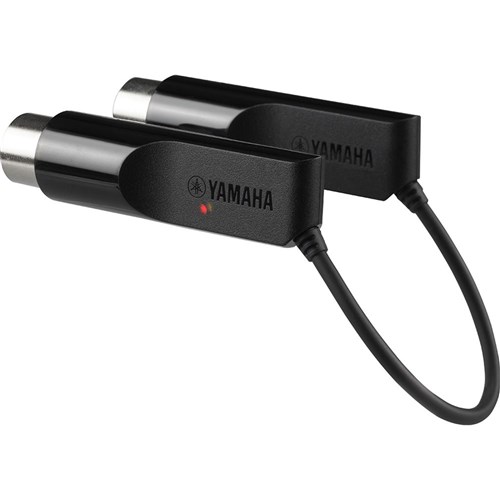
Wireless control of Disklavier
2017-05-02 by gward1211@...
Yahoo Groups archive
Index last updated: 2026-04-28 23:20 UTC
Thread
2017-05-02 by gward1211@...
See file attached. This is a great little device for playing midi files on a DKV using, say, the Sweet MIDI app, on an iPad. It works very well.
Kind regards
Geoff Ward
2017-05-02 by Carol Beigel
Yes, it is a marvelous device!  I posted some
more information about using it at:
www.midiplayertools.com/Connecting.htm

Carol Beigel


Sent from my iPhone
> On May 2, 2017, at 3:44 AM, gward1211@... [disklavier] <disklavier@yahoogroups.com> wrote:
>
> [Attachment(s) from gward1211@bigpond.com [disklavier] included below]
>
> See file attached.  This is a great little device for playing midi files on a DKV using, say, the Sweet MIDI app, on an iPad.  It works very well.
>
>
>
> Kind regards
>
>
>
> Geoff Ward
>
>
>
>
>
>
>
>
>
>
>
>
2017-05-06 by Ralph Specht
Can this tool be controlled by a Windows 10 Device.  What is the recommended app for Windows 10?

Thanks

Ralph Specht
From: Carol Beigel carol@carolrpt.com [disklavier]
Sent: Tuesday, May 2, 2017 7:51 AM
To: disklavier@yahoogroups.com
Subject: Re: [disklavier] Wireless control of Disklavier


Yes, it is a marvelous device!  I posted some
more information about using it at:
www.midiplayertools.com/Connecting.htm

Carol Beigel


Sent from my iPhone

On May 2, 2017, at 3:44 AM, gward1211@... [disklavier] <disklavier@yahoogroups.com> wrote:


  See file attached.  This is a great little device for playing midi files on a DKV using, say, the Sweet MIDI app, on an iPad.  It works very well.


  Kind regards


  Geoff Ward
2017-05-06 by Carol Beigel
I have not checked out Windows 10.  you would need an app that does Bluetooth LE for the internet of things.  I am still looking for an app for Android.

Carol Beigel


Sent from my iPhone
> On May 6, 2017, at 10:26 AM, 'Ralph Specht' capespechts@... [disklavier] <disklavier@yahoogroups.com> wrote:
>
>
>
> Can this tool be controlled by a Windows 10 Device.  What is the recommended app for Windows 10?
>
> Thanks
>
> Ralph Specht
>
> From: Carol Beigel carol@... [disklavier]
> Sent: Tuesday, May 2, 2017 7:51 AM
> To: disklavier@yahoogroups.com
> Subject: Re: [disklavier] Wireless control of Disklavier
>
> Yes, it is a marvelous device!  I posted some
> more information about using it at:
> www.midiplayertools.com/Connecting.htm
>
> Carol Beigel
>
>
> Sent from my iPhone
>
>> On May 2, 2017, at 3:44 AM, gward1211@... [disklavier] <disklavier@yahoogroups.com> wrote:
>>
>> See file attached.  This is a great little device for playing midi files on a DKV using, say, the Sweet MIDI app, on an iPad.  It works very well.
>>
>>
>>
>> Kind regards
>>
>>
>>
>> Geoff Ward
>>
>>
>>
>>
>>
>>
>>
>>
>>
>
>
>
2017-05-07 by kenig@...
Mid iPlayer - > loopMidi -> MidiBerry -> Windows paired MD-BT01 device -> MD-BT01 -> Disklavier
You need Midi software able to map midi output to the loopMidi device, and also map midi instrument tracks (i.e. the piano tracks, though any other instrument will play thru the DKV synthesizer via BT LE). In my scoring software, Melody Assistant, I mapped the Midi track for the Midi piano to that loopMidi device in your player/editor rather than the built-in Windows Midi Sound. This took some trial-and-error.
But voila! I can hit the play button on Win 10 and have the Disklavier play wirelessly in the next room. I did say it was complicated, didn't I? Edit score, play, edit score, play. Mission accomplished.
NOTE: At first, the Midi stream was initially very laggy and sounded like a drunk pianist was at the keyboard. I had to turn off my ant-virus software (ESET) since it monitors inter-process communication for virus signatures and slows the midi stream.
Marc Kenig
2017-05-07 by Geoff Ward
In Windows 10, I use VanBasco to control my DKV, but it won’t recognise the Yamaha Bluetooth Midi device.  For wireless control of my DKV using Win 10 and Vanbasco, I use a Wireless 4 Port USB sharing station from IOGear - https://www.iogear.com/product/GUWIP204


It works fine with Vanbasco.


Kind regards


Geoff Ward
From: disklavier@yahoogroups.com [mailto:disklavier@yahoogroups.com]
Sent: Sunday, 7 May 2017 12:27 AM
To: disklavier@yahoogroups.com
Subject: Re: [disklavier] Wireless control of Disklavier


Can this tool be controlled by a Windows 10 Device.  What is the recommended app for Windows 10?


Thanks


Ralph Specht


From: Carol Beigel carol@... <mailto:carol@...>  [disklavier]

Sent: Tuesday, May 2, 2017 7:51 AM

To: disklavier@yahoogroups.com <mailto:disklavier@yahoogroups.com>

Subject: Re: [disklavier] Wireless control of Disklavier


Yes, it is a marvelous device!  I posted some

more information about using it at:

www.midiplayertools.com/Connecting.htm <http://www.midiplayertools.com/Connecting.htm>


Carol Beigel


Sent from my iPhone


On May 2, 2017, at 3:44 AM, gward1211@... <mailto:gward1211@...>  [disklavier] <disklavier@yahoogroups.com <mailto:disklavier@yahoogroups.com> > wrote:

See file attached.  This is a great little device for playing midi files on a DKV using, say, the Sweet MIDI app, on an iPad.  It works very well.


Kind regards


Geoff Ward
2017-05-07 by Carol Beigel
Perhaps an easy, cheap way to have wireless control of your Disklavier is to buy a refurb iPod.  The Bluetooth interface costs about $45, Sweet MIDI Player is $15.  I saw a 4th gen refurb ipod for $65 this morning.

Carol Beigel


Sent from my iPhone
> On May 7, 2017, at 6:11 AM, 'Geoff Ward' gward1211@... [disklavier] <disklavier@yahoogroups.com> wrote:
>
>
>
> In Windows 10, I use VanBasco to control my DKV, but it won’t recognise the Yamaha Bluetooth Midi device.  For wireless control of my DKV using Win 10 and Vanbasco, I use a Wireless 4 Port USB sharing station from IOGear - https://www.iogear.com/product/GUWIP204
>
> It works fine with Vanbasco.
>
> Kind regards
>
> Geoff Ward
>
>
>
> From: disklavier@yahoogroups.com [mailto:disklavier@yahoogroups.com]
> Sent: Sunday, 7 May 2017 12:27 AM
> To: disklavier@yahoogroups.com
> Subject: Re: [disklavier] Wireless control of Disklavier
>
>
> Can this tool be controlled by a Windows 10 Device.  What is the recommended app for Windows 10?
>
> Thanks
>
> Ralph Specht
>
> From: Carol Beigel carol@... [disklavier]
> Sent: Tuesday, May 2, 2017 7:51 AM
> To: disklavier@yahoogroups.com
> Subject: Re: [disklavier] Wireless control of Disklavier
>
>
> Yes, it is a marvelous device!  I posted some
> more information about using it at:
> www.midiplayertools.com/Connecting.htm
>
> Carol Beigel
>
>
> Sent from my iPhone
>
> On May 2, 2017, at 3:44 AM, gward1211@... [disklavier] <disklavier@yahoogroups.com> wrote:
>
> See file attached.  This is a great little device for playing midi files on a DKV using, say, the Sweet MIDI app, on an iPad.  It works very well.
>
>
>
> Kind regards
>
>
>
> Geoff Ward
>
>
>
>
>
>
>
>
>
>
>
>
2017-05-07 by kenig@...
2017-05-28 by rrred@...
2017-05-29 by George F. Litterst
Good morning, everyone.

Hopefully someone on this list has tried the MD-BT01 with this model of Disklavier. If not, I recommend that rrred call Yamaha Piano Service.

Yamaha publishes a list of compatible products:

http://download.yamaha.com/api/asset/file/?language=en&site=usa.yamaha.com&asset_id=66577

However, the list appears only to reference contemporary products. In the case of Disklavier, it references E3/DKC-850, M4, and ENSPIRE. Although my Disklavier PRO (Mark IIXG vintage) is not listed, I can report that it works just fine with my piano. I would be surprised if it does not work with all Disklaviers.

The MD-BT01 and similar devices from other sources requires power. Most MIDI keyboards can power this interface via the MIDI ports of the instrument.

Of course to use it, one must have compatible hardware and software that can connect to a Bluetooth MIDI device.

Regards,
PianoBench
> On May 28, 2017, at 3:33 AM, rrred@... [disklavier] <disklavier@yahoogroups.com> wrote:
>
> Does it work on early model Yamaha MX100A ?
>
>
2017-05-29 by Carol Beigel
I find the MDBt101 works on any instrument with both a MIDI IN AND MIDI OUT port.  I have personally tried this out on a Yamaha MX100a/b, MarkIIXG, MarkIII, Clavinova, PianoDisc and QRS Pianomation systems.  I use Sweet Midi Player in my iPhone 6S Plus as a controller.

I put some midi files at:  www.midiplayertools.com/midifiles that can be downloaded to play with Sweet Midi Player app.  Further information and links to more midi files can be found at:  www.midiplayertools.com/Connecting.htm

Carol Beigel


Sent from my iPhone
> On May 29, 2017, at 9:17 AM, 'George F. Litterst' PianoBench@aol.com [disklavier] <disklavier@yahoogroups.com> wrote:
>
>
>
> Good morning, everyone.
>
> Hopefully someone on this list has tried the MD-BT01 with this model of Disklavier. If not, I recommend that rrred call Yamaha Piano Service.
>
> Yamaha publishes a list of compatible products:
>
> http://download.yamaha.com/api/asset/file/?language=en&site=usa.yamaha.com&asset_id=66577
>
> However, the list appears only to reference contemporary products. In the case of Disklavier, it references E3/DKC-850, M4, and ENSPIRE. Although my Disklavier PRO (Mark IIXG vintage) is not listed, I can report that it works just fine with my piano. I would be surprised if it does not work with all Disklaviers.
>
> The MD-BT01 and similar devices from other sources requires power. Most MIDI keyboards can power this interface via the MIDI ports of the instrument.
>
> Of course to use it, one must have compatible hardware and software that can connect to a Bluetooth MIDI device.
>
> Regards,
> PianoBench
>
>
>> On May 28, 2017, at 3:33 AM, rrred@... [disklavier] <disklavier@yahoogroups.com> wrote:
>>
>> Does it work on early model Yamaha MX100A ?
>>
>
>
>
>
2017-05-29 by Mark Fontana
The MIDI OUT port is the key, because the MD-BT01 parasitically powers
itself from the current loop of the host's MIDI OUT port. Wireline MIDI
is designed such that an OUT port powers an LED connected to the
receiver's IN port.  (The LEDs are part of opto-isolators that
electrically protect the two MIDI devices from each other.)   If the
MD-BT01 is connected to only an IN port, there's no source of power, so
it won't work.

Mark Fontana
On 05/29/2017 08:47 AM, Carol Beigel carol@... [disklavier] wrote:
> I find the MDBt101 works on any instrument with both a MIDI IN AND
> MIDI OUT port.  I have personally tried this out on a Yamaha MX100a/b,
> MarkIIXG, MarkIII, Clavinova, PianoDisc and QRS Pianomation systems.
>  I use Sweet Midi Player in my iPhone 6S Plus as a controller.
>
> I put some midi files at: www.midiplayertools.com/midifiles
> <http://www.midiplayertools.com/midifiles> that can be downloaded to
> play with Sweet Midi Player app.  Further information and links to
> more midi files can be found at:
> www.midiplayertools.com/Connecting.htm
> <http://www.midiplayertools.com/Connecting.htm>
>
> Carol Beigel
>
>
> Sent from my iPhone
>
> On May 29, 2017, at 9:17 AM, 'George F. Litterst' PianoBench@...
> <mailto:PianoBench@...> [disklavier] <disklavier@yahoogroups.com
> <mailto:disklavier@yahoogroups.com>> wrote:
>
>> Good morning, everyone.
>>
>> Hopefully someone on this list has tried the MD-BT01 with this model
>> of Disklavier. If not, I recommend that rrred call Yamaha Piano Service.
>>
>> Yamaha publishes a list of compatible products:
>>
>> http://download.yamaha.com/api/asset/file/?language=en&site=usa.yamaha.com&asset_id=66577
>>
>> However, the list appears only to reference contemporary products. In
>> the case of Disklavier, it references E3/DKC-850, M4, and ENSPIRE.
>> Although my Disklavier PRO (Mark IIXG vintage) is not listed, I can
>> report that it works just fine with my piano. I would be surprised if
>> it does not work with all Disklaviers.
>>
>> The MD-BT01 and similar devices from other sources requires power.
>> Most MIDI keyboards can power this interface via the MIDI ports of
>> the instrument.
>>
>> Of course to use it, one must have compatible hardware and software
>> that can connect to a Bluetooth MIDI device.
>>
>> Regards,
>> PianoBench
>>
>>
>>> On May 28, 2017, at 3:33 AM, rrred@...
>>> <mailto:rrred@...> [disklavier] <disklavier@yahoogroups.com
>>> <mailto:disklavier@yahoogroups.com>> wrote:
>>>
>>> Does it work on early model Yamaha MX100A ?
>>>
>>
>