Yahoo Groups archive

Disklavier

Index last updated: 2026-04-28 23:20 UTC

Thread

pb Disklavier MX100B

pb Disklavier MX100B

2017-07-07 by Rd

Hello everyone,

i need help, if possible.....

I'm in France, I have a Disklavier MX100B since 1993 and today...

When I wanted to start it; the motor seems worked but not completly.

and impossible to start a dk

It's seem impossible to have a technician in France

Can anybody help me, please

Best regards

Rd

Re: pb Disklavier MX100B

2017-07-10 by tnmshd@...

Hi Rd.

What is error message on LCD?
Number and Message.

Can you enter the test mode?
Push power switch with L,R switch.
Push + button change Test number and enter 8 (piano test).


Re: [disklavier] Re: pb Disklavier MX100B

2017-07-10 by Raymond Dupuy

Hi And Many thanks for your answer, the lcd is on, with 00 And many squares,but I can't access to the test mode.
I don't know what to do....

Rd

Envoyé de mon iPad
Show quoted textHide quoted text
> Le 10 juil. 2017 à 11:34, tnmshd@... [disklavier] <disklavier@yahoogroups.com> a écrit :
> 
> 
> 
> Hi Rd.
> 
> What is  error message on LCD?  
> Number and Message.
> 
> Can you enter the test mode?
> Push power switch with L,R switch.
> Push + button change Test number and enter 8 (piano test).
> 
> 
> 
> 
>

Re: [disklavier] Re: pb Disklavier MX100B

2017-07-10 by tnmshd@...

00 ■■■■

How about following mode?
Can you enter the each mode?
Push with power switch +each key and hold 2-3 second.

Menu Mode:
Push Power switch with ALL+1+A-B.

MIDI date record mode:
Push power sw with Vol+Tempo+Trance

MIDI excrusive mode:
Push power sw with Metro+MIDI

Open the lower panel.
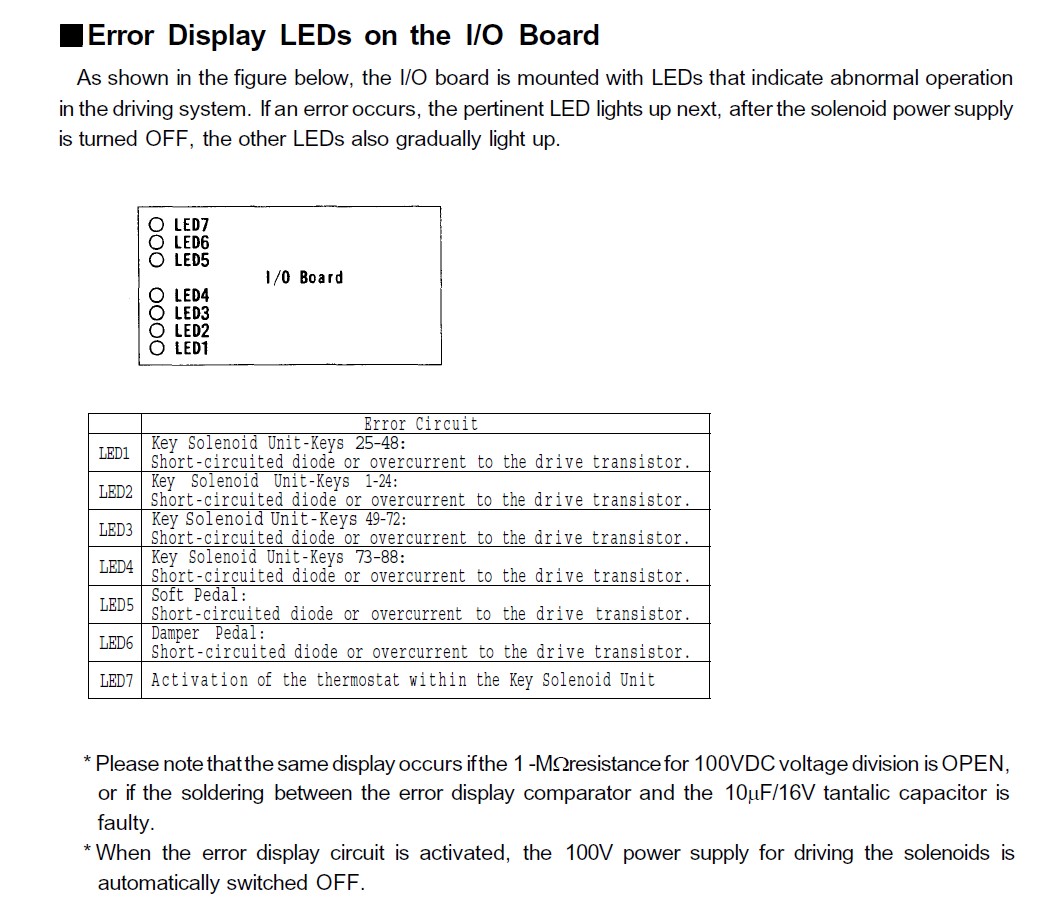
And check I/O sheet LED.
(see the attached file)

I guess CPU sheet is dead.
It is common symptom in MX series.
I recommend to call Yamaha France.


Attachments

Re: [disklavier] Re: pb Disklavier MX100B [1 Attachment]

2017-07-10 by Rd

Hi,

nothing to do

Nothing appended when I sw and all the combinaison

I am not able to read the joint , yahoo don't reconize my e mail or I've forgotten mine...

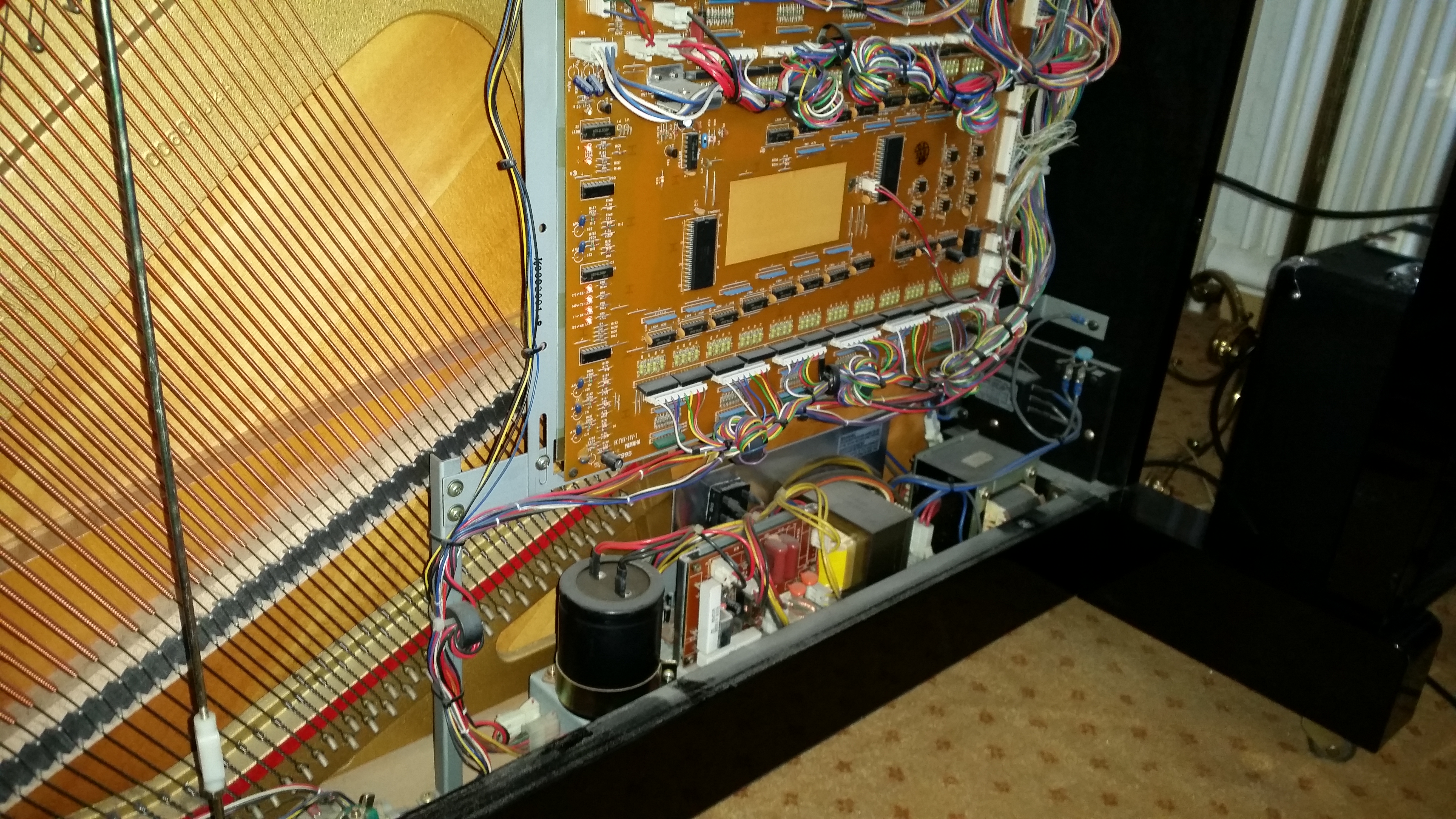
I send you a foto of the lower part.

The six red led are switch on on the left

Thanks for your help

I've contact yamaha france which send me to a technician in Rennes, that he said it was the player of diskette

I don't know what I must think.

He calls for the price and the deplacement, beacause I live at 150km of Rennes.....

Best ragards

Rd

Show quoted textHide quoted text
> Message du 10/07/17 16:27
> De : "tnmshd@yahoo.com [disklavier]"
> A : disklavier@yahoogroups.com
> Copie à :
> Objet : Re: [disklavier] Re: pb Disklavier MX100B [1 Attachment]
>
>00 ■■■■

>
How about following mode?
Can you enter the each mode?
Push with power switch +each key and hold 2-3 second.

>
Menu Mode:
Push Power switch with ALL+1+A-B.

>
MIDI date record mode:
Push power sw with Vol+Tempo+Trance

>
MIDI excrusive mode:
Push power sw with Metro+MIDI

>
Open the lower panel.
And check I/O sheet LED.
(see the attached file)

>
I guess CPU sheet is dead.
It is common symptom in MX series.
>
I recommend to call Yamaha France.
>

>

>

Attachments

Re: pb Disklavier MX100B

2017-07-30 by rightnightboy@...

Hi , I dont know much on how to help you with your tech problem. Im in Nice and I investigated a couple of years ago about getting a disklavier technician to check on my piano. It was very difficult to find any. Yamaha France directed me to some piano shops selling the disklaviers ... the ones i contacted refused to give me reference tech since i had not bought my piano from them !!!

I had noted down a very knowledgeable british guy which I thought maybe to get here in Nice and finally didn't since i solved the problem I had. This guys name Im trying to find back ...

Alternatively i copy below here the notes I had on french alternatives, good luck

-Alain


Philippe Copin

Technicien-Accordeur de Concert,

Vice-Président d’Europiano France,

Formateur à l’Institut Technologique Européen

des Métiers de la Musique et membre

de la Yamaha Piano Technician Guild

1

Philippe Copin

Accordeurs, réparateurs de pianos

55 rue des Bons Raisins

92150 Suresnes


hervé CoChet

Technicien accordeur de concert,

directeur de magasin de musique,

membre de la Yamaha Piano Technician Guild

Hervé Cochet accordeur- réparateur de pianos Diplomé d'Etat. Piano:loc, Vente neuf occasion Instruments. Accessoires. Librairie musicale

www.athena-music.fr

02 37 21 56 76


Bonjour Mr Mamane, j'habite sur Nice et je suis a la recherche d'un technicien competent pour régler mon piano droit disklavier... quelqu'un qui s'y connait. J'ai contacté yamaha France et on m'a dit qu'ils n'avaient pas de noms et qu'il fallait passer par les distributeurs magasins. Comme mon piano n'a pas été acheté en France les magasins du coin ici ne veulent pas me donner la référence de leur technicien... Pouvez vous me suggérer quelqu'un ou un organisme... MERCI ! - Alain Pierard


http://www.mamane-pianos.com


A.F.A.R.P. (Association Française des Accordeurs Réparateurs de Pianos) EUROPIANO FRANCE

AFARP / EUROPIANO-FRANCE

SIÈGE SOCIAL – SECRÉTARIAT

71, avenue Olivier MESSIAEN 72000 LE MANS

Email : pianoafarp@yahoo.fr

Tel : 02 43 43 03 81 Fax : 02 43 43 03 83


Voici l'attaché commercial Yamaha corresondant à votre secteur géographique

: Louis Nicolas Glock au 06.14.56.02.47, il saura vous donner les

coordonnées que vous recherchez !

Re: [disklavier] Re: pb Disklavier MX100B

2017-07-30 by Raymond Dupuy

Bonjour Alain,

Pouvez vous me donner votre mail, car moi aussi, j'ai un problème avec mon mx100b, qui ne veut plus fonctionner.merci. Cordialement,je suis dans l'ouest 

Envoyé de mon iPad
Show quoted textHide quoted text
> Le 30 juil. 2017 à 07:58, rightnightboy@... [disklavier] <disklavier@yahoogroups.com> a écrit :
> 
> 
> 
> Hi , I dont know much on how to help you with your tech problem. Im in Nice and I investigated a couple of years ago about getting a disklavier technician to check on my piano. It was very difficult to find any. Yamaha France directed me to some piano shops selling the disklaviers ... the ones i contacted refused to give me reference tech since i had not bought my piano from them !!!
> 
> I had noted down a very knowledgeable british guy which I thought maybe to get here in Nice and finally didn't since i solved the problem I had. This guys name Im trying to find back ... 
> 
> Alternatively i copy below here the notes I had on french alternatives, good luck
> 
> -Alain
> 
> 
> 
> 
> 
> Philippe Copin
> 
> Technicien-Accordeur de Concert,
> 
> Vice-Président d’Europiano France,
> 
> Formateur à l’Institut Technologique Européen
> 
> des Métiers de la Musique et membre
> 
> de la Yamaha Piano Technician Guild
> 
> 1
> 
> Philippe Copin
> 
> Accordeurs, réparateurs de pianos
> 
> 55 rue des Bons Raisins
> 
> 92150 Suresnes
> 
> 
> 
> 
> 
> hervé CoChet
> 
> Technicien accordeur de concert,
> 
> directeur de magasin de musique,
> 
> membre de la Yamaha Piano Technician Guild
> 
> Hervé Cochet accordeur- réparateur de pianos Diplomé d'Etat. Piano:loc, Vente neuf occasion Instruments. Accessoires. Librairie musicale 
> 
> www.athena-music.fr
> 
> 02 37 21 56 76
> 
> 
> 
> Bonjour Mr Mamane, j'habite sur Nice et je suis a la recherche d'un technicien competent pour régler mon piano droit disklavier... quelqu'un qui s'y connait. J'ai contacté yamaha France et on m'a dit qu'ils n'avaient pas de noms et qu'il fallait passer par les distributeurs magasins. Comme mon piano n'a pas été acheté en France les magasins du coin ici ne veulent pas me donner la référence de leur technicien... Pouvez vous me suggérer quelqu'un ou un organisme... MERCI ! - Alain Pierard
> 
> 
> 
> 
> 
> http://www.mamane-pianos.com
> 
> 
> 
> 
> 
> 
> 
> 
> 
> 
> 
> 
> 
> 
> 
> A.F.A.R.P. (Association Française des Accordeurs Réparateurs de Pianos) EUROPIANO FRANCE
> 
> AFARP / EUROPIANO-FRANCE
> 
> SIÈGE SOCIAL – SECRÉTARIAT
> 
> 71, avenue Olivier MESSIAEN    72000 LE MANS
> 
> Email : pianoafarp@...
> 
> Tel : 02 43 43 03 81       Fax : 02 43 43 03 83
> 
> 
> 
> 
> 
> 
> 
> 
> 
> Voici l'attaché commercial Yamaha corresondant à votre secteur géographique 
> 
> : Louis Nicolas Glock au 06.14.56.02.47, il saura vous donner les 
> 
> coordonnées que vous recherchez !
> 
> 
> 
> 
>

RE: [disklavier] Re: pb Disklavier MX100B

2017-07-30 by Alain P

Bonjour Raymond

Utilisez svp sunriseforall@...


Crdlmt

Alain


De : disklavier@yahoogroups.com de la part de Raymond Dupuy Raymond.Dupuy@... [disklavier] <disklavier@yahoogroups.com>
Envoyé : dimanche 30 juillet 2017 06:51
À : disklavier@yahoogroups.com
Objet : Re: [disklavier] Re: pb Disklavier MX100B


Bonjour Alain,

Pouvez vous me donner votre mail, car moi aussi, j'ai un problème avec mon mx100b, qui ne veut plus fonctionner.merci. Cordialement,je suis dans l'ouest

Envoyé de mon iPad

Le 30 juil. 2017 à 07:58, rightnightboy@... [disklavier] <disklavier@yahoogroups.com> a écrit :

Show quoted textHide quoted text
Hi , I dont know much on how to help you with your tech problem. Im in Nice and I investigated a couple of years ago about getting a disklavier technician to check on my piano. It was very difficult to find any. Yamaha France directed me to some piano shops selling the disklaviers ... the ones i contacted refused to give me reference tech since i had not bought my piano from them !!!

I had noted down a very knowledgeable british guy which I thought maybe to get here in Nice and finally didn't since i solved the problem I had. This guys name Im trying to find back ...

Alternatively i copy below here the notes I had on french alternatives, good luck

-Alain


Philippe Copin

Technicien-Accordeur de Concert,

Vice-Président d’Europiano France,

Formateur à l’Institut Technologique Européen

des Métiers de la Musique et membre

de la Yamaha Piano Technician Guild

1

Philippe Copin

Accordeurs, réparateurs de pianos

55 rue des Bons Raisins

92150 Suresnes


hervé CoChet

Technicien accordeur de concert,

directeur de magasin de musique,

membre de la Yamaha Piano Technician Guild

Hervé Cochet accordeur- réparateur de pianos Diplomé d'Etat. Piano:loc, Vente neuf occasion Instruments. Accessoires. Librairie musicale

www.athena-music.fr

02 37 21 56 76


Bonjour Mr Mamane, j'habite sur Nice et je suis a la recherche d'un technicien competent pour régler mon piano droit disklavier... quelqu'un qui s'y connait. J'ai contacté yamaha France et on m'a dit qu'ils n'avaient pas de noms et qu'il fallait passer par les distributeurs magasins. Comme mon piano n'a pas été acheté en France les magasins du coin ici ne veulent pas me donner la référence de leur technicien... Pouvez vous me suggérer quelqu'un ou un organisme... MERCI ! - Alain Pierard


http://www.mamane-pianos.com


A.F.A.R.P. (Association Française des Accordeurs Réparateurs de Pianos) EUROPIANO FRANCE

AFARP / EUROPIANO-FRANCE

SIÈGE SOCIAL – SECRÉTARIAT

71, avenue Olivier MESSIAEN 72000 LE MANS

Email : pianoafarp@yahoo.fr

Tel : 02 43 43 03 81 Fax : 02 43 43 03 83


Voici l'attaché commercial Yamaha corresondant à votre secteur géographique

: Louis Nicolas Glock au 06.14.56.02.47, il saura vous donner les

coordonnées que vous recherchez !


Re: pb Disklavier MX100B

2019-06-03 by dleang@...

Hi. I have this exact problem with my MX100B. The LCD shows squares on the top row, the display shows 00, and nothing else is responsive. I also have LEDs 1-6 on, while LED 7 is off. 

Were you able to resolve this problem? And if so, can you share what the fix was? Thank you.

Re: pb Disklavier MX100B

2019-06-04 by tnmshd@...

Does the 8 piano checks work after entering the test program?  
See the group’s photo .test MX.

The keyboard thermostat may be dead, had there been any abnormal movement before it broke?

Re: pb Disklavier MX100B

2019-06-04 by dleang@...

I cannot enter test mode. Holding the L and R buttons, and then pushing the power switch, don’t do anything. The number display remains at 00 and pushing + doesn’t change a thing. 

What do you mean by the group’s photo .test MX?

Where is the keyboard’s thermostat?  There was no abnormal movement when this error occurred. The player simply stopped playing music all of a sudden. 

I don’t know if the issue I have is due to failed capacitors (all of them look okay; no bulge), failed fuses (two fuses are they’re in tact), or something else. Again, the system turns on, but the LCD is nonsensical and pressing buttons doesn’t do anything.

Re: [disklavier] Re: pb Disklavier MX100B

2019-06-04 by Carol Beigel

That model Disklavier was before memory so there are no built in test or maintenance modes.  Try a new LED.

Carol Beigel 


Sent from my iPhone
Show quoted textHide quoted text
> On Jun 4, 2019, at 2:10 AM, dleang@... [disklavier] <disklavier@yahoogroups.com> wrote:
> 
> I cannot enter test mode. Holding the L and R buttons, and then pushing the power switch, don’t do anything. The number display remains at 00 and pushing + doesn’t change a thing. 
> 
> What do you mean by the group’s photo .test MX?
> 
> Where is the keyboard’s thermostat?  There was no abnormal movement when this error occurred. The player simply stopped playing music all of a sudden. 
> 
> I don’t know if the issue I have is due to failed capacitors (all of them look okay; no bulge), failed fuses (two fuses are they’re in tact), or something else. Again, the system turns on, but the LCD is nonsensical and pressing buttons doesn’t do anything. 
> 
> ------------------------------------
> Posted by: dleang@...
> ------------------------------------
> 
> To Post a message to the group, send it to:   disklavier@...
> 
> To Post a private message to Todd Muncy, the group's founder and moderator, send it to:
> disklavier-owner@Yahoogroups.com
> 
> To reach our group's web site go to:
> http://groups.yahoo.com/neo/groups/disklavier/info
> 
> THINKING OF LEAVING THE GROUP?
> If you are thinking of unsubcribing because you are getting too much mail, go the the web site and change your email delivery option instead.  That will fix the problem, while maintaining your access to the group.  If you insist on leaving us completely send a blank email to:
> disklavier-unsubscribe@yahooGroups.com
> ------------------------------------
> 
> Yahoo Groups Links
> 
> 
>

Re: pb Disklavier MX100B

2019-06-05 by pnobeeter@yahoo.com

This was so long ago  ....  

Parts aren't available for the MX100 as a general rule.  The last MX100 that I worked on had a bad disk drive.  I tried cleaning it but perhaps I didn't leave the cleaner disk in there long enough.  I sent the power supply in to have it monitored but it came back fully functional after a 24 hour observation time.


The MX100 II I worked on recently had an all green LCD display.  I replaced the display and installed a small circuit board that the owner ordered a long time ago for a failed record feature.  Once both these items were replaced the piano worked perfectly.

Re: [disklavier] pb Disklavier MX100B

2019-06-05 by Sandi Bowen

It might need a new disk drive. Or upgrade to the DKC 850. I recently had to make the choice for my Disklavier Grand Pro Mark II. The disk drive was dead and my technician advised me to get the new box. It's pricy, but worth it!
Show quoted textHide quoted text
On Fri, Jul 7, 2017 at 2:19 AM Rd Raymond.Dupuy@... [disklavier] <disklavier@yahoogroups.com> wrote:

Hello everyone,

i need help, if possible.....

I'm in France, I have a Disklavier MX100B since 1993 and today...

When I wanted to start it; the motor seems worked but not completly.

and impossible to start a dk

It's seem impossible to have a technician in France

Can anybody help me, please

Best regards

Rd

Re: pb Disklavier MX100B

2019-06-07 by tnmshd@...

My statement was wrong.

MX series I/o board LED lighting routine.

Main power switch On=all led On.(other than 7 Led.)
Control unit power switch On(no disk)=all Led On from all off.(other than 7)
Disk in=all Led off.
Disk out=all Led on(other than 7)

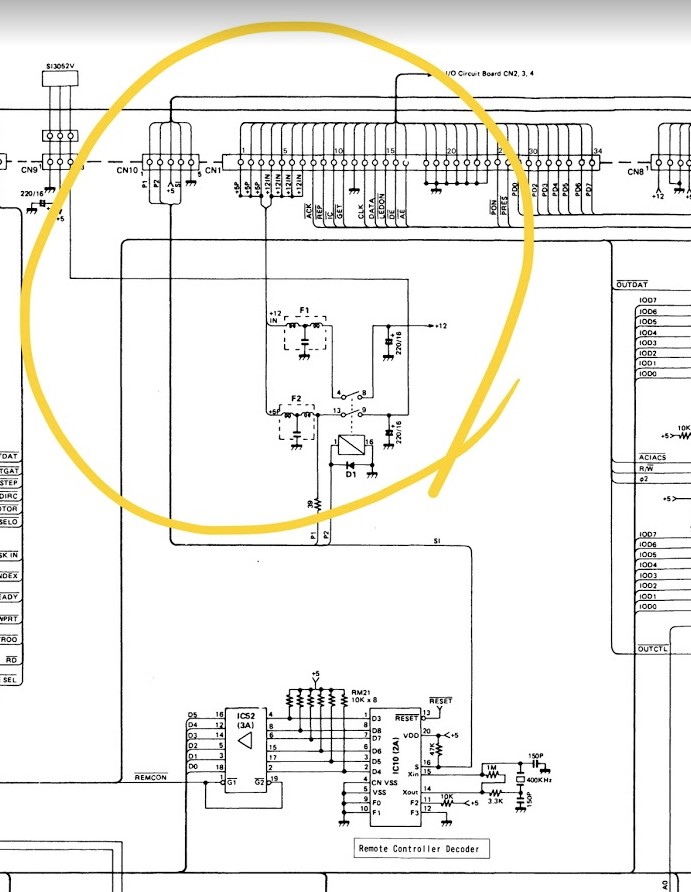
Please check wiring about external midi connector box and power unit voltage.
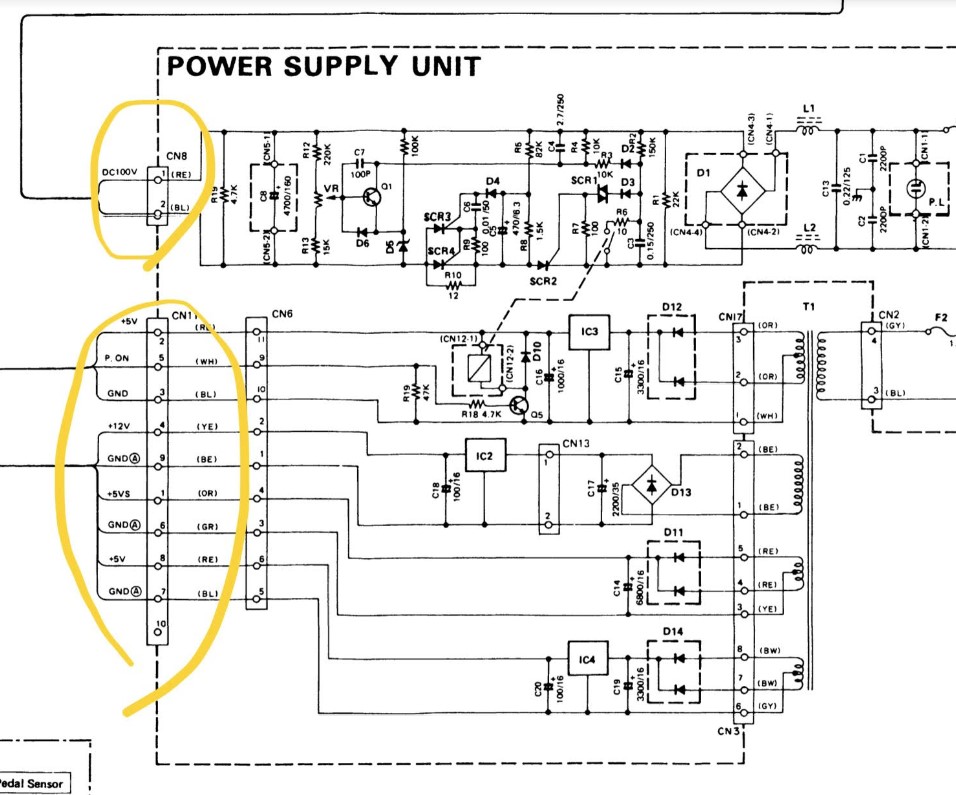
Power unit connector 
PIN number 1=+5v
2=+5v
4=+12v
8=+5v

I have I/o ,cpu board and others too.

https://goo.gl/photos/2HCPcVofXueSuotD8

Re: pb Disklavier MX100B

2019-06-07 by dleang@...

Thanks for this information. I’ll check voltages on the connector and report back. 

I don’t think the LCD is defective since it lights up. It just doesn’t show anything meaningful. 

On the I/O board, it seems to me that LED 7 serves no purpose at all, since it’s always expected to be off. Is this correct?

Re: [disklavier] pb Disklavier MX100B

2019-06-07 by dleang@...

I don’t believe the system on the MX100B can be swapped our completely in lieu of the DKC 850. My understanding is that these have to work together through the MIDI ports.  So if my system is faulty now, adding the DKC 850 won’t help. :-(

Re: pb Disklavier MX100B

2019-06-07 by dleang@...

Thanks for this information. My guess is that the LCD display is functional, but related circuit board may not. There’s another post in this thread with possible parts, so I may go the route of obtaining them.

Re: [disklavier] pb Disklavier MX100B

2019-06-07 by George F. Litterst

Good afternoon, everyone.

For reasons that have not been explained, Yamaha does not recommend the DKC-850 for the MX100A/B, Wagon Grand, and MX80 systems. However, if MIDI input and output are functioning on these systems, the unit can be set to work with them by connecting with MIDI cables, following the same procedure that is used with the Mark II.

Starting with the Mark IIXG (and any Mark II that was previously upgraded to the Mark IIXG), the DKC-850 can be set up as a complete replacement unit for the existing control unit. From a user interface perspective, the DKC-850 control box provides functionality that is essentially indistinguishable from what you get with an E3 Disklavier. Of course the DKC-850 does not update the hardware in the piano. For example, it does not provide a silent system for pianos that did not have one originally. Regrettably, the DKC-850 does not support the high resolution recording and playback of the Disklavier PRO. So, when used to “upgrade” a Mark IIXG PRO or Mark III PRO, you simultaneously downgrade the “PRO” aspect of the instrument.

Using the DKC-850 as an upgrade for a Mark II or Disklavier earlier obviously extends the functionality of the earlier instrument. However, you do have the awkwardness of contending with 2 control units: the original and the new one. Because the old and new units connect with MIDI cables, you do not get access to DisklavierTV or DisklavierRadio since Yamaha does not permit data from those services to be transmitted by the MIDI Out port.

Regards,
PianoBench
Show quoted textHide quoted text
> On Jun 7, 2019, at 12:48 PM, dleang@... [disklavier] <disklavier@yahoogroups.com> wrote:
> 
> I don’t believe the system on the MX100B can be swapped our completely in lieu of the DKC 850. My understanding is that these have to work together through the MIDI ports. So if my system is faulty now, adding the DKC 850 won’t help. :-( 
> 
>

Re: pb Disklavier MX100B

2019-06-08 by tnmshd@...

>On the I/O board, it seems to me that LED 7 serves no purpose at all, since it’s always expected to be off. Is this correct?

Correct.
If the thermo is dead then Led 7 is on.

MX series does not accept MIDI signal unless the disk drive is normal.
https://photos.app.goo.gl/E6pHkNrGxF1rgaUQ7

Re: pb Disklavier MX100B

2019-07-09 by dleang@...

LEDs on the I/O all look good. I don't see any issues there.

If it helps, I have attached 4 photos that show what happens when the Disklavier unit is powered on. As you can see, the 7-segment display shows "00", and the LCD has black rectangles on the top row. None of the control buttons light up or respond when pressed.

Any ideas?

Move to quarantaine

This moves the raw source file on disk only. The archive index is not changed automatically, so you still need to run a manual refresh afterward.