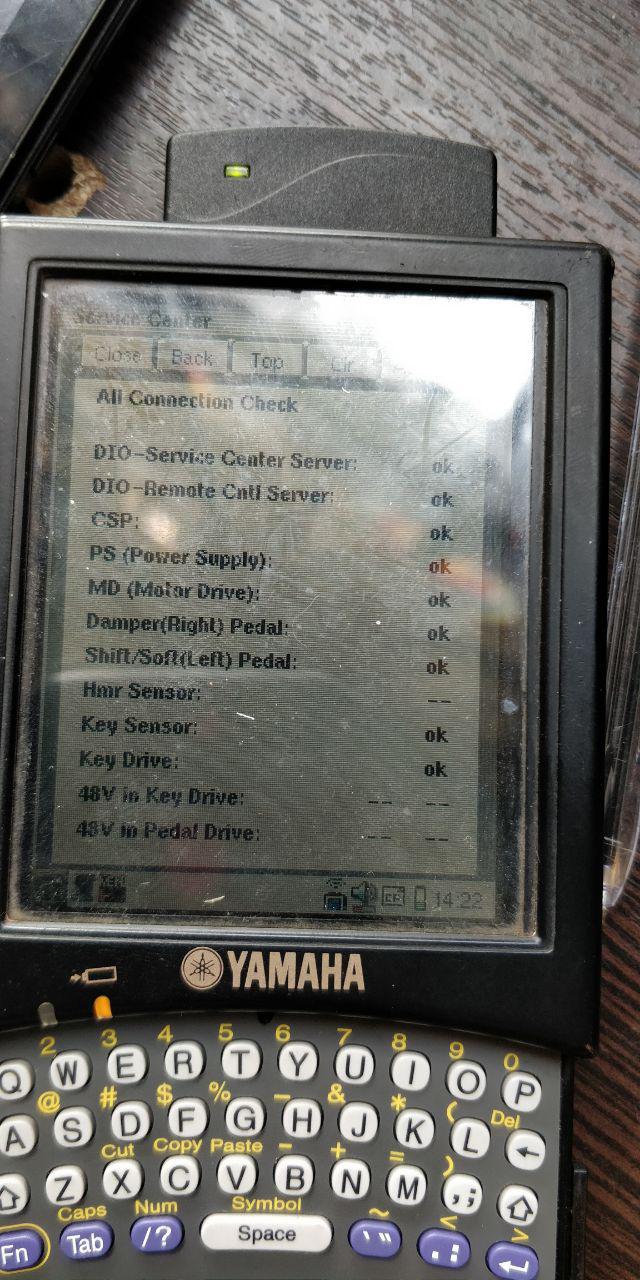
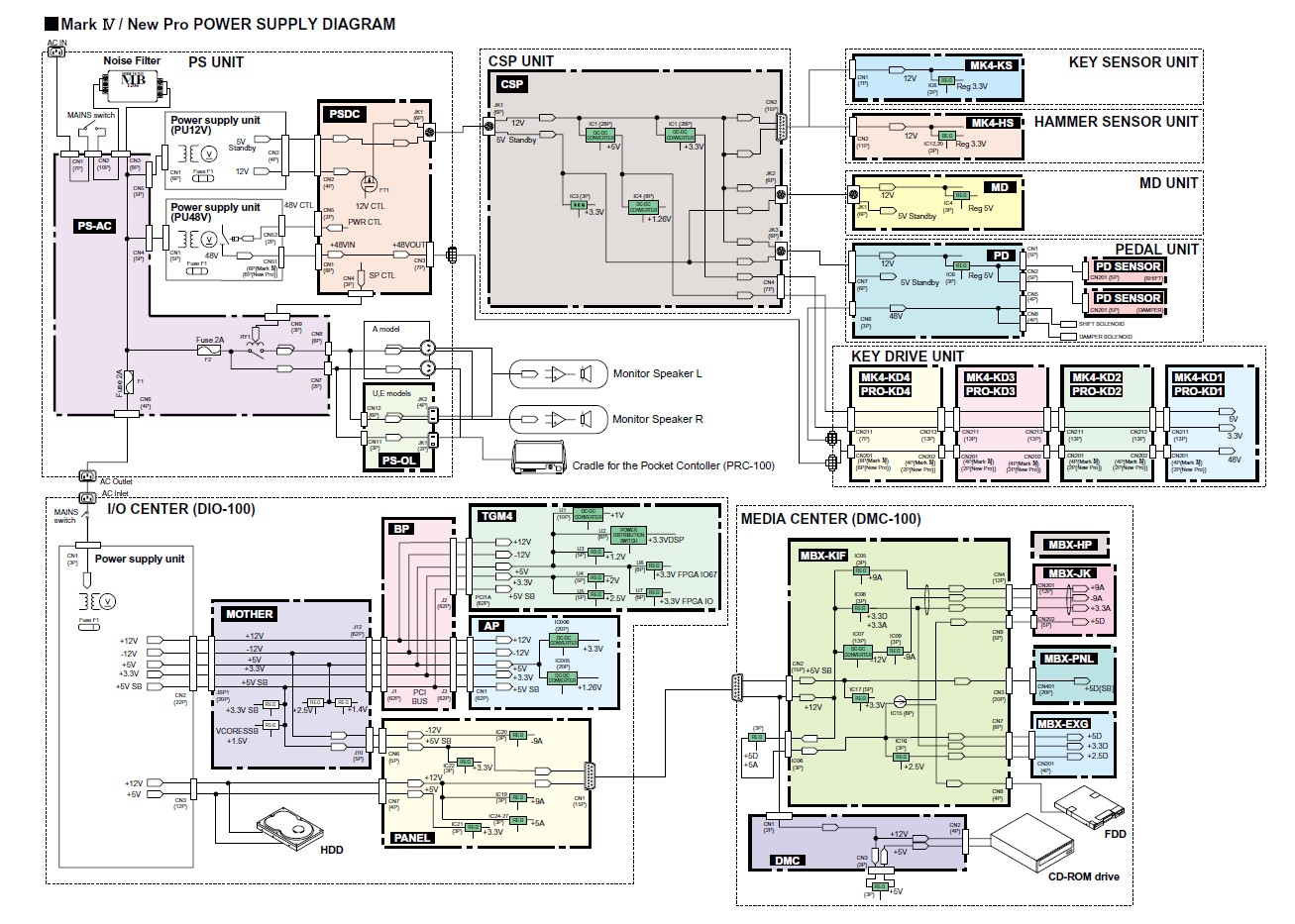
Do not play Acoustic keys MARK IV D- Help me find a service manual
2019-04-26 by master-12l@...
Yahoo Groups archive
Index last updated: 2026-04-28 23:20 UTC
Thread
2019-04-26 by master-12l@...
Lately, the keys on my Mark IV have stopped playing, the key in acoustic mode is not available. If you need skins settings with PRC100. I was told maybe it's in blocks or contacts. Is there a scheme of this model or tips?
In silent mode it plays through monitors.
2019-04-26 by Carol Beigel
I have been seeing this problem more than usual lately.  Unplug your Disklavier totally from the wall and any surge protector.  Wait at least 10 minutes and plug it back in directly to wall. That procedure has worked about 80% of the time.

Carol Beigel


Sent from my iPhone
> On Apr 26, 2019, at 1:07 AM, master-12l@... [disklavier] <disklavier@yahoogroups.com> wrote:
>
>
>
> Lately, the keys on my Mark IV have stopped playing, the key in acoustic mode is not available. If you need skins settings with PRC100. I was told maybe it's in blocks or contacts. Is there a scheme of this model or tips?
>
>
>
> In silent mode it plays through monitors.
>
>
>
>
2019-04-26 by George F. Litterst
Good afternoon, everyone.

I agree with Carol. A “cold reboot” may fix the problem. I have run into many instances in which a Mark IV has lost MIDI IM, MIDI Out, Recording, or Playback—not all 4 at one time, necessarily. A cold reboot has always fixed the problem for me.

Unfortunately, it is hard to know just how long you have to unplug the instrument to drain the electricity fully out of the chips that store mixed up data.

Regards,
PianoBench
> On Apr 26, 2019, at 9:00 AM, Carol Beigel carol@carolrpt.com [disklavier] <disklavier@yahoogroups.com> wrote:
>
> I have been seeing this problem more than usual lately.  Unplug your Disklavier totally from the wall and any surge protector.  Wait at least 10 minutes and plug it back in directly to wall. That procedure has worked about 80% of the time.
>
>
> Carol Beigel
>
>
> Sent from my iPhone
>
> On Apr 26, 2019, at 1:07 AM, master-12l@... <mailto:master-12l@...> [disklavier] <disklavier@yahoogroups.com <mailto:disklavier@yahoogroups.com>> wrote:
>
>> Lately, the keys on my Mark IV have stopped playing, the key in acoustic mode is not available. If you need skins settings with PRC100. I was told maybe it's in blocks or contacts. Is there a scheme of this model or tips?
>>
>>
>>
>>
>> In silent mode it plays through monitors.
>>
>
>
>
2019-04-26 by master-12l@...
2019-04-26 by master-12l@...
2019-04-26 by George F. Litterst
The point is that you need to drain the circuits that store bits of corrupted memory.

Shut down the instrument and disconnect the main power cable from the wall outlet. Then, wait 10-40 minutes before plugging in and starting up again.

PianoBench
> On Apr 26, 2019, at 2:01 PM, master-12l@yandex.ru [disklavier] <disklavier@yahoogroups.com> wrote:
>
>
> Good day:)
>
> Thanks for the answer.
> Really need to turn off so long? I turned off but a maximum of a minute.
>
> It is necessary to switch off completely the unit where the power is distributed and where does everything else already feed from?
>
>
2019-04-26 by Geoff Ward
Just a point of interest, I unplug from the wall socket every night, just in case there’s a nearby lightning strike that gets through.  Mine is a 6 year old Mark IV C3 and I am awaiting a new power supply and motherboard with a cost of $2,200.  Apparently the power supply failed and sent a surge through the mother board and blew it as well.  It will be interesting to test Yamaha Australia’s attitude to warranty.


Kind regards


Geoff
From: disklavier@yahoogroups.com [mailto:disklavier@yahoogroups.com]
Sent: Saturday, 27 April 2019 6:25 AM
To: bill@...-a-geek.com [disklavier] <disklavier@yahoogroups.com>
Subject: Re: [disklavier] Do not play Acoustic keys MARK IV D- Help me find a service manual


The point is that you need to drain the circuits that store bits of corrupted memory.


Shut down the instrument and disconnect the main power cable from the wall outlet. Then, wait 10-40 minutes before plugging in and starting up again.


PianoBench


On Apr 26, 2019, at 2:01 PM, master-12l@yandex.ru <mailto:master-12l@...>  [disklavier] <disklavier@yahoogroups.com <mailto:disklavier@yahoogroups.com> > wrote:


Good day:)


Thanks for the answer.

Really need to turn off so long? I turned off but a maximum of a minute.


It is necessary to switch off completely the unit where the power is distributed and where does everything else already feed from?
2019-04-26 by George Litterst
Unfortunately I tried to turn it off for 10-15 minutes, there was no result.I turned off all the incoming wire. What kind of contacts you need to check?
2019-04-26 by Horatio Kemeny
Just to clarify a bit of reality here… the circuitry of all of these pianos is relatively conventional. There are no magic secret batteries or bits of memory that take a long time to drain or whatever… and suggestions that it’s needed to unplug the piano for anything longer than 30 seconds are simply wrong, as far as rebooting the electronics. The only thing in these pianos holding a charge of any significance are the capacitors, and even the biggest and baddest of those, in these pianos, are fully drained after 15 seconds. Thirty, if you want to be super-duper sure. But 40 minutes? An hour? Makes no difference.

That being said, if you’re finding that your piano works best (and reliably) after unplugging it for an hour or more, then you have indeed identified a problem, but it’s not one that's resolved by rebooting.

The issue in that case is overheating… and unplugging it for an hour or more simply gives it a chance to cool down.

The two most common issues that cause overheating are a cooling-fan failures and the accumulation of dust. These pianos are wonderfully designed not to need cooling fans (even the silent ones are noisy, and when they fail they’re awfully noisy), and therefore, the only issue might be restricted airflow. These M4s have two main components that are relevant, the power supply and the I/O board. They’re the ones enclosed in those metal boxes, and if you crawl under the piano on your back, you’ll see those metal boxes and how full of holes they are. What’s lost without a fan is gained by having as many holes as possible, to promote cooling from ambient airflow… and it works very well, provided those holes aren’t covered In dust.

Blow compressed air, suck it with a (not too strong) vacuum, whatever. If you’re finding that your piano gets unhappy after being on for a while, and a long-term reboot seems to resolve the issue, this is quite likely what’s going on.

To answer a couple of other questions that have appeared in this thread, it is indeed important to fully unplug the piano. There’s a lot going on in “stand-by” mode. Unplugging the main guarantees that nothing anywhere is getting any power, and indeed, it’s the primary (and only) source of power to the piano. Various components are powered from the power supply (you can see the distribution of that power when you look at it, as per two paragraphs above), but it’s all fed from one single plug.

With respect to power spikes… a UPS/line-conditioner is a really good idea with an expensive and somewhat-sensitive instrument like this. It won’t prevent a power supply from failing and frying your I/O board (rare, but it happened to someone and I’ve had it happen to a computer as well — just rotten luck) but it will prevent the sort of spikes that could cause problems.

While lightning strikes are unlikely, far likelier are power outages, and corresponding surges when power is restored. Those can cause serious issues… and a UPS addresses both. And also provides even and reliable electricity.

…..HK
> On Apr 26, 2019, at 11:01 AM, master-12l@... [disklavier] <disklavier@yahoogroups.com> wrote:
>
>
> Good day:)
>
> Thanks for the answer.
> Really need to turn off so long? I turned off but a maximum of a minute.
>
> It is necessary to switch off completely the unit where the power is distributed and where does everything else already feed from?
>
>
2019-04-27 by Spencer Chase
Just to clarify a bit of reality here… the circuitry of all of these pianos is relatively conventional. There are no magic secret batteries or bits of memory that take a long time to drain or whatever… and suggestions that it’s needed to unplug the piano for anything longer than 30 seconds are simply wrong, as far as rebooting the electronics. The only thing in these pianos holding a charge of any significance are the capacitors, and even the biggest and baddest of those, in these pianos, are fully drained after 15 seconds. Thirty, if you want to be super-duper sure. But 40 minutes? An hour? Makes no difference.
That being said, if you’re finding that your piano works best (and reliably) after unplugging it for an hour or more, then you have indeed identified a problem, but it’s not one that's resolved by rebooting.The issue in that case is overheating… and unplugging it for an hour or more simply gives it a chance to cool down.The two most common issues that cause overheating are a cooling-fan failures and the accumulation of dust. These pianos are wonderfully designed not to need cooling fans (even the silent ones are noisy, and when they fail they’re awfully noisy), and therefore, the only issue might be restricted airflow. These M4s have two main components that are relevant, the power supply and the I/O board. They’re the ones enclosed in those metal boxes, and if you crawl under the piano on your back, you’ll see those metal boxes and how full of holes they are. What’s lost without a fan is gained by having as many holes as possible, to promote cooling from ambient airflow… and it works very well, provided those holes aren’t covered In dust.Blow compressed air, suck it with a (not too strong) vacuum, whatever. If you’re finding that your piano gets unhappy after being on for a while, and a long-term reboot seems to resolve the issue, this is quite likely what’s going on.To answer a couple of other questions that have appeared in this thread, it is indeed important to fully unplug the piano. There’s a lot going on in “stand-by” mode. Unplugging the main guarantees that nothing anywhere is getting any power, and indeed, it’s the primary (and only) source of power to the piano. Various components are powered from the power supply (you can see the distribution of that power when you look at it, as per two paragraphs above), but it’s all fed from one single plug.With respect to power spikes… a UPS/line-conditioner is a really good idea with an expensive and somewhat-sensitive instrument like this. It won’t prevent a power supply from failing and frying your I/O board (rare, but it happened to someone and I’ve had it happen to a computer as well — just rotten luck) but it will prevent the sort of spikes that could cause problems.While lightning strikes are unlikely, far likelier are power outages, and corresponding surges when power is restored. Those can cause serious issues… and a UPS addresses both. And also provides even and reliable electricity.…..HKOn Apr 26, 2019, at 11:01 AM, master-12l@... [disklavier] <disklavier@yahoogroups.com> wrote:Good day:)Thanks for the answer.Really need to turn off so long? I turned off but a maximum of a minute.It is necessary to switch off completely the unit where the power is distributed and where does everything else already feed from?
2019-04-27 by tnmshd@...
I guess it's already checked but It's not a quiet mode, isn't it?     (Ouner’s Manual page 66) 😋

If you have a problem with the Disklavier, you can see the cause by referring to the error history of the maintenance mode.
2019-04-27 by master-12l@...
2019-04-28 by tnmshd@...
Check all wirring and see the error history in maintenance mode.(See the group’s photo area)
2019-04-28 by master-12l@...
2019-04-28 by Dmitry
Thanks, I'll take a look.Does anyone have this file Service manual? maintenance handbook pp008607 mark IV
2019-04-29 by master-12l@...
2019-04-29 by master-12l@...
2019-04-29 by master-12l@...
2019-04-30 by tnmshd@...
2019-04-30 by master-12l@...
2019-04-30 by master-12l@...
2019-04-30 by ygozmljslmj4uvb7yu5jxk3dnzrlstqtgxpjmara@...
2019-05-01 by tnmshd@...
2019-05-01 by master-12l@...
2019-05-01 by Geoff Ward
Many thanks.  Great quality.


Kind regards


Geoff
From: disklavier@yahoogroups.com [mailto:disklavier@yahoogroups.com]
Sent: Wednesday, 1 May 2019 7:38 PM
To: disklavier@yahoogroups.com
Subject: [disklavier] Re: Do not play Acoustic keys MARK IV D- Help me find a service manual


>Geoff


MkIV service manual。

Uploaded to Google Drive

https://drive.google.com/open?id=1foWRnkQlcIg2CyR6N4dPn4VZv-Vjo9fO


The normal piano regulation work and pedal and keyboard measurements are very important in all Disklavier series.
2019-05-26 by master-12l@...
2019-05-26 by master-12l@...
--9nlWnTS9ocNmxdhsK3FKVLWiM6a5jwOaA8HvrLV
Content-Type: multipart/alternative; boundary="B2WnTS9ocNmxdhsK3FKVLWiM6a5jwOaA8HvrLV"


--B2WnTS9ocNmxdhsK3FKVLWiM6a5jwOaA8HvrLV
Content-Type:  text/plain;  charset=utf-8
Content-Transfer-Encoding: base64


--B2WnTS9ocNmxdhsK3FKVLWiM6a5jwOaA8HvrLV
Content-Type:  text/html;  charset=utf-8
Content-Transfer-Encoding: base64


--B2WnTS9ocNmxdhsK3FKVLWiM6a5jwOaA8HvrLV--


--9nlWnTS9ocNmxdhsK3FKVLWiM6a5jwOaA8HvrLV
Content-Type: image/png
Content-Disposition: attachment; filename="фот.PNG"

[ Attachment content not displayed ]
--9nlWnTS9ocNmxdhsK3FKVLWiM6a5jwOaA8HvrLV--