Yahoo Groups archive

Cgs synth

Index last updated: 2026-04-28 23:16 UTC

Thread

Check out the WaveMultiplier in this picture:

Check out the WaveMultiplier in this picture:

2005-08-19 by waveform100

oh! ... there it is, sharp, in the upper left of the picture:

http://www.sequencer.de/pix/auralesque/Auralesque.jpg
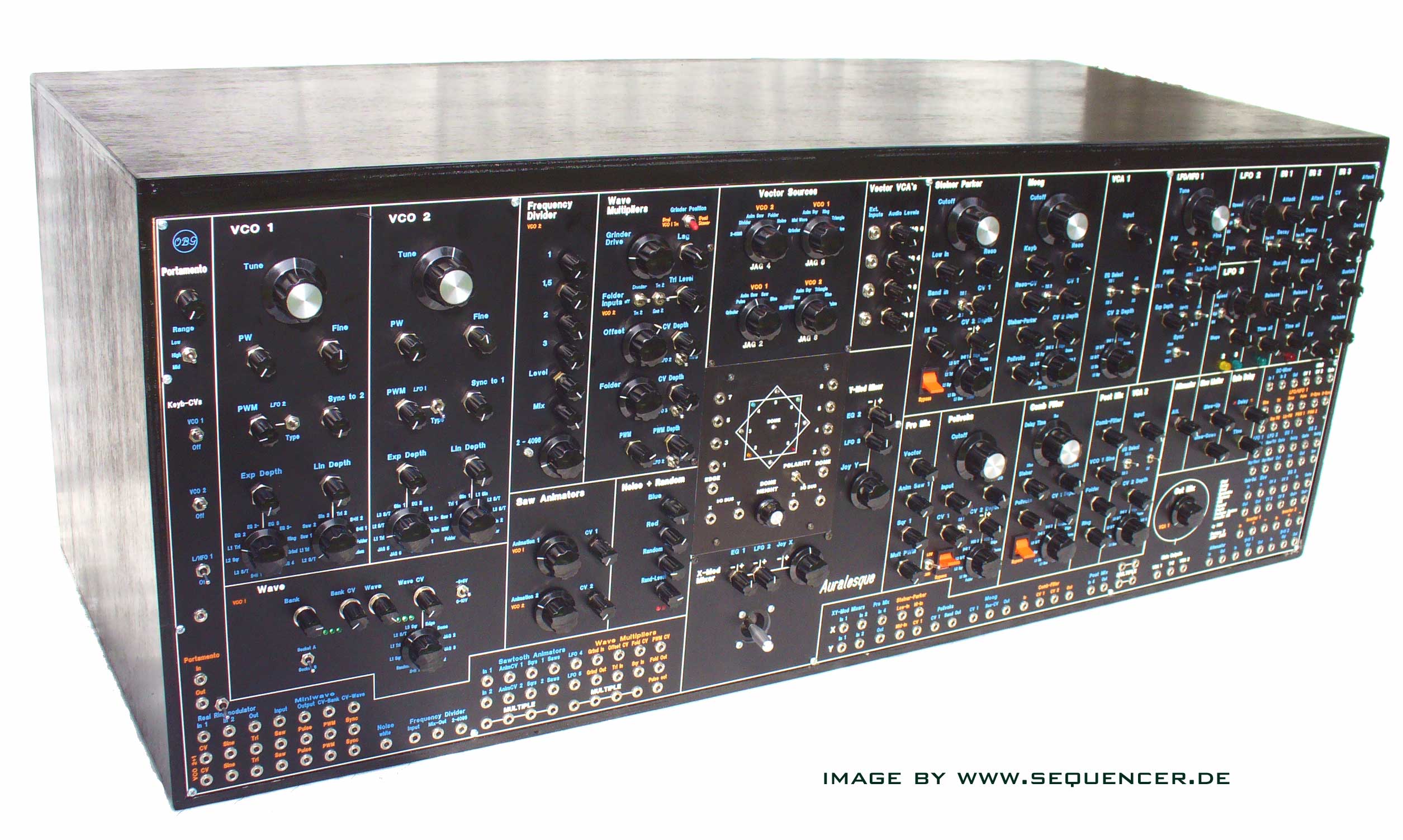
As this is a Half-Modular Synth, I had to find out how to get the
most out of the module without having to patch it. After a long test
(on a wooden faceplate), I had the impression, that I will use for
the Sqr-Inputs:
A) Output from a Divider (Blacet), this one has a Output-Attenuator
B) Sine from the same VCO
C): Off (Middle-Position of the Switch)

For the Triangle-Inputs I added a extra input-Attenuator:
A) Triangle (from the same VCO)
B) Sine (from the same VCO)
No Off (Input Attenuator)

I use the Grinder separately: It has nothing to do with the Folder
Section. I can use it to shape the Triangle of another VCO OR (as the
Grinder is NICE for complex Inputs): I can switch the whole Grinder
to another position between two Filters. With just one 4-Switch.

BTW: The Ringmodulator in the same Picture is the Real-Ring. I love
it, but it loads the inputs, I already mentionned that here.

cheers!
Olivier

Re: Check out the WaveMultiplier in this picture:

2005-08-19 by Richard Brewster

What a great looking synth! I'm always impressed when someone takes the
time to make a complete synth in a single panel, deciding what all the
modules will be. You used very nice design principles for the
large/small knobs, lending a wonderful consistency across these diverse
modules. It is modular in the patching sense, but not the physical
sense. I'd like to know more about this Auralesque. Do you have a
straight-on photo? A list of the modules?

-Richard Brewster

waveform100 wrote:
Show quoted textHide quoted text
>oh! ... there it is, sharp, in the upper left of the picture:
>
>http://www.sequencer.de/pix/auralesque/Auralesque.jpg
>
>As this is a Half-Modular Synth, I had to find out how to get the
>most out of the module without having to patch it. After a long test
>(on a wooden faceplate), I had the impression, that I will use for
>the Sqr-Inputs:
>A) Output from a Divider (Blacet), this one has a Output-Attenuator
>B) Sine from the same VCO
>C): Off (Middle-Position of the Switch)
>
>For the Triangle-Inputs I added a extra input-Attenuator:
>A) Triangle (from the same VCO)
>B) Sine (from the same VCO)
>No Off (Input Attenuator)
>
>I use the Grinder separately: It has nothing to do with the Folder
>Section. I can use it to shape the Triangle of another VCO OR (as the
>Grinder is NICE for complex Inputs): I can switch the whole Grinder
>to another position between two Filters. With just one 4-Switch.
>
>BTW: The Ringmodulator in the same Picture is the Real-Ring. I love
>it, but it loads the inputs, I already mentionned that here.
>
>cheers!
>Olivier
>
>
>
>

Re: Check out the WaveMultiplier in this picture:

2005-08-20 by waveform100

Thanks Richard! You're right: It was the hardest choosing the
modules. This took several month. But some of the modules I had
already and always knew that those have to be in (for example:
Sawtooth Animator, JAG, MiniWave, Frequency Shifter from Blacet,
RealRing, Wave Multiplier and the two Mixer-Processors for the Vector-
Heart (its possible to mix in LFO's and EG's next to the Joystick for
the JAG without patching). At the moment, I don't have a picture
straight on, but I have another hi-res from the right. Together with
that from the left you can see almost everything. I WILL make more
pictures, but this may take some time, because its in the studio now.

Do you recognise the Sawtooth Animator? There I did the little mod
you suggested :-).

I'll post a list of all the modules next week with the picture. Am in
a hurry...
Show quoted textHide quoted text
--- In cgs_synth@yahoogroups.com, Richard Brewster <pugix@e...> wrote:
> What a great looking synth! I'm always impressed when someone
takes the
> time to make a complete synth in a single panel, deciding what all
the
> modules will be. You used very nice design principles for the
> large/small knobs, lending a wonderful consistency across these
diverse
> modules. It is modular in the patching sense, but not the physical
> sense. I'd like to know more about this Auralesque. Do you have a
> straight-on photo? A list of the modules?
>
> -Richard Brewster
>
> waveform100 wrote:
>
> >oh! ... there it is, sharp, in the upper left of the picture:
> >
> >http://www.sequencer.de/pix/auralesque/Auralesque.jpg
> >
> >As this is a Half-Modular Synth, I had to find out how to get the
> >most out of the module without having to patch it. After a long
test
> >(on a wooden faceplate), I had the impression, that I will use for
> >the Sqr-Inputs:
> >A) Output from a Divider (Blacet), this one has a Output-Attenuator
> >B) Sine from the same VCO
> >C): Off (Middle-Position of the Switch)
> >
> >For the Triangle-Inputs I added a extra input-Attenuator:
> >A) Triangle (from the same VCO)
> >B) Sine (from the same VCO)
> >No Off (Input Attenuator)
> >
> >I use the Grinder separately: It has nothing to do with the
Folder
> >Section. I can use it to shape the Triangle of another VCO OR (as
the
> >Grinder is NICE for complex Inputs): I can switch the whole
Grinder
> >to another position between two Filters. With just one 4-Switch.
> >
> >BTW: The Ringmodulator in the same Picture is the Real-Ring. I
love
> >it, but it loads the inputs, I already mentionned that here.
> >
> >cheers!
> >Olivier
> >
> >
> >
> >

Re: Check out the WaveMultiplier in this picture:

2005-08-20 by Dennis Verschoor

Hi Oliver

I gues you ment a Blacet Frequency Divider.
Can you tell me more how you patched the JAG and mix it?

Regards,

Dennis
Show quoted textHide quoted text
On 8/20/05, waveform100 <googol@...> wrote:
> Thanks Richard! You're right: It was the hardest choosing the
> modules. This took several month. But some of the modules I had
> already and always knew that those have to be in (for example:
> Sawtooth Animator, JAG, MiniWave, Frequency Shifter from Blacet,
> RealRing, Wave Multiplier and the two Mixer-Processors for the Vector-
> Heart (its possible to mix in LFO's and EG's next to the Joystick for
> the JAG without patching). At the moment, I don't have a picture
> straight on, but I have another hi-res from the right. Together with
> that from the left you can see almost everything. I WILL make more
> pictures, but this may take some time, because its in the studio now.
>
> Do you recognise the Sawtooth Animator? There I did the little mod
> you suggested :-).
>
> I'll post a list of all the modules next week with the picture. Am in
> a hurry...
>
>
>
> --- In cgs_synth@yahoogroups.com, Richard Brewster <pugix@e...> wrote:
> > What a great looking synth! I'm always impressed when someone
> takes the
> > time to make a complete synth in a single panel, deciding what all
> the
> > modules will be. You used very nice design principles for the
> > large/small knobs, lending a wonderful consistency across these
> diverse
> > modules. It is modular in the patching sense, but not the physical
> > sense. I'd like to know more about this Auralesque. Do you have a
> > straight-on photo? A list of the modules?
> >
> > -Richard Brewster
> >
> > waveform100 wrote:
> >
> > >oh! ... there it is, sharp, in the upper left of the picture:
> > >
> > >http://www.sequencer.de/pix/auralesque/Auralesque.jpg
> > >
> > >As this is a Half-Modular Synth, I had to find out how to get the
> > >most out of the module without having to patch it. After a long
> test
> > >(on a wooden faceplate), I had the impression, that I will use for
> > >the Sqr-Inputs:
> > >A) Output from a Divider (Blacet), this one has a Output-Attenuator
> > >B) Sine from the same VCO
> > >C): Off (Middle-Position of the Switch)
> > >
> > >For the Triangle-Inputs I added a extra input-Attenuator:
> > >A) Triangle (from the same VCO)
> > >B) Sine (from the same VCO)
> > >No Off (Input Attenuator)
> > >
> > >I use the Grinder separately: It has nothing to do with the
> Folder
> > >Section. I can use it to shape the Triangle of another VCO OR (as
> the
> > >Grinder is NICE for complex Inputs): I can switch the whole
> Grinder
> > >to another position between two Filters. With just one 4-Switch.
> > >
> > >BTW: The Ringmodulator in the same Picture is the Real-Ring. I
> love
> > >it, but it loads the inputs, I already mentionned that here.
> > >
> > >cheers!
> > >Olivier
> > >
> > >
> > >
> > >
>
>
>
>
>
> The CGS Modular Synth home page: http://www.cgs.synth.net/
>
> Yahoo! Groups Links
>
>
>
>
>
>
>


--
----------------------------------------------------------------------------------
- Gear pictures at: http://jx.riscy.net/gallery/albums.php -
-
-
- Music at: http://www.soundclick.com/trestrois -
----------------------------------------------------------------------------------

Re: Check out the WaveMultiplier in this picture:

2005-08-20 by waveform100

UPS! of course, I meant the Divider not a Frequency Shifter. Sorry.
There is no Frequency Shifter in this synth.

The JAG: I have two Blacet Mixer-Processors, one for each JAG-Input.
Each Mixer has 3 Inputs, one is hardwired to a Joystick-Out, the
other two to LFO 2 (3) and to a EG 1 (2). Those you can break up to
use other LFO's or EG's or any CV or audio stuff :-)

--- In cgs_synth@yahoogroups.com, Dennis Verschoor <modular@g...>
wrote:
Show quoted textHide quoted text
> Hi Oliver
>
> I gues you ment a Blacet Frequency Divider.
> Can you tell me more how you patched the JAG and mix it?
>
> Regards,
>
> Dennis
>
> On 8/20/05, waveform100 <googol@g...> wrote:
> > Thanks Richard! You're right: It was the hardest choosing the
> > modules. This took several month. But some of the modules I had
> > already and always knew that those have to be in (for example:
> > Sawtooth Animator, JAG, MiniWave, Frequency Shifter from Blacet,
> > RealRing, Wave Multiplier and the two Mixer-Processors for the
Vector-
> > Heart (its possible to mix in LFO's and EG's next to the Joystick
for
> > the JAG without patching). At the moment, I don't have a picture
> > straight on, but I have another hi-res from the right. Together
with
> > that from the left you can see almost everything. I WILL make more
> > pictures, but this may take some time, because its in the studio
now.
> >
> > Do you recognise the Sawtooth Animator? There I did the little mod
> > you suggested :-).
> >
> > I'll post a list of all the modules next week with the picture.
Am in
> > a hurry...
> >
> >
> >
> > --- In cgs_synth@yahoogroups.com, Richard Brewster <pugix@e...>
wrote:
> > > What a great looking synth! I'm always impressed when someone
> > takes the
> > > time to make a complete synth in a single panel, deciding what
all
> > the
> > > modules will be. You used very nice design principles for the
> > > large/small knobs, lending a wonderful consistency across these
> > diverse
> > > modules. It is modular in the patching sense, but not the
physical
> > > sense. I'd like to know more about this Auralesque. Do you
have a
> > > straight-on photo? A list of the modules?
> > >
> > > -Richard Brewster
> > >
> > > waveform100 wrote:
> > >
> > > >oh! ... there it is, sharp, in the upper left of the picture:
> > > >
> > > >http://www.sequencer.de/pix/auralesque/Auralesque.jpg
> > > >
> > > >As this is a Half-Modular Synth, I had to find out how to get
the
> > > >most out of the module without having to patch it. After a long
> > test
> > > >(on a wooden faceplate), I had the impression, that I will use
for
> > > >the Sqr-Inputs:
> > > >A) Output from a Divider (Blacet), this one has a Output-
Attenuator
> > > >B) Sine from the same VCO
> > > >C): Off (Middle-Position of the Switch)
> > > >
> > > >For the Triangle-Inputs I added a extra input-Attenuator:
> > > >A) Triangle (from the same VCO)
> > > >B) Sine (from the same VCO)
> > > >No Off (Input Attenuator)
> > > >
> > > >I use the Grinder separately: It has nothing to do with the
> > Folder
> > > >Section. I can use it to shape the Triangle of another VCO OR
(as
> > the
> > > >Grinder is NICE for complex Inputs): I can switch the whole
> > Grinder
> > > >to another position between two Filters. With just one 4-
Switch.
> > > >
> > > >BTW: The Ringmodulator in the same Picture is the Real-Ring. I
> > love
> > > >it, but it loads the inputs, I already mentionned that here.
> > > >
> > > >cheers!
> > > >Olivier
> > > >
> > > >
> > > >
> > > >
> >
> >
> >
> >
> >
> > The CGS Modular Synth home page: http://www.cgs.synth.net/
> >
> > Yahoo! Groups Links
> >
> >
> >
> >
> >
> >
> >
>
>
> --
> --------------------------------------------------------------------
--------------
> - Gear pictures at: http://jx.riscy.net/gallery/albums.php -
> -

> -
> - Music at: http://www.soundclick.com/trestrois -
> --------------------------------------------------------------------
--------------

Re: Check out the WaveMultiplier in this picture:

2005-08-25 by waveform100

There is a photo more from the right. its not straight on:
http://www.sequencer.de/pix/auralesque/Auralesquerechts.jpg

List of modules is coming!

Olivier
Show quoted textHide quoted text
--- In cgs_synth@yahoogroups.com, Richard Brewster <pugix@e...> wrote:
> What a great looking synth! I'm always impressed when someone
takes the
> time to make a complete synth in a single panel, deciding what all
the
> modules will be. You used very nice design principles for the
> large/small knobs, lending a wonderful consistency across these
diverse
> modules. It is modular in the patching sense, but not the physical
> sense. I'd like to know more about this Auralesque. Do you have a
> straight-on photo? A list of the modules?
>
> -Richard Brewster
>
> waveform100 wrote:
>
> >oh! ... there it is, sharp, in the upper left of the picture:
> >
> >http://www.sequencer.de/pix/auralesque/Auralesque.jpg
> >
> >As this is a Half-Modular Synth, I had to find out how to get the
> >most out of the module without having to patch it. After a long
test
> >(on a wooden faceplate), I had the impression, that I will use for
> >the Sqr-Inputs:
> >A) Output from a Divider (Blacet), this one has a Output-Attenuator
> >B) Sine from the same VCO
> >C): Off (Middle-Position of the Switch)
> >
> >For the Triangle-Inputs I added a extra input-Attenuator:
> >A) Triangle (from the same VCO)
> >B) Sine (from the same VCO)
> >No Off (Input Attenuator)
> >
> >I use the Grinder separately: It has nothing to do with the
Folder
> >Section. I can use it to shape the Triangle of another VCO OR (as
the
> >Grinder is NICE for complex Inputs): I can switch the whole
Grinder
> >to another position between two Filters. With just one 4-Switch.
> >
> >BTW: The Ringmodulator in the same Picture is the Real-Ring. I
love
> >it, but it loads the inputs, I already mentionned that here.
> >
> >cheers!
> >Olivier
> >
> >
> >
> >

Re: Check out the WaveMultiplier in this picture:

2005-08-25 by Fiercefish

That is sex!
----- Original Message -----
Show quoted textHide quoted text
From: waveform100
To: cgs_synth@yahoogroups.com
Sent: Thursday, August 25, 2005 7:44 PM
Subject: [cgs_synth] Re: Check out the WaveMultiplier in this picture:


There is a photo more from the right. its not straight on:
http://www.sequencer.de/pix/auralesque/Auralesquerechts.jpg

List of modules is coming!

Olivier


--- In cgs_synth@yahoogroups.com, Richard Brewster <pugix@e...> wrote:
> What a great looking synth! I'm always impressed when someone
takes the
> time to make a complete synth in a single panel, deciding what all
the
> modules will be. You used very nice design principles for the
> large/small knobs, lending a wonderful consistency across these
diverse
> modules. It is modular in the patching sense, but not the physical
> sense. I'd like to know more about this Auralesque. Do you have a
> straight-on photo? A list of the modules?
>
> -Richard Brewster
>
> waveform100 wrote:
>
> >oh! ... there it is, sharp, in the upper left of the picture:
> >
> >http://www.sequencer.de/pix/auralesque/Auralesque.jpg
> >
> >As this is a Half-Modular Synth, I had to find out how to get the
> >most out of the module without having to patch it. After a long
test
> >(on a wooden faceplate), I had the impression, that I will use for
> >the Sqr-Inputs:
> >A) Output from a Divider (Blacet), this one has a Output-Attenuator
> >B) Sine from the same VCO
> >C): Off (Middle-Position of the Switch)
> >
> >For the Triangle-Inputs I added a extra input-Attenuator:
> >A) Triangle (from the same VCO)
> >B) Sine (from the same VCO)
> >No Off (Input Attenuator)
> >
> >I use the Grinder separately: It has nothing to do with the
Folder
> >Section. I can use it to shape the Triangle of another VCO OR (as
the
> >Grinder is NICE for complex Inputs): I can switch the whole
Grinder
> >to another position between two Filters. With just one 4-Switch.
> >
> >BTW: The Ringmodulator in the same Picture is the Real-Ring. I
love
> >it, but it loads the inputs, I already mentionned that here.
> >
> >cheers!
> >Olivier
> >
> >
> >
> >


The CGS Modular Synth home page: http://www.cgs.synth.net/


------------------------------------------------------------------------------
YAHOO! GROUPS LINKS

a.. Visit your group "cgs_synth" on the web.

b.. To unsubscribe from this group, send an email to:
cgs_synth-unsubscribe@yahoogroups.com

c.. Your use of Yahoo! Groups is subject to the Yahoo! Terms of Service.


------------------------------------------------------------------------------


------------------------------------------------------------------------------


No virus found in this incoming message.
Checked by AVG Anti-Virus.
Version: 7.0.344 / Virus Database: 267.10.15/81 - Release Date: 24/08/2005

----------

No virus found in this outgoing message.
Checked by AVG Anti-Virus.
Version: 7.0.344 / Virus Database: 267.10.15/81 - Release Date: 24/08/2005


[Non-text portions of this message have been removed]

Move to quarantaine

This moves the raw source file on disk only. The archive index is not changed automatically, so you still need to run a manual refresh afterward.