> On Feb 26, 2014, at 1:56 AM, Bill Brandom <bill.brandom03@...> wrote:
>
> True. Keys can be turned off in Silent mode. Most people do not turn the keys. They like to watch the keys going up and down. However, if the damper pedal is down the dampers are off the strings and acoustic resonance will take place. The piano will not be silent anymore.
>
> Bill
>
> On Feb 25, 2014, at 10:15 PM, Skanter123 <skanter123@...> wrote:
>
>
>> Correct. Pedals don't playback when Silent Mode. There is no reason to. The internal piano voice doesn't need the pedal to sustain digital sounds.
>
> Bill, this is true, but there is no reason for the keys to go up and down either. In silent mode, all of this is cosmetic or theatrical, and it makes little sense to me to have keys working (there is the option to turn off) and not the pedals. No big deal one way or the other, however. A bigger deal to me is if I can incremental pedal events working on the thousands of MIDI files I have. Hopefully i can with Spence's utility.
>
> Sam
> www.keyboardcollective.com
> (212) 684-3304
>
>
>
>
>
>> On Feb 26, 2014, at 12:41 AM, Bill Brandom <bill.brandom03@...> wrote:
>>
>>
>> Sam,
>>
>> Correct. Pedals don't playback when Silent Mode. There is no reason to. The internal piano voice doesn't need the pedal to sustain digital sounds.
>>
>> Bill
>>
>> On Feb 25, 2014, at 8:39 PM, Spencer Chase <lists@...> wrote:
>>
>>
>> what do you mean by extra notes? any idea where they came from? did you process with nothing but pedals on ch 3 selected? all that should happen is changing of channels. the program should do nothing else. it might have been that brushed notes became apparent once the pedal was working differently.
>>
>>> On 2/25/2014 8:35 PM, Skanter123 wrote:
>>>
>>> For some reason, pedals are disabled when DKV is in silent mode, though you have the option of keys going up and down. Strange. In any case, i can't test MIDImod till tomorrow...
>>>
>>> Sam
>>> www.keyboardcollective.com
>>> (212) 684-3304
>>>
>>>
>>>
>>>
>>>
>>> On Feb 25, 2014, at 10:47 PM, Skanter123 <skanter123@...> wrote:
>>>
>>>> Geoff and Spence,I used the version on the site, checked "pedal events on ch 3" box. I then changed MIDI IN settings on DKV to HP (what does that stand for?)
>>>>
>>>> It seemed to work, though i got a few extra notes playing on piano that didn't belong. Couldn't test fully as it got too late here and can't play acoustic after 10 pm. I guess i could test with internal sounds and headphones. Will do a bit later, report back. If it works, it's terrific!
>>>>
>>>> Sam
>>>> www.keyboardcollective.com
>>>> (212) 684-3304
>>>>
>>>>
>>>>
>>>>
>>>>
>>>> On Feb 25, 2014, at 9:11 PM, "Geoff Ward" <gward1211@...> wrote:
>>>>
>>>>>
>>>>> I think you should post the full screen version and make it a new version.
>>>>>
>>>>>
>>>>>
>>>>> Kind regards
>>>>>
>>>>>
>>>>>
>>>>> Geoff
>>>>>
>>>>>
>>>>>
>>>>>
>>>>>
>>>>> From: disklavier@yahoogroups.com [mailto:disklavier@yahoogroups.com] On Behalf Of Spencer Chase
>>>>> Sent: Wednesday, 26 February 2014 12:58 PM
>>>>> To: disklavier@yahoogroups.com
>>>>> Subject: Re: [disklavier] DKV volume
>>>>>
>>>>>
>>>>>
>>>>>
>>>>>
>>>>> i think the only things i changed were allowing all the sliders to fit on one screen without scrolling and putting the config file in the working folder in case windows doesn't like to write it to C:\. there were no changes to anything else so if it works for you as it is, there is no reason to get another version unless you use the velocity sliders a lot and want them all shown at once.
>>>>>
>>>>> Geoff, please tell me which version to post. i don't want the confusion of multiple versions.
>>>>>
>>>>>>
>>>>>>
>>>>>> Should i try this version?
>>>>>>
>>>>>> Sam
>>>>>>
>>>>>> www.keyboardcollective.com
>>>>>>
>>>>>>
>>>>>>
>>>>>>
>>>>>>
>>>>>>
>>>>>>
>>>>>>
>>>>>>
>>>>>>
>>>>>>
>>>>>>
>>>>>>> On Feb 25, 2014, at 7:14 PM, Spencer Chase <lists@...> wrote:
>>>>>>>
>>>>>>>
>>>>>>> no attachment, please send directly to me. i know i changed to a different arrangement of the window. i also have a version that does not write the config file to C:\ because some windows installations do not allow this. which do you have and which do you think makes sense for most people? it is only a few very secure windows installations that prevent writing a txt file to C:\ from what i an see it is only this new "no c" version that has all the sliders showing without scrolling.
>>>>>>>
>>>>>>>> On 2/25/2014 3:45 PM, Geoff Ward wrote:
>>>>>>>>
>>>>>>>>
>>>>>>>>
>>>>>>>> Spencer
>>>>>>>>
>>>>>>>>
>>>>>>>>
>>>>>>>> This is the latest of midimod2 that you sent me. Remember that you modified it to show a full screen. I’m not sure that it has been fully tested but it has worked OK for me so far.
>>>>>>>>
>>>>>>>>
>>>>>>>>
>>>>>>>> Kind regards
>>>>>>>>
>>>>>>>>
>>>>>>>>
>>>>>>>> Geoff
>>>>>>>>
>>>>>>>>
>>>>>>>>
>>>>>>>>
>>>>>>>>
>>>>>>>> From: disklavier@yahoogroups.com [mailto:disklavier@yahoogroups.com] On Behalf Of Spencer Chase
>>>>>>>> Sent: Wednesday, 26 February 2014 10:13 AM
>>>>>>>> To: disklavier@yahoogroups.com
>>>>>>>> Subject: Re: [disklavier] DKV volume
>>>>>>>>
>>>>>>>>
>>>>>>>>
>>>>>>>>
>>>>>>>>
>>>>>>>> geoff send me the latest one and i'll post it.
>>>>>>>>
>>>>>>>>> On 2/25/2014 1:43 PM, Geoff Ward wrote:
>>>>>>>>>
>>>>>>>>>
>>>>>>>>>
>>>>>>>>> Spencer
>>>>>>>>>
>>>>>>>>>
>>>>>>>>>
>>>>>>>>> The link you gave below does not lead to the latest version of your program.
>>>>>>>>>
>>>>>>>>>
>>>>>>>>>
>>>>>>>>> Kind regards
>>>>>>>>>
>>>>>>>>>
>>>>>>>>>
>>>>>>>>> Geoff
>>>>>>>>>
>>>>>>>>>
>>>>>>>>>
>>>>>>>>>
>>>>>>>>>
>>>>>>>>> From: disklavier@yahoogroups.com [mailto:disklavier@yahoogroups.com] On Behalf Of Spencer Chase
>>>>>>>>> Sent: Wednesday, 26 February 2014 1:29 AM
>>>>>>>>> To: disklavier@yahoogroups.com
>>>>>>>>> Subject: Re: [disklavier] DKV volume
>>>>>>>>>
>>>>>>>>>
>>>>>>>>>
>>>>>>>>>
>>>>>>>>>
>>>>>>>>> my midimod2 program will move all pedal data to channel 3 if you select the "pedal events on ch 3" checkbox. if this is all you want to do, leave the default preset of "no change" for velocity modifications. you can do single files or whole folders in batch mode. the program may be found on my download page http://spencerserolls.com/Files4Download.html
>>>>>>>>>
>>>>>>>>>> On 2/25/2014 12:03 AM, Skanter123 wrote:
>>>>>>>>>>
>>>>>>>>>>
>>>>>>>>>>
>>>>>>>>>> As i look at event lists from DKV files (from eCompetitions) it seems that #67 is soft pedal. Sustain data is all #64, both on/off and incremental.
>>>>>>>>>>
>>>>>>>>>>
>>>>>>>>>>
>>>>>>>>>> I don't know how to batch copy all pedal data to another channel (at least with the sequencer I have here at home), but I certainly can move everything to ch 1. Ill try this and report back. Thanks!
>>>>>>>>>>
>>>>>>>>>>
>>>>>>>>>>
>>>>>>>>>> Sam
>>>>>>>>>>
>>>>>>>>>> www.keyboardcollective.com
>>>>>>>>>>
>>>>>>>>>> (212) 684-3304
>>>>>>>>>>
>>>>>>>>>>
>>>>>>>>>>
>>>>>>>>>>
>>>>>>>>>>
>>>>>>>>>>
>>>>>>>>>>
>>>>>>>>>>
>>>>>>>>>>
>>>>>>>>>>
>>>>>>>>>>> On Feb 25, 2014, at 2:46 AM, Bill Brandom <billbrando@...> wrote:
>>>>>>>>>>>
>>>>>>>>>>>
>>>>>>>>>>> If you have both on/off and incremental on channel 1, then copy all of the pedal data (Controllers 64 and 67) to channel 3.
>>>>>>>>>>>
>>>>>>>>>>>
>>>>>>>>>>>
>>>>>>>>>>> If you can't extract the pedal data from the note data, and
>>>>>>>>>>>
>>>>>>>>>>> if you are making Piano-only music, try just copying ALL of the note and pedal data on channel 1 to channel 3.
>>>>>>>>>>>
>>>>>>>>>>>
>>>>>>>>>>>
>>>>>>>>>>> Bill
>>>>>>>>>>>
>>>>>>>>>>>
>>>>>>>>>>> On Feb 24, 2014, at 11:35 PM, Sam Kanter <skanter123@...> wrote:
>>>>>>>>>>>
>>>>>>>>>>>
>>>>>>>>>>>
>>>>>>>>>>> Bill, not sure what you mean here. How would I copy MIDI half-pedal (controller #67) from channel 1 to channel 3 on MIDI files that have both on ch 1? I am referring to files that already have the half-pedal data.
>>>>>>>>>>>
>>>>>>>>>>>
>>>>>>>>>>>
>>>>>>>>>>> Sam Kanter
>>>>>>>>>>> www.keyboardcollective.com
>>>>>>>>>>> (212) 684-3304
>>>>>>>>>>>
>>>>>>>>>>>
>>>>>>>>>>>
>>>>>>>>>>> On Tue, Feb 25, 2014 at 2:04 AM, Bill Brandom <bill.brandom03@...> wrote:
>>>>>>>>>>>
>>>>>>>>>>>
>>>>>>>>>>>
>>>>>>>>>>> Sam,
>>>>>>>>>>>
>>>>>>>>>>>
>>>>>>>>>>>
>>>>>>>>>>> I believe you can copy your on/off pedal data from channel one to channel 3 on both types of MIDI files. Leave your on/off pedal data on channel 1 and then make your incremental modifications to the on/off pedal data on channel 3. You should be fine.
>>>>>>>>>>>
>>>>>>>>>>> Bill
>>>>>>>>>>>
>>>>>>>>>>>
>>>>>>>>>>> On Feb 24, 2014, at 9:58 PM, Skanter123 <skanter123@...> wrote:
>>>>>>>>>>>
>>>>>>>>>>>
>>>>>>>>>>>
>>>>>>>>>>> Hello everyone,
>>>>>>>>>>>
>>>>>>>>>>>
>>>>>>>>>>>
>>>>>>>>>>> Geoff and Spence have both been incredibly generous in trying to help me with the clunking, noisy damper pedal on my MK II DKV when playing back MIDI files.
>>>>>>>>>>>
>>>>>>>>>>>
>>>>>>>>>>>
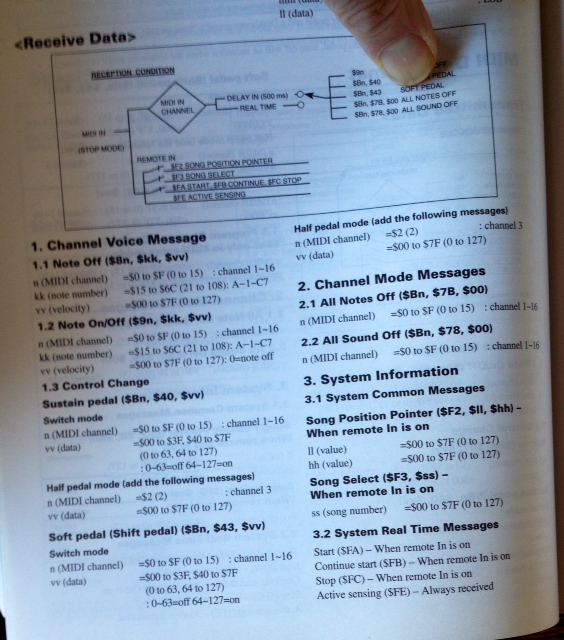
>>>>>>>>>>> After trying Spence's pedal on/off program to no avail, we are realizing that the older DKVs like the MKII receive damper on/off data on ch 1, and half-pedal data on ch 3.
>>>>>>>>>>>
>>>>>>>>>>>
>>>>>>>>>>>
>>>>>>>>>>> Can anyone enlighten us on what type of MIDI files (0 or1) have pedal info on ch 3? Is there a way to extract this data that might be embedded on ch 1?
>>>>>>>>>>>
>>>>>>>>>>>
>>>>>>>>>>>
>>>>>>>>>>> Does anyone with older DKVs have this clunking pedal issue, and have they found a way to solve it?
>>>>>>>>>>>
>>>>>>>>>>>
>>>>>>>>>>>
>>>>>>>>>>> Thanks in advance...
>>>>>>>>>>>
>>>>>>>>>>>
>>>>>>>>>>>
>>>>>>>>>>> Sam
>>>>>>>>>>>
>>>>>>>>>>> www.keyboardcollective.com
>>>>>>>>>>>
>>>>>>>>>>> (212) 684-3304
>>>>>>>>>>>
>>>>>>>>>>>
>>>>>>>>>>>
>>>>>>>>>>>
>>>>>>>>>>>
>>>>>>>>>>>
>>>>>>>>>>>
>>>>>>>>>>>
>>>>>>>>>>>
>>>>>>>>>>>
>>>>>>>>>>>> On Feb 20, 2014, at 7:40 PM, Sam Kanter <skanter123@...> wrote:
>>>>>>>>>>>>
>>>>>>>>>>>>
>>>>>>>>>>>> Geoff, the settings are very helpful. Hopefully I can experiment tomorrow and see how they work. I will report back and update. Thanks!
>>>>>>>>>>>>
>>>>>>>>>>>> Sam
>>>>>>>>>>>>
>>>>>>>>>>>> www.keyboardcollective.com
>>>>>>>>>>>>
>>>>>>>>>>>> (212) 684-3304
>>>>>>>>>>>>
>>>>>>>>>>>>
>>>>>>>>>>>>
>>>>>>>>>>>> *(Sent from phone - please excuse brevity and typos.)
>>>>>>>>>>>>
>>>>>>>>>>>>
>>>>>>>>>>>>> On Feb 20, 2014, at 5:57 PM, "Geoff Ward" <gward1211@...> wrote:
>>>>>>>>>>>>>
>>>>>>>>>>>>>
>>>>>>>>>>>>> Sam
>>>>>>>>>>>>>
>>>>>>>>>>>>>
>>>>>>>>>>>>>
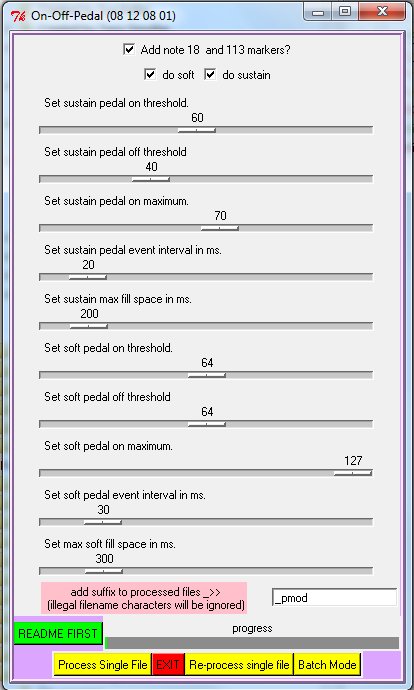
>>>>>>>>>>>>> The attached screenshot is of the settings I found best, but it depends on the regulation of the piano. On mine, the dampers just clear all of the strings at a midi value of 60 (I created a test file with various levels to ascertain that figure). So I set it at a max of 70 to ensure strings were undamped. At 40 all strings were fully damped. So a range of 40 to 70 minimises the pedal travel. However, the ramps of midi 64 controllers thus created still descend to 0 if time permits, so I’m not quite sure what the pedal off threshold of 40 determines. It does seem to put a shoulder in the ramp at the 40 mark and affects the position of the ramp. This is always a compromise. The sustain pedal will take effect at a later point in time and will come off earlier and I think that the threshold levels are intended to position the ramps so that the sustain actuation occurs as close as possible to where the former on/off controllers occurred. It’s not perfect because damper lift-off is not perfect. On my piano, which is new, the damper lift-off range is about 50 to 60.
>>>>>>>>>>>>>
>>>>>>>>>>>>>
>>>>>>>>>>>>>
>>>>>>>>>>>>> The soft pedal is not so critical. For the soft pedal, the ramp is set to run the full range from 0 to 127, as you would expect. I’m again not sure of the significance of the on and off threshold values, but these settings worked for me.
>>>>>>>>>>>>>
>>>>>>>>>>>>>
>>>>>>>>>>>>>
>>>>>>>>>>>>> Kind regards
>>>>>>>>>>>>>
>>>>>>>>>>>>>
>>>>>>>>>>>>>
>>>>>>>>>>>>> Geoff
>>>>>>>>>>>>>
>>>>>>>>>>>>>
>>>>>>>>>>>>>
>>>>>>>>>>>>>
>>>>>>>>>>>>>
>>>>>>>>>>>>> From: disklavier@yahoogroups.com [mailto:disklavier@yahoogroups.com] On Behalf Of Skanter123
>>>>>>>>>>>>> Sent: Thursday, 20 February 2014 5:29 PM
>>>>>>>>>>>>> To: disklavier@yahoogroups.com
>>>>>>>>>>>>> Cc: disklavier@yahoogroups.com
>>>>>>>>>>>>> Subject: Re: [disklavier] DKV volume
>>>>>>>>>>>>>
>>>>>>>>>>>>>
>>>>>>>>>>>>>
>>>>>>>>>>>>>
>>>>>>>>>>>>>
>>>>>>>>>>>>> Geoff, do you have an idea what would be good starting settings for MPX100II?
>>>>>>>>>>>>>
>>>>>>>>>>>>> This is a mark II DKV, not mark II XG.
>>>>>>>>>>>>>
>>>>>>>>>>>>> Sam
>>>>>>>>>>>>>
>>>>>>>>>>>>> www.keyboardcollective.com
>>>>>>>>>>>>>
>>>>>>>>>>>>> (212) 684-3304
>>>>>>>>>>>>>
>>>>>>>>>>>>>
>>>>>>>>>>>>>
>>>>>>>>>>>>>
>>>>>>>>>>>>>
>>>>>>>>>>>>>
>>>>>>>>>>>>>
>>>>>>>>>>>>>
>>>>>>>>>>>>>
>>>>>>>>>>>>>
>>>>>>>>>>>>>> On Feb 20, 2014, at 1:26 AM, Spencer Chase <lists@...> wrote:
>>>>>>>>>>>>>>
>>>>>>>>>>>>>>
>>>>>>>>>>>>>> i wrote the program but Geoff did the testing and has a DKV to test on so he is the authority for appropriate settings, at least for pianos similar to his.
>>>>>>>>>>>>>>
>>>>>>>>>>>>>>> On 2/19/2014 10:16 PM, Sam Kanter wrote:
>>>>>>>>>>>>>>>
>>>>>>>>>>>>>>>
>>>>>>>>>>>>>>>
>>>>>>>>>>>>>>> Wow - this looks like just what the doctor ordered to fix the noisy on/off pedaling issue. Can't wait to test it during day hours. Thanks!
>>>>>>>>>>>>>>>
>>>>>>>>>>>>>>>
>>>>>>>>>>>>>>>
>>>>>>>>>>>>>>> Sam Kanter
>>>>>>>>>>>>>>> www.keyboardcollective.com
>>>>>>>>>>>>>>> (212) 684-3304
>>>>>>>>>>>>>>>
>>>>>>>>>>>>>>>
>>>>>>>>>>>>>>>
>>>>>>>>>>>>>>> On Thu, Feb 20, 2014 at 1:05 AM, Spencer Chase <lists@spencerserolls.com> wrote:
>>>>>>>>>>>>>>>
>>>>>>>>>>>>>>>
>>>>>>>>>>>>>>>
>>>>>>>>>>>>>>> i uploaded the new version of the pedal modifier program do not use the link in the last e-mail because the name has changed. go to the download page of my site spencerserolls.com and find the On Off to Gradual Pedal converter program (New) actually, this link might work from e-mail but best to visit the download page instead.
>>>>>>>>>>>>>>>
>>>>>>>>>>>>>>>
>>>>>>>>>>>>>>>
>>>>>>>>>>>>>>>
>>>>>>>>>>>>>>>
>>>>>>>>>>>>>>>
>>>>>>>>>>>>>>>> On 2/19/2014 8:20 PM, Skanter123 wrote:
>>>>>>>>>>>>>>>>
>>>>>>>>>>>>>>>>
>>>>>>>>>>>>>>>>
>>>>>>>>>>>>>>>> Geoff, what is the exact name of Spencer's pedal program? I could not find it...
>>>>>>>>>>>>>>>>
>>>>>>>>>>>>>>>> Sam
>>>>>>>>>>>>>>>>
>>>>>>>>>>>>>>>> www.keyboardcollective.com
>>>>>>>>>>>>>>>>
>>>>>>>>>>>>>>>> (212) 684-3304
>>>>>>>>>>>>>>>>
>>>>>>>>>>>>>>>>
>>>>>>>>>>>>>>>>
>>>>>>>>>>>>>>>>
>>>>>>>>>>>>>>>>
>>>>>>>>>>>>>>>>
>>>>>>>>>>>>>>>>
>>>>>>>>>>>>>>>>
>>>>>>>>>>>>>>>>
>>>>>>>>>>>>>>>>
>>>>>>>>>>>>>>>>> On Feb 19, 2014, at 11:18 PM, Geoff Ward <gward1211@...> wrote:
>>>>>>>>>>>>>>>>>
>>>>>>>>>>>>>>>>>
>>>>>>>>>>>>>>>>> Just following up on Spencer’s comments about his program to apply up and down ramps to on-off pedal controllers. The program works best with type 0 midi files and it works well to remove pedal noise from my MKIV when playing low volume midi files. File of just piano music can be easily converted from type 1 to type 0 in a program like Cakewalk, or Spencer also has a program to do it.
>>>>>>>>>>>>>>>>>
>>>>>>>>>>>>>>>>>
>>>>>>>>>>>>>>>>>
>>>>>>>>>>>>>>>>> (Spencer, the pedal modifier program on your website is not the latest – the latest version displays parameters for both sustain and soft pedals).
>>>>>>>>>>>>>>>>>
>>>>>>>>>>>>>>>>>
>>>>>>>>>>>>>>>>>
>>>>>>>>>>>>>>>>> If someone wants to use this program, I have worked out the settings which give good results for my MKIV. If anyone wants them, please let me know.
>>>>>>>>>>>>>>>>>
>>>>>>>>>>>>>>>>>
>>>>>>>>>>>>>>>>>
>>>>>>>>>>>>>>>>> Kind regards
>>>>>>>>>>>>>>>>>
>>>>>>>>>>>>>>>>>
>>>>>>>>>>>>>>>>>
>>>>>>>>>>>>>>>>> Geoff Ward
>>>>>>>>>>>>>>>>>
>>>>>>>>>>>>>>>>>
>>>>>>>>>>>>>>>>>
>>>>>>>>>>>>>>>>>
>>>>>>>>>>>>>>>>>
>>>>>>>>>>>>>>>>>
>>>>>>>>>>>>>>>>>
>>>>>>>>>>>>>>>>> From: disklavier@yahoogroups.com [mailto:disklavier@yahoogroups.com] On Behalf Of Spencer Chase
>>>>>>>>>>>>>>>>> Sent: Wednesday, 19 February 2014 4:23 AM
>>>>>>>>>>>>>>>>> To: disklavier@yahoogroups.com
>>>>>>>>>>>>>>>>> Subject: Re: [disklavier] DKV volume
>>>>>>>>>>>>>>>>>
>>>>>>>>>>>>>>>>>
>>>>>>>>>>>>>>>>>
>>>>>>>>>>>>>>>>>
>>>>>>>>>>>>>>>>>
>>>>>>>>>>>>>>>>> my computer is screwing up after that last win8 update. not sure how much i can do while traveling. hope it recovers. it looks like the most recent version of on off to gradual pedaling is on the download page of my web site. Geoff reads this list. he recently had some "problems" with the program but it turned out to be misunderstanding of what it could do. he remembers better than i so can probably answer questions. i know he has successfully used it to reduce both soft and sustain pedal noise. be sure to use the on off to gradual, not the reverse. the program has to interpolate ramped controllers. it does the best it can but you have to choose settings for some strange files??? probably best to use the default settings until you figure out something better.
>>>>>>>>>>>>>>>>>
>>>>>>>>>>>>>>>>> http://spencerserolls.com/Files4Download.html
>>>>>>>>>>>>>>>>>
>>>>>>>>>>>>>>>>>> On 2/18/2014 9:10 AM, Skanter123 wrote:
>>>>>>>>>>>>>>>>>>
>>>>>>>>>>>>>>>>>>
>>>>>>>>>>>>>>>>>>
>>>>>>>>>>>>>>>>>> Thanks Spence - I would be interested...
>>>>>>>>>>>>>>>>>>
>>>>>>>>>>>>>>>>>> Sam
>>>>>>>>>>>>>>>>>>
>>>>>>>>>>>>>>>>>> www.keyboardcollective.com
>>>>>>>>>>>>>>>>>>
>>>>>>>>>>>>>>>>>> (212) 684-3304
>>>>>>>>>>>>>>>>>>
>>>>>>>>>>>>>>>>>>
>>>>>>>>>>>>>>>>>>
>>>>>>>>>>>>>>>>>>
>>>>>>>>>>>>>>>>>>
>>>>>>>>>>>>>>>>>>
>>>>>>>>>>>>>>>>>>
>>>>>>>>>>>>>>>>>>
>>>>>>>>>>>>>>>>>>
>>>>>>>>>>>>>>>>>>
>>>>>>>>>>>>>>>>>>> On Feb 18, 2014, at 11:13 AM, Spencer Chase <lists@...> wrote:
>>>>>>>>>>>>>>>>>>>
>>>>>>>>>>>>>>>>>>>
>>>>>>>>>>>>>>>>>>> about pedals, i have a program that interpolates progressive pedaling in to MIDI files. not sure if i put it on my web site or not. i recently went through testing with Geoff Ward and i believe we found the program to do what it should. it definitely reduces pedal noise. i am really busy right now getting ready for a trip but will probably be stuck in the airport for hours later today (weather) and can make sure a working version is posted to my server.
>>>>>>>>>>>>>>>>>>>
>>>>>>>>>>>>>>>>>>> if anyone is interested, let me know. i have a lot to do so will not bother unless people want it.
>>>>>>>>>>>>>>>>>>>
>>>>>>>>>>>>>>>>>>>> On 2/18/2014 12:01 AM, Skanter123 wrote:
>>>>>>>>>>>>>>>>>>>>
>>>>>>>>>>>>>>>>>>>> Â
>>>>>>>>>>>>>>>>>>>>
>>>>>>>>>>>>>>>>>>>>
>>>>>>>>>>>>>>>>>>>>
>>>>>>>>>>>>>>>>>>>>>
>>>>>>>>>>>>>>>>>>>>>
>>>>>>>>>>>>>>>>>>>>> Sorry about that. I mis-read your question. George will need to respond on your Controller 7 question about how it affects the Disklavier. I just know that Controller 7 is set to 100 at the beginning of Yamaha PianoSoft Disklavier files.
>>>>>>>>>>>>>>>>>>>>>
>>>>>>>>>>>>>>>>>>>>
>>>>>>>>>>>>>>>>>>>>
>>>>>>>>>>>>>>>>>>>> Hmmm...I'm wondering how MIDI volume (controller 7) can affect an acoustic piano. It seems the only way to affect volume on a DKV is by velocity or soft pedal (bringing hammers closer),
>>>>>>>>>>>>>>>>>>>>
>>>>>>>>>>>>>>>>>>>>
>>>>>>>>>>>>>>>>>>>>
>>>>>>>>>>>>>>>>>>>>
>>>>>>>>>>>>>>>>>>>>
>>>>>>>>>>>>>>>>>>>> I have not seen any sort of volume control curve for Disklavier.
>>>>>>>>>>>>>>>>>>>>
>>>>>>>>>>>>>>>>>>>>
>>>>>>>>>>>>>>>>>>>>
>>>>>>>>>>>>>>>>>>>> Noisy pedals - This is usually the result of playing MIDI files that have ON/OFF pedaling, instead of incremental pedaling. During playback, ON/OFF pedaling goes from full OFF to full ON and then back to full OFF. This is much noiser (and much less musical) than incremental pedaling. I imagine that when you record on your Disklavier, the playback of the pedals is much better, right?
>>>>>>>>>>>>>>>>>>>>
>>>>>>>>>>>>>>>>>>>>
>>>>>>>>>>>>>>>>>>>>
>>>>>>>>>>>>>>>>>>>> Yes! This makes sense. Â I wonder if there is a simple way to control this when playing MIDI files that only have ON/OFF? Probably some utility somewhere...
>>>>>>>>>>>>>>>>>>>>
>>>>>>>>>>>>>>>>>>>>
>>>>>>>>>>>>>>>>>>>>
>>>>>>>>>>>>>>>>>>>> Thanks again!
>>>>>>>>>>>>>>>>>>>>
>>>>>>>>>>>>>>>>>>>>
>>>>>>>>>>>>>>>>>>>>
>>>>>>>>>>>>>>>>>>>>
>>>>>>>>>>>>>>>>>>>>
>>>>>>>>>>>>>>>>>>>> Bill
>>>>>>>>>>>>>>>>>>>>
>>>>>>>>>>>>>>>>>>>> -----Original Message-----
>>>>>>>>>>>>>>>>>>>> From: Skanter123 <skanter123@gmail.com>
>>>>>>>>>>>>>>>>>>>> To: disklavier <disklavier@yahoogroups.com>
>>>>>>>>>>>>>>>>>>>> Cc: disklavier <disklavier@yahoogroups.com>
>>>>>>>>>>>>>>>>>>>> Sent: Mon, Feb 17, 2014 10:53 pm
>>>>>>>>>>>>>>>>>>>> Subject: Re: [disklavier] DKV volume
>>>>>>>>>>>>>>>>>>>>
>>>>>>>>>>>>>>>>>>>> Â
>>>>>>>>>>>>>>>>>>>>
>>>>>>>>>>>>>>>>>>>>
>>>>>>>>>>>>>>>>>>>>
>>>>>>>>>>>>>>>>>>>> SamÂ
>>>>>>>>>>>>>>>>>>>>
>>>>>>>>>>>>>>>>>>>> www.keyboardcollective.com
>>>>>>>>>>>>>>>>>>>>
>>>>>>>>>>>>>>>>>>>> (212) 684-3304
>>>>>>>>>>>>>>>>>>>>
>>>>>>>>>>>>>>>>>>>>
>>>>>>>>>>>>>>>>>>>>
>>>>>>>>>>>>>>>>>>>>
>>>>>>>>>>>>>>>>>>>>
>>>>>>>>>>>>>>>>>>>>
>>>>>>>>>>>>>>>>>>>>
>>>>>>>>>>>>>>>>>>>>
>>>>>>>>>>>>>>>>>>>>
>>>>>>>>>>>>>>>>>>>>
>>>>>>>>>>>>>>>>>>>> On Feb 18, 2014, at 1:36 AM, Bill Brandom <billbrando@...>
>>>>>>>>>>>>>>>>>>>>
>>>>>>>>>>>>>>>>>>>> Bill, thanks for your detailed reply. I'm still confused about a few things, though.
>>>>>>>>>>>>>>>>>>>>
>>>>>>>>>>>>>>>>>>>>
>>>>>>>>>>>>>>>>>>>>
>>>>>>>>>>>>>>>>>>>> Â
>>>>>>>>>>>>>>>>>>>>
>>>>>>>>>>>>>>>>>>>>
>>>>>>>>>>>>>>>>>>>>
>>>>>>>>>>>>>>>>>>>>
>>>>>>>>>>>>>>>>>>>>
>>>>>>>>>>>>>>>>>>>> You stated that you are reducing MIDI velocities and not hearing a difference on the Disklavier. My guess is that your music must be playing pretty softly and the Disklavier will not attempt to play it any softer, even with the velocities reduced. Just to confirm that your velocity changes are or are not working, take a very high velocity note and reduce its velocity considerably and see if the Disklavier plays it back considerable softer.
>>>>>>>>>>>>>>>>>>>>
>>>>>>>>>>>>>>>>>>>>
>>>>>>>>>>>>>>>>>>>>
>>>>>>>>>>>>>>>>>>>> I said that lowering MIDI VOLUME (not velocity) produced no affect. I'm not sure how changing MIDI volume (controller #7) affects the DKV if at all. Is it supposed to?
>>>>>>>>>>>>>>>>>>>>
>>>>>>>>>>>>>>>>>>>>
>>>>>>>>>>>>>>>>>>>>
>>>>>>>>>>>>>>>>>>>>
>>>>>>>>>>>>>>>>>>>>
>>>>>>>>>>>>>>>>>>>> The built in volume control on the Disklavier compresses the playback, reducing the highest velocity notes much more than the lower velocity notes. On your MPX100II, at a certain volume level (I think -7, the hammer rest rail of your piano moves the hammers much closer to the strings, thereby making the piano play much softer.)
>>>>>>>>>>>>>>>>>>>>
>>>>>>>>>>>>>>>>>>>>
>>>>>>>>>>>>>>>>>>>>
>>>>>>>>>>>>>>>>>>>> On my DKV, the velocity seems to decrease as I bring it down from 0 to -10, but I'm not sure what the curve is. Is there a graphic showing this curve? I assume the  volume control affects velocity only, and not the soft pedal?
>>>>>>>>>>>>>>>>>>>>
>>>>>>>>>>>>>>>>>>>>
>>>>>>>>>>>>>>>>>>>>
>>>>>>>>>>>>>>>>>>>> Another unrelated issue i have is that, on some MIDI file playback, the damper pedal is quite noisy. It is sustaining notes properly but moving up and down more than it needs to (like some of my beginning students who stamp on the pedal until they learn to use it). Â Is there a way to control the continuous movement of the pedal to limit it's movement somewhat so it will be quieter?
>>>>>>>>>>>>>>>>>>>>
>>>>>>>>>>>>>>>>>>>>
>>>>>>>>>>>>>>>>>>>>
>>>>>>>>>>>>>>>>>>>> Thanks in advance for your help...
>>>>>>>>>>>>>>>>>>>>
>>>>>>>>>>>>>>>>>>>>
>>>>>>>>>>>>>>>>>>>>
>>>>>>>>>>>>>>>>>>>>
>>>>>>>>>>>>>>>>>>>>
>>>>>>>>>>>>>>>>>>>>
>>>>>>>>>>>>>>>>>>>>
>>>>>>>>>>>>>>>>>>>>
>>>>>>>>>>>>>>>>>>>>
>>>>>>>>>>>>>>>>>>>> Bill
>>>>>>>>>>>>>>>>>>>>
>>>>>>>>>>>>>>>>>>>> -----Original Message-----
>>>>>>>>>>>>>>>>>>>> From: Skanter123 <skanter123@...>
>>>>>>>>>>>>>>>>>>>> To: disklavier <disklavier@yahoogroups.com>
>>>>>>>>>>>>>>>>>>>> Sent: Mon, Feb 17, 2014 8:43 pm
>>>>>>>>>>>>>>>>>>>> Subject: Re: [disklavier] DKV volume
>>>>>>>>>>>>>>>>>>>>
>>>>>>>>>>>>>>>>>>>> Â
>>>>>>>>>>>>>>>>>>>>
>>>>>>>>>>>>>>>>>>>> Thanks, George.
>>>>>>>>>>>>>>>>>>>>
>>>>>>>>>>>>>>>>>>>>
>>>>>>>>>>>>>>>>>>>>
>>>>>>>>>>>>>>>>>>>> Being a synthesist as well as pianist, I was there at MIDI's start, and know my way around SYSEX charts, but am still confused about how MIDI volume and velocity affects an acousto-electric instrument like the DKV.Â
>>>>>>>>>>>>>>>>>>>>
>>>>>>>>>>>>>>>>>>>>
>>>>>>>>>>>>>>>>>>>>
>>>>>>>>>>>>>>>>>>>> I see no affect when I lower MIDI volume of MIDI files with a sequencer. How is that supposed to work? Also, does changing velocity values affect the force or speed of the hammers, or just implement the soft pedal? What exactly does the built-in volume control on DKV do, is it the same on all DKVs? Mine is a 1997 MPX100II.
>>>>>>>>>>>>>>>>>>>>
>>>>>>>>>>>>>>>>>>>>
>>>>>>>>>>>>>>>>>>>>
>>>>>>>>>>>>>>>>>>>>
>>>>>>>>>>>>>>>>>>>>
>>>>>>>>>>>>>>>>>>>>
>>>>>>>>>>>>>>>>>>>>
>>>>>>>>>>>>>>>>>>>> SamÂ
>>>>>>>>>>>>>>>>>>>>
>>>>>>>>>>>>>>>>>>>> www.keyboardcollective.com
>>>>>>>>>>>>>>>>>>>>
>>>>>>>>>>>>>>>>>>>> (212) 684-3304
>>>>>>>>>>>>>>>>>>>>
>>>>>>>>>>>>>>>>>>>>
>>>>>>>>>>>>>>>>>>>>
>>>>>>>>>>>>>>>>>>>>
>>>>>>>>>>>>>>>>>>>>
>>>>>>>>>>>>>>>>>>>>
>>>>>>>>>>>>>>>>>>>>
>>>>>>>>>>>>>>>>>>>>
>>>>>>>>>>>>>>>>>>>>
>>>>>>>>>>>>>>>>>>>>
>>>>>>>>>>>>>>>>>>>>> On Feb 17, 2014, at 7:04 PM, Bill Brandom <bill.brandom03@...> wrote:
>>>>>>>>>>>>>>>>>>>>> Â
>>>>>>>>>>>>>>>>>>>>>
>>>>>>>>>>>>>>>>>>>>> George,
>>>>>>>>>>>>>>>>>>>>>
>>>>>>>>>>>>>>>>>>>>>
>>>>>>>>>>>>>>>>>>>>>
>>>>>>>>>>>>>>>>>>>>> Great Disklavier volume explanation!!
>>>>>>>>>>>>>>>>>>>>>
>>>>>>>>>>>>>>>>>>>>> Bill
>>>>>>>>>>>>>>>>>>>>>
>>>>>>>>>>>>>>>>>>>>>
>>>>>>>>>>>>>>>>>>>>> On Feb 17, 2014, at 2:41 PM, George Frederick Litterst <PianoBench@...> wrote:
>>>>>>>>>>>>>>>>>>>>>
>>>>>>>>>>>>>>>>>>>>> Â
>>>>>>>>>>>>>>>>>>>>>
>>>>>>>>>>>>>>>>>>>>> Good afternoon, everyone.
>>>>>>>>>>>>>>>>>>>>>
>>>>>>>>>>>>>>>>>>>>>
>>>>>>>>>>>>>>>>>>>>>
>>>>>>>>>>>>>>>>>>>>> Here is a comprehensive dissertation on the various elements that affect playback volume of the Disklavier:
>>>>>>>>>>>>>>>>>>>>>
>>>>>>>>>>>>>>>>>>>>>
>>>>>>>>>>>>>>>>>>>>>
>>>>>>>>>>>>>>>>>>>>> (1) Disklavier's Volume Setting on the Control Panel
>>>>>>>>>>>>>>>>>>>>>
>>>>>>>>>>>>>>>>>>>>> For all Disklaviers except the Mark IV, volume is set on a scale of 0 to -10. A setting of 0 is the default (full volume) and is the only setting that properly plays back a file that was recorded on the instrument. All of the other volume settings on the control panel result in the volume being scaled down, with -10 as the lowest setting.
>>>>>>>>>>>>>>>>>>>>>
>>>>>>>>>>>>>>>>>>>>>
>>>>>>>>>>>>>>>>>>>>>
>>>>>>>>>>>>>>>>>>>>> The Mark IV is a bit different. The hand-held PRC has a volume meter that goes from 1 to 127. A value of 100 is normal, full volume. A higher value scales up the volume beyond normal, and a lower setting scales down the volume.
>>>>>>>>>>>>>>>>>>>>>
>>>>>>>>>>>>>>>>>>>>>
>>>>>>>>>>>>>>>>>>>>>
>>>>>>>>>>>>>>>>>>>>> Bottom Line: For accurate playback, set your Disklavier's volume to 0 (or to 100, in the case of the Mark IV).
>>>>>>>>>>>>>>>>>>>>>
>>>>>>>>>>>>>>>>>>>>>
>>>>>>>>>>>>>>>>>>>>>
>>>>>>>>>>>>>>>>>>>>> (2) MIDI Note-on Velocity
>>>>>>>>>>>>>>>>>>>>>
>>>>>>>>>>>>>>>>>>>>> Depending upon the model of Disklavier, MIDI note-on velocity represents either the hammer velocity of the note (in the case of instruments that have hammer sensors) or the key velocity of a note (in the case of the Disklaviers that do not have hammer sensors). The range of possible values is 0 to 127. A value of 0 in the MIDI world is the same as a note-off message. Therefore, the effective minimum value is 1 and the maximum value is 127.
>>>>>>>>>>>>>>>>>>>>>
>>>>>>>>>>>>>>>>>>>>>
>>>>>>>>>>>>>>>>>>>>>
>>>>>>>>>>>>>>>>>>>>> In the case of casual playing, the Disklavier generates note-on values in the range of about 40 to 90. When an artist pushes the dynamic range of the instrument, the low values may start in the 15-20 range and go up into the 105-115 range. It is rather unusual for a pianist to generate note-on values above 115. Note-on values below 20 are often brushed notes that were barely played and/or which may have been accidentally played.
>>>>>>>>>>>>>>>>>>>>>
>>>>>>>>>>>>>>>>>>>>>
>>>>>>>>>>>>>>>>>>>>>
>>>>>>>>>>>>>>>>>>>>> Unfortunately, there is no industry standard for what a particular MIDI note-on value actually means. If you record a MIDI file on certain Yamaha keyboards--such as an AvantGrand or a Clavinova, the playback on the Disklavier will sound pretty good. If you record on a Yamaha DGX-640, playback may sound OK in the soft range but will sound bizarre in the medium to loud range with certain notes unexpectedly jumping out at you. The reason is that the velocity profile of the DGX-640 does not match the velocity profile of the Disklavier.
>>>>>>>>>>>>>>>>>>>>>
>>>>>>>>>>>>>>>>>>>>>
>>>>>>>>>>>>>>>>>>>>>
>>>>>>>>>>>>>>>>>>>>> Many light action keyboards routinely generate velocities in the range of 100-127. When those files are played on a Disklavier, it may sound as though one is taking a sledgehammer to the instrument. The best way to adjust for these files is to scale down the velocities so that they are within the Disklavier's normal range. That does not mean that the resulting velocity profile will match up musically with the Diskla vier's profile, but at least the sound will not be excruciatingly loud.
>>>>>>>>>>>>>>>>>>>>>
>>>>>>>>>>>>>>>>>>>>>
>>>>>>>>>>>>>>>>>>>>>
>>>>>>>>>>>>>>>>>>>>> Bottom Line: It's best to stick with files that were recorded on the Disklavier or which were recorded with instruments that have similar velocity profiles.
>>>>>>>>>>>>>>>>>>>>>
>>>>>>>>>>>>>>>>>>>>>
>>>>>>>>>>>>>>>>>>>>>
>>>>>>>>>>>>>>>>>>>>> NOTE: The Disklavier PRO records note-on velocity with higher than normal resolution, effectively on a scale of 0 - 1023 where the Disklavier PRO's 0 normal MIDI 0 and the Disklavier PRO's 1023 normal MIDI 127. The extra bits of resolution are stored as MIDI controller data. Â
>>>>>>>>>>>>>>>>>>>>>
>>>>>>>>>>>>>>>>>>>>>
>>>>>>>>>>>>>>>>>>>>>
>>>>>>>>>>>>>>>>>>>>> (3) MIDI Controller 7
>>>>>>>>>>>>>>>>>>>>>
>>>>>>>>>>>>>>>>>>>>> The MIDI spec has provision for 128 controllers, numbered from 0 to 127. Many of these controllers are defined for specific purposes. For example:
>>>>>>>>>>>>>>>>>>>>>
>>>>>>>>>>>>>>>>>>>>>
>>>>>>>>>>>>>>>>>>>>>
>>>>>>>>>>>>>>>>>>>>> Controller 64 = sustain pedal
>>>>>>>>>>>>>>>>>>>>>
>>>>>>>>>>>>>>>>>>>>> Controller 66 = sostenuto pedal
>>>>>>>>>>>>>>>>>>>>>
>>>>>>>>>>>>>>>>>>>>> Controller 67 = una corda pedal
>>>>>>>>>>>>>>>>>>>>>
>>>>>>>>>>>>>>>>>>>>>
>>>>>>>>>>>>>>>>>>>>>
>>>>>>>>>>>>>>>>>>>>> Many controllers are undefined.
>>>>>>>>>>>>>>>>>>>>>
>>>>>>>>>>>>>>>>>>>>>
>>>>>>>>>>>>>>>>>>>>>
>>>>>>>>>>>>>>>>>>>>> The controllers that typically affect volume are controller 7 (known as Volume) and controller 11 (known as Expression).
>>>>>>>>>>>>>>>>>>>>>
>>>>>>>>>>>>>>>>>>>>>
>>>>>>>>>>>>>>>>>>>>>
>>>>>>>>>>>>>>>>>>>>> Each track of a properly formatted MIDI file has a controller 7 value at the beginning of the track that sets an overall relative volume for the entire track. Imagine, for example, that you are creating a multitrack MIDI file for piano, bass, and flute. You might start by setting controller 7 100 at the beginning of each track. After you finish recording each track, if you decide that the flute part is a bit soft, you might raise its controller 7 value. If the bass is too loud, you might lower its controller 7 value a bit.
>>>>>>>>>>>>>>>>>>>>>
>>>>>>>>>>>>>>>>>>>>>
>>>>>>>>>>>>>>>>>>>>>
>>>>>>>>>>>>>>>>>>>>> In other words, you might use the controller 7 values like sliders on a channel mixer.
>>>>>>>>>>>>>>>>>>>>>
>>>>>>>>>>>>>>>>>>>>>
>>>>>>>>>>>>>>>>>>>>>
>>>>>>>>>>>>>>>>>>>>> In theory, these controller 7 values function much like swell shades in a pipe organ. A rank of pipes lives inside a chamber that is separated from the audience by a wall of louvered panels. When the organist rocks down or up on the swell pedal, these louvered panels close or open, thus causing the rank of pipes to sound softer or allowing them to sound louder.Â
>>>>>>>>>>>>>>>>>>>>>
>>>>>>>>>>>>>>>>>>>>>
>>>>>>>>>>>>>>>>>>>>>
>>>>>>>>>>>>>>>>>>>>> If controller 7 could be properly implemented on an acoustic piano, it would result in the lid of the piano being moved farther up or down, thus allowing the sound to be louder or causing it to be softer. Of course this is not practical. Therefore, if the controller 7 value for the piano part is higher or lower than 100, the Disklavier scales up or down the note-on velocities in order to simulate the same effect.
>>>>>>>>>>>>>>>>>>>>>
>>>>>>>>>>>>>>>>>>>>>
>>>>>>>>>>>>>>>>>>>>>
>>>>>>>>>>>>>>>>>>>>> Unfortunately, the authors of many MIDI files that you find on the Internet assign high values for controller 7 for the piano tracks. The reason is that they are listening to keyboards or tone generators that have weak piano samples. Therefore, they try to get a more robust sound by increasing the volume level--often in combination with deploying high key velocities. This can result in destructively loud sound when these files are played on a Disklavier.
>>>>>>>>>>>>>>>>>>>>>
>>>>>>>>>>>>>>>>>>>>>
>>>>>>>>>>>>>>>>>>>>>
>>>>>>>>>>>>>>>>>>>>> Bottom Line: As stated above, it's best to stick with files that were recorded on the Disklavier or which were recorded with instruments that have similar velocity profiles. If you want to play files from other sources, it is best to make sure that controller 7 is set to 100 for the piano track and that the note-on velocities are within the normal range of what is generated by the Disklavier.
>>>>>>>>>>>>>>>>>>>>>
>>>>>>>>>>>>>>>>>>>>>
>>>>>>>>>>>>>>>>>>>>>
>>>>>>>>>>>>>>>>>>>>> (4) MIDI Controller 11
>>>>>>>>>>>>>>>>>>>>>
>>>>>>>>>>>>>>>>>>>>> MIDI controller 11 is known as Expression. In most cases, it functions identically to controller 7.Â
>>>>>>>>>>>>>>>>>>>>>
>>>>>>>>>>>>>>>>>>>>>
>>>>>>>>>>>>>>>>>>>>>
>>>>>>>>>>>>>>>>>>>>> Authors of multitrack MIDI files often use controller 7 to set overall volume levels for each track (placing these messages at the beginning of the file) and then use controller 11 later in the file to make small adjustments to the instrumental balance or to generate crescendos and diminuendos in the case of wind and bowed instruments whose notes can sustain indefinitely.
>>>>>>>>>>>>>>>>>>>>>
>>>>>>>>>>>>>>>>>>>>>
>>>>>>>>>>>>>>>>>>>>>
>>>>>>>>>>>>>>>>>>>>> There is no need for controller 11 in a piano track. In the case of the Disklavier, using controller 11 in the piano track only serves to confuse the controller 7 setting.
>>>>>>>>>>>>>>>>>>>>>
>>>>>>>>>>>>>>>>>>>>>
>>>>>>>>>>>>>>>>>>>>>
>>>>>>>>>>>>>>>>>>>>> Bottom Line: If you play files that have controller 11 messages in the piano track, it is best to get rid of them.
>>>>>>>>>>>>>>>>>>>>>
>>>>>>>>>>>>>>>>>>>>>
>>>>>>>>>>>>>>>>>>>>>
>>>>>>>>>>>>>>>>>>>>> Regards,
>>>>>>>>>>>>>>>>>>>>>
>>>>>>>>>>>>>>>>>>>>> PianoBench
>>>>>>>>>>>>>>>>>>>>>
>>>>>>>>>>>>>>>>>>>>>
>>>>>>>>>>>>>>>>>>>>>
>>>>>>>>>>>>>>>>>>>>> On Feb 17, 2014, at 1:59 PM, Sam Kanter wrote:
>>>>>>>>>>>>>>>>>>>>>
>>>>>>>>>>>>>>>>>>>>>
>>>>>>>>>>>>>>>>>>>>>
>>>>>>>>>>>>>>>>>>>>> Â
>>>>>>>>>>>>>>>>>>>>>
>>>>>>>>>>>>>>>>>>>>>
>>>>>>>>>>>>>>>>>>>>>
>>>>>>>>>>>>>>>>>>>>> So is volume on DKV normally set to 0, 3, or is it variable for each MIDI file?
>>>>>>>>>>>>>>>>>>>>>
>>>>>>>>>>>>>>>>>>>>> Sam
>>>>>>>>>>>>>>>>>>>>>
>>>>>>>>>>>>>>>>>>>>> www.keyboardcollective.com
>>>>>>>>>>>>>>>>>>>>>
>>>>>>>>>>>>>>>>>>>>> (212) 684-3304
>>>>>>>>>>>>>>>>>>>>>
>>>>>>>>>>>>>>>>>>>>>
>>>>>>>>>>>>>>>>>>>>>
>>>>>>>>>>>>>>>>>>>>> *(Sent from phone - please excuse brevity and typos.)
>>>>>>>>>>>>>>>>>>>>>
>>>>>>>>>>>>>>>>>>>>>
>>>>>>>>>>>>>>>>>>>>>> On Feb 16, 2014, at 7:49 PM, Bill Brandom <bill.brandom03@...> wrote:
>>>>>>>>>>>>>>>>>>>>>> Â
>>>>>>>>>>>>>>>>>>>>>>
>>>>>>>>>>>>>>>>>>>>>>
>>>>>>>>>>>>>>>>>>>>>>
>>>>>>>>>>>>>>>>>>>>>> Yamaha PianoSoft files for Disklavier have controller 7 set to 100 at the beginning of each file. Without it, files typically play too loud on a Disklavier.
>>>>>>>>>>>>>>>>>>>>>>
>>>>>>>>>>>>>>>>>>>>>> Bill
>>>>>>>>>>>>>>>>>>>>>>
>>>>>>>>>>>>>>>>>>>>>>
>>>>>>>>>>>>>>>>>>>>>> On Feb 16, 2014, at 4:43 PM, Skanter123 <skanter123@...> wrote:
>>>>>>>>>>>>>>>>>>>>>>
>>>>>>>>>>>>>>>>>>>>>> Â
>>>>>>>>>>>>>>>>>>>>>>
>>>>>>>>>>>>>>>>>>>>>> Hi everyone,
>>>>>>>>>>>>>>>>>>>>>>
>>>>>>>>>>>>>>>>>>>>>> I've been unclear about this: regarding volume, is there a "normal" volume for playback of MIDI files, i.e. the thousands on www.disklavierworld.com?
>>>>>>>>>>>>>>>>>>>>>>
>>>>>>>>>>>>>>>>>>>>>> I've been using 3, but wondering if 0 is the starting point. Is each MIDI file different volume?
>>>>>>>>>>>>>>>>>>>>>>
>>>>>>>>>>>>>>>>>>>>>> Thanks in advance...
>>>>>>>>>>>>>>>>>>>>>>
>>>>>>>>>>>>>>>>>>>>>>
>>>>>>>>>>>>>>>>>>>>>>
>>>>>>>>>>>>>>>>>>>>>
>>>>>>>>>>>>>>>>>>>>>
>>>>>>>>>>>>>>>>>>>>>
>>>>>>>>>>>>>>>>>>>>>
>>>>>>>>>>>>>>>>>>>
>>>>>>>>>>>>>>>>>>>
>>>>>>>>>>>>>>>>>>> --
>>>>>>>>>>>>>>>>>>>
>>>>>>>>>>>>>>>>>>> Best regards, Spencer Chase
>>>>>>>>>>>>>>>>>>> 67550-Bell Springs Rd.
>>>>>>>>>>>>>>>>>>> Garberville, CA 95542 Postal service only.
>>>>>>>>>>>>>>>>>>> Laytonville, CA 95454 UPS only.
>>>>>>>>>>>>>>>>>>> Spencer@...
>>>>>>>>>>>>>>>>>>> http://www.spencerserolls.com
>>>>>>>>>>>>>>>>>>> (707) 984-8356
>>>>>>>>>>>>>>>>>>> (425) 791-0309
>>>>>>>>>>>>>>>>>
>>>>>>>>>>>>>>>>>
>>>>>>>>>>>>>>>>> --
>>>>>>>>>>>>>>>>>
>>>>>>>>>>>>>>>>> Best regards, Spencer Chase
>>>>>>>>>>>>>>>>> 67550-Bell Springs Rd.
>>>>>>>>>>>>>>>>> Garberville, CA 95542 Postal service only.
>>>>>>>>>>>>>>>>> Laytonville, CA 95454 UPS only.
>>>>>>>>>>>>>>>>> Spencer@...
>>>>>>>>>>>>>>>>> http://www.spencerserolls.com
>>>>>>>>>>>>>>>>> (707) 984-8356
>>>>>>>>>>>>>>>>> (425) 791-0309
>>>>>>>>>>>>>>>
>>>>>>>>>>>>>>>
>>>>>>>>>>>>>>> --
>>>>>>>>>>>>>>>
>>>>>>>>>>>>>>> Best regards, Spencer Chase
>>>>>>>>>>>>>>> 67550-Bell Springs Rd.
>>>>>>>>>>>>>>> Garberville, CA 95542 Postal service only.
>>>>>>>>>>>>>>> Laytonville, CA 95454 UPS only.
>>>>>>>>>>>>>>> Spencer@spencerserolls.com
>>>>>>>>>>>>>>> http://www.spencerserolls.com
>>>>>>>>>>>>>>> (707) 984-8356
>>>>>>>>>>>>>>> (425) 791-0309
>>>>>>>>>>>>>>>
>>>>>>>>>>>>>>>
>>>>>>>>>>>>>>
>>>>>>>>>>>>>>
>>>>>>>>>>>>>> --
>>>>>>>>>>>>>>
>>>>>>>>>>>>>> Best regards, Spencer Chase
>>>>>>>>>>>>>> 67550-Bell Springs Rd.
>>>>>>>>>>>>>> Garberville, CA 95542 Postal service only.
>>>>>>>>>>>>>> Laytonville, CA 95454 UPS only.
>>>>>>>>>>>>>> Spencer@...
>>>>>>>>>>>>>> http://www.spencerserolls.com
>>>>>>>>>>>>>> (707) 984-8356
>>>>>>>>>>>>>> (425) 791-0309
>>>>>>>>>>>
>>>>>>>>>>>
>>>>>>>>>>>
>>>>>>>>>
>>>>>>>>>
>>>>>>>>>
>>>>>>>>>
>>>>>>>>> --
>>>>>>>>>
>>>>>>>>> Best regards, Spencer Chase
>>>>>>>>> 67550-Bell Springs Rd.
>>>>>>>>> Garberville, CA 95542 Postal service only.
>>>>>>>>> Laytonville, CA 95454 UPS only.
>>>>>>>>> Spencer@...
>>>>>>>>> http://www.spencerserolls.com
>>>>>>>>> (707) 984-8356
>>>>>>>>> (425) 791-0309
>>>>>>>>
>>>>>>>>
>>>>>>>>
>>>>>>>> --
>>>>>>>>
>>>>>>>> Best regards, Spencer Chase
>>>>>>>> 67550-Bell Springs Rd.
>>>>>>>> Garberville, CA 95542 Postal service only.
>>>>>>>> Laytonville, CA 95454 UPS only.
>>>>>>>> Spencer@spencerserolls.com
>>>>>>>> http://www.spencerserolls.com
>>>>>>>> (707) 984-8356
>>>>>>>> (425) 791-0309
>>>>>>>
>>>>>>>
>>>>>>> --
>>>>>>>
>>>>>>> Best regards, Spencer Chase
>>>>>>> 67550-Bell Springs Rd.
>>>>>>> Garberville, CA 95542 Postal service only.
>>>>>>> Laytonville, CA 95454 UPS only.
>>>>>>> Spencer@...
>>>>>>> http://www.spencerserolls.com
>>>>>>> (707) 984-8356
>>>>>>> (425) 791-0309
>>>>>
>>>>>
>>>>> --
>>>>>
>>>>> Best regards, Spencer Chase
>>>>> 67550-Bell Springs Rd.
>>>>> Garberville, CA 95542 Postal service only.
>>>>> Laytonville, CA 95454 UPS only.
>>>>> Spencer@...
>>>>> http://www.spencerserolls.com
>>>>> (707) 984-8356
>>>>> (425) 791-0309
>>
>> --
>>
>> Best regards, Spencer Chase
>> 67550-Bell Springs Rd.
>> Garberville, CA 95542 Postal service only.
>> Laytonville, CA 95454 UPS only.
>> Spencer@...
>> http://www.spencerserolls.com
>> (707) 984-8356
>> (425) 791-0309
>
>