Photoshop Create Cloud program for photographers
2013-09-05 by Paul
Yahoo Groups archive
Index last updated: 2026-04-28 22:56 UTC
Thread
2013-09-05 by Paul
I'd be curious about reactions to the Adobe Photoshop Photography Program.  See

http://blogs.adobe.com/creativelayer/introducing-the-photoshop-photography-program/

It looks like a Creative Cloud suite for $10/mo forever.  I have heard some things about the cloud version of PS that do sound good, but I have not spent much time actually analyzing it or the economics of getting roped into another monthly "utility" bill.

Paul
www.PaulRoark.com
2013-09-06 by Philip Lindsay
I wonder if Lightroom 5.2 will limited to Cloud Users? Does Adobe actually state in writing that $9.95 per month is a "forever" price? What happens if a person drops out of the Cloud for a period of time - what does it cost to rejoin? It seems that Adobe has been listening to the needs of photographers so the new pricing is a step in the right direction.


________________________________
 From: Paul <roark.paul@...>
To: DigitalBlackandWhiteThePrint@yahoogroups.com
Sent: Thursday, September 5, 2013 7:59 AM
Subject: [Digital BW] Photoshop Create Cloud program for photographers


I'd be curious about reactions to the Adobe Photoshop Photography Program.  See

http://blogs.adobe.com/creativelayer/introducing-the-photoshop-photography-program/

It looks like a Creative Cloud suite for $10/mo forever.  I have heard some things about the cloud version of PS that do sound good, but I have not spent much time actually analyzing it or the economics of getting roped into another monthly "utility" bill.

Paul
www.PaulRoark.com
2013-09-06 by David Kachel
C'mon guys. If you buy into Adobe's Cloud scam, you deserve what you get.
Software by subscription? This scam is definitely NOT new! Ask people who've
been getting raped for years on subscription database solutions that hold
your data hostage if you don't keep paying. That's the entire idea behind
these subscription software scams, to get you sucked in, then bleed you
forever. Not one of them has ever been honest. Not one!
And if you believe the "price will never go up" lie, you probably bought the
"2% forever income tax" and the social security "lock box".
If Adobe doesn't suffer a "new coke" like disaster over this, god help us
all.


It looks like a Creative Cloud suite for $10/mo forever. I have heard some
things about the cloud version of PS that do sound good, but I have not
spent much time actually analyzing it or the economics of getting roped into
another monthly "utility" bill.


David Kachel

___________________

Artist-Photographer
Fine B&W Photographs

www.davidkachel.com
david@...

Gallery:
www.reddoorfinephotographs.com
director@...

PO Box  1893
Alpine, TX 79831
(432) 386-5787
2013-09-06 by Tina Manley
I'd be curious about reactions to the Adobe Photoshop Photography Program. See
http://blogs.adobe.com/creativelayer/introducing-the-photoshop-photography-program/
It looks like a Creative Cloud suite for $10/mo forever. I have heard some things about the cloud version of PS that do sound good, but I have not spent much time actually analyzing it or the economics of getting roped into another monthly ";utility" bill.
Paul
www.PaulRoark.com
2013-09-06 by Jim Goshorn
On Sep 5, 2013, at 8:03 PM, Philip Lindsay wrote:

> I wonder if Lightroom 5.2 will limited to Cloud Users? Does Adobe actually state in writing that $9.95 per month is a "forever" price? What happens if a person drops out of the Cloud for a period of time - what does it cost to rejoin? It seems that Adobe has been listening to the needs of photographers so the new pricing is a step in the right direction.

According to what I have read, the $10 price is good till the end of this year for those who want to join and qualify. After that, the price for that package will go up for people joining the cloud but they haven't said by how much. If you get in at $10 and then cancel at a later date, you won't be able to get that price again if you decide to join again. The price is what they intend to charge for the foreseeable future but like all your other bills, the price may go up over time (just like the rest of the cloud offerings).
>

Jim
2013-09-06 by Charles Peacock
Like it or not, software by subscription is becoming the norm.


If you're a professional software developer you will have found that over
the last couple of years, most of your tools have moved to a subscription
model. It started with vendors demanding that you purchase a "support
package" at about 20% or the original purchase price per year if you wanted
to use the product beyond the first year. In the last year or so I've had
more and more quotes come back as a yearly price for as long as we want to
use the product


From my company's standpoint this is a terrible model - we have a
development cycle that usually runs about two years, a six to eight year
product life and a requirement to support the product for ten years after
the last production delivery. The upshot of a subscription pricing model is
that we will have to pay for a subscription for about 20 years. Our
suppliers grin hungrily and suggest we don't have to buy their product, but
in fact we do - our customers require it.


I fully expect that long before the end of the decade we will see the
software world divided into two groups. At one end you will have the
Linux/Gnu people giving away software that amateurs love but few
professionals will accept. At the other end you will have subscription
software that professionals love and everyone else abhors. And . very little
in between.


Like it or not, Adobe Creative Suite including Photoshop and Lightroom is
professional software. While Adobe is more than willing to take money from
us amateurs, they perceive their main customer base as commercial art
studios that will love the subscription model since they will never again
need to pay for a upgrade. Note that one of the things that is NOT included
in the CS subscription is Elements - the one program that they actively
market to amateurs.


Chuck Peacock
From: DigitalBlackandWhiteThePrint@yahoogroups.com
[mailto:DigitalBlackandWhiteThePrint@yahoogroups.com] On Behalf Of David
Kachel
Sent: Thursday, September 05, 2013 8:14 PM
To: DigitalBlackandWhiteThePrint@yahoogroups.com
Subject: Re: [Digital BW] Photoshop Create Cloud program for photographers


C'mon guys. If you buy into Adobe's Cloud scam, you deserve what you get.

Software by subscription? This scam is definitely NOT new! Ask people who've
been getting raped for years on subscription database solutions that hold
your data hostage if you don't keep paying. That's the entire idea behind
these subscription software scams, to get you sucked in, then bleed you
forever. Not one of them has ever been honest. Not one!

And if you believe the "price will never go up" lie, you probably bought the
"2% forever income tax" and the social security "lock box".

If Adobe doesn't suffer a "new coke" like disaster over this, god help us
all.


It looks like a Creative Cloud suite for $10/mo forever. I have heard some
things about the cloud version of PS that do sound good, but I have not
spent much time actually analyzing it or the economics of getting roped into
another monthly "utility" bill.


David Kachel


___________________


Artist-Photographer

Fine B&W Photographs


www.davidkachel.com

david@...


Gallery:

www.reddoorfinephotographs.com

director@...


PO Box  1893

Alpine, TX 79831

(432) 386-5787
2013-09-06 by David Kachel
2013-09-06 by jimbo
From: PaulSent: Thursday, September 05, 2013 8:59 AMSubject: [Digital BW] Photoshop Create Cloud program for photographersI'd be curious about reactions to the Adobe Photoshop Photography Program. See
http://blogs.adobe.com/creativelayer/introducing-the-photoshop-photography-program/
It looks like a Creative Cloud suite for $10/mo forever. I have heard some things about the cloud version of PS that do sound good, but I have not spent much time actually analyzing it or the economics of getting roped into another monthly "utility" bill.
Paul
www.PaulRoark.comNo virus found in this message.
Checked by AVG - www.avg.com
Version: 2013.0.3392 / Virus Database: 3222/6640 - Release Date: 09/05/13
2013-09-06 by Ernst Dinkla
On 09/06/2013 06:14 AM, jimbo wrote:

> Sorry Paul...maybe not what you expected.. I respect you a lot.. so I
> hope were ok.. I had to do it this way.. Hopefully were all fine.. we
> just need to keep rowing the boat and not focus on a single wave..
> jimbo

With this package at that price I am considering to join. Not sure how
long I will be doing print jobs in the future and with less desire to
keep a full Premium CS updated, it is attractive. I did not upgrade CS
that often so the price is about equal if stretched over 4 -5 years.
Qimage Ultimate at the much lower 20$ a year subscription price will
stay on my list for much longer I expect.

Depends what the EU price will be, strange conversion ratios can be
expected I think.
The CS 5.5 still does a good job. There is an old Picture Window Pro
license here that I could upgrade. So I have alternatives.

--
Met vriendelijke groet, Ernst Dinkla

http://www.pigment-print.com/spectralplots/spectrumviz_1.htm
December 2012: 500+ inkjet media paper white spectral plots.
2013-09-06 by Clicio Barroso Filho
Hello, Tina (and all other members)

Is this special offer (PSCC+LR5) already valid?
I thought it was supposed to be running from the 10th os September onwards, is that right?

Thanks,
Clicio
On Sep 5, 2013, at 9:15 PM, Tina Manley wrote:

>
> I signed up when it was first offered.
> Tina Manley
> http://www.tinamanley.com
>
>
2013-09-06 by <jules50uk@...>
Lightroom is not included in CC and can still be bought separately and will continue to be. However the rest of the Suite is contained in CC. I am not happy about this as a small photographic business we only use PS and LR and none of the other packages and were quite happy to upgrade when we wanted to. I shall stick with CS6 as long as I can. Since we are not upgrading our cameras and have no need to we can still use the Raw converters that Adobe has provided. Hopefuly until we do change to newer cameras we will be ok.
If you don't like Adobe's new police please do fill in this form at Change.org
jules
On 09/06/2013 06:14 AM, jimbo wrote:
> Sorry Paul...maybe not what you expected.. I respect you a lot.. so I
> hope were ok.. I had to do it this way.. Hopefully were all fine.. we
> just need to keep rowing the boat and not focus on a single wave..
> jimbo
With this package at that price I am considering to join. Not sure how
long I will be doing print jobs in the future and with less desire to
keep a full Premium CS updated, it is attractive. I did not upgrade CS
that often so the price is about equal if stretched over 4 -5 years.
Qimage Ultimate at the much lower 20$ a year subscription price will
stay on my list for much longer I expect.
Depends what the EU price will be, strange conversion ratios can be
expected I think.
The CS 5.5 still does a good job. There is an old Picture Window Pro
license here that I could upgrade. So I have alternatives.
--
Met vriendelijke groet, Ernst Dinkla
http://www.pigment-print.com/spectralplots/spectrumviz_1.htm
December 2012: 500+ inkjet media paper white spectral plots.
2013-09-06 by C D Tobie
On Sep 6, 2013, at 9:53 AM, <jules50uk@...> wrote:

>
>  Lightroom is not included in CC and can still be bought separately and will continue to be. However the rest of the Suite is contained in CC. I am not happy about this as a small photographic business we only use PS and LR and none of the other packages and were quite happy to upgrade when we wanted to. I shall stick with CS6 as long as I can. Since we are not upgrading our cameras and have no need to we can still use the Raw converters that Adobe has provided. Hopefuly until we do change to newer cameras we will be ok.
>
> If you don't like Adobe's new police please do fill in this form at Change.org
>
>

Adobe has just announced a ten dollar per month Lightroom and Photoshop combination, specifically for photographers who could not justify the complete Creative Cloud bundle. Take a look:

http://www.imaging-resource.com/news/2013/09/04/adobe-offering-photoshop-cc-and-lightroom-bundle-with-cloud-storage-for-10

C. David Tobie
Global Product Technology Manager

Datacolor
5 Princess Road
Lawrenceville, NJ 08648, USA
609.924.2189
www.datacolor.com

Phone: 207.685.9248
Mobile: 207.312.0448
Fax: 207.685.4455
Email:  cdtobie@...
Skype: cdtobie
2013-09-06 by <bill.iverson@...>
Adobe has pretty much taken the price issue away for photographers who only want LR and Photoshop. So that pretty much leaves the lock-in issue. If I subscribe for 6 years but allow my subscription to lapse, how much of problem of (1) inaccessible or (2) uneditable files will I have for DNG's in LR or PSD's in Photoshop? If there are problems, how do I protect myself? By making flat TIFF's of everying I've edited? I'd like to see some focused discussion of the lock-in issue and workarounds. (For extra credit, from someone who's scanning 100-year-old family pictures this morning, I'd like to see some discussion also of how to maximize that people will be able to access my pictures long after I and Adobe are gone).
Bill Iverson
Lightroom is not included in CC and can still be bought separately and will continue to be. However the rest of the Suite is contained in CC. I am not happy about this as a small photographic business we only use PS and LR and none of the other packages and were quite happy to upgrade when we wanted to. I shall stick with CS6 as long as I can. Since we are not upgrading our cameras and have no need to we can still use the Raw converters that Adobe has provided. Hopefuly until we do change to newer cameras we will be ok.
If you don't like Adobe's new police please do fill in this form at Change.org
C. David Tobie
Datacolor
5 Princess Road
Lawrenceville, NJ 08648, USA
609.924.2189
Phone: 207.685.9248
Mobile: 207.312.0448
Fax: 207.685.4455
Email: cdtobie@...
Skype: cdtobie
2013-09-06 by Philip Lindsay
Lightroom is not included in CC and can still be bought separately and will continue to be. However the rest of the Suite is contained in CC. I am not happy about this as a small photographic business we only use PS and LR and none of the other packages and were quite happy to upgrade when we wanted to. I shall stick with CS6 as long as I can. Since we are not upgrading our cameras and have no need to we can still use the Raw converters that Adobe has provided. Hopefuly until we do change to newer cameras we will be ok.If you don't like Adobe's new police please do fill in this form at Change.org
2013-09-06 by David Whistance
I save all of my files as layered Tiff's but if you aren't going to do anything else to the file then by all means flatten it to save space.  As Tiff is an international standard not a proprietory format there is no lock-in issue with this approach.  Theoretically DNG should be the same but it hasn't had universal buy in so far.

David Whistance


________________________________
 From: "bill.iverson@..." <bill.iverson@verizon.net>
To: DigitalBlackandWhiteThePrint@yahoogroups.com
Sent: Friday, 6 September 2013, 15:29
Subject: [Digital BW] RE: Photoshop Create Cloud program for photographers


Adobe has pretty much taken the price issue away for photographers who only want LR and Photoshop.  So that pretty much leaves the lock-in issue.  If I subscribe for 6 years but allow my subscription to lapse, how much of problem of (1) inaccessible or (2) uneditable files will I have for DNG's in LR or PSD's in Photoshop?  If there are problems, how do I protect myself?  By making flat TIFF's of everying I've edited?  I'd like to see some focused discussion of the lock-in issue and workarounds. (For extra credit, from someone who's scanning 100-year-old family pictures this morning, I'd like to see some discussion also of how to maximize that people will be able to access my pictures long after I and Adobe are gone).

Bill Iverson

--- In digitalblackandwhitetheprint@yahoogroups.com, <CDTobie@...> wrote:
On Sep 6, 2013, at 9:53 AM, <jules50uk@...> wrote:

>
>
> Lightroom is not included in CC and can still be bought separately and will continue to be. However the rest of the Suite is contained in CC. I am not happy about this as a small photographic business we only use PS and LR and none of the other packages and were quite happy to upgrade when we wanted to. I shall stick with CS6 as long as I can. Since we are not upgrading our cameras and have no need to we can still use the Raw converters that Adobe has provided. Hopefuly until we do change to newer cameras we will be ok.
>If you don't like Adobe's new police please do fill in this form at Change.org
Adobe has just announced a ten dollar per month Lightroom and Photoshop combination, specifically for photographers who could not justify the complete Creative Cloud bundle. Take a look:

http://www.imaging-resource.com/news/2013/09/04/adobe-offering-photoshop-cc-and-lightroom-bundle-with-cloud-storage-for-10

C. David Tobie
Global Product Technology Manager


Datacolor
5 Princess Road
Lawrenceville, NJ 08648, USA

609.924.2189
http://www.datacolor.com/

Phone: 207.685.9248
Mobile: 207.312.0448

Fax: 207.685.4455

Email:  cdtobie@...
Skype: cdtobie
2013-09-06 by David Whistance
Lightroom is not included in CC and can still be bought separately and will continue to be. However the rest of the Suite is contained in CC. I am not happy about this as a small photographic business we only use PS and LR and none of the other packages and were quite happy to upgrade when we wanted to. I shall stick with CS6 as long as I can. Since we are not upgrading our cameras and have no need to we can still use the Raw converters that Adobe has provided. Hopefuly until we do change to newer cameras we will be ok.If you don't like Adobe's new police please do fill in this form at Change.org
2013-09-06 by Mike Finley
Strictly speaking Tiff is a proprietary format managed by Adobe,
originally designed by Aldus. It is not an international standard. Its
also not in any realistic sense a single format - there are many
different Tiff formats (T stands for tagged, and the tag defines what
the file actually contains). I wouldn't bet on all Adobe layered  TIFF
files being readable by all image processing applications - what does
Lightroom do with them?  I wouldn't even bet on Photoshop being able to
read use all data contained in all current Tiff file formats. Likewise
DNG is an Adobe format, not an international standard, one reason not
everyone adopts it.

On 06/09/2013 15:57, David Whistance wrote:
> I save all of my files as layered Tiff's but if you aren't going to do
> anything else to the file then by all means flatten it to save space.
> As Tiff is an international standard not a proprietory format there is
> no lock-in issue with this approach.  Theoretically DNG should be the
> same but it hasn't had universal buy in so far.
> David Whistance
>
>
> .
>
>

--
mike finley photography
http://www.mikefinley.co.uk
2013-09-06 by Jim Goshorn
On Sep 6, 2013, at 10:32 AM, Philip Lindsay <fotophil@...> wrote:

> Does anyone know about the backward compatability of Photoshop CC Files in previous versions of Photoshop like CS6?

If you are going to go back to a previous version, you have to make sure that you have accounted for newer features in your file such as CC now allows you to use Camera Raw as a smart filter so you would have to rasterize the layer. Same would apply if you went to a version that didn't support smart objects which would need rasterizing. The biggest loss would be that you would lose the ability to edit those layers.

Jim
2013-09-06 by Paul
I assume my Tiff files will always be readable by other programs.  If there is some evidence Adobe is trying to lock us in there, I must have missed that.  I would think the market would reject that immediately.

Price is one issue for me, but when I think of how important Photoshop is for what I do, having the best tools in my toolbox is probably worth it.  I still am running CS5, but when I look at my pattern, I usually upgrade with every iteration eventually.

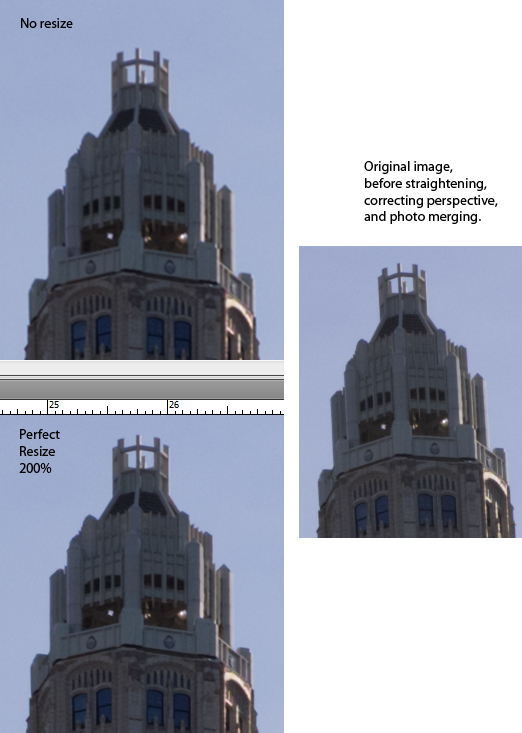
One issue I have not heard anything on is whether the CC version of PS gets some tools that are unique.  One in particular that I'm interested in is smart re-sizing.  I've used Genuine Fractals (now Perfect Resize) for some time.  I still believe it's the best.  CC is supposed to have Adobe's version of smart re-sizing.  I'm not sure if CS6 has it.  This could be important to me.  Whenever the geometry of a file is affected; sharpness is decreased.  Whether the image was increased in size in a smart fashion first affects the final sharpness.  (See comparison at http://www.paulroark.com/BW-Info/Perfect-Resize-comparison.jpg )

I do agree with jimbo that the digital tools have become a critical part of what we do, and I do want the best.  If CC is it, then the cost is rather reasonable, assuming there are no hidden traps.

Other issues that I'm curious about are whether the cloud version is more efficient in terms of space taken on the drive.  Is there a way to avoid every camera raw converter lens setting being downloaded?  That is, is it sensitive to what we actually use as opposed to dumping everything into our computers -- including our laptops?

With respect to laptops, how many platforms does the $10/month cover?  Is that a per computer price?

Thanks,

Paul
www.PaulRoark.com
2013-09-06 by Tina Manley
I assume my Tiff files will always be readable by other programs. If there is some evidence Adobe is trying to lock us in there, I must have missed that. I would think the market would reject that immediately.
Price is one issue for me, but when I think of how important Photoshop is for what I do, having the best tools in my toolbox is probably worth it. I still am running CS5, but when I look at my pattern, I usually upgrade with every iteration eventually.
One issue I have not heard anything on is whether the CC version of PS gets some tools that are unique. One in particular that I'm interested in is smart re-sizing. I've used Genuine Fractals (now Perfect Resize) for some time. I still believe it's the best. CC is supposed to have Adobe's version of smart re-sizing. I'm not sure if CS6 has it. This could be important to me. Whenever the geometry of a file is affected; sharpness is decreased. Whether the image was increased in size in a smart fashion first affects the final sharpness. (See comparison at http://www.paulroark.com/BW-Info/Perfect-Resize-comparison.jpg )
I do agree with jimbo that the digital tools have become a critical part of what we do, and I do want the best. If CC is it, then the cost is rather reasonable, assuming there are no hidden traps.
Other issues that I'm curious about are whether the cloud version is more efficient in terms of space taken on the drive. Is there a way to avoid every camera raw converter lens setting being downloaded? That is, is it sensitive to what we actually use as opposed to dumping everything into our computers -- including our laptops?
With respect to laptops, how many platforms does the $10/month cover? Is that a per computer price?
Thanks,
Paul
www.PaulRoark.com
2013-09-06 by David Whistance
I stand corrected. However Lightroom reads layered TIFF files perfectly well as do all of the other image processing programs I own/use. Whatever its origins TIFF has more universal acceptance than PSD or other more recent Adobe formats.


________________________________
From: Mike Finley <mike.finley@...> To: DigitalBlackandWhiteThePrint@yahoogroups.com Sent: Friday, 6 September 2013, 16:20 Subject: Re: [Digital BW] RE: Photoshop Create Cloud program for photographers Strictly speaking Tiff is a proprietary format managed by Adobe, originally designed by Aldus. It is not an international standard. Its also not in any realistic sense a single format - there are many different Tiff formats (T stands for tagged, and the tag defines what the file actually contains). I wouldn't bet on all Adobe layered TIFF files being readable by all image processing applications - what does Lightroom do with them? I wouldn't even bet on Photoshop being able to read use all data contained in all current Tiff file formats. Likewise DNG is an Adobe format, not an international standard, one reason not everyone adopts it. On 06/09/2013 15:57, David Whistance wrote:  >I save all of my files as layered Tiff's but if you aren't going to do anything else to the file then by all means flatten it to save space. As Tiff is an international standard not a proprietory format there is no lock-in issue with this approach. Theoretically DNG should be the same but it hasn't had universal buy in so far. > >David Whistance > > > >. > -- mike finley photography http://www.mikefinley.co.uk/
2013-09-06 by Philip Lindsay
How do the new features in CC affect backwards compatibility? I would hope that a flattened TIF from CC could be read by CS6 but could a layered file be read? I have been told that some of the new features in Lightroom 5 such as the improved healing brush may not be compatible with the smart object / object functions in CC. Lots of questions!!

________________________________
 From: Tina Manley <images@...>
To: DigitalBlackandWhiteThePrint@yahoogroups.com
Sent: Friday, September 6, 2013 8:56 AM
Subject: Re: [Digital BW] RE: Photoshop Create Cloud program for photographers


Paul, Â

There are quite a few new features available only in the CC version of PS: Â http://www.adobe.com/products/photoshop/features.html

Tina


On Fri, Sep 6, 2013 at 11:46 AM, Paul <roark.paul@gmail.com> wrote:


>Â
>I assume my Tiff files will always be readable by other programs.  If there is some evidence Adobe is trying to lock us in there, I must have missed that.  I would think the market would reject that immediately.
>
>Price is one issue for me, but when I think of how important Photoshop is for what I do, having the best tools in my toolbox is probably worth it.  I still am running CS5, but when I look at my pattern, I usually upgrade with every iteration eventually.
>
>One issue I have not heard anything on is whether the CC version of PS gets some tools that are unique.  One in particular that I'm interested in is smart re-sizing.  I've used Genuine Fractals (now Perfect Resize) for some time.  I still believe it's the best.  CC is supposed to have Adobe's version of smart re-sizing.  I'm not sure if CS6 has it.  This could be important to me.  Whenever the geometry of a file is affected; sharpness is decreased.  Whether the image was increased in size in a smart fashion first affects the final sharpness.  (See comparison at http://www.paulroark.com/BW-Info/Perfect-Resize-comparison.jpg )
>
>I do agree with jimbo that the digital tools have become a critical part of what we do, and I do want the best.  If CC is it, then the cost is rather reasonable, assuming there are no hidden traps.
>
>Other issues that I'm curious about are whether the cloud version is more efficient in terms of space taken on the drive.  Is there a way to avoid every camera raw converter lens setting being downloaded?  That is, is it sensitive to what we actually use as opposed to dumping everything into our computers -- including our laptops?
>
>With respect to laptops, how many platforms does the $10/month cover?  Is that a per computer price?
>
>Thanks,
>
>Paul
>www.PaulRoark.com
>
>


--

Tina Manley
http://tina-manley.artistwebsites.com/www.tinamanley.com
2013-09-06 by Edward Wiseman
Paul..


You can have up to 2 computers MAX..Doesn’t need to be the SAME OS..ie..You can have this on your desktop on windows, and on your MAC as well.. computers MAX..


What troubles me, is that all the ADOBE hoopla says the price will never go up if you sign up by 12/31….IF you read the fine print of their agreement, they may unilaterally increase the price after the first year as long as they notify you in advance., giving you a chance to cancel if you would like to  ...I read the terms 3 times, and that’s the essence of it..I don’t think any one of us would be happy at all if they went ahead and did just that..ADOBE is sort of speaking out of “both sides” of it’s mouth on this issue of the “$9.99”  being a “forever cost” for the consumer..I was ready to jump on this deal, until I read the “fine print”….I’m still thinking about it..


Eddie Wiseman
From: DigitalBlackandWhiteThePrint@yahoogroups.com [mailto:DigitalBlackandWhiteThePrint@yahoogroups.com] On Behalf Of Tina Manley
Sent: Friday, September 06, 2013 11:56 AM
To: DigitalBlackandWhiteThePrint@yahoogroups.com
Subject: Re: [Digital BW] RE: Photoshop Create Cloud program for photographers


Paul,


There are quite a few new features available only in the CC version of PS:  http://www.adobe.com/products/photoshop/features.html


Tina


On Fri, Sep 6, 2013 at 11:46 AM, Paul <roark.paul@... <mailto:roark.paul@...> > wrote:


I assume my Tiff files will always be readable by other programs. If there is some evidence Adobe is trying to lock us in there, I must have missed that. I would think the market would reject that immediately.

Price is one issue for me, but when I think of how important Photoshop is for what I do, having the best tools in my toolbox is probably worth it. I still am running CS5, but when I look at my pattern, I usually upgrade with every iteration eventually.

One issue I have not heard anything on is whether the CC version of PS gets some tools that are unique. One in particular that I'm interested in is smart re-sizing. I've used Genuine Fractals (now Perfect Resize) for some time. I still believe it's the best. CC is supposed to have Adobe's version of smart re-sizing. I'm not sure if CS6 has it. This could be important to me. Whenever the geometry of a file is affected; sharpness is decreased. Whether the image was increased in size in a smart fashion first affects the final sharpness. (See comparison at http://www.paulroark.com/BW-Info/Perfect-Resize-comparison.jpg )

I do agree with jimbo that the digital tools have become a critical part of what we do, and I do want the best. If CC is it, then the cost is rather reasonable, assuming there are no hidden traps.

Other issues that I'm curious about are whether the cloud version is more efficient in terms of space taken on the drive. Is there a way to avoid every camera raw converter lens setting being downloaded? That is, is it sensitive to what we actually use as opposed to dumping everything into our computers -- including our laptops?

With respect to laptops, how many platforms does the $10/month cover? Is that a per computer price?

Thanks,

Paul
www.PaulRoark.com <http://www.PaulRoark.com>


--

Tina Manley

http:// <http://tina-manley.artistwebsites.com/> www.tinamanley.com <http://www.tinamanley.com>
2013-09-06 by Philip Lindsay
Just based upon inflation alone, it seems unlikely the Adobe would have a permanent fixed $10 per month price for Photoshop CC. The question is how much the monthly fee might increase. Adobe has made no reference to inflation adjustments so it seems that after one year they have the right to increase the monthly fee without limit which means no cost protection for the photographer after the first year.

________________________________
 From: Edward Wiseman <pahts@...>
To: DigitalBlackandWhiteThePrint@yahoogroups.com
Sent: Friday, September 6, 2013 10:04 AM
Subject: RE: [Digital BW] RE: Photoshop Create Cloud program for photographers


Paul..

You can have up to 2 computers MAX..Doesn’t need to be the SAME OS..ie..You can have this on your desktop on windows, and on your MAC as well.. computers MAX..

What troubles me, is that all the ADOBE hoopla says the price will never go up if you sign up by 12/31….IF you read the fine print of their agreement, they may unilaterally increase the price after the first year as long as they notify you in advance., giving you a chance to cancel if you would like to  ...I read the terms 3 times, and that’s the essence of it..I don’t think any one of us would be happy at all if they went ahead and did just that..ADOBE is sort of speaking out of “both sides� of it’s mouth on this issue of the “$9.99�  being a “forever cost� for the consumer..I was ready to jump on this deal, until I read the “fine print�….I’m still thinking about it..

Eddie Wiseman
From:DigitalBlackandWhiteThePrint@yahoogroups.com [mailto:DigitalBlackandWhiteThePrint@yahoogroups.com] On Behalf Of Tina Manley
Sent: Friday, September 06, 2013 11:56 AM
To: DigitalBlackandWhiteThePrint@yahoogroups.com
Subject: Re: [Digital BW] RE: Photoshop Create Cloud program for photographers


Paul,

There are quite a few new features available only in the CC version of PS:  http://www.adobe.com/products/photoshop/features.html

Tina

On Fri, Sep 6, 2013 at 11:46 AM, Paul <roark.paul@...> wrote:

>I assume my Tiff files will always be readable by other programs. If there is some evidence Adobe is trying to lock us in there, I must have missed that. I would think the market would reject that immediately.
>
>Price is one issue for me, but when I think of how important Photoshop is for what I do, having the best tools in my toolbox is probably worth it. I still am running CS5, but when I look at my pattern, I usually upgrade with every iteration eventually.
>
>One issue I have not heard anything on is whether the CC version of PS gets some tools that are unique. One in particular that I'm interested in is smart re-sizing. I've used Genuine Fractals (now Perfect Resize) for some time. I still believe it's the best. CC is supposed to have Adobe's version of smart re-sizing. I'm not sure if CS6 has it. This could be important to me. Whenever the geometry of a file is affected; sharpness is decreased. Whether the image was increased in size in a smart fashion first affects the final sharpness. (See comparison at http://www.paulroark.com/BW-Info/Perfect-Resize-comparison.jpg )
>
>I do agree with jimbo that the digital tools have become a critical part of what we do, and I do want the best. If CC is it, then the cost is rather reasonable, assuming there are no hidden traps.
>
>Other issues that I'm curious about are whether the cloud version is more efficient in terms of space taken on the drive. Is there a way to avoid every camera raw converter lens setting being downloaded? That is, is it sensitive to what we actually use as opposed to dumping everything into our computers -- including our laptops?
>
>With respect to laptops, how many platforms does the $10/month cover? Is that a per computer price?
>
>Thanks,
>
>Paul
>www.PaulRoark.com


--
Tina Manley
http://tina-manley.artistwebsites.com/www.tinamanley.com
2013-09-06 by jimbo
----- Original Message -----From: PaulSent: Friday, September 06, 2013 9:46 AMSubject: Re: [Digital BW] RE: Photoshop Create Cloud program for photographersI assume my Tiff files will always be readable by other programs. If there is some evidence Adobe is trying to lock us in there, I must have missed that. I would think the market would reject that immediately.
Price is one issue for me, but when I think of how important Photoshop is for what I do, having the best tools in my toolbox is probably worth it. I still am running CS5, but when I look at my pattern, I usually upgrade with every iteration eventually.
One issue I have not heard anything on is whether the CC version of PS gets some tools that are unique. One in particular that I'm interested in is smart re-sizing. I've used Genuine Fractals (now Perfect Resize) for some time. I still believe it's the best. CC is supposed to have Adobe's version of smart re-sizing. I'm not sure if CS6 has it. This could be important to me. Whenever the geometry of a file is affected; sharpness is decreased. Whether the image was increased in size in a smart fashion first affects the final sharpness. (See comparison at http://www.paulroark.com/BW-Info/Perfect-Resize-comparison.jpg )
I do agree with jimbo that the digital tools have become a critical part of what we do, and I do want the best. If CC is it, then the cost is rather reasonable, assuming there are no hidden traps.
Other issues that I'm curious about are whether the cloud version is more efficient in terms of space taken on the drive. Is there a way to avoid every camera raw converter lens setting being downloaded? That is, is it sensitive to what we actually use as opposed to dumping everything into our computers -- including our laptops?
With respect to laptops, how many platforms does the $10/month cover? Is that a per computer price?
Thanks,
Paul
www.PaulRoark.comNo virus found in this message.
Checked by AVG - www.avg.com
Version: 2013.0.3392 / Virus Database: 3222/6641 - Release Date: 09/05/13
2013-09-06 by Edward Wiseman
Available to join CC on 9/17 online..


Eddie
From: DigitalBlackandWhiteThePrint@yahoogroups.com
[mailto:DigitalBlackandWhiteThePrint@yahoogroups.com] On Behalf Of Clicio
Barroso Filho
Sent: Friday, September 06, 2013 7:55 AM
To: DigitalBlackandWhiteThePrint@yahoogroups.com
Subject: Re: [Digital BW] Photoshop Create Cloud program for photographers


Hello, Tina (and all other members)


Is this special offer (PSCC+LR5) already valid?

I thought it was supposed to be running from the 10th os September onwards,
is that right?


Thanks,

Clicio


On Sep 5, 2013, at 9:15 PM, Tina Manley wrote:


I signed up when it was first offered.

Tina Manley

http:// <http://tina-manley.artistwebsites.com/> www.tinamanley.com
<http://www.tinamanley.com/>
2013-09-06 by jimbo
Eddie,
I mean this constructively.. even if they did do what you suggest ..stick it to us after 12 months.. I think it's in how we chose to view that in a way.. I do not plan to abandon everything I do now nor the tools I use.. I look at it like it's a test bed for the cloud for a lousy 120 bucks .. so it's my cost to check it out plus I get the latest and greatest tools to boot... at the end of 12 months I will be much better positioned to evaluate the value and function they offer.

So I'm going to be able to try this whole new thing out for much less then I traditionally spend to keep up in PS & LR.. I figure their bending for us ...most of the whiners I think are totally stuck in the process of it all and just don't trust them and are infact quite mad at them.. I'm not.. I've worked with them for years an they haven't really screwed me yet.. I geared myself to be self sufficient without the cloud.. now I'm moving over.. their bending so I'm going to also.. after one year I may decide on my own that I don't want to continue with CC.. or they may move it to 19.95 again. I'm just not going to worry about it and just give it a go. I honestly regardless of how it all shakes out at the end of a year it still an opportunity..

jimbo
  ----- Original Message -----
  From: Edward Wiseman
  To: DigitalBlackandWhiteThePrint@yahoogroups.com
  Sent: Friday, September 06, 2013 11:04 AM
  Subject: RE: [Digital BW] RE: Photoshop Create Cloud program for photographers


  Paul..


  You can have up to 2 computers MAX..Doesn’t need to be the SAME OS..ie..You can have this on your desktop on windows, and on your MAC as well.. computers MAX..


  What troubles me, is that all the ADOBE hoopla says the price will never go up if you sign up by 12/31….IF you read the fine print of their agreement, they may unilaterally increase the price after the first year as long as they notify you in advance., giving you a chance to cancel if you would like to  ...I read the terms 3 times, and that’s the essence of it..I don’t think any one of us would be happy at all if they went ahead and did just that..ADOBE is sort of speaking out of “both sides” of it’s mouth on this issue of the “$9.99”  being a “forever cost” for the consumer..I was ready to jump on this deal, until I read the “fine print”….I’m still thinking about it..


  Eddie Wiseman

  From: DigitalBlackandWhiteThePrint@yahoogroups.com [mailto:DigitalBlackandWhiteThePrint@yahoogroups.com] On Behalf Of Tina Manley
  Sent: Friday, September 06, 2013 11:56 AM
  To: DigitalBlackandWhiteThePrint@yahoogroups.com
  Subject: Re: [Digital BW] RE: Photoshop Create Cloud program for photographers


  Paul,


  There are quite a few new features available only in the CC version of PS:  http://www.adobe.com/products/photoshop/features.html


  Tina


  On Fri, Sep 6, 2013 at 11:46 AM, Paul <roark.paul@...> wrote:


    I assume my Tiff files will always be readable by other programs. If there is some evidence Adobe is trying to lock us in there, I must have missed that. I would think the market would reject that immediately.

    Price is one issue for me, but when I think of how important Photoshop is for what I do, having the best tools in my toolbox is probably worth it. I still am running CS5, but when I look at my pattern, I usually upgrade with every iteration eventually.

    One issue I have not heard anything on is whether the CC version of PS gets some tools that are unique. One in particular that I'm interested in is smart re-sizing. I've used Genuine Fractals (now Perfect Resize) for some time. I still believe it's the best. CC is supposed to have Adobe's version of smart re-sizing. I'm not sure if CS6 has it. This could be important to me. Whenever the geometry of a file is affected; sharpness is decreased. Whether the image was increased in size in a smart fashion first affects the final sharpness. (See comparison at http://www.paulroark.com/BW-Info/Perfect-Resize-comparison.jpg )

    I do agree with jimbo that the digital tools have become a critical part of what we do, and I do want the best. If CC is it, then the cost is rather reasonable, assuming there are no hidden traps.

    Other issues that I'm curious about are whether the cloud version is more efficient in terms of space taken on the drive. Is there a way to avoid every camera raw converter lens setting being downloaded? That is, is it sensitive to what we actually use as opposed to dumping everything into our computers -- including our laptops?

    With respect to laptops, how many platforms does the $10/month cover? Is that a per computer price?

    Thanks,

    Paul
    www.PaulRoark.com


  --

  Tina Manley

  http://www.tinamanley.com


  No virus found in this message.
  Checked by AVG - www.avg.com
Version: 2013.0.3392 / Virus Database: 3222/6641 - Release Date: 09/05/132013-09-06 by Edward Wiseman
Jimbo..


You may be right..it will be a “test’ of sorts..I still own my CS5 Photoshop, and can buy Lightroom anytime..Not bad at $120 for the year of testing out CC..At least I have something to go back to if I opt out after a year..


THX for your thoughts on this..


Eddie
From: DigitalBlackandWhiteThePrint@yahoogroups.com [mailto:DigitalBlackandWhiteThePrint@yahoogroups.com] On Behalf Of jimbo
Sent: Friday, September 06, 2013 1:50 PM
To: DigitalBlackandWhiteThePrint@yahoogroups.com
Subject: Re: [Digital BW] RE: Photoshop Create Cloud program for photographers


Eddie,

I mean this constructively.. even if they did do what you suggest ..stick it to us after 12 months.. I think it's in how we chose to view that in a way.. I do not plan to abandon everything I do now nor the tools I use.. I look at it like it's a test bed for the cloud for a lousy 120 bucks .. so it's my cost to check it out plus I get the latest and greatest tools to boot... at the end of 12 months I will be much better positioned to evaluate the value and function they offer.


So I'm going to be able to try this whole new thing out for much less then I traditionally spend to keep up in PS & LR.. I figure their bending for us ...most of the whiners I think are totally stuck in the process of it all and just don't trust them and are infact quite mad at them.. I'm not.. I've worked with them for years an they haven't really screwed me yet.. I geared myself to be self sufficient without the cloud.. now I'm moving over.. their bending so I'm going to also.. after one year I may decide on my own that I don't want to continue with CC.. or they may move it to 19.95 again. I'm just not going to worry about it and just give it a go. I honestly regardless of how it all shakes out at the end of a year it still an opportunity..


jimbo

----- Original Message -----

From: Edward Wiseman <mailto:pahts@comcast.net>

To: DigitalBlackandWhiteThePrint@yahoogroups.com <mailto:DigitalBlackandWhiteThePrint@yahoogroups.com>

Sent: Friday, September 06, 2013 11:04 AM

Subject: RE: [Digital BW] RE: Photoshop Create Cloud program for photographers


Paul..

You can have up to 2 computers MAX..Doesn’t need to be the SAME OS..ie..You can have this on your desktop on windows, and on your MAC as well.. computers MAX..

What troubles me, is that all the ADOBE hoopla says the price will never go up if you sign up by 12/31….IF you read the fine print of their agreement, they may unilaterally increase the price after the first year as long as they notify you in advance., giving you a chance to cancel if you would like to  ...I read the terms 3 times, and that’s the essence of it..I don’t think any one of us would be happy at all if they went ahead and did just that..ADOBE is sort of speaking out of “both sides” of it’s mouth on this issue of the “$9.99”  being a “forever cost” for the consumer..I was ready to jump on this deal, until I read the “fine print”….I’m still thinking about it..

Eddie Wiseman

From: DigitalBlackandWhiteThePrint@yahoogroups.com <mailto:DigitalBlackandWhiteThePrint@yahoogroups.com>  [mailto:DigitalBlackandWhiteThePrint@yahoogroups.com] On Behalf Of Tina Manley
Sent: Friday, September 06, 2013 11:56 AM
To: DigitalBlackandWhiteThePrint@yahoogroups.com <mailto:DigitalBlackandWhiteThePrint@yahoogroups.com>
Subject: Re: [Digital BW] RE: Photoshop Create Cloud program for photographers


Paul,

There are quite a few new features available only in the CC version of PS:  http://www.adobe.com/products/photoshop/features.html

Tina

On Fri, Sep 6, 2013 at 11:46 AM, Paul <roark.paul@... <mailto:roark.paul@gmail.com> > wrote:


I assume my Tiff files will always be readable by other programs. If there is some evidence Adobe is trying to lock us in there, I must have missed that. I would think the market would reject that immediately.

Price is one issue for me, but when I think of how important Photoshop is for what I do, having the best tools in my toolbox is probably worth it. I still am running CS5, but when I look at my pattern, I usually upgrade with every iteration eventually.

One issue I have not heard anything on is whether the CC version of PS gets some tools that are unique. One in particular that I'm interested in is smart re-sizing. I've used Genuine Fractals (now Perfect Resize) for some time. I still believe it's the best. CC is supposed to have Adobe's version of smart re-sizing. I'm not sure if CS6 has it. This could be important to me. Whenever the geometry of a file is affected; sharpness is decreased. Whether the image was increased in size in a smart fashion first affects the final sharpness. (See comparison at http://www.paulroark.com/BW-Info/Perfect-Resize-comparison.jpg )

I do agree with jimbo that the digital tools have become a critical part of what we do, and I do want the best. If CC is it, then the cost is rather reasonable, assuming there are no hidden traps.

Other issues that I'm curious about are whether the cloud version is more efficient in terms of space taken on the drive. Is there a way to avoid every camera raw converter lens setting being downloaded? That is, is it sensitive to what we actually use as opposed to dumping everything into our computers -- including our laptops?

With respect to laptops, how many platforms does the $10/month cover? Is that a per computer price?

Thanks,

Paul
www.PaulRoark.com <http://www.PaulRoark.com>


--

Tina Manley

http:// <http://tina-manley.artistwebsites.com/> www.tinamanley.com <http://www.tinamanley.com>

No virus found in this message.
Checked by AVG - www.avg.com <http://www.avg.com>
Version: 2013.0.3392 / Virus Database: 3222/6641 - Release Date: 09/05/13
2013-09-06 by C D Tobie
On Sep 6, 2013, at 1:49 PM, "jimbo" <mrjimbo@...> wrote:

> So I'm going to be able to try this whole new thing out for much less then I traditionally spend to keep up in PS & LR.. I figure their bending for us ...most of the whiners I think are totally stuck in the process of it all and just don't trust them and are infact quite mad at them.


That's an astute analysis, and a fair one. Adobe has found that many people are not just against the cost, they are against the concept. They don't want to rent, instead of buy. So, for these people, Adobe is offering an unquestionably good deal. But to get it, you have to drink the Kool-ade, and sign up for a subscription. I believe Adobe is banking on the fact that, a year from now, when you have been paying for a subscription and the sky hasn't fallen, things will look different. At that point it will be about the options, the features, the price points, not about the subscription system; you'll already be part of that.

C. David Tobie
Global Product Technology Manager

Datacolor
5 Princess Road
Lawrenceville, NJ 08648, USA
609.924.2189
www.datacolor.com

Phone: 207.685.9248
Mobile: 207.312.0448
Fax: 207.685.4455
Email:  cdtobie@...
Skype: cdtobie
2013-09-06 by Tina Manley
Hello, Tina (and all other members)Is this special offer (PSCC+LR5) already valid?I thought it was supposed to be running from the 10th os September onwards, is that right?
Thanks,ClicioOn Sep 5, 2013, at 9:15 PM, Tina Manley wrote:
2013-09-06 by Jim Zietz
My favorite "new" feature in Photoshop CC is that the crop tool is now
almost as good as it was in PS CS5. CS6's crop tool was torture to use on
a regular basis.
--
Jim Zietz


On 9/6/13 12:35 PM, "DigitalBlackandWhiteThePrint@yahoogroups.com"
<DigitalBlackandWhiteThePrint@yahoogroups.com> wrote:
>________________________________________________________________________
>1j. Re: Photoshop Create Cloud program for photographers
>    Posted by: "Tina Manley" images@... tinamanley
>    Date: Fri Sep 6, 2013 8:56 am ((PDT))
>
>Paul,
>
>There are quite a few new features available only in the CC version of PS:
>http://www.adobe.com/products/photoshop/features.html
>
>Tina
>
2013-09-06 by Charles Peacock
Hi, David,


"I REALLY don't get the "never again pay for an upgrade" idea."


   I'm talking about big ad agencies, etc. that have a couple dozen
licenses. In my experience it's a bunch easier to get the powers-that-be in
such companies to pay a continuing fee than it is to get them to pay a much
larger initial investment followed by sporadic upgrade investments. Back
when I was in IT I used to routinely slide purchases through in smaller,
monthly increments to get things I could never have got my CEO to sign off
on.


   Also consider that in many cases (including my company) a low level
manager can approve a $50 per month purchase but spending $600 requires
higher-level approval - never mind that by the end of the year 12x$50 is the
same as $600..


"To me that is perpetually paying for upgrades"


   Of course it is  - but the advantage to a department manager is that the
upgrades are hidden. He/she never has to justify why they need THIS upgrade,
it's all a part of the monthly license.


"I haven't. What tools are you using? "


  Just about all of the cross-compiler suites we use.


.         Green Hills went to a subscription only pricing model two or three
years ago.

.         Freescale Codewarrior is technically still available for purchase,
but once your IT department forces you to upgrade your desktop to a version
that wasn't supported when you purchased the package, Freescale  makes you
pay for support for all the years you have "missed" before they will talk to
you.

.         IAR is pretty much like Freescale, but their  support people are a
little more understanding.

.         So far Cosmic is a (blessed) hold out.

.         PRQA-QAC (this is an analysis suite, not a cross compiler) - PRQA
is actually pushing a "per use" model rather than a subscription which in
many ways is worse. They will still sell you a permanent license but like
Freescale and IAR won't help if you need to upgrade the system it's running
on.


Chuck Peacock
From: DigitalBlackandWhiteThePrint@yahoogroups.com
[mailto:DigitalBlackandWhiteThePrint@yahoogroups.com] On Behalf Of David
Kachel
Sent: Thursday, September 05, 2013 9:48 PM
To: DigitalBlackandWhiteThePrint@yahoogroups.com
Subject: Re: [Digital BW] Photoshop Create Cloud program for photographers


From: Charles Peacock <lists@...>


 they perceive their main customer base as commercial art studios that will
love the subscription model since they will never again need to pay for a
upgrade. Note that one of the things that is NOT included in the CS
subscription is Elements


Well, here's one art studio that definitely doesn't love it. I REALLY don't
get the "never again pay for an upgrade" idea. To me that is perpetually
paying for upgrades, whether you want them or not. And as for "terrible
model", the one sure way to get that terrible model is to pay for it, and
thereby make them think you like it.


If you're a professional software developer..


I am/was.


you will have found that over the last couple of years, most of your tools
have moved to a subscription model.


I haven't. What tools are you using?


David Kachel


___________________


Artist-Photographer

Fine B&W Photographs


www.davidkachel.com

david@...


Gallery:

www.reddoorfinephotographs.com

director@...


PO Box  1893

Alpine, TX 79831

(432) 386-5787
2013-09-06 by David Kachel
2013-09-06 by Charles Peacock
I'm not saying I like it - I don't. But I know of people who would.


Chuck
From: DigitalBlackandWhiteThePrint@yahoogroups.com
[mailto:DigitalBlackandWhiteThePrint@yahoogroups.com] On Behalf Of David
Kachel
Sent: Friday, September 06, 2013 5:34 PM
To: DigitalBlackandWhiteThePrint@yahoogroups.com
Subject: Re: [Digital BW] Photoshop Create Cloud program for photographers


From: Charles Peacock <lists@...>


   I'm talking about big ad agencies, etc. that have a couple dozen
licenses.


So, because "big ad agencies" like the idea, everybody else should be OK
with getting royally screwed?


And we haven't even touched on the 1984 aspect. I don't like to be spied on,
and I don't like to be controlled.


I do not like the idea of Adobe peeking into my hard drive to see if they
like what they find there and I will decide if and when I upgrade, thank you
very much.

The sheep who are going along with this are selling the rest of us out.


David Kachel


___________________


Artist-Photographer

Fine B&W Photographs


www.davidkachel.com

david@...


Gallery:

www.reddoorfinephotographs.com

director@...


PO Box  1893

Alpine, TX 79831

(432) 386-5787
2013-09-06 by <jacques.caron@...>
I'm with you Charles - I don't!
I’m not saying I like it – I don’t. But I know of people who would.
Chuck
From: DigitalBlackandWhiteThePrint@yahoogroups.com [mailto:DigitalBlackandWhiteThePrint@yahoogroups.com] On Behalf Of David Kachel
Sent: Friday, September 06, 2013 5:34 PM
To: DigitalBlackandWhiteThePrint@yahoogroups.com
Subject: Re: [Digital BW] Photoshop Create Cloud program for photographers
From: Charles Peacock <lists@...>
I’m talking about big ad agencies, etc. that have a couple dozen licenses.
So, because "big ad agencies" like the idea, everybody else should be OK with getting royally screwed?
And we haven't even touched on the 1984 aspect. I don't like to be spied on, and I don't like to be controlled.
I do not like the idea of Adobe peeking into my hard drive to see if they like what they find there and I will decide if and when I upgrade, thank you very much.
The sheep who are going along with this are selling the rest of us out.
David Kachel
___________________
Artist-Photographer
Fine B&W Photographs
Gallery:
PO Box 1893
Alpine, TX 79831
(432) 386-5787
2013-09-06 by Jim Goshorn
I do not like the idea of Adobe peeking into my hard drive to see if they like what they find there and I will decide if and when I upgrade, thank you very much.
The sheep who are going along with this are selling the rest of us out.
2013-09-06 by Charles Peacock
The thing I don’t understand is why people are so enraged at Adobe for doing this, but when Microsoft did the same thing with Office 365 I didn’t hear a whimper. And, I suspect there are 100 users of Microsoft Office for every user of Photoshop – if not more.


Chuck
From: DigitalBlackandWhiteThePrint@yahoogroups.com [mailto:DigitalBlackandWhiteThePrint@yahoogroups.com] On Behalf Of jacques.caron@videotron.qc.ca
Sent: Friday, September 06, 2013 5:49 PM
To: DigitalBlackandWhiteThePrint@yahoogroups.com
Subject: RE: RE: [Digital BW] Photoshop Create Cloud program for photographers


I'm with you Charles - I don't!


--- In DigitalBlackandWhiteThePrint@yahoogroups.com, <digitalblackandwhitetheprint@yahoogroups.com> wrote:

I’m not saying I like it – I don’t. But I know of people who would.


Chuck


From: DigitalBlackandWhiteThePrint@yahoogroups.com [mailto:DigitalBlackandWhiteThePrint@yahoogroups.com] On Behalf Of David Kachel
Sent: Friday, September 06, 2013 5:34 PM
To: DigitalBlackandWhiteThePrint@yahoogroups.com
Subject: Re: [Digital BW] Photoshop Create Cloud program for photographers


From: Charles Peacock <lists@...>


   I’m talking about big ad agencies, etc. that have a couple dozen licenses.


So, because "big ad agencies" like the idea, everybody else should be OK with getting royally screwed?


And we haven't even touched on the 1984 aspect. I don't like to be spied on, and I don't like to be controlled.


I do not like the idea of Adobe peeking into my hard drive to see if they like what they find there and I will decide if and when I upgrade, thank you very much.

The sheep who are going along with this are selling the rest of us out.


David Kachel


___________________


Artist-Photographer

Fine B&W Photographs


www.davidkachel.com

david@...


Gallery:

www.reddoorfinephotographs.com

director@...


PO Box  1893

Alpine, TX 79831

(432) 386-5787
2013-09-06 by john eckenrode
Office is still available as a perpetual license, IE you can buy it. So you have a choice, buy or subscribe.
Adobe took away the choice, subscribe only.
Thus the outrage.


________________________________
 From: Charles Peacock <lists@...>
To: DigitalBlackandWhiteThePrint@yahoogroups.com
Sent: Friday, September 6, 2013 3:21 PM
Subject: RE: RE: [Digital BW] Photoshop Create Cloud program for photographers


The thing I don’t understand is why people are so enraged at Adobe for doing this, but when Microsoft did the same thing with Office 365 I didn’t hear a whimper. And, I suspect there are 100 users of Microsoft Office for every user of Photoshop – if not more.

Chuck


From:DigitalBlackandWhiteThePrint@yahoogroups.com [mailto:DigitalBlackandWhiteThePrint@yahoogroups.com] On Behalf Of jacques.caron@...
Sent: Friday, September 06, 2013 5:49 PM
To: DigitalBlackandWhiteThePrint@yahoogroups.com
Subject: RE: RE: [Digital BW] Photoshop Create Cloud program for photographers


I'm with you Charles - I don't!


--- In DigitalBlackandWhiteThePrint@yahoogroups.com, <digitalblackandwhitetheprint@yahoogroups.com> wrote:
I’m not saying I like it – I don’t. But I know of people who would.

Chuck

From:DigitalBlackandWhiteThePrint@yahoogroups.com [mailto:DigitalBlackandWhiteThePrint@yahoogroups.com] On Behalf Of David Kachel
Sent: Friday, September 06, 2013 5:34 PM
To: DigitalBlackandWhiteThePrint@yahoogroups.com
Subject: Re: [Digital BW] Photoshop Create Cloud program for photographers


From: Charles Peacock <lists@...>

   I’m talking about big ad agencies, etc. that have a couple dozen licenses.

So, because "big ad agencies" like the idea, everybody else should be OK with getting royally screwed?

And we haven't even touched on the 1984 aspect. I don't like to be spied on, and I don't like to be controlled.

I do not like the idea of Adobe peeking into my hard drive to see if they like what they find there and I will decide if and when I upgrade, thank you very much.
The sheep who are going along with this are selling the rest of us out.

David Kachel

___________________

Artist-Photographer
Fine B&W Photographs

www.davidkachel.com
david@...

Gallery:
www.reddoorfinephotographs.com
director@...

PO Box  1893
Alpine, TX 79831
(432) 386-5787
2013-09-06 by David Kachel
2013-09-06 by dmneely@gmail.com
Tina:

I am interested, and tried to sign-up but it asked me for $79. I don't see a
way to specifically sign-up for the "Photographers" discounted price. Your
Link describes everything but there is no actual Link to click on to sign-up
that I can see??

David
-------Original Message-------

From: Tina Manley
Date: 9/6/2013 12:31:40 PM
To: DigitalBlackandWhiteThePrint@yahoogroups.com
Subject: Re: [Digital BW] Photoshop Create Cloud program for photographers


If you had already signed up, it kicked in automatically.  The website says
Beginning today" which was Sept. 4th:  http://blogs.adobe
com/creativelayer/introducing-the-photoshop-photography-program/


Tina


On Fri, Sep 6, 2013 at 7:55 AM, Clicio Barroso Filho <clicio@...>
wrote:


Hello, Tina (and all other members)


Is this special offer (PSCC+LR5) already valid?
I thought it was supposed to be running from the 10th os September onwards,
is that right?


Thanks,
Clicio


On Sep 5, 2013, at 9:15 PM, Tina Manley wrote:


I signed up when it was first offered.
Tina Manley
http://www.tinamanley.com


--

Tina Manley
http://www.tinamanley.com


[Non-text portions of this message have been removed]
2013-09-07 by <donsbryant@...>
2013-09-07 by Tina Manley
On Sep 6, 2013, at 5:33 PM, David Kachel wrote:I do not like the idea of Adobe peeking into my hard drive to see if they like what they find there and I will decide if and when I upgrade, thank you very much.Huh?? The Creative Cloud Desktop app notifies you that an update is available for each app you have installed. Don't want it? Don't click the update button for that app. Want them all updated, click the Update All button. How is that 1984??The sheep who are going along with this are selling the rest of us out.I am NOT a sheep and I am NOT selling you out. The cloud is not going away according to every post I have seen from Adobe on the subject. It is here to stay (unfortunately) and you can get on board, stay with the version you have or look for an alternative. Each of us must make that choice for ourselves and we should be respectful about each others' choices.Jim
2013-09-07 by David Kachel
Each of us must make that choice for ourselves and we should be respectful
about each others' choices.

My choice does not eliminate your choice. Your choice DOES eliminate my
choice.


David Kachel

___________________

Artist-Photographer
Fine B&W Photographs

www.davidkachel.com
david@...

Gallery:
www.reddoorfinephotographs.com
director@...

PO Box  1893
Alpine, TX 79831
(432) 386-5787
2013-09-07 by David Kachel
Huh?? The Creative Cloud Desktop app notifies you that an update is
available for each app you have installed. Don't want it? Don't click the
update button for that app. Want them all updated, click the Update All
button. How is that 1984??

You can't possibly be THAT gullible!


David Kachel

___________________

Artist-Photographer
Fine B&W Photographs

www.davidkachel.com
david@...

Gallery:
www.reddoorfinephotographs.com
director@...

PO Box  1893
Alpine, TX 79831
(432) 386-5787
2013-09-07 by Fernando Lopez_Arbarello
Aloha all from Hawaii, I've been participating as an avid reader of this group for several months now, this being my first post.

This topic is still controversial because very different groups of users are treated under the same rule and that creates the incompatibility.

Unfortunately Adobe owns the products, we only purchase the right to use a particular version and that's it. They do have the right to change the rules as suddenly and as often as they want to, no matter how much we cry and complain.

Several years ago I switched over from windows to MAC and I loved it … except that I didn't have Outlook anymore and I couldn't afford to purchase the mac version. I was pissed off and frustrated with both microsoft and mac and I felt stuck and forced to switch to Apple Mail which I found unfriendly, buggy, limited … and didn't like it at all. With the time I realized that the real reason for my anger was the fact that I had become a slave of outlook, got used to do things the "outlook" way … and was so stuck into this ways that found very hard to conceive different ways to manage my emails. A few years later, I love apple mail so much I wouldn't go back to outlook even if I got it for free. Actually I can't understand how could I have used it for so long.

I think many photographers might be experiencing the same situation with photoshop. We are so used to it that we can't conceive any other alternative, and we resist to accept the possibility of a change.

I have forced myself away from adobe products to break this dependency and have found great surprises, I still use Lightroom for cataloguing purposes but I don't use the edit module or I try to avoid it.

Phase One Capture One is not a replacement for photoshop, but it does not only replace camera raw or lightroom, I find it way superior. The color rendition, tonal range is much reacher and pleasant before applying any adjustment. It also has very unique tools not available in adobe's counterparts. This is my software of choice right now.

I'd like to mention two other great developments from the open source community,

LightZone is back and a very active community is bringing it up to speed. LZ also has unique tools, and all tools can be applied as adjustment layers with full blending modes as many times as you want … and this is photoshop territory. LZ is free and available for windows, mac and linux

http://www.lightzoneproject.org/

But my biggest discovery on the quest for photoshop alternatives was DarkTable (mac or linux)

http://www.darktable.org/

DarkTable is also free and provides access to pretty much any possible adjustment you can imagine. Some of its unique tools are revolutionary and very promising, like the equalizer. I can't say I find it user friendly yet because it is so different, but I still need to learn how to use it and become more familiar with it. It is the only software that gave me similar results to Capture One. It has a huge and very active community of users and developers providing advise and guidance.

I know changing software is not for everyone, but I've been much happier complaining less about adobe's doing and shifting my attention and focusing my time onto new horizons. I hope that helped.

I have no affiliation with any of the software I mentioned.

Aloha to all

Fernando ./
On Sep 6, 2013, at 2:59 PM, donsbryant@... wrote:

> Phase Ones Capture 1 Pro is a great alternative to PS CC. Also consider PS Elements used in conjunction with LR to get off the cloud.
>
>
> The PS CC suite does include InDesign which maybe worth the subscription fee if you don't already own (license) the product.
>
>
>
2013-09-07 by Philip Lindsay
Having to keep track of new CC features which are not compatible with CS6 would certainly discourage folks from jumping off the cloud


________________________________
 From: Jim Goshorn <jgoshorn@...>
To: "DigitalBlackandWhiteThePrint@yahoogroups.com" <DigitalBlackandWhiteThePrint@yahoogroups.com>
Sent: Friday, September 6, 2013 8:38 AM
Subject: Re: [Digital BW] RE: Photoshop Create Cloud program for photographers


On Sep 6, 2013, at 10:32 AM, Philip Lindsay <fotophil@...> wrote:

> Does anyone know about the backward compatability of Photoshop CC Files in previous versions of Photoshop like CS6?

If you are going to go back to a previous version, you have to make sure that you have accounted for newer features in your file such as CC now allows you to use Camera Raw as a smart filter so you would have to rasterize the layer. Same would apply if you went to a version that didn't support smart objects which would need rasterizing. The biggest loss would be that you would lose the ability to edit those layers.

Jim
2013-09-07 by Jim Goshorn
On Sep 6, 2013, at 9:58 PM, David Kachel <david@...> wrote:
> You can't possibly be THAT gullible

Obviously, you are THAT paranoid about Adobe.
2013-09-07 by Jim Goshorn
On Sep 6, 2013, at 9:56 PM, David Kachel <david@...> wrote:

> Each of us must make that choice for ourselves and we should be respectful about each others' choices.
>
> My choice does not eliminate your choice. Your choice DOES eliminate my choice.

Adobe has gotten tens of thousands of complaints and hasn't eliminated the program. I held out till last Saturday in hopes they would change their minds. I made my objections known to someone at Adobe by emails and by phone conversation. They are determined to move in this new direction and my choice didn't change that or eliminate yours. They did make a counter offer with the photographers package but the cloud stayed intact.

This is not an us vs. them issue (which seems to be the way our society is getting trained to think lately). It's a business decision they made and we either can accept it or move on. Getting pissed at those who accepted it accomplishes nothing (other than satisfying the urge to vent).
2013-09-07 by Paul Grant
Very well said.

Sent from my iPhone 📷
On Sep 6, 2013, at 9:34 PM, Jim Goshorn <jgoshorn@...> wrote:

> On Sep 6, 2013, at 9:56 PM, David Kachel <david@...> wrote:
>
>>
>> Each of us must make that choice for ourselves and we should be respectful about each others' choices.
>>
>> My choice does not eliminate your choice. Your choice DOES eliminate my choice.
>
> Adobe has gotten tens of thousands of complaints and hasn't eliminated the program. I held out till last Saturday in hopes they would change their minds. I made my objections known to someone at Adobe by emails and by phone conversation. They are determined to move in this new direction and my choice didn't change that or eliminate yours. They did make a counter offer with the photographers package but the cloud stayed intact.
>
> This is not an us vs. them issue (which seems to be the way our society is getting trained to think lately). It's a business decision they made and we either can accept it or move on. Getting pissed at those who accepted it accomplishes nothing (other than satisfying the urge to vent).
>
2013-09-07 by Bob Frost
On Sep 6, 2013, at 5:33 PM, David Kachel wrote:
>
> I do not like the idea of Adobe peeking into my hard drive to see if they
> like what they find there and I will decide if and when I upgrade, thank
> you very much.


Obviously paranoid! What do you do about all the other programs that check
for updates frequently? Off the top of my head on my computer, Microsoft
does it to update Win8 and all my Office programs, Adobe does it to update
Reader, Lightroom, and now Photoshop CC, Nikon does it to update Nikon
Capture, NikonView, and Camera Control Pro, Eizo does it to update its
Navigator software, Google does it to update Google Maps,  CCleaner does it
to update itself, Directory Opus does it to update itself, PhotoMechanic
does it to update itself, and so on.

We can choose not to accept the updates they find, but why would I do that?
Updates are for my benefit if they cure bugs or give me new features.

Bob Frost
2013-09-07 by Ernst Dinkla
What kind of restrictions exist on the cloud storage? Is it only
accessible through the Adobe programs? Is it possible to store camera
RAW files and flattened Tiffs there or only the Adobe proprietary
formats? Does Adobe take any responsibility for piracy, theft of data?
Is that cloud storage acting as a web portal too or could it develop
that way? One would expect that Adobe would like to enter where Flickr,
Facebook and more pro web undertakings have taken position already.

I have no experience at all with cloud software for reasons sketched by
others in this thread but good information may take away part of teh
suspicions I have.


--
Met vriendelijke groet, Ernst Dinkla

http://www.pigment-print.com/spectralplots/spectrumviz_1.htm
December 2012: 500+ inkjet media paper white spectral plots.
2013-09-07 by Michael King
What kind of restrictions exist on the cloud storage? Is it only
accessible through the Adobe programs? Is it possible to store camera
RAW files and flattened Tiffs there or only the Adobe proprietary
formats? Does Adobe take any responsibility for piracy, theft of data?
Is that cloud storage acting as a web portal too or could it develop
that way? One would expect that Adobe would like to enter where Flickr,
Facebook and more pro web undertakings have taken position already.
I have no experience at all with cloud software for reasons sketched by
others in this thread but good information may take away part of teh
suspicions I have.
--
Met vriendelijke groet, Ernst Dinkla
http://www.pigment-print.com/spectralplots/spectrumviz_1.htm
December 2012: 500+ inkjet media paper white spectral plots.
2013-09-07 by Mike Finley
\ufffdErnest,
I can't answer your questions, but I can say that the cloud storage is clearly a trojan horse to future revenue streams and models.Once we have all our images stored on the cloud, then processing can easily take place in the cloud and we can be charged based on usage and storage rather than a flat fee.
Mike
--
mike finley photography
http://www.mikefinley.co.uk
2013-09-07 by billdlewis
Elements along with either Elements+ or ElementsXXL wake up many PS hidden tools and along with Lightroom is a capable choice. However if I owned the full PS the $10 option is a fantastic option. If they open this for anyone then I would most likely bite.

For those old enough to remember the subscription model is the way all early pre PC software was available, and for major Cad and Scientific software it is still the method used. In reality this gives Adobe a steady cash flow model rather than a burst of cash then a trickle. This should result in a stable group of programmers that will be focused on one product all year and there should be more regular stable builds adding new features rather than the once a year model.

Bill Lewis
2013-09-07 by Jim Goshorn
Graphical processing requires powerful CPUs and GPUs to work in reasonable times on todays hardware which consumes a lot of memory and electrical power and generate large amounts of heat. They would also need very fast connections to allow real-time graphical manipulation.
2013-09-07 by Jim Goshorn
On Sep 6, 2013, at 11:20 PM, Philip Lindsay wrote:

> Having to keep track of new CC features which are not compatible with CS6 would certainly discourage folks from jumping off the cloud

Here is a link to an article on What's New from PhotoFocus:

http://photofocus.com/2013/06/19/whats-new-in-adobe-photoshop-cc/

Some of the features like editable shapes will have the shape intact but your ability to edit them the same way as in CC would be lost. Conditional actions break (just tested it) with an alert that says that If doesn't exist.

Jim
2013-09-07 by jimbo
----- Original Message -----From: Michael KingSent: Saturday, September 07, 2013 3:49 AMSubject: Re: [Digital BW] RE: Photoshop Create Cloud program for photographers
Ernest,I can't answer your questions, but I can say that the cloud storage is clearly a trojan horse to future revenue streams and models.Once we have all our images stored on the cloud, then processing can easily take place in the cloud and we can be charged based on usage and storage rather than a flat fee.
Mike
On 7 September 2013 10:36, Ernst Dinkla <e.dinkla@...> wrote:
What kind of restrictions exist on the cloud storage? Is it only
accessible through the Adobe programs? Is it possible to store camera
RAW files and flattened Tiffs there or only the Adobe proprietary
formats? Does Adobe take any responsibility for piracy, theft of data?
Is that cloud storage acting as a web portal too or could it develop
that way? One would expect that Adobe would like to enter where Flickr,
Facebook and more pro web undertakings have taken position already.
I have no experience at all with cloud software for reasons sketched by
others in this thread but good information may take away part of teh
suspicions I have.
--
Met vriendelijke groet, Ernst Dinkla
http://www.pigment-print.com/spectralplots/spectrumviz_1.htm
December 2012: 500+ inkjet media paper white spectral plots.No virus found in this message.
Checked by AVG - www.avg.com
Version: 2013.0.3392 / Virus Database: 3222/6644 - Release Date: 09/06/13
2013-09-07 by Walker Blackwell
For those who have money up front subscription is not a good deal. For myself when I started Latitude (a community digital lab) without any money to speak of, 30/seat was totally great. Lots if people run zero debt lifestyles now.

And for those pros who are studio shooting and need access to updated raw handling each year without paying a boxed upgrade fee, it's also a deal.

Walker
--
latitudechicago.org
lightwork.org
2013-09-07 by Philip Lindsay
Since the CC upgrade features will be implemented as they are released, it may be difficult to keep the CC vs. CS6 Score. It seems that the longer a person uses CC, the deeper the hole becomes and until there is no turning back to CS6.


________________________________
 From: Jim Goshorn <jgoshorn@...>
To: DigitalBlackandWhiteThePrint@yahoogroups.com
Sent: Saturday, September 7, 2013 6:27 AM
Subject: Re: [Digital BW] Photoshop Create Cloud program for photographers


On Sep 6, 2013, at 11:20 PM, Philip Lindsay wrote:

> Having to keep track of new CC features which are not compatible with CS6 would certainly discourage folks from jumping off the cloud

Here is a link to an article on What's New from PhotoFocus:

http://photofocus.com/2013/06/19/whats-new-in-adobe-photoshop-cc/

Some of the features like editable shapes will have the shape intact but your ability to edit them the same way as in CC would be lost. Conditional actions break (just tested it) with an alert that says that If doesn't exist.

Jim
2013-09-07 by David Kachel
The problem is NOT, "is it a deal for someone?" There would have to be
people who think CC is a wonderful deal.
I'm all for them and I have no problem with Adobe marketing this way, as
long as they don't force everyone to buy this way.
But this attitude of "It's a good deal for me, so to hell with all you other
people who don't want to rent their software", is galling.
When the day arrives that you people think Adobe is screwing you in some
way, and that day WILL arrive, don't expect any sympathy or support from
those of us who got screwed this time and got no support from you. When they
raise that subscription to $150 a month, and there is a 100% certainty that
will, I will be the first to throw it in your faces.
You should be telling Adobe you like CC but refuse to buy it, because you
are supporting all the unhappy Adobe customers who don't like it, and that
you will buy only when Adobe reinstates the packaged software paradigm
alongside CC.
From:  Walker Blackwell <forums@...>

And for those pros who are studio shooting and need access to updated raw
handling each year without paying a boxed upgrade fee, it's also a deal.


David Kachel

___________________

Artist-Photographer
Fine B&W Photographs

www.davidkachel.com
david@...

Gallery:
www.reddoorfinephotographs.com
director@...

PO Box  1893
Alpine, TX 79831
(432) 386-5787
2013-09-07 by Walker Blackwell
I'm not one for flame wars and don't have anything against those who want the package deal.

I do think Adobe is a monopoly and they are acting like one now and that isn't good.

In the long run I would like to see a pay as you go thing where it would be a little bit more expensive per month to license the software and after one year you own it and can end your subscription but keep that version of the software.

I read a long time ago that 70 percent of adobe software was used cracked. I think they are trying to tap those people who use the software but can't afford upfront costs.

Another thing that is happening (programmatically) is that adobe is increasing their upgrade speed following the lead of Chrome and Firefox and even (to a certain extent) OS X. That is a good thing for us because it means less bugs and less upgrade fatigue and less headaches teaching the tools. But it's pretty hard for a business to maintain the old massive upgrade boxed model while doing fast mini upgrades.

Best,
Walker
On Sep 7, 2013, at 11:30 AM, David Kachel <david@...> wrote:

> The problem is NOT, "is it a deal for someone?" There would have to be people who think CC is a wonderful deal.
> I'm all for them and I have no problem with Adobe marketing this way, as long as they don't force everyone to buy this way.
> But this attitude of "It's a good deal for me, so to hell with all you other people who don't want to rent their software", is galling.
> When the day arrives that you people think Adobe is screwing you in some way, and that day WILL arrive, don't expect any sympathy or support from those of us who got screwed this time and got no support from you. When they raise that subscription to $150 a month, and there is a 100% certainty that will, I will be the first to throw it in your faces.
> You should be telling Adobe you like CC but refuse to buy it, because you are supporting all the unhappy Adobe customers who don't like it, and that you will buy only when Adobe reinstates the packaged software paradigm alongside CC.
>
> From: Walker Blackwell <forums@walkerblackwell.com>
>
> And for those pros who are studio shooting and need access to updated raw handling each year without paying a boxed upgrade fee, it's also a deal.
>
>
> David Kachel
>
> ___________________
>
> Artist-Photographer
> Fine B&W Photographs
>
> www.davidkachel.com
> david@davidkachel.com
>
> Gallery:
> www.reddoorfinephotographs.com
> director@reddoorfinephotographs.com
>
> PO Box  1893
> Alpine, TX 79831
> (432) 386-5787
>
2013-09-07 by jimbo
Walker, this whole change is difficult for everyone. You hit the nail on the head regarding using cracked software..but it's actually easier then that their is a technology that is used today to reproduce it and one license can turn into several hundred easily.. the issue is that when this is done Adobe is still providing updates and fixes for the bogus software along with excess use of reduced price upgrades. Additionally the sad part is that this new method allows them no legal recourse in most cases. Their only viable solution was to go to a subscription model with monthly license renewal.

I'm honestly sad that well David and others are so upset about this but hopefully their will be a silver lining down the road.. It would be great if they could feasibly offer the software both ways but to solve the problem of piracy it would only make the hole deeper an bigger..  I will say that those of us that are running legally with licensed copies will at some point get something back in the form of less competition for our skills. As over time the pirates will fall by the wayside or just run older versions will lesser capability. Also solving the internal cost issues caused by these newer piracy techniques , which are big business by the way, in theory they should be able to at some point stabilize their costs and provide better pricing to us..

David... I got how upset you are about all this and I respect it.. I mean that..So it's not about that I don't want to support your position... it's more that, in conscience I can't as I am intimately familiar with this software abuse technology and in the long run if they can't resolve that their screwed.. I don't want them to leave us as a software source.. It's just to special..

Constructively Adobe now has a sense of how much illegal software is actually out there .. we must remember that they are paying to support and upgrade it.. Those costs are passed back to us..

The pain of all this will at some point pass. We must realize that what were seeing is a monthly subscription business plan... What we must really try to see also is a monthly licensing plan to eliminate illegal use of their software.

jimbo
  ----- Original Message -----
  From: Walker Blackwell
  To: DigitalBlackandWhiteThePrint@yahoogroups.com
  Cc: <DigitalBlackandWhiteThePrint@yahoogroups.com>
  Sent: Saturday, September 07, 2013 9:44 AM
  Subject: Re: [Digital BW] RE: Photoshop Create Cloud program for photographers


  I'm not one for flame wars and don't have anything against those who want the package deal.


  I do think Adobe is a monopoly and they are acting like one now and that isn't good.


  In the long run I would like to see a pay as you go thing where it would be a little bit more expensive per month to license the software and after one year you own it and can end your subscription but keep that version of the software.


  I read a long time ago that 70 percent of adobe software was used cracked. I think they are trying to tap those people who use the software but can't afford upfront costs.


  Another thing that is happening (programmatically) is that adobe is increasing their upgrade speed following the lead of Chrome and Firefox and even (to a certain extent) OS X. That is a good thing for us because it means less bugs and less upgrade fatigue and less headaches teaching the tools. But it's pretty hard for a business to maintain the old massive upgrade boxed model while doing fast mini upgrades.


  Best,
  Walker


  On Sep 7, 2013, at 11:30 AM, David Kachel <david@...> wrote:


    The problem is NOT, "is it a deal for someone?" There would have to be people who think CC is a wonderful deal.
    I'm all for them and I have no problem with Adobe marketing this way, as long as they don't force everyone to buy this way.
    But this attitude of "It's a good deal for me, so to hell with all you other people who don't want to rent their software", is galling.
    When the day arrives that you people think Adobe is screwing you in some way, and that day WILL arrive, don't expect any sympathy or support from those of us who got screwed this time and got no support from you. When they raise that subscription to $150 a month, and there is a 100% certainty that will, I will be the first to throw it in your faces.
    You should be telling Adobe you like CC but refuse to buy it, because you are supporting all the unhappy Adobe customers who don't like it, and that you will buy only when Adobe reinstates the packaged software paradigm alongside CC.


    From: Walker Blackwell <forums@...>


    And for those pros who are studio shooting and need access to updated raw handling each year without paying a boxed upgrade fee, it's also a deal.


    David Kachel


    ___________________


    Artist-Photographer
    Fine B&W Photographs


    www.davidkachel.com
    david@...m


    Gallery:
    www.reddoorfinephotographs.com
    director@reddoorfinephotographs.com


    PO Box  1893
    Alpine, TX 79831
    (432) 386-5787


  No virus found in this message.
  Checked by AVG - www.avg.com
Version: 2013.0.3392 / Virus Database: 3222/6645 - Release Date: 09/07/132013-09-07 by David Kachel
From:  jimbo <mrjimbo@...>

David... I got how upset you are about all this and I respect it.. I mean
that..So it's not about that I don't want to support your position... it's
more that, in conscience I can't as I am intimately familiar with this
software abuse technology and in the long run if they can't resolve that
their screwed.. I don't want them to leave us as a software source.. It's
just to special..

Constructively Adobe now has a sense of how much illegal software is
actually out there .. we must remember that they are paying to support and
upgrade it.. Those costs are passed back to us..


Jimbo,
The piracy excuse is nonsense.
First, I read that CC was cracked within HOURS of release. HOURS!! Not days
or weeks!
So it is just plain silly for Adobe to think they are going to stop piracy
by screwing everyone who PAYS for their software.
That's like the police kicking down your door and arresting you in the
middle of the night because someone else held up a liquor store.
I haven't seen Adobe explain CC anywhere with the "piracy prevention"
excuse, but if they did, it would never hold water.

Second, software is generally not pirated by people who could pay for it but
won't. Largely, it is pirated by people who need it but can't afford it, and
bored teenagers, millions of bored teenagers who download it, install it,
play with it for a few hours and then never touch it again, until the next
pirated version comes out.
Then, there is the cultural thing. In the US (and I presume England, Canada,
Australia, etc.) we view piracy as a crime and the people who do it,
generally hide their faces. They know they've done something wrong.
In Latin America, China, the Middle East, etc., they don't see anything
wrong with it, AND Adobe grossly overprices it for those cultures anyway.
People who can't afford something and genuinely believe it should be either
cheap or free, will not pay regardless of the marketing method or payment
schedule.

I remember when I lived in Peru, you could go downtown and find pirated
software of EVERY kind on the street. Right out in the open. Of course you
might have to wait a couple of minutes until the policeman or Mayor or
Senator in line ahead of you finished HIS purchase, but it was and still is,
just that easy. Adobe could stand on their heads and whistle Dixie for the
next twenty years and they are NEVER going to change those cultures. Bottom
line, even an honest person who wants to buy the software legitimately in
these countries cannot do so because the price is so steep. Imagine that
Photoshop cost you $6,000 here instead of $600! That is the kind of income
difference you can expect.

If Adobe's plan is to force people who cannot afford their software to buy
it anyway, good luck to them. It is a monumentally stupid plan.


David Kachel

___________________

Artist-Photographer
Fine B&W Photographs

www.davidkachel.com
david@...

Gallery:
www.reddoorfinephotographs.com
director@...

PO Box  1893
Alpine, TX 79831
(432) 386-5787
2013-09-07 by jimbo
From: David KachelSent: Saturday, September 07, 2013 11:02 AMSubject: Re: [Digital BW] RE: Photoshop Create Cloud program for photographers
From: jimbo <mrjimbo@wispwest.net>David... I got how upset you are about all this and I respect it.. I mean that..So it's not about that I don't want to support your position... it's more that, in conscience I can't as I am intimately familiar with this software abuse technology and in the long run if they can't resolve that their screwed.. I don't want them to leave us as a software source.. It's just to special..Constructively Adobe now has a sense of how much illegal software is actually out there .. we must remember that they are paying to support and upgrade it.. Those costs are passed back to us..Jimbo,The piracy excuse is nonsense.First, I read that CC was cracked within HOURS of release. HOURS!! Not days or weeks!So it is just plain silly for Adobe to think they are going to stop piracy by screwing everyone who PAYS for their software.That's like the police kicking down your door and arresting you in the middle of the night because someone else held up a liquor store.I haven't seen Adobe explain CC anywhere with the "piracy prevention" excuse, but if they did, it would never hold water.Second, software is generally not pirated by people who could pay for it but won't. Largely, it is pirated by people who need it but can't afford it, and bored teenagers, millions of bored teenagers who download it, install it, play with it for a few hours and then never touch it again, until the next pirated version comes out.Then, there is the cultural thing. In the US (and I presume England, Canada, Australia, etc.) we view piracy as a crime and the people who do it, generally hide their faces. They know they've done something wrong.In Latin America, China, the Middle East, etc., they don't see anything wrong with it, AND Adobe grossly overprices it for those cultures anyway. People who can't afford something and genuinely believe it should be either cheap or free, will not pay regardless of the marketing method or payment schedule.I remember when I lived in Peru, you could go downtown and find pirated software of EVERY kind on the street. Right out in the open. Of course you might have to wait a couple of minutes until the policeman or Mayor or Senator in line ahead of you finished HIS purchase, but it was and still is, just that easy. Adobe could stand on their heads and whistle Dixie for the next twenty years and they are NEVER going to change those cultures. Bottom line, even an honest person who wants to buy the software legitimately in these countries cannot do so because the price is so steep. Imagine that Photoshop cost you $6,000 here instead of $600! That is the kind of income difference you can expect.If Adobe's plan is to force people who cannot afford their software to buy it anyway, good luck to them. It is a monumentally stupid plan.David Kachel___________________Artist-PhotographerFine B&W Photographswww.davidkachel.comdavid@...Gallery:www.reddoorfinephotographs.comdirector@...PO Box 1893Alpine, TX 79831(432) 386-5787No virus found in this message.
Checked by AVG - www.avg.com
Version: 2013.0.3392 / Virus Database: 3222/6645 - Release Date: 09/07/13
2013-09-07 by Charles Peacock
The problem remains that if every member of this list plus every other
photographer I know were to tell Adobe that they liked CC but weren't going
to spring for the subscription pricing, Adobe's answer would be "So what?"
They might (or might not) be a bit more polite about it, but they mostly
could care less about photographers and small-budget professionals. They are
marketing to big users and unless you can get those users to refuse to
accept subscription pricing, you are pounding sand.


Chuck Peacock
From: DigitalBlackandWhiteThePrint@yahoogroups.com
[mailto:DigitalBlackandWhiteThePrint@yahoogroups.com] On Behalf Of David
Kachel
Sent: Saturday, September 07, 2013 11:31 AM
To: DigitalBlackandWhiteThePrint@yahoogroups.com
Subject: Re: [Digital BW] RE: Photoshop Create Cloud program for
photographers


The problem is NOT, "is it a deal for someone?" There would have to be
people who think CC is a wonderful deal.

I'm all for them and I have no problem with Adobe marketing this way, as
long as they don't force everyone to buy this way.

But this attitude of "It's a good deal for me, so to hell with all you other
people who don't want to rent their software", is galling.

When the day arrives that you people think Adobe is screwing you in some
way, and that day WILL arrive, don't expect any sympathy or support from
those of us who got screwed this time and got no support from you. When they
raise that subscription to $150 a month, and there is a 100% certainty that
will, I will be the first to throw it in your faces.

You should be telling Adobe you like CC but refuse to buy it, because you
are supporting all the unhappy Adobe customers who don't like it, and that
you will buy only when Adobe reinstates the packaged software paradigm
alongside CC.


From: Walker Blackwell <forums@...>


And for those pros who are studio shooting and need access to updated raw
handling each year without paying a boxed upgrade fee, it's also a deal.


David Kachel


___________________


Artist-Photographer

Fine B&W Photographs


www.davidkachel.com

david@...


Gallery:

www.reddoorfinephotographs.com

director@...


PO Box  1893

Alpine, TX 79831

(432) 386-5787
2013-09-07 by David Kachel
From:  jimbo <mrjimbo@...>

"So your using a cracked serial is really not the issue you think it is.."

Whoa! Where do you get off saying you think I am using a cracked serial (not
quite sure what that is, but I get the implication)?
I never said or implied anything remotely like that.
If I was using pirated software, why the he!! would I care how Adobe sells
it?!

And I don't buy the premise that "many large businesses" are using pirated
software. I consider that highly unlikely, in the US, anyway.


David Kachel

___________________

Artist-Photographer
Fine B&W Photographs

www.davidkachel.com
david@...

Gallery:
www.reddoorfinephotographs.com
director@...

PO Box  1893
Alpine, TX 79831
(432) 386-5787
2013-09-07 by David Kachel
2013-09-07 by Jim Goshorn
On Sep 7, 2013, at 11:30 AM, David Kachel wrote:

> But this attitude of "It's a good deal for me, so to hell with all you other people who don't want to rent their software", is galling.

So by the same token if you vote for a politician I can't stand that I don't believe should be elected, you are basically saying that he's fine for you and the hell with me and the rest of the country? I should be tis pissed with you for your vote? Are you listening to yourself???? If everyone thought that way, we'd be pissed at each other all the time. At that point, all those that follow the unhappy people would be the sheep because they'd be giving up their right to freedom of choice. What's galling is that you expect all of us to conform to your way of thinking or you're pissed and looking forward to throwing it in our faces! Would you like it if someone were to say to you I told you so when Adobe doesn't reinstate the perpetual licenses?

> You should be telling Adobe you like CC but refuse to buy it, because you are supporting all the unhappy Adobe customers who don't like it, and that you will buy only when Adobe reinstates the packaged software paradigm alongside CC.

And if they don't reinstate the perpetual licenses, then I am supposed to look for alternatives just to make you feel vindicated or you'll say I told you so? In that case, obviously it is you who don't care about my right to choose what software I want to work with or how much productive time I would lose in the process of learning alternatives which might not work as well for me.

I understand why you are pissed and I don't blame you. However, I don't think you are right to have the level of animosity you have towards those who choose to join. There were over 700,000 people who signed up before I ever did. People inside Adobe were not happy and it's still here (this has been mentioned in multiple places on the net) and the cloud is still here, tens of thousands complained in the petition, in forums, in lists etc. and the cloud is still here. They conceded on the photographer's package but the cloud is still here. If you or I don't sign up, their attitude will be Hasta la vista baby but the cloud will still be here. They consider the cloud to be their future. They have the right to choose that future and we have the right to go along on the journey or walk away. You have the right to walk away (obviously you don't want to work with the alternatives though) if you want to and unlike you, I wish you well and will not throw anything in your face.

Jim
2013-09-07 by Jim Goshorn
On Sep 7, 2013, at 11:21 AM, Philip Lindsay wrote:

> Since the CC upgrade features will be implemented as they are released, it may be difficult to keep the CC vs. CS6 Score. It seems that the longer a person uses CC, the deeper the hole becomes and until there is no turning back to CS6.

You basically just have to keep the file as simple as possible. If you want to, as you finish a file, open it in CS6 to verify it.

In my own workflow, I use Smart Objects until I finish with the file and then I rasterize all of them so my files are fairly compatible. If you want to get away from psd, you can save all the files as layered tif files.

Jim
2013-09-07 by jimbo
From: David KachelSent: Saturday, September 07, 2013 11:51 AMSubject: Re: [Digital BW] RE: Photoshop Create Cloud program for photographers
From: jimbo <mrjimbo@...t>"So your using a cracked serial is really not the issue you think it is.."Whoa! Where do you get off saying you think I am using a cracked serial (not quite sure what that is, but I get the implication)?I never said or implied anything remotely like that.If I was using pirated software, why the he!! would I care how Adobe sells it?!And ;I don't buy the premise that "many large businesses" are using pirated software. I consider that highly unlikely, in the US, anyway.David Kachel___________________Artist-PhotographerFine B&W Photographswww.davidkachel.comdavid@davidkachel.comGallery:www.reddoorfinephotographs.comdirector@...PO Box 1893Alpine, TX 79831(432) 386-5787No virus found in this message.
Checked by AVG - www.avg.com
Version: 2013.0.3392 / Virus Database: 3222/6645 - Release Date: 09/07/13
2013-09-07 by Philip Lindsay
Sounds good - thanks


________________________________
 From: Jim Goshorn <jgoshorn@...>
To: DigitalBlackandWhiteThePrint@yahoogroups.com
Sent: Saturday, September 7, 2013 11:48 AM
Subject: Re: [Digital BW] Photoshop Create Cloud program for photographers


On Sep 7, 2013, at 11:21 AM, Philip Lindsay wrote:

> Since the CC upgrade features will be implemented as they are released, it may be difficult to keep the CC vs. CS6 Score. It seems that the longer a person uses CC, the deeper the hole becomes and until there is no turning back to CS6.

You basically just have to keep the file as simple as possible. If you want to, as you finish a file, open it in CS6 to verify it.

In my own workflow, I use Smart Objects until I finish with the file and then I rasterize all of them so my files are fairly compatible. If you want to get away from psd, you can save all the files as layered tif files.

Jim
2013-09-07 by Tina Manley
Tina:
I am interested, and tried to sign-up but it asked me for $79. I don't see a
way to specifically sign-up for the "Photographers" discounted price. Your
Link describes everything but there is no actual Link to click on to sign-up
that I can see??
David
-------Original Message-------
From: Tina Manley
Date: 9/6/2013 12:31:40 PM
To: DigitalBlackandWhiteThePrint@yahoogroups.com
Subject: Re: [Digital BW] Photoshop Create Cloud program for photographers
If you had already signed up, it kicked in automatically. The website says
Beginning today" which was Sept. 4th: http://blogs.adobe
com/creativelayer/introducing-the-photoshop-photography-program/
Tina
On Fri, Sep 6, 2013 at 7:55 AM, Clicio Barroso Filho <clicio@...>
wrote:
Hello, Tina (and all other members)
Is this special offer (PSCC+LR5) already valid?
I thought it was supposed to be running from the 10th os September onwards,
is that right?
Thanks,
Clicio
On Sep 5, 2013, at 9:15 PM, Tina Manley wrote:
I signed up when it was first offered.
Tina Manley
http://www.tinamanley.com
--
Tina Manley
http://www.tinamanley.com
[Non-text portions of this message have been removed]
2013-09-07 by grdglass 1
2013-09-07 by jimbo
----- Original Message -----From: grdglass 1Sent: Saturday, September 07, 2013 4:00 PMSubject: [Digital BW] Re: Photoshop Create Cloud program for photographers
HeleneI bought every upgrade since PS 3 in 1995 (?). After CS4, I decided I would skip a version. Adobe announced if you didn't buy the CS5 upgrade, you wouldn't be able to buy the CS6 upgrade. I rushed to buy CS5. Guess what? Adobe then announced you could buy CS6 even if you didn't buy CS5. I'm finished with them! They are not exactly a corporate example of trustworthiness.I was shocked this morning watching Michael Reichmann's interview with Thomas Knoll on Luminous Landscape when Reichmann announced he skipped every other version of Photoshop. Imagine that!No virus found in this message.
Checked by AVG - www.avg.com
Version: 2013.0.3392 / Virus Database: 3222/6645 - Release Date: 09/07/13
2013-09-07 by Kip Babington
I mostly use Lightroom (V. 4.4, I think), but never upgraded from PS7 to
any of the CS versions.  I do have a reasonably current version of
Elements, which does what I need when it comes to pixel level work.

 From what I see in this thread and online, if I wanted to get on the
Cloud system for Lightroom and PS only (I don't need any of the other
Creative Suite functions) it looks like I would have to subscribe to
each of them separately, which I think would be $40/month.  Does that
sound right?

Of course, I think I could keep my standalone LR and just subscribe to
PS for $20, but there ARE some neat-sounding features in LR5, so it's at
least a bit of a temptation.

Thanks if anyone who has been thinking about this longer than I can confirm.

Cheers
Kip
2013-09-08 by hberg2049@...
I WOULD BE INTERESTED DEPENDING ON THE COST

HBERG2049@...
----- Original Message -----


From: "jimbo" <mrjimbo@...>
To: DigitalBlackandWhiteThePrint@yahoogroups.com
Sent: Saturday, September 7, 2013 5:11:30 PM
Subject: Re: [Digital BW] Re: Photoshop Create Cloud program for photographers


Helene,
The upgrade to CS6 was only valid if you owned CS5. So an upgrade from say CS3 or CS4 to CS6 was not allowed. This was published on most of the sources such as B&H , Adorama etc etc.. included being listed in the upgrade requirement listing on Adobe's site..( you can easily view them as their still up)  That was from day one.. So if you were at CS4 you had to buy both the CS5 and CS6 upgrades to get there or just buy the CS6 retail software.. The CS6 upgrade software will not work with CS3 or CS4.. So I suggest somehow you have a misunderstanding.. The tough part now is that unless you stumble on an upgrade for CS5 say on ebay or Craigs list your out of luck. those have pretty much been sold out and are no longer being produced.. The CS6 upgrade today typically comes directly from Adobe unless you find one on Craigs list or eBay.. or??  You do have one more option.. and that is to call Adobe Support..... If you validate that you have a working license for CS4 and their are no CS5 upgrades in the pipe what they may do for you is ship you a retail version of CS6 and charge you for both upgrades.. They did that for me while back to resolve an issue I had. It saved me a few bucks..

Not sure if it's ok to do this or not  but I have a brand new unopened boxed PS CS6 for Windows (two computers allowed) retail package that I can live without.. If anyone wants it I will make a good deal it sells for 600 bucks on Amazon..I've never even opened the package..

jimbo


----- Original Message -----
From: grdglass 1
To: DigitalBlackandWhiteThePrint@yahoogroups.com
Sent: Saturday, September 07, 2013 4:00 PM
Subject: [Digital BW] Re: Photoshop Create Cloud program for photographers


I bought every upgrade since PS 3 in 1995 (?). After CS4, I decided I would skip a version. Adobe announced if you didn't buy the CS5 upgrade, you wouldn't be able to buy the CS6 upgrade. I rushed to buy CS5. Guess what? Adobe then announced you could buy CS6 even if you didn't buy CS5. I'm finished with them! They are not exactly a corporate example of trustworthiness.

I was shocked this morning watching Michael Reichmann's interview with Thomas Knoll on Luminous Landscape when Reichmann announced he skipped every other version of Photoshop. Imagine that!

Helene


No virus found in this message.
Checked by AVG - www.avg.com
Version: 2013.0.3392 / Virus Database: 3222/6645 - Release Date: 09/07/13
2013-09-09 by grdglass 1
2013-09-09 by AnnMarie Tornabene
I haven't read the program explanation yet but I want to ask, what  might be a stupid question but one that no one has addressed yet. Do you have to be online to use Photoshop then? Are your files only accessible then through the Cloud. I am a bit paranoid in the sense that I do not put any of my images in the Cloud for any reason. There are real low-res versions of my work online but my originals are printed and on a couple of external hard drives that I have. I almost think that there will be other issues with Adobe's subscription plan...


AnnMarie Tornabene
www.annmarietornabene.net
917-698-2107
2013-09-09 by Jim Goshorn
On Sep 9, 2013, at 10:01 AM, AnnMarie Tornabene wrote:

> I haven't read the program explanation yet but I want to ask, what  might be a stupid question but one that no one has addressed yet. Do you have to be online to use Photoshop then? Are your files only accessible then through the Cloud. I am a bit paranoid in the sense that I do not put any of my images in the Cloud for any reason. There are real low-res versions of my work online but my originals are printed and on a couple of external hard drives that I have. I almost think that there will be other issues with Adobe's subscription plan...
>
Photoshop resides on your computer just as it does now. It will ping the Adobe servers to verify you are up do date on your subscription. You can save your files to your HD as you do now or save them to the cloud and they can be synced if you decide to save them to the cloud.

Here's a coming soon link talking about file and font syncing:

http://helpx.adobe.com/creative-cloud/help/whats-new.html#coming_soon

Jim
2013-09-09 by jimbo
From: grdglass 1Sent: Monday, September 09, 2013 6:59 AMSubject: [Digital BW] Re: Photoshop Create Cloud program for photographers;
HeleneJimbo,I suggest you have the misunderstanding. Read my original post more carefully. I bought CS5 in order to be able to buy CS6, which I have. You seem to be forgetting the history of Adobe's back tracking on their original policy regarding this issue.
The upgrade to CS6 was only valid if you owned CS5. So an upgrade from say CS3 or CS4 to CS6 was not allowed. This was published on most of the sources such as B&H , Adorama etc etc.. included being listed in the upgrade requirement listing on Adobe's site..( you can easily view them as their still up) That was from day one.. So if you were at CS4 you had to buy both the CS5 and CS6 upgrades to get there or just buy the CS6 retail software.. The CS6 upgrade software will not work with CS3 or CS4.. So I suggest somehow you have a misunderstanding.. The tough part now is that unless you stumble on an upgrade for CS5 say on ebay or Craigs list your out of luck. those have pretty much been sold out and are no longer being produced.. The CS6 upgrade today typically comes directly from Adobe unless you find one on Craigs list or eBay.. or?? You do have one more option.. and that is to call Adobe Support..... If you validate that you have a working license for CS4 and their are no CS5 upgrades in the pipe what they may do for you is ship you a retail version of CS6 and charge you for both upgrades.. They did that for me while back to resolve an issue I had. It saved me a few bucks..
Not sure if it's ok to do this or not but I have a brand new unopened boxed PS CS6 for Windows (two computers allowed) retail package that I can live without.. If anyone wants it I will make a good deal it sells for 600 bucks on Amazon..I've never even opened the package..
jimbo
----- Original Message -----
From: grdglass 1
To: DigitalBlackandWhiteThePrint@yahoogroups.com
Sent: Saturday, September 07, 2013 4:00 PM
Subject: [Digital BW] Re: Photoshop Create Cloud program for photographers
I bought every upgrade since PS 3 in 1995 (?). After CS4, I decided I would skip a version. Adobe announced if you didn't buy the CS5 upgrade, you wouldn't be able to buy the CS6 upgrade. I rushed to buy CS5. Guess what? Adobe then announced you could buy CS6 even if you didn't buy CS5. I'm finished with them! They are not exactly a corporate example of trustworthiness.
I was shocked this morning watching Michael Reichmann's interview with Thomas Knoll on Luminous Landscape when Reichmann announced he skipped every other version of Photoshop. Imagine that!No virus found in this message.
Checked by AVG - www.avg.com
Version: 2013.0.3392 / Virus Database: 3222/6648 - Release Date: 09/08/13
2013-09-09 by jimbo
----- Original Message -----From: Jim GoshornSent: Monday, September 09, 2013 8:14 AMSubject: Re: [Digital BW] Re: Photoshop Create Cloud program for photographers
Photoshop resides on your computer just as it does now. It will ping the Adobe servers to verify you are up do date on your subscription. You can save your files to your HD as you do now or save them to the cloud and they can be synced if you decide to save them to the cloud.On Sep 9, 2013, at 10:01 AM, AnnMarie Tornabene wrote:
I haven't read the program explanation yet but I want to ask, what might be a stupid question but one that no one has addressed yet. Do you have to be online to use Photoshop then? Are your files only accessible then through the Cloud. I am a bit paranoid in the sense that I do not put any of my images in the Cloud for any reason. There are real low-res versions of my work online but my originals are printed and on a couple of external hard drives that I have. I almost think that there will be other issues with Adobe's subscription plan...
Here's a coming soon link talking about file and font syncing:JimNo virus found in this message.
Checked by AVG - www.avg.com
Version: 2013.0.3392 / Virus Database: 3222/6648 - Release Date: 09/08/13
2013-09-09 by Mark Savoia
Or until somebody figures out a crack that pings a fake Adobe server to keep the programs running.

Mark
http://www.stillrivereditions.com
On Sep 9, 2013, at 11:17 AM, jimbo wrote:

>
>
> A small add on to Jim's post.. The pinging to validate a license does not occur every time you start PS.. As I understand it ...it's on a monthly schedule of sorts. That allows us to use non internet connected things like lap tops or units in RV's  etc that may not always have constant internet access..
>
> jimbo
>
>
>
2013-09-09 by john eckenrode
Jimbo,

Yes Adobe did backtrack on the upgrade path. Back around November 2011 they announced that in order to upgrade to CS6 one had to own CS5.
There was not going to be an upgrade path for owners of CS4 or CS3, etc. Up to this point Adobe had always had an upgrade path for owners that include older suites. This had several implications, but in short it meant that long time customers of Adobe that did not have CS5 would have to pay full price, not an upgrade price, to enter CS6. There was a well documented and huge backlash against Adobe then as well. Here is just one link, but google around and you can find lots of info on this.
http://scottkelby.com/2011/an-open-letter-to-adobe-systems/


I know firsthand, it very much affected me. CS5 was the only Adobe upgrade I had not made since about 1991-about the time I started using photoshop. Why? I had a Mac pro G5 and CS5 was not compatible. I was waiting for Apple to upgrade the Mac Pro. The latest Intel version had been out for a long time, it seemed an update to the machine was imminent–so I waited. Well in that process Apple never upgraded its Mac Pro–even though a new one is now imminent, they still haven't. I was not alone in this conundrum. So I was faced with either buying CS5, which I couldn't use, just so I could get CS6 when I could finally get an upgraded Intel Mac OR I could pay full price for CS6 by skipping CS5. It was a pickle. But Adobe's sudden policy change made it even more infuriating. Well, Adobe backtracked and provided an upgrade path to CS6 for CS3 and CS4 owners. I could't wait for Apple to quit dragging its feet so I upgraded to the current version of a Mac Pro
 and upgraded to CS6.

Long story, but yes Adobe has been flip flopping all over the place for a couple years now on its policies and price changes and upgrade paths. There is not a lot of trust right now among many long term pro users of Adobe's products.

The biggest fly in the ointment by far, by far, by far among my colleagues is the issue of CC file access. Price is of varying concern. (For me and the tools I need, the price is quite steep, but that is my issue.) But the fact that I will not be able to open my files if I stop paying the rental fee (MY creative work–not Adobe's). I face the very real possibility of having effectively useless files. The longer CC develops away from CS6 the more this becomes an issue. If Adobe had say a plan where after each year or two the user could "own" a copy of CC up to point of not renting, then I bet they would have many many people on board. But paying in perpetuity for guaranteed access to my files is simply an non-starter for me and many others. This trumps price completely.

Thanks for listening :-)
John


________________________________
 From: jimbo <mrjimbo@...>
To: DigitalBlackandWhiteThePrint@yahoogroups.com
Sent: Monday, September 9, 2013 7:35 AM
Subject: Re: [Digital BW] Re: Photoshop Create Cloud program for photographers


Sorry , I guess I didn't get it when I read it but
I'm not sure what I didn't get..
You said "I
rushed to buy CS5. Guess what? Adobe then announced you could buy CS6 even if
you didn't buy CS5. I'm finished with them!"

I assumed that
you meant a CS6 upgrade not a CS6 Retail package as the CS6 upgrade would not
work unless you had CS5 installed.. If you bought the retail package of
CS6  having CS5 wouldn't matter and you wouldn't need CS5.

Adobe to the
best of my knowledge, and I follow it pretty close, never offered to allow
a CS6 upgrade package to license unless you had a valid CS5 licensed
install. I in fact called them on that very issue as I had one work station
at CS4 and was told the upgrade path was CS5 for CS6. As far as I know Adobe
never back tracked as you say... but they did change their upgrade path
policy with the entrance of CS6 so may be that's the issue at hand.....but that
was made known from day one of the CS6 intro. So no biggy..

jimbo
  ----- Original Message -----
From: grdglass 1
>To: DigitalBlackandWhiteThePrint@yahoogroups.com
>Sent: Monday, September 09, 2013 6:59  AM
>Subject: [Digital BW] Re: Photoshop  Create Cloud program for photographers
>
>
>Jimbo,
>
>I suggest you have the misunderstanding. Read my  original post more carefully. I bought CS5 in order to be able to buy CS6,  which I have. You seem to be forgetting the history of Adobe's back tracking  on their original policy regarding this issue.
>
>Helene
>
>
>The upgrade to CS6 was only valid if you owned CS5. So an upgrade
  from say CS3 or CS4 to CS6 was not allowed. This was published on most of the
  sources such as B&H , Adorama etc etc.. included being listed in the
  upgrade requirement listing on Adobe's site..( you can easily view them as
  their still up) That was from day one.. So if you were at CS4 you had to buy
  both the CS5 and CS6 upgrades to get there or just buy the CS6 retail
  software.. The CS6 upgrade software will not work with CS3 or CS4.. So I  suggest somehow you have a misunderstanding.. The tough part now is that  unless you stumble on an upgrade for CS5 say on ebay or Craigs list your out  of luck. those have pretty much been sold out and are no longer being  produced.. The CS6 upgrade today typically comes directly from Adobe unless  you find one on Craigs list or eBay.. or?? You do have one more option.. and  that is to call Adobe Support..... If you validate that you have a working  license for CS4 and their are no CS5 upgrades in the pipe what they may do for  you is ship you a retail version of CS6 and charge you for both upgrades..  They did that for me while back to resolve an issue I had. It saved me a few  bucks..
>
>Not sure if it's ok to do this or not but I have a brand new
  unopened boxed PS CS6 for Windows (two computers allowed) retail package that
  I can live without.. If anyone wants it I will make a good deal it sells for
  600 bucks on Amazon..I've never even opened the package..
>
>jimbo
>
>----- Original Message -----
>From: grdglass 1
>To:
  DigitalBlackandWhiteThePrint@y
>ahoogroups.com
>Sent: Saturday,
  September 07, 2013 4:00 PM
>Subject: [Digital BW] Re: Photoshop Create Cloud
  program for photographers
>
>I bought every upgrade since PS 3 in 1995
  (?). After CS4, I decided I would skip a version. Adobe announced if you
  didn't buy the CS5 upgrade, you wouldn't be able to buy the CS6 upgrade. I
  rushed to buy CS5. Guess what? Adobe then announced you could buy CS6 even if
  you didn't buy CS5. I'm finished with them! They are not exactly a corporate
  example of trustworthiness.
>
>I was shocked this morning watching Michael
  Reichmann's interview with Thomas Knoll on Luminous Landscape when Reichmann
  announced he skipped every other version of Photoshop. Imagine
  that!
>No virus found in this  message.
>Checked by AVG - www.avg.com
>Version: 2013.0.3392 / Virus
  Database: 3222/6648 - Release Date: 09/08/13
2013-09-10 by Richard Eskin
“A clear vision, backed by definite plans, gives you a tremendous feeling of confidence and personal power.” — Brian Tracy
2013-09-10 by john eckenrode
Richard

The LR option might work or be a semi-viable work around. But it is not just a matter of just opening, it is a matter of being able to continue edits. PS edits may not work in LR.

Also layered .tiffs do not retain all .psd info. Smart object layers for example.

This issue goes beyond my photo work however. I make a living using Illustrator and InDesign, that is where many there are gigantic concerns with future compatibility. Just ask any former Freehand or Page Maker user about that. This not just a CC issue entirely, computer file workability and "archivability" is a great concern in general. CC just added to and complicated that concern.

The vector world=I hate CC with a passion. The pixel world=I don't like CC but there are far more workarounds available and more coming.

John


________________________________
 From: Richard Eskin <richard.eskin@...>
To: DigitalBlackandWhiteThePrint@yahoogroups.com
Sent: Monday, September 9, 2013 5:39 PM
Subject: [Digital BW] Re: Photoshop Create Cloud program for photographers


John -

With regard to file compatibility:  It is my understanding that Adobe is going to continue to issue Lightroom for direct purchase.  Wouldn't successive Lightroom iterations need to continue to read .psd files through time, so that you could always access your files?  Also couldn't you save your files as layered .tiff files or .dng files to continue to access them through a retained version of CS6 (or CS5) or successive versions of LR?

I am on the fence with regard to a CC subscription.  I typically upgrade several months after Adobe issues PS upgrades, so that is about $200 every two years (of course if I wait one more year the annual cost drops to $67 and the difference greatly increases, possibly one reason why Adobe is going this route).  At $10 per month that costs me $240 over the same two years, not a huge increase, but at the same time I enjoy having the choice of whether or not to upgrade and can continue to use my current version of CS6 as long as I want to.  I really don't like to be tethered to a continuing cost, but at the same time, I believe I could probably fall back to LR or my current version of PS.  In the short term, the key issue is whether PSCC is offering me anything I really can't do without and whether, if I don't subscribe by December, the cost will increase even more.

--

Richard Eskin
Richard.Eskin@...
410-825-2503
443-415-0349 (cell)

RichEskinPhoto
www.richeskinphoto.com
https://richeskin.photoshelter.com


We can see the human spirit of a particular age expressed in
the landscape, and we can comprehend it with the camera.  -- August Sander during a 1931
lecture on the ability of photography to help make sense of one’s environment
and circumstances.

A room hung with pictures is a room hung with thoughts.  -- Joshua Reynolds
“A clear vision, backed by
definite plans, gives you a tremendous feeling of confidence and personal
power.” — Brian Tracy
2013-09-10 by Ernst Dinkla
On 09/10/2013 02:55 AM, john eckenrode wrote:

> This issue goes beyond my photo work however. I make a living using
> Illustrator and InDesign, that is where many there are gigantic concerns
> with future compatibility. Just ask any former Freehand or Page Maker
> user about that. This not just a CC issue entirely, computer file
> workability and "archivability" is a great concern in general. CC just
> added to and complicated that concern.
>
> The vector world=I hate CC with a passion. The pixel world=I don't like
> CC but there are far more workarounds available and more coming.

One wonders what the PDF compatibility will be in the future. There was
a time that several Postscript interpreters in RIPs etc competed with
Adobe's engines but Adobe dominates that market again I think. A short
and fast introduction of some new features in Adobe PDFs and the
compatibility of Ghostscript, Jaws, etc becomes a big issue again. Since
2011 Adobe has not given its new specifications to the ISO committee.
Four days ago the Adobe PDF Print Engine 3 was announced. High CC
compatibility it says.

It is time to guide my customers (again) to the best flattened Tiff
exports of Adobe CS and CC application designs so I can still print
their work on my Hp Zs. I am not printing books on them .... Qimage
Ultimate can cope with the Tiffs, its RAW conversion is not bad either.
My HP Z3200-PS has Adobe Postscript 3 that will do for some time but not
long I guess.  My own vector and web work was mainly done with Xara
Extreme Pro and the upgrade to its latest incarnation is 129 Euro I see.
There are RAW converters enough in the market for proper competition and
pricing.

The way I see it is that Adobe is an elephant in the market that takes a
sharp corner now. Could be quite dangerous for the animal and/or bystanders.

--
Met vriendelijke groet, Ernst Dinkla

http://www.pigment-print.com/spectralplots/spectrumviz_1.htm
December 2012: 500+ inkjet media paper white spectral plots.
2013-09-10 by jimbo
Hi John,
First I'd like to complement you if that's ok.. Your post method back lends itself to be part of meaningful conversation and discussion.. So up front I respect you for that ..ok?

That being said ...I am well aware of the upgrade path change that occurred with CS6 .. How could one miss it as it was very controversial.. So much negative communication went in to Adobe on it that they lowered the price by around 20% as I recall to the CS5 upgrade to get their.. Ok so what's missing for me here is the upgrade path timeline actual schedule for Photoshop for the past say 10 years or so.. I had it and didn't save it.. :-(( .

So , yes typically, the upgrade path would go beyond the single previous version...But Adobe decided to change that ..Most of us assumed we were going to be able to go from say CS3 right to CS6 and as you and I both know they changed the upgrade policy on that and they made so you had to go from CS5 and up. This is the issue that everyone got upset about. On my end I feel they were not sneaky about it they just did it.. So that was a business decision for them.. I mean sure I wasn't happy about it but it wasn't my decision to make it was theirs.

As far as the Apple Mac Pro issue.. I don't know what build your running but I have three of them here two with the early 2008 dual 4 core processors and one with 2009 dual 4 core and the 2008 vintage have CS4 , CS5 and CS6 on them and the 2009 vintage has only CS5 and CS6 the only OS that would not run on this vintage was CS3..So you must have something different then me.

Constructively I'm sure Adobe was fully aware they were moving to the CC system when they brought out CS6 so that too, my guess is, influenced their thinking on the whole thing.. I also would like to toss this into the equation again... piracy.. most here have made light of it but it is really a bigger deal then most think. I 'm bringing this up only to so that we consider that it will help tremendously regarding helping to deter piracy. It won't solve it but totally but using drive cloning as a method to upgrade all the off lease machines will get stopped. In the past few years this has been a large issue on both platforms.

As far as adobe's flip flopping the past few years.. well I agree with you there.. They have really had a tuff go the past few years in the industry.. After they bought Macromedia they were viewed quite differently.. More a monopoly within the industry. Some separation occurred between Apple and Adobe ..the industry pulling away from Flash..Lots going on.

Ok now as far as the file access issue I respect everyone's concerns with this but I see it as workable.. I mean we have had the same issues already looking at say CS5 working files being compatible with say CS3 but of course we don't loose CS5.. The key is the if we know that were going to bail out on the CC version then we need to go into our files and rasterize those layers that will cause a compatibility issue.. So the fact is that is what we have to do now if we deal with compatibility issues. I don't think it's all over yet and it's still getting figured out.. Adobe is still getting tons of input from every direction.. I think we should hopefully clearly see that their recent photographer package of 9.99 a month for CC is an honest effort at both listening to and dealing with the noise and also trying to buy more time at their expense for both us and them to get it sorted out. I guess I should also say that I feel they will. This is a tuff shift for both them and much of their user base.. but they really feel this business model is their path to staying alive moving into the future... They are far better positioned to know that then we are. We must also realize that it's not just us that stand to loose something so do they.. their existence...

I'm not mad at them and I don't hate them. It would have been easy if they would have left it like it was but apparently that is not workable for them to stay solvent and deal with some of the issues.. So I think we just need to tuff it out and see where it goes. The concept of a subscription model doesn't really make me nervous.. It's already going on with a lot of software that we both use and need I.E. Norton, Cad software, our web sites  etc.. So here for me it's just about continuing to row the boat. If I want off the ride I can get off.

jimbo
----- Original Message -----
  From: john eckenrode
  To: DigitalBlackandWhiteThePrint@yahoogroups.com
  Sent: Monday, September 09, 2013 4:41 PM
  Subject: Re: [Digital BW] Re: Photoshop Create Cloud program for photographers


  Jimbo,


  Yes Adobe did backtrack on the upgrade path. Back around November 2011 they announced that in order to upgrade to CS6 one had to own CS5.
  There was not going to be an upgrade path for owners of CS4 or CS3, etc. Up to this point Adobe had always had an upgrade path for owners that include older suites. This had several implications, but in short it meant that long time customers of Adobe that did not have CS5 would have to pay full price, not an upgrade price, to enter CS6. There was a well documented and huge backlash against Adobe then as well. Here is just one link, but google around and you can find lots of info on this.
  http://scottkelby.com/2011/an-open-letter-to-adobe-systems/


  I know firsthand, it very much affected me. CS5 was the only Adobe upgrade I had not made since about 1991-about the time I started using photoshop. Why? I had a Mac pro G5 and CS5 was not compatible. I was waiting for Apple to upgrade the Mac Pro. The latest Intel version had been out for a long time, it seemed an update to the machine was imminent–so I waited. Well in that process Apple never upgraded its Mac Pro–even though a new one is now imminent, they still haven't. I was not alone in this conundrum. So I was faced with either buying CS5, which I couldn't use, just so I could get CS6 when I could finally get an upgraded Intel Mac OR I could pay full price for CS6 by skipping CS5. It was a pickle. But Adobe's sudden policy change made it even more infuriating. Well, Adobe backtracked and provided an upgrade path to CS6 for CS3 and CS4 owners. I could't wait for Apple to quit dragging its feet so I upgraded to the current version of a Mac Pro and upgraded to CS6.


  Long story, but yes Adobe has been flip flopping all over the place for a couple years now on its policies and price changes and upgrade paths. There is not a lot of trust right now among many long term pro users of Adobe's products.


  The biggest fly in the ointment by far, by far, by far among my colleagues is the issue of CC file access. Price is of varying concern. (For me and the tools I need, the price is quite steep, but that is my issue.) But the fact that I will not be able to open my files if I stop paying the rental fee (MY creative work–not Adobe's). I face the very real possibility of having effectively useless files. The longer CC develops away from CS6 the more this becomes an issue. If Adobe had say a plan where after each year or two the user could "own" a copy of CC up to point of not renting, then I bet they would have many many people on board. But paying in perpetuity for guaranteed access to my files is simply an non-starter for me and many others. This trumps price completely.


  Thanks for listening :-)
  John


------------------------------------------------------------------------------
  From: jimbo <mrjimbo@...>
  To: DigitalBlackandWhiteThePrint@yahoogroups.com
  Sent: Monday, September 9, 2013 7:35 AM
  Subject: Re: [Digital BW] Re: Photoshop Create Cloud program for photographers


  Sorry , I guess I didn't get it when I read it but I'm not sure what I didn't get..
  You said "I rushed to buy CS5. Guess what? Adobe then announced you could buy CS6 even if you didn't buy CS5. I'm finished with them!"

  I assumed that you meant a CS6 upgrade not a CS6 Retail package as the CS6 upgrade would not work unless you had CS5 installed.. If you bought the retail package of CS6  having CS5 wouldn't matter and you wouldn't need CS5.

  Adobe to the best of my knowledge, and I follow it pretty close, never offered to allow a CS6 upgrade package to license unless you had a valid CS5 licensed install. I in fact called them on that very issue as I had one work station at CS4 and was told the upgrade path was CS5 for CS6. As far as I know Adobe never back tracked as you say... but they did change their upgrade path policy with the entrance of CS6 so may be that's the issue at hand.....but that was made known from day one of the CS6 intro. So no biggy..

  jimbo
    ----- Original Message -----
    From: grdglass 1
    To: DigitalBlackandWhiteThePrint@yahoogroups.com
    Sent: Monday, September 09, 2013 6:59 AM
    Subject: [Digital BW] Re: Photoshop Create Cloud program for photographers


    Jimbo,


    I suggest you have the misunderstanding. Read my original post more carefully. I bought CS5 in order to be able to buy CS6, which I have. You seem to be forgetting the history of Adobe's back tracking on their original policy regarding this issue.


    Helene


    The upgrade to CS6 was only valid if you owned CS5. So an upgrade from say CS3 or CS4 to CS6 was not allowed. This was published on most of the sources such as B&H , Adorama etc etc.. included being listed in the upgrade requirement listing on Adobe's site..( you can easily view them as their still up) That was from day one.. So if you were at CS4 you had to buy both the CS5 and CS6 upgrades to get there or just buy the CS6 retail software.. The CS6 upgrade software will not work with CS3 or CS4.. So I suggest somehow you have a misunderstanding.. The tough part now is that unless you stumble on an upgrade for CS5 say on ebay or Craigs list your out of luck. those have pretty much been sold out and are no longer being produced.. The CS6 upgrade today typically comes directly from Adobe unless you find one on Craigs list or eBay.. or?? You do have one more option.. and that is to call Adobe Support..... If you validate that you have a working license for CS4 and their are no CS5 upgrades in the pipe what they may do for you is ship you a retail version of CS6 and charge you for both upgrades.. They did that for me while back to resolve an issue I had. It saved me a few bucks..

    Not sure if it's ok to do this or not but I have a brand new unopened boxed PS CS6 for Windows (two computers allowed) retail package that I can live without.. If anyone wants it I will make a good deal it sells for 600 bucks on Amazon..I've never even opened the package..

    jimbo

    ----- Original Message -----
    From: grdglass 1
    To: DigitalBlackandWhiteThePrint@y
    ahoogroups.com
    Sent: Saturday, September 07, 2013 4:00 PM
    Subject: [Digital BW] Re: Photoshop Create Cloud program for photographers

    I bought every upgrade since PS 3 in 1995 (?). After CS4, I decided I would skip a version. Adobe announced if you didn't buy the CS5 upgrade, you wouldn't be able to buy the CS6 upgrade. I rushed to buy CS5. Guess what? Adobe then announced you could buy CS6 even if you didn't buy CS5. I'm finished with them! They are not exactly a corporate example of trustworthiness.

    I was shocked this morning watching Michael Reichmann's interview with Thomas Knoll on Luminous Landscape when Reichmann announced he skipped every other version of Photoshop. Imagine that!
    No virus found in this message.
    Checked by AVG - www.avg.com
    Version: 2013.0.3392 / Virus Database: 3222/6648 - Release Date: 09/08/13


  No virus found in this message.
  Checked by AVG - www.avg.com
Version: 2013.0.3392 / Virus Database: 3222/6650 - Release Date: 09/09/132013-09-10 by jimbo
John,
In the CC version smart objects and raw processing work on non raw or psd files such as tiff & jpgs.. I was a tutorial by Knoll and watched him do it..

jimbo
  ----- Original Message -----
  From: john eckenrode
  To: DigitalBlackandWhiteThePrint@yahoogroups.com
  Sent: Monday, September 09, 2013 6:55 PM
  Subject: Re: [Digital BW] Re: Photoshop Create Cloud program for photographers


  Richard


  The LR option might work or be a semi-viable work around. But it is not just a matter of just opening, it is a matter of being able to continue edits. PS edits may not work in LR.


  Also layered .tiffs do not retain all .psd info. Smart object layers for example.


  This issue goes beyond my photo work however. I make a living using Illustrator and InDesign, that is where many there are gigantic concerns with future compatibility. Just ask any former Freehand or Page Maker user about that. This not just a CC issue entirely, computer file workability and "archivability" is a great concern in general. CC just added to and complicated that concern.


  The vector world=I hate CC with a passion. The pixel world=I don't like CC but there are far more workarounds available and more coming.


  John


------------------------------------------------------------------------------
  From: Richard Eskin <richard.eskin@gmail.com>
  To: DigitalBlackandWhiteThePrint@yahoogroups.com
  Sent: Monday, September 9, 2013 5:39 PM
  Subject: [Digital BW] Re: Photoshop Create Cloud program for photographers


  John -


  With regard to file compatibility:  It is my understanding that Adobe is going to continue to issue Lightroom for direct purchase.  Wouldn't successive Lightroom iterations need to continue to read .psd files through time, so that you could always access your files?  Also couldn't you save your files as layered .tiff files or .dng files to continue to access them through a retained version of CS6 (or CS5) or successive versions of LR?


  I am on the fence with regard to a CC subscription.  I typically upgrade several months after Adobe issues PS upgrades, so that is about $200 every two years (of course if I wait one more year the annual cost drops to $67 and the difference greatly increases, possibly one reason why Adobe is going this route).  At $10 per month that costs me $240 over the same two years, not a huge increase, but at the same time I enjoy having the choice of whether or not to upgrade and can continue to use my current version of CS6 as long as I want to.  I really don't like to be tethered to a continuing cost, but at the same time, I believe I could probably fall back to LR or my current version of PS.  In the short term, the key issue is whether PSCC is offering me anything I really can't do without and whether, if I don't subscribe by December, the cost will increase even more.


  --

  Richard Eskin
  Richard.Eskin@...
  410-825-2503
  443-415-0349 (cell)


  RichEskinPhoto
  www.richeskinphoto.com
  https://richeskin.photoshelter.com


  We can see the human spirit of a particular age expressed in the landscape, and we can comprehend it with the camera.  -- August Sander during a 1931 lecture on the ability of photography to help make sense of one’s environment and circumstances.


  A room hung with pictures is a room hung with thoughts.  -- Joshua Reynolds
  “A clear vision, backed by definite plans, gives you a tremendous feeling of confidence and personal power.” — Brian Tracy


  No virus found in this message.
  Checked by AVG - www.avg.com
Version: 2013.0.3392 / Virus Database: 3222/6651 - Release Date: 09/09/132013-11-22 by Ernst Dinkla
Now everybody can join the scheme:

http://news.cnet.com/8301-1001_3-57613183-92/adobes-photoshop-lightroom-deal-open-to-all-comers/

Looks like subscriber numbers were too low so far.


--
Met vriendelijke groet, Ernst Dinkla

http://www.pigment-print.com/spectralplots/spectrumviz_1.htm
December 2012: 500+ inkjet media paper white spectral plots.
2013-11-22 by Paul Roark
2013-11-22 by jimbo
I've been using Fractals / Resize for some time also.. and the CC version of PS has really improved ..actually in many areas.. Anyway you may want to download the latest version of OnOne their in their 3rd beta of a new release.. they improved their algorithms also in vers 8
In your post I thought we were going to see a comparison between Perfect Resize and the new PSCC version.. I see a 200% of resize, an original image  and one that says  no resize  ...What am I looking at???

I really like PS CC where it going with smart objects is scary.. we can now use all the raw tool on tiff's etc. non destructive etc... but large files..

jimbo
  ----- Original Message -----
  From: Paul Roark
  To: DigitalB&WPrint
  Sent: Friday, November 22, 2013 9:14 AM
  Subject: Re: [Digital BW] Photoshop Create Cloud program for photographers


  I made the switch to PS CC on the $9.99/month plan for several reasons.  One of the most important is that the new image resizing algorithms are much better (and, I believe, not available on CS6).  I have been using Genuine Fractals, now called Perfect Resize, for years to up-res files.  A "smart" up-res of 200% effectively increases the signal to noise ratio and is particularly valuable whenever one is going to alter the geometry of a file, including straightening (leveling), altering perspective, or stitching.  Whenever a file's geometry is altered, information (sharpness) is lost.  This loss can be minimized if a smart resize was done prior to the geometry correction.   I've posted an example of the impact on the image here: http://www.paulroark.com/Perfect-Resize-comparison.jpg .  PS CC's new up-res capabilities beat Genuine Fractals/Perfect Resize, and it's nice to not have to fire up a separate piece of software.


  Paul
  www.PaulRoark.com


  No virus found in this message.
  Checked by AVG - www.avg.com
Version: 2014.0.4158 / Virus Database: 3629/6847 - Release Date: 11/18/132013-11-22 by Paul Roark
...In your post I thought we were going to see a comparison between Perfect Resize and the new PSCC version.. I see a 200% of resize, an original image and one that says no resize ...What am I looking at???
2013-11-22 by jimbo
Thnx Paul... if the sky is cleaner then they did make some changes.. What version of resize were you using?

jimbo
  ----- Original Message -----
  From: Paul Roark
  To: DigitalB&WPrint
  Sent: Friday, November 22, 2013 9:54 AM
  Subject: Re: [Digital BW] Photoshop Create Cloud program for photographers


  jimbo wrote:

     ...
    In your post I thought we were going to see a comparison between Perfect Resize and the new PSCC version.. I see a 200% of resize, an original image  and one that says  no resize  ...What am I looking at???


  That is just a demonstration of how important a smart resize is if the geometry is going to be altered.  PS CC is even better.  I don't have a ready-to-post comparison, but verbally, the most noticeable difference is the reduction of noise in the sky (and other smooth area?).


  Paul
  www.PaulRoark.com


  No virus found in this message.
  Checked by AVG - www.avg.com
Version: 2014.0.4158 / Virus Database: 3629/6847 - Release Date: 11/18/132013-11-22 by Paul Roark
2013-11-22 by Kip Babington
Now everybody can join the scheme:
http://news.cnet.com/8301-1001_3-57613183-92/adobes-photoshop-lightroom-deal-open-to-all-comers/
Looks like subscriber numbers were too low so far.
--
2013-11-22 by Tina Manley
I stopped using PS when they went to the CS - I have no use for any of the other pieces, and couldn’t justify the cost of keeping up the whole suite just to get the PS bit. So I generally managed to get along with PS7, and have switched much of my basic editing now to Lightroom, which gets more capable with each iteration. I picked up Elements recently, which has been getting some of the “magic” capabilities of PS, and now use it on the occasions when I need more pixel-level power than LR offers.But I am seriously considering the $10/month plan for PS only. Even more magic than Elements, plus the ability to save custom crops and other tools like I used to be able to do in PS7.
Does anybody know if you can choose NOT to implement the rental version of LR if you buy into this program? I own LR5 now, and am (only sightly, but still . . . ) concerned that if I switch to the rental version and down the road decide to discontinue the subscription to PS, I would not be able to buy a standalone version of LR whatever they’re up to at that point. I know they’re selling LR separately at this point, but if in the future they roll it into the rental-only model I’d have to give it all up if I decided to drop renting PS. (I’ve never read a how-to on managing the catalog if you want to go back to an earlier version of LR.)Any thoughts, or better yet, actual experience, on keeping on with a purchased copy of LR if you join the rental program?On Nov 22, 2013, at 6:41, Ernst Dinkla <e.dinkla@...> wrote:Now everybody can join the scheme:
http://news.cnet.com/8301-1001_3-57613183-92/adobes-photoshop-lightroom-deal-open-to-all-comers/
Looks like subscriber numbers were too low so far.
--
2013-11-22 by jimbo
----- Original Message -----From: Kip BabingtonSent: Friday, November 22, 2013 11:32 AMSubject: Re: [Digital BW] Photoshop Create Cloud program for photographers
I stopped using PS when they went to the CS - I have no use for any of the other pieces, and couldn’t justify the cost of keeping up the whole suite just to get the PS bit. So I generally managed to get along with PS7, and have switched much of my basic editing now to Lightroom, which gets more capable with each iteration. I picked up Elements recently, which has been getting some of the “magic” capabilities of PS, and now use it on the occasions when I need more pixel-level power than LR offers.But I am seriously considering the $10/month plan for PS only. Even more magic than Elements, plus the ability to save custom crops and other tools like I used to be able to do in PS7.Does anybody know if you can choose NOT to implement the rental version of LR if you buy into this program? I own LR5 now, and am (only sightly, but still . . . ) concerned that if I switch to the rental version and down the road decide to discontinue the subscription to PS, I would not be able to buy a standalone version of LR whatever they’re up to at that point. I know they’re selling LR separately at this point, but if in the future they roll it into the rental-only model I’d have to give it all up if I decided to drop renting PS. (I’ve never read a how-to on managing the catalog if you want to go back to an earlier version of LR.)Any thoughts, or better yet, actual experience, on keeping on with a purchased copy of LR if you join the rental program?
On Nov 22, 2013, at 6:41, Ernst Dinkla <e.dinkla@...> wrote:
Now everybody can join the scheme:
http://news.cnet.com/8301-1001_3-57613183-92/adobes-photoshop-lightroom-deal-open-to-all-comers/
Looks like subscriber numbers were too low so far.
--
No virus found in this message.
Checked by AVG - www.avg.com
Version: 2014.0.4158 / Virus Database: 3629/6847 - Release Date: 11/18/13
2013-11-22 by Kip Babington
Kip,Presently LR is / was not intended to be a cloud offering. They did it as a peacemaker to Photographers who already had CS3 or above..I already had LR 5 so didn't really need it.. So I didn't have to down load it.. if you bump to 5.2 or 5.3 your still fine as long as you have a license ..the software will not crap out on you.. If you got it as part of the CC package and do not have a license for vers 5 and discontinue cloud you'll loose it unless you purchase a license.. Anyway presently they have just tossed LR in the package .. but you can keep it as part of the cloud thing or have your own license..jimbo----- Original Message -----From: Kip BabingtonSent: Friday, November 22, 2013 11:32 AMSubject: Re: [Digital BW] Photoshop Create Cloud program for photographersI stopped using PS when they went to the CS - I have no use for any of the other pieces, and couldn’t justify the cost of keeping up the whole suite just to get the PS bit. So I generally managed to get along with PS7, and have switched much of my basic editing now to Lightroom, which gets more capable with each iteration. I picked up Elements recently, which has been getting some of the “magic” capabilities of PS, and now use it on the occasions when I need more pixel-level power than LR offers.But I am seriously considering the $10/month plan for PS only. Even more magic than Elements, plus the ability to save custom crops and other tools like I used to be able to do in PS7.Does anybody know if you can choose NOT to implement the rental version of LR if you buy into this program? I own LR5 now, and am (only sightly, but still . . . ) concerned that if I switch to the rental version and down the road decide to discontinue the subscription to PS, I would not be able to buy a standalone version of LR whatever they’re up to at that point. I know they’re selling LR separately at this point, but if in the future they roll it into the rental-only model I’d have to give it all up if I decided to drop renting PS. (I’ve never read a how-to on managing the catalog if you want to go back to an earlier version of LR.)Any thoughts, or better yet, actual experience, on keeping on with a purchased copy of LR if you join the rental program?On Nov 22, 2013, at 6:41, Ernst Dinkla <e.dinkla@...> wrote:Now everybody can join the scheme:
http://news.cnet.com/8301-1001_3-57613183-92/adobes-photoshop-lightroom-deal-open-to-all-comers/
Looks like subscriber numbers were too low so far.
--No virus found in this message.
Checked by AVG - www.avg.com
Version: 2014.0.4158 / Virus Database: 3629/6847 - Release Date: 11/18/13
2013-11-22 by Tina Manley
Thanks, Jimbo. For grins, I went to the Adobe site and started a chat on this. The story I got was that if I want to rent PS only, without the LR component, it would be $19.99/month. If I want the $9.99 rate, I have to rent LR too.Maybe they didn’t understand my question. I think the mechanical one is, can I take the PS/LR rental package and just NOT install the rental version of LR, and prevent the rental program from automatically updating LR? (Which I gather is the whole point of the program - you’re continually up to date with the latest versions - so I assume its set up to do automatic updates as the default.)Cheers,KipOn Nov 22, 2013, at 12:46, jimbo <mrjimbo@wispwest.net> wrote:Kip,Presently LR is / was not intended to be a cloud offering. They did it as a peacemaker to Photographers who already had CS3 or above..I already had LR 5 so didn't really need it.. So I didn't have to down load it.. if you bump to 5.2 or 5.3 your still fine as long as you have a license ..the software will not crap out on you.. If you got it as part of the CC package and do not have a license for vers 5 and discontinue cloud you'll loose it unless you purchase a license.. Anyway presently they have just tossed LR in the package .. but you can keep it as part of the cloud thing or have your own license..jimbo----- Original Message -----From: Kip BabingtonSent: Friday, November 22, 2013 11:32 AMSubject: Re: [Digital BW] Photoshop Create Cloud program for photographersI stopped using PS when they went to the CS - I have no use for any of the other pieces, and couldn’t justify the cost of keeping up the whole suite just to get the PS bit. So I generally managed to get along with PS7, and have switched much of my basic editing now to Lightroom, which gets more capable with each iteration. I picked up Elements recently, which has been getting some of the “magic” capabilities of PS, and now use it on the occasions when I need more pixel-level power than LR offers.But I am seriously considering the $10/month plan for PS only. Even more magic than Elements, plus the ability to save custom crops and other tools like I used to be able to do in PS7.
Does anybody know if you can choose NOT to implement the rental version of LR if you buy into this program? I own LR5 now, and am (only sightly, but still . . . ) concerned that if I switch to the rental version and down the road decide to discontinue the subscription to PS, I would not be able to buy a standalone version of LR whatever they’re up to at that point. I know they’re selling LR separately at this point, but if in the future they roll it into the rental-only model I’d have to give it all up if I decided to drop renting PS. (I’ve never read a how-to on managing the catalog if you want to go back to an earlier version of LR.)Any thoughts, or better yet, actual experience, on keeping on with a purchased copy of LR if you join the rental program?On Nov 22, 2013, at 6:41, Ernst Dinkla <e.dinkla@...> wrote:Now everybody can join the scheme:
http://news.cnet.com/8301-1001_3-57613183-92/adobes-photoshop-lightroom-deal-open-to-all-comers/
Looks like subscriber numbers were too low so far.
--No virus found in this message.
Checked by AVG - www.avg.com
Version: 2014.0.4158 / Virus Database: 3629/6847 - Release Date: 11/18/13
2013-11-22 by jimbo
From: Kip BabingtonSent: Friday, November 22, 2013 11:58 AMSubject: Re: [Digital BW] Photoshop Create Cloud program for photographers
Thanks, Jimbo. ;For grins, I went to the Adobe site and started a chat on this. The story I got was that if I want to rent PS only, without the LR component, it would be $19.99/month. If I want the $9.99 rate, I have to rent LR too.Maybe they didn’t understand my question. I think the mechanical one is, can I take the PS/LR rental package and just NOT install the rental version of LR, and prevent the rental program from automatically updating LR? (Which I gather is the whole point of the program - you’re continually up to date with the latest versions - so I assume its set up to do automatic updates as the default.)Cheers,Kip
On Nov 22, 2013, at 12:46, jimbo <mrjimbo@...> wrote:
Kip,Presently LR is / was not intended to be a cloud offering. They did it as a peacemaker to Photographers who already had CS3 or above..I already had LR 5 so didn't really need it.. So I didn't have to down load it.. if you bump to 5.2 or 5.3 your still fine as long as you have a license ..the software will not crap out on you.. If you got it as part of the CC package and do not have a license for vers 5 and discontinue cloud you'll loose it unless you purchase a license.. Anyway presently they have just tossed LR in the package .. but you can keep it as part of the cloud thing or have your own license..jimbo----- Original Message -----From: Kip BabingtonSent: Friday, November 22, 2013 11:32 AMSubject: Re: [Digital BW] Photoshop Create Cloud program for photographersI stopped using PS when they went to the CS - I have no use for any of the other pieces, and couldn’t justify the cost of keeping up the whole suite just to get the PS bit. So I generally managed to get along with PS7, and have switched much of my basic editing now to Lightroom, which gets more capable with each iteration. I picked up Elements recently, which has been getting some of the “magic” capabilities of PS, and now use it on the occasions when I need more pixel-level power than LR offers.But I am seriously considering the $10/month plan for PS only. Even more magic than Elements, plus the ability to save custom crops and other tools like I used to be able to do in PS7.Does anybody know if you can choose NOT to implement the rental version of LR if you buy into this program? I own LR5 now, and am (only sightly, but still . . . ) concerned that if I switch to the rental version and down the road decide to discontinue the subscription to PS, I would not be able to buy a standalone version of LR whatever they’re up to at that point. I know they’re selling LR separately at this point, but if in the future they roll it into the rental-only model I’d have to give it all up if I decided to drop renting PS. (I’ve never read a how-to on managing the catalog if you want to go back to an earlier version of LR.)Any thoughts, or better yet, actual experience, on keeping on with a purchased copy of LR if you join the rental program?
On Nov 22, 2013, at 6:41, Ernst Dinkla <e.dinkla@...> wrote:
Now everybody can join the scheme:
http://news.cnet.com/8301-1001_3-57613183-92/adobes-photoshop-lightroom-deal-open-to-all-comers/
Looks like subscriber numbers were too low so far.
--
No virus found in this message.
Checked by AVG - www.avg.com
Version: 2014.0.4158 / Virus Database: 3629/6847 - Release Date: 11/18/13
No virus found in this message.
Checked by AVG - www.avg.com
Version: 2014.0.4158 / Virus Database: 3629/6847 - Release Date: 11/18/13
2013-11-22 by jimbo
Tina,
The LR version that was / is offered with CC is specifically vers 5.2 or later..  They added some trickery to that version to accommodate the cloud.. an dalso honor existing licenses. If you install that version on your rig it will install over your existing version.. so you'll loose vers 5 .. No biggy .. You can reinstall it.. If you already have  vers 5 the new software honors your old license.. So downloading your update off the cloud is the same as just doing an update .. If you quite cloud PS will fizzle out but in your case not LR.. as you already have a valid license.. As a note on this did you download the CC version of Bridge?  If you didn't you may want to do that it's free. It is backwards compatible with all CS6 software.

jimbo
  ----- Original Message -----
  From: Tina Manley
  To: DigitalBlackandWhiteThePrint@yahoogroups.com
  Sent: Friday, November 22, 2013 11:44 AM
  Subject: Re: [Digital BW] Photoshop Create Cloud program for photographers


  I have been using PSCC for PS only and my original version of LR5 since CC first came out with no problems.  Today I'm downloading the CC version of LR, too, just to keep up with the upgrades all at one time.  There should be no differences in LR5 and the CC version of LR.  I'm backing mine original version up now before I try installing the CC version.


  Tina


  On Fri, Nov 22, 2013 at 7:32 PM, Kip Babington <cbabing3@gmail.com> wrote:


    I stopped using PS when they went to the CS - I have no use for any of the other pieces, and couldn’t justify the cost of keeping up the whole suite just to get the PS bit.  So I generally managed to get along with PS7, and have switched much of my basic editing now to Lightroom, which gets more capable with each iteration.  I picked up Elements recently, which has been getting some of the “magic” capabilities of PS, and now use it on the occasions when I need more pixel-level power than LR offers.


    But I am seriously considering the $10/month plan for PS only.  Even more magic than Elements, plus the ability to save custom crops and other tools like I used to be able to do in PS7.


    Does anybody know if you can choose NOT to implement the rental version of LR if you buy into this program?  I own LR5 now, and am (only sightly, but still . . . ) concerned that if I switch to the rental version and down the road decide to discontinue the subscription to PS, I would not be able to buy a standalone version of LR whatever they’re up to at that point.  I know they’re selling LR separately at this point, but if in the future they roll it into the rental-only model I’d have to give it all up if I decided to drop renting PS.  (I’ve never read a how-to on managing the catalog if you want to go back to an earlier version of LR.)


    Any thoughts, or better yet, actual experience, on keeping on with a purchased copy of LR if you join the rental program?


    On Nov 22, 2013, at 6:41, Ernst Dinkla <e.dinkla@...> wrote:


      Now everybody can join the scheme:

      http://news.cnet.com/8301-1001_3-57613183-92/adobes-photoshop-lightroom-deal-open-to-all-comers/

      Looks like subscriber numbers were too low so far.

      --


  --

  Tina Manley
  http://www.tinamanley.com


  No virus found in this message.
  Checked by AVG - www.avg.com
Version: 2014.0.4158 / Virus Database: 3629/6847 - Release Date: 11/18/132013-11-22 by Kip Babington
Thanks, all.  That’s exactly what I was wondering.  I must not have made my concerns clear to the Adobe chatter, or else they just don’t want to spread that word.

My currently licensed version of LR is 5.2.  As long as I can preserve an exit strategy from renting PS without having to give up my LR catalog and all its image adjustments, I think the $9.99 program will be more than worth trying.  Thanks for clarifying.

As for Bridge, jimbo, I’ve never used it.  I think I saw it as part of an early CS trial version I looked at, but my impression was that it was just an image organizer, which I didn’t want to use.  I think it’s also available as part of the latest Elements I have installed, but again I've never known what good it would do me, and seem to get along OK without it, so never bothered to look further.

Cheers,
Kip
On Nov 22, 2013, at 13:18, jimbo <mrjimbo@...> wrote:

>
>
> Tina,
> The LR version that was / is offered with CC is specifically vers 5.2 or later..  They added some trickery to that version to accommodate the cloud.. an dalso honor existing licenses. If you install that version on your rig it will install over your existing version.. so you'll loose vers 5 .. No biggy .. You can reinstall it.. If you already have  vers 5 the new software honors your old license.. So downloading your update off the cloud is the same as just doing an update .. If you quite cloud PS will fizzle out but in your case not LR.. as you already have a valid license.. As a note on this did you download the CC version of Bridge?  If you didn't you may want to do that it's free. It is backwards compatible with all CS6 software.
>
> jimbo
> ----- Original Message -----
> From: Tina Manley
> To: DigitalBlackandWhiteThePrint@yahoogroups.com
> Sent: Friday, November 22, 2013 11:44 AM
> Subject: Re: [Digital BW] Photoshop Create Cloud program for photographers
>
>
>
> I have been using PSCC for PS only and my original version of LR5 since CC first came out with no problems.  Today I'm downloading the CC version of LR, too, just to keep up with the upgrades all at one time.  There should be no differences in LR5 and the CC version of LR.  I'm backing mine original version up now before I try installing the CC version.
>
> Tina
>
>
> On Fri, Nov 22, 2013 at 7:32 PM, Kip Babington <cbabing3@...> wrote:
>
>
> I stopped using PS when they went to the CS - I have no use for any of the other pieces, and couldn’t justify the cost of keeping up the whole suite just to get the PS bit.  So I generally managed to get along with PS7, and have switched much of my basic editing now to Lightroom, which gets more capable with each iteration.  I picked up Elements recently, which has been getting some of the “magic” capabilities of PS, and now use it on the occasions when I need more pixel-level power than LR offers.
>
> But I am seriously considering the $10/month plan for PS only.  Even more magic than Elements, plus the ability to save custom crops and other tools like I used to be able to do in PS7.
>
> Does anybody know if you can choose NOT to implement the rental version of LR if you buy into this program?  I own LR5 now, and am (only sightly, but still . . . ) concerned that if I switch to the rental version and down the road decide to discontinue the subscription to PS, I would not be able to buy a standalone version of LR whatever they’re up to at that point.  I know they’re selling LR separately at this point, but if in the future they roll it into the rental-only model I’d have to give it all up if I decided to drop renting PS.  (I’ve never read a how-to on managing the catalog if you want to go back to an earlier version of LR.)
>
> Any thoughts, or better yet, actual experience, on keeping on with a purchased copy of LR if you join the rental program?
>
> On Nov 22, 2013, at 6:41, Ernst Dinkla <e.dinkla@...> wrote:
>
>> Now everybody can join the scheme:
>>
>> http://news.cnet.com/8301-1001_3-57613183-92/adobes-photoshop-lightroom-deal-open-to-all-comers/
>>
>> Looks like subscriber numbers were too low so far.
>>
>> --
>>
>
>
>
>
>
> --
> Tina Manley
> http://www.tinamanley.com
>
>
>
> No virus found in this message.
> Checked by AVG - www.avg.com
> Version: 2014.0.4158 / Virus Database: 3629/6847 - Release Date: 11/18/13
>
>
>
2013-11-22 by Tina Manley
Tina,The LR version that was / is offered with CC is specifically vers 5.2 or later.. They added some trickery to that version to accommodate the cloud.. an dalso honor existing licenses. If you install that version on your rig it will install over your existing version.. so you'll loose vers 5 .. No biggy .. You can reinstall it.. If you already have vers 5 the new software honors your old license.. So downloading your update off the cloud is the same as just doing an update .. If you quite cloud PS will fizzle out but in your case not LR.. as you already have a valid license.. As a note on this did you download the CC version of Bridge? If you didn't you may want to do that it9;s free. It is backwards compatible with all CS6 software.jimboSent: Friday, November 22, 2013 11:44 AMSubject: Re: [Digital BW] Photoshop Create Cloud program for photographers
I have been using PSCC for PS only and my original version of LR5 since CC first came out with no problems. Today I'm downloading the CC version of LR, too, just to keep up with the upgrades all at one time. There should be no differences in LR5 and the CC version of LR. I'm backing mine original version up now before I try installing the CC version.Tina
On Fri, Nov 22, 2013 at 7:32 PM, Kip Babington <cbabing3@...> wrote:
I stopped using PS when they went to the CS - I have no use for any of the other pieces, and couldn’t justify the cost of keeping up the whole suite just to get the PS bit. So I generally managed to get along with PS7, and have switched much of my basic editing now to Lightroom, which gets more capable with each iteration. I picked up Elements recently, which has been getting some of the “magic” capabilities of PS, and now use it on the occasions when I need more pixel-level power than LR offers.But I am seriously considering the $10/month plan for PS only. Even more magic than Elements, plus the ability to save custom crops and other tools like I used to be able to do in PS7.Does anybody know if you can choose NOT to implement the rental version of LR if you buy into this program? I own LR5 now, and am (only sightly, but still . . . ) concerned that if I switch to the rental version and down the road decide to discontinue the subscription to PS, I would not be able to buy a standalone version of LR whatever they’re up to at that point. I know they’re selling LR separately at this point, but if in the future they roll it into the rental-only model I’d have to give it all up if I decided to drop renting PS. (I’ve never read a how-to on managing the catalog if you want to go back to an earlier version of LR.)Any thoughts, or better yet, actual experience, on keeping on with a purchased copy of LR if you join the rental program?
On Nov 22, 2013, at 6:41, Ernst Dinkla <e.dinkla@onsneteindhoven.nl> wrote:
Now everybody can join the scheme:
http://news.cnet.com/8301-1001_3-57613183-92/adobes-photoshop-lightroom-deal-open-to-all-comers/
Looks like subscriber numbers were too low so far.
--
--
No virus found in this message.
Checked by AVG - www.avg.com
Version: 2014.0.4158 / Virus Database: 3629/6847 - Release Date: 11/18/13
2013-11-22 by Jim Goshorn
On Nov 22, 2013, at 1:58 PM, Kip Babington wrote:

> I think the mechanical one is, can I take the PS/LR rental package and just NOT install the rental version of LR, and prevent the rental program from automatically updating LR?  (Which I gather is the whole point of the program - you’re continually up to date with the latest versions - so I assume its set up to do automatic updates as the default.)


The updates are not automatic. You will get notice if a new version is available and you will be able to update or not - it's your decision. As far as LR goes, you will only get the same updates that the perpetual license users get.

Jim
2013-11-22 by Paul Roark
Thanks, Jimbo. Yes, I have installed the CC version of Bridge. I don't use it very often and it is driving me crazy because it tries to open every file as I scan them. Haven";t figured out how to stop it from doing that. I would just as soon use the CC version of LR so I'll continue installing it. I doubt I'll ever quit the cloud unless they raise the prices drastically!TinaOn Fri, Nov 22, 2013 at 8:18 PM, jimbo <mrjimbo@...> wrote:
Tina,The LR version that was / is offered with CC is specifically vers 5.2 or later.. They added some trickery to that version to accommodate the cloud.. an dalso honor existing licenses. If you install that version on your rig it will install over your existing version.. so you'll loose vers 5 .. No biggy .. You can reinstall it.. If you already have vers 5 the new software honors your old license.. So downloading your update off the cloud is the same as just doing an update .. If you quite cloud PS will fizzle out but in your case not LR.. as you already have a valid license.. As a note on this did you download the CC version of Bridge? If you didn't you may want to do that it';s free. It is backwards compatible with all CS6 software.jimboSent: Friday, November 22, 2013 11:44 AMSubject: Re: [Digital BW] Photoshop Create Cloud program for photographers
I have been using PSCC for PS only and my original version of LR5 since CC first came out with no problems. Today I'm downloading the CC version of LR, too, just to keep up with the upgrades all at one time. There should be no differences in LR5 and the CC version of LR. I'm backing mine original version up now before I try installing the CC version.Tina
On Fri, Nov 22, 2013 at 7:32 PM, Kip Babington <cbabing3@...> wrote:
I stopped using PS when they went to the CS - I have no use for any of the other pieces, and couldn’t justify the cost of keeping up the whole suite just to get the PS bit. So I generally managed to get along with PS7, and have switched much of my basic editing now to Lightroom, which gets more capable with each iteration. I picked up Elements recently, which has been getting some of the “magic” capabilities of PS, and now use it on the occasions when I need more pixel-level power than LR offers.But I am seriously considering the $10/month plan for PS only. Even more magic than Elements, plus the ability to save custom crops and other tools like I used to be able to do in PS7.Does anybody know if you can choose NOT to implement the rental version of LR if you buy into this program? I own LR5 now, and am (only sightly, but still . . . ) concerned that if I switch to the rental version and down the road decide to discontinue the subscription to PS, I would not be able to buy a standalone version of LR whatever they’re up to at that point. I know they’re selling LR separately at this point, but if in the future they roll it into the rental-only model I’d have to give it all up if I decided to drop renting PS. (I’ve never read a how-to on managing the catalog if you want to go back to an earlier version of LR.)Any thoughts, or better yet, actual experience, on keeping on with a purchased copy of LR if you join the rental program?
On Nov 22, 2013, at 6:41, Ernst Dinkla <e.dinkla@...> wrote:
Now everybody can join the scheme:
http://news.cnet.com/8301-1001_3-57613183-92/adobes-photoshop-lightroom-deal-open-to-all-comers/
Looks like subscriber numbers were too low so far.
--
--
No virus found in this message.
Checked by AVG - www.avg.com
Version: 2014.0.4158 / Virus Database: 3629/6847 - Release Date: 11/18/13--
2013-11-23 by Ernst Dinkla
On 11/22/2013 05:14 PM, Paul Roark wrote:
> I made the switch to PS CC on the $9.99/month plan for several reasons.
>   One of the most important is that the new image resizing algorithms
> are much better (and, I believe, not available on CS6).  I have been
> using Genuine Fractals, now called Perfect Resize, for years to up-res
> files.  A "smart" up-res of 200% effectively increases the signal to
> noise ratio and is particularly valuable whenever one is going to alter
> the geometry of a file, including straightening (leveling), altering
> perspective, or stitching.  Whenever a file's geometry is altered,
> information (sharpness) is lost.  This loss can be minimized if a smart
> resize was done prior to the geometry correction.   I've posted an
> example of the impact on the image here:
> http://www.paulroark.com/Perfect-Resize-comparison.jpg .  PS CC's new
> up-res capabilities beat Genuine Fractals/Perfect Resize, and it's nice
> to not have to fire up a separate piece of software.
>
> Paul
> www.PaulRoark.com <http://www.PaulRoark.com>


In Qimage Ultimate the RAW developer adds the filter data for rotation.
At print time (or Print to File, Tiff export) I expect Qimage's
extrapolation tools + sharpening to handle that total. The route could
also be a Tiff export first after the upsampling and then using the
transform tools in PS CS 5.5. Qimage is limited on transformations and
post RAW editing in general. Though the Deep Focus Sharpening works very
nice.
http://www.luminous-landscape.com/forum/index.php?topic=71495.0

I am more curious about deconvolution sharpening done in the best way.
Bart van der Wolf created a nice and more precise workflow:
http://www.luminous-landscape.com/forum/index.php?topic=68089.0
but I would like to see more tools like that bundled to RAW development.
None of the RAW developers really covers all we wish them to have. It
should not be a problem to use a separate RAW developer, my old PS CS
5.5 for post RAW editing and then Qimage Ultimate for filing and
printing. Allows a 16 bit workflow where it counts. Qimage Ultimate is
the shortcut for less important work anyway.


--
Met vriendelijke groet, Ernst Dinkla

http://www.pigment-print.com/spectralplots/spectrumviz_1.htm
December 2012: 500+ inkjet media paper white spectral plots.
2013-11-23 by <homershannon@...>
I signed up for the $10 cloud last night. Once you sign up, they download to you a console of applications you are eligible to use - this includes CS, Lr5 and half a dozen others I don't need or know. You only download what you want.
Therefore, if you are running a purchased version of Lr, I see no reason that you can't keep on using it and upgrade, if you need to, using the standard purchased software prices and download sites. You don't have to use the CC version of Lr.
Though at $10 a month, I can't imagine why you wouldn't want to. The price is a steal.
> I made the switch to PS CC on the $9.99/month plan for several reasons.In Qimage Ultimate the RAW developer adds the filter data for rotation.
> One of the most important is that the new image resizing algorithms
> are much better (and, I believe, not available on CS6). I have been
> using Genuine Fractals, now called Perfect Resize, for years to up-res
> files. A "smart" up-res of 200% effectively increases the signal to
> noise ratio and is particularly valuable whenever one is going to alter
> the geometry of a file, including straightening (leveling), altering
> perspective, or stitching. Whenever a file's geometry is altered,
> information (sharpness) is lost. This loss can be minimized if a smart
> resize was done prior to the geometry correction. I've posted an
> example of the impact on the image here:
> http://www.paulroark.com/Perfect-Resize-comparison.jpg . PS CC's new
> up-res capabilities beat Genuine Fractals/Perfect Resize, and it's nice
> to not have to fire up a separate piece of software.
>
> Paul
> www.PaulRoark.com <http://www.PaulRoark.com>
2013-11-23 by <michael3442@...>
BTW, some time ago I looked into the fine print of this offer and I think it said the $9.99/mo. price was guaranteed only for one year after which it would update to whatever is then the current price. Others, here, may have additional information.
I signed up for the $10 cloud last night. Once you sign up, they download to you a console of applications you are eligible to use - this includes CS, Lr5 and half a dozen others I don't need or know. You only download what you want.
Therefore, if you are running a purchased version of Lr, I see no reason that you can't keep on using it and upgrade, if you need to, using the standard purchased software prices and download sites. You don't have to use the CC version of Lr.
Though at $10 a month, I can't imagine why you wouldn't want to. The price is a steal.
---In DigitalBlackandWhiteThePrint@yahoogroups.com, <e.dinkla@...> wrote:On 11/22/2013 05:14 PM, Paul Roark wrote:
> I made the switch to PS CC on the $9.99/month plan for several reasons.In Qimage Ultimate the RAW developer adds the filter data for rotation.
> One of the most important is that the new image resizing algorithms
> are much better (and, I believe, not available on CS6). I have been
> using Genuine Fractals, now called Perfect Resize, for years to up-res
> files. A "smart" up-res of 200% effectively increases the signal to
> noise ratio and is particularly valuable whenever one is going to alter
> the geometry of a file, including straightening (leveling), altering
> perspective, or stitching. Whenever a file's geometry is altered,
> information (sharpness) is lost. This loss can be minimized if a smart
> resize was done prior to the geometry correction. I've posted an
> example of the impact on the image here:
> http://www.paulroark.com/Perfect-Resize-comparison.jpg . PS CC's new
> up-res capabilities beat Genuine Fractals/Perfect Resize, and it's nice
> to not have to fire up a separate piece of software.
>
> Paul
> www.PaulRoark.com <http://www.PaulRoark.com>
At print time (or Print to File, Tiff export) I expect Qimage's
extrapolation tools + sharpening to handle that total. The route could
also be a Tiff export first after the upsampling and then using the
transform tools in PS CS 5.5. Qimage is limited on transformations and
post RAW editing in general. Though the Deep Focus Sharpening works very
nice.
http://www.luminous-landscape.com/forum/index.php?topic=71495.0
I am more curious about deconvolution sharpening done in the best way.
Bart van der Wolf created a nice and more precise workflow:
http://www.luminous-landscape.com/forum/index.php?topic=68089.0
but I would like to see more tools like that bundled to RAW development.
None of the RAW developers really covers all we wish them to have. It
should not be a problem to use a separate RAW developer, my old PS CS
5.5 for post RAW editing and then Qimage Ultimate for filing and
printing. Allows a 16 bit workflow where it counts. Qimage Ultimate is
the shortcut for less important work anyway.
--
Met vriendelijke groet, Ernst Dinkla
http://www.pigment-print.com/spectralplots/spectrumviz_1.htm
December 2012: 500+ inkjet media paper white spectral plots.
2013-11-23 by jimbo
Adobe has stated that the is not a one year deal they have stated indefinite ... which maybe 13 months...:-)

jimbo----- Original Message -----
  From: michael3442@...
  To: DigitalBlackandWhiteThePrint@...m
  Sent: Saturday, November 23, 2013 9:59 AM
  Subject: RE: Re: [Digital BW] Photoshop Create Cloud program for photographers


  BTW, some time ago I looked into the fine print of this offer and I think it said the $9.99/mo. price was guaranteed only for one year after which it would update to whatever is then the current price. Others, here, may have additional information.


  ---In digitalblackandwhitetheprint@yahoogroups.com, <homershannon@...> wrote:


  I signed up for the $10 cloud last night. Once you sign up, they  download to you a console of applications you are eligible to use - this includes CS, Lr5 and half a dozen others I don't need or know. You only download what you want.


  Therefore, if you are running a purchased version of Lr, I see no reason that you can't keep on using it and upgrade, if you need to, using the standard purchased software prices and download sites. You don't have to use the CC version of Lr.


  Though at $10 a month, I can't imagine why you wouldn't want to. The price is a steal.


    ---In DigitalBlackandWhiteThePrint@yahoogroups.com, <e.dinkla@...> wrote:


    On 11/22/2013 05:14 PM, Paul Roark wrote:

      > I made the switch to PS CC on the $9.99/month plan for several reasons.
      > One of the most important is that the new image resizing algorithms
      > are much better (and, I believe, not available on CS6). I have been
      > using Genuine Fractals, now called Perfect Resize, for years to up-res
      > files. A "smart" up-res of 200% effectively increases the signal to
      > noise ratio and is particularly valuable whenever one is going to alter
      > the geometry of a file, including straightening (leveling), altering
      > perspective, or stitching. Whenever a file's geometry is altered,
      > information (sharpness) is lost. This loss can be minimized if a smart
      > resize was done prior to the geometry correction. I've posted an
      > example of the impact on the image here:
      > http://www.paulroark.com/Perfect-Resize-comparison.jpg . PS CC's new
      > up-res capabilities beat Genuine Fractals/Perfect Resize, and it's nice
      > to not have to fire up a separate piece of software.
      >
      > Paul
      > www.PaulRoark.com <http://www.PaulRoark.com>


    In Qimage Ultimate the RAW developer adds the filter data for rotation.
    At print time (or Print to File, Tiff export) I expect Qimage's
    extrapolation tools + sharpening to handle that total. The route could
    also be a Tiff export first after the upsampling and then using the
    transform tools in PS CS 5.5. Qimage is limited on transformations and
    post RAW editing in general. Though the Deep Focus Sharpening works very
    nice.
    http://www.luminous-landscape.com/forum/index.php?topic=71495.0

    I am more curious about deconvolution sharpening done in the best way.
    Bart van der Wolf created a nice and more precise workflow:
    http://www.luminous-landscape.com/forum/index.php?topic=68089.0
    but I would like to see more tools like that bundled to RAW development.
    None of the RAW developers really covers all we wish them to have. It
    should not be a problem to use a separate RAW developer, my old PS CS
    5.5 for post RAW editing and then Qimage Ultimate for filing and
    printing. Allows a 16 bit workflow where it counts. Qimage Ultimate is
    the shortcut for less important work anyway.


    --
    Met vriendelijke groet, Ernst Dinkla

    http://www.pigment-print.com/spectralplots/spectrumviz_1.htm
    December 2012: 500+ inkjet media paper white spectral plots.


  No virus found in this message.
  Checked by AVG - www.avg.com
Version: 2014.0.4158 / Virus Database: 3629/6847 - Release Date: 11/18/132013-11-23 by Jim Goshorn
On Nov 23, 2013, at 12:14 PM, jimbo wrote:

> Adobe has stated that the is not a one year deal they have stated indefinite ... which maybe 13 months...:-)
>
As Adobe stated, the difference with the Photo offer is that unlike the Cloud offer for $19.95/month, which goes up to $50/month after the first year, they are not offering it with an automatic increase after the first year. Their intention is to keep it at $9.99/month as long as they can but they have not indicated it is a forever deal. It's a given that, like other services you get bills for, it will go up over time.

Jim
2013-11-23 by jimbo
----- Original Message -----From: Jim GoshornSent: Saturday, November 23, 2013 10:23 AMSubject: Re: [Digital BW] Photoshop Create Cloud program for photographers
As Adobe stated, the difference with the Photo offer is that unlike the Cloud offer for $19.95/month, which goes up to $50/month after the first year, they are not offering it with an automatic increase after the first year. Their intention is to keep it at $9.99/month as long as they can but they have not indicated it is a forever deal. It's a given that, like other services you get bills for, it will go up over time.On Nov 23, 2013, at 12:14 PM, jimbo wrote:
Adobe has stated that the is not a one year deal they have stated indefinite ... which maybe 13 months...:-)
JimNo virus found in this message.
Checked by AVG - www.avg.com
Version: 2014.0.4158 / Virus Database: 3629/6847 - Release Date: 11/18/13
2013-11-23 by <michael3442@...>
Here's the relevant statement from their Terms & Conditions: " Renewal After the first 12 months, we will automatically renew your contract based on the current price of the offering."
See: http://www.adobe.com/store/en_us/popup/offer/ccm_photoshop_app_offer.html
----- Original Message -----From: Jim GoshornSent: Saturday, November 23, 2013 10:23 AMSubject: Re: [Digital BW] Photoshop Create Cloud program for photographers
As Adobe stated, the difference with the Photo offer is that unlike the Cloud offer for $19.95/month, which goes up to $50/month after the first year, they are not offering it with an automatic increase after the first year. Their intention is to keep it at $9.99/month as long as they can but they have not indicated it is a forever deal. It's a given that, like other services you get bills for, it will go up over time.On Nov 23, 2013, at 12:14 PM, jimbo wrote:
Adobe has stated that the is not a one year deal they have stated indefinite ... which maybe 13 months...:-)
JimNo virus found in this message.
Checked by AVG - www.avg.com
Version: 2014.0.4158 / Virus Database: 3629/6847 - Release Date: 11/18/13
2013-11-23 by Philip Lindsay
Automatic renewal without knowing the rate is scary to me!! That means there is no advance warning if there is a price increase.


________________________________
 From: "michael3442@..." <michael3442@...>
To: DigitalBlackandWhiteThePrint@yahoogroups.com
Sent: Saturday, November 23, 2013 1:48 PM
Subject: RE: Re: [Digital BW] Photoshop Create Cloud program for photographers


Here's the relevant statement from their Terms & Conditions: " Renewal After the first 12 months, we will automatically renew your contract based on the current price of the offering."

See: http://www.adobe.com/store/en_us/popup/offer/ccm_photoshop_app_offer.html


---In digitalblackandwhitetheprint@yahoogroups.com, <mrjimbo@...> wrote:


I'm sure that you are correct there Jim.. Nothing
stays where it's at price wise.. So my guess is they'll feel the waters as
they go. Their smart enough to know that if they raise the anti immediately
after a one year subscription they will have a mass exodus.. I'm just not going
to go nuts worrying about this. When the time comes I will choose to do what's
right for me.. but no sense worrying about it now.

jimbo
----- Original Message -----
>>From: Jim Goshorn
>>To: DigitalBlackandWhiteThePrint@yahoogroups.com
>>Sent: Saturday, November 23, 2013 10:23  AM
>>Subject: Re: [Digital BW] Photoshop  Create Cloud program for photographers
>>
>>
>>
>>
>>On Nov 23, 2013, at 12:14 PM, jimbo wrote:
>>
>>
>>>Adobe has stated that the is not a one year  deal they have stated indefinite ... which maybe 13  months...:-)As Adobe stated, the  difference with the Photo offer is that unlike the Cloud offer for  $19.95/month, which goes up to $50/month after the first year, they are not  offering it with an automatic increase after the first year. Their intention  is to keep it at $9.99/month as long as they can but they have not indicated  it is a forever deal. It's a given that, like other services you get bills  for, it will go up over time.
>>
>>
>>Jim
>>No virus found in this  message.
>>Checked by AVG - www.avg.com
>>Version: 2014.0.4158 / Virus
  Database: 3629/6847 - Release Date: 11/18/13
2013-11-23 by rene@qx.net
My recollection is that u get advance warning before renewal and can cancel. I am pretty sure that is
what I read before signing up.
Rene
------- Original Message -------
From    : Philip Lindsay[mailto:fotophil@pacbell.net]
Sent    : 11/23/2013 5:15:24 PM
To      : DigitalBlackandWhiteThePrint@yahoogroups.com
Cc      :
Subject : RE: Re: Re: [Digital BW] Photoshop Create Cloud program for photographers


Automatic renewal without knowing the rate is scary to me!! That means there is no advance warning if
there is a price increase.
        From: "michael3442@..." <michael3442@...>
 To: DigitalBlackandWhiteThePrint@yahoogroups.com
 Sent: Saturday, November 23, 2013 1:48 PM
 Subject: RE: Re: [Digital BW] Photoshop Create Cloud program for photographers


      Here's the relevant statement from their Terms & Conditions: " Renewal After the first 12
months, we will automatically renew your contract based on the current price of the offering."
See: http://www.adobe.com/store/en_us/popup/offer/ccm_photoshop_app_offer.html


---In digitalblackandwhitetheprint@yahoogroups.com, <mrjimbo@...> wrote:


I'm sure that you are correct there Jim.. Nothing
stays where it's at price wise.. So my guess is they'll feel the waters as
they go. Their smart enough to know that if they raise the anti immediately
after a one year subscription they will have a mass exodus.. I'm just not going
to go nuts worrying about this. When the time comes I will choose to do what's
right for me.. but no sense worrying about it now.

jimbo

  ----- Original Message -----
  From:
  Jim Goshorn
  To: DigitalBlackandWhiteThePrint@yahoogroups.com

  Sent: Saturday, November 23, 2013 10:23
  AM
  Subject: Re: [Digital BW] Photoshop
  Create Cloud program for photographers


  On Nov 23, 2013, at 12:14 PM, jimbo wrote:


    Adobe has stated that the is not a one year
    deal they have stated indefinite ... which maybe 13
    months...:-)As Adobe stated, the
  difference with the Photo offer is that unlike the Cloud offer for
  $19.95/month, which goes up to $50/month after the first year, they are not
  offering it with an automatic increase after the first year. Their intention
  is to keep it at $9.99/month as long as they can but they have not indicated
  it is a forever deal. It's a given that, like other services you get bills
  for, it will go up over time.


  Jim

  No virus found in this
  message.
Checked by AVG - www.avg.com
Version: 2014.0.4158 / Virus
Database: 3629/6847 - Release Date: 11/18/132013-11-23 by jimbo
I got it .. the current pricing of the Photographers package (offering)  is 9.99 per month.. If you get Photoshop as a stand alone it 19.95 per month.. but that is not Photographers package that is something different.. right ?  So if they change the pricing of the photographers package then our monthly fee goes up..  AS a not you could sign up for the 19.99 package with no qualifier.. on the photographers package you had to own CS3 on up..  I'm just going to wait it out and enjoy it for now..

jimbo
  ----- Original Message -----
  From: michael3442@...
  To: DigitalBlackandWhiteThePrint@yahoogroups.com
  Sent: Saturday, November 23, 2013 2:48 PM
  Subject: RE: Re: [Digital BW] Photoshop Create Cloud program for photographers


  Here's the relevant statement from their Terms & Conditions: " Renewal After the first 12 months, we will automatically renew your contract based on the current price of the offering."


  See: http://www.adobe.com/store/en_us/popup/offer/ccm_photoshop_app_offer.html


  ---In digitalblackandwhitetheprint@yahoogroups.com, <mrjimbo@...> wrote:


  I'm sure that you are correct there Jim.. Nothing stays where it's at price wise.. So my guess is they'll feel the waters as they go. Their smart enough to know that if they raise the anti immediately after a one year subscription they will have a mass exodus.. I'm just not going to go nuts worrying about this. When the time comes I will choose to do what's right for me.. but no sense worrying about it now.

  jimbo
      ----- Original Message -----
      From: Jim Goshorn
      To: DigitalBlackandWhiteThePrint@yahoogroups.com
      Sent: Saturday, November 23, 2013 10:23 AM
      Subject: Re: [Digital BW] Photoshop Create Cloud program for photographers


      On Nov 23, 2013, at 12:14 PM, jimbo wrote:


        Adobe has stated that the is not a one year deal they have stated indefinite ... which maybe 13 months...:-)

      As Adobe stated, the difference with the Photo offer is that unlike the Cloud offer for $19.95/month, which goes up to $50/month after the first year, they are not offering it with an automatic increase after the first year. Their intention is to keep it at $9.99/month as long as they can but they have not indicated it is a forever deal. It's a given that, like other services you get bills for, it will go up over time.


      Jim
      No virus found in this message.
      Checked by AVG - www.avg.com
      Version: 2014.0.4158 / Virus Database: 3629/6847 - Release Date: 11/18/13


  No virus found in this message.
  Checked by AVG - www.avg.com
Version: 2014.0.4158 / Virus Database: 3629/6860 - Release Date: 11/23/132013-11-24 by jimbo
Philip..
First honest ..just relax.. it's not that way.. that is not how it works in the USA today.. I cannot speak for other countries but I feel just fine speaking for this one.. and it's credit card providers.. The way they are billing is on a monthly basis to you CC .. What I suggest you do is check out the rules, laws etc to this type of transaction.. and maybe who your credit card is with.. So constructively if they bumped the per month rate and failed to inform me of that change they don't get a dime in my arena.. and my credit card outfit (Chase Sapphire) will support that ..

Constructively.. and please hear this... I'm a service provider to artists in the arts.. if I change my rate structure and fail to communicate it I'm screwed.. Same way on this scenario.. so my suggestion is to tell the goblins to go to bed and do what you can to enjoy the ride.. I am not suggesting that don't do due diligence  but I am suggesting that a lot of noise gets in the way of the ride. So maybe let it play out if you choose to step up..... or just forget the whole adventure if you choose not to.. and you can then figure out your next steps with out Adobe.. It's really that simple..

jimbo
  ----- Original Message -----
  From: Philip Lindsay
  To: DigitalBlackandWhiteThePrint@yahoogroups.com
  Sent: Saturday, November 23, 2013 3:15 PM
  Subject: Re: Re: [Digital BW] Photoshop Create Cloud program for photographers


  Automatic renewal without knowing the rate is scary to me!! That means there is no advance warning if there is a price increase.


------------------------------------------------------------------------------
  From: "michael3442@..." <michael3442@...>
  To: DigitalBlackandWhiteThePrint@yahoogroups.com
  Sent: Saturday, November 23, 2013 1:48 PM
  Subject: RE: Re: [Digital BW] Photoshop Create Cloud program for photographers


  Here's the relevant statement from their Terms & Conditions: " Renewal After the first 12 months, we will automatically renew your contract based on the current price of the offering."


  See: http://www.adobe.com/store/en_us/popup/offer/ccm_photoshop_app_offer.html


  ---In digitalblackandwhitetheprint@yahoogroups.com, <mrjimbo@...> wrote:


  I'm sure that you are correct there Jim.. Nothing stays where it's at price wise.. So my guess is they'll feel the waters as they go. Their smart enough to know that if they raise the anti immediately after a one year subscription they will have a mass exodus.. I'm just not going to go nuts worrying about this. When the time comes I will choose to do what's right for me.. but no sense worrying about it now.

  jimbo
      ----- Original Message -----
      From: Jim Goshorn
      To: DigitalBlackandWhiteThePrint@yahoogroups.com
      Sent: Saturday, November 23, 2013 10:23 AM
      Subject: Re: [Digital BW] Photoshop Create Cloud program for photographers


      On Nov 23, 2013, at 12:14 PM, jimbo wrote:


        Adobe has stated that the is not a one year deal they have stated indefinite ... which maybe 13 months...:-)
      As Adobe stated, the difference with the Photo offer is that unlike the Cloud offer for $19.95/month, which goes up to $50/month after the first year, they are not offering it with an automatic increase after the first year. Their intention is to keep it at $9.99/month as long as they can but they have not indicated it is a forever deal. It's a given that, like other services you get bills for, it will go up over time.


      Jim
      No virus found in this message.
      Checked by AVG - www.avg.com
      Version: 2014.0.4158 / Virus Database: 3629/6847 - Release Date: 11/18/13


  No virus found in this message.
  Checked by AVG - www.avg.com
Version: 2014.0.4158 / Virus Database: 3629/6860 - Release Date: 11/23/132013-11-24 by John Castronovo
You’re probably correct that a trustworthy company like Adobe will give proper notice before raising the price, but rest assured that they eventually will. As far as the law is concerned, however, they really don’t have to give much advance notice and they probably have it in their policy which we all sign and agree to that they can change the price at will after the one year is up. While that wouldn’t please their customers, they could do it all the same with let’s say 30 day’s notice or maybe even less. Some credit card banks have also changed their rules this year and now they can shy away from getting in the middle of disputed charges, so you’re correct advising people to check with their card company to see how they’re protected as consumers. My point is that none of this is automatically in favor of the consumer any more.
From: jimbo
Sent: Saturday, November 23, 2013 9:42 PM
To: DigitalBlackandWhiteThePrint@yahoogroups.com
Subject: Re: Re: [Digital BW] Photoshop Create Cloud program for photographers


Philip..
First honest ..just relax.. it's not that way.. that is not how it works in the USA today.. I cannot speak for other countries but I feel just fine speaking for this one.. and it's credit card providers.. The way they are billing is on a monthly basis to you CC .. What I suggest you do is check out the rules, laws etc to this type of transaction.. and maybe who your credit card is with.. So constructively if they bumped the per month rate and failed to inform me of that change they don't get a dime in my arena.. and my credit card outfit (Chase Sapphire) will support that ..

Constructively.. and please hear this... I'm a service provider to artists in the arts.. if I change my rate structure and fail to communicate it I'm screwed.. Same way on this scenario.. so my suggestion is to tell the goblins to go to bed and do what you can to enjoy the ride.. I am not suggesting that don't do due diligence  but I am suggesting that a lot of noise gets in the way of the ride. So maybe let it play out if you choose to step up..... or just forget the whole adventure if you choose not to.. and you can then figure out your next steps with out Adobe.. It's really that simple..

jimbo
  ----- Original Message -----
  From: Philip Lindsay
  To: DigitalBlackandWhiteThePrint@yahoogroups.com
  Sent: Saturday, November 23, 2013 3:15 PM
  Subject: Re: Re: [Digital BW] Photoshop Create Cloud program for photographers


  Automatic renewal without knowing the rate is scary to me!! That means there is no advance warning if there is a price increase.


------------------------------------------------------------------------------
  From: "michael3442@yahoo.com" <michael3442@...>
  To: DigitalBlackandWhiteThePrint@yahoogroups.com
  Sent: Saturday, November 23, 2013 1:48 PM
  Subject: RE: Re: [Digital BW] Photoshop Create Cloud program for photographers


  Here's the relevant statement from their Terms & Conditions: " Renewal After the first 12 months, we will automatically renew your contract based on the current price of the offering."

  See: http://www.adobe.com/store/en_us/popup/offer/ccm_photoshop_app_offer.html


  ---In digitalblackandwhitetheprint@yahoogroups.com, <mrjimbo@...> wrote:


  I'm sure that you are correct there Jim.. Nothing stays where it's at price wise.. So my guess is they'll feel the waters as they go. Their smart enough to know that if they raise the anti immediately after a one year subscription they will have a mass exodus.. I'm just not going to go nuts worrying about this. When the time comes I will choose to do what's right for me.. but no sense worrying about it now.

  jimbo
      ----- Original Message -----
      From: Jim Goshorn
      To: DigitalBlackandWhiteThePrint@yahoogroups.com
      Sent: Saturday, November 23, 2013 10:23 AM
      Subject: Re: [Digital BW] Photoshop Create Cloud program for photographers


      On Nov 23, 2013, at 12:14 PM, jimbo wrote:


        Adobe has stated that the is not a one year deal they have stated indefinite ... which maybe 13 months...:-)
      As Adobe stated, the difference with the Photo offer is that unlike the Cloud offer for $19.95/month, which goes up to $50/month after the first year, they are not offering it with an automatic increase after the first year. Their intention is to keep it at $9.99/month as long as they can but they have not indicated it is a forever deal. It's a given that, like other services you get bills for, it will go up over time.

      Jim
      No virus found in this message.
      Checked by AVG - www.avg.com
      Version: 2014.0.4158 / Virus Database: 3629/6847 - Release Date: 11/18/13


  No virus found in this message.
  Checked by AVG - www.avg.com
  Version: 2014.0.4158 / Virus Database: 3629/6860 - Release Date: 11/23/13


No virus found in this message.
Checked by AVG - www.avg.com
Version: 2014.0.4158 / Virus Database: 3629/6841 - Release Date: 11/16/132013-11-24 by Philip Lindsay
Thanks for your suggestions. VISA  provides me with rapid E-mail notification for all charges made to my credit card. It was the term "automatic renewal" in the Adobe Terms and Conditions that concerns me. I will ask VISA if they will dispute such charges I had previously accepted automatic renewal as part of the terms and conditions as part of signing-up to the CC Program.

________________________________
 From: John Castronovo <jc@technicalphoto.com>
To: DigitalBlackandWhiteThePrint@yahoogroups.com
Sent: Saturday, November 23, 2013 8:06 PM
Subject: Re: [Digital BW] Photoshop Create Cloud program for photographers


You’re probably correct that a trustworthy company like Adobe will give
proper notice before raising the price, but rest assured that they eventually
will. As far as the law is concerned, however, they really don’t have to give
much advance notice and they probably have it in their policy which we all sign
and agree to that they can change the price at will after the one year is up.
While that wouldn’t please their customers, they could do it all the same with
let’s say 30 day’s notice or maybe even less. Some credit card banks have also
changed their rules this year and now they can shy away from getting in the
middle of disputed charges, so you’re correct advising people to check with
their card company to see how they’re protected as consumers. My point is that
none of this is automatically in favor of the consumer any more.

From: jimbo
Sent: Saturday, November 23, 2013 9:42 PM
To: DigitalBlackandWhiteThePrint@yahoogroups.com
Subject: Re: Re: [Digital BW] Photoshop Create Cloud program for
photographers


Philip..
First honest ..just relax.. it's not that way..
that is not how it works in the USA today.. I cannot speak for other countries
but I feel just fine speaking for this one.. and it's credit card providers..
The way they are billing is on a monthly basis to you CC .. What I suggest you
do is check out the rules, laws etc to this type of transaction.. and maybe who
your credit card is with.. So constructively if they bumped the per month rate
and failed to inform me of that change they don't get a dime in my arena.. and
my credit card outfit (Chase Sapphire) will support that ..

Constructively.. and please hear this... I'm a
service provider to artists in the arts.. if I change my rate structure and fail
to communicate it I'm screwed.. Same way on this scenario.. so my suggestion is
to tell the goblins to go to bed and do what you can to enjoy the ride.. I am
not suggesting that don't do due diligence  but I am suggesting that a lot
of noise gets in the way of the ride. So maybe let it play out if you choose to
step up..... or just forget the whole adventure if you choose not to.. and you
can then figure out your next steps with out Adobe.. It's really that
simple..

jimbo
----- Original Message -----
>From: Philip  Lindsay
>To: DigitalBlackandWhiteThePrint@yahoogroups.com
>Sent: Saturday, November 23, 2013 3:15  PM
>Subject: Re: Re: [Digital BW] Photoshop  Create Cloud program for photographers
>
>Automatic renewal without knowing the rate is scary to me!! That  means there is no advance warning if there is a price increase.
>
>
>________________________________
> From: "michael3442@..." <michael3442@...>
>To: DigitalBlackandWhiteThePrint@yahoogroups.com
>Sent: Saturday, November 23,  2013 1:48 PM
>Subject: RE: Re:  [Digital BW] Photoshop Create Cloud program for photographers
>
>
>
>Here's the relevant statement from their Terms & Conditions: " Renewal After the first 12 months, we will automatically renew your  contract based on the current price of the offering."
>
>See:  http://www.adobe.com/store/en_us/popup/offer/ccm_photoshop_app_offer.html
>
>
>
>---In
  digitalblackandwhitetheprint@yahoogroups.com, <mrjimbo@...>
  wrote:
>
>
>I'm sure that you are correct there Jim.. Nothing  stays where it's at price wise.. So my guess is they'll feel the waters as  they go. Their smart enough to know that if they raise the anti immediately  after a one year subscription they will have a mass exodus.. I'm just not  going to go nuts worrying about this. When the time comes I will choose to do  what's right for me.. but no sense worrying about it now.
>
>jimbo
>----- Original Message -----
>>>From: Jim Goshorn
>>>To: DigitalBlackandWhiteThePrint@yahoogroups.com
>>>Sent: Saturday, November 23, 2013  10:23 AM
>>>Subject: Re: [Digital BW] Photoshop  Create Cloud program for photographers
>>>
>>>
>>>On Nov 23, 2013, at 12:14 PM, jimbo wrote:
>>>
>>>
>>>>Adobe  has stated that the is not a one year deal they have stated indefinite  ... which maybe 13  months...:-)As Adobe stated,  the difference with the Photo offer is that unlike the Cloud offer for  $19.95/month, which goes up to $50/month after the first year, they are  not offering it with an automatic increase after the first year. Their  intention is to keep it at $9.99/month as long as they can but they have  not indicated it is a forever deal. It's a given that, like other services  you get bills for, it will go up over time.
>>>
>>>Jim
>>>No virus found in this message.
>>>Checked by AVG - www.avg.com
>>>Version: 2014.0.4158 / Virus Database:
      3629/6847 - Release Date:
  11/18/13
>
>
>No virus found in this  message.
>Checked by AVG - www.avg.com
>Version: 2014.0.4158 / Virus
  Database: 3629/6860 - Release Date: 11/23/13
No virus found in this
message.
Checked by AVG - www.avg.com
Version: 2014.0.4158 / Virus
Database: 3629/6841 - Release Date: 11/16/132013-11-24 by Paul Roark
... a trustworthy company
... none of this is automatically in favor of the consumer any more.
2013-11-24 by John Castronovo
Absolutely right Paul. Corporations have only one concern and that’s to prosper through greater profitability. In order to do that some of them find it helpful to be kind to their customers and make better products at reasonable prices while others (like banks) will attempt to rape, pillage and steal. I suspect from past experience that that Adobe is in the first camp, but who knows what the future holds since Adobe management has established a stranglehold monopoly in its market. With the rollout of CC, they’ve written themselves blank checks to our accounts with our consent. Consumers have rights against abuse of that trust, but companies may not be so lucky. Business to business transactions aren’t covered by consumer protection laws, but rather the UCC. Time will tell.
From: Paul Roark
Sent: Sunday, November 24, 2013 11:15 AM
To: DigitalB&WPrint
Subject: Re: [Digital BW] Photoshop Create Cloud program for photographers


John Castronovo <jc@...> wrote:

    ... a trustworthy company

Corporations have a duty to their stockholders to maximize profits.  What you can "trust" is that they will do just that.

  ...  none of this is automatically in favor of the consumer any more.

Never was.

Ultimately, it's only competition and long term self interest of the company that will hold down prices.2013-11-24 by Don
Lets hope that OnOne's full editing capability in v8 provides that competion!


Sent from my iPhone
On Nov 24, 2013, at 8:15 AM, Paul Roark <roark.paul@...> wrote: > John Castronovo <jc@...> wrote: >>  >> ... a trustworthy company > > Corporations have a duty to their stockholders to maximize profits.  What you can "trust" is that they will do just that. >  >> ...  none of this is automatically in favor of the consumer any more. > > Never was. > > Ultimately, it's only competition and long term self interest of the company that will hold down prices. > > Paul > www.PaulRoark.com >
2013-11-25 by Ernst Dinkla
It could be a rough road I am heading for but I decided to skip the
Adobe offer and look for alternatives. Wonder what others think about
this move.

In short I have to learn RawTherapee. I use Qimage Ultimate as the base
for anything including filing and set the external image editor to Raw
Therapee. In many cases I can do the job from RAW/Tiff to print with
Qimage. If more control in RAW is needed I transfer the RAW to
RawTherapee. Do the job there and save a 16 bit Tiff back to the map
Qimage has open. If I need Photoshop CS 5.5 editing features I can
transfer the image to Photoshop with RawTherapee's external image editor
setting and save a 16 bit Tiff to Qimage's file map.

RawTherapee gives me Flat Field for RAW  (bought Robin Meyer's
Equalight-3 a month ago :-( and has a good base for deconvolution
sharpening. Have to take Bart van der Wolf's optimising route in focus
compensation and focus/lens characterising for best quality. Lens
profiles from several sources are available that do not exist in
Qimage's RAW processing. The 96 bit development in RT is in my view
excellent for color control and geometric transformations. Both Qimage
rely on DCRAW and LCMS-2 so that may reduce surprises. I can run RT on
Windows and Ubuntu systems here.

For my own web/vector/sign/publishing needs I upgraded Xara Pro to its
latest incarnation Xara Designer Pro 9. The program I always went for
despite the installed Designer CS 5.5 package. Most what comes in from
Illustrator or InDesign is PDF and can go through either the Z3200-PS
route or get rasterized in Photoshop 5.5, the route I prefer to check
colors and avoid font issues.


--
Met vriendelijke groet, Ernst Dinkla

http://www.pigment-print.com/spectralplots/spectrumviz_1.htm
December 2012: 500+ inkjet media paper white spectral plots.
2013-11-25 by jimbo
Sent: Monday, November 25, 2013 3:34 AMSubject: Re: [Digital BW] Photoshop Create Cloud program for photographersIt could be a rough road I am heading for but I decided to skip the
Adobe offer and look for alternatives. Wonder what others think about
this move.
In short I have to learn RawTherapee. I use Qimage Ultimate as the base
for anything including filing and set the external image editor to Raw
Therapee. In many cases I can do the job from RAW/Tiff to print with
Qimage. If more control in RAW is needed I transfer the RAW to
RawTherapee. Do the job there and save a 16 bit Tiff back to the map
Qimage has open. If I need Photoshop CS 5.5 editing features I can
transfer the image to Photoshop with RawTherapee's external image editor
setting and save a 16 bit Tiff to Qimage's file map.
RawTherapee gives me Flat Field for RAW (bought Robin Meyer's
Equalight-3 a month ago :-( and has a good base for deconvolution
sharpening. Have to take Bart van der Wolf's optimising route in focus
compensation and focus/lens characterising for best quality. Lens
profiles from several sources are available that do not exist in
Qimage's RAW processing. The 96 bit development in RT is in my view
excellent for color control and geometric transformations. Both Qimage
rely on DCRAW and LCMS-2 so that may reduce surprises. I can run RT on
Windows and Ubuntu systems here.
For my own web/vector/sign/publishing needs I upgraded Xara Pro to its
latest incarnation Xara Designer Pro 9. The program I always went for
despite the installed Designer CS 5.5 package. Most what comes in from
Illustrator or InDesign is PDF and can go through either the Z3200-PS
route or get rasterized in Photoshop 5.5, the route I prefer to check
colors and avoid font issues.
--
Met vriendelijke groet, Ernst Dinkla
http://www.pigment-print.com/spectralplots/spectrumviz_1.htm
December 2012: 500+ inkjet media paper white spectral plots.No virus found in this message.
Checked by AVG - www.avg.com
Version: 2014.0.4158 / Virus Database: 3629/6861 - Release Date: 11/23/13
2013-11-25 by Ernst Dinkla
On 11/25/2013 02:40 PM, jimbo wrote:
> Ernst,
> The path your taking is fine, especially if your not favorable to the
> moves that Adobe is taking.. The question does and will remain however
> if this path delivers what the other path would .. So that answer will
> always be up in the air.. having said that and your asking what others
> think about your not going the way of Adobe.. I would like to say this.
> I was all geared up on my end to by pass Adobe's new way of doing
> business but it still bugged me as I was being a bit stubborn plus I
> will have to spend some bucks to go that route..  They then came out
> with the Photographers package which included PS CC, LR 5.2, Beyonce,
> 20Gb of storage that can be used as a drop or place for clients to get
> data and also a few freebee's like Bridge CC which interfaces with all
> CS 6 apps..and maybe older issues but I haven't tested that yet..
> Anyway it's 9.99 a month so 120 bucks US for a year.. I did it simply
> for the test ride so that I can make a proper decision... I feel that if
> after that time I can live without it then I simply will but I also feel
> that this way I'll have all the facts and not be dealing with jimbo's
> stubborn streak.. If you choose to do that I especially feel it would be
> a good thing as you have chosen to walk both sides of the fence.. In the
> end you too would have all the tools necessary to make the perfect
> decision.. We are all doing this going different ways.. But to really
> compare and share we, in my opinion , need to know what's on both sides
> of the fence.. Your having PS 5.5 makes you eligible for the package..
> so your call but just saying..ok?
> Also not sure who here uses many plugins.. but Nik and OnOne and several
> others work very well with PS & LR and the improvements in smart objects
> in the latest version now allow the use of all the raw tools on tiff and
> similar files including non destructive editing.
> jimbo


Jimbo, thank you for your comment.

There are several factors why I decided that. Some with more logic, in
other cases based on sentiments I am not ashamed off.

66 years now. How long I will do business is one thing but I will
continue with photography and printing in another fashion. I can learn
some new tricks but see that it is not going as fast as it used to be.
To explore two or more paths to find the best one is not a good choice
anymore. I can find my way in Qimage Ultimate, DPP, ACR and Photoshop CS
5.5, Neat Image, Vuescan and some other programs. The limitations in
some are compensated by other programs and none, including Photoshop,
have the full scope aboard. Not now and not in the future. I see a lot
of knowledgeable people go by the horses for courses approach with good
reasons so why shouldn't I follow their path? Some even creating their
own applications being unsatisfied by existing programs for various
reasons. I do not see Adobe as a real inventor either in for example
features for printing, Lightroom is still behind Qimage Ultimate there.
DxO has the better lens and sensor information + algorithms to exploit
them. Many Open Source initiatives have people aboard that show
creativity and knowledge in programming and the tasks needed. They act
on user demands more than on marketing strategies. Slick ergonomic GUIs
do not have the appeal for me that they have for others. I usually get
the feeling that it obscures the functions for the user.

The other one is that I never liked to deal with big companies and Adobe
in particular. I had some nasty experiences with Adobe on purchases like
the company taking 3x the amount I had to pay for a CS upgrade. That
took more than a month to rectify.
It has a bad protection of my identity as shown last month. I have some
reservations about the security (and hype) of the cloud in general. The
chance the content of my HDs ,hidden in the shed, gets stolen by a nasty
NSA employee must be 1 to a billion compared to cloud storage. Yes, I
know nobody is interested in my data.  Adobe's pricing for Europe is as
usual not representing the Euro<>$ rate even if I count in that we have
a VAT system. We should go on an international cloud yet I would need a
more expensive EU subscription. For what reason?
I do not have the impression that Adobe has a good price/performance on
the goods they deliver and I am not prepared to subsidize 8000 men
working there or share holders when I see that some software groups like
Mike Chaney's shop (4 men) deliver far more for the money than this
mastodont does, even on innovative features. I can contact Mike and get
an answer. There are more small companies like that and they get my
support where possible. Some gurus may have better connections with
Adobe but they also have a biased opinion which does not help in
discussions and in solving issues.

I see Adobe/Apple throw their weight around in this industry and fine
porcelain like profile target printing gets broken and in the end it has
to be repaired by third parties like Roy Harrington without even an
excuse by Adobe to its customers. Whoever caused that issue does not
matter, it was not flawed on my Windows system. Adobe has no interest in
users that like to fine tune their workflow. It likes to sell its
proprietary, black box solutions and obeys only to partners that are
important for its existence.

On the deal here, I could not get that deal based on my Design CS 5.5
license, one could get it based on whatever Photoshop CS license. Now
everybody and his aunt can get that deal. I find that as disloyal as the
first deal was. Something did not go as nice as Adobe expected it to go.
My gut feeling is that Adobe enters a difficult period in its existence
with a shrinking graphics market and a growing market of mobile
applications that show Adobe is not really needed to get things done.
The pricing of Lightroom is a result of that competition, a good thing.
Where Adobe is a monopolist it will not go towards competitive pricing.
It became a monopolist mainly by buying up the competition in the past
with the exception of InDesign versus Quark. I expect that the programs
in the Design CS packet including Photoshop will be cows milked by Adobe
till the company finds a new place in the market. I do not like my
position in that shift. I am out.


--
Met vriendelijke groet, Ernst Dinkla

http://www.pigment-print.com/spectralplots/spectrumviz_1.htm
December 2012: 500+ inkjet media paper white spectral plots.
2013-11-25 by Ben Albu
I find Bridge very useful, as it previews the *.dng "raw" files, unlike PS.
On Fri, Nov 22, 2013 at 11:32 AM, Tina Manley <images@comporium.net> wrote:
Thanks, Jimbo. Yes, I have installed the CC version of Bridge. I don't use it very often and it is driving me crazy because it tries to open every file as I scan them. Haven"t figured out how to stop it from doing that. I would just as soon use the CC version of LR so I'll continue installing it. I doubt I'll ever quit the cloud unless they raise the prices drastically!
Tina
On Fri, Nov 22, 2013 at 8:18 PM, jimbo <mrjimbo@...> wrote:
Tina,The LR version that was / is offered with CC is specifically vers 5.2 or later.. They added some trickery to that version to accommodate the cloud.. an dalso honor existing licenses. If you install that version on your rig it will install over your existing version.. so you'll loose vers 5 .. No biggy .. You can reinstall it.. If you already have vers 5 the new software honors your old license.. So downloading your update off the cloud is the same as just doing an update .. If you quite cloud PS will fizzle out but in your case not LR.. as you already have a valid license.. As a note on this did you download the CC version of Bridge? If you didn't you may want to do that it's free. It is backwards compatible with all CS6 software.jimboSent: Friday, November 22, 2013 11:44 AMSubject: Re: [Digital BW] Photoshop Create Cloud program for photographers
I have been using PSCC for PS only and my original version of LR5 since CC first came out with no problems. Today I'm downloading the CC version of LR, too, just to keep up with the upgrades all at one time. There should be no differences in LR5 and the CC version of LR. I'm backing mine original version up now before I try installing the CC version.
Tina
On Fri, Nov 22, 2013 at 7:32 PM, Kip Babington <cbabing3@gmail.com> wrote:
I stopped using PS when they went to the CS - I have no use for any of the other pieces, and couldn’t justify the cost of keeping up the whole suite just to get the PS bit. So I generally managed to get along with PS7, and have switched much of my basic editing now to Lightroom, which gets more capable with each iteration. I picked up Elements recently, which has been getting some of the “magic” capabilities of PS, and now use it on the occasions when I need more pixel-level power than LR offers.
But I am seriously considering the $10/month plan for PS only. Even more magic than Elements, plus the ability to save custom crops and other tools like I used to be able to do in PS7.
Does anybody know if you can choose NOT to implement the rental version of LR if you buy into this program? I own LR5 now, and am (only sightly, but still . . . ) concerned that if I switch to the rental version and down the road decide to discontinue the subscription to PS, I would not be able to buy a standalone version of LR whatever they’re up to at that point. I know they’re selling LR separately at this point, but if in the future they roll it into the rental-only model I’d have to give it all up if I decided to drop renting PS. (I’ve never read a how-to on managing the catalog if you want to go back to an earlier version of LR.)
Any thoughts, or better yet, actual experience, on keeping on with a purchased copy of LR if you join the rental program?
On Nov 22, 2013, at 6:41, Ernst Dinkla <e.dinkla@onsneteindhoven.nl> wrote:
Now everybody can join the scheme:
http://news.cnet.com/8301-1001_3-57613183-92/adobes-photoshop-lightroom-deal-open-to-all-comers/
Looks like subscriber numbers were too low so far.
--
--
No virus found in this message.
Checked by AVG - www.avg.com
Version: 2014.0.4158 / Virus Database: 3629/6847 - Release Date: 11/18/13
--
2013-11-25 by <tyler@...>
I would again encourage anyone looking at alternatives to investigate photoline. Setting "you-get-what-you-pay-for" interface issues aside, it appears to do literally everything I used Photoshop for, hi bit available, layers, masks, color managed, etc etc...
Tyler
2013-11-25 by Paul Roark
I would again encourage anyone looking at alternatives to investigate photoline. Setting "you-get-what-you-pay-for" interface issues aside, it appears to do literally everything I used Photoshop for, hi bit available, layers, masks, color managed, etc etc...
Tyler
...
2013-11-25 by <tyler@...>
just one more issue here I've not seen mentioned.. the newest LR version with the subscription requires the latest Mac OS.. so that's an additional cost, and how often? Add to that, how many of my other apps will not run on the newest OS, and will also need upgrading? I've been through this wringer a few times the last 5 to 10 years with the Mac and all of my apps, and it's not good. Not only the expense, but the times wasted constantly getting new things to work. I've wasted weeks on these kinds of transitions way too many times.
There's a lot to be said for an excellently performing system, even dated, just left alone. The problem is.. no one but the end user (me cranking out stuff on my antiquated system) can prosper from that... and THAT is why we are faced with this.
Tyler
Sent: Monday, November 25, 2013 3:34 AMSubject: Re: [Digital BW] Photoshop Create Cloud program for photographersIt could be a rough road I am heading for but I decided to skip the
Adobe offer and look for alternatives. Wonder what others think about
this move.
In short I have to learn RawTherapee. I use Qimage Ultimate as the base
for anything including filing and set the external image editor to Raw
Therapee. In many cases I can do the job from RAW/Tiff to print with
Qimage. If more control in RAW is needed I transfer the RAW to
RawTherapee. Do the job there and save a 16 bit Tiff back to the map
Qimage has open. If I need Photoshop CS 5.5 editing features I can
transfer the image to Photoshop with RawTherapee's external image editor
setting and save a 16 bit Tiff to Qimage's file map.
RawTherapee gives me Flat Field for RAW (bought Robin Meyer's
Equalight-3 a month ago :-( and has a good base for deconvolution
sharpening. Have to take Bart van der Wolf's optimising route in focus
compensation and focus/lens characterising for best quality. Lens
profiles from several sources are available that do not exist in
Qimage's RAW processing. The 96 bit development in RT is in my view
excellent for color control and geometric transformations. Both Qimage
rely on DCRAW and LCMS-2 so that may reduce surprises. I can run RT on
Windows and Ubuntu systems here.
For my own web/vector/sign/publishing needs I upgraded Xara Pro to its
latest incarnation Xara Designer Pro 9. The program I always went for
despite the installed Designer CS 5.5 package. Most what comes in from
Illustrator or InDesign is PDF and can go through either the Z3200-PS
route or get rasterized in Photoshop 5.5, the route I prefer to check
colors and avoid font issues.
--
Met vriendelijke groet, Ernst Dinkla
http://www.pigment-print.com/spectralplots/spectrumviz_1.htm
December 2012: 500+ inkjet media paper white spectral plots.No virus found in this message.
Checked by AVG - www.avg.com
Version: 2014.0.4158 / Virus Database: 3629/6861 - Release Date: 11/23/13
2013-11-25 by <tyler@...>
Not sure, I've only briefly looked at a demo. and just made sure it covered some of my important issues.. I'd love to set aside a day to really learn it. I could not find an "apply image" command equivalent either, certainly not a deal killer but I use it a lot to get image info into masks easily... I really need some time with it, but keep mentioning it anyway in the hopes others will look into it too, move past me, and spread the word.
T
I would again encourage anyone looking at alternatives to investigate photoline. Setting "you-get-what-you-pay-for" interface issues aside, it appears to do literally everything I used Photoshop for, hi bit available, layers, masks, color managed, etc etc...
Tyler
...
2013-11-26 by lgrrrb@bellsouth.net
Ernst,

I, too, am not going the CC route unless new functionality is developed that I really need. My limitation to better photography is my vision rather than a new software program.

PS6 and QImage provide more functionality than I currently need. I'll wait patiently to see what the future holds.

Randy Bresee

--- In DigitalBlackandWhiteThePrint@yahoogroups.com, Ernst Dinkla <e.dinkla@...> wrote:
>
> It could be a rough road I am heading for but I decided to skip the
> Adobe offer and look for alternatives. Wonder what others think about
> this move.
>
> In short I have to learn RawTherapee. I use Qimage Ultimate as the base
> for anything including filing and set the external image editor to Raw
> Therapee. In many cases I can do the job from RAW/Tiff to print with
> Qimage. If more control in RAW is needed I transfer the RAW to
> RawTherapee. Do the job there and save a 16 bit Tiff back to the map
> Qimage has open. If I need Photoshop CS 5.5 editing features I can
> transfer the image to Photoshop with RawTherapee's external image editor
> setting and save a 16 bit Tiff to Qimage's file map.
>
> RawTherapee gives me Flat Field for RAW  (bought Robin Meyer's
> Equalight-3 a month ago :-( and has a good base for deconvolution
> sharpening. Have to take Bart van der Wolf's optimising route in focus
> compensation and focus/lens characterising for best quality. Lens
> profiles from several sources are available that do not exist in
> Qimage's RAW processing. The 96 bit development in RT is in my view
> excellent for color control and geometric transformations. Both Qimage
> rely on DCRAW and LCMS-2 so that may reduce surprises. I can run RT on
> Windows and Ubuntu systems here.
>
> For my own web/vector/sign/publishing needs I upgraded Xara Pro to its
> latest incarnation Xara Designer Pro 9. The program I always went for
> despite the installed Designer CS 5.5 package. Most what comes in from
> Illustrator or InDesign is PDF and can go through either the Z3200-PS
> route or get rasterized in Photoshop 5.5, the route I prefer to check
> colors and avoid font issues.
>
>
> --
> Met vriendelijke groet, Ernst Dinkla
>
> http://www.pigment-print.com/spectralplots/spectrumviz_1.htm
> December 2012: 500+ inkjet media paper white spectral plots.
>
2013-11-26 by Phil Morse
Ernst,
I, too, am not going the CC route unless new functionality is developed that I really need. My limitation to better photography is my vision rather than a new software program.
PS6 and QImage provide more functionality than I currently need. I'll wait patiently to see what the future holds.
Randy Bresee
--- In DigitalBlackandWhiteThePrint@yahoogroups.com, Ernst Dinkla wrote:
>
> It could be a rough road I am heading for but I decided to skip the
> Adobe offer and look for alternatives. Wonder what others think about
> this move.
>
> In short I have to learn RawTherapee. I use Qimage Ultimate as the base
> for anything including filing and set the external image editor to Raw
> Therapee. In many cases I can do the job from RAW/Tiff to print with
> Qimage. If more control in RAW is needed I transfer the RAW to
> RawTherapee. Do the job there and save a 16 bit Tiff back to the map
> Qimage has open. If I need Photoshop CS 5.5 editing features I can
> transfer the image to Photoshop with RawTherapee's external image editor
> setting and save a 16 bit Tiff to Qimage's file map.
>
> RawTherapee gives me Flat Field for RAW (bought Robin Meyer's
> Equalight-3 a month ago :-( and has a good base for deconvolution
> sharpening. Have to take Bart van der Wolf's optimising route in focus
> compensation and focus/lens characterising for best quality. Lens
> profiles from several sources are available that do not exist in
> Qimage's RAW processing. The 96 bit development in RT is in my view
> excellent for color control and geometric transformations. Both Qimage
> rely on DCRAW and LCMS-2 so that may reduce surprises. I can run RT on
> Windows and Ubuntu systems here.
>
> For my own web/vector/sign/publishing needs I upgraded Xara Pro to its
> latest incarnation Xara Designer Pro 9. The program I always went for
> despite the installed Designer CS 5.5 package. Most what comes in from
> Illustrator or InDesign is PDF and can go through either the Z3200-PS
> route or get rasterized in Photoshop 5.5, the route I prefer to check
> colors and avoid font issues.
>
>
> --
> Met vriendelijke groet, Ernst Dinkla
>
> http://www.pigment-print.com/spectralplots/spectrumviz_1.htm
> December 2012: 500+ inkjet media paper white spectral plots.
>
2013-11-26 by billdlewis
I have been using PSCC for PS only and my original version of LR5 since CC first came out with no problems.  Today I'm downloading the CC version of LR, too, just to keep up with the upgrades all at one time.  There should be no differences in LR5 and the CC version of LR.  I'm backing mine original version up now before I try installing the CC version.

Tina
*************************
One Question I have concerning CC Lightroom is what will happen to my files if I discontinue. Will they leave the cloud and be washed into a gutter never to be seen again? I realize the originals remain on my hard drive but what about the information for the non destructive changes. I have LR and have begun to wonder if I should keep it as a stand alone to preserve the integrity of my files. I have hesitated to let LR manage my images as I have over many years had to re enter my entire data into various other filing systems. I have heard of people having to do a large amount of data entry to get back to where they were after a version change. I would like to have everything in one database but do not want to experience the month of down time re-entering information that I had already entered.

Any thoughts on what happens after one departs the cloud. I realize no digital file is ever really archival. Which is why I always had a second camera with B&W film at birthdays and holiday gatherings. I can look back at photos my grandfather took 100 years ago and have had to struggle to get a realistic image from my dads ectachrome slides and color prints. One reason I bought a 1430 and use Pauls E-6 Carbon on cotton printing is that I want my grandkids grandkids to be able to see what we were like and what we did. I knnow all the sunrises and sunsets at senic places will not last I visit people and see family on the walls not grandmas vacation but grandmas family group shot or their parents wedding picture these are the images that will remain for most of us.

So any thoughts on what happens after the cloud to ones image files?

Bill Lewis
2013-11-26 by Pete Bergstrom
I have been using PSCC for PS only and my original version of LR5 since CC first came out with no problems. Today I'm downloading the CC version of LR, too, just to keep up with the upgrades all at one time. There should be no differences in LR5 and the CC version of LR. I'm backing mine original version up now before I try installing the CC version.*************************
Tina
One Question I have concerning CC Lightroom is what will happen to my files if I discontinue. Will they leave the cloud and be washed into a gutter never to be seen again? I realize the originals remain on my hard drive but what about the information for the non destructive changes. I have LR and have begun to wonder if I should keep it as a stand alone to preserve the integrity of my files. I have hesitated to let LR manage my images as I have over many years had to re enter my entire data into various other filing systems. I have heard of people having to do a large amount of data entry to get back to where they were after a version change. I would like to have everything in one database but do not want to experience the month of down time re-entering information that I had already entered.
Any thoughts on what happens after one departs the cloud. I realize no digital file is ever really archival. Which is why I always had a second camera with B&W film at birthdays and holiday gatherings. I can look back at photos my grandfather took 100 years ago and have had to struggle to get a realistic image from my dads ectachrome slides and color prints. One reason I bought a 1430 and use Pauls E-6 Carbon on cotton printing is that I want my grandkids grandkids to be able to see what we were like and what we did. I knnow all the sunrises and sunsets at senic places will not last I visit people and see family on the walls not grandmas vacation but grandmas family group shot or their parents wedding picture these are the images that will remain for most of us.
So any thoughts on what happens after the cloud to ones image files?
Bill Lewis
------------------------------------
Please visit the Group Homepage to check the Files, and other resources as they are often being updated.
http://groups.yahoo.com/group/DigitalBlackandWhiteThePrint
If you wish to receive no emails or just a daily digest, or you wish to unsubscribe, please edit your Membership preferences by visiting this same page.
Please follow these basic guidelines:
- As threads develop, trim off excess portions of earlier messages to keep them short.
- Good manners are required at all time. No personal attacks or flames. Hostile, aggressive or argumentative users may be removed from the membership without notice.
- Keep your posts and threads related to the group topic of digital B&W printing. Users who persistently make off-topic posts may be removed from the membership.
- By posting on this forum you agree to abide by the group rules and guidelines, and to abide by the actions and decisions of the group Owner and Moderators. See “Group Topic, Rules and Guidelines” in the Files section:
http://groups.yahoo.com/group/DigitalBlackandWhiteThePrint/files/
BY PARTICIPATING IN AND/OR POSTING MESSAGES TO THE DIGITAL BW, THE PRINT YAHOO! GROUP YOU EXPRESSLY UNDERSTAND AND AGREE THAT THE “OWNER” AND “MODERATORS” OF DIGITAL BW, THE PRINT YAHOO GROUP SHALL NOT BE LIABLE TO YOU FOR ANY DIRECT, INDIRECT, INCIDENTAL, SPECIAL, CONSEQUENTIAL OR EXEMPLARY DAMAGES, INCLUDING BUT NOT LIMITED TO, DAMAGES FOR LOSS OF PROFITS, GOODWILL, USE, DATA OR OTHER INTANGIBLE LOSSES (EVEN IF THE “OWNER” AND “MODERATORS” OF DIGITAL BW, THE PRINT YAHOO GROUP HAVE BEEN ADVISED OF THE POSSIBILITY OF SUCH DAMAGES), RESULTING FROM: (i) THE USE OR THE INABILITY TO USE THE DIGITAL BW, THE PRINT YAHOO GROUP; (ii) UNAUTHORIZED ACCESS TO OR ALTERATION OF YOUR TRANSMISSIONS OR DATA; (iii) STATEMENTS OR CONDUCT OF ANY THIRD PARTY ON THE DIGITAL BW, THE PRINT YAHOO GROUP; OR (iv) ANY OTHER MATTER RELATING TO THE DIGITAL BW, THE PRINT YAHOO GROUP.
Yahoo Groups Links<*> Your email settings:
<*> To visit your group on the web, go to:
http://groups.yahoo.com/group/DigitalBlackandWhiteThePrint/
Individual Email | Traditional
<*> To change settings online go to:
http://groups.yahoo.com/group/DigitalBlackandWhiteThePrint/join
(Yahoo! ID required)
<*> To change settings via email:
DigitalBlackandWhiteThePrint-digest@yahoogroups.com
DigitalBlackandWhiteThePrint-fullfeatured@yahoogroups.com
<*> To unsubscribe from this group, send an email to:
DigitalBlackandWhiteThePrint-unsubscribe@yahoogroups.com
<*> Your use of Yahoo Groups is subject to:
http://info.yahoo.com/legal/us/yahoo/utos/terms/
2013-11-26 by Paul Roark
...One Question I have concerning CC Lightroom is what will happen to my files if I discontinue. ...
...
I want my grandkids grandkids to be able to see what we were like and what we did....
2013-11-26 by jimbo
----- Original Message -----From: billdlewisSent: Tuesday, November 26, 2013 12:41 PMSubject: Re: [Digital BW] Photoshop Create Cloud program for photographersI have been using PSCC for PS only and my original version of LR5 since CC first came out with no problems. Today I'm downloading the CC version of LR, too, just to keep up with the upgrades all at one time. There should be no differences in LR5 and the CC version of LR. I'm backing mine original version up now before I try installing the CC version.
Tina
*************************
One Question I have concerning CC Lightroom is what will happen to my files if I discontinue. Will they leave the cloud and be washed into a gutter never to be seen again? I realize the originals remain on my hard drive but what about the information for the non destructive changes. I have LR and have begun to wonder if I should keep it as a stand alone to preserve the integrity of my files. I have hesitated to let LR manage my images as I have over many years had to re enter my entire data into various other filing systems. I have heard of people having to do a large amount of data entry to get back to where they were after a version change. I would like to have everything in one database but do not want to experience the month of down time re-entering information that I had already entered.
Any thoughts on what happens after one departs the cloud. I realize no digital file is ever really archival. Which is why I always had a second camera with B&W film at birthdays and holiday gatherings. I can look back at photos my grandfather took 100 years ago and have had to struggle to get a realistic image from my dads ectachrome slides and color prints. One reason I bought a 1430 and use Pauls E-6 Carbon on cotton printing is that I want my grandkids grandkids to be able to see what we were like and what we did. I knnow all the sunrises and sunsets at senic places will not last I visit people and see family on the walls not grandmas vacation but grandmas family group shot or their parents wedding picture these are the images that will remain for most of us.
So any thoughts on what happens after the cloud to ones image files?
Bill LewisNo virus found in this message.
Checked by AVG - www.avg.com
Version: 2014.0.4259 / Virus Database: 3629/6868 - Release Date: 11/26/13
2013-11-26 by jimbo
----- Original Message -----From: Pete BergstromSent: Tuesday, November 26, 2013 12:49 PMSubject: Re: [Digital BW] Photoshop Create Cloud program for photographers
Lightroom keeps a database file (SQLite-operated, as far as I can tell) for the catalog and non-destructive edits. Unless you go to extreme lengths, it ends up on your local drive not in the cloud.If you decide to drop the subscription and your LR license ends, I'm sure you'll want to export (somehow) all of the changed images before you lose access.Pete
On Tue, Nov 26, 2013 at 1:41 PM, billdlewis <bill-lewis@...> wrote:
I have been using PSCC for PS only and my original version of LR5 since CC first came out with no problems. Today I'm downloading the CC version of LR, too, just to keep up with the upgrades all at one time. There should be no differences in LR5 and the CC version of LR. I'm backing mine original version up now before I try installing the CC version.*************************
Tina
One Question I have concerning CC Lightroom is what will happen to my files if I discontinue. Will they leave the cloud and be washed into a gutter never to be seen again? I realize the originals remain on my hard drive but what about the information for the non destructive changes. I have LR and have begun to wonder if I should keep it as a stand alone to preserve the integrity of my files. I have hesitated to let LR manage my images as I have over many years had to re enter my entire data into various other filing systems. I have heard of people having to do a large amount of data entry to get back to where they were after a version change. I would like to have everything in one database but do not want to experience the month of down time re-entering information that I had already entered.
Any thoughts on what happens after one departs the cloud. I realize no digital file is ever really archival. Which is why I always had a second camera with B&W film at birthdays and holiday gatherings. I can look back at photos my grandfather took 100 years ago and have had to struggle to get a realistic image from my dads ectachrome slides and color prints. One reason I bought a 1430 and use Pauls E-6 Carbon on cotton printing is that I want my grandkids grandkids to be able to see what we were like and what we did. I knnow all the sunrises and sunsets at senic places will not last I visit people and see family on the walls not grandmas vacation but grandmas family group shot or their parents wedding picture these are the images that will remain for most of us.
So any thoughts on what happens after the cloud to ones image files?
Bill Lewis
------------------------------------
Please visit the Group Homepage to check the Files, and other resources as they are often being updated.
http://groups.yahoo.com/group/DigitalBlackandWhiteThePrint
If you wish to receive no emails or just a daily digest, or you wish to unsubscribe, please edit your Membership preferences by visiting this same page.
Please follow these basic guidelines:
- As threads develop, trim off excess portions of earlier messages to keep them short.
- Good manners are required at all time. No personal attacks or flames. Hostile, aggressive or argumentative users may be removed from the membership without notice.
- Keep your posts and threads related to the group topic of digital B&W printing. Users who persistently make off-topic posts may be removed from the membership.
- By posting on this forum you agree to abide by the group rules and guidelines, and to abide by the actions and decisions of the group Owner and Moderators. See “Group Topic, Rules and Guidelines” in the Files section:
http://groups.yahoo.com/group/DigitalBlackandWhiteThePrint/files/
BY PARTICIPATING IN AND/OR POSTING MESSAGES TO THE DIGITAL BW, THE PRINT YAHOO! GROUP YOU EXPRESSLY UNDERSTAND AND AGREE THAT THE “OWNER” AND “MODERATORS” OF DIGITAL BW, THE PRINT YAHOO GROUP SHALL NOT BE LIABLE TO YOU FOR ANY DIRECT, INDIRECT, INCIDENTAL, SPECIAL, CONSEQUENTIAL OR EXEMPLARY DAMAGES, INCLUDING BUT NOT LIMITED TO, DAMAGES FOR LOSS OF PROFITS, GOODWILL, USE, DATA OR OTHER INTANGIBLE LOSSES (EVEN IF THE “OWNER” AND “MODERATORS” OF DIGITAL BW, THE PRINT YAHOO GROUP HAVE BEEN ADVISED OF THE POSSIBILITY OF SUCH DAMAGES), RESULTING FROM: (i) THE USE OR THE INABILITY TO USE THE DIGITAL BW, THE PRINT YAHOO GROUP; (ii) UNAUTHORIZED ACCESS TO OR ALTERATION OF YOUR TRANSMISSIONS OR DATA; (iii) STATEMENTS OR CONDUCT OF ANY THIRD PARTY ON THE DIGITAL BW, THE PRINT YAHOO GROUP; OR (iv) ANY OTHER MATTER RELATING TO THE DIGITAL BW, THE PRINT YAHOO GROUP.Yahoo Groups Links<*> Your email settings:
<*> To visit your group on the web, go to:
http://groups.yahoo.com/group/DigitalBlackandWhiteThePrint/
Individual Email | Traditional
<*> To change settings online go to:
http://groups.yahoo.com/group/DigitalBlackandWhiteThePrint/join
(Yahoo! ID required)
<*> To change settings via email:
DigitalBlackandWhiteThePrint-digest@yahoogroups.com
DigitalBlackandWhiteThePrint-fullfeatured@yahoogroups.com
<*> To unsubscribe from this group, send an email to:
DigitalBlackandWhiteThePrint-unsubscribe@yahoogroups.com
<*> Your use of Yahoo Groups is subject to:
http://info.yahoo.com/legal/us/yahoo/utos/terms/No virus found in this message.
Checked by AVG - www.avg.com
Version: 2014.0.4259 / Virus Database: 3629/6868 - Release Date: 11/26/13
2013-11-26 by Pete Bergstrom
Hi Pete..Just to help... No CC software achieves any of it function from interaction with the cloud..ok? All CC software is totally stand alone on your computer.. So you could remove your internet connection if you want to and do business as usual.. The CC part only comes into play for a monthly license check..Now having said all that ...if you want to keep your catalogues out in the cloud you could do that ..but most would say that is a bad policy ..keeping a backup out there however might be a good move.. :-)jimboSent: Tuesday, November 26, 2013 12:49 PMSubject: Re: [Digital BW] Photoshop Create Cloud program for photographers
Lightroom keeps a database file (SQLite-operated, as far as I can tell) for the catalog and non-destructive edits. Unless you go to extreme lengths, it ends up on your local drive not in the cloud.If you decide to drop the subscription and your LR license ends, I'm sure you'll want to export (somehow) all of the changed images before you lose access.Pete
On Tue, Nov 26, 2013 at 1:41 PM, billdlewis <bill-lewis@...> wrote:
I have been using PSCC for PS only and my original version of LR5 since CC first came out with no problems. Today I'm downloading the CC version of LR, too, just to keep up with the upgrades all at one time. There should be no differences in LR5 and the CC version of LR. I'm backing mine original version up now before I try installing the CC version.*************************
Tina
One Question I have concerning CC Lightroom is what will happen to my files if I discontinue. Will they leave the cloud and be washed into a gutter never to be seen again? I realize the originals remain on my hard drive but what about the information for the non destructive changes. I have LR and have begun to wonder if I should keep it as a stand alone to preserve the integrity of my files. I have hesitated to let LR manage my images as I have over many years had to re enter my entire data into various other filing systems. I have heard of people having to do a large amount of data entry to get back to where they were after a version change. I would like to have everything in one database but do not want to experience the month of down time re-entering information that I had already entered.
Any thoughts on what happens after one departs the cloud. I realize no digital file is ever really archival. Which is why I always had a second camera with B&W film at birthdays and holiday gatherings. I can look back at photos my grandfather took 100 years ago and have had to struggle to get a realistic image from my dads ectachrome slides and color prints. One reason I bought a 1430 and use Pauls E-6 Carbon on cotton printing is that I want my grandkids grandkids to be able to see what we were like and what we did. I knnow all the sunrises and sunsets at senic places will not last I visit people and see family on the walls not grandmas vacation but grandmas family group shot or their parents wedding picture these are the images that will remain for most of us.
So any thoughts on what happens after the cloud to ones image files?
Bill Lewis
------------------------------------
Please visit the Group Homepage to check the Files, and other resources as they are often being updated.
http://groups.yahoo.com/group/DigitalBlackandWhiteThePrint
If you wish to receive no emails or just a daily digest, or you wish to unsubscribe, please edit your Membership preferences by visiting this same page.
Please follow these basic guidelines:
- As threads develop, trim off excess portions of earlier messages to keep them short.
- Good manners are required at all time. No personal attacks or flames. Hostile, aggressive or argumentative users may be removed from the membership without notice.
- Keep your posts and threads related to the group topic of digital B&W printing. Users who persistently make off-topic posts may be removed from the membership.
- By posting on this forum you agree to abide by the group rules and guidelines, and to abide by the actions and decisions of the group Owner and Moderators. See “Group Topic, Rules and Guidelines” in the Files section:
http://groups.yahoo.com/group/DigitalBlackandWhiteThePrint/files/
BY PARTICIPATING IN AND/OR POSTING MESSAGES TO THE DIGITAL BW, THE PRINT YAHOO! GROUP YOU EXPRESSLY UNDERSTAND AND AGREE THAT THE “OWNER” AND “MODERATORS” OF DIGITAL BW, THE PRINT YAHOO GROUP SHALL NOT BE LIABLE TO YOU FOR ANY DIRECT, INDIRECT, INCIDENTAL, SPECIAL, CONSEQUENTIAL OR EXEMPLARY DAMAGES, INCLUDING BUT NOT LIMITED TO, DAMAGES FOR LOSS OF PROFITS, GOODWILL, USE, DATA OR OTHER INTANGIBLE LOSSES (EVEN IF THE “OWNER” AND “MODERATORS” OF DIGITAL BW, THE PRINT YAHOO GROUP HAVE BEEN ADVISED OF THE POSSIBILITY OF SUCH DAMAGES), RESULTING FROM: (i) THE USE OR THE INABILITY TO USE THE DIGITAL BW, THE PRINT YAHOO GROUP; (ii) UNAUTHORIZED ACCESS TO OR ALTERATION OF YOUR TRANSMISSIONS OR DATA; (iii) STATEMENTS OR CONDUCT OF ANY THIRD PARTY ON THE DIGITAL BW, THE PRINT YAHOO GROUP; OR (iv) ANY OTHER MATTER RELATING TO THE DIGITAL BW, THE PRINT YAHOO GROUP.Yahoo Groups Links<*> Your email settings:
<*> To visit your group on the web, go to:
http://groups.yahoo.com/group/DigitalBlackandWhiteThePrint/
Individual Email | Traditional
<*> To change settings online go to:
http://groups.yahoo.com/group/DigitalBlackandWhiteThePrint/join
(Yahoo! ID required)
<*> To change settings via email:
DigitalBlackandWhiteThePrint-digest@yahoogroups.com
DigitalBlackandWhiteThePrint-fullfeatured@yahoogroups.com
<*> To unsubscribe from this group, send an email to:
DigitalBlackandWhiteThePrint-unsubscribe@yahoogroups.com
<;*> Your use of Yahoo Groups is subject to:
http://info.yahoo.com/legal/us/yahoo/utos/terms/
No virus found in this message.
Checked by AVG - www.avg.com
Version: 2014.0.4259 / Virus Database: 3629/6868 - Release Date: 11/26/13
2013-11-26 by Jim Goshorn
On Nov 26, 2013, at 3:48 PM, jimbo wrote:

> Lastly... Adobe has apparently put a firm deadline on those interested in the Photographers Package for 9.99.. That deal ends officially Dec 2nd according to the latest release on their site.

Dec 2nd is the deadline for anyone at all (even those who don't own Photoshop), however, if you own Photoshop CS3 or later, you have until Dec 31st.

Jim
2013-11-26 by Shoshanna Moser
2013-11-27 by jimbo
----- Original Message -----From: Shoshanna MoserSent: Tuesday, November 26, 2013 4:28 PMSubject: Re: [Digital BW] Photoshop Create Cloud program for photographers
On 11/26/2013 12:48 PM, jimbo wrote:
. If you download the CC version it will install right over your present version 5.0.. you can't stop that .. but you could reinstall version 5.0 if you want to stay there but their really is no point in that.. The CC version does check your licensing path and it can tell if your a licensed user so when it upgrades you will still retain your present license.. your just facilitating your upgrade thru the cloud that all. So if you quit the cloud you can keep going and you won't have any issues with LR as long as your licensed. ok?
__________________________________________
That's entirely incorrect. Photoshop CC does not overwrite previous versions of Photoshop. I've been using Photoshop since 1992, and at various times have had as many as four different versions resident and active on the same computer. To the best of my recollection it has NEVER overwritten a previous version and, at the moment, I have both CS6 (Expanded) and CC on my current system.
For the moment, Adobe is the only game in town for professionals who work with publications, advertising agencies, PR firms, etc., and who thus not only require CMYK and other capabilities not offered by the hobbyist alternatives, but who have to remain current in their software. I cannot, however, imagine why anyone whose work doesn't require him or her to be fully current, and who doesn't absolutely require those abilities only offered by Photoshop, would buy into this scam.
I subscribed to CC because I had no choice. I did not want CC, I resent the entire idea of it, and I am convinced that Adobe is engaging in a customer ripoff for which they will never be forgiven and which will eventually lead to the company's downfall, as they've left the door wide open for a true competitor and given their customers no reason whatsoever to remain loyal.
I would strongly discourage anyone who doesn't absolutely need it-- and that's the overwhelming majority of photographers-- from subscribing to the "Cloud". Photoshop is overkill for all but a relative few, and it was intended to be. It was designed as a professional's work horse, not a hobbyist's toy, and the things that make it virtually indispensable to those few are almost entirely unknown-- and certainly unused-- by the many.
As for storing my work on "Cloud"... you've got to be kidding. First, 20Gb wouldn't get me anywhere at all, and second, I wouldn't trust Adobe as far as I'd trust Barack Obama. (If anyone finds that offensive, you're just going to have to live with it.)
I back up everything on three external hard drives, and for the last six or seven years have been doing off-site backup using Carbonite, which which I've been very happy. (There are two or three other services similar to Carbonite, and they probably all perform equally well. Carbonite, however, saved me from a nightmare scenario three years ago when I was crashing several deadlines, had been working 'round the clock and had not had the time to back up my work for a few days, and a client spilled a 20 oz. chai latte all over my open laptop, thoroughly destroying it. Carbonite-- which runs constantly in the background-- saved not only the day, but also my 30+ year reputation for never missing a deadline.)
Don't reward Adobe for its inexcusable behavior.
Shoshanna
Gold Beach - South Coast of Oregon
http://www.pbase.com/shoshanna
No virus found in this message.
Checked by AVG - www.avg.com
Version: 2014.0.4259 / Virus Database: 3629/6868 - Release Date: 11/26/13
2013-11-27 by Tina Manley
2013-11-27 by John Castronovo
I can imagine a time in the not too distant future where people might use some new features which are only in the cc version of LR. Then if those people drop out of the cc program and try to open those images in an older version of LR, those files which depend on the new features in cc may not open at all. There is no reason why Adobe should guarantee to make anything backward compatible or even tell us when it isn’t, so as time goes on, we’ll certainly become more and more dependent on the subscription model and they’ll be able to raise the stakes at will. Even so, I bit the bullet and went with their current 9.99 offer, but I’m nervous about what happens two years from now. As a community, users should be checking to make sure that we can still open files on older versions if we use new features as they are introduced. Then we can make an informed choice about whether or not to make files that are not backward compatible, just in case we need to drop out of the cloud for any reason years from now.
From: jimbo
Sent: Tuesday, November 26, 2013 3:48 PM
To: DigitalBlackandWhiteThePrint@yahoogroups.com
Subject: Re: [Digital BW] Photoshop Create Cloud program for photographers


Hi Tina,
If I may... :-).. The CC version and regular version of LR are virtually the same piece of software except that some code has been added to the CC version such that if it's not licensed it will expire if you quit the cloud program.. The only reason that is this way is due to the photographers package that was offered to all of us shooters as long as we have qualifying software..

So in function if you go to your present license and click on check for upgrades you will get upgraded to version 5.2 or 5.3.. same as the CC version.. If you download the CC version it will install right over your present version 5.0.. you can't stop that .. but you could reinstall version 5.0 if you want to stay there but their really is no point in that.. The CC version does check your licensing path and it can tell if your a licensed user so when it upgrades you will still retain your present license.. your just facilitating your upgrade thru the cloud that all. So if you quit the cloud you can keep going and you won't have any issues with LR as long as your licensed. ok?

Lastly... Adobe has apparently put a firm deadline on those interested in the Photographers Package for 9.99.. That deal ends officially Dec 2nd according to the latest release on their site.
2013-11-27 by jimbo
Their  was a guy once.... FDR if I remember correctly... ..that once said "Only thing we have to fear is fear itself".. Ok that being said please let me share a few things.. The backwards compatibility issue will be no different then that we are being faced with today with all our pre cloud software.. PS 7 doesn't have a clue what to do with a raw file nor can it work with a layered document that contains smart objects as an example.. But we can rasterize those layers and save the job as a tiff file and open that job up in PS7.. The very same rules will apply. Also today we have png file types which have been developed in part for this very reason. To standardize all the ongoing file type changes.

As far as what Adobe does down the road with their pricing I , we , you have no control over that.. But if they want to sell product then they do need to price it appropriately.. If and when they decide to screw me I will deal with that at the time and make whatever decision is appropriate..I've been behaving like that all my life and see no need to stop that methodology now. In the interim I've decided to not dwell on the notion that Adobe is out to screw the world.. rather I simply see a company that has had more then it's fair share of issues and problems in recent years and that this move is an effort to change their business model.. In spite of all the noise going on something must be working right as their stock prices have shown favorably since they switched to this model.. I actually want Adobe to be successful.. The thought of them living day to day just sucks.

So to close this I honestly get all the dis trust in Adobe.. but I don't feel it's well founded.. They as business owners get to choose their business model. We as consumers get to choose our suppliers and business partners.. It's no secret that the art market has been less then favorable the past few years. I am quite sure Adobe has felt the pain just like many of us. They have a responsibility to their customer base, their employees, their stock holders and the industries that they provide product for.. And finally.. a touch of reality.. Here we are print makers primarily.. generally speaking PS is over kill for processing images to the printer.. So in truth  probably many could live without PS.. and use alternate methods.. but some amount of us try to take images to a different level.. and for those maybe they need it.. Only we as individuals can sort that out.. Just sayin......

jimbo ----- Original Message -----
  From: John Castronovo
  To: DigitalBlackandWhiteThePrint@yahoogroups.com
  Sent: Wednesday, November 27, 2013 5:35 AM
  Subject: Re: [Digital BW] Photoshop Create Cloud program for photographers


  I can imagine a time in the not too distant future where people might use some new features which are only in the cc version of LR. Then if those people drop out of the cc program and try to open those images in an older version of LR, those files which depend on the new features in cc may not open at all. There is no reason why Adobe should guarantee to make anything backward compatible or even tell us when it isn’t, so as time goes on, we’ll certainly become more and more dependent on the subscription model and they’ll be able to raise the stakes at will. Even so, I bit the bullet and went with their current 9.99 offer, but I’m nervous about what happens two years from now. As a community, users should be checking to make sure that we can still open files on older versions if we use new features as they are introduced. Then we can make an informed choice about whether or not to make files that are not backward compatible, just in case we need to drop out of the cloud for any reason years from now.


  From: jimbo
  Sent: Tuesday, November 26, 2013 3:48 PM
  To: DigitalBlackandWhiteThePrint@yahoogroups.com
  Subject: Re: [Digital BW] Photoshop Create Cloud program for photographers


  Hi Tina,
  If I may... :-).. The CC version and regular version of LR are virtually the same piece of software except that some code has been added to the CC version such that if it's not licensed it will expire if you quit the cloud program.. The only reason that is this way is due to the photographers package that was offered to all of us shooters as long as we have qualifying software..

  So in function if you go to your present license and click on check for upgrades you will get upgraded to version 5.2 or 5.3.. same as the CC version.. If you download the CC version it will install right over your present version 5.0.. you can't stop that .. but you could reinstall version 5.0 if you want to stay there but their really is no point in that.. The CC version does check your licensing path and it can tell if your a licensed user so when it upgrades you will still retain your present license.. your just facilitating your upgrade thru the cloud that all. So if you quit the cloud you can keep going and you won't have any issues with LR as long as your licensed. ok?

  Lastly... Adobe has apparently put a firm deadline on those interested in the Photographers Package for 9.99.. That deal ends officially Dec 2nd according to the latest release on their site.


  No virus found in this message.
  Checked by AVG - www.avg.com
Version: 2014.0.4259 / Virus Database: 3629/6870 - Release Date: 11/26/132013-11-27 by Jim Goshorn
On Nov 27, 2013, at 8:28 AM, jimbo wrote:

> So to close this I honestly get all the dis trust in Adobe.. but I don't feel it's well founded.. They as business owners get to choose their business model. We as consumers get to choose our suppliers and business partners.

I agree with your logic and that's the way that I look at it myself. The real issue causing these conversations, I feel, is that Adobe mislead people into thinking that they would be able to upgrade to CS7 if they bought CS6 because Adobe was no longer going to allow upgrades from 2 versions back. All of a sudden, they sprung the cloud thing on us and people understandingly balked. Some of those people who really resented Adobe's actions started spreading fear and misinformation, which still lingers, in hopes of overturning the inevitable. While I am a member of the cloud, make no mistake, I don't like it but it is what it is and you go with it or not.

It is far more productive to spend our energies discussing alternatives, exit strategies just in case and using the cloud.

Jim
2013-11-27 by Fred Fischer
I would agree with all you have said. Our decision here was easy: this studio will not participate in Adobe's  "cloud' endeavor. PS (started in '93) is the main program in use here and most of our work is cmyk in nature. Our clients are very demanding (but not as demanding as ourselves) of high quality. AFA 20GB storage, I do that in a day. And I also would not trust Adobe (witness the recent hack) with ANY image, and I know my clients would thank me for that. I'm more likely to trust the GOP, and that's never gonna happen.

So,we might differ on who we trust, except when it comes to Adobe.

--Fred Fischer
2013-11-27 by jimbo
From: Jim GoshornSent: Wednesday, November 27, 2013 7:20 AMSubject: Re: [Digital BW] Photoshop Create Cloud program for photographers
On Nov 27, 2013, at 8:28 AM, jimbo wrote:So to close this I honestly get all the dis trust in Adobe.. but I don't feel it's well founded.. They as business owners get to choose their business model. We as consumers get to choose our suppliers and business partners.I agree with your logic and that's the way that I look at it myself. The real issue causing these conversations, I feel, is that Adobe mislead people into thinking that they would be able to upgrade to CS7 if they bought CS6 because Adobe was no longer going to allow upgrades from 2 versions back. All of a sudden, they sprung the cloud thing on us and people understandingly balked. Some of those people who really resented Adobe's actions started spreading fear and misinformation, which still lingers, in hopes of overturning the inevitable. While I am a member of the cloud, make no mistake, I don't like it but it is what it is and you go with it or not.It is far more productive to spend our energies discussing alternatives, exit strategies just in case and using the cloud.JimNo virus found in this message.
Checked by AVG - www.avg.com
Version: 2014.0.4259 / Virus Database: 3629/6870 - Release Date: 11/26/13
2013-11-27 by Kip Babington
2013-11-27 by John Castronovo
The difference is that in prior versions I never had to consider backward compatibility. My old versions didn’t stop working if I stopped buying them every month and I could always reinstall them. I don’t know what the future monthly cost will be and there may come a time when I can’t continue to pay the monthly fee, maybe when I’m old or sick for example. Not having access to a life’s work is a bitter pill to swallow at a time when I may have bigger financial concerns. And who really knows if Adobe will be around forever when corporate raiders are capable of taking it over and selling off the pieces for a fast buck. Anything is possible. The best advice is to save work as generic files like Tiffs which don’t depend on Adobe’s involvement to open them. Keep the original raw files and flattened tiffs is all I’m saying I guess, and don’t depend on LRcc being there for you with all the work you’ve done to your files in it.

From: jimbo
Sent: Wednesday, November 27, 2013 8:28 AM
The backwards compatibility issue will be no different then that we are being faced with today with all our pre cloud software.. PS 7 doesn't have a clue what to do with a raw file nor can it work with a layered document that contains smart objects as an example.. But we can rasterize those layers and save the job as a tiff file and open that job up in PS7.. The very same rules will apply. Also today we have png file types which have been developed in part for this very reason. To standardize all the ongoing file type changes.
2013-11-27 by Groups From Yahoo
Wow, The latest Lightroom CC Version require OSX Mavericks to run??? That's funny since I'm still on Mountain Lion and it runs fine, same as it runs on Lion. Why o these false rumors get spread by people trying to make their points seem as reasonable.

Dave
On Nov 25, 2013, at 1:18 PM, tyler@tylerboley.com wrote:

>
> just one more issue here I've not seen mentioned.. the newest LR version with the subscription requires the latest Mac OS.. so that's an additional cost, and how often? Add to that, how many of my other apps will not run on the newest OS, and will also need upgrading? I've been through this wringer a few times the last 5 to 10 years with the Mac and all of my apps, and it's not good. Not only the expense, but the times wasted constantly getting new things to work. I've wasted weeks on these kinds of transitions way too many times.
>
> There's a lot to be said for an excellently performing system, even dated, just left alone. The problem is.. no one but the end user (me cranking out stuff on my antiquated system) can prosper from that... and THAT is why we are faced with this.
>
> Tyler
>
>
>
> ---In DigitalBlackandWhiteThePrint@yahoogroups.com, <mrjimbo@...> wrote:
>
> Ernst,
> The path your taking is fine, especially if your not favorable to the moves that Adobe is taking.. The question does and will remain however if this path delivers what the other path would .. So that answer will always be up in the air.. having said that and your asking what others think about your not going the way of Adobe.. I would like to say this.
>
> I was all geared up on my end to by pass Adobe's new way of doing business but it still bugged me as I was being a bit stubborn plus I will have to spend some bucks to go that route..  They then came out with the Photographers package which included PS CC, LR 5.2, Beyonce, 20Gb of storage that can be used as a drop or place for clients to get data and also a few freebee's like Bridge CC which interfaces with all CS 6 apps..and maybe older issues but I haven't tested that yet..  Anyway it's 9.99 a month so 120 bucks US for a year.. I did it simply for the test ride so that I can make a proper decision... I feel that if after that time I can live without it then I simply will but I also feel that this way I'll have all the facts and not be dealing with jimbo's stubborn streak.. If you choose to do that I especially feel it would be a good thing as you have chosen to walk both sides of the fence.. In the end you too would have all the tools necessary to make the perfect decision.. We are all doing this going different ways.. But to really compare and share we, in my opinion , need to know what's on both sides of the fence.. Your having PS 5.5 makes you eligible for the package.. so your call but just saying..ok?
>
> Also not sure who here uses many plugins.. but Nik and OnOne and several others work very well with PS & LR and the improvements in smart objects in the latest version now allow the use of all the raw tools on tiff and similar files including non destructive editing.
>
> jimbo
>
> From: Ernst Dinkla
> To: DigitalBlackandWhiteThePrint@yahoogroups.com
> Sent: Monday, November 25, 2013 3:34 AM
> Subject: Re: [Digital BW] Photoshop Create Cloud program for photographers
>
>
> It could be a rough road I am heading for but I decided to skip the
> Adobe offer and look for alternatives. Wonder what others think about
> this move.
>
> In short I have to learn RawTherapee. I use Qimage Ultimate as the base
> for anything including filing and set the external image editor to Raw
> Therapee. In many cases I can do the job from RAW/Tiff to print with
> Qimage. If more control in RAW is needed I transfer the RAW to
> RawTherapee. Do the job there and save a 16 bit Tiff back to the map
> Qimage has open. If I need Photoshop CS 5.5 editing features I can
> transfer the image to Photoshop with RawTherapee's external image editor
> setting and save a 16 bit Tiff to Qimage's file map.
>
> RawTherapee gives me Flat Field for RAW (bought Robin Meyer's
> Equalight-3 a month ago :-( and has a good base for deconvolution
> sharpening. Have to take Bart van der Wolf's optimising route in focus
> compensation and focus/lens characterising for best quality. Lens
> profiles from several sources are available that do not exist in
> Qimage's RAW processing. The 96 bit development in RT is in my view
> excellent for color control and geometric transformations. Both Qimage
> rely on DCRAW and LCMS-2 so that may reduce surprises. I can run RT on
> Windows and Ubuntu systems here.
>
> For my own web/vector/sign/publishing needs I upgraded Xara Pro to its
> latest incarnation Xara Designer Pro 9. The program I always went for
> despite the installed Designer CS 5.5 package. Most what comes in from
> Illustrator or InDesign is PDF and can go through either the Z3200-PS
> route or get rasterized in Photoshop 5.5, the route I prefer to check
> colors and avoid font issues.
>
> --
> Met vriendelijke groet, Ernst Dinkla
>
> http://www.pigment-print.com/spectralplots/spectrumviz_1.htm
> December 2012: 500+ inkjet media paper white spectral plots.
>
> No virus found in this message.
> Checked by AVG - www.avg.com
> Version: 2014.0.4158 / Virus Database: 3629/6861 - Release Date: 11/23/13
>
>
>
2013-11-27 by jimbo
Yeh I saw that.. I'm kinda surprised as Tyler knows better.. maybe he's simply pulling our chain..  :-).. Anyway PSCC requires OSX 10.7 or later as does LR 5.2 or 5.3

jimbo  ----- Original Message -----
  From: Groups From Yahoo
  To: DigitalBlackandWhiteThePrint@yahoogroups.com
  Sent: Wednesday, November 27, 2013 8:55 AM
  Subject: Re: [Digital BW] Photoshop Create Cloud program for photographers


  Wow, The latest Lightroom CC Version require OSX Mavericks to run??? That's funny since I'm still on Mountain Lion and it runs fine, same as it runs on Lion. Why o these false rumors get spread by people trying to make their points seem as reasonable.


  Dave


  On Nov 25, 2013, at 1:18 PM, tyler@... wrote:


    just one more issue here I've not seen mentioned.. the newest LR version with the subscription requires the latest Mac OS.. so that's an additional cost, and how often? Add to that, how many of my other apps will not run on the newest OS, and will also need upgrading? I've been through this wringer a few times the last 5 to 10 years with the Mac and all of my apps, and it's not good. Not only the expense, but the times wasted constantly getting new things to work. I've wasted weeks on these kinds of transitions way too many times.


    There's a lot to be said for an excellently performing system, even dated, just left alone. The problem is.. no one but the end user (me cranking out stuff on my antiquated system) can prosper from that... and THAT is why we are faced with this.


    Tyler


    ---In DigitalBlackandWhiteThePrint@yahoogroups.com, <mrjimbo@...> wrote:


    Ernst,
    The path your taking is fine, especially if your not favorable to the moves that Adobe is taking.. The question does and will remain however if this path delivers what the other path would .. So that answer will always be up in the air.. having said that and your asking what others think about your not going the way of Adobe.. I would like to say this.

    I was all geared up on my end to by pass Adobe's new way of doing business but it still bugged me as I was being a bit stubborn plus I will have to spend some bucks to go that route..  They then came out with the Photographers package which included PS CC, LR 5.2, Beyonce, 20Gb of storage that can be used as a drop or place for clients to get data and also a few freebee's like Bridge CC which interfaces with all CS 6 apps..and maybe older issues but I haven't tested that yet..  Anyway it's 9.99 a month so 120 bucks US for a year.. I did it simply for the test ride so that I can make a proper decision... I feel that if after that time I can live without it then I simply will but I also feel that this way I'll have all the facts and not be dealing with jimbo's stubborn streak.. If you choose to do that I especially feel it would be a good thing as you have chosen to walk both sides of the fence.. In the end you too would have all the tools necessary to make the perfect decision.. We are all doing this going different ways.. But to really compare and share we, in my opinion , need to know what's on both sides of the fence.. Your having PS 5.5 makes you eligible for the package.. so your call but just saying..ok?

    Also not sure who here uses many plugins.. but Nik and OnOne and several others work very well with PS & LR and the improvements in smart objects in the latest version now allow the use of all the raw tools on tiff and similar files including non destructive editing.

    jimbo

    From: Ernst Dinkla
        To: DigitalBlackandWhiteThePrint@yahoogroups.com
        Sent: Monday, November 25, 2013 3:34 AM
        Subject: Re: [Digital BW] Photoshop Create Cloud program for photographers


        It could be a rough road I am heading for but I decided to skip the
        Adobe offer and look for alternatives. Wonder what others think about
        this move.

        In short I have to learn RawTherapee. I use Qimage Ultimate as the base
        for anything including filing and set the external image editor to Raw
        Therapee. In many cases I can do the job from RAW/Tiff to print with
        Qimage. If more control in RAW is needed I transfer the RAW to
        RawTherapee. Do the job there and save a 16 bit Tiff back to the map
        Qimage has open. If I need Photoshop CS 5.5 editing features I can
        transfer the image to Photoshop with RawTherapee's external image editor
        setting and save a 16 bit Tiff to Qimage's file map.

        RawTherapee gives me Flat Field for RAW (bought Robin Meyer's
        Equalight-3 a month ago :-( and has a good base for deconvolution
        sharpening. Have to take Bart van der Wolf's optimising route in focus
        compensation and focus/lens characterising for best quality. Lens
        profiles from several sources are available that do not exist in
        Qimage's RAW processing. The 96 bit development in RT is in my view
        excellent for color control and geometric transformations. Both Qimage
        rely on DCRAW and LCMS-2 so that may reduce surprises. I can run RT on
        Windows and Ubuntu systems here.

        For my own web/vector/sign/publishing needs I upgraded Xara Pro to its
        latest incarnation Xara Designer Pro 9. The program I always went for
        despite the installed Designer CS 5.5 package. Most what comes in from
        Illustrator or InDesign is PDF and can go through either the Z3200-PS
        route or get rasterized in Photoshop 5.5, the route I prefer to check
        colors and avoid font issues.

        --
        Met vriendelijke groet, Ernst Dinkla

        http://www.pigment-print.com/spectralplots/spectrumviz_1.htm
        December 2012: 500+ inkjet media paper white spectral plots.


        No virus found in this message.
        Checked by AVG - www.avg.com
        Version: 2014.0.4158 / Virus Database: 3629/6861 - Release Date: 11/23/13


  No virus found in this message.
  Checked by AVG - www.avg.com
Version: 2014.0.4259 / Virus Database: 3629/6871 - Release Date: 11/27/132013-11-27 by Paul Grant
And Maverick is FREE

Paul

Sent from my iPhone 📷
> On Nov 27, 2013, at 8:30 AM, "jimbo" <mrjimbo@...> wrote:
>
>
>
> Yeh I saw that.. I'm kinda surprised as Tyler knows better.. maybe he's simply pulling our chain..  :-).. Anyway PSCC requires OSX 10.7 or later as does LR 5.2 or 5.3
>
> jimbo  ----- Original Message -----
> From: Groups From Yahoo
> To: DigitalBlackandWhiteThePrint@yahoogroups.com
> Sent: Wednesday, November 27, 2013 8:55 AM
> Subject: Re: [Digital BW] Photoshop Create Cloud program for photographers
>
>
> Wow, The latest Lightroom CC Version require OSX Mavericks to run??? That's funny since I'm still on Mountain Lion and it runs fine, same as it runs on Lion. Why o these false rumors get spread by people trying to make their points seem as reasonable.
>
>
> Dave
>
>
>> On Nov 25, 2013, at 1:18 PM, tyler@tylerboley.com wrote:
>>
>>
>>
>> just one more issue here I've not seen mentioned.. the newest LR version with the subscription requires the latest Mac OS.. so that's an additional cost, and how often? Add to that, how many of my other apps will not run on the newest OS, and will also need upgrading? I've been through this wringer a few times the last 5 to 10 years with the Mac and all of my apps, and it's not good. Not only the expense, but the times wasted constantly getting new things to work. I've wasted weeks on these kinds of transitions way too many times.
>>
>> There's a lot to be said for an excellently performing system, even dated, just left alone. The problem is.. no one but the end user (me cranking out stuff on my antiquated system) can prosper from that... and THAT is why we are faced with this.
>>
>> Tyler
>>
>>
>>
>> ---In DigitalBlackandWhiteThePrint@yahoogroups.com, <mrjimbo@...> wrote:
>>
>> Ernst,
>> The path your taking is fine, especially if your not favorable to the moves that Adobe is taking.. The question does and will remain however if this path delivers what the other path would .. So that answer will always be up in the air.. having said that and your asking what others think about your not going the way of Adobe.. I would like to say this.
>>
>> I was all geared up on my end to by pass Adobe's new way of doing business but it still bugged me as I was being a bit stubborn plus I will have to spend some bucks to go that route..  They then came out with the Photographers package which included PS CC, LR 5.2, Beyonce, 20Gb of storage that can be used as a drop or place for clients to get data and also a few freebee's like Bridge CC which interfaces with all CS 6 apps..and maybe older issues but I haven't tested that yet..  Anyway it's 9.99 a month so 120 bucks US for a year.. I did it simply for the test ride so that I can make a proper decision... I feel that if after that time I can live without it then I simply will but I also feel that this way I'll have all the facts and not be dealing with jimbo's stubborn streak.. If you choose to do that I especially feel it would be a good thing as you have chosen to walk both sides of the fence.. In the end you too would have all the tools necessary to make the perfect decision.. We are all doing this going different ways.. But to really compare and share we, in my opinion , need to know what's on both sides of the fence.. Your having PS 5.5 makes you eligible for the package.. so your call but just saying..ok?
>>
>> Also not sure who here uses many plugins.. but Nik and OnOne and several others work very well with PS & LR and the improvements in smart objects in the latest version now allow the use of all the raw tools on tiff and similar files including non destructive editing.
>>
>> jimbo
>>
>> From: Ernst Dinkla
>> To: DigitalBlackandWhiteThePrint@yahoogroups.com
>> Sent: Monday, November 25, 2013 3:34 AM
>> Subject: Re: [Digital BW] Photoshop Create Cloud program for photographers
>>
>>
>> It could be a rough road I am heading for but I decided to skip the
>> Adobe offer and look for alternatives. Wonder what others think about
>> this move.
>>
>> In short I have to learn RawTherapee. I use Qimage Ultimate as the base
>> for anything including filing and set the external image editor to Raw
>> Therapee. In many cases I can do the job from RAW/Tiff to print with
>> Qimage. If more control in RAW is needed I transfer the RAW to
>> RawTherapee. Do the job there and save a 16 bit Tiff back to the map
>> Qimage has open. If I need Photoshop CS 5.5 editing features I can
>> transfer the image to Photoshop with RawTherapee's external image editor
>> setting and save a 16 bit Tiff to Qimage's file map.
>>
>> RawTherapee gives me Flat Field for RAW (bought Robin Meyer's
>> Equalight-3 a month ago :-( and has a good base for deconvolution
>> sharpening. Have to take Bart van der Wolf's optimising route in focus
>> compensation and focus/lens characterising for best quality. Lens
>> profiles from several sources are available that do not exist in
>> Qimage's RAW processing. The 96 bit development in RT is in my view
>> excellent for color control and geometric transformations. Both Qimage
>> rely on DCRAW and LCMS-2 so that may reduce surprises. I can run RT on
>> Windows and Ubuntu systems here.
>>
>> For my own web/vector/sign/publishing needs I upgraded Xara Pro to its
>> latest incarnation Xara Designer Pro 9. The program I always went for
>> despite the installed Designer CS 5.5 package. Most what comes in from
>> Illustrator or InDesign is PDF and can go through either the Z3200-PS
>> route or get rasterized in Photoshop 5.5, the route I prefer to check
>> colors and avoid font issues.
>>
>> --
>> Met vriendelijke groet, Ernst Dinkla
>>
>> http://www.pigment-print.com/spectralplots/spectrumviz_1.htm
>> December 2012: 500+ inkjet media paper white spectral plots.
>>
>> No virus found in this message.
>> Checked by AVG - www.avg.com
>> Version: 2014.0.4158 / Virus Database: 3629/6861 - Release Date: 11/23/13
>>
>>
>
> No virus found in this message.
> Checked by AVG - www.avg.com
> Version: 2014.0.4259 / Virus Database: 3629/6871 - Release Date: 11/27/13
>
>
2013-11-27 by jimbo
John,
Sincerely .. ok? In truth I think it is pretty easy to solve the concerns you have listed as far as they relate to Adobe goes so that you have your bases covered... and in truth this is how I'm positioned here.. LR 5.2 is not dependant upon Adobe at all ...You own it.. You paid your price and it's yours..  if you bought a license....actually LR is one of the few software items they offer that you can install it on as many computers as you have. So with a single license you can load up 6 rigs if you want to.. As far as Photoshop.. If you have a license for CS6 your good to go.. and frankly I would really highly recommend that..  The only issues you'll have beyond that is making sure you keep hardware going to run it on.. and I think most here would agree that we've been doing that route for years.. I still have a must have Silver Door Mac and a second for back up.. for the scanners.. etc..

I probably sound like an idiot to many here on the group as if I have my bloody head in the clouds.. (Yes that was a pun but intended to be funny) ..The truth is I don't.. I have my ass covered like a blanket.. If Adobe blew up today I can still keep going.. The point is their is a lot of stuff that goes on in my life that I have to be responsible for not Adobe.. As  far as health and money issues that occur as we move thru life.. these are certainly not an Adobe problem.. these are our items.. they have more then enough to worry about right now I'm sure.. I mean shit the assholes Verizon charge me almost a hundred bucks a month for damn cell phone service that I don't put 300 minutes on and texting jeeze!!!! I don't need that. So we all have different priorities..  I honestly really get a kick out of Ernst.. no bones about he thinks their smucks and he's just not going their and he's got a plan to do that.. He's the man in my book..I respect and admire him.. but were all different aren't we?.. and we do things different ways and have different workflows..

As far as your "saving everything as a tiff" goes.. Their is nothing wrong with that logic.. when a job is "done" and you want to output it isn't that what your doing now? Unless your printing fine art out of LR which most don't I would think.

All we can do it look at what we need to keep going and do the best we can to keep that in place.. Non of us have a Crystal ball .. Maybe the calderas under Yellowstone Park blows up and all this is mute conversation.. All any of us can do is do the best we can and keep rowing the boat.. It's like going to Vegas and telling a dealer you don't like how he's dealing the cards.. Their really aren't to many options.. move to a different table or leave the building.. Presently I honestly view what has transpired as an opportunity.. I did not need to sign up to CC but when they put the Photographers package out their for 9.99 well I had to laugh.. for 120 bucks I get to put the tires to the road .. and drive the car .. 10 months from now I won't have to ask anyone what to do...I'll know .. even if that means pulling the plug. So simply put I'm in school..

jimbo
----- Original Message -----
  From: John Castronovo
  To: DigitalBlackandWhiteThePrint@yahoogroups.com
  Sent: Wednesday, November 27, 2013 8:50 AM
  Subject: Re: [Digital BW] Photoshop Create Cloud program for photographers


  The difference is that in prior versions I never had to consider backward compatibility. My old versions didn’t stop working if I stopped buying them every month and I could always reinstall them. I don’t know what the future monthly cost will be and there may come a time when I can’t continue to pay the monthly fee, maybe when I’m old or sick for example. Not having access to a life’s work is a bitter pill to swallow at a time when I may have bigger financial concerns. And who really knows if Adobe will be around forever when corporate raiders are capable of taking it over and selling off the pieces for a fast buck. Anything is possible. The best advice is to save work as generic files like Tiffs which don’t depend on Adobe’s involvement to open them. Keep the original raw files and flattened tiffs is all I’m saying I guess, and don’t depend on LRcc being there for you with all the work you’ve done to your files in it.

  From: jimbo
  Sent: Wednesday, November 27, 2013 8:28 AM
  The backwards compatibility issue will be no different then that we are being faced with today with all our pre cloud software.. PS 7 doesn't have a clue what to do with a raw file nor can it work with a layered document that contains smart objects as an example.. But we can rasterize those layers and save the job as a tiff file and open that job up in PS7.. The very same rules will apply. Also today we have png file types which have been developed in part for this very reason. To standardize all the ongoing file type changes.


  No virus found in this message.
  Checked by AVG - www.avg.com
Version: 2014.0.4259 / Virus Database: 3629/6871 - Release Date: 11/27/132013-11-27 by <tyler@...>
my apologies, I definitely do NOT know better. I"m trying to sort this out and make a decision just like everyone else, I have until 12/31. That info was clearly stated in a thread on "another network"... where there has been a lot of noise about this entire issue. So I passed it on here, sorry. Is Maverick free? Have I EVER done an OS upgrade that didn't cost me years off my impending stroke date?
On another issue though, I'm still not clear if my existing versions of PS and LR, bought and paid for, will remain intact after a CC install.. seems to be conflicting info around about that too.
On Nov 27, 2013, at 8:30 AM, "jimbo" <mrjimbo@...> wrote:

Yeh I saw that.. I'm kinda surprised as Tyler knows better.. maybe he's simply pulling our chain.. :-).. Anyway PSCC requires OSX 10.7 or later as does LR 5.2 or 5.3jimbo ----- Original Message -----From: Groups From YahooSent: Wednesday, November 27, 2013 8:55 AMSubject: Re: [Digital BW] Photoshop Create Cloud program for photographersWow, The latest Lightroom CC Version require OSX Mavericks to run??? That's funny since I'm still on Mountain Lion and it runs fine, same as it runs on Lion. Why o these false rumors get spread by people trying to make their points seem as reasonable.
Dave
On Nov 25, 2013, at 1:18 PM, tyler@... wrote:
just one more issue here I've not seen mentioned.. the newest LR version with the subscription requires the latest Mac OS.. so that's an additional cost, and how often? Add to that, how many of my other apps will not run on the newest OS, and will also need upgrading? I've been through this wringer a few times the last 5 to 10 years with the Mac and all of my apps, and it's not good. Not only the expense, but the times wasted constantly getting new things to work. I've wasted weeks on these kinds of transitions way too many times.
There's a lot to be said for an excellently performing system, even dated, just left alone. The problem is.. no one but the end user (me cranking out stuff on my antiquated system) can prosper from that... and THAT is why we are faced with this.
Tyler
---In DigitalBlackandWhiteThePrint@yahoogroups.com, <mrjimbo@...> wrote:
Ernst,The path your taking is fine, especially if your not favorable to the moves that Adobe is taking.. The question does and will remain however if this path delivers what the other path would .. So that answer will always be up in the air.. having said that and your asking what others think about your not going the way of Adobe.. I would like to say this.I was all geared up on my end to by pass Adobe's new way of doing business but it still bugged me as I was being a bit stubborn plus I will have to spend some bucks to go that route.. They then came out with the Photographers package which included PS CC, LR 5.2, Beyonce, 20Gb of storage that can be used as a drop or place for clients to get data and also a few freebee's like Bridge CC which interfaces with all CS 6 apps..and maybe older issues but I haven't tested that yet.. Anyway it's 9.99 a month so 120 bucks US for a year.. I did it simply for the test ride so that I can make a proper decision... I feel that if after that time I can live without it then I simply will but I also feel that this way I'll have all the facts and not be dealing with jimbo's stubborn streak.. If you choose to do that I especially feel it would be a good thing as you have chosen to walk both sides of the fence.. In the end you too would have all the tools necessary to make the perfect decision.. We are all doing this going different ways.. But to really compare and share we, in my opinion , need to know what's on both sides of the fence.. Your having PS 5.5 makes you eligible for the package.. so your call but just saying..ok?Also not sure who here uses many plugins.. but Nik and OnOne and several others work very well with PS & LR and the improvements in smart objects in the latest version now allow the use of all the raw tools on tiff and similar files including non destructive editing.jimboFrom: Ernst DinklaSent: Monday, November 25, 2013 3:34 AMSubject: Re: [Digital BW] Photoshop Create Cloud program for photographersIt could be a rough road I am heading for but I decided to skip the
Adobe offer and look for alternatives. Wonder what others think about
this move.
In short I have to learn RawTherapee. I use Qimage Ultimate as the base
for anything including filing and set the external image editor to Raw
Therapee. In many cases I can do the job from RAW/Tiff to print with
Qimage. If more control in RAW is needed I transfer the RAW to
RawTherapee. Do the job there and save a 16 bit Tiff back to the map
Qimage has open. If I need Photoshop CS 5.5 editing features I can
transfer the image to Photoshop with RawTherapee's external image editor
setting and save a 16 bit Tiff to Qimage's file map.
RawTherapee gives me Flat Field for RAW (bought Robin Meyer's
Equalight-3 a month ago :-( and has a good base for deconvolution
sharpening. Have to take Bart van der Wolf's optimising route in focus
compensation and focus/lens characterising for best quality. Lens
profiles from several sources are available that do not exist in
Qimage's RAW processing. The 96 bit development in RT is in my view
excellent for color control and geometric transformations. Both Qimage
rely on DCRAW and LCMS-2 so that may reduce surprises. I can run RT on
Windows and Ubuntu systems here.
For my own web/vector/sign/publishing needs I upgraded Xara Pro to its
latest incarnation Xara Designer Pro 9. The program I always went for
despite the installed Designer CS 5.5 package. Most what comes in from
Illustrator or InDesign is PDF and can go through either the Z3200-PS
route or get rasterized in Photoshop 5.5, the route I prefer to check
colors and avoid font issues.
--
Met vriendelijke groet, Ernst Dinkla
http://www.pigment-print.com/spectralplots/spectrumviz_1.htm
December 2012: 500+ inkjet media paper white spectral plots.No virus found in this message.
Checked by AVG - www.avg.com
Version: 2014.0.4158 / Virus Database: 3629/6861 - Release Date: 11/23/13No virus found in this message.
Checked by AVG - www.avg.com
Version: 2014.0.4259 / Virus Database: 3629/6871 - Release Date: 11/27/13
2013-11-27 by Leslie Tihor
2013-11-27 by Paul Grant
Maverick is free.   Even when Apple charged for upgrades it was only in the range of $29.

Paul

Sent from my iPhone 📷
> On Nov 27, 2013, at 11:21 AM, <tyler@...> wrote:
>
> my apologies, I definitely do NOT know better. I"m trying to sort this out and make a decision just like everyone else, I have until 12/31. That info was clearly stated in a thread on "another network"... where there has been a lot of noise about this entire issue. So I passed it on here, sorry.  Is Maverick free? Have I EVER done an OS upgrade that didn't cost me years off my impending stroke date?
>
>
>
> On another issue though, I'm still not clear if my existing versions of PS and LR, bought and paid for, will remain intact after a CC install.. seems to be conflicting info around about that too.
>
>
>
> ---In DigitalBlackandWhiteThePrint@yahoogroups.com, <studiopbg@...> wrote:
>
> And Maverick is FREE
>
> Paul
>
> Sent from my iPhone 📷
>
>> On Nov 27, 2013, at 8:30 AM, "jimbo" <mrjimbo@...> wrote:
>>
>>
>>
>>
>> Yeh I saw that.. I'm kinda surprised as Tyler knows better.. maybe he's simply pulling our chain..  :-).. Anyway PSCC requires OSX 10.7 or later as does LR 5.2 or 5.3
>>
>> jimbo  ----- Original Message -----
>> From: Groups From Yahoo
>> To: DigitalBlackandWhiteThePrint@yahoogroups.com
>> Sent: Wednesday, November 27, 2013 8:55 AM
>> Subject: Re: [Digital BW] Photoshop Create Cloud program for photographers
>>
>>
>> Wow, The latest Lightroom CC Version require OSX Mavericks to run??? That's funny since I'm still on Mountain Lion and it runs fine, same as it runs on Lion. Why o these false rumors get spread by people trying to make their points seem as reasonable.
>>
>>
>> Dave
>>
>>
>>> On Nov 25, 2013, at 1:18 PM, tyler@... wrote:
>>>
>>>
>>>
>>> just one more issue here I've not seen mentioned.. the newest LR version with the subscription requires the latest Mac OS.. so that's an additional cost, and how often? Add to that, how many of my other apps will not run on the newest OS, and will also need upgrading? I've been through this wringer a few times the last 5 to 10 years with the Mac and all of my apps, and it's not good. Not only the expense, but the times wasted constantly getting new things to work. I've wasted weeks on these kinds of transitions way too many times.
>>>
>>> There's a lot to be said for an excellently performing system, even dated, just left alone. The problem is.. no one but the end user (me cranking out stuff on my antiquated system) can prosper from that... and THAT is why we are faced with this.
>>>
>>> Tyler
>>>
>>>
>>>
>>> ---In DigitalBlackandWhiteThePrint@yahoogroups.com, <mrjimbo@...> wrote:
>>>
>>> Ernst,
>>> The path your taking is fine, especially if your not favorable to the moves that Adobe is taking.. The question does and will remain however if this path delivers what the other path would .. So that answer will always be up in the air.. having said that and your asking what others think about your not going the way of Adobe.. I would like to say this.
>>>
>>> I was all geared up on my end to by pass Adobe's new way of doing business but it still bugged me as I was being a bit stubborn plus I will have to spend some bucks to go that route..  They then came out with the Photographers package which included PS CC, LR 5.2, Beyonce, 20Gb of storage that can be used as a drop or place for clients to get data and also a few freebee's like Bridge CC which interfaces with all CS 6 apps..and maybe older issues but I haven't tested that yet..  Anyway it's 9.99 a month so 120 bucks US for a year.. I did it simply for the test ride so that I can make a proper decision... I feel that if after that time I can live without it then I simply will but I also feel that this way I'll have all the facts and not be dealing with jimbo's stubborn streak.. If you choose to do that I especially feel it would be a good thing as you have chosen to walk both sides of the fence.. In the end you too would have all the tools necessary to make the perfect decision.. We are all doing this going different ways.. But to really compare and share we, in my opinion , need to know what's on both sides of the fence.. Your having PS 5.5 makes you eligible for the package.. so your call but just saying..ok?
>>>
>>> Also not sure who here uses many plugins.. but Nik and OnOne and several others work very well with PS & LR and the improvements in smart objects in the latest version now allow the use of all the raw tools on tiff and similar files including non destructive editing.
>>>
>>> jimbo
>>>
>>> From: Ernst Dinkla
>>> To: DigitalBlackandWhiteThePrint@yahoogroups.com
>>> Sent: Monday, November 25, 2013 3:34 AM
>>> Subject: Re: [Digital BW] Photoshop Create Cloud program for photographers
>>>
>>>
>>> It could be a rough road I am heading for but I decided to skip the
>>> Adobe offer and look for alternatives. Wonder what others think about
>>> this move.
>>>
>>> In short I have to learn RawTherapee. I use Qimage Ultimate as the base
>>> for anything including filing and set the external image editor to Raw
>>> Therapee. In many cases I can do the job from RAW/Tiff to print with
>>> Qimage. If more control in RAW is needed I transfer the RAW to
>>> RawTherapee. Do the job there and save a 16 bit Tiff back to the map
>>> Qimage has open. If I need          Photoshop CS 5.5 editing features I can
>>> transfer the image to Photoshop with RawTherapee's external image editor
>>> setting and save a 16 bit Tiff to Qimage's file map.
>>>
>>> RawTherapee gives me Flat Field for RAW (bought Robin Meyer's
>>> Equalight-3 a month ago :-( and has a good base for deconvolution
>>> sharpening. Have to take Bart van der Wolf's optimising route in focus
>>> compensation and focus/lens characterising for best quality. Lens
>>> profiles from several sources are available that do not exist in
>>> Qimage's RAW processing. The 96 bit development in RT is in my view
>>> excellent for color control and geometric transformations. Both Qimage
>>> rely on DCRAW and LCMS-2 so that may reduce surprises. I can run RT on
>>> Windows and Ubuntu systems here.
>>>
>>> For my own web/vector/sign/publishing needs I upgraded Xara Pro to its
>>> latest incarnation Xara Designer Pro 9. The program I always went for
>>> despite the installed Designer CS 5.5 package. Most what comes in from
>>> Illustrator or InDesign is PDF and can go through either the Z3200-PS
>>> route or get rasterized in Photoshop 5.5, the route I prefer to check
>>> colors and avoid font issues.
>>>
>>> --
>>> Met vriendelijke groet, Ernst Dinkla
>>>
>>> http://www.pigment-print.com/spectralplots/spectrumviz_1.htm
>>> December 2012: 500+ inkjet media paper white spectral plots.
>>>
>>> No virus found in this message.
>>> Checked by AVG - www.avg.com
>>> Version: 2014.0.4158 / Virus Database: 3629/6861 - Release Date: 11/23/13
>>>
>>>
>>
>> No virus found in this message.
>> Checked by AVG - www.avg.com
>> Version: 2014.0.4259 / Virus Database: 3629/6871 - Release Date: 11/27/13
>>
>
>
2013-11-27 by <tyler@...>
got it Paul.. the point I'm
sarcastically making is that I have a small one man business and the
main computer has a lot of related apps from accounting to image
editing to web to vid to audio etc.. including some pretty arcane stuff
for niche work. OS upgrading is not a simple decision, and has resulted
in fall out of one kind or another in EVERY case.. from printer drivers
to requiring entire new versions of something like, say, accounting
software updates that suddenly can't read previous years data, profiling software, spectro drivers... Name
your update disaster, I've been through it, including having to turn
down work for a week while getting back up. Not free.
On Nov 27, 2013, at 11:21 AM, <tyler@...> wrote:
my apologies, I definitely do NOT know better. I"m trying to sort this out and make a decision just like everyone else, I have until 12/31. That info was clearly stated in a thread on "another network"... where there has been a lot of noise about this entire issue. So I passed it on here, sorry. Is Maverick free? Have I EVER done an OS upgrade that didn't cost me years off my impending stroke date?
On another issue though, I'm still not clear if my existing versions of PS and LR, bought and paid for, will remain intact after a CC install.. seems to be conflicting info around about that too.
---In DigitalBlackandWhiteThePrint@yahoogroups.com, <studiopbg@...> wrote:And Maverick is FREEPaul
Sent from my iPhone 📷On Nov 27, 2013, at 8:30 AM, "jimbo" <mrjimbo@...> wrote:
Yeh I saw that.. I'm kinda surprised as Tyler knows better.. maybe he's simply pulling our chain.. :-).. Anyway PSCC requires OSX 10.7 or later as does LR 5.2 or 5.3jimbo ----- Original Message -----From: Groups From YahooSent: Wednesday, November 27, 2013 8:55 AMSubject: Re: [Digital BW] Photoshop Create Cloud program for photographersWow, The latest Lightroom CC Version require OSX Mavericks to run??? That's funny since I'm still on Mountain Lion and it runs fine, same as it runs on Lion. Why o these false rumors get spread by people trying to make their points seem as reasonable.
Dave
On Nov 25, 2013, at 1:18 PM, tyler@... wrote:
just one more issue here I've not seen mentioned.. the newest LR version with the subscription requires the latest Mac OS.. so that's an additional cost, and how often? Add to that, how many of my other apps will not run on the newest OS, and will also need upgrading? I've been through this wringer a few times the last 5 to 10 years with the Mac and all of my apps, and it's not good. Not only the expense, but the times wasted constantly getting new things to work. I've wasted weeks on these kinds of transitions way too many times.
There's a lot to be said for an excellently performing system, even dated, just left alone. The problem is.. no one but the end user (me cranking out stuff on my antiquated system) can prosper from that... and THAT is why we are faced with this.
Tyler
---In DigitalBlackandWhiteThePrint@yahoogroups.com, <mrjimbo@...> wrote:
Ernst,The path your taking is fine, especially if your not favorable to the moves that Adobe is taking.. The question does and will remain however if this path delivers what the other path would .. So that answer will always be up in the air.. having said that and your asking what others think about your not going the way of Adobe.. I would like to say this.I was all geared up on my end to by pass Adobe's new way of doing business but it still bugged me as I was being a bit stubborn plus I will have to spend some bucks to go that route.. They then came out with the Photographers package which included PS CC, LR 5.2, Beyonce, 20Gb of storage that can be used as a drop or place for clients to get data and also a few freebee's like Bridge CC which interfaces with all CS 6 apps..and maybe older issues but I haven't tested that yet.. Anyway it's 9.99 a month so 120 bucks US for a year.. I did it simply for the test ride so that I can make a proper decision... I feel that if after that time I can live without it then I simply will but I also feel that this way I'll have all the facts and not be dealing with jimbo's stubborn streak.. If you choose to do that I especially feel it would be a good thing as you have chosen to walk both sides of the fence.. In the end you too would have all the tools necessary to make the perfect decision.. We are all doing this going different ways.. But to really compare and share we, in my opinion , need to know what's on both sides of the fence.. Your having PS 5.5 makes you eligible for the package.. so your call but just saying..ok?Also not sure who here uses many plugins.. but Nik and OnOne and several others work very well with PS & LR and the improvements in smart objects in the latest version now allow the use of all the raw tools on tiff and similar files including non destructive editing.jimboFrom: Ernst DinklaSent: Monday, November 25, 2013 3:34 AMSubject: Re: [Digital BW] Photoshop Create Cloud program for photographersIt could be a rough road I am heading for but I decided to skip the
Adobe offer and look for alternatives. Wonder what others think about
this move.
In short I have to learn RawTherapee. I use Qimage Ultimate as the base
for anything including filing and set the external image editor to Raw
Therapee. In many cases I can do the job from RAW/Tiff to print with
Qimage. If more control in RAW is needed I transfer the RAW to
RawTherapee. Do the job there and save a 16 bit Tiff back to the map
Qimage has open. If I need Photoshop CS 5.5 editing features I can
transfer the image to Photoshop with RawTherapee's external image editor
setting and save a 16 bit Tiff to Qimage's file map.
RawTherapee gives me Flat Field for RAW (bought Robin Meyer's
Equalight-3 a month ago :-( and has a good base for deconvolution
sharpening. Have to take Bart van der Wolf's optimising route in focus
compensation and focus/lens characterising for best quality. Lens
profiles from several sources are available that do not exist in
Qimage's RAW processing. The 96 bit development in RT is in my view
excellent for color control and geometric transformations. Both Qimage
rely on DCRAW and LCMS-2 so that may reduce surprises. I can run RT on
Windows and Ubuntu systems here.
For my own web/vector/sign/publishing needs I upgraded Xara Pro to its
latest incarnation Xara Designer Pro 9. The program I always went for
despite the installed Designer CS 5.5 package. Most what comes in from
Illustrator or InDesign is PDF and can go through either the Z3200-PS
route or get rasterized in Photoshop 5.5, the route I prefer to check
colors and avoid font issues.
--
Met vriendelijke groet, Ernst Dinkla
http://www.pigment-print.com/spectralplots/spectrumviz_1.htm
December 2012: 500+ inkjet media paper white spectral plots.No virus found in this message.
Checked by AVG - www.avg.com
Version: 2014.0.4158 / Virus Database: 3629/6861 - Release Date: 11/23/13No virus found in this message.
Checked by AVG - www.avg.com
Version: 2014.0.4259 / Virus Database: 3629/6871 - Release Date: 11/27/13
2013-11-27 by John Castronovo
You make a good point. I used to maintain my old lab’s SCO Unix  based system. It had order entry, tracking, inventory, accounting, reporting and everything else you could think of to run the business end of things for 15 terminals and 10 printers. I used to pay over thousand dollars a month for maintenance, which I was happy to do, but along with that came monthly “enhancements” and “upgrades”. Each time the developers had a new passion for something to throw at us I had the devil to pay to work out the new bugs that came along with it and one day I finally said enough. I got everything to a workable state where I knew how to handle any problem or error that was likely to occur and I stopped paying for service. That was 12 years ago and they system has been running ever since doing just what it was intended to do. Three years ago I moved to a new system in the cloud, but the old Unix box is still running and it’s been up since 1999. It’s the devil I’ve gotten to know very well.

If you really want to lose it, try a bios upgrade. Never again!
From: tyler@...
Sent: Wednesday, November 27, 2013 3:17 PM
To: DigitalBlackandWhiteThePrint@yahoogroups.com
Subject: RE: Re: [Digital BW] Photoshop Create Cloud program for photographers


got it Paul.. the point I'm sarcastically making is that I have a small one man business and the main computer has a lot of related apps from accounting to image editing  to web to vid to audio etc.. including some pretty arcane stuff for niche work. OS upgrading is not a simple decision, and has resulted in fall out of one kind or another in EVERY case.. from printer drivers to requiring entire new versions of something like, say, accounting software updates that suddenly can't read previous years data, profiling software, spectro drivers... Name your update disaster, I've been through it, including having to turn down work for a week while getting back up. Not free.


I do not take OS updates lightly, have a lot of research to do with every driver and app I have before doing it, and tend to stay at least 6 months behind to make sure bugs are worked out and other apps etc. have come up to speed. I've been on Macs since OS7. There have already been driver issues reported for Maverick.. I'll be later getting on board there, things are working fine as they are.
2013-11-27 by Jim Goshorn
On another issue though, I'm still not clear if my existing versions of PS and LR, bought and paid for, will remain intact after a CC install.. seems to be conflicting info around about that too.
2013-11-27 by Ernst Dinkla
On 11/26/2013 09:42 PM, Paul Roark wrote:

> Our carbon prints should be well up to the task.  Protect them from
> physical damage and make copies of the best.  I use mylar sleeves for
> prints that are not displayed under glass or acrylic.
>
> One of the things we hear all too regularly is that family photos were
> lost in a fire.  I keep at least one backup drive in a bank box.  I've
> heard some recommend copy prints with relatives.  Taking advantage of
> the cloud storage may be a good place to have copies of images off-site.
>
> I don't worry much about preserving special, proprietary layers, or
> whatever.  For archiving, I think a flattened Tiff is our best bet.  I
> do try to keep one that is as "original" as possible for important
> images.  If I have a good 16 bit Tiff version of my raw file that is not
> clipped, sharpened or otherwise manipulated in a destructive way, I
> probably have enough original information saved to re-create my final
> image even if the raw file (also saved) can't be opened 20 years from now.
>
> Paul
> www.PaulRoark.com <http://www.PaulRoark.com>

Paul,

Is there not something in returning to the original, whether RAW or
film, and process, edit again with newer tools and another view on the
subject? You once remarked that limited editions should not imply that
print sizes are set or another expression of content impossible. I can
understand the preservation of the original and saving the long hours of
editing for a good print but also admire the idea that not all is set in
stone. Not to mention that we often changed printers within 5 years
periods that asked for edits if the print had to be identical to the
first print made. I like the idea of more piggy back files from more RAW
developers on one RAW file and keep that total functional in time where
possible. It would surprise me if RAW files can not be opened in 20
years time even when some RAW developer programs may not survive another
OS upgrade. There is an evolution in the quality of RAW developers that
could lead to a new edit on old RAWs, just for the quality. More editing
can be done within the RAW phase than was possible in the past.

--
Met vriendelijke groet, Ernst Dinkla

http://www.pigment-print.com/spectralplots/spectrumviz_1.htm
December 2012: 500+ inkjet media paper white spectral plots.
2013-11-27 by jimbo
From: Jim GoshornSent: Wednesday, November 27, 2013 2:24 PMSubject: Re: [Digital BW] Photoshop Create Cloud program for photographers
On Nov 27, 2013, at 2:21 PM, tyler@... wrote:
On another issue though, I'm still not clear if my existing versions of PS and LR, bought and paid for, will remain intact after a CC install.. seems to be conflicting info around about that too.
Using CS6 and CC here with no issuesJim
No virus found in this message.
Checked by AVG - www.avg.com
Version: 2014.0.4259 / Virus Database: 3629/6871 - Release Date: 11/27/13
2013-11-27 by Michael Prestie
Let's say for a moment that Adobe did do something as described above.
Can't we export images as TIFF files (or DNG) and continue as before in some
older version from Adobe or in some 3rd party application?  Most of us have
the original images that came from the scan or from a DSLR.  An exported
TIFF file would have the processing work "baked in" and TIFF files are
standard in the industry.


Pay by subscription is the future in software.  The environment grows more
and more complex requiring constant patches to remain compatible with the
ever changing world.  (For example, mobility, Cloud based apps, tablets
replacing PC's, Create a book in an hour.)  The old model of upgrades every
18 months is not a match for the new world.


Future Shock!
2013-11-28 by Paul Roark
...Using CS6 and CC here with no issues
2013-11-28 by Paul Roark
...Is there not something in returning to the original, whether RAW or
film, and process, edit again with newer tools and another view on the
subject? ...
2013-11-28 by John Castronovo
This issue of more frequent updates for the cloud version is a bogus one. The cloud version still requires us to download and install updates, just as the older versions would do. So what’s the difference? It’s not like the software is being updated in the cloud on its own.
From: Michael Prestie
Sent: Wednesday, November 27, 2013 6:40 PM
To: DigitalBlackandWhiteThePrint@yahoogroups.com
Subject: [Digital BW] Re: Photoshop Create Cloud program for photographers


Let’s say for a moment that Adobe did do something as described above.  Can’t we export images as TIFF files (or DNG) and continue as before in some older version from Adobe or in some 3rd party application?  Most of us have the original images that came from the scan or from a DSLR.  An exported TIFF file would have the processing work “baked in” and TIFF files are standard in the industry.


Pay by subscription is the future in software.  The environment grows more and more complex requiring constant patches to remain compatible with the ever changing world.  (For example, mobility, Cloud based apps, tablets replacing PC’s, Create a book in an hour.)  The old model of upgrades every 18 months is not a match for the new world.


Future Shock!


No virus found in this message.
Checked by AVG - www.avg.com
Version: 2014.0.4259 / Virus Database: 3629/6872 - Release Date: 11/27/13
2013-11-28 by Kip Babington
This issue of more frequent updates for the cloud version is a bogus one. The cloud version still requires us to download and install updates, just as the older versions would do. So what’s the difference? It’s not like the software is being updated in the cloud on its own.
2013-11-28 by Ernst Dinkla
On 11/28/2013 08:19 AM, Kip Babington wrote:
> I believe the theoretical (as in, yet to be proved in practice) benefit
> of the cloud subscription model is that an individual update can be made
> available to subscribers as soon as it is created.  Subscribers can
> decide when to download and start using it.  Under the old
> updates-on-disk model, we all had to wait for the new disk to be ready
> with (usually) a whole bunch of updated features, and that only happened
> every year or two.  I guess we shall see if the new model actually
> begins delivering updates regularly.

Downloads for software installs, instant software upgrades, happens
everywhere. The disc arriving later or no disc version exists.
Subscription models exist as well but in the usual contracts you are
entitled to use the last software upgrade for as long as it goes when
the contract ends. Qimage Ultimate is now $70 in purchase and $20 a year
after that. The frequency of new versions to download is high, has
always been like that for 10 years. The reaction on bug reports, the
downside of that method, has been fast. (It has to be seen whether the
structure of Adobe allows that too)  You can still use the last version
of Qimage Ultimate if you end the subscription.

On the other hand my bookkeeping software uses the aging method, if I
stop the subscription I can be sure that it will not open next year. If
I set the system's  time a year back it will open. The money they charge
a year is not representing the work they have to do to keep it updated,
VAT changes are hardly a major task for them. Yet I am hooked to that
program for several reasons and they know that. Companies that create
administration software have a good reputation on the stock market,
which says little about their popularity among customers. Schemes like
this have nothing to do with modern times, they are as old as the
written word.

--
Met vriendelijke groet, Ernst Dinkla

http://www.pigment-print.com/spectralplots/spectrumviz_1.htm
December 2012: 500+ inkjet media paper white spectral plots.
2013-11-28 by Joseph Meyerson
2013-11-28 by Ernst Dinkla
On 11/28/2013 10:06 AM, Ernst Dinkla wrote:

> the contract ends. Qimage Ultimate is now $70 in purchase and $20 a year
> after that. The frequency of new versions to download is high, has

Oh, right now better than that for former Qimage Pro etc owners:

http://www.ddisoftware.com/qimage-u/BlackFriday/

--
Met vriendelijke groet, Ernst Dinkla

http://www.pigment-print.com/spectralplots/spectrumviz_1.htm
December 2012: 500+ inkjet media paper white spectral plots.
2013-11-28 by jimbo
----- Original Message -----From: Michael PrestieSent: Wednesday, November 27, 2013 4:40 PMSubject: [Digital BW] Re: Photoshop Create Cloud program for photographers
Lets say for a moment that Adobe did do something as described above. Cant we export images as TIFF files (or DNG) and continue as before in some older version from Adobe or in some 3rd party application? Most of us have the original images that came from the scan or from a DSLR. An exported TIFF file would have the processing work baked in and TIFF files are standard in the industry.
Pay by subscription is the future in software. The environment grows more and more complex requiring constant patches to remain compatible with the ever changing world. (For example, mobility, Cloud based apps, tablets replacing PCs, Create a book in an hour.) The old model of upgrades every 18 months is not a match for the new world.
Future Shock!
No virus found in this message.
Checked by AVG - www.avg.com
Version: 2014.0.4259 / Virus Database: 3629/6871 - Release Date: 11/27/13
2013-11-28 by John Castronovo
This issue of more frequent updates for the cloud version is a bogus one. The cloud version still requires us to download and install updates, just as the older versions would do. So what’s the difference? It’s not like the software is being updated in the cloud on its own.
No virus found in this
message.
Checked by AVG - www.avg.com
Version: 2014.0.4259 / Virus
Database: 3629/6872 - Release Date: 11/27/13
2013-11-28 by jimbo
Their are several types of updates that occur with software.. patches that resolve function issues which need to be released pretty much as soon as they get them and then their are product improvements that typically get batched up and sold as a new version.. This type of product improvement will now be (supposedly) available as they are developed which allows for continuous product and feature improvement .. but yup we still have to download them. So rather then our purchasing a new version every other year we pay a monthly fee and product updates are available on the fly as they go. Just a different business model..

jimbo
  ----- Original Message -----
  From: John Castronovo
  To: DigitalBlackandWhiteThePrint@yahoogroups.com
  Sent: Wednesday, November 27, 2013 7:51 PM
  Subject: Re: [Digital BW] Re: Photoshop Create Cloud program for photographers


  This issue of more frequent updates for the cloud version is a bogus one. The cloud version still requires us to download and install updates, just as the older versions would do. So what’s the difference? It’s not like the software is being updated in the cloud on its own.

  From: Michael Prestie
  Sent: Wednesday, November 27, 2013 6:40 PM
  To: DigitalBlackandWhiteThePrint@yahoogroups.com
  Subject: [Digital BW] Re: Photoshop Create Cloud program for photographers


  Let’s say for a moment that Adobe did do something as described above.  Can’t we export images as TIFF files (or DNG) and continue as before in some older version from Adobe or in some 3rd party application?  Most of us have the original images that came from the scan or from a DSLR.  An exported TIFF file would have the processing work “baked in” and TIFF files are standard in the industry.


  Pay by subscription is the future in software.  The environment grows more and more complex requiring constant patches to remain compatible with the ever changing world.  (For example, mobility, Cloud based apps, tablets replacing PC’s, Create a book in an hour.)  The old model of upgrades every 18 months is not a match for the new world.


  Future Shock!


  No virus found in this message.
  Checked by AVG - www.avg.com
  Version: 2014.0.4259 / Virus Database: 3629/6872 - Release Date: 11/27/13


  No virus found in this message.
  Checked by AVG - www.avg.com
Version: 2014.0.4259 / Virus Database: 3629/6873 - Release Date: 11/27/132013-11-28 by Jim Goshorn
On Nov 28, 2013, at 8:23 AM, John Castronovo wrote:

> I can barely remember having to wait for an update to arrive in the mail. In the 21st century almost all of my software has been downloaded and it was ready just as soon as the company released it, so there’s no difference between that and Adobe’s cc updates except for how we pay for it.

The big difference, as I understand it, is that traditionally, Adobe would release a new version and then all the updates would basically be bug and compatibility fixes until the next version. The traditional perpetual license fell under certain regulations which prevented the adding of features between releases. Now, with the cloud, they will also be able to add new features as they go along instead of waiting for a new version to release them since it falls under a subscription model.

Jim
2013-11-28 by John Castronovo
Right, so what's really different is how we pay for it. New versions in this
century were ALWAYS available for download, but we had to pay a lot for them
and now we pay monthly whether we do an upgrade or not. As I see it, how we
pay is the only difference, so I don't see the frequency and ease of updates
as a feature they can market as a benefit.
-----Original Message-----
From: Jim Goshorn
Sent: Thursday, November 28, 2013 9:43 AM
To: DigitalBlackandWhiteThePrint@yahoogroups.com
Subject: Re: [Digital BW] Photoshop Create Cloud program for photographers


On Nov 28, 2013, at 8:23 AM, John Castronovo wrote:

> I can barely remember having to wait for an update to arrive in the mail.
> In the 21st century almost all of my software has been downloaded and it
> was ready just as soon as the company released it, so there\ufffds no
> difference between that and Adobe\ufffds cc updates except for how we pay for
> it.

The big difference, as I understand it, is that traditionally, Adobe would
release a new version and then all the updates would basically be bug and
compatibility fixes until the next version. The traditional perpetual
license fell under certain regulations which prevented the adding of
features between releases. Now, with the cloud, they will also be able to
add new features as they go along instead of waiting for a new version to
release them since it falls under a subscription model.

Jim

------------------------------------

Please visit the Group Homepage to check the Files, and other resources as
they are often being updated.

http://groups.yahoo.com/group/DigitalBlackandWhiteThePrint

If you wish to receive no emails or just a daily digest, or you wish to
unsubscribe, please edit your Membership preferences by visiting this same
page.

Please follow these basic guidelines:
- As threads develop, trim off excess portions of earlier messages to keep
them short.
- Good manners are required at all time. No personal attacks or flames.
Hostile, aggressive or argumentative users may be removed from the
membership without notice.
- Keep your posts and threads related to the group topic of digital B&W
printing. Users who persistently make off-topic posts may be removed from
the membership.
- By posting on this forum you agree to abide by the group rules and
guidelines, and to abide by the actions and decisions of the group Owner and
Moderators. See \ufffdGroup Topic, Rules and Guidelines\ufffd in the Files section:
http://groups.yahoo.com/group/DigitalBlackandWhiteThePrint/files/

BY PARTICIPATING IN AND/OR POSTING MESSAGES TO THE DIGITAL BW, THE PRINT
YAHOO! GROUP YOU EXPRESSLY UNDERSTAND AND AGREE THAT THE \ufffdOWNER\ufffd AND
\ufffdMODERATORS\ufffd OF DIGITAL BW, THE PRINT YAHOO GROUP SHALL NOT BE LIABLE TO YOU
FOR ANY DIRECT, INDIRECT, INCIDENTAL, SPECIAL, CONSEQUENTIAL OR EXEMPLARY
DAMAGES, INCLUDING BUT NOT LIMITED TO, DAMAGES FOR LOSS OF PROFITS,
GOODWILL, USE, DATA OR OTHER INTANGIBLE LOSSES (EVEN IF THE  \ufffdOWNER\ufffd AND
\ufffdMODERATORS\ufffd OF DIGITAL BW, THE PRINT YAHOO GROUP HAVE BEEN ADVISED OF THE
POSSIBILITY OF SUCH DAMAGES), RESULTING FROM: (i) THE USE OR THE INABILITY
TO USE THE DIGITAL BW, THE PRINT YAHOO GROUP; (ii) UNAUTHORIZED ACCESS TO OR
ALTERATION OF YOUR TRANSMISSIONS OR DATA; (iii) STATEMENTS OR CONDUCT OF ANY
THIRD PARTY ON THE DIGITAL BW, THE PRINT YAHOO GROUP; OR (iv) ANY OTHER
MATTER RELATING TO THE DIGITAL BW, THE PRINT YAHOO GROUP.
Yahoo Groups Links


-----
No virus found in this message.
Checked by AVG - www.avg.com
Version: 2014.0.4259 / Virus Database: 3629/6874 - Release Date: 11/28/13
2013-11-28 by jimbo
I think maybe were all getting caught up in the muck of all this.. Maybe
it's time to get above that.. One of if not the largest single primary
reason for Adobe going to the subscription model was to eliminate or curb
piracy. In the past 3 or 4 years a different technology has been used to
pirate software..They had virtually no way to stop it.. What's more they had
to provide support for all the pirated software.. It was killing Autodesk
and a subscription model was the only way they could figure out how to curb
it.. I suppose they could go to a dongle but apparently that was not the way
they wanted to go. This business model in one that I think we'll be looking
at for some time.. If it doesn't work for us then it's time to move on and
develop a new workflow or stick with earlier versions of the software.. We
simply don't have the right to tell them how to run their business.

jimbo


----- Original Message -----
From: "John Castronovo" <jc@...>
To: <DigitalBlackandWhiteThePrint@yahoogroups.com>
Sent: Thursday, November 28, 2013 8:04 AM
Subject: Re: [Digital BW] Photoshop Create Cloud program for photographers


> Right, so what's really different is how we pay for it. New versions in
> this
> century were ALWAYS available for download, but we had to pay a lot for
> them
> and now we pay monthly whether we do an upgrade or not. As I see it, how
> we
> pay is the only difference, so I don't see the frequency and ease of
> updates
> as a feature they can market as a benefit.
>
> -----Original Message-----
> From: Jim Goshorn
> Sent: Thursday, November 28, 2013 9:43 AM
> To: DigitalBlackandWhiteThePrint@yahoogroups.com
> Subject: Re: [Digital BW] Photoshop Create Cloud program for photographers
>
>
> On Nov 28, 2013, at 8:23 AM, John Castronovo wrote:
>
>> I can barely remember having to wait for an update to arrive in the mail.
>> In the 21st century almost all of my software has been downloaded and it
>> was ready just as soon as the company released it, so there\ufffds no
>> difference between that and Adobe\ufffds cc updates except for how we pay for
>> it.
>
> The big difference, as I understand it, is that traditionally, Adobe would
> release a new version and then all the updates would basically be bug and
> compatibility fixes until the next version. The traditional perpetual
> license fell under certain regulations which prevented the adding of
> features between releases. Now, with the cloud, they will also be able to
> add new features as they go along instead of waiting for a new version to
> release them since it falls under a subscription model.
>
> Jim
>
> ------------------------------------
>
> Please visit the Group Homepage to check the Files, and other resources as
> they are often being updated.
>
> http://groups.yahoo.com/group/DigitalBlackandWhiteThePrint
>
> If you wish to receive no emails or just a daily digest, or you wish to
> unsubscribe, please edit your Membership preferences by visiting this same
> page.
>
> Please follow these basic guidelines:
> - As threads develop, trim off excess portions of earlier messages to keep
> them short.
> - Good manners are required at all time. No personal attacks or flames.
> Hostile, aggressive or argumentative users may be removed from the
> membership without notice.
> - Keep your posts and threads related to the group topic of digital B&W
> printing. Users who persistently make off-topic posts may be removed from
> the membership.
> - By posting on this forum you agree to abide by the group rules and
> guidelines, and to abide by the actions and decisions of the group Owner
> and
> Moderators. See \ufffdGroup Topic, Rules and Guidelines\ufffd in the Files section:
> http://groups.yahoo.com/group/DigitalBlackandWhiteThePrint/files/
>
> BY PARTICIPATING IN AND/OR POSTING MESSAGES TO THE DIGITAL BW, THE PRINT
> YAHOO! GROUP YOU EXPRESSLY UNDERSTAND AND AGREE THAT THE \ufffdOWNER\ufffd AND
> \ufffdMODERATORS\ufffd OF DIGITAL BW, THE PRINT YAHOO GROUP SHALL NOT BE LIABLE TO
> YOU
> FOR ANY DIRECT, INDIRECT, INCIDENTAL, SPECIAL, CONSEQUENTIAL OR EXEMPLARY
> DAMAGES, INCLUDING BUT NOT LIMITED TO, DAMAGES FOR LOSS OF PROFITS,
> GOODWILL, USE, DATA OR OTHER INTANGIBLE LOSSES (EVEN IF THE  \ufffdOWNER\ufffd AND
> \ufffdMODERATORS\ufffd OF DIGITAL BW, THE PRINT YAHOO GROUP HAVE BEEN ADVISED OF THE
> POSSIBILITY OF SUCH DAMAGES), RESULTING FROM: (i) THE USE OR THE INABILITY
> TO USE THE DIGITAL BW, THE PRINT YAHOO GROUP; (ii) UNAUTHORIZED ACCESS TO
> OR
> ALTERATION OF YOUR TRANSMISSIONS OR DATA; (iii) STATEMENTS OR CONDUCT OF
> ANY
> THIRD PARTY ON THE DIGITAL BW, THE PRINT YAHOO GROUP; OR (iv) ANY OTHER
> MATTER RELATING TO THE DIGITAL BW, THE PRINT YAHOO GROUP.
> Yahoo Groups Links
>
>
>
>
>
> -----
> No virus found in this message.
> Checked by AVG - www.avg.com
> Version: 2014.0.4259 / Virus Database: 3629/6874 - Release Date: 11/28/13
>
>
>
> ------------------------------------
>
> Please visit the Group Homepage to check the Files, and other resources as
> they are often being updated.
>
> http://groups.yahoo.com/group/DigitalBlackandWhiteThePrint
>
> If you wish to receive no emails or just a daily digest, or you wish to
> unsubscribe, please edit your Membership preferences by visiting this same
> page.
>
> Please follow these basic guidelines:
> - As threads develop, trim off excess portions of earlier messages to keep
> them short.
> - Good manners are required at all time. No personal attacks or flames.
> Hostile, aggressive or argumentative users may be removed from the
> membership without notice.
> - Keep your posts and threads related to the group topic of digital B&W
> printing. Users who persistently make off-topic posts may be removed from
> the membership.
> - By posting on this forum you agree to abide by the group rules and
> guidelines, and to abide by the actions and decisions of the group Owner
> and Moderators. See \ufffdGroup Topic, Rules and Guidelines\ufffd in the Files
> section:
> http://groups.yahoo.com/group/DigitalBlackandWhiteThePrint/files/
>
> BY PARTICIPATING IN AND/OR POSTING MESSAGES TO THE DIGITAL BW, THE PRINT
> YAHOO! GROUP YOU EXPRESSLY UNDERSTAND AND AGREE THAT THE \ufffdOWNER\ufffd AND
> \ufffdMODERATORS\ufffd OF DIGITAL BW, THE PRINT YAHOO GROUP SHALL NOT BE LIABLE TO
> YOU FOR ANY DIRECT, INDIRECT, INCIDENTAL, SPECIAL, CONSEQUENTIAL OR
> EXEMPLARY DAMAGES, INCLUDING BUT NOT LIMITED TO, DAMAGES FOR LOSS OF
> PROFITS, GOODWILL, USE, DATA OR OTHER INTANGIBLE LOSSES (EVEN IF THE
> \ufffdOWNER\ufffd AND \ufffdMODERATORS\ufffd OF DIGITAL BW, THE PRINT YAHOO GROUP HAVE BEEN
> ADVISED OF THE POSSIBILITY OF SUCH DAMAGES), RESULTING FROM: (i) THE USE
> OR THE INABILITY TO USE THE DIGITAL BW, THE PRINT YAHOO GROUP; (ii)
> UNAUTHORIZED ACCESS TO OR ALTERATION OF YOUR TRANSMISSIONS OR DATA; (iii)
> STATEMENTS OR CONDUCT OF ANY THIRD PARTY ON THE DIGITAL BW, THE PRINT
> YAHOO GROUP; OR (iv) ANY OTHER MATTER RELATING TO THE DIGITAL BW, THE
> PRINT YAHOO GROUP.
> Yahoo Groups Links
>
>
>
>
>
> -----
> No virus found in this message.
> Checked by AVG - www.avg.com
> Version: 2014.0.4259 / Virus Database: 3629/6873 - Release Date: 11/27/13
>
2013-11-28 by Jim Goshorn
On Nov 28, 2013, at 10:04 AM, John Castronovo wrote:

> so I don't see the frequency and ease of updates
> as a feature they can market as a benefit.

They are marketing it on the idea that you won't have to wait for a full new version to get the newer features. They will put them out as developed.

Jim
2013-11-28 by John Castronovo
You're absolutely correct about all that, but I don't think for a second
that the hackers and crackers can't find a way to circumvent the need for
the generation of monthly access codes. I'm sure the pirates working on it
now, and they're a creative bunch who need to prove that they can outsmart
the engineers who make the products. Even dongles are easy to get around.
Every lock has a key. I think Adobe's new approach is to appear to provide a
consistently high level of service and benefits that make it not worth
trying to cheat them, and that's our best insurance that they won't
eventually try to screw their base by overcharging.
-----Original Message-----
From: jimbo
Sent: Thursday, November 28, 2013 10:49 AM
To: DigitalBlackandWhiteThePrint@yahoogroups.com
Subject: Re: [Digital BW] Photoshop Create Cloud program for photographers

I think maybe were all getting caught up in the muck of all this.. Maybe
it's time to get above that.. One of if not the largest single primary
reason for Adobe going to the subscription model was to eliminate or curb
piracy. In the past 3 or 4 years a different technology has been used to
pirate software..They had virtually no way to stop it.. What's more they had
to provide support for all the pirated software.. It was killing Autodesk
and a subscription model was the only way they could figure out how to curb
it.. I suppose they could go to a dongle but apparently that was not the way
they wanted to go. This business model in one that I think we'll be looking
at for some time.. If it doesn't work for us then it's time to move on and
develop a new workflow or stick with earlier versions of the software.. We
simply don't have the right to tell them how to run their business.

jimbo


----- Original Message -----
From: "John Castronovo" <jc@...>
To: <DigitalBlackandWhiteThePrint@yahoogroups.com>
Sent: Thursday, November 28, 2013 8:04 AM
Subject: Re: [Digital BW] Photoshop Create Cloud program for photographers


> Right, so what's really different is how we pay for it. New versions in
> this
> century were ALWAYS available for download, but we had to pay a lot for
> them
> and now we pay monthly whether we do an upgrade or not. As I see it, how
> we
> pay is the only difference, so I don't see the frequency and ease of
> updates
> as a feature they can market as a benefit.
>
> -----Original Message-----
> From: Jim Goshorn
> Sent: Thursday, November 28, 2013 9:43 AM
> To: DigitalBlackandWhiteThePrint@yahoogroups.com
> Subject: Re: [Digital BW] Photoshop Create Cloud program for photographers
>
>
> On Nov 28, 2013, at 8:23 AM, John Castronovo wrote:
>
>> I can barely remember having to wait for an update to arrive in the mail.
>> In the 21st century almost all of my software has been downloaded and it
>> was ready just as soon as the company released it, so there\ufffds no
>> difference between that and Adobe\ufffds cc updates except for how we pay for
>> it.
>
> The big difference, as I understand it, is that traditionally, Adobe would
> release a new version and then all the updates would basically be bug and
> compatibility fixes until the next version. The traditional perpetual
> license fell under certain regulations which prevented the adding of
> features between releases. Now, with the cloud, they will also be able to
> add new features as they go along instead of waiting for a new version to
> release them since it falls under a subscription model.
>
> Jim
>
> ------------------------------------
>
> Please visit the Group Homepage to check the Files, and other resources as
> they are often being updated.
>
> http://groups.yahoo.com/group/DigitalBlackandWhiteThePrint
>
> If you wish to receive no emails or just a daily digest, or you wish to
> unsubscribe, please edit your Membership preferences by visiting this same
> page.
>
> Please follow these basic guidelines:
> - As threads develop, trim off excess portions of earlier messages to keep
> them short.
> - Good manners are required at all time. No personal attacks or flames.
> Hostile, aggressive or argumentative users may be removed from the
> membership without notice.
> - Keep your posts and threads related to the group topic of digital B&W
> printing. Users who persistently make off-topic posts may be removed from
> the membership.
> - By posting on this forum you agree to abide by the group rules and
> guidelines, and to abide by the actions and decisions of the group Owner
> and
> Moderators. See \ufffdGroup Topic, Rules and Guidelines\ufffd in the Files section:
> http://groups.yahoo.com/group/DigitalBlackandWhiteThePrint/files/
>
> BY PARTICIPATING IN AND/OR POSTING MESSAGES TO THE DIGITAL BW, THE PRINT
> YAHOO! GROUP YOU EXPRESSLY UNDERSTAND AND AGREE THAT THE \ufffdOWNER\ufffd AND
> \ufffdMODERATORS\ufffd OF DIGITAL BW, THE PRINT YAHOO GROUP SHALL NOT BE LIABLE TO
> YOU
> FOR ANY DIRECT, INDIRECT, INCIDENTAL, SPECIAL, CONSEQUENTIAL OR EXEMPLARY
> DAMAGES, INCLUDING BUT NOT LIMITED TO, DAMAGES FOR LOSS OF PROFITS,
> GOODWILL, USE, DATA OR OTHER INTANGIBLE LOSSES (EVEN IF THE  \ufffdOWNER\ufffd AND
> \ufffdMODERATORS\ufffd OF DIGITAL BW, THE PRINT YAHOO GROUP HAVE BEEN ADVISED OF THE
> POSSIBILITY OF SUCH DAMAGES), RESULTING FROM: (i) THE USE OR THE INABILITY
> TO USE THE DIGITAL BW, THE PRINT YAHOO GROUP; (ii) UNAUTHORIZED ACCESS TO
> OR
> ALTERATION OF YOUR TRANSMISSIONS OR DATA; (iii) STATEMENTS OR CONDUCT OF
> ANY
> THIRD PARTY ON THE DIGITAL BW, THE PRINT YAHOO GROUP; OR (iv) ANY OTHER
> MATTER RELATING TO THE DIGITAL BW, THE PRINT YAHOO GROUP.
> Yahoo Groups Links
>
>
>
>
>
> -----
> No virus found in this message.
> Checked by AVG - www.avg.com
> Version: 2014.0.4259 / Virus Database: 3629/6874 - Release Date: 11/28/13
>
>
>
> ------------------------------------
>
> Please visit the Group Homepage to check the Files, and other resources as
> they are often being updated.
>
> http://groups.yahoo.com/group/DigitalBlackandWhiteThePrint
>
> If you wish to receive no emails or just a daily digest, or you wish to
> unsubscribe, please edit your Membership preferences by visiting this same
> page.
>
> Please follow these basic guidelines:
> - As threads develop, trim off excess portions of earlier messages to keep
> them short.
> - Good manners are required at all time. No personal attacks or flames.
> Hostile, aggressive or argumentative users may be removed from the
> membership without notice.
> - Keep your posts and threads related to the group topic of digital B&W
> printing. Users who persistently make off-topic posts may be removed from
> the membership.
> - By posting on this forum you agree to abide by the group rules and
> guidelines, and to abide by the actions and decisions of the group Owner
> and Moderators. See \ufffdGroup Topic, Rules and Guidelines\ufffd in the Files
> section:
> http://groups.yahoo.com/group/DigitalBlackandWhiteThePrint/files/
>
> BY PARTICIPATING IN AND/OR POSTING MESSAGES TO THE DIGITAL BW, THE PRINT
> YAHOO! GROUP YOU EXPRESSLY UNDERSTAND AND AGREE THAT THE \ufffdOWNER\ufffd AND
> \ufffdMODERATORS\ufffd OF DIGITAL BW, THE PRINT YAHOO GROUP SHALL NOT BE LIABLE TO
> YOU FOR ANY DIRECT, INDIRECT, INCIDENTAL, SPECIAL, CONSEQUENTIAL OR
> EXEMPLARY DAMAGES, INCLUDING BUT NOT LIMITED TO, DAMAGES FOR LOSS OF
> PROFITS, GOODWILL, USE, DATA OR OTHER INTANGIBLE LOSSES (EVEN IF THE
> \ufffdOWNER\ufffd AND \ufffdMODERATORS\ufffd OF DIGITAL BW, THE PRINT YAHOO GROUP HAVE BEEN
> ADVISED OF THE POSSIBILITY OF SUCH DAMAGES), RESULTING FROM: (i) THE USE
> OR THE INABILITY TO USE THE DIGITAL BW, THE PRINT YAHOO GROUP; (ii)
> UNAUTHORIZED ACCESS TO OR ALTERATION OF YOUR TRANSMISSIONS OR DATA; (iii)
> STATEMENTS OR CONDUCT OF ANY THIRD PARTY ON THE DIGITAL BW, THE PRINT
> YAHOO GROUP; OR (iv) ANY OTHER MATTER RELATING TO THE DIGITAL BW, THE
> PRINT YAHOO GROUP.
> Yahoo Groups Links
>
>
>
>
>
> -----
> No virus found in this message.
> Checked by AVG - www.avg.com
> Version: 2014.0.4259 / Virus Database: 3629/6873 - Release Date: 11/27/13
>


------------------------------------

Please visit the Group Homepage to check the Files, and other resources as
they are often being updated.

http://groups.yahoo.com/group/DigitalBlackandWhiteThePrint

If you wish to receive no emails or just a daily digest, or you wish to
unsubscribe, please edit your Membership preferences by visiting this same
page.

Please follow these basic guidelines:
- As threads develop, trim off excess portions of earlier messages to keep
them short.
- Good manners are required at all time. No personal attacks or flames.
Hostile, aggressive or argumentative users may be removed from the
membership without notice.
- Keep your posts and threads related to the group topic of digital B&W
printing. Users who persistently make off-topic posts may be removed from
the membership.
- By posting on this forum you agree to abide by the group rules and
guidelines, and to abide by the actions and decisions of the group Owner and
Moderators. See \ufffdGroup Topic, Rules and Guidelines\ufffd in the Files section:
http://groups.yahoo.com/group/DigitalBlackandWhiteThePrint/files/

BY PARTICIPATING IN AND/OR POSTING MESSAGES TO THE DIGITAL BW, THE PRINT
YAHOO! GROUP YOU EXPRESSLY UNDERSTAND AND AGREE THAT THE \ufffdOWNER\ufffd AND
\ufffdMODERATORS\ufffd OF DIGITAL BW, THE PRINT YAHOO GROUP SHALL NOT BE LIABLE TO YOU
FOR ANY DIRECT, INDIRECT, INCIDENTAL, SPECIAL, CONSEQUENTIAL OR EXEMPLARY
DAMAGES, INCLUDING BUT NOT LIMITED TO, DAMAGES FOR LOSS OF PROFITS,
GOODWILL, USE, DATA OR OTHER INTANGIBLE LOSSES (EVEN IF THE  \ufffdOWNER\ufffd AND
\ufffdMODERATORS\ufffd OF DIGITAL BW, THE PRINT YAHOO GROUP HAVE BEEN ADVISED OF THE
POSSIBILITY OF SUCH DAMAGES), RESULTING FROM: (i) THE USE OR THE INABILITY
TO USE THE DIGITAL BW, THE PRINT YAHOO GROUP; (ii) UNAUTHORIZED ACCESS TO OR
ALTERATION OF YOUR TRANSMISSIONS OR DATA; (iii) STATEMENTS OR CONDUCT OF ANY
THIRD PARTY ON THE DIGITAL BW, THE PRINT YAHOO GROUP; OR (iv) ANY OTHER
MATTER RELATING TO THE DIGITAL BW, THE PRINT YAHOO GROUP.
Yahoo Groups Links


-----
No virus found in this message.
Checked by AVG - www.avg.com
Version: 2014.0.4259 / Virus Database: 3629/6874 - Release Date: 11/28/13
2013-11-28 by jimbo
You are right every lock has a key.. but this is a new type of lock so to
speak.. In a sense the tumblers in the lock can be changed which would
require a new key to be generated every month.. This is working well for
very auto desk..  The guys just run out of gas building keys.. to much
work.... So yup it can still get cracked but not permanently. The concept is
pretty solid.. and it makes sense to curb piracy  ..It won't stop it for the
hacker that is serving himself but for the hacker that is selling his
efforts it will.. We also have to realize that this is a solution that is
used world wide.. Other countries have most likely way more of it going
on..It's actually big business in some countries like Russia.. This method
pretty much stops the current trend which is cloning and duplicating..  In
theory some good could come out of this for the end users.. Whether that
happens or not remains to be seen..

jimbo
----- Original Message -----
From: "John Castronovo" <jc@...>
To: <DigitalBlackandWhiteThePrint@yahoogroups.com>
Sent: Thursday, November 28, 2013 9:18 AM
Subject: Re: [Digital BW] Photoshop Create Cloud program for photographers


> You're absolutely correct about all that, but I don't think for a second
> that the hackers and crackers can't find a way to circumvent the need for
> the generation of monthly access codes. I'm sure the pirates working on it
> now, and they're a creative bunch who need to prove that they can outsmart
> the engineers who make the products. Even dongles are easy to get around.
> Every lock has a key. I think Adobe's new approach is to appear to provide
> a
> consistently high level of service and benefits that make it not worth
> trying to cheat them, and that's our best insurance that they won't
> eventually try to screw their base by overcharging.
>
> -----Original Message-----
> From: jimbo
> Sent: Thursday, November 28, 2013 10:49 AM
> To: DigitalBlackandWhiteThePrint@yahoogroups.com
> Subject: Re: [Digital BW] Photoshop Create Cloud program for photographers
>
> I think maybe were all getting caught up in the muck of all this.. Maybe
> it's time to get above that.. One of if not the largest single primary
> reason for Adobe going to the subscription model was to eliminate or curb
> piracy. In the past 3 or 4 years a different technology has been used to
> pirate software..They had virtually no way to stop it.. What's more they
> had
> to provide support for all the pirated software.. It was killing Autodesk
> and a subscription model was the only way they could figure out how to
> curb
> it.. I suppose they could go to a dongle but apparently that was not the
> way
> they wanted to go. This business model in one that I think we'll be
> looking
> at for some time.. If it doesn't work for us then it's time to move on and
> develop a new workflow or stick with earlier versions of the software.. We
> simply don't have the right to tell them how to run their business.
>
> jimbo
>
>
> ----- Original Message -----
> From: "John Castronovo" <jc@...>
> To: <DigitalBlackandWhiteThePrint@yahoogroups.com>
> Sent: Thursday, November 28, 2013 8:04 AM
> Subject: Re: [Digital BW] Photoshop Create Cloud program for photographers
>
>
>> Right, so what's really different is how we pay for it. New versions in
>> this
>> century were ALWAYS available for download, but we had to pay a lot for
>> them
>> and now we pay monthly whether we do an upgrade or not. As I see it, how
>> we
>> pay is the only difference, so I don't see the frequency and ease of
>> updates
>> as a feature they can market as a benefit.
>>
>> -----Original Message-----
>> From: Jim Goshorn
>> Sent: Thursday, November 28, 2013 9:43 AM
>> To: DigitalBlackandWhiteThePrint@yahoogroups.com
>> Subject: Re: [Digital BW] Photoshop Create Cloud program for
>> photographers
>>
>>
>> On Nov 28, 2013, at 8:23 AM, John Castronovo wrote:
>>
>>> I can barely remember having to wait for an update to arrive in the
>>> mail.
>>> In the 21st century almost all of my software has been downloaded and it
>>> was ready just as soon as the company released it, so there\ufffds no
>>> difference between that and Adobe\ufffds cc updates except for how we pay for
>>> it.
>>
>> The big difference, as I understand it, is that traditionally, Adobe
>> would
>> release a new version and then all the updates would basically be bug and
>> compatibility fixes until the next version. The traditional perpetual
>> license fell under certain regulations which prevented the adding of
>> features between releases. Now, with the cloud, they will also be able to
>> add new features as they go along instead of waiting for a new version to
>> release them since it falls under a subscription model.
>>
>> Jim
>>
>> ------------------------------------
>>
>> Please visit the Group Homepage to check the Files, and other resources
>> as
>> they are often being updated.
>>
>> http://groups.yahoo.com/group/DigitalBlackandWhiteThePrint
>>
>> If you wish to receive no emails or just a daily digest, or you wish to
>> unsubscribe, please edit your Membership preferences by visiting this
>> same
>> page.
>>
>> Please follow these basic guidelines:
>> - As threads develop, trim off excess portions of earlier messages to
>> keep
>> them short.
>> - Good manners are required at all time. No personal attacks or flames.
>> Hostile, aggressive or argumentative users may be removed from the
>> membership without notice.
>> - Keep your posts and threads related to the group topic of digital B&W
>> printing. Users who persistently make off-topic posts may be removed from
>> the membership.
>> - By posting on this forum you agree to abide by the group rules and
>> guidelines, and to abide by the actions and decisions of the group Owner
>> and
>> Moderators. See \ufffdGroup Topic, Rules and Guidelines\ufffd in the Files section:
>> http://groups.yahoo.com/group/DigitalBlackandWhiteThePrint/files/
>>
>> BY PARTICIPATING IN AND/OR POSTING MESSAGES TO THE DIGITAL BW, THE PRINT
>> YAHOO! GROUP YOU EXPRESSLY UNDERSTAND AND AGREE THAT THE \ufffdOWNER\ufffd AND
>> \ufffdMODERATORS\ufffd OF DIGITAL BW, THE PRINT YAHOO GROUP SHALL NOT BE LIABLE TO
>> YOU
>> FOR ANY DIRECT, INDIRECT, INCIDENTAL, SPECIAL, CONSEQUENTIAL OR EXEMPLARY
>> DAMAGES, INCLUDING BUT NOT LIMITED TO, DAMAGES FOR LOSS OF PROFITS,
>> GOODWILL, USE, DATA OR OTHER INTANGIBLE LOSSES (EVEN IF THE  \ufffdOWNER\ufffd AND
>> \ufffdMODERATORS\ufffd OF DIGITAL BW, THE PRINT YAHOO GROUP HAVE BEEN ADVISED OF
>> THE
>> POSSIBILITY OF SUCH DAMAGES), RESULTING FROM: (i) THE USE OR THE
>> INABILITY
>> TO USE THE DIGITAL BW, THE PRINT YAHOO GROUP; (ii) UNAUTHORIZED ACCESS TO
>> OR
>> ALTERATION OF YOUR TRANSMISSIONS OR DATA; (iii) STATEMENTS OR CONDUCT OF
>> ANY
>> THIRD PARTY ON THE DIGITAL BW, THE PRINT YAHOO GROUP; OR (iv) ANY OTHER
>> MATTER RELATING TO THE DIGITAL BW, THE PRINT YAHOO GROUP.
>> Yahoo Groups Links
>>
>>
>>
>>
>>
>> -----
>> No virus found in this message.
>> Checked by AVG - www.avg.com
>> Version: 2014.0.4259 / Virus Database: 3629/6874 - Release Date: 11/28/13
>>
>>
>>
>> ------------------------------------
>>
>> Please visit the Group Homepage to check the Files, and other resources
>> as
>> they are often being updated.
>>
>> http://groups.yahoo.com/group/DigitalBlackandWhiteThePrint
>>
>> If you wish to receive no emails or just a daily digest, or you wish to
>> unsubscribe, please edit your Membership preferences by visiting this
>> same
>> page.
>>
>> Please follow these basic guidelines:
>> - As threads develop, trim off excess portions of earlier messages to
>> keep
>> them short.
>> - Good manners are required at all time. No personal attacks or flames.
>> Hostile, aggressive or argumentative users may be removed from the
>> membership without notice.
>> - Keep your posts and threads related to the group topic of digital B&W
>> printing. Users who persistently make off-topic posts may be removed from
>> the membership.
>> - By posting on this forum you agree to abide by the group rules and
>> guidelines, and to abide by the actions and decisions of the group Owner
>> and Moderators. See \ufffdGroup Topic, Rules and Guidelines\ufffd in the Files
>> section:
>> http://groups.yahoo.com/group/DigitalBlackandWhiteThePrint/files/
>>
>> BY PARTICIPATING IN AND/OR POSTING MESSAGES TO THE DIGITAL BW, THE PRINT
>> YAHOO! GROUP YOU EXPRESSLY UNDERSTAND AND AGREE THAT THE \ufffdOWNER\ufffd AND
>> \ufffdMODERATORS\ufffd OF DIGITAL BW, THE PRINT YAHOO GROUP SHALL NOT BE LIABLE TO
>> YOU FOR ANY DIRECT, INDIRECT, INCIDENTAL, SPECIAL, CONSEQUENTIAL OR
>> EXEMPLARY DAMAGES, INCLUDING BUT NOT LIMITED TO, DAMAGES FOR LOSS OF
>> PROFITS, GOODWILL, USE, DATA OR OTHER INTANGIBLE LOSSES (EVEN IF THE
>> \ufffdOWNER\ufffd AND \ufffdMODERATORS\ufffd OF DIGITAL BW, THE PRINT YAHOO GROUP HAVE BEEN
>> ADVISED OF THE POSSIBILITY OF SUCH DAMAGES), RESULTING FROM: (i) THE USE
>> OR THE INABILITY TO USE THE DIGITAL BW, THE PRINT YAHOO GROUP; (ii)
>> UNAUTHORIZED ACCESS TO OR ALTERATION OF YOUR TRANSMISSIONS OR DATA; (iii)
>> STATEMENTS OR CONDUCT OF ANY THIRD PARTY ON THE DIGITAL BW, THE PRINT
>> YAHOO GROUP; OR (iv) ANY OTHER MATTER RELATING TO THE DIGITAL BW, THE
>> PRINT YAHOO GROUP.
>> Yahoo Groups Links
>>
>>
>>
>>
>>
>> -----
>> No virus found in this message.
>> Checked by AVG - www.avg.com
>> Version: 2014.0.4259 / Virus Database: 3629/6873 - Release Date: 11/27/13
>>
>
>
>
> ------------------------------------
>
> Please visit the Group Homepage to check the Files, and other resources as
> they are often being updated.
>
> http://groups.yahoo.com/group/DigitalBlackandWhiteThePrint
>
> If you wish to receive no emails or just a daily digest, or you wish to
> unsubscribe, please edit your Membership preferences by visiting this same
> page.
>
> Please follow these basic guidelines:
> - As threads develop, trim off excess portions of earlier messages to keep
> them short.
> - Good manners are required at all time. No personal attacks or flames.
> Hostile, aggressive or argumentative users may be removed from the
> membership without notice.
> - Keep your posts and threads related to the group topic of digital B&W
> printing. Users who persistently make off-topic posts may be removed from
> the membership.
> - By posting on this forum you agree to abide by the group rules and
> guidelines, and to abide by the actions and decisions of the group Owner
> and
> Moderators. See \ufffdGroup Topic, Rules and Guidelines\ufffd in the Files section:
> http://groups.yahoo.com/group/DigitalBlackandWhiteThePrint/files/
>
> BY PARTICIPATING IN AND/OR POSTING MESSAGES TO THE DIGITAL BW, THE PRINT
> YAHOO! GROUP YOU EXPRESSLY UNDERSTAND AND AGREE THAT THE \ufffdOWNER\ufffd AND
> \ufffdMODERATORS\ufffd OF DIGITAL BW, THE PRINT YAHOO GROUP SHALL NOT BE LIABLE TO
> YOU
> FOR ANY DIRECT, INDIRECT, INCIDENTAL, SPECIAL, CONSEQUENTIAL OR EXEMPLARY
> DAMAGES, INCLUDING BUT NOT LIMITED TO, DAMAGES FOR LOSS OF PROFITS,
> GOODWILL, USE, DATA OR OTHER INTANGIBLE LOSSES (EVEN IF THE  \ufffdOWNER\ufffd AND
> \ufffdMODERATORS\ufffd OF DIGITAL BW, THE PRINT YAHOO GROUP HAVE BEEN ADVISED OF THE
> POSSIBILITY OF SUCH DAMAGES), RESULTING FROM: (i) THE USE OR THE INABILITY
> TO USE THE DIGITAL BW, THE PRINT YAHOO GROUP; (ii) UNAUTHORIZED ACCESS TO
> OR
> ALTERATION OF YOUR TRANSMISSIONS OR DATA; (iii) STATEMENTS OR CONDUCT OF
> ANY
> THIRD PARTY ON THE DIGITAL BW, THE PRINT YAHOO GROUP; OR (iv) ANY OTHER
> MATTER RELATING TO THE DIGITAL BW, THE PRINT YAHOO GROUP.
> Yahoo Groups Links
>
>
>
>
>
> -----
> No virus found in this message.
> Checked by AVG - www.avg.com
> Version: 2014.0.4259 / Virus Database: 3629/6874 - Release Date: 11/28/13
>
>
>
> ------------------------------------
>
> Please visit the Group Homepage to check the Files, and other resources as
> they are often being updated.
>
> http://groups.yahoo.com/group/DigitalBlackandWhiteThePrint
>
> If you wish to receive no emails or just a daily digest, or you wish to
> unsubscribe, please edit your Membership preferences by visiting this same
> page.
>
> Please follow these basic guidelines:
> - As threads develop, trim off excess portions of earlier messages to keep
> them short.
> - Good manners are required at all time. No personal attacks or flames.
> Hostile, aggressive or argumentative users may be removed from the
> membership without notice.
> - Keep your posts and threads related to the group topic of digital B&W
> printing. Users who persistently make off-topic posts may be removed from
> the membership.
> - By posting on this forum you agree to abide by the group rules and
> guidelines, and to abide by the actions and decisions of the group Owner
> and Moderators. See \ufffdGroup Topic, Rules and Guidelines\ufffd in the Files
> section:
> http://groups.yahoo.com/group/DigitalBlackandWhiteThePrint/files/
>
> BY PARTICIPATING IN AND/OR POSTING MESSAGES TO THE DIGITAL BW, THE PRINT
> YAHOO! GROUP YOU EXPRESSLY UNDERSTAND AND AGREE THAT THE \ufffdOWNER\ufffd AND
> \ufffdMODERATORS\ufffd OF DIGITAL BW, THE PRINT YAHOO GROUP SHALL NOT BE LIABLE TO
> YOU FOR ANY DIRECT, INDIRECT, INCIDENTAL, SPECIAL, CONSEQUENTIAL OR
> EXEMPLARY DAMAGES, INCLUDING BUT NOT LIMITED TO, DAMAGES FOR LOSS OF
> PROFITS, GOODWILL, USE, DATA OR OTHER INTANGIBLE LOSSES (EVEN IF THE
> \ufffdOWNER\ufffd AND \ufffdMODERATORS\ufffd OF DIGITAL BW, THE PRINT YAHOO GROUP HAVE BEEN
> ADVISED OF THE POSSIBILITY OF SUCH DAMAGES), RESULTING FROM: (i) THE USE
> OR THE INABILITY TO USE THE DIGITAL BW, THE PRINT YAHOO GROUP; (ii)
> UNAUTHORIZED ACCESS TO OR ALTERATION OF YOUR TRANSMISSIONS OR DATA; (iii)
> STATEMENTS OR CONDUCT OF ANY THIRD PARTY ON THE DIGITAL BW, THE PRINT
> YAHOO GROUP; OR (iv) ANY OTHER MATTER RELATING TO THE DIGITAL BW, THE
> PRINT YAHOO GROUP.
> Yahoo Groups Links
>
>
>
>
>
> -----
> No virus found in this message.
> Checked by AVG - www.avg.com
> Version: 2014.0.4259 / Virus Database: 3629/6874 - Release Date: 11/28/13
>
2013-11-28 by billdlewis
While for many there may be negatives to the cloud. For me a moderatley serious hobbyest it allows me to use tools not available in my Elements Lightroom combination and at the current $10 price I am pleased with what is happening. As long as they do small increases in price I will stay. My ISP however went up 133% in one month so I am looking at options so if The Cloud jumps rapidly in price I would probably quit. It is like a magazine I get a great price to sign up then if I stay a "Loyal" subscriber they raise my cost it would seem to me that loyalty should be rewarded not punished. So if CC jumps to $25 or $30 next year hopefully I will have corrected the paralax on all my favorite photos and used any other tools not in Elements or LR.

As mentioned LR keeps improving, and while I do loose bit depth with Elements, for my hobby use I may not see that great a difference. There are excellent add ons and other options available to increase the capability of these programs. They should turn up the heat slowly while cooking this frog or I will hop out of the pot.

Bill Lewis
2013-11-28 by Clayton Price
Jimbo wrote:
...We simply don't have the right to tell them how to run their business.

Well Jimbo, it depends on how you look at things.  In general, as a society we often let things go, perhaps for
the same reason you just stated.  But we should remember, and this is certainly true for companies like Adobe --
If we decline to use their new innovations, and let them know why, en masse,  then they will quickly learn which products
or methods their customers don't want. The long term success of products, and therefore the company,  can be
somewhat steered by us, if we choose to communicate!

clay price

 www.claytonpricephotographer.com
cpricephoto@...
2013-11-28 by Sam McCandless
Sent from my iPad
> On Nov 27, 2013, at 9:35 AM, Fred Fischer <fred@tomfritz.com> wrote:
>
>
>
> I would agree with all you have said. Our decision here was easy: this studio will not participate in Adobe's  "cloud' endeavor. PS (started in '93) is the main program in use here and most of our work is cmyk in nature. Our clients are very demanding (but not as demanding as ourselves) of high quality. AFA 20GB storage, I do that in a day. And I also would not trust Adobe (witness the recent hack) with ANY image, and I know my clients would thank me for that. I'm more likely to trust the GOP, and that's never gonna happen.
>
> So,we might differ on who we trust, except when it comes to Adobe.
>
> --Fred Fischer
>
>
>
>
>
2013-11-29 by Ernst Dinkla
On 11/28/2013 03:37 AM, Paul Roark wrote:
> Ernst wrote:
>
>     __
>     ...
>
>     Is there not something in returning to the original, whether RAW or
>     film, and process, edit again with newer tools and another view on the
>     subject? ...
>
> Yes, definitely.  I try to save the original as well as significant
> drafts of the files I work up.  But I think that a good, as unaltered as
> possible 16 bit Tiff captures most of what the raw file has.  True, if
> there are new methods of decoding the Bayer pattern or the like they
> would be missed, but it would probably not be a huge loss.
>
> Actually, I like the strategy of Leica in having their raw be the *.dng
> format.  It may be the most likely to be supported years from now.  I
> get very annoyed when Nikon and others don't make updated drivers for
> items like the Nikon 8000 scanner when new OS's come out.
>
> Paul
> www.PaulRoark.com <http://www.PaulRoark.com>

The trend is to shift more editing tools into the RAW development phase
including more choices in demosaicing and sharpening algorithms.

The definitions of RAW formats in time are probably better preserved and
kept usable in open source initiatives and small companies than by the
original creators, whether camera manufacturers or for example Adobe.
One of Mike Chaney's arguments on the risks of the DNG format is that it
is coming from Adobe and build on Tiff with the same origin. There is
even a risk in using Tiff as the implementations of Tiff creation are
not universal and sometimes proprietary flags are used.  In general it
is a pity that the PNG format is not fully supported in all
applications, a compressed 16 bit PNG file is smaller than an
uncompressed one, in 16 bit Tiffs most of the time not. So I wouldn't
mind a universal open source RAW format. OpenRaw forum is still
discussing ........... It is more likely I will see files with the
rumored Android RAW format coming my way soon :-)

My Nikon 8000 still runs on a Vista system here with Vuescan to drive
it. NikonScan should work as well but isn't installed. Vuescan does that
for Windows, OS-X and Linux varieties. A wide range of supported old and
new scanners usable within one license and usually fast updates to OS
upgrades. The theoretical limit of use on 4 systems covered in the
license. Another example where a small company keeps things going in a
flexible and affordable way.

--
Met vriendelijke groet, Ernst Dinkla

http://www.pigment-print.com/spectralplots/spectrumviz_1.htm
December 2012: 500+ inkjet media paper white spectral plots.
2013-11-29 by Paul Roark
The trend is to shift more editing tools into the RAW development phase ...
... It is more likely I will see files with the
rumored Android RAW format coming my way soon :-)
My Nikon 8000 still runs ...
2013-11-30 by Tony Sleep
On 27/11/2013 15:50, John Castronovo wrote:
> The best advice is to save work as generic files like Tiffs which don\u2019t
> depend on Adobe\u2019s involvement to open them. Keep the original raw files
> and flattened tiffs is all I\u2019m saying I guess, and don\u2019t depend on LRcc
> being there for you with all the work you\u2019ve done to your files in it.

Well said.

The reasons for Adobephobia are of its own making, as its interests have
changed and sometime competitors (Photostyler, Picture Publisher)
eliminated. Short memory and lack of imagination is optional.

At one time, PS was distributed as bundled OEM software as a low-cost
means of access, as well as retail, now it isn't.

At one time PS was immature and developed significantly between versions
justifying cost, now it is a mature software that changes little except
updating for newer hardware in a saturated market.

At one time PSD was a fully-documented open file format like DNG, now it
isn't.

At one time you could upgrade from as many as 4 versions back, now you
cannot.

At one time the US price and elsewhere in the world were roughly comparable.

At one time you could buy from the US or anywhere else in the world, now
you cannot.

At one time it was safe to buy from dealers who discounted competitively,
now - thanks to vast and expert counterfeiting to which Adobe appear
strangely indifferent - the only truly safe place to buy is via Adobe
online, at full SRP. There is no online list of franchised dealers from
whom it is safe to buy, you have to phone Adobe and ask.

At one time PS was a flagship product aimed at designers and
photographers, now it's a single component of a creative suite aimed at
corporates with bigger wallets.

At one time, PS was Adobe's key strategic product, now Acrobat is.

All the changes, every single one, has of course been formulated to
increase Adobe's commercial grip, not to primarily improve the product or
benefit users.

You may or may not be comfortable with these demonstrable changes, but
they exist, and you don't have to be a weatherman to see which way the
wind blows.

--
Regards

Tony Sleep
http://tonysleep.co.uk